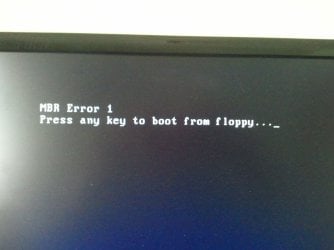
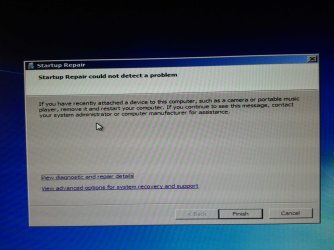
I have multiple HDDs in my box...the main Win 7 Pro installation is on c: drive - a Samsung SSD 840 128GB. Some how...the boot menu setup changed...did noting I'm aware of tto cause the change...but apparently one of the HHD's has a Win XP Pro cloned drive...thought is was simply a backup of my laptop (XP) ?
Anyway if I let my system bios start normally...it starts the XP version (never ever did this before)...I have a 'choose boot drive' option in the bios and if I select that...I can start the Win 7 Pro 64 bit with no issues...but rebooting and letting the bios start normally...I'm back to the XP drive
If I disconnect the XP drive...I get an error at boot saying something like insert or add boot drive...
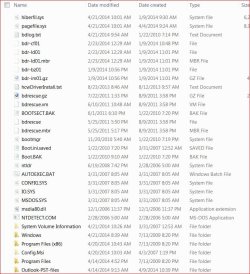
Attached is the current boot.ini.saved(.txt) file on my c: drive...referring to XP. There's no plain boot.ini drive that I can see. I have show system & hidden files on in Explorer
I have EasyBCD 2.1.2 installed...it just shows Win 7 drive....nothing referring to XP that I can find ?
Before I completely lose my Win 7 system...how can I remove the reference to XP at boot and restore the boot.ini file to load Win 7 Pro 64bit?
This was a clean install of Win 7 Pro...not an upgrade from XP or anything else...only connections to XP was on the extra HDD that I thought was only a Tib backup of my laptop XP system
Thanks...TiminAz
Anyway if I let my system bios start normally...it starts the XP version (never ever did this before)...I have a 'choose boot drive' option in the bios and if I select that...I can start the Win 7 Pro 64 bit with no issues...but rebooting and letting the bios start normally...I'm back to the XP drive
If I disconnect the XP drive...I get an error at boot saying something like insert or add boot drive...
Attached is the current boot.ini.saved(.txt) file on my c: drive...referring to XP. There's no plain boot.ini drive that I can see. I have show system & hidden files on in Explorer
I have EasyBCD 2.1.2 installed...it just shows Win 7 drive....nothing referring to XP that I can find ?
Before I completely lose my Win 7 system...how can I remove the reference to XP at boot and restore the boot.ini file to load Win 7 Pro 64bit?
This was a clean install of Win 7 Pro...not an upgrade from XP or anything else...only connections to XP was on the extra HDD that I thought was only a Tib backup of my laptop XP system
Thanks...TiminAz
Attachments

Last edited:
My Computer
At a glance
Windows 7 Pro 64bit SP1AMD FX-6100 Six-Core Processor2ea Corsair-1333MHz-PC3-10666-240-pin-CMX4GX3...NVIDIA GeForce GT 630 - 1023MB (EVGA)
- Computer type
- PC/Desktop
- Computer Manufacturer/Model Number
- Self built
- OS
- Windows 7 Pro 64bit SP1
- CPU
- AMD FX-6100 Six-Core Processor
- Motherboard
- M5A78L-M LX PLUS
- Memory
- 2ea Corsair-1333MHz-PC3-10666-240-pin-CMX4GX3M1A1333C9
- Graphics Card(s)
- NVIDIA GeForce GT 630 - 1023MB (EVGA)
- Sound Card
- OnBoard Via High Def Audio
- Monitor(s) Displays
- Samsung 204B main - ASUS VS228 secondary
- Screen Resolution
- 1920x1080 main - 1920x1080 secondary
- Hard Drives
- Samsung SSD 840 128GB Win7 Pro 64bit - Western Digital WDC 465GB - Seagate 640GB Sata B/U - Maxtor 500GB Sata B/U - Maxtor 200GB Sata
- PSU
- Antec 650 watt
- Cooling
- Multiple case fans
- Keyboard
- MS USB dual Wireless Keyboard - IntelliType Pro
- Mouse
- MS USB dual Wireless Mouse - IntelliPoint
- Internet Speed
- Cox Cable
- Antivirus
- Bitdefender IS 2014
- Browser
- FireFox Primary - IE 11
- Other Info
- Hauppaguge Win TV HVR-1250 (Model 22xxx, Hybrid ATSC/QAM)
Samsung HD103SI USB 1TB Desktop Drive - Backup & Disk Image storage