Windows 7 Installation - Transfer to a New Computer

How to Transfer your Complete Windows 7 Installation to New Computer

To start, a warning from Microsoft:

   Note
Important

You must use the Sysprep /generalize command to generalize a complete Windows installation before you can use the installation for deployment to a new computer, whether you use imaging, hard disk duplication, or another method. Moving or copying a Windows image to a different computer without running the Sysprep /generalize command is not supported.

This tutorial will show you how to do the transfer.

   Information
Windows 7 System Preparation Tool is a powerful, native Windows tool. When for instance used in so called Audit Mode, it let's you to freely configure Windows 7 to be then deployed to other computers as hardware independent image.

In this tutorial we use System Preparation Tool (sysprep) to prepare your Windows 7 installation to be moved to a new computer, keeping all your installed applications, program settings and user profiles. You can use this method for instance when you have bought a new PC and want to transfer your existing setup completely, without need to reinstall everything, or when you want to make major hardware changes like change the motherboard or GPU, which would usually cause Windows to stop booting normally.

   Warning
Using this method causes Windows 7 to lose all activation information, and it needs to be reactivated afterwards. If your Windows 7 is an OEM version, you might not be able to reactivate it, at least not without phone activation option.

I do not recommend to use this method on RAID systems. All experiments on RAID I know have failed.

With the speed of today's hardware evolution, most of us geeks are upgrading the hardware more often than operating system. Upgrading hardware can be painfully slow process if we need to reinstall the operating system and all our installed applications, plus transfer program settings and user profiles.

Using sysprep makes this easy. Changing the motherboard, or for instance an old ATI GPU to a new nVidia GPU quite often causes Windows 7 not to be able to boot anymore. This fact is usually accepted by the user, who then reinstalls the OS and all applications and transfers user profiles from a backup location.

Same thing when buying a new computer with completely different hardware setup compared to the old one, or trying to restore a system image to different hardware setup. Normally this would include a complete reinstallation of Windows 7 and all applications.

Why not use sysprep to avoid reinstalling? Here are the different scenarios where you can use it.


   Warning

An upgraded Windows cannot be sysprepped. As this method is based in sysprepping, this tutorial is valid only for Windows setups which have not been upgraded.

This means that if you have for instance in-place upgraded Vista to Seven, or using Anytime Upgrade upgraded for instance a Home Premium to Ultimate, you cannot sysprep and this tutorial cannot be used in your case.

Notice that a repair install is also an upgrade install, so if you have ever done a repair install (= in-place upgrade to same edition), you cannot sysprep.


PLEASE DO NOT FORGET TO CREATE A SYSTEM IMAGE BEFORE PROCEEDING!​


As you can read on this thread, on rare occasions this method does not work. If this happens, you can always restore your system using your backup image.

Backup Complete Computer - Create an Image Backup
System Image Recovery

IE10 Users: Please read this article first: Sysprep Fatal Error With IE 10 (FIX) | System Administration


METHOD ONE

Changing hardware components but keeping old hard disk(s)


Use this method if you:
- Change other hardware components but keep your old HD containing Windows 7
- Move the HD containing Windows 7 to another computer
  1. Before installing new hardware, boot Windows 7 normally
  2. Disconnect all external hardware except mouse, keyboard and main display. If your system folders are located only on C: drive, disconnect all other hard disks except that containing the C:. In case of relocated system folders, for instance the profile folder Users located in another drive and other system folders on C:, first move the relocated system folders back to C: then disconnect all other drives. Reboot after this
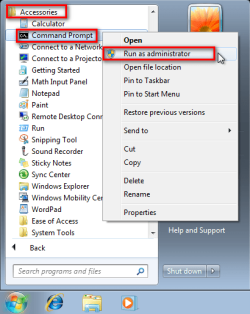
  3. Run Command Prompt as administrator
    .
    Audit_1.png
    .
  4. Type to Command Prompt: %windir%\System32\Sysprep\Sysprep.exe, and hit Enter
    .
    sysprep_start.png
    .
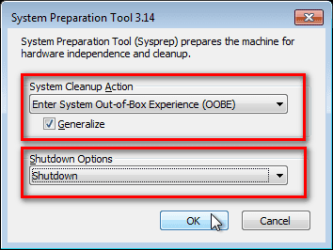
  5. In sysprep dialog that opens, choose System Cleanup Action as Enter System Out-of-Box-Experience (OOBE), select Generalize, select Shutdown Options Shutdown. Click OK
    .
    Sysprep_Run_and_generalize.png
    .
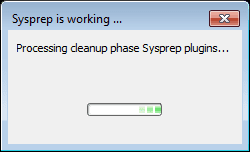
  6. Sysprep generalizes now your Windows 7 setup and shuts down your computer. Do not run any other programs during this phase!
    .
    Sysprep_Run_and_generalize_2.png
    .
    Sysprep_Run_and_generalize_3.png
    .
  7. Switch the main power of your PC off and install the new hardware OR dismount the hard disk(s) and mount it (them) to a new computer
  8. Boot the PC from sysprep generalized hard disk. You will notice Windows booting as if it was the first boot after installation, installing default drivers and updating registry. One or two reboots are needed, depending on your system specifications
    .

    Sysprep_Reinstalling_devices.png
    .
    Sysprep_Registry_settings.png
    .
    Sysprep_Reboot_needed.png
    .
  9. When Windows finally boots up, you will need to enter all information as if this really was a new, fresh installation
    .
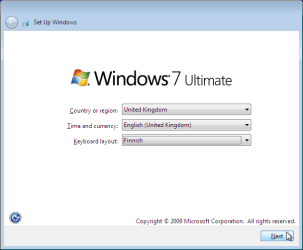
    Sysprep_First_boot_2.png
    .
  10. Because your old user profiles already exist, Windows does not accept your normal username, but instead you have to create a new temporary user. I use username Test for this purpose
    .
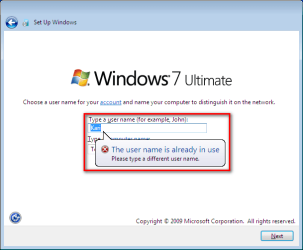
    Sysprep_First_boot_3.png
    .
  11. When login screen appears, choose your old user account to login
    .

    Sysprep_First_boot_5.png
    .
  12. Windows boots now to default OOBE first boot desktop, with default 800*600 resolution and default theme. All your installed applications are there, as well as your old user profiles and folders. Windows has installed the default drivers for your setup, you can update them if needed
    .
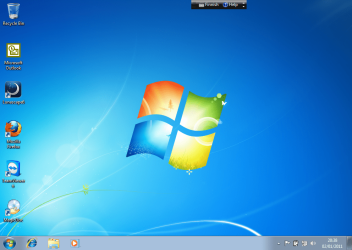
    Sysprep_First_boot_6.png
    .
  13. Go to Control Panel > User Accounts and delete the temporary user account (in this case Test) that you just created


METHOD TWO

Change the hard disk(s) or move Windows 7 setup to a new computer using third party imaging software

Use this method if you:
- Replace the HD containing Windows 7 on your old computer
- Move Windows 7 to a new HD on another computer
  1. Follow steps 1 through 5 above (method 1)
  2. Boot PC with an imaging CD/DVD (Paragon, Macrium etc.). See Macrium Reflect Free:at our sister site TenForums.com: Backup and Restore with Macrium Reflect Windows 10 Backup Restore Tutorials . Also see this post for a practical tip to create a Macrium system image.
  3. Create an image of your system
  4. Turn PC off, change the hard disk(s) and reboot with imaging application, restoring the image OR boot the new computer with imaging software and restore the image
  5. Continue from step 7 above (method 1)

This procedure is failsafe, and works every time. There is nothing to worry, but of course it is recommended to make a backup before trying this. I have even used this method when some serious driver issues caused the PC to constantly crash (BSOD), to reset all drivers to Windows defaults and then reinstalling them one by one to find the culprit.

   Note
What does Sysprep generalizing do to my Windows 7 setup?
  • All system specific information is removed or uninstalled
  • Security ID (SID) of your hardware setup is reseted
  • All system restore points are deleted
  • All event logs are deleted
  • All personalization is removed (taskbar, toolbars, folder options, start orb etc.)
  • Built-in administrator account is disabled (if it was enabled) and needs to be re-enabled after the transfer if needed

What happens when booting first time after sysprep generalizing?
  • First boot configuration is run
  • New SID is created
  • Re-arm counter is reseted if not already re-armed three times
  • Windows 7 is booted using first boot default drivers and settings


I have tested all above mentioned methods with all versions of Windows 7, from Starter to Enterprise. It works every time, with one exception: for reasons unknown to me, sysprep seems sometimes dislike Windows Media Player networking service, which is by default started every time Windows 7 starts. In about every third time I've done this, I've got an error message when trying to generalize:
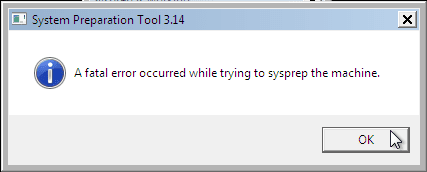
Sysprep_Fatal_Error.png

However, this is not a big problem. You just need to stop the WMP networking service, and run sysprep with generalize option again. You can stop the service in question by typing net stop WMPNetworkSvc to command prompt, and hitting Enter:

Sysprep_Stop_WMP_service.png

If you have any questions, do not hesitate to ask.

Happy computing!

Kari

EDIT: A Useful tip from xxxwea, as later confirmed by Victor:
Kari, just a suggestion.

You might note in the tutorial that if on first booting Windows can't finish configuring, a reboot into safe mode, then a normal reboot will allow it to finish successfully.

This has happened to me both times I used a sysprepped system drive in a new computer. I found the answer to this problem buried deep in this thread the first time I ran into it, and the same thing happened yesterday on a different computer.

It's a seemingly very silly solution, but it works. I do believe many people have abandoned their sysprep work when they encounter the problem.

I think the solution deserves more visibility.
 
Last edited:
One more question:

When I do the migration to a new laptop (X61T to XT61) what licensing/ software issues could I face?
e.g. MS Office and other software applications that might have some kind of 'link' or binding to the previous machine?

Any such experiences?
You will have to reactivate Windows. The software's Id will/should also be removed and would have to be addressed per program. I suspect there should not be a problem.
Activating windows is not an issue. Does Office need to get reactivated after this?

Would a lot of Windows Settings/ Configurations (non hardware/ driver) need to be redone?

Would application settings & configurations be gone or only System Settings?
 

My Computer My Computer

At a glance

WinXP/ Win7x64/ Mac OSX Snow Leopard - Multi ...
Computer Manufacturer/Model Number
Mac Book Pro | Thinkpads T61 X61T W510
OS
WinXP/ Win7x64/ Mac OSX Snow Leopard - Multi Boot
As to Office I can't say but I would think it would have to be reactivated.
If you use an image all of your settings, customizations, etc. will still be there along with app preferences too.
 

My Computer My Computer

At a glance

Windows 7 Ultimate X64 SP1Intel i5-2550K, Differing ~4.4-4.8GHz No buil...16GB G.Skill Sniper 1866MHz @ 2133MHz 2x8GBASUS GTX650TIB-DC2OC-2GD5, (650TI Boost)
Computer type
PC/Desktop
Computer Manufacturer/Model Number
Home Built Desktop By DataTech
OS
Windows 7 Ultimate X64 SP1
CPU
Intel i5-2550K, Differing ~4.4-4.8GHz No built in GPU
Motherboard
ASUS P8Z68-V PRO/GEN3
Memory
16GB G.Skill Sniper 1866MHz @ 2133MHz 2x8GB
Graphics Card(s)
ASUS GTX650TIB-DC2OC-2GD5, (650TI Boost)
Sound Card
Onboard Realtek 5-1
Monitor(s) Displays
Samsung P2570HD
Screen Resolution
1920x1080
Hard Drives
Samsung 840 Pro 256GB SSD for OS, 500GB Seagate Constellation (Enterprise drive) for Data
PSU
Corsair HX650W
Case
Inwin Dragon Rider
Cooling
Hyper 212 EVO w/two Noctua fans, push-pull, @1300 RPM
Keyboard
E-Z Eyes, bright yellow keys with large characters
Mouse
steelseries SENSEI Laser Pro Gaming
Internet Speed
48-51Mbs Mbs down, 11 Mbs up Xfinity Cable
Antivirus
Norton Internet Security 2013
Browser
IE 10, Opera, Pale Moon if needed
Other Info
4 case fans, LG BluRay-RE, ASUS DVD-RW, Mr. Fusion power supply, 1.21 gigawatts.
As to Office I can't say but I would think it would have to be reactivated.
If you use an image all of your settings, customizations, etc. will still be there along with app preferences too.

Sorry, not understand what do you mean use an image of all settings? I thought the point of doing this was to not have to do all of this.. just reconfig and install hardware / drivers.. and all software (maybe except MS activations) would keep their settings?
 

My Computer My Computer

At a glance

WinXP/ Win7x64/ Mac OSX Snow Leopard - Multi ...
Computer Manufacturer/Model Number
Mac Book Pro | Thinkpads T61 X61T W510
OS
WinXP/ Win7x64/ Mac OSX Snow Leopard - Multi Boot
Method two and three uses imaging. If you only did the sysprep generalize everything is like you left it except for drivers and the Windows Key/ hardware ID.
 

My Computer My Computer

At a glance

Windows 7 Ultimate X64 SP1Intel i5-2550K, Differing ~4.4-4.8GHz No buil...16GB G.Skill Sniper 1866MHz @ 2133MHz 2x8GBASUS GTX650TIB-DC2OC-2GD5, (650TI Boost)
Computer type
PC/Desktop
Computer Manufacturer/Model Number
Home Built Desktop By DataTech
OS
Windows 7 Ultimate X64 SP1
CPU
Intel i5-2550K, Differing ~4.4-4.8GHz No built in GPU
Motherboard
ASUS P8Z68-V PRO/GEN3
Memory
16GB G.Skill Sniper 1866MHz @ 2133MHz 2x8GB
Graphics Card(s)
ASUS GTX650TIB-DC2OC-2GD5, (650TI Boost)
Sound Card
Onboard Realtek 5-1
Monitor(s) Displays
Samsung P2570HD
Screen Resolution
1920x1080
Hard Drives
Samsung 840 Pro 256GB SSD for OS, 500GB Seagate Constellation (Enterprise drive) for Data
PSU
Corsair HX650W
Case
Inwin Dragon Rider
Cooling
Hyper 212 EVO w/two Noctua fans, push-pull, @1300 RPM
Keyboard
E-Z Eyes, bright yellow keys with large characters
Mouse
steelseries SENSEI Laser Pro Gaming
Internet Speed
48-51Mbs Mbs down, 11 Mbs up Xfinity Cable
Antivirus
Norton Internet Security 2013
Browser
IE 10, Opera, Pale Moon if needed
Other Info
4 case fans, LG BluRay-RE, ASUS DVD-RW, Mr. Fusion power supply, 1.21 gigawatts.
Method two and three uses imaging. If you only did the sysprep generalize everything is like you left it except for drivers and the Windows Key/ hardware ID.
Exactly. Only thing needing to be reactivated is the Windows itself. Sysprep with generalizing switch does not remove any other registration entries from registry.

That being said, if a software licence is tied to a certain SID / hardware ID or hardware setup, it might not work on the new hardware, or at least it needs to be set up and activated again. An example is certain by manufacturer bundled hardware specific programs like for instance PC label A could have given you a free amazing app which does no longer work on PC label B; for example the Stardock Fences I got free from HP with my Envy series laptop does not work if the HDD is transferred to a Dell lapop.
 

My Computer My Computer

At a glance

Windows 10 Pro x64 EN-GB1.6 GHz Intel Core i7-720QM Processor6 GBATI Mobility Radeon HD 5850 Graphics
Computer type
Laptop
Computer Manufacturer/Model Number
HP ENVY 17-1150eg
OS
Windows 10 Pro x64 EN-GB
CPU
1.6 GHz Intel Core i7-720QM Processor
Memory
6 GB
Graphics Card(s)
ATI Mobility Radeon HD 5850 Graphics
Sound Card
Beats sound system with integrated subwoofer
Monitor(s) Displays
17" laptop display, 22" LED and 32" Full HD TV through HDMI
Screen Resolution
1600*900 (1), 1920*1080 (2&3)
Hard Drives
Internal: 2 x 500 GB SATA Hard Disk Drive 7200 rpm
External: 2TB for backups, 3TB USB3 network drive for media
Cooling
As Envy runs a bit warm, I have it on a Cooler Master pad
Keyboard
Logitech diNovo Media Desktop Laser (bluetooth)
Mouse
Logitech Performance Mouse MX
Internet Speed
50/10 Mbps VDSL
Antivirus
Windows Defender 4.3.9431.0
Browser
Maxthon 3.5.2., IE11
Thanks guys for all the responses to Qs. I appreciate it very much.

I was away from tool kit last weekend so will do it over this weekend for sure.

One last question bank:
- How many times (for each one below)
... Have you done the above?
... Has the Generalization 'borked' or gotten stuck or not gone as it should have?
... Has the 'Restore' gotten stuck (for some reason)?

(Additional notes on the above 'stuck' situations and resolutions would be welcome).
 

My Computer My Computer

At a glance

WinXP/ Win7x64/ Mac OSX Snow Leopard - Multi ...
Computer Manufacturer/Model Number
Mac Book Pro | Thinkpads T61 X61T W510
OS
WinXP/ Win7x64/ Mac OSX Snow Leopard - Multi Boot
Thanks guys for all the responses to Qs. I appreciate it very much.

I was away from tool kit last weekend so will do it over this weekend for sure.

One last question bank:
- How many times (for each one below)
... Have you done the above?
... Has the Generalization 'borked' or gotten stuck or not gone as it should have?
... Has the 'Restore' gotten stuck (for some reason)?

(Additional notes on the above 'stuck' situations and resolutions would be welcome).
For my experience"
Have done this 4 times.
No problems with Generalization at all.
No sticking anywhere.

Problems have been reported if the net stop WMPNetworkSvc is not run first.
 

My Computer My Computer

At a glance

Windows 7 Ultimate X64 SP1Intel i5-2550K, Differing ~4.4-4.8GHz No buil...16GB G.Skill Sniper 1866MHz @ 2133MHz 2x8GBASUS GTX650TIB-DC2OC-2GD5, (650TI Boost)
Computer type
PC/Desktop
Computer Manufacturer/Model Number
Home Built Desktop By DataTech
OS
Windows 7 Ultimate X64 SP1
CPU
Intel i5-2550K, Differing ~4.4-4.8GHz No built in GPU
Motherboard
ASUS P8Z68-V PRO/GEN3
Memory
16GB G.Skill Sniper 1866MHz @ 2133MHz 2x8GB
Graphics Card(s)
ASUS GTX650TIB-DC2OC-2GD5, (650TI Boost)
Sound Card
Onboard Realtek 5-1
Monitor(s) Displays
Samsung P2570HD
Screen Resolution
1920x1080
Hard Drives
Samsung 840 Pro 256GB SSD for OS, 500GB Seagate Constellation (Enterprise drive) for Data
PSU
Corsair HX650W
Case
Inwin Dragon Rider
Cooling
Hyper 212 EVO w/two Noctua fans, push-pull, @1300 RPM
Keyboard
E-Z Eyes, bright yellow keys with large characters
Mouse
steelseries SENSEI Laser Pro Gaming
Internet Speed
48-51Mbs Mbs down, 11 Mbs up Xfinity Cable
Antivirus
Norton Internet Security 2013
Browser
IE 10, Opera, Pale Moon if needed
Other Info
4 case fans, LG BluRay-RE, ASUS DVD-RW, Mr. Fusion power supply, 1.21 gigawatts.
Will all the settings of Windows Explorer, Start Menu and Taskbar, Desktop Settings etc will be saved as a part of the User Profiles under Windows after Generalization?
 

My Computer My Computer

At a glance

WinXP/ Win7x64/ Mac OSX Snow Leopard - Multi ...
Computer Manufacturer/Model Number
Mac Book Pro | Thinkpads T61 X61T W510
OS
WinXP/ Win7x64/ Mac OSX Snow Leopard - Multi Boot
Will all the settings of Windows Explorer, Start Menu and Taskbar, Desktop Settings etc will be saved as a part of the User Profiles under Windows after Generalization?

It's quite clearly told in tutorial:

   Note
What does Sysprep generalizing do to my Windows 7 setup?
  • All system specific information is removed or uninstalled
  • Security ID (SID) of your hardware setup is reseted
  • All system restore points are deleted
  • All event logs are deleted
  • All personalization is removed (taskbar, toolbars, folder options, start orb etc.)
  • Built-in administrator account is disabled (if it was enabled) and needs to be re-enabled if needed

What happens when booting first time after sysprep generalizing?
  • First boot configuration is run
  • New SID is created
  • Re-arm counter is reseted if not already re-armed three times
  • Windows 7 is booted using first boot default drivers and settings

First boot after generalizing you start with the default Windows theme by wallpaper by Microsoft, without a trace of your personal settings.

Kari
 

My Computer My Computer

At a glance

Windows 10 Pro x64 EN-GB1.6 GHz Intel Core i7-720QM Processor6 GBATI Mobility Radeon HD 5850 Graphics
Computer type
Laptop
Computer Manufacturer/Model Number
HP ENVY 17-1150eg
OS
Windows 10 Pro x64 EN-GB
CPU
1.6 GHz Intel Core i7-720QM Processor
Memory
6 GB
Graphics Card(s)
ATI Mobility Radeon HD 5850 Graphics
Sound Card
Beats sound system with integrated subwoofer
Monitor(s) Displays
17" laptop display, 22" LED and 32" Full HD TV through HDMI
Screen Resolution
1600*900 (1), 1920*1080 (2&3)
Hard Drives
Internal: 2 x 500 GB SATA Hard Disk Drive 7200 rpm
External: 2TB for backups, 3TB USB3 network drive for media
Cooling
As Envy runs a bit warm, I have it on a Cooler Master pad
Keyboard
Logitech diNovo Media Desktop Laser (bluetooth)
Mouse
Logitech Performance Mouse MX
Internet Speed
50/10 Mbps VDSL
Antivirus
Windows Defender 4.3.9431.0
Browser
Maxthon 3.5.2., IE11
Will all the settings of Windows Explorer, Start Menu and Taskbar, Desktop Settings etc will be saved as a part of the User Profiles under Windows after Generalization?

It's quite clearly told in tutorial:

   Note
What does Sysprep generalizing do to my Windows 7 setup?
  • All system specific information is removed or uninstalled
  • Security ID (SID) of your hardware setup is reseted
  • All system restore points are deleted
  • All event logs are deleted
  • All personalization is removed (taskbar, toolbars, folder options, start orb etc.)
  • Built-in administrator account is disabled (if it was enabled) and needs to be re-enabled if needed

What happens when booting first time after sysprep generalizing?
  • First boot configuration is run
  • New SID is created
  • Re-arm counter is reseted if not already re-armed three times
  • Windows 7 is booted using first boot default drivers and settings

First boot after generalizing you start with the default Windows theme by wallpaper by Microsoft, without a trace of your personal settings.

Kari

Yes, but that would be for the TEST user we create right. When I go back to MyUserName, would it also have reset the settings for that? And if so, can I use the following?

Is there any way to back and restore the profile settings? e.g. like this so that after the system is restored all settings can be 'ported' back and applied.

DataGrab Backs Up All Users' Profiles and Settings with One Click
Backup All User Profiles And Other Windows Settings With DataGrab
Or partial / some parts of this..??
http://www.thewindowsclub.com/transfer-user-profile-in-windows

Any risks with doing this after? Issues?
 

My Computer My Computer

At a glance

WinXP/ Win7x64/ Mac OSX Snow Leopard - Multi ...
Computer Manufacturer/Model Number
Mac Book Pro | Thinkpads T61 X61T W510
OS
WinXP/ Win7x64/ Mac OSX Snow Leopard - Multi Boot
No, it's not just for the Test user.

No rocket science here: If you want to use this method to move your Windows installation, you have to use the Generalize switch and that very effectively removes all personal customizations.

You can of course try other methods if saving the customizations is really important for you. Remember though what Microsoft has officially to say about this procedure:

   Note
Important

You must use the Sysprep /generalize command to generalize a complete Windows installation before you can use the installation for deployment to a new computer, whether you use imaging, hard disk duplication, or another method. Moving or copying a Windows image to a different computer without running the Sysprep /generalize command is not supported.

I do not know any of the tools you told about to backup user profile settings, can't comment them.

Kari
 

My Computer My Computer

At a glance

Windows 10 Pro x64 EN-GB1.6 GHz Intel Core i7-720QM Processor6 GBATI Mobility Radeon HD 5850 Graphics
Computer type
Laptop
Computer Manufacturer/Model Number
HP ENVY 17-1150eg
OS
Windows 10 Pro x64 EN-GB
CPU
1.6 GHz Intel Core i7-720QM Processor
Memory
6 GB
Graphics Card(s)
ATI Mobility Radeon HD 5850 Graphics
Sound Card
Beats sound system with integrated subwoofer
Monitor(s) Displays
17" laptop display, 22" LED and 32" Full HD TV through HDMI
Screen Resolution
1600*900 (1), 1920*1080 (2&3)
Hard Drives
Internal: 2 x 500 GB SATA Hard Disk Drive 7200 rpm
External: 2TB for backups, 3TB USB3 network drive for media
Cooling
As Envy runs a bit warm, I have it on a Cooler Master pad
Keyboard
Logitech diNovo Media Desktop Laser (bluetooth)
Mouse
Logitech Performance Mouse MX
Internet Speed
50/10 Mbps VDSL
Antivirus
Windows Defender 4.3.9431.0
Browser
Maxthon 3.5.2., IE11
No, it's not just for the Test user.

No rocket science here: If you want to use this method to move your Windows installation, you have to use the Generalize switch and that very effectively removes all personal customizations.

You can of course try other methods if saving the customizations is really important for you. Remember though what Microsoft has officially to say about this procedure:

   Note
Important

You must use the Sysprep /generalize command to generalize a complete Windows installation before you can use the installation for deployment to a new computer, whether you use imaging, hard disk duplication, or another method. Moving or copying a Windows image to a different computer without running the Sysprep /generalize command is not supported.

I do not know any of the tools you told about to backup user profile settings, can't comment them.

Kari

I don't know all of them either. One of the ways is the Windows Easy Transfer 'User Profile Files and Settings' Wizard and other are similar tools.

There are tons of links on how to save and restore User Profile settings. I am guessing that should be no harm if that is done afterwards to restore some 'tweaks' and 'UI' changes. (I used a good old Windows 2000 like Classic Gray look) with Classic Shell.

That part is what I am trying to 'conserve' and restore without having to do it from scratch I suppose. I hope I was able to convey this correctly.
 

My Computer My Computer

At a glance

WinXP/ Win7x64/ Mac OSX Snow Leopard - Multi ...
Computer Manufacturer/Model Number
Mac Book Pro | Thinkpads T61 X61T W510
OS
WinXP/ Win7x64/ Mac OSX Snow Leopard - Multi Boot
Will all the settings of Windows Explorer, Start Menu and Taskbar, Desktop Settings etc will be saved as a part of the User Profiles under Windows after Generalization?

It's quite clearly told in tutorial:

   Note
What does Sysprep generalizing do to my Windows 7 setup?
  • All system specific information is removed or uninstalled
  • Security ID (SID) of your hardware setup is reseted
  • All system restore points are deleted
  • All event logs are deleted
    [*]All personalization is removed (taskbar, toolbars, folder options, start orb etc.)
  • Built-in administrator account is disabled (if it was enabled) and needs to be re-enabled if needed

What happens when booting first time after sysprep generalizing?
  • First boot configuration is run
  • New SID is created
  • Re-arm counter is reseted if not already re-armed three times
  • Windows 7 is booted using first boot default drivers and settings

First boot after generalizing you start with the default Windows theme by wallpaper by Microsoft, without a trace of your personal settings.

Kari

Could someone detail out what more is on this list of PERSONALIZATION that is removed?

More importantly.. are there any tutorials on these forums that allow one to SAVE / BACKUP / RESTORE some of these.. ?

Windows had a 'Files and Settings' Wizard i.e. Windows Easy Transfer (which does User Accounts and more)

And tutorials like this?
http://www.sevenforums.com/tutorials/324228-advanced-appearance-settings-backup-restore-windows.html
Folder View Settings - Back Up and Restore in Windows
IE Security Zones - Enable or Disable Level Settings
http://www.sevenforums.com/tutorial...e-settings-copy-new-users-welcome-screen.html
http://www.sevenforums.com/tutorials/142442-wireless-network-profile-backup-restore.html
Wi-Fi Network Backup Manager Saves and Restores Your Wi-Fi Configuration

Which of the above will be lost and should/ can be used to Backup Restore?
I am wondering about Wireless Network Router Names and Passwords which are saved. I'd hate to do them all over again.

Can the above be combined and used in conjunction, later after the System is restored and back on track to RESTORE some of the lost PERSONALIZATION settings?

Nice:
http://www.sevenforums.com/tutorials/137083-region-language-formats-tab-add-remove.html
http://www.sevenforums.com/tutorial...ate-live-cd-dvd-usb-use-emergency-backup.html
http://www.sevenforums.com/tutorials/516-context-menu-add-copy-folder-move-folder.html
http://www.sevenforums.com/tutorials/2803-device-installation-settings.html
 
Last edited:

My Computer My Computer

At a glance

WinXP/ Win7x64/ Mac OSX Snow Leopard - Multi ...
Computer Manufacturer/Model Number
Mac Book Pro | Thinkpads T61 X61T W510
OS
WinXP/ Win7x64/ Mac OSX Snow Leopard - Multi Boot

My Computer My Computer

At a glance

Windows 7 Ultimate X64 SP1Intel i5-2550K, Differing ~4.4-4.8GHz No buil...16GB G.Skill Sniper 1866MHz @ 2133MHz 2x8GBASUS GTX650TIB-DC2OC-2GD5, (650TI Boost)
Computer type
PC/Desktop
Computer Manufacturer/Model Number
Home Built Desktop By DataTech
OS
Windows 7 Ultimate X64 SP1
CPU
Intel i5-2550K, Differing ~4.4-4.8GHz No built in GPU
Motherboard
ASUS P8Z68-V PRO/GEN3
Memory
16GB G.Skill Sniper 1866MHz @ 2133MHz 2x8GB
Graphics Card(s)
ASUS GTX650TIB-DC2OC-2GD5, (650TI Boost)
Sound Card
Onboard Realtek 5-1
Monitor(s) Displays
Samsung P2570HD
Screen Resolution
1920x1080
Hard Drives
Samsung 840 Pro 256GB SSD for OS, 500GB Seagate Constellation (Enterprise drive) for Data
PSU
Corsair HX650W
Case
Inwin Dragon Rider
Cooling
Hyper 212 EVO w/two Noctua fans, push-pull, @1300 RPM
Keyboard
E-Z Eyes, bright yellow keys with large characters
Mouse
steelseries SENSEI Laser Pro Gaming
Internet Speed
48-51Mbs Mbs down, 11 Mbs up Xfinity Cable
Antivirus
Norton Internet Security 2013
Browser
IE 10, Opera, Pale Moon if needed
Other Info
4 case fans, LG BluRay-RE, ASUS DVD-RW, Mr. Fusion power supply, 1.21 gigawatts.
Could someone detail out what more is on this list of PERSONALIZATION that is removed?
Windows reverts to its default theme, the one used when Windows is first time installed. The default blue Windows background image, color theme and so on. If you have modified Start Orb it's reverted to the default one. Folder settings and icons, system icons are reverted to system defaults.

Basically, everything you have done to change the look and feel of your desktop is reverted to Windows defaults.

Only tutorial that I know which can help you to save at least some of these settings is this: http://www.sevenforums.com/tutorials/280-theme-change-save.html

Save your theme, apply it after the process.

Kari
 

My Computer My Computer

At a glance

Windows 10 Pro x64 EN-GB1.6 GHz Intel Core i7-720QM Processor6 GBATI Mobility Radeon HD 5850 Graphics
Computer type
Laptop
Computer Manufacturer/Model Number
HP ENVY 17-1150eg
OS
Windows 10 Pro x64 EN-GB
CPU
1.6 GHz Intel Core i7-720QM Processor
Memory
6 GB
Graphics Card(s)
ATI Mobility Radeon HD 5850 Graphics
Sound Card
Beats sound system with integrated subwoofer
Monitor(s) Displays
17" laptop display, 22" LED and 32" Full HD TV through HDMI
Screen Resolution
1600*900 (1), 1920*1080 (2&3)
Hard Drives
Internal: 2 x 500 GB SATA Hard Disk Drive 7200 rpm
External: 2TB for backups, 3TB USB3 network drive for media
Cooling
As Envy runs a bit warm, I have it on a Cooler Master pad
Keyboard
Logitech diNovo Media Desktop Laser (bluetooth)
Mouse
Logitech Performance Mouse MX
Internet Speed
50/10 Mbps VDSL
Antivirus
Windows Defender 4.3.9431.0
Browser
Maxthon 3.5.2., IE11

With no disrespect and big thank you for your helping and guidance. I am quite familiar with Paragon / Partition and Imaging tools, and can use that for the full partition. And I am not sure 'which files' you are recommending I backup & restore? Am I correct in assuming no files or user profiles are destroyed or lost in the Sysprep Generalization process. I am right now more concerned about saving 'settings' that are flushed/ reset by the process.
Thanks again thought. Let me know your thoughts if I am missing something or not getting your hinted direction.

Windows reverts to its default theme, the one used when Windows is first time installed. The default blue Windows background image, color theme and so on. If you have modified Start Orb it's reverted to the default one. Folder settings and icons, system icons are reverted to system defaults.

Basically, everything you have done to change the look and feel of your desktop is reverted to Windows defaults.

Only tutorial that I know which can help you to save at least some of these settings is this: http://www.sevenforums.com/tutorials/280-theme-change-save.html

Save your theme, apply it after the process.
[*]All personalization is removed (taskbar, toolbars, folder options, start orb etc.)
First boot after generalizing you start with the default Windows theme by wallpaper by Microsoft, without a trace of your personal settings.

Kari - Thank you for the great suggestion. Maybe it should/ could be added as a ADD-ON to the Tutorial?

Am I correct to say that all that SYSPREP GENERALIZATION does is it Resets the following:
- HARDWARE/ DRIVER stuff and the
- LOOK & FEEL (theme/ wallpaper, explorer, desktop, folder stuff?)?
Did I get that right? User profiles remain untouched except for the LOOK & FEEL personalizations being reset.
Based on your answer and above replies, this THEME Saving will definitely help.
Note: I am using the Windows Classic theme with Classic Shell x64. Very minimal to zero theme-ing, almost looks like Windows 2000.

Kari - I am wondering and guessing some of the following could help a bit?
Or are they overkill and not needed?
Would the following save something that THEME Save missed out? Or is that covered by the THEME Saving?
Which of the following do you think/ have you seen will be lost and should and can be Saved for Restore?


Which of these do you think would be JUST NOT NEEDED - N, and NICE TO HAVE - NTH , DEFINITELY YES - Y
http://www.sevenforums.com/tutorials/324228-advanced-appearance-settings-backup-restore-windows.html
Folder View Settings - Back Up and Restore in Windows
IE Security Zones - Enable or Disable Level Settings
http://www.sevenforums.com/tutorial...e-settings-copy-new-users-welcome-screen.html
 
Last edited:

My Computer My Computer

At a glance

WinXP/ Win7x64/ Mac OSX Snow Leopard - Multi ...
Computer Manufacturer/Model Number
Mac Book Pro | Thinkpads T61 X61T W510
OS
WinXP/ Win7x64/ Mac OSX Snow Leopard - Multi Boot
I might describe it as a fresh install but all of your programs and user profile(s) are still there after generalization and booting to OOBE, Out Of Box Experience.
 

My Computer My Computer

At a glance

Windows 7 Ultimate X64 SP1Intel i5-2550K, Differing ~4.4-4.8GHz No buil...16GB G.Skill Sniper 1866MHz @ 2133MHz 2x8GBASUS GTX650TIB-DC2OC-2GD5, (650TI Boost)
Computer type
PC/Desktop
Computer Manufacturer/Model Number
Home Built Desktop By DataTech
OS
Windows 7 Ultimate X64 SP1
CPU
Intel i5-2550K, Differing ~4.4-4.8GHz No built in GPU
Motherboard
ASUS P8Z68-V PRO/GEN3
Memory
16GB G.Skill Sniper 1866MHz @ 2133MHz 2x8GB
Graphics Card(s)
ASUS GTX650TIB-DC2OC-2GD5, (650TI Boost)
Sound Card
Onboard Realtek 5-1
Monitor(s) Displays
Samsung P2570HD
Screen Resolution
1920x1080
Hard Drives
Samsung 840 Pro 256GB SSD for OS, 500GB Seagate Constellation (Enterprise drive) for Data
PSU
Corsair HX650W
Case
Inwin Dragon Rider
Cooling
Hyper 212 EVO w/two Noctua fans, push-pull, @1300 RPM
Keyboard
E-Z Eyes, bright yellow keys with large characters
Mouse
steelseries SENSEI Laser Pro Gaming
Internet Speed
48-51Mbs Mbs down, 11 Mbs up Xfinity Cable
Antivirus
Norton Internet Security 2013
Browser
IE 10, Opera, Pale Moon if needed
Other Info
4 case fans, LG BluRay-RE, ASUS DVD-RW, Mr. Fusion power supply, 1.21 gigawatts.
I have nothing to add to what is already said. If you want to use this method, only method recommended and supported by Microsoft to move your Windows installation, you lose your customization settings and that's it. IE and other software settings have nothing to do with Windows customization which in this case includes icon, folder, theme, color, screensaver, system sound and such settings.

I really do not know how else to say it. My last try: Windows will be restored to default settings as seen after first boot following a clean install.

Kari
 

My Computer My Computer

At a glance

Windows 10 Pro x64 EN-GB1.6 GHz Intel Core i7-720QM Processor6 GBATI Mobility Radeon HD 5850 Graphics
Computer type
Laptop
Computer Manufacturer/Model Number
HP ENVY 17-1150eg
OS
Windows 10 Pro x64 EN-GB
CPU
1.6 GHz Intel Core i7-720QM Processor
Memory
6 GB
Graphics Card(s)
ATI Mobility Radeon HD 5850 Graphics
Sound Card
Beats sound system with integrated subwoofer
Monitor(s) Displays
17" laptop display, 22" LED and 32" Full HD TV through HDMI
Screen Resolution
1600*900 (1), 1920*1080 (2&3)
Hard Drives
Internal: 2 x 500 GB SATA Hard Disk Drive 7200 rpm
External: 2TB for backups, 3TB USB3 network drive for media
Cooling
As Envy runs a bit warm, I have it on a Cooler Master pad
Keyboard
Logitech diNovo Media Desktop Laser (bluetooth)
Mouse
Logitech Performance Mouse MX
Internet Speed
50/10 Mbps VDSL
Antivirus
Windows Defender 4.3.9431.0
Browser
Maxthon 3.5.2., IE11
Would VMWare and Oracle Virtualbox be an issue to this process? (Due to drivers etc?)
 

My Computer My Computer

At a glance

WinXP/ Win7x64/ Mac OSX Snow Leopard - Multi ...
Computer Manufacturer/Model Number
Mac Book Pro | Thinkpads T61 X61T W510
OS
WinXP/ Win7x64/ Mac OSX Snow Leopard - Multi Boot
Back
Top