
Solved MalwareBytes 2.0.1 taking forever to scan

Thanks for the offer of all the help.
During all the things I have done today I have cleaned out the minidump so I will save it the next time so Golden can take a look.

I will try and get the new beta version and see what happens.
 

My Computer My Computer

Computer type
PC/Desktop
Computer Manufacturer/Model Number
Home made Desktop
OS
Windows 10 Pro. 64/ version 1709 Windows 7 Pro/64
CPU
Intel i7-6800K @ 4.3
Motherboard
ASUS X-99 Deluxe II
Memory
Corsair Platinum 16 gig @2400
Graphics Card(s)
EVGA GTX 1070 OC
Monitor(s) Displays
Asus 27" LED LCD/VE278Q
Screen Resolution
1920-1080 or 1280-720 HDMI
Hard Drives
INTEL SSD 730-240 Gb Sata 3.0/
PSU
EVGA Platium 1200W
Case
Phanteks Luxe Tempered Glass 8 fans/ one radiator
Cooling
XSPC/ Water Cooled CPU
Keyboard
Das 4 Professional
Mouse
Logitech M705/MX Anywhere 2-S
Internet Speed
100 mbits
Antivirus
Microsoft Security Essentials/ Malwarebytes Premium 3.0/ SAS
Browser
I.E. 11 default/Firefox/ ISP Time Warner Cable/Spectrum
Other Info
LG BluRay Burner/
Sound system-KLipsch-THX/
Icy Dock ssd Hot Swap bays.
Malwarebytes beta 2.0.2.1007 will not download properly their for will not install. I have no idea what this means.
No mini dumps to show.

Install Error (at 69:177):
External Exception E06D7363.'

Tried both I.E. 11 and Firefox 28.

Update:
Removed 1.75 and tried to down load and install 1004 and got this.

Internal Error (at 57:177):
External Exception E06D7363,'

 
Last edited:

My Computer My Computer

Computer type
PC/Desktop
Computer Manufacturer/Model Number
Home made Desktop
OS
Windows 10 Pro. 64/ version 1709 Windows 7 Pro/64
CPU
Intel i7-6800K @ 4.3
Motherboard
ASUS X-99 Deluxe II
Memory
Corsair Platinum 16 gig @2400
Graphics Card(s)
EVGA GTX 1070 OC
Monitor(s) Displays
Asus 27" LED LCD/VE278Q
Screen Resolution
1920-1080 or 1280-720 HDMI
Hard Drives
INTEL SSD 730-240 Gb Sata 3.0/
PSU
EVGA Platium 1200W
Case
Phanteks Luxe Tempered Glass 8 fans/ one radiator
Cooling
XSPC/ Water Cooled CPU
Keyboard
Das 4 Professional
Mouse
Logitech M705/MX Anywhere 2-S
Internet Speed
100 mbits
Antivirus
Microsoft Security Essentials/ Malwarebytes Premium 3.0/ SAS
Browser
I.E. 11 default/Firefox/ ISP Time Warner Cable/Spectrum
Other Info
LG BluRay Burner/
Sound system-KLipsch-THX/
Icy Dock ssd Hot Swap bays.
Malwarebytes beta 2.0.2.1007 will not download properly their for will not install. I have no idea what this means.
No mini dumps to show.

Install Error (at 69:177):
External Exception E06D7363.'

Tried both I.E. 11 and Firefox 28.

Update:
Removed 1.75 and tried to down load and install 1004 and got this.

Internal Error (at 57:177):
External Exception E06D7363,'


Rather odd to say or think that nothing is wrong with your computer when thousands of other users can download these files without an issue. I'm not saying your infected but surely something is going on there that is not normal.


  1. Please try the following and let me know if this corrects your issue or not. - MBAM Clean Removal Process 2x
  2. If that does not correct the issue then please read the following and post back the requested logs. - Diagnostic Logs
  3. NOTE: There is an FAQ section with valuable information located here: - Common Questions, Issues, and their Solutions
  4. NOTE: I would also highly suggest you try installing the new beta which has corrected some previously reported issues (each of your previous installs were the original build 1004 not 1007 ): - Malwarebytes Anti-Malware 2.0.2 Public Beta

Thank You
 

My Computer My Computer

OS
Windows 7 Pro x64
CPU
i7 2600K 4.7Ghz
Memory
16GB
Hard Drives
OCZ Vertex 3
RAID 0 SSD
Internet Speed
100Mbps
I have the Malwarebytes I.D. # and Key # on a print out will that do to activate again? It is from cleverbridge.
 

My Computer My Computer

Computer type
PC/Desktop
Computer Manufacturer/Model Number
Home made Desktop
OS
Windows 10 Pro. 64/ version 1709 Windows 7 Pro/64
CPU
Intel i7-6800K @ 4.3
Motherboard
ASUS X-99 Deluxe II
Memory
Corsair Platinum 16 gig @2400
Graphics Card(s)
EVGA GTX 1070 OC
Monitor(s) Displays
Asus 27" LED LCD/VE278Q
Screen Resolution
1920-1080 or 1280-720 HDMI
Hard Drives
INTEL SSD 730-240 Gb Sata 3.0/
PSU
EVGA Platium 1200W
Case
Phanteks Luxe Tempered Glass 8 fans/ one radiator
Cooling
XSPC/ Water Cooled CPU
Keyboard
Das 4 Professional
Mouse
Logitech M705/MX Anywhere 2-S
Internet Speed
100 mbits
Antivirus
Microsoft Security Essentials/ Malwarebytes Premium 3.0/ SAS
Browser
I.E. 11 default/Firefox/ ISP Time Warner Cable/Spectrum
Other Info
LG BluRay Burner/
Sound system-KLipsch-THX/
Icy Dock ssd Hot Swap bays.
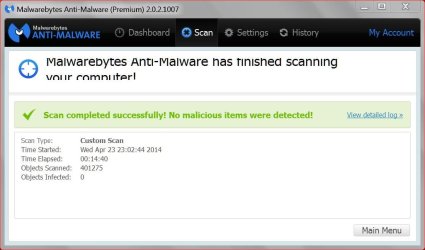
Thanks for your quick reply.
So far so good. Activated again, updated, scanned.
The only changes I did was remove scheduled task.
I always check several times a day for updates and scan very often.

I will not try your 2.0.2 beta.

Update:
So far so good with 2.0.2. Install, updated and reboot.
Doing a scan now with the rootkit included.
 
Last edited:

My Computer My Computer

Computer type
PC/Desktop
Computer Manufacturer/Model Number
Home made Desktop
OS
Windows 10 Pro. 64/ version 1709 Windows 7 Pro/64
CPU
Intel i7-6800K @ 4.3
Motherboard
ASUS X-99 Deluxe II
Memory
Corsair Platinum 16 gig @2400
Graphics Card(s)
EVGA GTX 1070 OC
Monitor(s) Displays
Asus 27" LED LCD/VE278Q
Screen Resolution
1920-1080 or 1280-720 HDMI
Hard Drives
INTEL SSD 730-240 Gb Sata 3.0/
PSU
EVGA Platium 1200W
Case
Phanteks Luxe Tempered Glass 8 fans/ one radiator
Cooling
XSPC/ Water Cooled CPU
Keyboard
Das 4 Professional
Mouse
Logitech M705/MX Anywhere 2-S
Internet Speed
100 mbits
Antivirus
Microsoft Security Essentials/ Malwarebytes Premium 3.0/ SAS
Browser
I.E. 11 default/Firefox/ ISP Time Warner Cable/Spectrum
Other Info
LG BluRay Burner/
Sound system-KLipsch-THX/
Icy Dock ssd Hot Swap bays.
Make sure to reboot the computer again after install to test it out with startup, etc.
 

My Computer My Computer

OS
Windows 7 Pro x64
CPU
i7 2600K 4.7Ghz
Memory
16GB
Hard Drives
OCZ Vertex 3
RAID 0 SSD
Internet Speed
100Mbps
Thanks for your quick reply.
So far so good. Activated again, updated, scanned.
The only changes I did was remove scheduled task.
I always check several times a day for updates and scan very often.

I will not try your 2.0.2 beta.
It cut over 3 1/2 hours from my custom scan.
 

My Computer My Computer

Computer type
PC/Desktop
Computer Manufacturer/Model Number
Home Built Desktop By DataTech
OS
Windows 7 Ultimate X64 SP1
CPU
Intel i5-2550K, Differing ~4.4-4.8GHz No built in GPU
Motherboard
ASUS P8Z68-V PRO/GEN3
Memory
16GB G.Skill Sniper 1866MHz @ 2133MHz 2x8GB
Graphics Card(s)
ASUS GTX650TIB-DC2OC-2GD5, (650TI Boost)
Sound Card
Onboard Realtek 5-1
Monitor(s) Displays
Samsung P2570HD
Screen Resolution
1920x1080
Hard Drives
Samsung 840 Pro 256GB SSD for OS, 500GB Seagate Constellation (Enterprise drive) for Data
PSU
Corsair HX650W
Case
Inwin Dragon Rider
Cooling
Hyper 212 EVO w/two Noctua fans, push-pull, @1300 RPM
Keyboard
E-Z Eyes, bright yellow keys with large characters
Mouse
steelseries SENSEI Laser Pro Gaming
Internet Speed
48-51Mbs Mbs down, 11 Mbs up Xfinity Cable
Antivirus
Norton Internet Security 2013
Browser
IE 10, Opera, Pale Moon if needed
Other Info
4 case fans, LG BluRay-RE, ASUS DVD-RW, Mr. Fusion power supply, 1.21 gigawatts.
AdvancedSetup thanks for the reminder about the reboot. I'm a boot crazy person. I did reboot and Malwarebytes was started and on my Taskbar live and well.
It's located in msconfig Service where it should be and starts at boot.

Much faster and it doesn't stop on the jpg.

malwarebytes picture..JPG
 

My Computer My Computer

Computer type
PC/Desktop
Computer Manufacturer/Model Number
Home made Desktop
OS
Windows 10 Pro. 64/ version 1709 Windows 7 Pro/64
CPU
Intel i7-6800K @ 4.3
Motherboard
ASUS X-99 Deluxe II
Memory
Corsair Platinum 16 gig @2400
Graphics Card(s)
EVGA GTX 1070 OC
Monitor(s) Displays
Asus 27" LED LCD/VE278Q
Screen Resolution
1920-1080 or 1280-720 HDMI
Hard Drives
INTEL SSD 730-240 Gb Sata 3.0/
PSU
EVGA Platium 1200W
Case
Phanteks Luxe Tempered Glass 8 fans/ one radiator
Cooling
XSPC/ Water Cooled CPU
Keyboard
Das 4 Professional
Mouse
Logitech M705/MX Anywhere 2-S
Internet Speed
100 mbits
Antivirus
Microsoft Security Essentials/ Malwarebytes Premium 3.0/ SAS
Browser
I.E. 11 default/Firefox/ ISP Time Warner Cable/Spectrum
Other Info
LG BluRay Burner/
Sound system-KLipsch-THX/
Icy Dock ssd Hot Swap bays.
Just a minor technical note about MSCONFIG as I see quite a few users on various sites using it as a Startup Manager. It is a Diagnostic Tool not a Startup Manager. If you're using it as a Startup Manager then you cannot use it as a Diagnostic Tool.

If you want a good free Startup Manager then I would recommend using Autoruns for Windows - TechNet Or if you want something even better (there is a free and paid version) I would recommend WinPatrol by Bill Pytlovany

Either one of those programs can easily manage what starts up. In the latter it can even delay it if wanted. Then that frees up your MSCONFIG program to be used for what it's really meant for as a Diagnostic Tool.

.
 

My Computer My Computer

OS
Windows 7 Pro x64
CPU
i7 2600K 4.7Ghz
Memory
16GB
Hard Drives
OCZ Vertex 3
RAID 0 SSD
Internet Speed
100Mbps
I have use this before.
Autoruns for Windows - TechNet

I never understood the difference between not allowing something to start at boot with msconfig or the autoruns program.
They both seem to do the same thing in the same way.
With autoruns you can dig deeper into the system if one cares to.

I have read this and it does make things complicated for a very simple task. That is probably because of my lack of knowledge.

Some more good reading.

http://social.technet.microsoft.com...le-and-enable-windows-7-startup-programs.aspx
 
Last edited:

My Computer My Computer

Computer type
PC/Desktop
Computer Manufacturer/Model Number
Home made Desktop
OS
Windows 10 Pro. 64/ version 1709 Windows 7 Pro/64
CPU
Intel i7-6800K @ 4.3
Motherboard
ASUS X-99 Deluxe II
Memory
Corsair Platinum 16 gig @2400
Graphics Card(s)
EVGA GTX 1070 OC
Monitor(s) Displays
Asus 27" LED LCD/VE278Q
Screen Resolution
1920-1080 or 1280-720 HDMI
Hard Drives
INTEL SSD 730-240 Gb Sata 3.0/
PSU
EVGA Platium 1200W
Case
Phanteks Luxe Tempered Glass 8 fans/ one radiator
Cooling
XSPC/ Water Cooled CPU
Keyboard
Das 4 Professional
Mouse
Logitech M705/MX Anywhere 2-S
Internet Speed
100 mbits
Antivirus
Microsoft Security Essentials/ Malwarebytes Premium 3.0/ SAS
Browser
I.E. 11 default/Firefox/ ISP Time Warner Cable/Spectrum
Other Info
LG BluRay Burner/
Sound system-KLipsch-THX/
Icy Dock ssd Hot Swap bays.
Just a minor technical note about MSCONFIG as I see quite a few users on various sites using it as a Startup Manager. It is a Diagnostic Tool not a Startup Manager. If you're using it as a Startup Manager then you cannot use it as a Diagnostic Tool.

If you want a good free Startup Manager then I would recommend using Autoruns for Windows - TechNet Or if you want something even better (there is a free and paid version) I would recommend WinPatrol by Bill Pytlovany

Either one of those programs can easily manage what starts up. In the latter it can even delay it if wanted. Then that frees up your MSCONFIG program to be used for what it's really meant for as a Diagnostic Tool.

.

Another free start up manager with delayer is Startup Delayer Overview | r2 Studios

There is a paid for Premium version and a free Standard version. I've been using the standard version for about a year or so.
Download Startup Delayer | r2 Studios
 

My Computer My Computer

Computer type
PC/Desktop
Computer Manufacturer/Model Number
1. HP p6733w Desktop 2. HP Envy 700-515xt Desktop
OS
1. Windows 7 Home Premium sp1 - 64bit 2. Windows 7 Pro sp1 - 64bit
CPU
1. AMD Phenom II x2 511 3.4GHz 2. Intel i7-4790 Quad 4.0GHz
Motherboard
1. N-Alvorix-RS880-uATX 2. Kaili2
Memory
1. 5 GB - DDR3 2. 8GB DDR3-1600MHz
Graphics Card(s)
Integrated 1. ATI Radeon 4200 2. Intel HD Graphics 4600
Sound Card
1. Realtek High Definition Audio 2. Realtek (Neutered Beats)
Monitor(s) Displays
1. Acer V193L 2. HP 2311 Series Wide LCD
Screen Resolution
1. 1280 x 1024 2. 1920 x 1080
Hard Drives
1. 750 GB - 7200 RPM SATA 2. 1TB 7200 RPM SATA
PSU
1. 250w 2. 300w
Cooling
Stock
Keyboard
Logitech USB keyboard
Mouse
Logitech USB optical mouse
Internet Speed
1.0 - 2.0 mbps
Antivirus
Eset Smart Security v9.0.349.0
Browser
Pale Moon
Yeah Autoruns and WinPatrol do make things more complex than needed.
 

My Computer My Computer

Computer type
PC/Desktop
Computer Manufacturer/Model Number
Home Built Desktop By DataTech
OS
Windows 7 Ultimate X64 SP1
CPU
Intel i5-2550K, Differing ~4.4-4.8GHz No built in GPU
Motherboard
ASUS P8Z68-V PRO/GEN3
Memory
16GB G.Skill Sniper 1866MHz @ 2133MHz 2x8GB
Graphics Card(s)
ASUS GTX650TIB-DC2OC-2GD5, (650TI Boost)
Sound Card
Onboard Realtek 5-1
Monitor(s) Displays
Samsung P2570HD
Screen Resolution
1920x1080
Hard Drives
Samsung 840 Pro 256GB SSD for OS, 500GB Seagate Constellation (Enterprise drive) for Data
PSU
Corsair HX650W
Case
Inwin Dragon Rider
Cooling
Hyper 212 EVO w/two Noctua fans, push-pull, @1300 RPM
Keyboard
E-Z Eyes, bright yellow keys with large characters
Mouse
steelseries SENSEI Laser Pro Gaming
Internet Speed
48-51Mbs Mbs down, 11 Mbs up Xfinity Cable
Antivirus
Norton Internet Security 2013
Browser
IE 10, Opera, Pale Moon if needed
Other Info
4 case fans, LG BluRay-RE, ASUS DVD-RW, Mr. Fusion power supply, 1.21 gigawatts.
I always use ccleaner as a way to manage/delete my startup entries.

The problem with msconfig is just like advanced setup stated. It is meant as a troubleshooting tool, not a permanent way of managing your startup programs. I believe the reason is when you disable things in msconfig, it grows a huge list of items that are disabled or enabled. As that list grows bigger and bigger, it slows down windows at boot due to the fact it has to look at that list to decide what to start up. I have seen some systems that were "fixed" by an IT guy and msconfig had a massive 2 or 3 page list of startup entries that were disabled, but due to the fact windows had to look at that long list at boot, it still slowed down the boot time. And some of them reappeared anyway.

I go into ccleaner under tools and startup and delete any disabled ones there, meaning the list is cut down from 100 random items down to 3 or 4 depending on the system. So even though msconfig might disable them, it is not meant as a permanent solution.

Another thing I want to add: It is always safer to uncheck the program that is launching at boot in the programs settings if the option is available.

From wiki:

"MSConfig is a troubleshooting tool. The main function of MSConfig is to temporarily disable or re-enable software, device drivers or Windows services that run during startup process to help user decide the cause of problem."


http://en.wikipedia.org/wiki/MSConfig
 

My Computer My Computer

Computer type
PC/Desktop
Computer Manufacturer/Model Number
Custom Built
OS
Windows 10 Pro
CPU
AMD Ryzen 5 2400G Processor with Radeon RX Vega 11 Graphics
Motherboard
ASRock X470 Master SLI/AC AM4 AMD Promontory X470 SATA 6Gb/s
Memory
G.SKILL Ripjaws V Series 16GB (2 x 8GB) 288-Pin DDR4 SDRAM D
Graphics Card(s)
2047MB NVIDIA GeForce GTX 1060 6GB (EVGA)
Sound Card
Motherboard Built in
Monitor(s) Displays
Acer R240HY bidx 23.8-Inch IPS HDMI DVI VGA (1920 x 1080) Wi
Screen Resolution
1920 x 1080
Hard Drives
1TB Sandisk SSD PLUS (Main drive)
500 GB Seagate 7200 RPM (Games)
500 GB Western Digital 7200 RPM (Virtual Machines)
PSU
CORSAIR TX Series TX650M 650W 80+ Gold Modular Power Supply
Case
CORSAIR CARBIDE SPEC-02 Mid-Tower Gaming Case, Red LED Fan
Cooling
220mm, two 120mm, and four 60mm fans
Keyboard
Wired Dell keyboard
Mouse
Wireless Logitech mouse
Internet Speed
250mb down, 30mb up
Antivirus
Panda Cloud Antivirus
Browser
Chrome-ish x64
Other Info
Your awesome for reading this.
I always use ccleaner as a way to manage/delete my startup entries.
~~~
...it slows down windows at boot due to the fact it has to look at that list to decide what to start up.
~~~
No, a large list of startup items that are disabled via msconfig does not slow down the boot process.

And that part of CCleaner is sort of an interface to msconfig. Look at msconfig, then disable something via CCLeaner, then look at msconfig again.


msconfig works exactly* like CCleaner and Autoruns.

*within the context of disabling startup items in the registry.

Removing a check by a line item in any of the 3 apps mentioned above - removes the entry from the areas where Windows looks for start up items in the registry. The app then stores that disabled entry in an area of the registry that is not parsed during boot.

CCleaner and msconfig BOTH move startup registry items to here:
HKLM\SOFTWARE\Microsoft\Shared Tools\MSConfig\startupreg

Autorun moves startup registry items to here:
HKLM\SOFTWARE\Microsoft\Windows\CurrentVersion\Run\AutorunsDisabled\

If updating or re-installing an app adds the startup item back, then disabling it again using msconfig or Autoruns will add another entry in the area where these apps keep such lists. (CCleaner tries to manage/remove the duplicates. CCLeaner does not always get it right - so duplicates can still appear.) These "disabled duplicates" from all 3 of these apps can be manually cleaned from the registry.


If the startup item being disabled happens to be a shortcut/file in an OS startup folder, then that shortcut/file is moved to a folder that is not evaluated during boot. msconfig moves these items to here: ...\Windows\pss


There are reasons why one should not use msconfig (or even Autoruns) to permanently disable stuff, but slowing down the boot time is not one of them.


caveat: the statements above are generalizations. They are true for most cases - but not in every single case. This post was not meant to be a white paper on how these 3 apps handle disabling startup items.

edit: to quote a wise forum member :-)
And sorry if I came across as rude. Was not my intention in any shape or form.
 

My Computer My Computer

Computer type
Laptop
Computer Manufacturer/Model Number
Employer provided Dell Latitude
OS
W7 Pro SP1 64bit
CPU
i7
Memory
8GB
Graphics Card(s)
Intel HD Graphics
Hard Drives
crappy SSD
Antivirus
Employer mandated Symantec Endpoint Protection
Browser
Pale Moon 64bit, IE11 64bit & Chrome 64bit
@usernameissues

I specified delete in ccleaner, not disable. So does that still hold true?
 

My Computer My Computer

Computer type
PC/Desktop
Computer Manufacturer/Model Number
Custom Built
OS
Windows 10 Pro
CPU
AMD Ryzen 5 2400G Processor with Radeon RX Vega 11 Graphics
Motherboard
ASRock X470 Master SLI/AC AM4 AMD Promontory X470 SATA 6Gb/s
Memory
G.SKILL Ripjaws V Series 16GB (2 x 8GB) 288-Pin DDR4 SDRAM D
Graphics Card(s)
2047MB NVIDIA GeForce GTX 1060 6GB (EVGA)
Sound Card
Motherboard Built in
Monitor(s) Displays
Acer R240HY bidx 23.8-Inch IPS HDMI DVI VGA (1920 x 1080) Wi
Screen Resolution
1920 x 1080
Hard Drives
1TB Sandisk SSD PLUS (Main drive)
500 GB Seagate 7200 RPM (Games)
500 GB Western Digital 7200 RPM (Virtual Machines)
PSU
CORSAIR TX Series TX650M 650W 80+ Gold Modular Power Supply
Case
CORSAIR CARBIDE SPEC-02 Mid-Tower Gaming Case, Red LED Fan
Cooling
220mm, two 120mm, and four 60mm fans
Keyboard
Wired Dell keyboard
Mouse
Wireless Logitech mouse
Internet Speed
250mb down, 30mb up
Antivirus
Panda Cloud Antivirus
Browser
Chrome-ish x64
Other Info
Your awesome for reading this.
Deleting a registry based startup item using CCleaner or Autoruns does just that: deletes the registry entry. The entry is not moved elsewhere in the registry.
 

My Computer My Computer

Computer type
Laptop
Computer Manufacturer/Model Number
Employer provided Dell Latitude
OS
W7 Pro SP1 64bit
CPU
i7
Memory
8GB
Graphics Card(s)
Intel HD Graphics
Hard Drives
crappy SSD
Antivirus
Employer mandated Symantec Endpoint Protection
Browser
Pale Moon 64bit, IE11 64bit & Chrome 64bit
I now have Malwarebytes 1007 on both computers and they do work well at this time.
 

My Computer My Computer

Computer type
PC/Desktop
Computer Manufacturer/Model Number
Home made Desktop
OS
Windows 10 Pro. 64/ version 1709 Windows 7 Pro/64
CPU
Intel i7-6800K @ 4.3
Motherboard
ASUS X-99 Deluxe II
Memory
Corsair Platinum 16 gig @2400
Graphics Card(s)
EVGA GTX 1070 OC
Monitor(s) Displays
Asus 27" LED LCD/VE278Q
Screen Resolution
1920-1080 or 1280-720 HDMI
Hard Drives
INTEL SSD 730-240 Gb Sata 3.0/
PSU
EVGA Platium 1200W
Case
Phanteks Luxe Tempered Glass 8 fans/ one radiator
Cooling
XSPC/ Water Cooled CPU
Keyboard
Das 4 Professional
Mouse
Logitech M705/MX Anywhere 2-S
Internet Speed
100 mbits
Antivirus
Microsoft Security Essentials/ Malwarebytes Premium 3.0/ SAS
Browser
I.E. 11 default/Firefox/ ISP Time Warner Cable/Spectrum
Other Info
LG BluRay Burner/
Sound system-KLipsch-THX/
Icy Dock ssd Hot Swap bays.
Deleting a registry based startup item using CCleaner or Autoruns does just that: deletes the registry entry. The entry is not moved elsewhere in the registry.

So deleting a startup entry is better then disabling it correct? I always delete instead of disable when a user has a ton of unnecessary startup items.

You were just correcting the fact that having a long list of disabled items does not slow down the boot? That has been my experience anyway, but I enjoyed the added info
 

My Computer My Computer

Computer type
PC/Desktop
Computer Manufacturer/Model Number
Custom Built
OS
Windows 10 Pro
CPU
AMD Ryzen 5 2400G Processor with Radeon RX Vega 11 Graphics
Motherboard
ASRock X470 Master SLI/AC AM4 AMD Promontory X470 SATA 6Gb/s
Memory
G.SKILL Ripjaws V Series 16GB (2 x 8GB) 288-Pin DDR4 SDRAM D
Graphics Card(s)
2047MB NVIDIA GeForce GTX 1060 6GB (EVGA)
Sound Card
Motherboard Built in
Monitor(s) Displays
Acer R240HY bidx 23.8-Inch IPS HDMI DVI VGA (1920 x 1080) Wi
Screen Resolution
1920 x 1080
Hard Drives
1TB Sandisk SSD PLUS (Main drive)
500 GB Seagate 7200 RPM (Games)
500 GB Western Digital 7200 RPM (Virtual Machines)
PSU
CORSAIR TX Series TX650M 650W 80+ Gold Modular Power Supply
Case
CORSAIR CARBIDE SPEC-02 Mid-Tower Gaming Case, Red LED Fan
Cooling
220mm, two 120mm, and four 60mm fans
Keyboard
Wired Dell keyboard
Mouse
Wireless Logitech mouse
Internet Speed
250mb down, 30mb up
Antivirus
Panda Cloud Antivirus
Browser
Chrome-ish x64
Other Info
Your awesome for reading this.
Since this is a public forum and all level of users might read this, then I'll say:
Deleting might not be the best for some users.
They might not know how to put stuff back...
...if things don't work as desired.

For those that you support, they know to come back to you if things are not to their liking... so, yes, you can delete as long as you know how to restore the startup item if they wish that. e.g. maybe they wanted the laptop's glide pad to do the extra stuff (likes flicks & zooms) that only works if an extra app is running at startup.

I can not see how having tons of msconfig disabled startup entries could slow boot time. Unfortunately, when folks like us clean a computer, we usually fix/clean lots of stuff & then reboot... so it is hard to say which cleanup helped the reboot time. I'll play with it more later.

You could always check your reboot times with this tiny tool...
http://www.sevenforums.com/tutorials/720-restart-time.html
...after removing only those msconfig entries.
 
Last edited:

My Computer My Computer

Computer type
Laptop
Computer Manufacturer/Model Number
Employer provided Dell Latitude
OS
W7 Pro SP1 64bit
CPU
i7
Memory
8GB
Graphics Card(s)
Intel HD Graphics
Hard Drives
crappy SSD
Antivirus
Employer mandated Symantec Endpoint Protection
Browser
Pale Moon 64bit, IE11 64bit & Chrome 64bit
All I know for sure is any Adobe product on startup is a pain,
Creative cloud especially,
I'm not syncing anything it still bogs down startup,
The only slight trick is to enable the buggers before opening it to check for updates otherwise if there's a new version it will re-add the cc entry and Adobe updater,
Same goes for Flash I believe,
Cheers.
 

My Computer My Computer

Computer type
PC/Desktop
Computer Manufacturer/Model Number
Custom assembled by me :}
OS
Win-7-Pro64bit 7-H-Prem-64bit
CPU
i7-5930K 2nd i9-9940x both water blocked VRM's too
Motherboard
ASUS SABERTOOTH X99 2nd ASUS x299 Apex
Memory
Trident-z 3200C14 2nd Trident-z 3600C16
Graphics Card(s)
EVGA 1080ti ftw3 2nd Titan Xp both water blocked
Sound Card
Built-in Realtek
Monitor(s) Displays
1-AOC G2460PG 24"G-Sync 144Hz/ 2nd 1-ASUS VG248QE 24" 144Hz
Screen Resolution
1920 x 1080 144Hz
Hard Drives
2-Samsung M.2 Evo & Evo Plus
2-Samsung 850 EVO 500GB SSD's/ 3-2.5 W.D. Black 1tb-&3-1tb/3-3.5 WD Black 1tb hdd's
PSU
EVGA SuperNOVA 1000-P2 2nd 1200-P2
Case
2-Corsair Obsidian Series 450D Black ATX Mid Tower
Cooling
Custom water loops
Keyboard
Logitech G710+/ 2nd Logitech G910
Mouse
2-RedDragon M901 Perdition 16400 dpi Gaming mouse = wired
Internet Speed
Comcast Ping 19ms 89.31mbps download speed 6.12mbps upload
Antivirus
Malwarebytes Pro/ Superantispyware Pro
Browser
FireFox & Pale moon
Other Info
2nd ASUS X299 Apex/Intel i9-9940x with Custom water loop/7H-Prem-x64/Corsair 450D case/Ram Trident-z 3600C16 4x8gb / Samsung970Evo plus 500gb SSD/Dual ssd EZ swap evo/PSU EVGA SuperNova 1200w-P2 80+Platinum/GPU Titan Xp /8-ML-140 on push-pull on 2-280GTX rads
Back
Top