MSE Taking Longer to do a Quick Scan

debodun

Member
Member
VIP
Local time
12:32 AM
Messages
291
Location
upstate NY
I do a quick scan once a week with MSE. For the last 3 weeks it's been taking around 6 minutes to do a quick scan. Previously it took about 2 minutes. It is still scanning about the same number of files. What's changed?
 

My Computer

Computer type
PC/Desktop
Computer Manufacturer/Model Number
refurb in an HP/Compaq case
OS
Windows 7 Ultimate x64
CPU
1.86 GHz Intrel Core 2
Motherboard
HP 0A60h XU1
Memory
3 GB Dual Channel DDR2 @ 3.32 MHz
Graphics Card(s)
Intel Q965/Q963 Express chipset
Monitor(s) Displays
Dell CRT
Hard Drives
977GB Samsung HD 103 SI ATA
Case
HP Compaq DC5800
Mouse
wired optical
Antivirus
Microsoft Security Essentials, MalwareBytes, Spyware Blaster
Browser
Firefox 32-bit
Run a disk check any disk fault would cause it
 

My Computer

Computer type
PC/Desktop
OS
win 8 32 bit
I do a quick scan once a week with MSE. For the last 3 weeks it's been taking around 6 minutes to do a quick scan. Previously it took about 2 minutes. It is still scanning about the same number of files. What's changed?

Hello, debodun.

What's changed could be a lot of things! The virus-definition database would probably have grown. That'll raise the time to scan immensely. Instead of scanning for only 1 signature per file: It may very well be scanning for 100 signatures per file now! That's a 10,000% increase in time off the bat.

It could also be due to the amount of data that it now has to scan. Perhaps you've added data to the harddrive? Installing a program (data), writing text files (4096 bytes on a 4K cluster setup; still data), registry entries (data), etc.

It could also be a combination of the above.

What samuria's suggesting it's due to hardware failure (mechanical disks do fail after years of heavy use or simply abuse). That could be a possible explanation. There's a lot of lacking data here to make any sort of assertion about the root cause of the implosion of the time to scan (from 2 minutes to 6 minutes! A 3x increase).

Your RAM may be over filling and it's relying on the pagefile swap. Perhaps your CPU is being bogged down. It could also be due to the HDD's I/O pipeline busting. An overly taxed HDD will make everything seize if not slow down to a crawl. It could be all of the above.
 

My Computer

Computer type
Laptop
OS
Windows 7 Lite: Professional 64-bit
CPU
Intel amd64
Memory
4GB DDR3
Screen Resolution
1366 x 768
Hard Drives
5400 RPM
Browser
Google Chrome
Other Info
Computer programmer enthusiast and hobbyist
MSE scans on Windows 7 are taking longer for me, too, since a bit over one week ago.

Same thing on my separate Windows 8.1 system - the Windows Defender scans now take about twice as long.


Because of the latter I decided to not consider it an issue, or at least an issue specific to me or my system(s).
 

My Computer

Computer type
PC/Desktop
OS
Windows 7 Professional x64 SP1
MSE scans on Windows 7 are taking longer for me, too, since a bit over one week ago.

Same thing on my separate Windows 8.1 system - the Windows Defender scans now take about twice as long.


Because of the latter I decided to not consider it an issue, or at least an issue specific to me or my system(s).

Did they recently give a huge increase on the virus definition database or literally just add heuristic scans by default or something else...?
 

My Computer

Computer type
Laptop
OS
Windows 7 Lite: Professional 64-bit
CPU
Intel amd64
Memory
4GB DDR3
Screen Resolution
1366 x 768
Hard Drives
5400 RPM
Browser
Google Chrome
Other Info
Computer programmer enthusiast and hobbyist
Did they recently give a huge increase on the virus definition database or literally just add heuristic scans by default or something else...?


No idea but yeah it's probably one of those!
 

My Computer

Computer type
PC/Desktop
OS
Windows 7 Professional x64 SP1
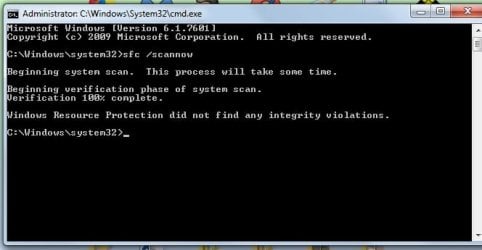
I did run a sfc scan. No issues detected. That took about 20 minutes.
 

Attachments

  • sfc scan.jpg
    sfc scan.jpg
    24.3 KB · Views: 8

My Computer

Computer type
PC/Desktop
Computer Manufacturer/Model Number
refurb in an HP/Compaq case
OS
Windows 7 Ultimate x64
CPU
1.86 GHz Intrel Core 2
Motherboard
HP 0A60h XU1
Memory
3 GB Dual Channel DDR2 @ 3.32 MHz
Graphics Card(s)
Intel Q965/Q963 Express chipset
Monitor(s) Displays
Dell CRT
Hard Drives
977GB Samsung HD 103 SI ATA
Case
HP Compaq DC5800
Mouse
wired optical
Antivirus
Microsoft Security Essentials, MalwareBytes, Spyware Blaster
Browser
Firefox 32-bit
Back
Top