
Constant deadlocks, ran driver verifier, not sure how to proceed.

cheesedout

New member
Local time
9:18 PM
Messages
5
Hey, as the title says...

I get deadlocks with just google chrome on so i decided to use the driver verifier..

Upon running driver verifier, i get a hidclass.sys bsod. What do i need to do from here on?

Thanks!
 

My Computer My Computer

At a glance

Microsoft Windows 7 Home Premium 32-bit 7601 ...Intel(R) Core(TM) i5 CPU 760 @ 2.80GHzNVIDIA GeForce GTX 750
Computer type
PC/Desktop
OS
Microsoft Windows 7 Home Premium 32-bit 7601 Multiprocessor Free Service Pack 1
CPU
Intel(R) Core(TM) i5 CPU 760 @ 2.80GHz
Motherboard
MSI P55-GD55 (MS-7589)
Graphics Card(s)
NVIDIA GeForce GTX 750
Sound Card
(1) NVIDIA High Definition Audio (2) Realtek High Definiti
Can you give us some more info to work with. First off, please fill in your system specs so we know which hardware you're running. What are the 'deadlocks' you're getting? System just locking up? Does it just happen with Google Chrome or does it happen at other times too? Do you get BSODs at any other time?
 

My Computer My Computer

At a glance

W7 Pro x64 SP1 | W10 Pro IP x64 | W8.1 Pro x6...i7-4790k @ 4GHz (4.4GHz Boost)16GB DDR3 Kingston HyperX Fury @ 1600MHz CL 9...EVGA GTX 980 Classified
Computer type
PC/Desktop
Computer Manufacturer/Model Number
Custom Build
OS
W7 Pro x64 SP1 | W10 Pro IP x64 | W8.1 Pro x64 VM | Linux Mint VM
CPU
i7-4790k @ 4GHz (4.4GHz Boost)
Motherboard
ASUS Sabertooth Z87 (BIOS Rev 2004)
Memory
16GB DDR3 Kingston HyperX Fury @ 1600MHz CL 9-9-9-27
Graphics Card(s)
EVGA GTX 980 Classified
Sound Card
Realtek Onboard
Monitor(s) Displays
Samsung S27D390
Screen Resolution
1920 x 1080
Hard Drives
240GB Intel 520 Series SSD |
Samsung 850 EVO 120GB SSD |
2TB WD Caviar Black |
2TB WD Caviar Green
PSU
Corsair HX850-80 Gold Modular
Case
Cooler Master Silencio 650
Cooling
Corsair H80i w/2 x Corsair SP120 | 2 x 120mm Noctua NF-S12B
Keyboard
Microsoft Sidewinder X4
Mouse
Gigabyte M6900 optical
Internet Speed
152mb
Antivirus
F-Secure
Browser
Firefox 38.0
Other Info
Backup Rig: Win 7 Pro 64-bit | AMD A10-5800k | ASUS F2A85-V Pro | 8GB Samsung DDR3 @1600MHz | 120GB Toshiba SDD | 2TB Seagate HDD | Cooler Master Silencio 550
Also upload the BSOD and related files.

1. Download the DM Log Collector application to your desktop by clicking the link below

DM Log Collector.exe

2. Run it by double-clicking the icon on your desktop, and follow the prompts.
3. Locate the .ZIP file created on your desktop, and upload it here in your next reply.

picture.php
 

My Computer My Computer

At a glance

Windows 10 Pro x64 ; Xubuntu x64Intel i7 860 @ 2.80 GHz O/C'ed to 4.0GHz16GB Corsair Vengance DDR3 @ 661 MHz Dual Cha...EVGA NVidia GTX 560 1024MB
Computer type
PC/Desktop
Computer Manufacturer/Model Number
Golden Mk. I.4
OS
Windows 10 Pro x64 ; Xubuntu x64
CPU
Intel i7 860 @ 2.80 GHz O/C'ed to 4.0GHz
Motherboard
Gigabyte P55A-UD3R Rev.1. Award BIOS F13
Memory
16GB Corsair Vengance DDR3 @ 661 MHz Dual Channel (9-9-9-24)
Graphics Card(s)
EVGA NVidia GTX 560 1024MB
Sound Card
Realtek Integrated
Monitor(s) Displays
Dual Samsung SyncMaster 2494HS
Screen Resolution
1920*1080 and 1920*1080
Hard Drives
1*Samsung 840 EVO 120GB SSD;
1*OCZ Vertex 2 60GB SSD;
2*Samsung F3 SpinPoint 1TB in RAID0;
1*Samsung F1 SpinPoint 1TB;
2*Western Digital 1TB External USB 3.0
1*Western Digital 500GB External USB 3.0
1*Seagate 500GB External USB 2.0
PSU
Thermaltake ToughPower QFan 750W
Case
Thermaltake Element S VK60001W2Z
Cooling
Corsair H60 Water Cooling, 2*230mm and 2*80mm case fans
Keyboard
Logitech G110
Mouse
Logitech MX518
Maybe I used the word deadlocks wrongly haha

These "deadlocks" occurred with my screen freezing, with ctrl-alt-del being unresponsive.
Thus far, it has only occurred with Google Chrome running, Steam, Garena and World of Warcraft (1st time).
The next 3 times were only with Google Chrome running.

The BSOD occurred with driver verifier leaving a HIDCLASS.sys

About 2-3 weeks before I had repeated BSOD with a nvlddmkm.sys but I changed my graphics card to the one listed and it stopped. (not sure if this info is necessary since after changing it this BSOD has only occurred once.)


Which file in the zip do I post here?

There are: all_services_status

autorun driver_status drivers dxdiag eventlog hosts hotfix inactive_services_status installed ipconfig msinfo32
 

My Computer My Computer

At a glance

Microsoft Windows 7 Home Premium 32-bit 7601 ...Intel(R) Core(TM) i5 CPU 760 @ 2.80GHzNVIDIA GeForce GTX 750
Computer type
PC/Desktop
OS
Microsoft Windows 7 Home Premium 32-bit 7601 Multiprocessor Free Service Pack 1
CPU
Intel(R) Core(TM) i5 CPU 760 @ 2.80GHz
Motherboard
MSI P55-GD55 (MS-7589)
Graphics Card(s)
NVIDIA GeForce GTX 750
Sound Card
(1) NVIDIA High Definition Audio (2) Realtek High Definiti
About 2-3 weeks before I had repeated BSOD with a nvlddmkm.sys but I changed my graphics card to the one listed and it stopped. (not sure if this info is necessary since after changing it this BSOD has only occurred once.)

It could well be relevant. The nvlddmkm.sys was pointing to a problem with your GPU driver, did you uninstall the previous card before physically removing it? And di you perform a clean install of the drivers for your new card? Just wondering if there's a driver conflict causing your freezes.

Which file in the zip do I post here?

There are: all_services_status

autorun driver_status drivers dxdiag eventlog hosts hotfix inactive_services_status installed ipconfig msinfo32

I think it will be eventlog, please wait for Golden to confirm.
 

My Computer My Computer

At a glance

W7 Pro x64 SP1 | W10 Pro IP x64 | W8.1 Pro x6...i7-4790k @ 4GHz (4.4GHz Boost)16GB DDR3 Kingston HyperX Fury @ 1600MHz CL 9...EVGA GTX 980 Classified
Computer type
PC/Desktop
Computer Manufacturer/Model Number
Custom Build
OS
W7 Pro x64 SP1 | W10 Pro IP x64 | W8.1 Pro x64 VM | Linux Mint VM
CPU
i7-4790k @ 4GHz (4.4GHz Boost)
Motherboard
ASUS Sabertooth Z87 (BIOS Rev 2004)
Memory
16GB DDR3 Kingston HyperX Fury @ 1600MHz CL 9-9-9-27
Graphics Card(s)
EVGA GTX 980 Classified
Sound Card
Realtek Onboard
Monitor(s) Displays
Samsung S27D390
Screen Resolution
1920 x 1080
Hard Drives
240GB Intel 520 Series SSD |
Samsung 850 EVO 120GB SSD |
2TB WD Caviar Black |
2TB WD Caviar Green
PSU
Corsair HX850-80 Gold Modular
Case
Cooler Master Silencio 650
Cooling
Corsair H80i w/2 x Corsair SP120 | 2 x 120mm Noctua NF-S12B
Keyboard
Microsoft Sidewinder X4
Mouse
Gigabyte M6900 optical
Internet Speed
152mb
Antivirus
F-Secure
Browser
Firefox 38.0
Other Info
Backup Rig: Win 7 Pro 64-bit | AMD A10-5800k | ASUS F2A85-V Pro | 8GB Samsung DDR3 @1600MHz | 120GB Toshiba SDD | 2TB Seagate HDD | Cooler Master Silencio 550
About 2-3 weeks before I had repeated BSOD with a nvlddmkm.sys but I changed my graphics card to the one listed and it stopped. (not sure if this info is necessary since after changing it this BSOD has only occurred once.)

It could well be relevant. The nvlddmkm.sys was pointing to a problem with your GPU driver, did you uninstall the previous card before physically removing it? And di you perform a clean install of the drivers for your new card? Just wondering if there's a driver conflict causing your freezes.

Which file in the zip do I post here?

There are: all_services_status

autorun driver_status drivers dxdiag eventlog hosts hotfix inactive_services_status installed ipconfig msinfo32

I think it will be eventlog, please wait for Golden to confirm.

I am not to sure how well it was installed or removed because i just brought it to a shop and they did everything for me. But i just experienced another screen freeze with chrome running, and i realised my speakers make a fuzzing sound as the screen freezes. Short and abrupt.
 

My Computer My Computer

At a glance

Microsoft Windows 7 Home Premium 32-bit 7601 ...Intel(R) Core(TM) i5 CPU 760 @ 2.80GHzNVIDIA GeForce GTX 750
Computer type
PC/Desktop
OS
Microsoft Windows 7 Home Premium 32-bit 7601 Multiprocessor Free Service Pack 1
CPU
Intel(R) Core(TM) i5 CPU 760 @ 2.80GHz
Motherboard
MSI P55-GD55 (MS-7589)
Graphics Card(s)
NVIDIA GeForce GTX 750
Sound Card
(1) NVIDIA High Definition Audio (2) Realtek High Definiti
And the freezing issue didn't happen before you changed your GPU?
 

My Computer My Computer

At a glance

W7 Pro x64 SP1 | W10 Pro IP x64 | W8.1 Pro x6...i7-4790k @ 4GHz (4.4GHz Boost)16GB DDR3 Kingston HyperX Fury @ 1600MHz CL 9...EVGA GTX 980 Classified
Computer type
PC/Desktop
Computer Manufacturer/Model Number
Custom Build
OS
W7 Pro x64 SP1 | W10 Pro IP x64 | W8.1 Pro x64 VM | Linux Mint VM
CPU
i7-4790k @ 4GHz (4.4GHz Boost)
Motherboard
ASUS Sabertooth Z87 (BIOS Rev 2004)
Memory
16GB DDR3 Kingston HyperX Fury @ 1600MHz CL 9-9-9-27
Graphics Card(s)
EVGA GTX 980 Classified
Sound Card
Realtek Onboard
Monitor(s) Displays
Samsung S27D390
Screen Resolution
1920 x 1080
Hard Drives
240GB Intel 520 Series SSD |
Samsung 850 EVO 120GB SSD |
2TB WD Caviar Black |
2TB WD Caviar Green
PSU
Corsair HX850-80 Gold Modular
Case
Cooler Master Silencio 650
Cooling
Corsair H80i w/2 x Corsair SP120 | 2 x 120mm Noctua NF-S12B
Keyboard
Microsoft Sidewinder X4
Mouse
Gigabyte M6900 optical
Internet Speed
152mb
Antivirus
F-Secure
Browser
Firefox 38.0
Other Info
Backup Rig: Win 7 Pro 64-bit | AMD A10-5800k | ASUS F2A85-V Pro | 8GB Samsung DDR3 @1600MHz | 120GB Toshiba SDD | 2TB Seagate HDD | Cooler Master Silencio 550

My Computer My Computer

At a glance

Microsoft Windows 7 Home Premium 32-bit 7601 ...Intel(R) Core(TM) i5 CPU 760 @ 2.80GHzNVIDIA GeForce GTX 750
Computer type
PC/Desktop
OS
Microsoft Windows 7 Home Premium 32-bit 7601 Multiprocessor Free Service Pack 1
CPU
Intel(R) Core(TM) i5 CPU 760 @ 2.80GHz
Motherboard
MSI P55-GD55 (MS-7589)
Graphics Card(s)
NVIDIA GeForce GTX 750
Sound Card
(1) NVIDIA High Definition Audio (2) Realtek High Definiti
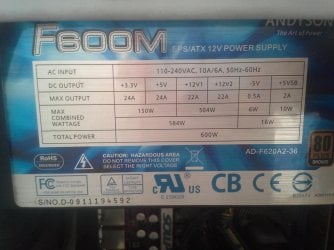
What's the rating of your power supply?

Also, look over this excellent tutorial by essenbe to perform a clean install of your drivers.
 

My Computer My Computer

At a glance

W7 Pro x64 SP1 | W10 Pro IP x64 | W8.1 Pro x6...i7-4790k @ 4GHz (4.4GHz Boost)16GB DDR3 Kingston HyperX Fury @ 1600MHz CL 9...EVGA GTX 980 Classified
Computer type
PC/Desktop
Computer Manufacturer/Model Number
Custom Build
OS
W7 Pro x64 SP1 | W10 Pro IP x64 | W8.1 Pro x64 VM | Linux Mint VM
CPU
i7-4790k @ 4GHz (4.4GHz Boost)
Motherboard
ASUS Sabertooth Z87 (BIOS Rev 2004)
Memory
16GB DDR3 Kingston HyperX Fury @ 1600MHz CL 9-9-9-27
Graphics Card(s)
EVGA GTX 980 Classified
Sound Card
Realtek Onboard
Monitor(s) Displays
Samsung S27D390
Screen Resolution
1920 x 1080
Hard Drives
240GB Intel 520 Series SSD |
Samsung 850 EVO 120GB SSD |
2TB WD Caviar Black |
2TB WD Caviar Green
PSU
Corsair HX850-80 Gold Modular
Case
Cooler Master Silencio 650
Cooling
Corsair H80i w/2 x Corsair SP120 | 2 x 120mm Noctua NF-S12B
Keyboard
Microsoft Sidewinder X4
Mouse
Gigabyte M6900 optical
Internet Speed
152mb
Antivirus
F-Secure
Browser
Firefox 38.0
Other Info
Backup Rig: Win 7 Pro 64-bit | AMD A10-5800k | ASUS F2A85-V Pro | 8GB Samsung DDR3 @1600MHz | 120GB Toshiba SDD | 2TB Seagate HDD | Cooler Master Silencio 550
I see a total power saying 600W. Cant really use the computer because it freezes on startup rather frequently now. Ill try to upload the sticker on the power supply with my phone.
 

Attachments

  • 20140430_130112.jpg
    20140430_130112.jpg
    363.7 KB · Views: 0

My Computer My Computer

At a glance

Microsoft Windows 7 Home Premium 32-bit 7601 ...Intel(R) Core(TM) i5 CPU 760 @ 2.80GHzNVIDIA GeForce GTX 750
Computer type
PC/Desktop
OS
Microsoft Windows 7 Home Premium 32-bit 7601 Multiprocessor Free Service Pack 1
CPU
Intel(R) Core(TM) i5 CPU 760 @ 2.80GHz
Motherboard
MSI P55-GD55 (MS-7589)
Graphics Card(s)
NVIDIA GeForce GTX 750
Sound Card
(1) NVIDIA High Definition Audio (2) Realtek High Definiti
Did you run the clean install of your drivers? A 600W PSU should be fine for a system running a 760, provided it's integrity is still intact. I've no experience with that brand of PSU so can't speak for it's quality.
 

My Computer My Computer

At a glance

W7 Pro x64 SP1 | W10 Pro IP x64 | W8.1 Pro x6...i7-4790k @ 4GHz (4.4GHz Boost)16GB DDR3 Kingston HyperX Fury @ 1600MHz CL 9...EVGA GTX 980 Classified
Computer type
PC/Desktop
Computer Manufacturer/Model Number
Custom Build
OS
W7 Pro x64 SP1 | W10 Pro IP x64 | W8.1 Pro x64 VM | Linux Mint VM
CPU
i7-4790k @ 4GHz (4.4GHz Boost)
Motherboard
ASUS Sabertooth Z87 (BIOS Rev 2004)
Memory
16GB DDR3 Kingston HyperX Fury @ 1600MHz CL 9-9-9-27
Graphics Card(s)
EVGA GTX 980 Classified
Sound Card
Realtek Onboard
Monitor(s) Displays
Samsung S27D390
Screen Resolution
1920 x 1080
Hard Drives
240GB Intel 520 Series SSD |
Samsung 850 EVO 120GB SSD |
2TB WD Caviar Black |
2TB WD Caviar Green
PSU
Corsair HX850-80 Gold Modular
Case
Cooler Master Silencio 650
Cooling
Corsair H80i w/2 x Corsair SP120 | 2 x 120mm Noctua NF-S12B
Keyboard
Microsoft Sidewinder X4
Mouse
Gigabyte M6900 optical
Internet Speed
152mb
Antivirus
F-Secure
Browser
Firefox 38.0
Other Info
Backup Rig: Win 7 Pro 64-bit | AMD A10-5800k | ASUS F2A85-V Pro | 8GB Samsung DDR3 @1600MHz | 120GB Toshiba SDD | 2TB Seagate HDD | Cooler Master Silencio 550
Back
Top