Mozilla Introduces Firefox 29 the Most Customizable Ever

Brink

Administrator
Staff member
Local time
2:45 AM
Messages
74,832
Location
Oklahoma
Mozilla is a non-profit organization driven by the mission of promoting openness, innovation and opportunity on the Web. We work as a global community to build products like Firefox that embody the values of our mission and create more user control, flexibility and innovation on the Web.

In the nearly 10 years since we first launched Firefox, it has grown to be the trusted and most customizable browser of choice for half a billion people worldwide.

We reimagined and redesigned Firefox to reflect how you use the Web today and we are excited to introduce many features including an elegant and fun design, new menu, customization mode and an enhanced Firefox Sync service powered by Firefox Accounts.


The first thing you’ll notice in Firefox is the beautiful new design that makes it easy to focus on your Web content. The tabs are sleek and smooth to help you navigate the Web faster. It’s easy to see what tab you’re currently visiting and the other tabs fade into the background to be less of a distraction when you’re not using them.

The Firefox menu has moved to the right corner of the toolbar and puts all your browser controls in one place. The menu includes a “Customize” tool that transforms Firefox into a powerful customization mode where you can add or move any feature, service or add-on. This level of Firefox customization puts you in control of your Web experience and is unmatched by any other browser.

The new Firefox Sync service is a safe and easy way to take your Firefox everywhere. Firefox Sync gives you access to Awesome Bar browsing history, saved passwords, bookmarks, open tabs and form data across your computers and mobile Android devices. It is powered by Firefox Accounts and simplifies the setup and device syncing process.

We looked at every piece of Firefox and made everything more enjoyable and easier to use – even bookmarks. You can create bookmarks with a single click and manage them from the same place.



Check out just some of the new features below, and have fun making Firefox yours.


What’s New in Firefox:
  • Elegant New Design: Sleek new tabs and an overall modern look that makes it easier to experience the Web the way you want.
  • Customization Mode: Makes it easy for you to personalize your Web experience to access the features you use the most. You can easily drag and drop your favorite feature, tool or add-on in the menu or toolbar.
  • Firefox Menu: Includes popular browser controls, features and add-ons in one place to make it easier and faster to access them. The menu is completely customizable so you can edit or add features you use most.
  • Fun and Simple Bookmarks: You can create bookmarks with a single click and manage them from the same place.
  • Easy Access to Add-ons Manager: Firefox includes an Add-ons Manager you can access directly from the menu to help easily discover and install add-ons.
  • Enhanced Firefox Sync Powered by Firefox Accounts: Just create a Firefox Account and our sync feature makes it even easier to setup and add multiple devices with end-to-end encryption. Firefox Sync gives you access to Awesome Bar history, saved passwords, bookmarks, open tabs and form data across your computers and mobile Android devices.
Web Platform and Developer Tools:
  • WebRTC: Firefox supports WebRTC, which enables video calls and file sharing between browsers.
  • WebAPIs: There are now more than 30 Mozilla-pioneered WebAPIs, which unlock more functionality and features in the Web platform.
  • asm.js and Emscripten: asm.js is a Mozilla-pioneered subset of JavaScript that can run at near-native speed for games and other performance-intensive applications. Specific asm.js optimizations in Firefox mean it currently runs asm.js-style code faster than any other browser. Using asm.js and Emscripten, we helped Epic Games and Unity add the Web as another export option to their hugely popular game engines without the need for plugins.
  • Web Audio API: With Web Audio API, developers can now build robust audio engines capable of new features like positional audio and support for effects such as reverb, which can create immersive audio experiences on the Web, which is especially important for game developers.
  • CSS Flexbox: The integration of CSS Flexbox in Firefox makes it easier for developers to build user interfaces that adapt to the size of the browser window or to create elastic layouts which adapt themselves to the font size. This is helpful when developers are trying to create a consistent user interface to their Website or Web app across desktop and mobile.
  • App Manager: Brings the Firefox Web developer tools to mobile app developers, simplifying mobile Web app development with live prototyping and debugging of apps on Firefox OS phones directly from the desktop.
  • Extension APIs: Developers using the Add-on SDK can now use the new button and toolbar APIs to easily integrate their add-on with Firefox’s new customizable toolbar.
For more information:

Source: https://blog.mozilla.org/blog/2014/...able-firefox-ever-with-an-elegant-new-design/
 

My Computer My Computer

Computer type
PC/Desktop
Computer Manufacturer/Model Number
Self built custom
OS
64-bit Windows 11 Pro for Workstations
CPU
Intel i7-8700K OC'd to 5 GHz
Motherboard
ASUS ROG Maximus XI Formula Z390
Memory
64 GB (4x16GB) G.SKILL TridentZ RGB DDR4 3600 MHz
Graphics Card(s)
ASUS ROG-STRIX-GTX1080TI-O11G-GAMING
Sound Card
Integrated
Monitor(s) Displays
2 x Samsung Odyssey G7 27"
Screen Resolution
2560x1440
Hard Drives
1TB Samsung 990 PRO M.2,
4TB Samsung 990 PRO PRO M.2,
TerraMaster F8 SSD Plus NAS
PSU
Seasonic Prime Titanium 850W
Case
Thermaltake Core P3
Cooling
Corsair Hydro H115i
Keyboard
Logitech wireless K800
Mouse
Logitech MX Master 4
Internet Speed
2 Gb/s Download and 100 Mb/s Upload
Antivirus
Malwarebyte Anti-Malware Premium
Browser
Google Chrome
Other Info
Logitech Z625 speaker system,
Logitech BRIO 4K Pro webcam,
HP Color LaserJet Pro MFP M477fdn,
APC SMART-UPS RT 1000 XL - SURT1000XLI,
Galaxy S23 Plus phone
Ugly FireChrome with the new (not) Asstralis look.

Not only have they dumbed down the interface, they've screwed all the desktop users in favor of touchscreen and mobile devices.

I have been and continue to use Pale Moon. The dev says he's keeping the old GUI, customizations, add-on bars, status bars, etc. and he has has a x64 version as well.

FireChrome is a bad joke.

Their intro article and blog is total rubbish
 

My Computer My Computer

Computer type
PC/Desktop
Computer Manufacturer/Model Number
Gateway DX4860
OS
Windows 7 Professional x64
CPU
Intel I5 2320 @ 3.0 HHz
Motherboard
Gateway / Acer
Memory
32 GB DDR3
Graphics Card(s)
Asus Nvidia 440 GT & Zotac Nvidia 610 GT
Sound Card
Realtek HDA
Monitor(s) Displays
(2) Asus VW246H 24" (16:9) & (1) Asus VB198 19" (4:3)
Screen Resolution
5120 Total x 1080
Hard Drives
WD 1.5 TB WD15EARX-22P
PSU
Basiq 650
Case
Gateway Tower
Cooling
(3) Case Fans
Keyboard
1. Saitek Eclipse 2. Focus FK8200
Mouse
Logitech M510
Internet Speed
90 mbps DL / 10 mbps UL (usually 110.5/11.5)
Antivirus
SuperAntiSpyware Pro, MalwareBytes Pro, MSE
Browser
1. Palemoon x64 2. IE 11
Other Info
USB 3.0 Card
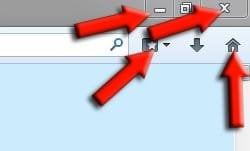
These are the four buttons I use on Firefox (apart from switching or closing tabs) so the look or functionality don't bother me.

Capture.JPG
 

My Computer My Computer

Computer type
PC/Desktop
Computer Manufacturer/Model Number
Custom Build
OS
W7 Pro x64 SP1 | W10 Pro IP x64 | W8.1 Pro x64 VM | Linux Mint VM
CPU
i7-4790k @ 4GHz (4.4GHz Boost)
Motherboard
ASUS Sabertooth Z87 (BIOS Rev 2004)
Memory
16GB DDR3 Kingston HyperX Fury @ 1600MHz CL 9-9-9-27
Graphics Card(s)
EVGA GTX 980 Classified
Sound Card
Realtek Onboard
Monitor(s) Displays
Samsung S27D390
Screen Resolution
1920 x 1080
Hard Drives
240GB Intel 520 Series SSD |
Samsung 850 EVO 120GB SSD |
2TB WD Caviar Black |
2TB WD Caviar Green
PSU
Corsair HX850-80 Gold Modular
Case
Cooler Master Silencio 650
Cooling
Corsair H80i w/2 x Corsair SP120 | 2 x 120mm Noctua NF-S12B
Keyboard
Microsoft Sidewinder X4
Mouse
Gigabyte M6900 optical
Internet Speed
152mb
Antivirus
F-Secure
Browser
Firefox 38.0
Other Info
Backup Rig: Win 7 Pro 64-bit | AMD A10-5800k | ASUS F2A85-V Pro | 8GB Samsung DDR3 @1600MHz | 120GB Toshiba SDD | 2TB Seagate HDD | Cooler Master Silencio 550
Funny did Firefox merge with Chrome :D
 

My Computer My Computer

Computer type
PC/Desktop
Computer Manufacturer/Model Number
Custom assembled by me :}
OS
Win-7-Pro64bit 7-H-Prem-64bit
CPU
i7-5930K 2nd i9-9940x both water blocked VRM's too
Motherboard
ASUS SABERTOOTH X99 2nd ASUS x299 Apex
Memory
Trident-z 3200C14 2nd Trident-z 3600C16
Graphics Card(s)
EVGA 1080ti ftw3 2nd Titan Xp both water blocked
Sound Card
Built-in Realtek
Monitor(s) Displays
1-AOC G2460PG 24"G-Sync 144Hz/ 2nd 1-ASUS VG248QE 24" 144Hz
Screen Resolution
1920 x 1080 144Hz
Hard Drives
2-Samsung M.2 Evo & Evo Plus
2-Samsung 850 EVO 500GB SSD's/ 3-2.5 W.D. Black 1tb-&3-1tb/3-3.5 WD Black 1tb hdd's
PSU
EVGA SuperNOVA 1000-P2 2nd 1200-P2
Case
2-Corsair Obsidian Series 450D Black ATX Mid Tower
Cooling
Custom water loops
Keyboard
Logitech G710+/ 2nd Logitech G910
Mouse
2-RedDragon M901 Perdition 16400 dpi Gaming mouse = wired
Internet Speed
Comcast Ping 19ms 89.31mbps download speed 6.12mbps upload
Antivirus
Malwarebytes Pro/ Superantispyware Pro
Browser
FireFox & Pale moon
Other Info
2nd ASUS X299 Apex/Intel i9-9940x with Custom water loop/7H-Prem-x64/Corsair 450D case/Ram Trident-z 3600C16 4x8gb / Samsung970Evo plus 500gb SSD/Dual ssd EZ swap evo/PSU EVGA SuperNova 1200w-P2 80+Platinum/GPU Titan Xp /8-ML-140 on push-pull on 2-280GTX rads
Funny did Firefox merge with Chrome :D

Same question came to mind when I looked it over this morning.

Like Sarris posted I'll stick with Pale Moon as well.
 

My Computer My Computer

Computer type
PC/Desktop
Computer Manufacturer/Model Number
1. HP p6733w Desktop 2. HP Envy 700-515xt Desktop
OS
1. Windows 7 Home Premium sp1 - 64bit 2. Windows 7 Pro sp1 - 64bit
CPU
1. AMD Phenom II x2 511 3.4GHz 2. Intel i7-4790 Quad 4.0GHz
Motherboard
1. N-Alvorix-RS880-uATX 2. Kaili2
Memory
1. 5 GB - DDR3 2. 8GB DDR3-1600MHz
Graphics Card(s)
Integrated 1. ATI Radeon 4200 2. Intel HD Graphics 4600
Sound Card
1. Realtek High Definition Audio 2. Realtek (Neutered Beats)
Monitor(s) Displays
1. Acer V193L 2. HP 2311 Series Wide LCD
Screen Resolution
1. 1280 x 1024 2. 1920 x 1080
Hard Drives
1. 750 GB - 7200 RPM SATA 2. 1TB 7200 RPM SATA
PSU
1. 250w 2. 300w
Cooling
Stock
Keyboard
Logitech USB keyboard
Mouse
Logitech USB optical mouse
Internet Speed
1.0 - 2.0 mbps
Antivirus
Eset Smart Security v9.0.349.0
Browser
Pale Moon
Well I like it so far, what exactly is the problem? The looks? does it work in some way that upsets you?

It works fine for me, and my missus loves it, what she knows or cares about computers does not go past the shopping, outings and activities and email. Has very little computer knowledge but took to FF 29 right away.

Horses for courses, what are the technical objections?
 

My Computer My Computer

Computer type
PC/Desktop
Computer Manufacturer/Model Number
bertison
OS
Windows 7/64 HPremium.
CPU
AMD FX-6300.
Motherboard
Asus M5A78L-M LE/USB3.
Memory
Corsair (2x4) GB DDR3 CMXGX3M2A1337CL9.
Graphics Card(s)
NVidia/Gigabyte GT730 (2GB) GDDR5.
Sound Card
Onboard.
Monitor(s) Displays
Iiyama PLE2407HDS.
Screen Resolution
1920 x 1280
Hard Drives
Desktop: 1TB. WD10EZEX-00BN5A0.
Zyxel nsa310 NAS: 2TB Seagate Barracuda 7200.14.
Cache Drive: Sandisk SDSSDRC032G.
Laptop Lenovo B50/80 128 GB SSD.
PSU
Corsair 750M.
Case
Coolermaster N300.
Cooling
FRONT: (2X) 140mm. TOP: (1x) 120mm. REAR: (1x) 120mm.
Keyboard
Logitech K290
Mouse
Trust Optical Wired
Internet Speed
15 Mb Down, 0.55 Up.
Antivirus
Kaspersky Total Security 2017, Hitman Pro.
Browser
Firefox.
Other Info
NETWORK:
Sky "Q box" and router.
Desktop & NAS - 30 Metres Cat6 Ethernet wired, via TP-Link 4-port switch.
Lenovo B50/80 Laptop, 2x Wileyfox phones, Lenovo TAB3-8 tablet - all wireless.
Grandchildren, their parents and friends as bandwidth 'parasites' at various times!

My Computer My Computer

Computer type
PC/Desktop
Computer Manufacturer/Model Number
Me
OS
Win 7 Ultimate x64
CPU
FX-8350 @ 4.6 GHz so far
Motherboard
Asus M5A97 EVO
Memory
ADATA XPG V1 Series Black 8GB DDR3 1600
Graphics Card(s)
Sapphire R9 270x Dual-X
Sound Card
Xonar DGX w/ Corsair Vengence 1300
Monitor(s) Displays
Acer S232HL Abid
Screen Resolution
1920x1080
Hard Drives
120 GB OCZ Vertex 3
500 GB Seagate 7200.12
PSU
Antec Earthwatts 650W Green
Case
Antec Three Hundred
Cooling
Cooler Master 212 EVO
Keyboard
Logitech G510
Mouse
Logitech G500s
Internet Speed
35000/3000

My Computer My Computer

Computer type
PC/Desktop
Computer Manufacturer/Model Number
Dell Inspiron 530
OS
Windows 7 Professional SP1 64-bit
CPU
Intel Core 2 Duo Processor E8300 @ 2.83GHz
Motherboard
Dell Inc. 0RY007 (Socket 775)
Memory
4.00 GB Dual-Channel DDR2 @ 332MHz (5-5-5-15)
Graphics Card(s)
Intel(R) G33/G31 Express Chipset Family
Sound Card
Integrated 7.1 Channel Audio
Monitor(s) Displays
Acer G245HQL 23.6" LED(1920x1080@60Hz)
Screen Resolution
1920 x 1080
Hard Drives
Disk 0 HITACHI 1TB OS Installed - Disk 1 HITACHI 1TB For Backups
Keyboard
Dell USB Keyboard
Mouse
Dell Optical USB Mouse
Internet Speed
DSL 10 meg
Antivirus
Symantec(SEP)
Browser
Pale Moon

I have some add-ons that use the add-on bar and that is gone. Also can't find out how to bookmark a site and save it where I want. It just sticks in bookmarks then I have to move it. Maybe I am missing something.

Did you have to do this recommendation?


It is recommended to switch to a new clean profile (or at least delete 'localstore.rdf' from profile folder) to avoid UI issues after upgrading from Firefox 28 (and older) to Firefox 29 (and newer).


My Computer My Computer

Computer type
PC/Desktop
Computer Manufacturer/Model Number
Home Built
OS
Windows 8.1 Pro w/Media Center 64bit, Windows 7 HP 64bit
CPU
Phenom II X6 1100T
Motherboard
ASUS M5A99X EVO
Memory
Crucial Balistic 8gb DDR3-1866 CL9
Graphics Card(s)
MSI R6850 Cyclone IGD5 PE
Sound Card
On Board
Monitor(s) Displays
ASUS VE258Q 25" LED with DVI-HDMI-DisplayPort
Screen Resolution
1920 x 1080
Hard Drives
Two WD Cavier Black 2TB Sata III, WD My Book Essential 2TB USB 3.0
PSU
Seasonic X650 80 Plus GOLD Modular
Case
Corsair 400R
Cooling
Antec Kuhler H2O 620, Two 120mm and four 140mm
Keyboard
Logitech K120
Mouse
Logitech Marble Mouse USB, Logitech Precision Game Pad
Internet Speed
15MB
Antivirus
Norton IS 2013, Malwarebytes Pro Beta 2
Browser
IE-11, FF-27
Other Info
APC UPS ES 750, Netgear WNR3500L Gigabit & Wireless N Router with SamKnows Test Program, Motorola SB6120 Gigabit Cable Modem. Brother HL-2170W Laser Printer, Epson V300 Scanner
Also can't find out how to bookmark a site and save it where I want. It just sticks in bookmarks then I have to move it. Maybe I am missing something.

Could do it the way I have always done it. Just right click somewhere on the page and select "Bookmark this page", that is still there in the context menu.
 

My Computer My Computer

Computer type
PC/Desktop
Computer Manufacturer/Model Number
Me
OS
Win 7 Ultimate x64
CPU
FX-8350 @ 4.6 GHz so far
Motherboard
Asus M5A97 EVO
Memory
ADATA XPG V1 Series Black 8GB DDR3 1600
Graphics Card(s)
Sapphire R9 270x Dual-X
Sound Card
Xonar DGX w/ Corsair Vengence 1300
Monitor(s) Displays
Acer S232HL Abid
Screen Resolution
1920x1080
Hard Drives
120 GB OCZ Vertex 3
500 GB Seagate 7200.12
PSU
Antec Earthwatts 650W Green
Case
Antec Three Hundred
Cooling
Cooler Master 212 EVO
Keyboard
Logitech G510
Mouse
Logitech G500s
Internet Speed
35000/3000

I have some add-ons that use the add-on bar and that is gone. Also can't find out how to bookmark a site and save it where I want. It just sticks in bookmarks then I have to move it. Maybe I am missing something.

Did you have to do this recommendation?


It is recommended to switch to a new clean profile (or at least delete 'localstore.rdf' from profile folder) to avoid UI issues after upgrading from Firefox 28 (and older) to Firefox 29 (and newer).
No, I did not do that. I have had no problems.
I'll get back to you on the bookmarks.
 

My Computer My Computer

Computer type
PC/Desktop
Computer Manufacturer/Model Number
Dell Inspiron 530
OS
Windows 7 Professional SP1 64-bit
CPU
Intel Core 2 Duo Processor E8300 @ 2.83GHz
Motherboard
Dell Inc. 0RY007 (Socket 775)
Memory
4.00 GB Dual-Channel DDR2 @ 332MHz (5-5-5-15)
Graphics Card(s)
Intel(R) G33/G31 Express Chipset Family
Sound Card
Integrated 7.1 Channel Audio
Monitor(s) Displays
Acer G245HQL 23.6" LED(1920x1080@60Hz)
Screen Resolution
1920 x 1080
Hard Drives
Disk 0 HITACHI 1TB OS Installed - Disk 1 HITACHI 1TB For Backups
Keyboard
Dell USB Keyboard
Mouse
Dell Optical USB Mouse
Internet Speed
DSL 10 meg
Antivirus
Symantec(SEP)
Browser
Pale Moon
Also can't find out how to bookmark a site and save it where I want. It just sticks in bookmarks then I have to move it. Maybe I am missing something.

Could do it the way I have always done it. Just right click somewhere on the page and select "Bookmark this page", that is still there in the context menu.

Dragging the tab still works as well. The only thing that annoyed me at all so far is I can't seem to set up an open bookmark sidebar button on the taskbar, only the drop down one. Ctrl-b still works though.
 

My Computer My Computer

OS
Windows 7 Ultimate x64
CPU
Intel i5 750
Motherboard
ASUS P7P55D Pro
Memory
GSkill 8GB DDR3-1600
Graphics Card(s)
EVGA Nvidia GTX 460
Sound Card
Onboard and external Presonus Firestudio Project
Monitor(s) Displays
2 x NEC LCD 1850E
Screen Resolution
1280x1024 x2
Hard Drives
lots of 'em
PSU
Thermaltake ToughPower 750W
Case
NZXT Lexa
Cooling
Air cooled
Keyboard
Logitech G15
Mouse
Logitech MX Revolution
Internet Speed
25 Mb/s down 1.5 Mb/s up
Other Info
This is my recording studio PC. I also have a gaming rig, a HTPC, an old dual-core system I set up as a server, and a few old dinosaurs (the oldest is an Intel P-90) that I use for DOS and Win95 gaming when I feel nostalgic.

I have some add-ons that use the add-on bar and that is gone. Also can't find out how to bookmark a site and save it where I want. It just sticks in bookmarks then I have to move it. Maybe I am missing something.

FWIW, I create Bookmarks mainly by dragging URLs out of the Address Bar and into the Bookmarks Sidebar, which gives me complete control over where they go. I've always done that.

Did you have to do this recommendation?


It is recommended to switch to a new clean profile (or at least delete 'localstore.rdf' from profile folder) to avoid UI issues after upgrading from Firefox 28 (and older) to Firefox 29 (and newer).
I did not.
 

My Computer My Computer

Computer type
PC/Desktop
OS
Windows 7 Ultimate x64
I'm running Firefox 20. Why change?
 

My Computer My Computer

Computer type
PC/Desktop
Computer Manufacturer/Model Number
Dell
OS
Windows 10 x64
CPU
i7-7700K
Memory
16 GB 2400 MHz
Graphics Card(s)
GTX 1060
Sound Card
Integrated, plus external Presonus Audiobox USB
Monitor(s) Displays
2x AOC 27"
Screen Resolution
1920x1080
Hard Drives
512 GB M.2 SSD
2 TB 7200 RPM disk
Internet Speed
110 Mbps
Browser
Firefox

I have some add-ons that use the add-on bar and that is gone. Also can't find out how to bookmark a site and save it where I want. It just sticks in bookmarks then I have to move it. Maybe I am missing something.

Did you have to do this recommendation?


It is recommended to switch to a new clean profile (or at least delete 'localstore.rdf' from profile folder) to avoid UI issues after upgrading from Firefox 28 (and older) to Firefox 29 (and newer).
No, I did not do that. I have had no problems.
I'll get back to you on the bookmarks.

Also can't find out how to bookmark a site and save it where I want. It just sticks in bookmarks then I have to move it. Maybe I am missing something.

Could do it the way I have always done it. Just right click somewhere on the page and select "Bookmark this page", that is still there in the context menu.

Dragging the tab still works as well. The only thing that annoyed me at all so far is I can't seem to set up an open bookmark sidebar button on the taskbar, only the drop down one. Ctrl-b still works though.
I got mine up there yesterday.

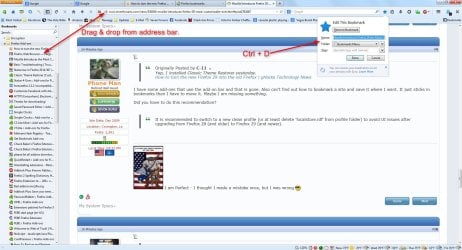
Ctrl + D to bring up page bookmarked, then select where to save.
I have dragged & dropped for years.

FF-Save Bookmark-2014-04-29.jpg
 

My Computer My Computer

Computer type
PC/Desktop
Computer Manufacturer/Model Number
Dell Inspiron 530
OS
Windows 7 Professional SP1 64-bit
CPU
Intel Core 2 Duo Processor E8300 @ 2.83GHz
Motherboard
Dell Inc. 0RY007 (Socket 775)
Memory
4.00 GB Dual-Channel DDR2 @ 332MHz (5-5-5-15)
Graphics Card(s)
Intel(R) G33/G31 Express Chipset Family
Sound Card
Integrated 7.1 Channel Audio
Monitor(s) Displays
Acer G245HQL 23.6" LED(1920x1080@60Hz)
Screen Resolution
1920 x 1080
Hard Drives
Disk 0 HITACHI 1TB OS Installed - Disk 1 HITACHI 1TB For Backups
Keyboard
Dell USB Keyboard
Mouse
Dell Optical USB Mouse
Internet Speed
DSL 10 meg
Antivirus
Symantec(SEP)
Browser
Pale Moon
Also can't find out how to bookmark a site and save it where I want. It just sticks in bookmarks then I have to move it. Maybe I am missing something.

Could do it the way I have always done it. Just right click somewhere on the page and select "Bookmark this page", that is still there in the context menu.

That's what I wanted. Thanks. There use to be a "STAR" button that did that but it got changed.

Thanks, Mickey for the Ctl-D option.

Thanks,
Jim :D
 

My Computer My Computer

Computer type
PC/Desktop
Computer Manufacturer/Model Number
Home Built
OS
Windows 8.1 Pro w/Media Center 64bit, Windows 7 HP 64bit
CPU
Phenom II X6 1100T
Motherboard
ASUS M5A99X EVO
Memory
Crucial Balistic 8gb DDR3-1866 CL9
Graphics Card(s)
MSI R6850 Cyclone IGD5 PE
Sound Card
On Board
Monitor(s) Displays
ASUS VE258Q 25" LED with DVI-HDMI-DisplayPort
Screen Resolution
1920 x 1080
Hard Drives
Two WD Cavier Black 2TB Sata III, WD My Book Essential 2TB USB 3.0
PSU
Seasonic X650 80 Plus GOLD Modular
Case
Corsair 400R
Cooling
Antec Kuhler H2O 620, Two 120mm and four 140mm
Keyboard
Logitech K120
Mouse
Logitech Marble Mouse USB, Logitech Precision Game Pad
Internet Speed
15MB
Antivirus
Norton IS 2013, Malwarebytes Pro Beta 2
Browser
IE-11, FF-27
Other Info
APC UPS ES 750, Netgear WNR3500L Gigabit & Wireless N Router with SamKnows Test Program, Motorola SB6120 Gigabit Cable Modem. Brother HL-2170W Laser Printer, Epson V300 Scanner

My Computer My Computer

Computer type
PC/Desktop
OS
Windows 10 Home x64
CPU
INTEL Core i5-750 Quad-Core 3.37GHz
Motherboard
ASUS P7P55D
Memory
HyperX Fury Black Series 8GB (2 x 4GB) 1866Mhz
Graphics Card(s)
EVGA GeForce GTX 750 Superclocked 1GB 128-Bit GDDR5
Monitor(s) Displays
LG 32MA68HY 32" IPS
Screen Resolution
1920 x 1080
Hard Drives
Samsung 840 Evo 120GB, SEAGATE 500GB Barracuda® 7200.12, SATA 3 Gb/s, 7200 RPM, 16MB cache
PSU
ANTEC TruePower New TP-550, 80 PLUS, 550W
Case
ANTEC Three Hundred Illusion
Cooling
COOLER MASTER Hyper 212 Plus, 4 x 120mm 1 x 140mm Noctua's
Internet Speed
85 + Mbps
Antivirus
Avast
Browser
Vivaldi
Here is a my screen shot of FF29. Clean and simple.

Screenshot (10).png

Jim :D
 

My Computer My Computer

Computer type
PC/Desktop
Computer Manufacturer/Model Number
Home Built
OS
Windows 8.1 Pro w/Media Center 64bit, Windows 7 HP 64bit
CPU
Phenom II X6 1100T
Motherboard
ASUS M5A99X EVO
Memory
Crucial Balistic 8gb DDR3-1866 CL9
Graphics Card(s)
MSI R6850 Cyclone IGD5 PE
Sound Card
On Board
Monitor(s) Displays
ASUS VE258Q 25" LED with DVI-HDMI-DisplayPort
Screen Resolution
1920 x 1080
Hard Drives
Two WD Cavier Black 2TB Sata III, WD My Book Essential 2TB USB 3.0
PSU
Seasonic X650 80 Plus GOLD Modular
Case
Corsair 400R
Cooling
Antec Kuhler H2O 620, Two 120mm and four 140mm
Keyboard
Logitech K120
Mouse
Logitech Marble Mouse USB, Logitech Precision Game Pad
Internet Speed
15MB
Antivirus
Norton IS 2013, Malwarebytes Pro Beta 2
Browser
IE-11, FF-27
Other Info
APC UPS ES 750, Netgear WNR3500L Gigabit & Wireless N Router with SamKnows Test Program, Motorola SB6120 Gigabit Cable Modem. Brother HL-2170W Laser Printer, Epson V300 Scanner
I haven't customised Firefox much, so it's mostly the same for me. It may take some time for me to get used to the menu button being relocated to the right. For the time being, the noticeable changes don't concern me but don't seem necessary either.
 

My Computer My Computer

Computer type
PC/Desktop
Computer Manufacturer/Model Number
Packard Bell ipower G5800
OS
Windows 7 Home Premium 64bit (Service Pack 1)
CPU
Intel Core i7
Memory
6.00 GB
Graphics Card(s)
NVIDIA GeForce GTX 550 Ti
Antivirus
Avira Free Antivirus
Browser
Firefox
I'm finding Firefox a little sluggish with age. Someone I know uses Chrome and it appears more responsive.
 

My Computer My Computer

Computer type
PC/Desktop
Computer Manufacturer/Model Number
Own build
OS
Windows 7x64 Home Premium SP1
CPU
Intel i7 2600k
Motherboard
ASUS P8Z68 Deluxe
Memory
G.Skill Ripjaws (DDR3-1600) 2x4GB
Graphics Card(s)
Nvidia GeForce GTS 450; Intel HD Graphics 3000(GT2+)
Monitor(s) Displays
Dell Ultrasharp IPS panel U2311H, Samsung SyncMaster P2350
Screen Resolution
1920x1080
Hard Drives
Samsung 850 Pro SSD 256GB, Samsung SSD 840 120GB, Seagates 1TB Barracuda ST31000528AS x2
PSU
Seasonic M12II 520W
Case
Lian Li Lancool PC-K60
Cooling
Case: 1x120mm, 3x140mm CPU: Hyper 212+
Keyboard
Logitech MK520 (wireless)
Mouse
Logitech MK520
Internet Speed
6-7 Mbps
Antivirus
Norton Security Premium, Malwarebytes on 2 (MSE on 3rd PC)
Browser
FireFox
Other Info
Audio: Logitech Z523 2.1
Back
Top