Solved lost disc space while using samsung magician?

p5200

New member
Member
VIP
Local time
10:25 AM
Messages
255
I had 91gb. free on 840 120gb. model but, after messing with the magician software and updating the firmware, I now have 79gb. free and I have no backups on the drive I keep an image backup on an external usb drive. Any help with this problem would sure be appreciated. :(
 

My Computer My Computer

Computer type
PC/Desktop
Computer Manufacturer/Model Number
custom build
OS
windows 7 Professional 64-bit
CPU
intel i5 4670k
Motherboard
ASUS Z87-A
Memory
G.SKILL 1866mhz. 16GB. (4 x 4GB) 240-Pin DDR3 SDRAM DDR3
Graphics Card(s)
HIS RADEON 4850 PCIE 2.0 ver.
Sound Card
onboard
Monitor(s) Displays
HP w2408h HDMI
Screen Resolution
1024 x 768
Hard Drives
SamSung 840 ssd 120 GB
PSU
Corsair HX 1050 Gold
Case
ALUMINUS FULL ATX
Cooling
Cooler Master Hyper 212 EVO
Keyboard
Logitech 520
Mouse
Logitech 310
Internet Speed
10 mbs
Antivirus
Avast full version
Browser
Firefox
Entered trim cmd. and got it back! :)
 

My Computer My Computer

Computer type
PC/Desktop
Computer Manufacturer/Model Number
custom build
OS
windows 7 Professional 64-bit
CPU
intel i5 4670k
Motherboard
ASUS Z87-A
Memory
G.SKILL 1866mhz. 16GB. (4 x 4GB) 240-Pin DDR3 SDRAM DDR3
Graphics Card(s)
HIS RADEON 4850 PCIE 2.0 ver.
Sound Card
onboard
Monitor(s) Displays
HP w2408h HDMI
Screen Resolution
1024 x 768
Hard Drives
SamSung 840 ssd 120 GB
PSU
Corsair HX 1050 Gold
Case
ALUMINUS FULL ATX
Cooling
Cooler Master Hyper 212 EVO
Keyboard
Logitech 520
Mouse
Logitech 310
Internet Speed
10 mbs
Antivirus
Avast full version
Browser
Firefox
Good to know that.

While most of the present breed of SSDs' firmware may support TRIM, it is nonetheless important to go through the specs and confirm that the SSD supports TRIM before purchasing.

It is also essential to check TRIM is enabled in the OS (Windows 7 and Windows 8)

Thanks p5200 for bringing this into the open.
 

My Computer My Computer

OS
Windows 7 Home Premium 32 bit
Entered trim cmd. and got it back! :)

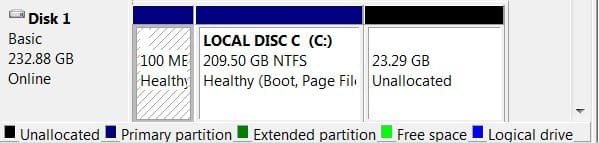
I'm a little confused. Is your SSD showing 10% unallocated - is that the 12GB you are talking about?
When you use the Optimization in Magician, it takes 10%(You can see from my pic that 23 GB have been used) and sets it aside as unallocated.

This is what gives you the speed.

When I got my first Samsung 128GB SSD and didn't use that command, I was getting read/write speeds of 250/200 - after Optimization - 500/480.

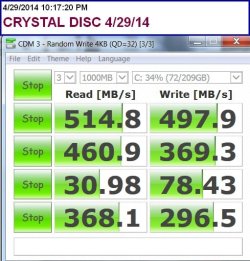
Run a Benchmark and see what you are getting.- You can also run CrystalDiskMark-64bit

CrystalDiskMark - Free download and software reviews - CNET Download.com

Here's a recent Benchmark - it's for the 840EVO 250GB, which will be a drop higher than yours.
 

Attachments

  • CRYSTAL DISC 4,29,14.jpg
    CRYSTAL DISC 4,29,14.jpg
    52.2 KB · Views: 13
  • DISC MGMT 5,4,14.jpg
    DISC MGMT 5,4,14.jpg
    16.3 KB · Views: 13

My Computer My Computer

Computer type
PC/Desktop
Computer Manufacturer/Model Number
Self-Built
OS
Windows 7 Professional X64
CPU
Core i7 (2nd gen) i7-2600K / 3.40GHz
Motherboard
ASUS P8Z77-V Intel 7 Series Motherboard
Memory
DDR3 2400MHz (OC) 16gb
Graphics Card(s)
Intel(R) HD Graphics 3000, -1988 Mb
Sound Card
8 ChannelsAudio Chipset Realtek ALC892
Monitor(s) Displays
LG 29UM65 Black 29"
Screen Resolution
2560 x 1080
Hard Drives
840 EVO 250 GB SSD ;2tb (2);Seagate;1tb Seagate; 750 gb Seagate; wd ext (2) 750 gb,WD 2tb X 2;WD 3TB Black
PSU
750 watt
Case
Thermaltake RX -1
Cooling
2120mm Fans Included 1Other Fan Ports 5x 200mm Fan Ports
Keyboard
Microsoft Digital Media Pro
Mouse
Microsoft Wireless 6000
Internet Speed
U-verse 18 mbps
Antivirus
MSE
Browser
Firefox, Chrome and my favorite: Pale Moon
Other Info
HdHomerun Dual Tuner.
SRS Audio Lab,
Pioneer BDR 208-DBK
PS3-What a difference in my Surround Sound Receiver!
HP 4540s - My new Toy.
Epson R280 Printer- To personalize my Dvds.
Canon MP 560 - For scanning.
Entered trim cmd. and got it back! :)

TRIM doesn't have that effect. The lost space was probably due to Magician overprovisioning the drive, and you may have unwittingly undid the overprovisioning the next time you went into Magician.

I'm a little confused. Is your SSD showing 10% unallocated - is that the 12GB you are talking about?
When you use the Optimization in Magician, it takes 10%(You can see from my pic that 23 GB have been used) and sets it aside as unallocated.

This is what gives you the speed.

No. You won't observe any difference in speed on a fresh drive vs. a fresh drive with 10% overprovisioning. Moreover, if TRIM is working, there's little reason to overprovision, as the only purpose it serves then is to ensure the used space doesn't approach the capacity of the drive.

When I got my first Samsung 128GB SSD and didn't use that command, I was getting read/write speeds of 250/200 - after Optimization - 500/480.

Run a Benchmark and see what you are getting.- You can also run CrystalDiskMark-64bit

CrystalDiskMark - Free download and software reviews - CNET Download.com

Here's a recent Benchmark - it's for the 840EVO 250GB, which will be a drop higher than yours.
That could have to do with enabling the Samsung "RAPID" gimmick.

My own experience with "Magician" is that it lives in the notification area after you close it, and unwittingly leaving it running there caused the first BSOD I've seen in years due to Samsung's purposeful interference with sleep, which they do because they say their drives don't work properly with sleep. More on that here:

http://www.sevenforums.com/hardware-devices/327037-samsung-magician-trim-message.html#post2736482
 

My Computer My Computer

Computer type
PC/Desktop
OS
Windows 7 Ultimate x64
Entered trim cmd. and got it back! :)

TRIM doesn't have that effect. The lost space was probably due to Magician overprovisioning the drive, and you may have unwittingly undid the overprovisioning the next time you went into Magician.

I'm a little confused. Is your SSD showing 10% unallocated - is that the 12GB you are talking about?
When you use the Optimization in Magician, it takes 10%(You can see from my pic that 23 GB have been used) and sets it aside as unallocated.

This is what gives you the speed.

No. You won't observe any difference in speed on a fresh drive vs. a fresh drive with 10% overprovisioning. Moreover, if TRIM is working, there's little reason to overprovision, as the only purpose it serves then is to ensure the used space doesn't approach the capacity of the drive.

When I got my first Samsung 128GB SSD and didn't use that command, I was getting read/write speeds of 250/200 - after Optimization - 500/480.

Run a Benchmark and see what you are getting.- You can also run CrystalDiskMark-64bit

CrystalDiskMark - Free download and software reviews - CNET Download.com

Here's a recent Benchmark - it's for the 840EVO 250GB, which will be a drop higher than yours.
That could have to do with enabling the Samsung "RAPID" gimmick.

My own experience with "Magician" is that it lives in the notification area after you close it, and unwittingly leaving it running there caused the first BSOD I've seen in years due to Samsung's purposeful interference with sleep, which they do because they say their drives don't work properly with sleep. More on that here:

http://www.sevenforums.com/hardware-devices/327037-samsung-magician-trim-message.html#post2736482

That could have to do with enabling the Samsung "RAPID" gimmick.
The 830 didn't have Rapid Mode - the speeds were half before I enabled Over Provisioning -That's what I meant to say in previous post - not Optimization.
 

My Computer My Computer

Computer type
PC/Desktop
Computer Manufacturer/Model Number
Self-Built
OS
Windows 7 Professional X64
CPU
Core i7 (2nd gen) i7-2600K / 3.40GHz
Motherboard
ASUS P8Z77-V Intel 7 Series Motherboard
Memory
DDR3 2400MHz (OC) 16gb
Graphics Card(s)
Intel(R) HD Graphics 3000, -1988 Mb
Sound Card
8 ChannelsAudio Chipset Realtek ALC892
Monitor(s) Displays
LG 29UM65 Black 29"
Screen Resolution
2560 x 1080
Hard Drives
840 EVO 250 GB SSD ;2tb (2);Seagate;1tb Seagate; 750 gb Seagate; wd ext (2) 750 gb,WD 2tb X 2;WD 3TB Black
PSU
750 watt
Case
Thermaltake RX -1
Cooling
2120mm Fans Included 1Other Fan Ports 5x 200mm Fan Ports
Keyboard
Microsoft Digital Media Pro
Mouse
Microsoft Wireless 6000
Internet Speed
U-verse 18 mbps
Antivirus
MSE
Browser
Firefox, Chrome and my favorite: Pale Moon
Other Info
HdHomerun Dual Tuner.
SRS Audio Lab,
Pioneer BDR 208-DBK
PS3-What a difference in my Surround Sound Receiver!
HP 4540s - My new Toy.
Epson R280 Printer- To personalize my Dvds.
Canon MP 560 - For scanning.
The 830 didn't have Rapid Mode - the speeds were half before I enabled Over Provisioning -That's what I meant to say in previous post - not Optimization.

It still had to be something else. Like I said, "You won't observe any difference in speed on a fresh drive vs. a fresh drive with 10% overprovisioning." I've done the tests myself with a 256 GB Samsung 830 among others. To be clear, a "fresh" drive is one that is new out of the box or has just been securely erased.
 

My Computer My Computer

Computer type
PC/Desktop
OS
Windows 7 Ultimate x64
Back
Top