
How to change sector size on an existing partition?

Tinsby

New member
Member
VIP
Local time
1:53 PM
Messages
176
I am trying to change the sector size of a partition either higher or lower than what is reported now.

Using the ADMIN | Computer Mgmt tools to shrink the partition does make it smaller, but the sector size stays the same. The one I am trying to change the size of is a logical drive inside an extended partition.

Here's hoping that I don't have to blow out the partition and make a new one.

Why do I want to do this? I have a dual boot machine and on the 3rd partition, I'd like to install a version of Linux to test. But since the two partitions have the exact same sector size, it's allegedly preventing the installer from seeing any of the partitions, it simply shows it as one large one with no partitions showing.

Any ideas?

Thank you

J T
 
Last edited:

My Computer My Computer

At a glance

Dual boot Win7 Pro 64 & Linux Mint 18.3Intel Core 2 Quad Core8GBNvidia GeForce GTX 750 Ti
Computer type
PC/Desktop
Computer Manufacturer/Model Number
Home/Custom built
OS
Dual boot Win7 Pro 64 & Linux Mint 18.3
CPU
Intel Core 2 Quad Core
Motherboard
Asus Rampage Extreme
Memory
8GB
Graphics Card(s)
Nvidia GeForce GTX 750 Ti
Sound Card
PCIe Supreme FX X-fi
Monitor(s) Displays
Viewsonic VX2450WM LED
Screen Resolution
1920x1080
Hard Drives
Intel SSD 240GB
WD 500GB HDD
PSU
Corsair 850 watt
Case
Lian Li
Cooling
Zalman
Keyboard
MS natural/ergonomic
Mouse
Intellimouse
Internet Speed
240 Mbps +/- Dnld, 12Mbps Upld via Xfinity Blast
Antivirus
Norton Security Suite by Xfinity
Browser
Firefox & Chrome
Other Info
4 slot memory card reader
Floppy drive
2 DVD burners
Brother MFCJ450dw AIO Printer/Scanner/Fax
eSATA connections
Sector size is an inherent property of the drive and cannot be changed.
But your problem has nothing to do with sector size.

Post a screenshot of Disk Manager showing the existing partitions.
 

My Computer My Computer

At a glance

Windows 7 Pro 64 bitXeon W35208 GBNvidia Geforce 210
Computer type
PC/Desktop
Computer Manufacturer/Model Number
HP
OS
Windows 7 Pro 64 bit
CPU
Xeon W3520
Memory
8 GB
Graphics Card(s)
Nvidia Geforce 210
Sector size is an inherent property of the drive and cannot be changed.
But your problem has nothing to do with sector size.

Post a screenshot of Disk Manager showing the existing partitions.

HI LMiller,

Here you go. XP was on the drive first then Win 7. I know if I remove XP 7 won't boot, so it can stay. I have programs on there that won't run on 64 bit. The things I use XP for do not require a Web connection. I had made a 4th partition on the storage drive to put Ubuntu on but the installer and GParted only showed one huge drive. I understand this is s common problem but I am not sure how to fix it quickly. I DO have images of every partition, I was going to reformat the drive and make the XP partition smaller, since there will be no more programs added to it. I'd leave the 7 alone and make a 4th partition on the storage drive to hold Ubuntu. So far no joy! :(

Thank you!
 

Attachments

  • Capture Win 7 Partition info.JPG
    Capture Win 7 Partition info.JPG
    84.2 KB · Views: 3

My Computer My Computer

At a glance

Dual boot Win7 Pro 64 & Linux Mint 18.3Intel Core 2 Quad Core8GBNvidia GeForce GTX 750 Ti
Computer type
PC/Desktop
Computer Manufacturer/Model Number
Home/Custom built
OS
Dual boot Win7 Pro 64 & Linux Mint 18.3
CPU
Intel Core 2 Quad Core
Motherboard
Asus Rampage Extreme
Memory
8GB
Graphics Card(s)
Nvidia GeForce GTX 750 Ti
Sound Card
PCIe Supreme FX X-fi
Monitor(s) Displays
Viewsonic VX2450WM LED
Screen Resolution
1920x1080
Hard Drives
Intel SSD 240GB
WD 500GB HDD
PSU
Corsair 850 watt
Case
Lian Li
Cooling
Zalman
Keyboard
MS natural/ergonomic
Mouse
Intellimouse
Internet Speed
240 Mbps +/- Dnld, 12Mbps Upld via Xfinity Blast
Antivirus
Norton Security Suite by Xfinity
Browser
Firefox & Chrome
Other Info
4 slot memory card reader
Floppy drive
2 DVD burners
Brother MFCJ450dw AIO Printer/Scanner/Fax
eSATA connections
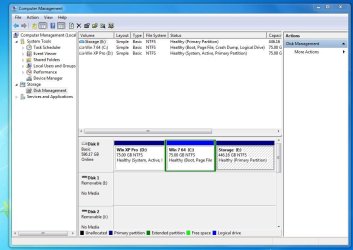
I assume you want to install Linux onto the partition containing the E: volume. The problem is that it is formatted as NTFS which has at best only limited compatibility with Linux. You certainly can't install Linux on such a partition.
 

My Computer My Computer

At a glance

Windows 7 Pro 64 bitXeon W35208 GBNvidia Geforce 210
Computer type
PC/Desktop
Computer Manufacturer/Model Number
HP
OS
Windows 7 Pro 64 bit
CPU
Xeon W3520
Memory
8 GB
Graphics Card(s)
Nvidia Geforce 210
I assume you want to install Linux onto the partition containing the E: volume. The problem is that it is formatted as NTFS which has at best only limited compatibility with Linux. You certainly can't install Linux on such a partition.


Yes I understand that. But the problem is that GParted doesn't see any of the ntfs partitions and it should do. If I could see the partition I'd simply format it to ext4 and I'd be good to go.

Something is causing Linux to see the entire drive as if it had no partitions.

J T
 

My Computer My Computer

At a glance

Dual boot Win7 Pro 64 & Linux Mint 18.3Intel Core 2 Quad Core8GBNvidia GeForce GTX 750 Ti
Computer type
PC/Desktop
Computer Manufacturer/Model Number
Home/Custom built
OS
Dual boot Win7 Pro 64 & Linux Mint 18.3
CPU
Intel Core 2 Quad Core
Motherboard
Asus Rampage Extreme
Memory
8GB
Graphics Card(s)
Nvidia GeForce GTX 750 Ti
Sound Card
PCIe Supreme FX X-fi
Monitor(s) Displays
Viewsonic VX2450WM LED
Screen Resolution
1920x1080
Hard Drives
Intel SSD 240GB
WD 500GB HDD
PSU
Corsair 850 watt
Case
Lian Li
Cooling
Zalman
Keyboard
MS natural/ergonomic
Mouse
Intellimouse
Internet Speed
240 Mbps +/- Dnld, 12Mbps Upld via Xfinity Blast
Antivirus
Norton Security Suite by Xfinity
Browser
Firefox & Chrome
Other Info
4 slot memory card reader
Floppy drive
2 DVD burners
Brother MFCJ450dw AIO Printer/Scanner/Fax
eSATA connections
I think you should be able to use MiniTool Partition Manager to manage your disk. I would maybe suggest converting that Win 7 logical partition that you have into a primary partition, rebuild MBR and then resize the partition you want to use with another OS.
 

My Computer My Computer

At a glance

Windows 7 Ultimate x64Intel Core i5-2410M2 x 4 GB ELPIDA 667Mhz 1.5VRadeon (TM) HD 7650M
Computer type
PC/Desktop
Computer Manufacturer/Model Number
Hewlett-Packard
OS
Windows 7 Ultimate x64
CPU
Intel Core i5-2410M
Motherboard
Hewlett-Packard 1651
Memory
2 x 4 GB ELPIDA 667Mhz 1.5V
Graphics Card(s)
Radeon (TM) HD 7650M
Hard Drives
750GB WD7500BPVT
Back
Top