How to merge 2 ext HDD into one partition?

teky

New member
Local time
3:49 AM
Messages
9
i have 2 external HDD each one of 300GB i wanted to merge them into one partition equivalent to approx 500GB(not less). i am using win7 and when attempt to do it with diskmgmt.msc tool:

Drive A = 300GB NTFS format
Drive B = 300 GB raw format (since already deleted volume)

when choose extend volume option for drive A and choose unallocated volume (drive B) got an error object is missing cant perform function

when try to create span volume got similar error.

any suggestions?
 

My Computer My Computer

At a glance

Windows 7 32bit
Computer type
Laptop
OS
Windows 7 32bit

My Computer My Computer

At a glance

Win 10 Pro x64Intel I5-2500K @3.3GHz16GB G.Skill Ripjaws X (4x4GB)EVGA GeForce 750 Ti SC 2GB
Computer type
PC/Desktop
Computer Manufacturer/Model Number
Self Built
OS
Win 10 Pro x64
CPU
Intel I5-2500K @3.3GHz
Motherboard
Asrock P67 Extreme4
Memory
16GB G.Skill Ripjaws X (4x4GB)
Graphics Card(s)
EVGA GeForce 750 Ti SC 2GB
Sound Card
ASUS Xonar DG 5.1 Channels 24-bit 96KHz PCI Interface Sound
Monitor(s) Displays
auria eq2367
Screen Resolution
1920 x 1080
Hard Drives
250GB Samsung 850 EVO SSD
1TB WD Blue
1TB Hitachi
PSU
SeaSonic X 650W 80 Plus Gold
Case
Corsair Obsidian 750D
Cooling
Corsair H60, Three 140mm case fans
Keyboard
Logitech Wireless Keyboard K520
Mouse
Logitech Wireless Mouse M310
Internet Speed
Wave Broadband ~ 100 dn 5 up
Antivirus
Windows Defender, Malwarebytes Premium
Browser
Edge, IE11, Chrome
Other Info
Laptop specs: HP g7-1365dx /
CPU: AMD A6-3420M APU with Radeon(tm) HD Graphics /
RAM: Crucial 8Gb (2x4Gb) /
SSD: Crucial M4-CT128M4SSD2 ATA Device/ FW 000F /
GFX: AMD Radeon HD 6520G /
OS: Windows 10 Pro x64
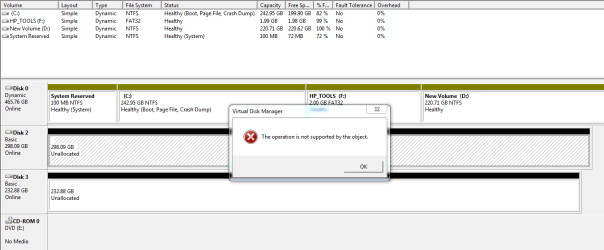
Main diskmgt.msc screen shot

attachment.php


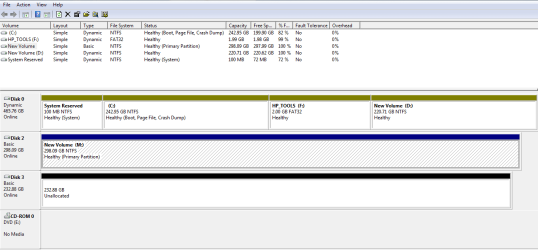
when i del both volumes (raw format) of ExtHDD and try to create a span vol from either of one got below error:


attachment.php


when one volume in raw format and other in NTFS, tried to extend NTFS vol and selected raw got below error:

attachment.php


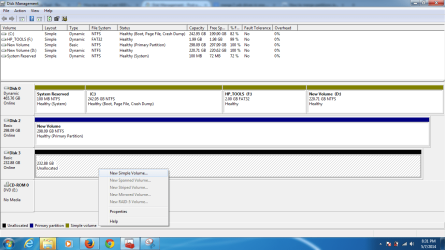
not getting any option when selected raw vol:

attachment.php


Attachments

  • Capt2.PNG
    Capt2.PNG
    19.4 KB · Views: 32
  • Capture.PNG
    Capture.PNG
    18.2 KB · Views: 0
  • Capture2.PNG
    Capture2.PNG
    13.5 KB · Views: 26
  • Untitled.png
    Untitled.png
    45 KB · Views: 26

My Computer My Computer

At a glance

Windows 7 32bit
Computer type
Laptop
OS
Windows 7 32bit
Why is all of Disk 0 Dynamic? That shouldn't be like that.
 

My Computer My Computer

At a glance

Win 10 Pro x64Intel I5-2500K @3.3GHz16GB G.Skill Ripjaws X (4x4GB)EVGA GeForce 750 Ti SC 2GB
Computer type
PC/Desktop
Computer Manufacturer/Model Number
Self Built
OS
Win 10 Pro x64
CPU
Intel I5-2500K @3.3GHz
Motherboard
Asrock P67 Extreme4
Memory
16GB G.Skill Ripjaws X (4x4GB)
Graphics Card(s)
EVGA GeForce 750 Ti SC 2GB
Sound Card
ASUS Xonar DG 5.1 Channels 24-bit 96KHz PCI Interface Sound
Monitor(s) Displays
auria eq2367
Screen Resolution
1920 x 1080
Hard Drives
250GB Samsung 850 EVO SSD
1TB WD Blue
1TB Hitachi
PSU
SeaSonic X 650W 80 Plus Gold
Case
Corsair Obsidian 750D
Cooling
Corsair H60, Three 140mm case fans
Keyboard
Logitech Wireless Keyboard K520
Mouse
Logitech Wireless Mouse M310
Internet Speed
Wave Broadband ~ 100 dn 5 up
Antivirus
Windows Defender, Malwarebytes Premium
Browser
Edge, IE11, Chrome
Other Info
Laptop specs: HP g7-1365dx /
CPU: AMD A6-3420M APU with Radeon(tm) HD Graphics /
RAM: Crucial 8Gb (2x4Gb) /
SSD: Crucial M4-CT128M4SSD2 ATA Device/ FW 000F /
GFX: AMD Radeon HD 6520G /
OS: Windows 10 Pro x64
ouch it seems it is not a right configuration; well i dont know i just installed windows and let windows to create partitions and assigned everything :)
 

My Computer My Computer

At a glance

Windows 7 32bit
Computer type
Laptop
OS
Windows 7 32bit
It looks like you actually converted DISK0 to Dynamic which is only meant to span a single partition across multiple HD's. You'll need to convert it back before Win7 stops booting. Back up your files first, Use Option 1 here to avoid having to wipe out your Win7 install: Convert a Dynamic Disk to a Basic Disk

After conversion I'd also convert D to a Logical data partition so you can add as many adjacent Logical partitions as you want: How to set partition as Primary or Logical with Partition Wizard

As to the externals, I don't think a spanned volume can or should be on removable drives because they are less stable than internal drives, hence you would be risking your data in case one would die or have its file system messed up. If you need a huge storage partition for video files, etc, then look into a larger internal HD for more stablity.

I notice you say you reinstalled Win7 but also kept the HP Tools partition. Is this because you confirmed the hardware diagnostics will still boot from F9 Boot menu, the only purpose for keeping that partition? See the Special Note for HP Owners at the end of Clean Reinstall - Factory OEM Windows 7
 
actually i am in mid of data recovery process lost 1TB bitlocker encrypted HDD passwords, long story short trying to recover one of the partition of 1TB HDD and need 500GB free space. at this moment i dont want to reformat either my main drive (Disk 0) however will definitely go through all the tutorials and set everything in proper format later. thanks for the support anyways.
 

My Computer My Computer

At a glance

Windows 7 32bit
Computer type
Laptop
OS
Windows 7 32bit
If you're inclined to experiment then be sure to always have your data backed up, and not to a dodgy spanned pair of externals. ;)
 
It's me again and if you all could explain some things to me because I'm confused.

*We started of with.
i have 2 external HDD each one of 300GB i wanted to merge them into one partition

*Then went to all drives being Dynamic including C partition.
*Then to all but one drive being Dynamic. New drive being Basic.
*Then to a 1 TB drive that is Bitlocker encrypted and trying to get the data without a password.

Is this a correct understanding or have I been drinking to much coffee?
I'm trying to follow this thread because it is interesting but I think I must have missed something.
I will go back to watching.
 

My Computer My Computer

At a glance

Windows 10 Pro. 64/ version 1709 Windows 7 Pr...Intel i7-6800K @ 4.3Corsair Platinum 16 gig @2400EVGA GTX 1070 OC
Computer type
PC/Desktop
Computer Manufacturer/Model Number
Home made Desktop
OS
Windows 10 Pro. 64/ version 1709 Windows 7 Pro/64
CPU
Intel i7-6800K @ 4.3
Motherboard
ASUS X-99 Deluxe II
Memory
Corsair Platinum 16 gig @2400
Graphics Card(s)
EVGA GTX 1070 OC
Monitor(s) Displays
Asus 27" LED LCD/VE278Q
Screen Resolution
1920-1080 or 1280-720 HDMI
Hard Drives
INTEL SSD 730-240 Gb Sata 3.0/
PSU
EVGA Platium 1200W
Case
Phanteks Luxe Tempered Glass 8 fans/ one radiator
Cooling
XSPC/ Water Cooled CPU
Keyboard
Das 4 Professional
Mouse
Logitech M705/MX Anywhere 2-S
Internet Speed
100 mbits
Antivirus
Microsoft Security Essentials/ Malwarebytes Premium 3.0/ SAS
Browser
I.E. 11 default/Firefox/ ISP Time Warner Cable/Spectrum
Other Info
LG BluRay Burner/
Sound system-KLipsch-THX/
Icy Dock ssd Hot Swap bays.
From a previous post by the OP Jack,

i encrypted my 1TB External HDD took backup of my laptop on it (including recovery keys backup files). formated my laptop reinstalled windows and now forgot the password for External HDD.

Any suggestions in recovering the key which is already backed up in the encrypted HDD.

thinking to format HDD and than attempt data recovery but not sure if i will be able to recover all or nothing.


It's only Disk 0 that is Dynamic, the other two in the screenshots are the externals they are trying to combine to be able to move 500GB of data from the 1TB drive mentioned in the previous post.

I don't remember all drives being Dynamic, just the system drive Disk 0.
 

My Computer My Computer

At a glance

Win 10 Pro x64Intel I5-2500K @3.3GHz16GB G.Skill Ripjaws X (4x4GB)EVGA GeForce 750 Ti SC 2GB
Computer type
PC/Desktop
Computer Manufacturer/Model Number
Self Built
OS
Win 10 Pro x64
CPU
Intel I5-2500K @3.3GHz
Motherboard
Asrock P67 Extreme4
Memory
16GB G.Skill Ripjaws X (4x4GB)
Graphics Card(s)
EVGA GeForce 750 Ti SC 2GB
Sound Card
ASUS Xonar DG 5.1 Channels 24-bit 96KHz PCI Interface Sound
Monitor(s) Displays
auria eq2367
Screen Resolution
1920 x 1080
Hard Drives
250GB Samsung 850 EVO SSD
1TB WD Blue
1TB Hitachi
PSU
SeaSonic X 650W 80 Plus Gold
Case
Corsair Obsidian 750D
Cooling
Corsair H60, Three 140mm case fans
Keyboard
Logitech Wireless Keyboard K520
Mouse
Logitech Wireless Mouse M310
Internet Speed
Wave Broadband ~ 100 dn 5 up
Antivirus
Windows Defender, Malwarebytes Premium
Browser
Edge, IE11, Chrome
Other Info
Laptop specs: HP g7-1365dx /
CPU: AMD A6-3420M APU with Radeon(tm) HD Graphics /
RAM: Crucial 8Gb (2x4Gb) /
SSD: Crucial M4-CT128M4SSD2 ATA Device/ FW 000F /
GFX: AMD Radeon HD 6520G /
OS: Windows 10 Pro x64
Hi there

I USED to SPAN HDD's - but be careful especially with EXTERNAL HDD's as now you need ALWAYS to have ALL the HDD's in the spanned group connected and they HAVE to be dynamic disks. Beware also that any error and you lose data in the entire spanned group.

A better solution might be to use Libraries.

I've solved this particular issue by actually using Linux as you can "mount" these into a single "mount" directory or create soft symbolic links.

Windows spanning works fine but be aware of consequences - I wouldn't recommend it for EXTERNAL drives - but fine for INTERNAL ones. Wit a Spanned volume set it's EVEN MORE IMPORTANT to take regular backups of your data or you'll be regretting say the loss of your "6.7 TB Multi media file" with 100's of your ripped CD's / DVD's / iTunes etc all down the toilet !!!!.

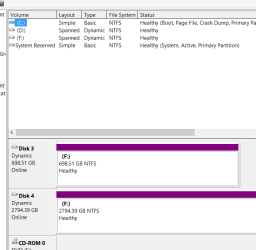
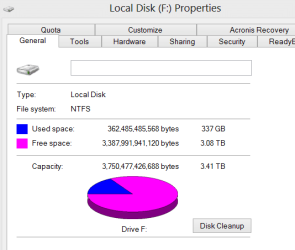
Your spanned drives should look like this when working. - For example spanned two volumes -- it will show two F drives but properties will list a single "composite F drive" with the total space aggregated.

Windows explorer now treats the F drive to a single aggregated drive.

(I think for spanning you also need to make them GPT drives) - can't remember as I don't use this method any more.

Finally DO NOT BOOT from a spanned volume it won't work !!! - If you've got a small HDD (or better an SSD) use that for the OS partition. Also I have to disagree with Greg above -- Logical Partitions are a MEGA PAIN and in any case you don't need them with GPT drives.


Cheers
jimbo
 

Attachments

  • span2.png
    span2.png
    10.6 KB · Views: 0
  • span3.png
    span3.png
    9.4 KB · Views: 14

My Computer My Computer

At a glance

Linux CENTOS 7 / various Windows OS'es and se...Intel i7 Intel i58GB, 16GBOn Motherboard
Computer type
PC/Desktop
Computer Manufacturer/Model Number
Custom built, several laptops HP/ASUS
OS
Linux CENTOS 7 / various Windows OS'es and servers
CPU
Intel i7 Intel i5
Memory
8GB, 16GB
Graphics Card(s)
On Motherboard
Sound Card
Realtek HD audio
Monitor(s) Displays
Apple Cinema display, Samsung LCD
Screen Resolution
1920 X 1080
Hard Drives
4 X 1TB SATA
Mouse
Toshiba wireless laser
Internet Speed
> 20MB up
From a previous post by the OP Jack,

i encrypted my 1TB External HDD took backup of my laptop on it (including recovery keys backup files). formated my laptop reinstalled windows and now forgot the password for External HDD.

Any suggestions in recovering the key which is already backed up in the encrypted HDD.

thinking to format HDD and than attempt data recovery but not sure if i will be able to recover all or nothing.


It's only Disk 0 that is Dynamic, the other two in the screenshots are the externals they are trying to combine to be able to move 500GB of data from the 1TB drive mentioned in the previous post.

I don't remember all drives being Dynamic, just the system drive Disk 0.

Post #3 this thread. All are Dyanmic/Simple


316993d1399520377-how-merge-2-ext-hdd-into-one-partition-capt2.png
 

My Computer My Computer

At a glance

Windows 10 Pro. 64/ version 1709 Windows 7 Pr...Intel i7-6800K @ 4.3Corsair Platinum 16 gig @2400EVGA GTX 1070 OC
Computer type
PC/Desktop
Computer Manufacturer/Model Number
Home made Desktop
OS
Windows 10 Pro. 64/ version 1709 Windows 7 Pro/64
CPU
Intel i7-6800K @ 4.3
Motherboard
ASUS X-99 Deluxe II
Memory
Corsair Platinum 16 gig @2400
Graphics Card(s)
EVGA GTX 1070 OC
Monitor(s) Displays
Asus 27" LED LCD/VE278Q
Screen Resolution
1920-1080 or 1280-720 HDMI
Hard Drives
INTEL SSD 730-240 Gb Sata 3.0/
PSU
EVGA Platium 1200W
Case
Phanteks Luxe Tempered Glass 8 fans/ one radiator
Cooling
XSPC/ Water Cooled CPU
Keyboard
Das 4 Professional
Mouse
Logitech M705/MX Anywhere 2-S
Internet Speed
100 mbits
Antivirus
Microsoft Security Essentials/ Malwarebytes Premium 3.0/ SAS
Browser
I.E. 11 default/Firefox/ ISP Time Warner Cable/Spectrum
Other Info
LG BluRay Burner/
Sound system-KLipsch-THX/
Icy Dock ssd Hot Swap bays.
All the partitions on Disk 0 are Dynamic, making Disk 0 Dynamic.

A couple of the screenshots show one of the externals formatted NTFS Basic during the attempt to create a spanned volume.

I was taking your term "Drives" to mean "Disks", maybe that's where the confusion started.

I think you are waiting for someone else to answer anyway, I'll let them take it from here.
 

My Computer My Computer

At a glance

Win 10 Pro x64Intel I5-2500K @3.3GHz16GB G.Skill Ripjaws X (4x4GB)EVGA GeForce 750 Ti SC 2GB
Computer type
PC/Desktop
Computer Manufacturer/Model Number
Self Built
OS
Win 10 Pro x64
CPU
Intel I5-2500K @3.3GHz
Motherboard
Asrock P67 Extreme4
Memory
16GB G.Skill Ripjaws X (4x4GB)
Graphics Card(s)
EVGA GeForce 750 Ti SC 2GB
Sound Card
ASUS Xonar DG 5.1 Channels 24-bit 96KHz PCI Interface Sound
Monitor(s) Displays
auria eq2367
Screen Resolution
1920 x 1080
Hard Drives
250GB Samsung 850 EVO SSD
1TB WD Blue
1TB Hitachi
PSU
SeaSonic X 650W 80 Plus Gold
Case
Corsair Obsidian 750D
Cooling
Corsair H60, Three 140mm case fans
Keyboard
Logitech Wireless Keyboard K520
Mouse
Logitech Wireless Mouse M310
Internet Speed
Wave Broadband ~ 100 dn 5 up
Antivirus
Windows Defender, Malwarebytes Premium
Browser
Edge, IE11, Chrome
Other Info
Laptop specs: HP g7-1365dx /
CPU: AMD A6-3420M APU with Radeon(tm) HD Graphics /
RAM: Crucial 8Gb (2x4Gb) /
SSD: Crucial M4-CT128M4SSD2 ATA Device/ FW 000F /
GFX: AMD Radeon HD 6520G /
OS: Windows 10 Pro x64
I'm going to keep watching. This could be interesting.
 

My Computer My Computer

At a glance

Windows 10 Pro. 64/ version 1709 Windows 7 Pr...Intel i7-6800K @ 4.3Corsair Platinum 16 gig @2400EVGA GTX 1070 OC
Computer type
PC/Desktop
Computer Manufacturer/Model Number
Home made Desktop
OS
Windows 10 Pro. 64/ version 1709 Windows 7 Pro/64
CPU
Intel i7-6800K @ 4.3
Motherboard
ASUS X-99 Deluxe II
Memory
Corsair Platinum 16 gig @2400
Graphics Card(s)
EVGA GTX 1070 OC
Monitor(s) Displays
Asus 27" LED LCD/VE278Q
Screen Resolution
1920-1080 or 1280-720 HDMI
Hard Drives
INTEL SSD 730-240 Gb Sata 3.0/
PSU
EVGA Platium 1200W
Case
Phanteks Luxe Tempered Glass 8 fans/ one radiator
Cooling
XSPC/ Water Cooled CPU
Keyboard
Das 4 Professional
Mouse
Logitech M705/MX Anywhere 2-S
Internet Speed
100 mbits
Antivirus
Microsoft Security Essentials/ Malwarebytes Premium 3.0/ SAS
Browser
I.E. 11 default/Firefox/ ISP Time Warner Cable/Spectrum
Other Info
LG BluRay Burner/
Sound system-KLipsch-THX/
Icy Dock ssd Hot Swap bays.

My Computer My Computer

At a glance

Win 10 Pro x64Intel I5-2500K @3.3GHz16GB G.Skill Ripjaws X (4x4GB)EVGA GeForce 750 Ti SC 2GB
Computer type
PC/Desktop
Computer Manufacturer/Model Number
Self Built
OS
Win 10 Pro x64
CPU
Intel I5-2500K @3.3GHz
Motherboard
Asrock P67 Extreme4
Memory
16GB G.Skill Ripjaws X (4x4GB)
Graphics Card(s)
EVGA GeForce 750 Ti SC 2GB
Sound Card
ASUS Xonar DG 5.1 Channels 24-bit 96KHz PCI Interface Sound
Monitor(s) Displays
auria eq2367
Screen Resolution
1920 x 1080
Hard Drives
250GB Samsung 850 EVO SSD
1TB WD Blue
1TB Hitachi
PSU
SeaSonic X 650W 80 Plus Gold
Case
Corsair Obsidian 750D
Cooling
Corsair H60, Three 140mm case fans
Keyboard
Logitech Wireless Keyboard K520
Mouse
Logitech Wireless Mouse M310
Internet Speed
Wave Broadband ~ 100 dn 5 up
Antivirus
Windows Defender, Malwarebytes Premium
Browser
Edge, IE11, Chrome
Other Info
Laptop specs: HP g7-1365dx /
CPU: AMD A6-3420M APU with Radeon(tm) HD Graphics /
RAM: Crucial 8Gb (2x4Gb) /
SSD: Crucial M4-CT128M4SSD2 ATA Device/ FW 000F /
GFX: AMD Radeon HD 6520G /
OS: Windows 10 Pro x64
Sure did, thanks.
 

My Computer My Computer

At a glance

Windows 10 Pro. 64/ version 1709 Windows 7 Pr...Intel i7-6800K @ 4.3Corsair Platinum 16 gig @2400EVGA GTX 1070 OC
Computer type
PC/Desktop
Computer Manufacturer/Model Number
Home made Desktop
OS
Windows 10 Pro. 64/ version 1709 Windows 7 Pro/64
CPU
Intel i7-6800K @ 4.3
Motherboard
ASUS X-99 Deluxe II
Memory
Corsair Platinum 16 gig @2400
Graphics Card(s)
EVGA GTX 1070 OC
Monitor(s) Displays
Asus 27" LED LCD/VE278Q
Screen Resolution
1920-1080 or 1280-720 HDMI
Hard Drives
INTEL SSD 730-240 Gb Sata 3.0/
PSU
EVGA Platium 1200W
Case
Phanteks Luxe Tempered Glass 8 fans/ one radiator
Cooling
XSPC/ Water Cooled CPU
Keyboard
Das 4 Professional
Mouse
Logitech M705/MX Anywhere 2-S
Internet Speed
100 mbits
Antivirus
Microsoft Security Essentials/ Malwarebytes Premium 3.0/ SAS
Browser
I.E. 11 default/Firefox/ ISP Time Warner Cable/Spectrum
Other Info
LG BluRay Burner/
Sound system-KLipsch-THX/
Icy Dock ssd Hot Swap bays.
:cool:I think the disk management utility in Windows won't allow you to merge your system partition.For this reason,it semms that you can only use some third-party software to do this.
There is something you must know before you merge 2 ext HDD into one partition:
1: This operation may change the original location of your data, so we suggest you to learn the tutorial “How to Safely Partition” before executing this operation.
2: You can only merge 2 partitions every time, and the two partitions must be adjacent. On the contrary, you can merge any unallocated space into a partition.
3: You can merge data partition into system boot drive, however, you cannot merge system boot drive into data partition.
4: "System Reserved" partition could not be merged.
After knowing this ,you can use a third-party partition software like Aomei Partition Assistant to merge you partition,here is the steps: How to Merge Partitions with AOMEI Partition Assistant?
 

My Computer My Computer

At a glance

gfgdfdcvcfdfd
Computer type
Tablet
Computer Manufacturer/Model Number
gfg
OS
gfg
CPU
dfd
Motherboard
dfd
Memory
cvc
Graphics Card(s)
fdfd
Antivirus
fdfd
Browser
vcv
Back
Top