
Solved Merge two data partitions into one partition?

JustWatching

New member
Member
Local time
8:16 AM
Messages
71
I have an SSD with my OS and system files (page file, etc) on it, and a 1TB HDD split into two partitions.(D and E) The 1TB is going on 5 years old so I was going to clone it to a 2TB drive, I would like to merger those two partitions into one though. I have programs installed on both partitions Was not sure if it was possible, and/or if I should do it before or after the clone.

(replacing hdd because this morning I came in to see my computer showing that there was no D and E drive. reboot brought them back thankfully, but since it is 5 years old, I figured I better replace it.)
 

Attachments
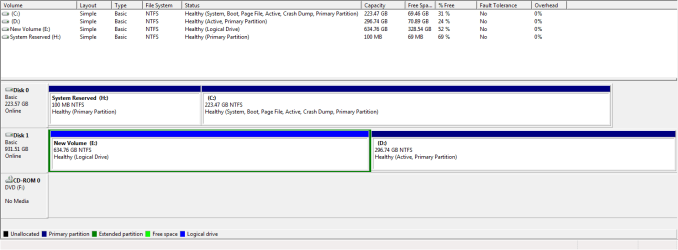
  • parts.png
    parts.png
    15 KB · Views: 1

My Computer My Computer

Computer type
PC/Desktop
Computer Manufacturer/Model Number
Custom
OS
Windows 7 Ultimate x64
CPU
Intel Core i5-3350P Ivy Bridge Quad-Core 3.1GHzz
Motherboard
Asus P8H77-v
Memory
HyperX XMP 10th Anniversary Series 16GB
Graphics Card(s)
EVGA GeForce GTX 970 4GB
Sound Card
Onboard
Monitor(s) Displays
Acer S241HL 24", ASUS V238h 23"
Screen Resolution
1920x1080
Hard Drives
Kingston SSD 240GB
Samsung 2TB
PSU
XION AXP-700K14XE 700W ATX
Case
HEC 6C28BBX585 Black Steel ATX Mid Tower
Cooling
ZALMAN CNPS9500 AT 2 Ball CPU Cooling Fan/Heatsink
Keyboard
Logitech G710+
Mouse
Anker Wireless Vertical Mouse
Internet Speed
220/20
Antivirus
Webroot
Browser
Chrome
Hi Just watching ,
i have done some searches and found that MiniTool Partition Wizard Free Edition could do the work.
to be honest i have not tried the software my self you can download it and try it by yourself
any way you have to be careful when downloading from the net , no one can guarantee any thing
 

My Computer My Computer

Computer type
Laptop
Computer Manufacturer/Model Number
Dell studio 1558
OS
Microsoft Windows 7 Home Premium 64-bit 7601 Multiprocessor Free Service Pack 1
CPU
Intel(R) Core(TM) i5 CPU M 460 @ 2.53GHz
Motherboard
Dell Inc. 0874P6
Memory
8GB , SODIMM ,CT51264BF1339.M16F
Graphics Card(s)
ATI Mobility Radeon HD 5400 Series
Sound Card
(1) AMD High Definition Audio Device (2) High Definition A
Monitor(s) Displays
VideoController1
Screen Resolution
1366 x 768 x 4294967296 colors
Hard Drives
TOSHIBA MK5076GSX ATA Device, 500GB
PSU
Dell studio 1558 power supply uint
Case
Dell studio 1558
Cooling
GENUINE DELL STUDIO 1558 CPU COOPER HEATSINK with FAN.
Keyboard
dell keyboard
Mouse
optical external drive
Internet Speed
60Mb/s
Antivirus
Norton Internet Security version 20.4.0.40
Browser
Google chrome
Hi Just watching ,
i have done some searches and found that MiniTool Partition Wizard Free Edition could do the work.
to be honest i have not tried the software my self you can download it and try it by yourself
any way you have to be careful when downloading from the net , no one can guarantee any thing

Thank you and I found that one as well, however it only references merging partitions that have data , no mention of installed programs, So I am not sure if it is even possible. Best bet may be to uninstall all on one partition, then install it on the other, then merge.
 

My Computer My Computer

Computer type
PC/Desktop
Computer Manufacturer/Model Number
Custom
OS
Windows 7 Ultimate x64
CPU
Intel Core i5-3350P Ivy Bridge Quad-Core 3.1GHzz
Motherboard
Asus P8H77-v
Memory
HyperX XMP 10th Anniversary Series 16GB
Graphics Card(s)
EVGA GeForce GTX 970 4GB
Sound Card
Onboard
Monitor(s) Displays
Acer S241HL 24", ASUS V238h 23"
Screen Resolution
1920x1080
Hard Drives
Kingston SSD 240GB
Samsung 2TB
PSU
XION AXP-700K14XE 700W ATX
Case
HEC 6C28BBX585 Black Steel ATX Mid Tower
Cooling
ZALMAN CNPS9500 AT 2 Ball CPU Cooling Fan/Heatsink
Keyboard
Logitech G710+
Mouse
Anker Wireless Vertical Mouse
Internet Speed
220/20
Antivirus
Webroot
Browser
Chrome
i am not sure that can be done as the programs installed in different paths , so even if you were able to merge E to D you will not be able to run programs originally installed in E unless you change all the programs paths
if it is easier you can un-install the programs installed in E and then merge E with D , then install programs were on E to D
 

My Computer My Computer

Computer type
Laptop
Computer Manufacturer/Model Number
Dell studio 1558
OS
Microsoft Windows 7 Home Premium 64-bit 7601 Multiprocessor Free Service Pack 1
CPU
Intel(R) Core(TM) i5 CPU M 460 @ 2.53GHz
Motherboard
Dell Inc. 0874P6
Memory
8GB , SODIMM ,CT51264BF1339.M16F
Graphics Card(s)
ATI Mobility Radeon HD 5400 Series
Sound Card
(1) AMD High Definition Audio Device (2) High Definition A
Monitor(s) Displays
VideoController1
Screen Resolution
1366 x 768 x 4294967296 colors
Hard Drives
TOSHIBA MK5076GSX ATA Device, 500GB
PSU
Dell studio 1558 power supply uint
Case
Dell studio 1558
Cooling
GENUINE DELL STUDIO 1558 CPU COOPER HEATSINK with FAN.
Keyboard
dell keyboard
Mouse
optical external drive
Internet Speed
60Mb/s
Antivirus
Norton Internet Security version 20.4.0.40
Browser
Google chrome
i am not sure that can be done as the programs installed in different paths , so even if you were able to merge E to D you will not be able to run programs originally installed in E unless you change all the programs paths
if it is easier you can un-install the programs installed in E and then merge E with D , then install programs were on E to D

Yep, I agree, think it will be my best bet. Thanks
 

My Computer My Computer

Computer type
PC/Desktop
Computer Manufacturer/Model Number
Custom
OS
Windows 7 Ultimate x64
CPU
Intel Core i5-3350P Ivy Bridge Quad-Core 3.1GHzz
Motherboard
Asus P8H77-v
Memory
HyperX XMP 10th Anniversary Series 16GB
Graphics Card(s)
EVGA GeForce GTX 970 4GB
Sound Card
Onboard
Monitor(s) Displays
Acer S241HL 24", ASUS V238h 23"
Screen Resolution
1920x1080
Hard Drives
Kingston SSD 240GB
Samsung 2TB
PSU
XION AXP-700K14XE 700W ATX
Case
HEC 6C28BBX585 Black Steel ATX Mid Tower
Cooling
ZALMAN CNPS9500 AT 2 Ball CPU Cooling Fan/Heatsink
Keyboard
Logitech G710+
Mouse
Anker Wireless Vertical Mouse
Internet Speed
220/20
Antivirus
Webroot
Browser
Chrome
Partition Wizard free doesn't feature merging partitions. You could just create one large partition on ne
HDD and copy paste D-E contents. About programs options I believecare:
- uninstall prior to removing E and install to D
- keep a very small E and ceate symbolic links to the new locations
- use AppMover or similar - Application Mover - Funduc Software
 

My Computer My Computer

Computer type
PC/Desktop
Computer Manufacturer/Model Number
Custom Build
OS
Windows 7 Ultimate x64 SP1
CPU
AMD Phenom 2 1090T
Motherboard
Gigabyte GA-890FXA-UD5
Memory
2x8GB Kingston HyperX Fury Black 1600Mhz Unganged
Graphics Card(s)
MSI GTX 970 Gaming 4G
Sound Card
Realtek On-Board HD 7.1 Audio / Logitech G35
Monitor(s) Displays
3xAcer GD245HQ
Screen Resolution
1920x1080
Hard Drives
Samsung 850 Pro 512GB SSD - OS /
WD Caviar Black SATA 3 - 1 TBx2 - Dynamic RAID 0 /
WD Caviar Green SATA 2 - 640GBx2 - Dynamic RAID 0 /
WD Caviar Green SATA 2 - 640GB - Internal Backup /
Seagate Barracude SATA 3 - 3TB - External Backup/ Sync
PSU
HighPower 1000W
Case
Cooler Master HAF 932
Cooling
Noctua NH-D14
Keyboard
Logitech G19
Mouse
Logitech G500
Internet Speed
100/4 Mbit Cable (100GB quota)
Antivirus
ZoneAlarm Extreme Security / MBAM Pro / MBAE Free / SAS Free
Browser
IE 11 - Firefox - Chrome
Other Info
Logitech F710/ G27/ G940/ Z5500 // TrackIR 5 // Nvidia 3D Surround Vision
Back
Top