Make Windows 7 bootable after motherboard swap

Make Windows 7 bootable after motherboard swap, or bootable after swapping hard drive to new machine. Software described Paragon P2P Adjust OS.


This procedure describes how to do it. Procedure can be used in case of:
  1. Download "Paragon Adaptive Restore 2010" from Paragon Adaptive Restore 2010 on my DROPBOX.
  2. Burn the ISO to CD/DVD using Windows Disc Image Burner or ImgBurn.
  3. Set CD/DVD as first boot device in BIOS.
Do the following:
  1. Boot the computer from Paragon Windows PE 3.0 based CD/DVD.
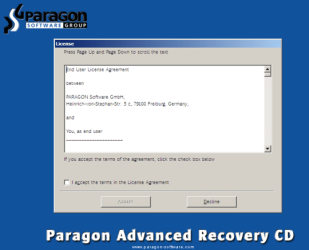
  2. Accept the end user license agreement, otherwise you are not able to use the tool.
    1.png
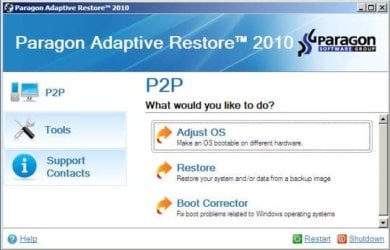
  3. Launch P2P Adjust OS.
    2.jpg
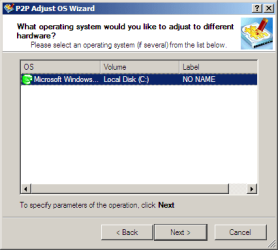
  4. Select the operating system you need to adjust to your new hardware.
    3.png
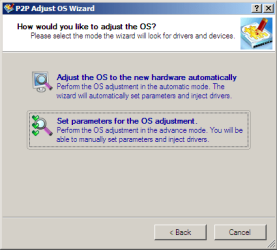
  5. Choose whether you want to add third-party drivers or not, and the way to do it.
    4.png
  6. If you chose "Adjust the OS to the new hardware automatically", the P2P Adjust OS Wizard will automatically accomplish all the necessary actions.
    5.png
  7. The only thing that might need your interaction is to specify additional driver repository.
    6.png
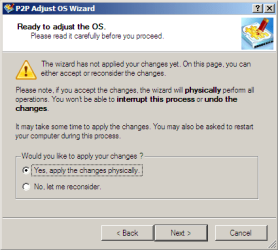
  8. At last, choose "Yes, apply the changes physically" and then restart your computer after operations are done. Do remember, you cannot interrupt the process or undo the changes.
    7.png
Compelete pdf manual: Paragon Adaptive Restore 2010 on my DROPBOX.

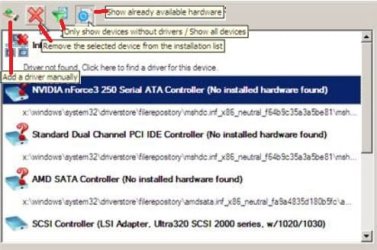
Just before the OS adjustment, you can additionally:
extra.JPG


   Warning
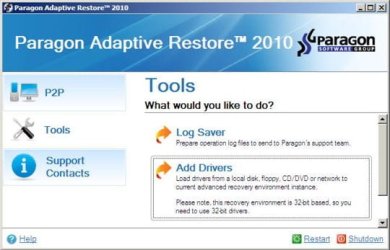
Sometimes the internal hard drive is not recognized in Paragon P2P Adjust OS due to missing SATA or RAID driver. In that case add specific drivers to Windows PE based Paragon Recovery Environment.
  1. Click to open Add Drivers dialog.
    a.jpg
  2. Browse for an .INF file of the required driver, then click the Open button to initiate the process.
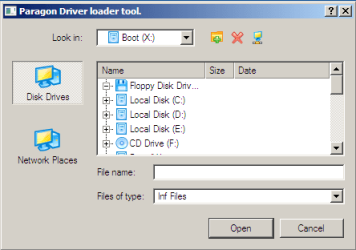
    b.png
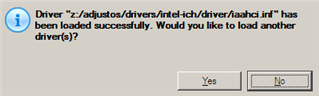
  3. Click Yes to confirm the operation.
    c.png
   Information
You can only add third-party drivers in INF file. If they are zipped, you need to unpack them before processing the steps. The Windows PE environment is 32bit-based, so you need to use 32-bit drivers for injection.
After procedure has finished succesfully and system boots fine, first check if Enable hardware auto-updating via Windows Update (Set to Automatic) is on so it will query Windows Update. After that:

  1. Uninstall Device and Device Driver for devices no longer attached to system. Uninstall associated software as well.
  2. Install all of your device drivers, then Windows Updates.
  3. Refresh your Windows Experience Index (WEI) score.
  4. When done, all you will need to do is to activate Windows 7.
After rebooting from disk, drivers should start swapping out in a cascade you can monitor by clicking on the system tray animation. Wait until all are finished before doing the requested restart. After reboot, go immediately to Check for Updates and install all Important and Optional Updates which may include critical drivers and patches for the OS to run on that hardware.

You must reactivate at the Change Product Key link on System page. If it's not present you can insert Product Key and then Activate using SLMgr Commands

On some systems you see "setup is preparing your computer for first use" on every reboot. Read this to fix that issue: Fix "Setup is Preparing Your Computer for First Use" on Every Reboot


Last edited:
Sweet Mother of God -

THANK YOU THANK YOU THANK YOU THANK YOU THANK YOU!

I cannot express how grateful I am for this guide and software.
Worked perfectly.

Thank you.
 

My Computer My Computer

At a glance

win7prox64
Computer type
PC/Desktop
OS
win7prox64
You are a hero. I had been trying for a day straight to boot into windows after replacing my motherboard with absolutely no luck. These instructions and program got me in within minutes and it was super easy. You saved my 900 gigabytes of games and programs from being wiped :D

I made this seven forums account just to thank you, if you want any feedback on how Paragon went for me just let me know.
 

My Computer My Computer

At a glance

Windows 7 Ultimate x64 SP1AMD FX-8320 @ 4.5 GHz (4.3 Volts)2 X 4 GB G Skill Ares 1600 @ 8-8-8-24Gigabyte G1 Gaming GTX 970
Computer type
PC/Desktop
Computer Manufacturer/Model Number
Custom Build
OS
Windows 7 Ultimate x64 SP1
CPU
AMD FX-8320 @ 4.5 GHz (4.3 Volts)
Motherboard
ASUS M5A99X EVO R2.0 AM3+
Memory
2 X 4 GB G Skill Ares 1600 @ 8-8-8-24
Graphics Card(s)
Gigabyte G1 Gaming GTX 970
Sound Card
On Board
Monitor(s) Displays
Asus 24" @ 144 Hz
Screen Resolution
1920 X 1080
Hard Drives
Samsung 840 EVO 120 GB SSD + WD Black Series 1 TB 7200 RPM
PSU
Corsair CXM 600 Watt
Case
NZXT Phantom 410
Cooling
3x 120 mm + 3x 140 mm + Corsair H80i Push/Pull
Keyboard
CM Storm QuickFire Rapid (mechanical)
Mouse
Anker 4000 DPI Gaming Mouse
Internet Speed
90 DL & 90 UL
Antivirus
MSE
Browser
Firefox
Other Info
Logitech Z-906 Speakers
You are a hero. I had been trying for a day straight to boot into windows after replacing my motherboard with absolutely no luck. These instructions and program got me in within minutes and it was super easy. You saved my 900 gigabytes of games and programs from being wiped :D

I made this seven forums account just to thank you, if you want any feedback on how Paragon went for me just let me know.
It was just a few clicks (all default) isn't it?
Did you have to reactivate windows 7?

http://www.sevenforums.com/tutorials/330-system-protection-turn-off.html step 6. Any fake disks there? All "system protection" settings are what they were automatically? Otherwise.... configure the fake disks (protection OFF).
 

My Computer My Computer

At a glance

Microsoft Windows 7 Home Premium 64-bits 7601...Intel(R) Core(TM) i3 CPU M 370 @ 2.40GHz4,00 GBATI Mobility Radeon HD 5400 Series
Computer type
Laptop
Computer Manufacturer/Model Number
ACER ASPIRE 5742G
OS
Microsoft Windows 7 Home Premium 64-bits 7601 Multiprocessor Free Service Pack 1
CPU
Intel(R) Core(TM) i3 CPU M 370 @ 2.40GHz
Motherboard
Acer Aspire 5742G
Memory
4,00 GB
Graphics Card(s)
ATI Mobility Radeon HD 5400 Series
Sound Card
(1) AMD High Definition Audio Device (2) Realtek High Defi
Screen Resolution
1366 x 768 x 32 bits (4294967296 colors) @ 60 Hz
Hard Drives
WDC WD5000BEVT-22ZAT0
It was just a few clicks (all default) isn't it?
Did you have to reactivate windows 7?

http://www.sevenforums.com/tutorials/330-system-protection-turn-off.html step 6. Any fake disks there? All "system protection" settings are what they were automatically? Otherwise.... configure the fake disks (protection OFF).

Yup, I was able to get through the whole program in about 3 minutes! I let it automatically install the correct drivers.

I have not yet been asked to reactivate windows 7, however I have only had the computer running for about 5 hours now and I am right now in the middle of a upgrade repair install of the OS (I am posting this from another computer).

When the upgrade installation finishes (hopefully it will it, failed the first time) I will check the status of system protection and post back here.

Thanks again for the help!!
 

My Computer My Computer

At a glance

Windows 7 Ultimate x64 SP1AMD FX-8320 @ 4.5 GHz (4.3 Volts)2 X 4 GB G Skill Ares 1600 @ 8-8-8-24Gigabyte G1 Gaming GTX 970
Computer type
PC/Desktop
Computer Manufacturer/Model Number
Custom Build
OS
Windows 7 Ultimate x64 SP1
CPU
AMD FX-8320 @ 4.5 GHz (4.3 Volts)
Motherboard
ASUS M5A99X EVO R2.0 AM3+
Memory
2 X 4 GB G Skill Ares 1600 @ 8-8-8-24
Graphics Card(s)
Gigabyte G1 Gaming GTX 970
Sound Card
On Board
Monitor(s) Displays
Asus 24" @ 144 Hz
Screen Resolution
1920 X 1080
Hard Drives
Samsung 840 EVO 120 GB SSD + WD Black Series 1 TB 7200 RPM
PSU
Corsair CXM 600 Watt
Case
NZXT Phantom 410
Cooling
3x 120 mm + 3x 140 mm + Corsair H80i Push/Pull
Keyboard
CM Storm QuickFire Rapid (mechanical)
Mouse
Anker 4000 DPI Gaming Mouse
Internet Speed
90 DL & 90 UL
Antivirus
MSE
Browser
Firefox
Other Info
Logitech Z-906 Speakers
Why do a repair install? What error message first time and in which phase?
 

My Computer My Computer

At a glance

Microsoft Windows 7 Home Premium 64-bits 7601...Intel(R) Core(TM) i3 CPU M 370 @ 2.40GHz4,00 GBATI Mobility Radeon HD 5400 Series
Computer type
Laptop
Computer Manufacturer/Model Number
ACER ASPIRE 5742G
OS
Microsoft Windows 7 Home Premium 64-bits 7601 Multiprocessor Free Service Pack 1
CPU
Intel(R) Core(TM) i3 CPU M 370 @ 2.40GHz
Motherboard
Acer Aspire 5742G
Memory
4,00 GB
Graphics Card(s)
ATI Mobility Radeon HD 5400 Series
Sound Card
(1) AMD High Definition Audio Device (2) Realtek High Defi
Screen Resolution
1366 x 768 x 32 bits (4294967296 colors) @ 60 Hz
Hard Drives
WDC WD5000BEVT-22ZAT0
It was just a few clicks (all default) isn't it?
Did you have to reactivate windows 7?

http://www.sevenforums.com/tutorials/330-system-protection-turn-off.html step 6. Any fake disks there? All "system protection" settings are what they were automatically? Otherwise.... configure the fake disks (protection OFF).

Yup, I was able to get through the whole program in about 3 minutes! I let it automatically install the correct drivers.

I have not yet been asked to reactivate windows 7, however I have only had the computer running for about 5 hours now and I am right now in the middle of a upgrade repair install of the OS (I am posting this from another computer).

When the upgrade installation finishes (hopefully it will it, failed the first time) I will check the status of system protection and post back here.

Thanks again for the help!!
Please check "device manager" to see if no "other devices" are there. And no missing drivers. Install new motherboard drivers anyway.
 

My Computer My Computer

At a glance

Microsoft Windows 7 Home Premium 64-bits 7601...Intel(R) Core(TM) i3 CPU M 370 @ 2.40GHz4,00 GBATI Mobility Radeon HD 5400 Series
Computer type
Laptop
Computer Manufacturer/Model Number
ACER ASPIRE 5742G
OS
Microsoft Windows 7 Home Premium 64-bits 7601 Multiprocessor Free Service Pack 1
CPU
Intel(R) Core(TM) i3 CPU M 370 @ 2.40GHz
Motherboard
Acer Aspire 5742G
Memory
4,00 GB
Graphics Card(s)
ATI Mobility Radeon HD 5400 Series
Sound Card
(1) AMD High Definition Audio Device (2) Realtek High Defi
Screen Resolution
1366 x 768 x 32 bits (4294967296 colors) @ 60 Hz
Hard Drives
WDC WD5000BEVT-22ZAT0
Why do a repair install? What error message first time and in which phase?

Im not repair installing because of an error, but because my computer could use it. It is almost 4 years old and could use the reinstall. I thought changing out the motherboard would be as good a time as any.
 

My Computer My Computer

At a glance

Windows 7 Ultimate x64 SP1AMD FX-8320 @ 4.5 GHz (4.3 Volts)2 X 4 GB G Skill Ares 1600 @ 8-8-8-24Gigabyte G1 Gaming GTX 970
Computer type
PC/Desktop
Computer Manufacturer/Model Number
Custom Build
OS
Windows 7 Ultimate x64 SP1
CPU
AMD FX-8320 @ 4.5 GHz (4.3 Volts)
Motherboard
ASUS M5A99X EVO R2.0 AM3+
Memory
2 X 4 GB G Skill Ares 1600 @ 8-8-8-24
Graphics Card(s)
Gigabyte G1 Gaming GTX 970
Sound Card
On Board
Monitor(s) Displays
Asus 24" @ 144 Hz
Screen Resolution
1920 X 1080
Hard Drives
Samsung 840 EVO 120 GB SSD + WD Black Series 1 TB 7200 RPM
PSU
Corsair CXM 600 Watt
Case
NZXT Phantom 410
Cooling
3x 120 mm + 3x 140 mm + Corsair H80i Push/Pull
Keyboard
CM Storm QuickFire Rapid (mechanical)
Mouse
Anker 4000 DPI Gaming Mouse
Internet Speed
90 DL & 90 UL
Antivirus
MSE
Browser
Firefox
Other Info
Logitech Z-906 Speakers
It was just a few clicks (all default) isn't it?
Did you have to reactivate windows 7?

http://www.sevenforums.com/tutorials/330-system-protection-turn-off.html step 6. Any fake disks there? All "system protection" settings are what they were automatically? Otherwise.... configure the fake disks (protection OFF).

Yup, I was able to get through the whole program in about 3 minutes! I let it automatically install the correct drivers.

I have not yet been asked to reactivate windows 7, however I have only had the computer running for about 5 hours now and I am right now in the middle of a upgrade repair install of the OS (I am posting this from another computer).

When the upgrade installation finishes (hopefully it will it, failed the first time) I will check the status of system protection and post back here.

Thanks again for the help!!
Please check "device manager" to see if no "other devices" are there. And no missing drivers. Install new motherboard drivers anyway.

Will do, as soon as this upgrade repair install finishes.
 

My Computer My Computer

At a glance

Windows 7 Ultimate x64 SP1AMD FX-8320 @ 4.5 GHz (4.3 Volts)2 X 4 GB G Skill Ares 1600 @ 8-8-8-24Gigabyte G1 Gaming GTX 970
Computer type
PC/Desktop
Computer Manufacturer/Model Number
Custom Build
OS
Windows 7 Ultimate x64 SP1
CPU
AMD FX-8320 @ 4.5 GHz (4.3 Volts)
Motherboard
ASUS M5A99X EVO R2.0 AM3+
Memory
2 X 4 GB G Skill Ares 1600 @ 8-8-8-24
Graphics Card(s)
Gigabyte G1 Gaming GTX 970
Sound Card
On Board
Monitor(s) Displays
Asus 24" @ 144 Hz
Screen Resolution
1920 X 1080
Hard Drives
Samsung 840 EVO 120 GB SSD + WD Black Series 1 TB 7200 RPM
PSU
Corsair CXM 600 Watt
Case
NZXT Phantom 410
Cooling
3x 120 mm + 3x 140 mm + Corsair H80i Push/Pull
Keyboard
CM Storm QuickFire Rapid (mechanical)
Mouse
Anker 4000 DPI Gaming Mouse
Internet Speed
90 DL & 90 UL
Antivirus
MSE
Browser
Firefox
Other Info
Logitech Z-906 Speakers
Why do a repair install? What error message first time and in which phase?

Im not repair installing because of an error, but because my computer could use it. It is almost 4 years old and could use the reinstall. I thought changing out the motherboard would be as good a time as any.
Are you really doing a "repair install" as explained on http://www.sevenforums.com/tutorials/3413-repair-install.html ? What problems do you expect it fixes?
 

My Computer My Computer

At a glance

Microsoft Windows 7 Home Premium 64-bits 7601...Intel(R) Core(TM) i3 CPU M 370 @ 2.40GHz4,00 GBATI Mobility Radeon HD 5400 Series
Computer type
Laptop
Computer Manufacturer/Model Number
ACER ASPIRE 5742G
OS
Microsoft Windows 7 Home Premium 64-bits 7601 Multiprocessor Free Service Pack 1
CPU
Intel(R) Core(TM) i3 CPU M 370 @ 2.40GHz
Motherboard
Acer Aspire 5742G
Memory
4,00 GB
Graphics Card(s)
ATI Mobility Radeon HD 5400 Series
Sound Card
(1) AMD High Definition Audio Device (2) Realtek High Defi
Screen Resolution
1366 x 768 x 32 bits (4294967296 colors) @ 60 Hz
Hard Drives
WDC WD5000BEVT-22ZAT0
Why do a repair install? What error message first time and in which phase?

Im not repair installing because of an error, but because my computer could use it. It is almost 4 years old and could use the reinstall. I thought changing out the motherboard would be as good a time as any.
Are you really doing a "repair install" as explained on http://www.sevenforums.com/tutorials/3413-repair-install.html ? What problems do you expect it fixes?

Yes, I want to reset my services and device drivers (I didn't uninstall any drivers for my old stuff at all, I have exchanged some hardware components). I have also read/heard that a reinstall can free up hard drive space (not so sure if this is true).

Another thing, I'm curious to see if it will change the performance of my computer at all, perhaps speed up the boot sequence. Probably not, but I have tried just about everything else I can think of to help that. This is an entirely different topic unrelated to this thread though.
 

My Computer My Computer

At a glance

Windows 7 Ultimate x64 SP1AMD FX-8320 @ 4.5 GHz (4.3 Volts)2 X 4 GB G Skill Ares 1600 @ 8-8-8-24Gigabyte G1 Gaming GTX 970
Computer type
PC/Desktop
Computer Manufacturer/Model Number
Custom Build
OS
Windows 7 Ultimate x64 SP1
CPU
AMD FX-8320 @ 4.5 GHz (4.3 Volts)
Motherboard
ASUS M5A99X EVO R2.0 AM3+
Memory
2 X 4 GB G Skill Ares 1600 @ 8-8-8-24
Graphics Card(s)
Gigabyte G1 Gaming GTX 970
Sound Card
On Board
Monitor(s) Displays
Asus 24" @ 144 Hz
Screen Resolution
1920 X 1080
Hard Drives
Samsung 840 EVO 120 GB SSD + WD Black Series 1 TB 7200 RPM
PSU
Corsair CXM 600 Watt
Case
NZXT Phantom 410
Cooling
3x 120 mm + 3x 140 mm + Corsair H80i Push/Pull
Keyboard
CM Storm QuickFire Rapid (mechanical)
Mouse
Anker 4000 DPI Gaming Mouse
Internet Speed
90 DL & 90 UL
Antivirus
MSE
Browser
Firefox
Other Info
Logitech Z-906 Speakers
A Repair Install is not going to help for that. With HP which has the worst load of corrupting bloatware of all brands, you want to do a http://www.sevenforums.com/tutorials/219487-clean-reinstall-factory-oem-windows-7-a.html#post1839164 as you've never even experienced Win7 performance on that PC until you do.

Be sure to read the Special Note for HP Owners at the end as your HP may have a Minimal Recovery option which is just as good.

Thanks for the advice, but I am not willing to give up my 900 GB of programs and games for performance. When I first got my HP I uninstalled 95%+ of the programs it came with and also removed their entries in the registry. If I would have known about a clean install then I would of done it, but I won't do it now.
 

My Computer My Computer

At a glance

Windows 7 Ultimate x64 SP1AMD FX-8320 @ 4.5 GHz (4.3 Volts)2 X 4 GB G Skill Ares 1600 @ 8-8-8-24Gigabyte G1 Gaming GTX 970
Computer type
PC/Desktop
Computer Manufacturer/Model Number
Custom Build
OS
Windows 7 Ultimate x64 SP1
CPU
AMD FX-8320 @ 4.5 GHz (4.3 Volts)
Motherboard
ASUS M5A99X EVO R2.0 AM3+
Memory
2 X 4 GB G Skill Ares 1600 @ 8-8-8-24
Graphics Card(s)
Gigabyte G1 Gaming GTX 970
Sound Card
On Board
Monitor(s) Displays
Asus 24" @ 144 Hz
Screen Resolution
1920 X 1080
Hard Drives
Samsung 840 EVO 120 GB SSD + WD Black Series 1 TB 7200 RPM
PSU
Corsair CXM 600 Watt
Case
NZXT Phantom 410
Cooling
3x 120 mm + 3x 140 mm + Corsair H80i Push/Pull
Keyboard
CM Storm QuickFire Rapid (mechanical)
Mouse
Anker 4000 DPI Gaming Mouse
Internet Speed
90 DL & 90 UL
Antivirus
MSE
Browser
Firefox
Other Info
Logitech Z-906 Speakers
Then I'd run through the Clean Up bloatware and Troubleshooting tutorials in my sig pic below to optimize and uncover problems to resolve.

If you'll report back results as you go we can customize solutions.

But even the best possible outcome will not be the best install possible which is our specialty here after helping millions do them without a single complaint.
 
Then I'd run through the Clean Up bloatware and Troubleshooting tutorials in my sig pic below to optimize and uncover problems to resolve.

If you'll report back results as you go we can customize solutions.

But even the best possible outcome will not be the best install possible which is our specialty here after helping millions do them without a single complaint.


I just read through you tutorial, looks like some decent stuff. When I get back from work today il go through it. If I have any problems I will reply back here. Glad to see you recommend ccleaner, I love it and have been using it for years.

One question, why do you recommend Puran Defrag instead of the one built into windows? What advantages does it have?
 

My Computer My Computer

At a glance

Windows 7 Ultimate x64 SP1AMD FX-8320 @ 4.5 GHz (4.3 Volts)2 X 4 GB G Skill Ares 1600 @ 8-8-8-24Gigabyte G1 Gaming GTX 970
Computer type
PC/Desktop
Computer Manufacturer/Model Number
Custom Build
OS
Windows 7 Ultimate x64 SP1
CPU
AMD FX-8320 @ 4.5 GHz (4.3 Volts)
Motherboard
ASUS M5A99X EVO R2.0 AM3+
Memory
2 X 4 GB G Skill Ares 1600 @ 8-8-8-24
Graphics Card(s)
Gigabyte G1 Gaming GTX 970
Sound Card
On Board
Monitor(s) Displays
Asus 24" @ 144 Hz
Screen Resolution
1920 X 1080
Hard Drives
Samsung 840 EVO 120 GB SSD + WD Black Series 1 TB 7200 RPM
PSU
Corsair CXM 600 Watt
Case
NZXT Phantom 410
Cooling
3x 120 mm + 3x 140 mm + Corsair H80i Push/Pull
Keyboard
CM Storm QuickFire Rapid (mechanical)
Mouse
Anker 4000 DPI Gaming Mouse
Internet Speed
90 DL & 90 UL
Antivirus
MSE
Browser
Firefox
Other Info
Logitech Z-906 Speakers
Boot time defrag gets system files that are running otherwise. But watch your System Restore points are not deleted as we are investigating this with all defraggers now.
 
You are a hero. I had been trying for a day straight to boot into windows after replacing my motherboard with absolutely no luck. These instructions and program got me in within minutes and it was super easy. You saved my 900 gigabytes of games and programs from being wiped :D

I made this seven forums account just to thank you, if you want any feedback on how Paragon went for me just let me know.
It was just a few clicks (all default) isn't it?
Did you have to reactivate windows 7?

http://www.sevenforums.com/tutorials/330-system-protection-turn-off.html step 6. Any fake disks there? All "system protection" settings are what they were automatically? Otherwise.... configure the fake disks (protection OFF).

Checked system protection, everything looks fine. However, it might be like that because I used windows easy transfer to get my settings back.

Also, when I finished the upgrade installation I had to enter my product key which for some reason didn't work. I called Microsoft and they sorted it out in about 20 minutes.
 

My Computer My Computer

At a glance

Windows 7 Ultimate x64 SP1AMD FX-8320 @ 4.5 GHz (4.3 Volts)2 X 4 GB G Skill Ares 1600 @ 8-8-8-24Gigabyte G1 Gaming GTX 970
Computer type
PC/Desktop
Computer Manufacturer/Model Number
Custom Build
OS
Windows 7 Ultimate x64 SP1
CPU
AMD FX-8320 @ 4.5 GHz (4.3 Volts)
Motherboard
ASUS M5A99X EVO R2.0 AM3+
Memory
2 X 4 GB G Skill Ares 1600 @ 8-8-8-24
Graphics Card(s)
Gigabyte G1 Gaming GTX 970
Sound Card
On Board
Monitor(s) Displays
Asus 24" @ 144 Hz
Screen Resolution
1920 X 1080
Hard Drives
Samsung 840 EVO 120 GB SSD + WD Black Series 1 TB 7200 RPM
PSU
Corsair CXM 600 Watt
Case
NZXT Phantom 410
Cooling
3x 120 mm + 3x 140 mm + Corsair H80i Push/Pull
Keyboard
CM Storm QuickFire Rapid (mechanical)
Mouse
Anker 4000 DPI Gaming Mouse
Internet Speed
90 DL & 90 UL
Antivirus
MSE
Browser
Firefox
Other Info
Logitech Z-906 Speakers
Boot time defrag gets system files that are running otherwise. But watch your System Restore points are not deleted as we are investigating this with all defraggers now.

I checked before and after using Puran to Defrag, all my restore points disappeared after...
 

My Computer My Computer

At a glance

Windows 7 Ultimate x64 SP1AMD FX-8320 @ 4.5 GHz (4.3 Volts)2 X 4 GB G Skill Ares 1600 @ 8-8-8-24Gigabyte G1 Gaming GTX 970
Computer type
PC/Desktop
Computer Manufacturer/Model Number
Custom Build
OS
Windows 7 Ultimate x64 SP1
CPU
AMD FX-8320 @ 4.5 GHz (4.3 Volts)
Motherboard
ASUS M5A99X EVO R2.0 AM3+
Memory
2 X 4 GB G Skill Ares 1600 @ 8-8-8-24
Graphics Card(s)
Gigabyte G1 Gaming GTX 970
Sound Card
On Board
Monitor(s) Displays
Asus 24" @ 144 Hz
Screen Resolution
1920 X 1080
Hard Drives
Samsung 840 EVO 120 GB SSD + WD Black Series 1 TB 7200 RPM
PSU
Corsair CXM 600 Watt
Case
NZXT Phantom 410
Cooling
3x 120 mm + 3x 140 mm + Corsair H80i Push/Pull
Keyboard
CM Storm QuickFire Rapid (mechanical)
Mouse
Anker 4000 DPI Gaming Mouse
Internet Speed
90 DL & 90 UL
Antivirus
MSE
Browser
Firefox
Other Info
Logitech Z-906 Speakers
Boot time defrag gets system files that are running otherwise. But watch your System Restore points are not deleted as we are investigating this with all defraggers now.

I checked before and after using Puran to Defrag, all my restore points disappeared after...

Can you test it again by setting some System Restore Points - Create and then running defrag, report your findings in http://www.sevenforums.com/general-...delete-system-restore-points.html#post2786800?

If you've already rebuilt your Restore points and would rather not, then I perfectly understand.
 
Boot time defrag gets system files that are running otherwise. But watch your System Restore points are not deleted as we are investigating this with all defraggers now.

I checked before and after using Puran to Defrag, all my restore points disappeared after...

Can you test it again by setting some System Restore Points - Create and then running defrag, report your findings in http://www.sevenforums.com/general-...delete-system-restore-points.html#post2786800?

If you've already rebuilt your Restore points and would rather not, then I perfectly understand.

I will post in that thread about it.
 

My Computer My Computer

At a glance

Windows 7 Ultimate x64 SP1AMD FX-8320 @ 4.5 GHz (4.3 Volts)2 X 4 GB G Skill Ares 1600 @ 8-8-8-24Gigabyte G1 Gaming GTX 970
Computer type
PC/Desktop
Computer Manufacturer/Model Number
Custom Build
OS
Windows 7 Ultimate x64 SP1
CPU
AMD FX-8320 @ 4.5 GHz (4.3 Volts)
Motherboard
ASUS M5A99X EVO R2.0 AM3+
Memory
2 X 4 GB G Skill Ares 1600 @ 8-8-8-24
Graphics Card(s)
Gigabyte G1 Gaming GTX 970
Sound Card
On Board
Monitor(s) Displays
Asus 24" @ 144 Hz
Screen Resolution
1920 X 1080
Hard Drives
Samsung 840 EVO 120 GB SSD + WD Black Series 1 TB 7200 RPM
PSU
Corsair CXM 600 Watt
Case
NZXT Phantom 410
Cooling
3x 120 mm + 3x 140 mm + Corsair H80i Push/Pull
Keyboard
CM Storm QuickFire Rapid (mechanical)
Mouse
Anker 4000 DPI Gaming Mouse
Internet Speed
90 DL & 90 UL
Antivirus
MSE
Browser
Firefox
Other Info
Logitech Z-906 Speakers
I seem to be a bit stuck on the final steps.

First off, after running the paragon os and doing all the steps what do I do after that? Do I backup. The image and then it will be compatible?

Also I do not understand these steps:

Uninstall Device and Device Driver for devices no longer attached to system. Uninstall associated software as well.
Install all of your device drivers, then Windows Updates.
Refresh your Windows Experience Index (WEI) score.
When done, all you will need to do is to activate Windows 7.


Also, there is nothing that mentions what to do on the computer you want to restore to.


Please help me because I am very confused
 

My Computer My Computer

At a glance

Windows 7 Home Premium 64-Bit4.00
Computer type
PC/Desktop
Computer Manufacturer/Model Number
HP
OS
Windows 7 Home Premium 64-Bit
Memory
4.00
Back
Top