Make Windows 7 bootable after motherboard swap

Make Windows 7 bootable after motherboard swap, or bootable after swapping hard drive to new machine. Software described Paragon P2P Adjust OS.


This procedure describes how to do it. Procedure can be used in case of:
  1. Download "Paragon Adaptive Restore 2010" from Paragon Adaptive Restore 2010 on my DROPBOX.
  2. Burn the ISO to CD/DVD using Windows Disc Image Burner or ImgBurn.
  3. Set CD/DVD as first boot device in BIOS.
Do the following:
  1. Boot the computer from Paragon Windows PE 3.0 based CD/DVD.
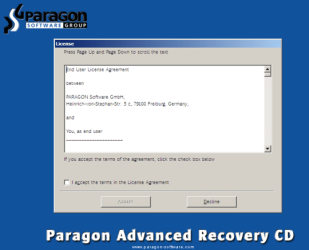
  2. Accept the end user license agreement, otherwise you are not able to use the tool.
    1.png
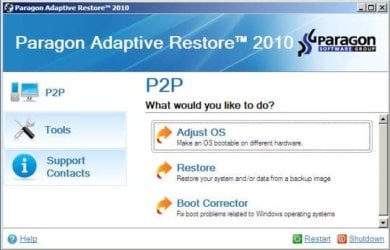
  3. Launch P2P Adjust OS.
    2.jpg
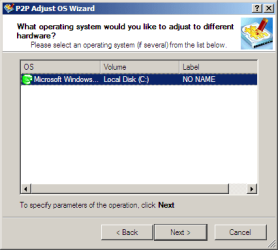
  4. Select the operating system you need to adjust to your new hardware.
    3.png
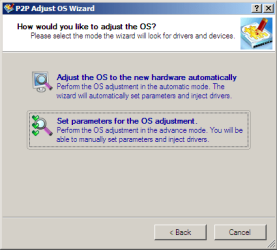
  5. Choose whether you want to add third-party drivers or not, and the way to do it.
    4.png
  6. If you chose "Adjust the OS to the new hardware automatically", the P2P Adjust OS Wizard will automatically accomplish all the necessary actions.
    5.png
  7. The only thing that might need your interaction is to specify additional driver repository.
    6.png
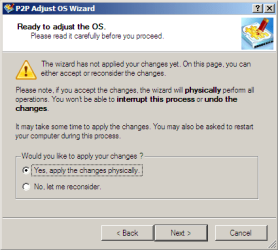
  8. At last, choose "Yes, apply the changes physically" and then restart your computer after operations are done. Do remember, you cannot interrupt the process or undo the changes.
    7.png
Compelete pdf manual: Paragon Adaptive Restore 2010 on my DROPBOX.

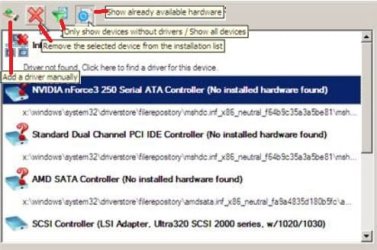
Just before the OS adjustment, you can additionally:
extra.JPG


   Warning
Sometimes the internal hard drive is not recognized in Paragon P2P Adjust OS due to missing SATA or RAID driver. In that case add specific drivers to Windows PE based Paragon Recovery Environment.
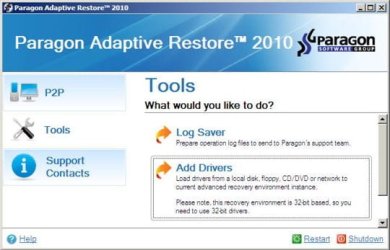
  1. Click to open Add Drivers dialog.
    a.jpg
  2. Browse for an .INF file of the required driver, then click the Open button to initiate the process.
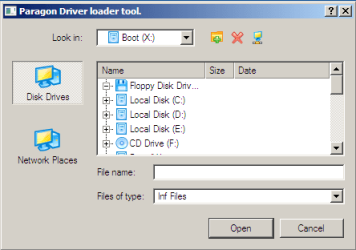
    b.png
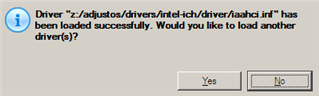
  3. Click Yes to confirm the operation.
    c.png
   Information
You can only add third-party drivers in INF file. If they are zipped, you need to unpack them before processing the steps. The Windows PE environment is 32bit-based, so you need to use 32-bit drivers for injection.
After procedure has finished succesfully and system boots fine, first check if Enable hardware auto-updating via Windows Update (Set to Automatic) is on so it will query Windows Update. After that:

  1. Uninstall Device and Device Driver for devices no longer attached to system. Uninstall associated software as well.
  2. Install all of your device drivers, then Windows Updates.
  3. Refresh your Windows Experience Index (WEI) score.
  4. When done, all you will need to do is to activate Windows 7.
After rebooting from disk, drivers should start swapping out in a cascade you can monitor by clicking on the system tray animation. Wait until all are finished before doing the requested restart. After reboot, go immediately to Check for Updates and install all Important and Optional Updates which may include critical drivers and patches for the OS to run on that hardware.

You must reactivate at the Change Product Key link on System page. If it's not present you can insert Product Key and then Activate using SLMgr Commands

On some systems you see "setup is preparing your computer for first use" on every reboot. Read this to fix that issue: Fix "Setup is Preparing Your Computer for First Use" on Every Reboot


Last edited:
No errors in "device manager" and my Radeon HD 7850 is working fine. In your experiences, is this unusual?

Its been less than one day, but I haven't found any problems. For what its worth, I went from an ASUS to an ASRock motherboard and kept everything else.
ATI Radion drivers are installed automatically by windows update. Most other drivers are installed using windows update (all alreayd in win7 repository).

Most important is the SATA disk driver. What driver do you have now (IDE ATA/ATAPI controllers)? Same as before motherboard swap? Most likey the network adapter driver was supported out-of-the-box (or the same adapter as before the swap).

No strange stuff in device manager.... all devices have correct drivers.... nice.
All programs should be working just as before the swap. There's no reason to expect any problems.
 

My Computer My Computer

At a glance

Microsoft Windows 7 Home Premium 64-bits 7601...Intel(R) Core(TM) i3 CPU M 370 @ 2.40GHz4,00 GBATI Mobility Radeon HD 5400 Series
Computer type
Laptop
Computer Manufacturer/Model Number
ACER ASPIRE 5742G
OS
Microsoft Windows 7 Home Premium 64-bits 7601 Multiprocessor Free Service Pack 1
CPU
Intel(R) Core(TM) i3 CPU M 370 @ 2.40GHz
Motherboard
Acer Aspire 5742G
Memory
4,00 GB
Graphics Card(s)
ATI Mobility Radeon HD 5400 Series
Sound Card
(1) AMD High Definition Audio Device (2) Realtek High Defi
Screen Resolution
1366 x 768 x 32 bits (4294967296 colors) @ 60 Hz
Hard Drives
WDC WD5000BEVT-22ZAT0
I did update the SATA drivers from the motherboard CD, along with the USB drivers and the network adapter.

I'm tickled it was as easy as it was. Thanks again for the post. I hope mine helps someone else down the road.
 

My Computer My Computer

At a glance

Windows 7 Professional 64-bitPhenom II X4 9458 GBRadeon HD 7850
Computer type
PC/Desktop
Computer Manufacturer/Model Number
Custom Built
OS
Windows 7 Professional 64-bit
CPU
Phenom II X4 945
Motherboard
ASRock 980DE3/U3S3
Memory
8 GB
Graphics Card(s)
Radeon HD 7850
The mobo CD is dated as soon as it's pressed. Your drivers should come first from Windows Update and then only if necessary the device's Support Downloads webpage, which should be kept current unlike a disk.
 
:confused: For some reason it didn't work for me. I changed my asus m2n32-sli to a gigabyte ga-z97x-ud3h. I decided to upgrade because my older system crash. But I want to keep my hdds with all the programs and settings installed. Before I tried paragon I did a lot of things until I realized that windows won't boot on a different system. I can see both hdds in bios. Then i ran paragon and it didn't detect any OS on my drives. So I grabbed and old sata hdd and install a fresh copy of windows 7 and I can see the other hdds on devices but not on my computer along with the rest of my drives. So I'm here wondering what to do next. Excuse my English and my terms but I'm not a gig oThen i run paragon and it didn't detect any OS on my drivesn computers, I'm a newbie trying to do big things. I Hope you guys have some answers for me.
 

My Computer My Computer

At a glance

windows 7 ultimate 64 bitintel core i58 gb
Computer type
PC/Desktop
OS
windows 7 ultimate 64 bit
CPU
intel core i5
Motherboard
ga-z97x-ud3h
Memory
8 gb
Thanks gregrocker for your response. Yes I tried that and it didn't work. I've created a raid with both hdds, didn't work. I've changed from raid to ide, from ide to achi and still don't work. One thing I've noticed is that even I saw them on my bios, it says "NOT SUPORTED" under each drive. I'm guessing that says that because they have the wrong drivers. Again thanks for your help.
 

My Computer My Computer

At a glance

windows 7 ultimate 64 bitintel core i58 gb
Computer type
PC/Desktop
OS
windows 7 ultimate 64 bit
CPU
intel core i5
Motherboard
ga-z97x-ud3h
Memory
8 gb
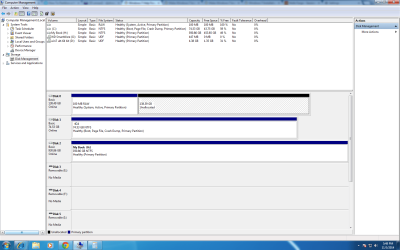
I can see my drives on computer management (as one disk because they are on raid) but as an unallocated disk and my question is if there is a way to allocate them without losing my OS, settings, files, etc?
 

My Computer My Computer

At a glance

windows 7 ultimate 64 bitintel core i58 gb
Computer type
PC/Desktop
OS
windows 7 ultimate 64 bit
CPU
intel core i5
Motherboard
ga-z97x-ud3h
Memory
8 gb
Thank you Greg for your response again, that was a great post that I may try. But before, I need to clarify something I didn't specify on my last post. I'm using a third hdd on witch I'he installed a fresh Win 7 Ult+ and of course my system set it up as my primary drive (C). Now, Loading from this hdd I'm able to see my other disk (two hdds on raid) but I can't access any info from those hdds, so I can back up anything from them or at least I don't know how. Remember my goal here is to save the Os with all the programs installed on these hdds or at least my documents and files so, I'm trying to stay away from any formatting or deleting this partition. If you understand my point now, let me know if I should go ahead with your posted tutorial. Thanks again for your help.
 

My Computer My Computer

At a glance

windows 7 ultimate 64 bitintel core i58 gb
Computer type
PC/Desktop
OS
windows 7 ultimate 64 bit
CPU
intel core i5
Motherboard
ga-z97x-ud3h
Memory
8 gb
One more question before you answer me. Do you thing that if I allocate the drive on computer management without formatting will revive my disks without loosing all my data and the OS installed on it?. It may sound stupid but as I stated before I'm a newbie trying to do (learn) big things. And again thanks in advance.
 

My Computer My Computer

At a glance

windows 7 ultimate 64 bitintel core i58 gb
Computer type
PC/Desktop
OS
windows 7 ultimate 64 bit
CPU
intel core i5
Motherboard
ga-z97x-ud3h
Memory
8 gb
Why would you expect your data to be still on HD's when you swapped out the mobo, tried a bunch of things with a Paragon disk, set up a RAID and who knows what else?

At least that's what I'm getting when I try to make sense of what's been done. Please correct me if I'm wrong.

Data should always be backed up but if ever it should have been backed up its before monkeying around like that. It is probably long gone.
 
thnks once again for your response. at first when i read your last post i was sad, but them it came to my mind that i haven't done anything that could deleted my files. Remember I don't have any access to those hdds on any form since I made the mobo swap. I din't backed up because the crash of my older mobo. I'm just able to see them on my bios with a "NOT SUPORTED" sing under and on computer management as unallocated drive. The only thing i have done on the bios is create RAID array on bios and change the drive from RAID to IDE, and from IDE to AHCI. With paragon i couldn't do any thing because it never detect the hdds or OS. Right now I'm on stand by waiting for your opinion about allocating the drive withou formatting will revive my drive and safe my OS, programs and files. You are my only hope right now. Here is a picture of my computer mangement. Thanks for help and time.
Untitled.png
 

My Computer My Computer

At a glance

windows 7 ultimate 64 bitintel core i58 gb
Computer type
PC/Desktop
OS
windows 7 ultimate 64 bit
CPU
intel core i5
Motherboard
ga-z97x-ud3h
Memory
8 gb
Which was your OS you need to rescue files from? If it's the Unallocated space on Disk0 then you'll need to try unplugging the other hard drives to run Partition Wizard Partition Recovery Wizard - Video Help and if that doesn't restore the deleted partition try to recover files using a program like Recuva - Features

Did you reinstall since you tried the inexplicable attempt to RAID drives which had data not backed up? If so then C on Disk1 is the result, I am assuming.
 
Paragon now has a freeware called "Rescue Kit" which allows to create either a "WinPE" or "Linux" based boot disk. While the "WinPE" version is limited in functionality, "Linux" media has latest version of "Paragon P2P Adjust" tool which supports not only Win7 but also Win8.1. It also came with an option to reset forgotten user passwords.
 

My Computer My Computer

At a glance

Windows 7 Ultimate x64
Computer type
PC/Desktop
OS
Windows 7 Ultimate x64
Thanks Anshad! :geek: Great find!

From what you can tell have they only updated the Driverstore to include 8 or does it have other improvements?

I think I'll test that on 10. Is there any special handing for creating a Linux disk?
 
Thank you guys for all your help. Especially to Greg because with the partition recovery wizard tool I was able to recover all my files and that was my main goal. But now after reinstall a fresh copy of win 7+, I'm having a lot of boot fails. I have installed win 7 several times and I still having these fails right after installing my motherboard drivers. Remember I created a raid array before and i'm using and achi setting on my bios. Would that has to do anything with it? Should I have to change my bios to raid or delete that raid array? That's my status right now. Again thanks for your help.
 

My Computer My Computer

At a glance

windows 7 ultimate 64 bitintel core i58 gb
Computer type
PC/Desktop
OS
windows 7 ultimate 64 bit
CPU
intel core i5
Motherboard
ga-z97x-ud3h
Memory
8 gb
We rarely see anything but problems with RAID here so I would unplug all but your best HD to install onto it, set SATA drive to AHCI.

Then wipe the HD of all code using Diskpart CLEAN command and do a full format following the Commands and all other steps in Troubleshoot Windows 7 Installation Failures - Windows 7 Help Forums.

If in doubt about HD or problems persist run the maker's HD Diagnostic extended CD scan followed by a full Disk Check on a full-disk partition you create from those commands.

Once the install gets going review the steps in Clean Reinstall Windows 7 as to how drivers are best handled in Win7 as it is not at all like XP. The tutorial compiles everything that's worked best in tens of thousands of installs we've directly helped with here since beta, and has been followed by a million viewers without a single complaint.
 
Hi Greg

The earlier versions of "P2P" tool has some known bugs - especially the repeating "Setup is preparing for first time use" message on every reboot ( http://www.sevenforums.com/hardware-devices/306433-paragon-migrate-os-ssd-8.html ). Newer version is free from such bugs.

From what you can tell have they only updated the Driverstore to include 8 or does it have other improvements?

To my understanding, P2P doesn't came with Driverstore but rather it modifies the offline OS Registry to make it compatible with the new MoBo. For example ;

- If SATA mode is originally set to IDE and the new MoBo requires AHCI, default AHCI driver "MsAhci.sys" will be activated.

- If new MoBo requires IDE mode, default IDE driver "PCIIDE.sys" will be activated.

- When switching from Intel to AMD, Intel CPU power management will be set to disabled state.

- User provided masstorage drivers will be added to the offline OS Driverstore via "DISM".

- It can also automatically switch the HAL and Kernel if CPU is changed from single-core to multi-core or vice versa.
 

My Computer My Computer

At a glance

Windows 7 Ultimate x64
Computer type
PC/Desktop
OS
Windows 7 Ultimate x64
Thank you Kaktussoft.
You saved my life.
 

My Computer My Computer

At a glance

CA
Computer type
PC/Desktop
OS
CA
Can this be used on a USB Flash Drive instead of a CD/DVD?
 

My Computer My Computer

At a glance

Windows 7 Ultimate 64bitIntel Core i5-4690K @ 4.7ghzG-Skill Snipers DDR3-1600 8GB oc'd@ 1866eVGA GTX 770 4GB FTW
Computer type
PC/Desktop
Computer Manufacturer/Model Number
Antares
OS
Windows 7 Ultimate 64bit
CPU
Intel Core i5-4690K @ 4.7ghz
Motherboard
ASRock Z97 Extreme6
Memory
G-Skill Snipers DDR3-1600 8GB oc'd@ 1866
Graphics Card(s)
eVGA GTX 770 4GB FTW
Sound Card
Creative X-Fi Titanium Fatal1ty Professional Series PCIe
Monitor(s) Displays
Acer K272HUL HDMI 27" 1440p
Screen Resolution
2560x1440
Hard Drives
Samsung 950 Pro M.2 512GB SSD, Samsong 850 Evo M.2 500GB SSD, Western Digital WD1002FAEX 1TB 6.0GBs HDD
PSU
EVGA SuperNOVA 750 G2
Case
CM Storm Trooper
Cooling
Corsair Hydro H105 High Performance w/ Dual GT AP-15's
Keyboard
Logitech G110
Mouse
RAZER Naga HEX Wraith Red
Internet Speed
Comcast 100mpbs
Back
Top