Locked out of primary account on Windows 7

Tiny Tina07

New member
Local time
12:12 AM
Messages
5
I can't log in as Administrator on my primary account. I get an error message: 'username or password is incorrect'. I can use my Guest account, but I'm not able to update, change or download anything as it asks me for my admin's username. I don't think I have a password, just the username.

I've been researching different answers online to this problem and have tried some of the recommendations using the guest account, but all to no avail. Each time I try something it throws the admin's sign-in page at me. When I sign in with the username (which I know is correct), it says it's incorrect. I don't know how this happened as it started without any warning. One day I turned on the computer and tried logging in to Windows and the error message jumped on.

How can I fix this? Seems everything I try does not work because the admin's sign-in page comes up every time. I really need help as I can't even use my printer now.

I am using a Lenovo desktop ThinkOffice - Windows 7 Professional 64 bit OS. Thanks for any help you can give me.
 

My Computer My Computer

At a glance

Windows 7 Professional 64 bitIntel(R) Core(TM) i5 cpu 650 @ 3.20GHzsays 'not available'Intel(R) HD Graphics
Computer type
PC/Desktop
Computer Manufacturer/Model Number
Lenovo ThinkOffice
OS
Windows 7 Professional 64 bit
CPU
Intel(R) Core(TM) i5 cpu 650 @ 3.20GHz
Motherboard
don't know
Memory
says 'not available'
Graphics Card(s)
Intel(R) HD Graphics
Hard Drives
ST3500418AS ATA Device
Optiarc DVD RW AD-7700H ATA Device
Antivirus
AVG
Browser
Chrome, Firefox, Explorer
try going to users on the control panel and change password there. if you want, you can backup your files from primary account, and then reinstall your os.
 

My Computer My Computer

At a glance

7 64bit
Computer type
PC/Desktop
OS
7 64bit
Antivirus
none
doublethe2, it doesn't work. I don't have a password, just the username and as soon as I click the user's account in the Control Panel to change the (password) or username, out pops the sign-in box for the admin's username. I'm not very saavy in computers so I don't know how to reinstall my os or backup the files.
 

My Computer My Computer

At a glance

Windows 7 Professional 64 bitIntel(R) Core(TM) i5 cpu 650 @ 3.20GHzsays 'not available'Intel(R) HD Graphics
Computer type
PC/Desktop
Computer Manufacturer/Model Number
Lenovo ThinkOffice
OS
Windows 7 Professional 64 bit
CPU
Intel(R) Core(TM) i5 cpu 650 @ 3.20GHz
Motherboard
don't know
Memory
says 'not available'
Graphics Card(s)
Intel(R) HD Graphics
Hard Drives
ST3500418AS ATA Device
Optiarc DVD RW AD-7700H ATA Device
Antivirus
AVG
Browser
Chrome, Firefox, Explorer
Enable the Built-in Administrator Account - Enable or Disable for the purpose of creating a new Admin level account in Control Panel>User Accounts which you should then Log Into and re-hide the hidden Admin account.

If there is any problem boot into the Win7 disk or Repair CD System Recovery Options to use Built-in Administrator - Enable from WinRE - Windows 7 Forums

If this account works correctly copy your files over to it via explorer, make sure all programs work from it correctly, leave the old account for awhile before deleting just in case you forgot anything then when you delete it in User Accounts, place its folders on desktop when prompted to keep until you are finally sure you have everything.
 
Thanks gregrocker. I tried the different options you sent and the one that worked (up to a point) was lusrmgr. I got to the Users and Groups page showing the Built-in Administrator account as well as the guest account and other users. I right-clicked on Administrator and got the drop-down menu, but when I clicked on properties I got a box with an error message: [X] The following error occurred while attempting to read properties for the user Administrator: Access is Denied. So, I couldn't un-check the 'disable' button. I clicked on properties for the other users, and got the same error message. Did I do this wrong or what? Thanks for your help so far.
 

My Computer My Computer

At a glance

Windows 7 Professional 64 bitIntel(R) Core(TM) i5 cpu 650 @ 3.20GHzsays 'not available'Intel(R) HD Graphics
Computer type
PC/Desktop
Computer Manufacturer/Model Number
Lenovo ThinkOffice
OS
Windows 7 Professional 64 bit
CPU
Intel(R) Core(TM) i5 cpu 650 @ 3.20GHz
Motherboard
don't know
Memory
says 'not available'
Graphics Card(s)
Intel(R) HD Graphics
Hard Drives
ST3500418AS ATA Device
Optiarc DVD RW AD-7700H ATA Device
Antivirus
AVG
Browser
Chrome, Firefox, Explorer
Have you tried CMD prompt from Safe Mode with Command Prompt, CMD prompt from System Recovery Options via F8 and then if necessary using the disk?

Once you find the WinRE method that works also run SFC /SCANNOW Run in Command Prompt at Boot or from the new Admin account run SFC /SCANNOW Command

If none of these work see if you can run a Repair Install
which is highly unlikely from the Guest account.

YOu may need to Clean Reinstall - Factory OEM Windows 7 and after taking the time to follow the steps you'll have a perfect install which you can save as a backup image in case of future problems.
http://www.sevenforums.com/tutorials/3413-repair-install.html?ltr=R
 
Last edited:

Thanks gregrocker. I tried the different options you sent and the one that worked (up to a point) was lusrmgr....

It took me a while to figure out how you got to lusrmgr from any of the tuts.

Then the light bulb came on :-)

Option 1, Step 1 of the tut quoted above points to a second tut.

Option 1, Step 1 of that second tut points to lusrmgr.

None of which will work while you are using the guest account and cannot get to an admin account.


It is kind of geeky, but I use option 5 here...
http://www.sevenforums.com/tutorials/238737-user-account-reset-password-windows-7-a.html
...to remove the password.
I've never had it fail or mess up a system.
Your mileage may vary.
 

My Computer My Computer

At a glance

W7 Pro SP1 64biti78GBIntel HD Graphics
Computer type
Laptop
Computer Manufacturer/Model Number
Employer provided Dell Latitude
OS
W7 Pro SP1 64bit
CPU
i7
Memory
8GB
Graphics Card(s)
Intel HD Graphics
Hard Drives
crappy SSD
Antivirus
Employer mandated Symantec Endpoint Protection
Browser
Pale Moon 64bit, IE11 64bit & Chrome 64bit
Thanks gregrocker. Just got back from vacation and saw your message. I will try the CMD prompt from the Safe Mode. If that doesn't work, I will probably have to take it to a computer repair shop. I really don't want to do that, so I'm hoping this will work. I'm also hoping that I don't need a disk as I moved recently and cannot remember where I stored the box with the disk. Very careless of me, I know, but what can I say.....

Will let you know if this work. Again, thanks.
 

My Computer My Computer

At a glance

Windows 7 Professional 64 bitIntel(R) Core(TM) i5 cpu 650 @ 3.20GHzsays 'not available'Intel(R) HD Graphics
Computer type
PC/Desktop
Computer Manufacturer/Model Number
Lenovo ThinkOffice
OS
Windows 7 Professional 64 bit
CPU
Intel(R) Core(TM) i5 cpu 650 @ 3.20GHz
Motherboard
don't know
Memory
says 'not available'
Graphics Card(s)
Intel(R) HD Graphics
Hard Drives
ST3500418AS ATA Device
Optiarc DVD RW AD-7700H ATA Device
Antivirus
AVG
Browser
Chrome, Firefox, Explorer
This is a very long shot and most probably not the cause of OP's password issue. However, as a growing number of Windows users are using multiple display and input languages, I thought it could be a good idea to post this tip in this thread.

Most common cause for "Wrong username or password" message when user is 100% sure it was typed correctly is the CAPS lock. When logging in to Windows this is easy to notice after one or two tries as Windows tells it just under the password prompt:

2014-06-12_01h01_43.png

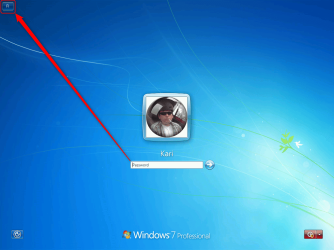
However, when there are additional display languages (Ultimate and Enterprise editions only) or input languages (all editions) installed and enabled, sometimes the "wrong" input language has been used and forgotten when logging out or shutting down. In case of multiple enabled display and / or input languages, the user should always check the login screen input language indicator to check he / she is using the correct keyboard language as Windows does not warn user for using "wrong" keyboard layout:

2014-06-12_01h06_06.png

A practical example: A US user, display language and computers physical keyboard device US English, for some reason also French input language enabled. User's Windows password is SamFromQueens. User logs in, changes the input language to French (accidentally or with purpose), locks the computer to go to get coffee. Comes back, tries to sign in but keeps getting false password error.

This is because the login screen's password prompt is now using the French input language, so when the user types (or rather thinks he / she is typing) SamFromQueens, he / she types Sq,Fro,Aueens instead. This is of course flagged as wrong password.

I don't say this happens often but as an ex-pat having multilingual social circles, I have solved at least one case like this monthly since XP's days. As we ex-pats are not the only ones sometimes needing additional input languages (students, researchers, travelers and so on) this is something worth to remember when dealing with password issues. By default Windows should remember the default input language for each user but not always.

My first question to someone who suddenly cannot sign in to Windows although he / she is 100% sure the password is correctly typed is nowadays "Have you enabled additional input languages?".

Kari
 

My Computer My Computer

At a glance

Windows 10 Pro x64 EN-GB1.6 GHz Intel Core i7-720QM Processor6 GBATI Mobility Radeon HD 5850 Graphics
Computer type
Laptop
Computer Manufacturer/Model Number
HP ENVY 17-1150eg
OS
Windows 10 Pro x64 EN-GB
CPU
1.6 GHz Intel Core i7-720QM Processor
Memory
6 GB
Graphics Card(s)
ATI Mobility Radeon HD 5850 Graphics
Sound Card
Beats sound system with integrated subwoofer
Monitor(s) Displays
17" laptop display, 22" LED and 32" Full HD TV through HDMI
Screen Resolution
1600*900 (1), 1920*1080 (2&3)
Hard Drives
Internal: 2 x 500 GB SATA Hard Disk Drive 7200 rpm
External: 2TB for backups, 3TB USB3 network drive for media
Cooling
As Envy runs a bit warm, I have it on a Cooler Master pad
Keyboard
Logitech diNovo Media Desktop Laser (bluetooth)
Mouse
Logitech Performance Mouse MX
Internet Speed
50/10 Mbps VDSL
Antivirus
Windows Defender 4.3.9431.0
Browser
Maxthon 3.5.2., IE11
Very interesting Kari.
That post has got to help others around the world.
I use one language so it never entered my mind.
I learned something today so I'm happy.
 

My Computer My Computer

At a glance

Windows 10 Pro. 64/ version 1709 Windows 7 Pr...Intel i7-6800K @ 4.3Corsair Platinum 16 gig @2400EVGA GTX 1070 OC
Computer type
PC/Desktop
Computer Manufacturer/Model Number
Home made Desktop
OS
Windows 10 Pro. 64/ version 1709 Windows 7 Pro/64
CPU
Intel i7-6800K @ 4.3
Motherboard
ASUS X-99 Deluxe II
Memory
Corsair Platinum 16 gig @2400
Graphics Card(s)
EVGA GTX 1070 OC
Monitor(s) Displays
Asus 27" LED LCD/VE278Q
Screen Resolution
1920-1080 or 1280-720 HDMI
Hard Drives
INTEL SSD 730-240 Gb Sata 3.0/
PSU
EVGA Platium 1200W
Case
Phanteks Luxe Tempered Glass 8 fans/ one radiator
Cooling
XSPC/ Water Cooled CPU
Keyboard
Das 4 Professional
Mouse
Logitech M705/MX Anywhere 2-S
Internet Speed
100 mbits
Antivirus
Microsoft Security Essentials/ Malwarebytes Premium 3.0/ SAS
Browser
I.E. 11 default/Firefox/ ISP Time Warner Cable/Spectrum
Other Info
LG BluRay Burner/
Sound system-KLipsch-THX/
Icy Dock ssd Hot Swap bays.
Thanks Layback. I repeat that this most probably is not the cause for this OP's issue but a factor to consider in some other cases like this.

BTW, I exaggerated a bit :p; I think I have seen something like 15 to 20 cases caused by wrong input language in past 5 years, not one per month.
 

My Computer My Computer

At a glance

Windows 10 Pro x64 EN-GB1.6 GHz Intel Core i7-720QM Processor6 GBATI Mobility Radeon HD 5850 Graphics
Computer type
Laptop
Computer Manufacturer/Model Number
HP ENVY 17-1150eg
OS
Windows 10 Pro x64 EN-GB
CPU
1.6 GHz Intel Core i7-720QM Processor
Memory
6 GB
Graphics Card(s)
ATI Mobility Radeon HD 5850 Graphics
Sound Card
Beats sound system with integrated subwoofer
Monitor(s) Displays
17" laptop display, 22" LED and 32" Full HD TV through HDMI
Screen Resolution
1600*900 (1), 1920*1080 (2&3)
Hard Drives
Internal: 2 x 500 GB SATA Hard Disk Drive 7200 rpm
External: 2TB for backups, 3TB USB3 network drive for media
Cooling
As Envy runs a bit warm, I have it on a Cooler Master pad
Keyboard
Logitech diNovo Media Desktop Laser (bluetooth)
Mouse
Logitech Performance Mouse MX
Internet Speed
50/10 Mbps VDSL
Antivirus
Windows Defender 4.3.9431.0
Browser
Maxthon 3.5.2., IE11
Back
Top