Solved Regular format of downloads folder

ethanchal

New member
Member
Local time
5:04 PM
Messages
19
Hi all,

I've got a little problem, my downloads folder ("C:\Users\Ethans PC\Downloads") randomly clears itself with files/folders in it. This problem occurs when the PC is on and also when it's off (cleared during shut down and boot). I'm not sure if the data is hidden or it's got to a "format" state but haven't noticed a difference in hard disk space via "computer". I've lost nearly 100gb and would like to stop the problem. It occurs now and then maybe monthly or even weekly. It only started to happen from Jan 2014 onward.

I'm assuming it's not my anti-virus software as it's usually pretty good or the hard disk as I've done a dskchk which provided no errors. Any help is appreciated.

Thanks,
Ethan
 
Last edited:

My Computer My Computer

At a glance

Windows 7 Home Premium 64bitIntel Core i5-3570KCorsair Value Select 4GB (3x4GB) DDR3 1333MSI Nvidia GTX 660 2GB
Computer type
PC/Desktop
Computer Manufacturer/Model Number
Chillblast Fusion Elixir (Custom Build)
OS
Windows 7 Home Premium 64bit
CPU
Intel Core i5-3570K
Motherboard
Asus P8Z77-V LX
Memory
Corsair Value Select 4GB (3x4GB) DDR3 1333
Graphics Card(s)
MSI Nvidia GTX 660 2GB
Monitor(s) Displays
Benq GL2450HM + LG DM2750D
Screen Resolution
1920x1080 x2
Hard Drives
Seagate 1TB 3.5 inch 7200RPM 64MB Cache SATA3 Hard Drive
PSU
BeQuiet Pure Power 530W
Case
CiT Vantage Midi Mesh Gaming Case
Cooling
Arctic Cooling Freezer 7 Pro rev 2
Keyboard
Qpad MK-80 Backlit Mechanical Keyboard - Cherry MX Brown
Mouse
Sharkoon Fireglider Laser Mouse
Internet Speed
36mbps download / 9mbps upload
Antivirus
Bullguard Anti-Virus
Browser
Google Chrome

My Computer My Computer

At a glance

Windows 10 ProAMD Ryzen 5 2400G Processor with Radeon RX Ve...G.SKILL Ripjaws V Series 16GB (2 x 8GB) 288-P...2047MB NVIDIA GeForce GTX 1060 6GB (EVGA)
Computer type
PC/Desktop
Computer Manufacturer/Model Number
Custom Built
OS
Windows 10 Pro
CPU
AMD Ryzen 5 2400G Processor with Radeon RX Vega 11 Graphics
Motherboard
ASRock X470 Master SLI/AC AM4 AMD Promontory X470 SATA 6Gb/s
Memory
G.SKILL Ripjaws V Series 16GB (2 x 8GB) 288-Pin DDR4 SDRAM D
Graphics Card(s)
2047MB NVIDIA GeForce GTX 1060 6GB (EVGA)
Sound Card
Motherboard Built in
Monitor(s) Displays
Acer R240HY bidx 23.8-Inch IPS HDMI DVI VGA (1920 x 1080) Wi
Screen Resolution
1920 x 1080
Hard Drives
1TB Sandisk SSD PLUS (Main drive)
500 GB Seagate 7200 RPM (Games)
500 GB Western Digital 7200 RPM (Virtual Machines)
PSU
CORSAIR TX Series TX650M 650W 80+ Gold Modular Power Supply
Case
CORSAIR CARBIDE SPEC-02 Mid-Tower Gaming Case, Red LED Fan
Cooling
220mm, two 120mm, and four 60mm fans
Keyboard
Wired Dell keyboard
Mouse
Wireless Logitech mouse
Internet Speed
250mb down, 30mb up
Antivirus
Panda Cloud Antivirus
Browser
Chrome-ish x64
Other Info
Your awesome for reading this.
Also, do you have any 3rd party maintenance applications that schedule a cleanup?

See what's in task scheduler, look at the actions tab.
 

My Computer My Computer

At a glance

x64 (6.3.9600) Win8.1 Pro & soon dual boot x6...AMD A6-3420M APU with Radeon(tm) HD Graphics6.00 GBAMD Radeon(TM) HD 6520G
Computer type
Laptop
Computer Manufacturer/Model Number
HP Pavilion dv6-6c10us
OS
x64 (6.3.9600) Win8.1 Pro & soon dual boot x64 (6.1.7601) Win7_SP1 HomePrem
CPU
AMD A6-3420M APU with Radeon(tm) HD Graphics
Motherboard
Hewlett-Packard 1805
Memory
6.00 GB
Graphics Card(s)
AMD Radeon(TM) HD 6520G
Sound Card
(1) AMD High Definition Audio Device (2) IDT High Definiti
Monitor(s) Displays
HP W2072a 20" LCD (1600 x 900) @ 60 Hz
Screen Resolution
1366 x 768 x 32 bits (4294967296 colors) @ 60 Hz
Hard Drives
ST640LM0 00 HM641JI SATA Disk Device
Keyboard
Logitech k520 wireless KB
Mouse
Logitech m320 wireless mouse (bundled with KB)
Internet Speed
15/5 | 54 MB Wireless 'n'
Antivirus
Realtime: Defender or Avast | On-demand: Malwarebytes, ESET
Browser
IE 11 on Win8, IE 10 on win 7
Other Info
Media: [Gimp, Audacity, VLC] || Comm: [WEmail 2012, Skype] || Productivity: [OpenOffice,| Textpad] || Utils: [Sysinternals, cCleaner, Speccy, Defraggler]
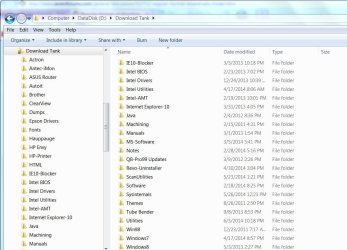
You shouldn't be using that folder. It's a temporary storage location for browser scripts and software. If you're talking about files/programs that YOU download, you should create a separate folder for that. I call mine "Download Tank" with various subfolders for application, use, etc. Everything I download off the web goes there first.
 

Attachments

  • DownloadTank.JPG
    DownloadTank.JPG
    96 KB · Views: 0

My Computer My Computer

At a glance

Windows 7 Pro-x64i7-2600 3.4GHz - 3.8GHz Turbo8Gb - 2x4GB, Muskin 991770 PC3-1333Integrated Intel HD 2000
Computer type
PC/Desktop
Computer Manufacturer/Model Number
Built 2/11/2011
OS
Windows 7 Pro-x64
CPU
i7-2600 3.4GHz - 3.8GHz Turbo
Motherboard
Intel DH67BL-B3
Memory
8Gb - 2x4GB, Muskin 991770 PC3-1333
Graphics Card(s)
Integrated Intel HD 2000
Sound Card
Integrated Intel 10.1 HD, RealTek ALC892
Monitor(s) Displays
Asus LCD VH222H, Haier HL24XSL2a
Screen Resolution
1920x1080, 1920x1080
Hard Drives
Crucial SSD C300-128Gb,
Western Digital WD5002AALX - 500Gb,
Western Digital WD7501AALS - 750Gb
PSU
Seasonic 650W 80+ Gold Modular
Case
Rosewill Defender
Cooling
Stock CPU, Four 120mm case fans, PCH fan added
Keyboard
Logitech EX100 Y-RBH94 Wireless
Mouse
Logitech EX100 M-RCE95 Wireless
Internet Speed
3.0/1.5 Mbs
Antivirus
Microsoft Security Essentials
Browser
Microsoft Internet Explorer 11
Other Info
Antec Veris Premier-Multimedia IR Station,
Cyber Accoustics-3602 Speakers,
AFT XM-5U Card Reader,
Hauppauge TV-HVR-2250,
Sony LX300 USB Turntable
Intresting,

Although you should not be storing stuff long term in there anyway.

What web browser do you use?


You may have programs running at startup that is causing this issue. Please see this tutorial to temporary disable them and see if the issue is resolved:

http://www.sevenforums.com/tutorial...ation-conflicts-performing-clean-startup.html

Okay thanks for the advice.. going to setup a folder somewhere else ;)

I use Google Chrome and never had any problems with it before on this PC and on my other PC's.

I've looked through the start-up tab in msconfig and there doesn't seem to be any programs that would affect this kind of issue, but in case I have disabled Google chrome on start up and I will wait to see if the problem reoccurs.
 

My Computer My Computer

At a glance

Windows 7 Home Premium 64bitIntel Core i5-3570KCorsair Value Select 4GB (3x4GB) DDR3 1333MSI Nvidia GTX 660 2GB
Computer type
PC/Desktop
Computer Manufacturer/Model Number
Chillblast Fusion Elixir (Custom Build)
OS
Windows 7 Home Premium 64bit
CPU
Intel Core i5-3570K
Motherboard
Asus P8Z77-V LX
Memory
Corsair Value Select 4GB (3x4GB) DDR3 1333
Graphics Card(s)
MSI Nvidia GTX 660 2GB
Monitor(s) Displays
Benq GL2450HM + LG DM2750D
Screen Resolution
1920x1080 x2
Hard Drives
Seagate 1TB 3.5 inch 7200RPM 64MB Cache SATA3 Hard Drive
PSU
BeQuiet Pure Power 530W
Case
CiT Vantage Midi Mesh Gaming Case
Cooling
Arctic Cooling Freezer 7 Pro rev 2
Keyboard
Qpad MK-80 Backlit Mechanical Keyboard - Cherry MX Brown
Mouse
Sharkoon Fireglider Laser Mouse
Internet Speed
36mbps download / 9mbps upload
Antivirus
Bullguard Anti-Virus
Browser
Google Chrome
Also, do you have any 3rd party maintenance applications that schedule a cleanup?

See what's in task scheduler, look at the actions tab.

Nope, no cleaning programs..however I have used them in the past e.g CCleaner + Tune Up Utilities.

Looked in the task scheduler and there is no tasks taking place in the actions tab.

Thanks though.
 

My Computer My Computer

At a glance

Windows 7 Home Premium 64bitIntel Core i5-3570KCorsair Value Select 4GB (3x4GB) DDR3 1333MSI Nvidia GTX 660 2GB
Computer type
PC/Desktop
Computer Manufacturer/Model Number
Chillblast Fusion Elixir (Custom Build)
OS
Windows 7 Home Premium 64bit
CPU
Intel Core i5-3570K
Motherboard
Asus P8Z77-V LX
Memory
Corsair Value Select 4GB (3x4GB) DDR3 1333
Graphics Card(s)
MSI Nvidia GTX 660 2GB
Monitor(s) Displays
Benq GL2450HM + LG DM2750D
Screen Resolution
1920x1080 x2
Hard Drives
Seagate 1TB 3.5 inch 7200RPM 64MB Cache SATA3 Hard Drive
PSU
BeQuiet Pure Power 530W
Case
CiT Vantage Midi Mesh Gaming Case
Cooling
Arctic Cooling Freezer 7 Pro rev 2
Keyboard
Qpad MK-80 Backlit Mechanical Keyboard - Cherry MX Brown
Mouse
Sharkoon Fireglider Laser Mouse
Internet Speed
36mbps download / 9mbps upload
Antivirus
Bullguard Anti-Virus
Browser
Google Chrome
You shouldn't be using that folder. It's a temporary storage location for browser scripts and software. If you're talking about files/programs that YOU download, you should create a separate folder for that. I call mine "Download Tank" with various subfolders for application, use, etc. Everything I download off the web goes there first.

Ok, but i've never had any issues with this before and kept lots of data there for a few years now. Thanks for the advice though I will now store this kind of data somewhere else.

;)
 

My Computer My Computer

At a glance

Windows 7 Home Premium 64bitIntel Core i5-3570KCorsair Value Select 4GB (3x4GB) DDR3 1333MSI Nvidia GTX 660 2GB
Computer type
PC/Desktop
Computer Manufacturer/Model Number
Chillblast Fusion Elixir (Custom Build)
OS
Windows 7 Home Premium 64bit
CPU
Intel Core i5-3570K
Motherboard
Asus P8Z77-V LX
Memory
Corsair Value Select 4GB (3x4GB) DDR3 1333
Graphics Card(s)
MSI Nvidia GTX 660 2GB
Monitor(s) Displays
Benq GL2450HM + LG DM2750D
Screen Resolution
1920x1080 x2
Hard Drives
Seagate 1TB 3.5 inch 7200RPM 64MB Cache SATA3 Hard Drive
PSU
BeQuiet Pure Power 530W
Case
CiT Vantage Midi Mesh Gaming Case
Cooling
Arctic Cooling Freezer 7 Pro rev 2
Keyboard
Qpad MK-80 Backlit Mechanical Keyboard - Cherry MX Brown
Mouse
Sharkoon Fireglider Laser Mouse
Internet Speed
36mbps download / 9mbps upload
Antivirus
Bullguard Anti-Virus
Browser
Google Chrome
Intresting,

Although you should not be storing stuff long term in there anyway.

What web browser do you use?


You may have programs running at startup that is causing this issue. Please see this tutorial to temporary disable them and see if the issue is resolved:

http://www.sevenforums.com/tutorial...ation-conflicts-performing-clean-startup.html

Ok thank you.

I use Google chrome and have done for many years and never had this issue.

I looked through the start-up tab and there isn't any program of concern which could cause this kind of issue however I shall un-tick Google chrome in case it is the cause and shall wait to see what happens.
 

My Computer My Computer

At a glance

Windows 7 Home Premium 64bitIntel Core i5-3570KCorsair Value Select 4GB (3x4GB) DDR3 1333MSI Nvidia GTX 660 2GB
Computer type
PC/Desktop
Computer Manufacturer/Model Number
Chillblast Fusion Elixir (Custom Build)
OS
Windows 7 Home Premium 64bit
CPU
Intel Core i5-3570K
Motherboard
Asus P8Z77-V LX
Memory
Corsair Value Select 4GB (3x4GB) DDR3 1333
Graphics Card(s)
MSI Nvidia GTX 660 2GB
Monitor(s) Displays
Benq GL2450HM + LG DM2750D
Screen Resolution
1920x1080 x2
Hard Drives
Seagate 1TB 3.5 inch 7200RPM 64MB Cache SATA3 Hard Drive
PSU
BeQuiet Pure Power 530W
Case
CiT Vantage Midi Mesh Gaming Case
Cooling
Arctic Cooling Freezer 7 Pro rev 2
Keyboard
Qpad MK-80 Backlit Mechanical Keyboard - Cherry MX Brown
Mouse
Sharkoon Fireglider Laser Mouse
Internet Speed
36mbps download / 9mbps upload
Antivirus
Bullguard Anti-Virus
Browser
Google Chrome
There's several places where those files could be cleared. Windows Disk Cleanup as well as by browser options and other utilities. Perhaps you've just been lucky in the past or Chrome is a new version and it works now. :) Or the files could have been in use. Whatever you do, don't include Windows' temp or work folders in your indexing. (If you use it.) If you have, it may be a good idea to remove them and rebuild the index. The rebuild option is on the index option window.
 

My Computer My Computer

At a glance

Windows 7 Pro-x64i7-2600 3.4GHz - 3.8GHz Turbo8Gb - 2x4GB, Muskin 991770 PC3-1333Integrated Intel HD 2000
Computer type
PC/Desktop
Computer Manufacturer/Model Number
Built 2/11/2011
OS
Windows 7 Pro-x64
CPU
i7-2600 3.4GHz - 3.8GHz Turbo
Motherboard
Intel DH67BL-B3
Memory
8Gb - 2x4GB, Muskin 991770 PC3-1333
Graphics Card(s)
Integrated Intel HD 2000
Sound Card
Integrated Intel 10.1 HD, RealTek ALC892
Monitor(s) Displays
Asus LCD VH222H, Haier HL24XSL2a
Screen Resolution
1920x1080, 1920x1080
Hard Drives
Crucial SSD C300-128Gb,
Western Digital WD5002AALX - 500Gb,
Western Digital WD7501AALS - 750Gb
PSU
Seasonic 650W 80+ Gold Modular
Case
Rosewill Defender
Cooling
Stock CPU, Four 120mm case fans, PCH fan added
Keyboard
Logitech EX100 Y-RBH94 Wireless
Mouse
Logitech EX100 M-RCE95 Wireless
Internet Speed
3.0/1.5 Mbs
Antivirus
Microsoft Security Essentials
Browser
Microsoft Internet Explorer 11
Other Info
Antec Veris Premier-Multimedia IR Station,
Cyber Accoustics-3602 Speakers,
AFT XM-5U Card Reader,
Hauppauge TV-HVR-2250,
Sony LX300 USB Turntable
Point of view: Downloads is more of a "one place" folder than a temp folder. It gives users one place to download anything and one place to look for downloads.

Downloads is not part of any native Windows cleanup that I know of, that's why I asked about 3rd party utilities.

Can objects be kept in Downloads? Sure, why not.

It is up to each individual to manage the Downloads folder. Most techies use it temporarily - download something; install and delete it, read and file or delete it, use it and move or delete it. But I really wouldn't classify it as temp storage in the same way \temp is classified.

Using another folder is a good suggestion, but managing your downloads (docs in documents, pics in pictures, music in music, vids in video, software install and delete.... etc) is, IMO, better.

My point? Files missing from the Downloads folder is not normal. Something cleaned them, not Windows.
 

My Computer My Computer

At a glance

x64 (6.3.9600) Win8.1 Pro & soon dual boot x6...AMD A6-3420M APU with Radeon(tm) HD Graphics6.00 GBAMD Radeon(TM) HD 6520G
Computer type
Laptop
Computer Manufacturer/Model Number
HP Pavilion dv6-6c10us
OS
x64 (6.3.9600) Win8.1 Pro & soon dual boot x64 (6.1.7601) Win7_SP1 HomePrem
CPU
AMD A6-3420M APU with Radeon(tm) HD Graphics
Motherboard
Hewlett-Packard 1805
Memory
6.00 GB
Graphics Card(s)
AMD Radeon(TM) HD 6520G
Sound Card
(1) AMD High Definition Audio Device (2) IDT High Definiti
Monitor(s) Displays
HP W2072a 20" LCD (1600 x 900) @ 60 Hz
Screen Resolution
1366 x 768 x 32 bits (4294967296 colors) @ 60 Hz
Hard Drives
ST640LM0 00 HM641JI SATA Disk Device
Keyboard
Logitech k520 wireless KB
Mouse
Logitech m320 wireless mouse (bundled with KB)
Internet Speed
15/5 | 54 MB Wireless 'n'
Antivirus
Realtime: Defender or Avast | On-demand: Malwarebytes, ESET
Browser
IE 11 on Win8, IE 10 on win 7
Other Info
Media: [Gimp, Audacity, VLC] || Comm: [WEmail 2012, Skype] || Productivity: [OpenOffice,| Textpad] || Utils: [Sysinternals, cCleaner, Speccy, Defraggler]

My Computer My Computer

At a glance

Windows 10 ProAMD Ryzen 5 2400G Processor with Radeon RX Ve...G.SKILL Ripjaws V Series 16GB (2 x 8GB) 288-P...2047MB NVIDIA GeForce GTX 1060 6GB (EVGA)
Computer type
PC/Desktop
Computer Manufacturer/Model Number
Custom Built
OS
Windows 10 Pro
CPU
AMD Ryzen 5 2400G Processor with Radeon RX Vega 11 Graphics
Motherboard
ASRock X470 Master SLI/AC AM4 AMD Promontory X470 SATA 6Gb/s
Memory
G.SKILL Ripjaws V Series 16GB (2 x 8GB) 288-Pin DDR4 SDRAM D
Graphics Card(s)
2047MB NVIDIA GeForce GTX 1060 6GB (EVGA)
Sound Card
Motherboard Built in
Monitor(s) Displays
Acer R240HY bidx 23.8-Inch IPS HDMI DVI VGA (1920 x 1080) Wi
Screen Resolution
1920 x 1080
Hard Drives
1TB Sandisk SSD PLUS (Main drive)
500 GB Seagate 7200 RPM (Games)
500 GB Western Digital 7200 RPM (Virtual Machines)
PSU
CORSAIR TX Series TX650M 650W 80+ Gold Modular Power Supply
Case
CORSAIR CARBIDE SPEC-02 Mid-Tower Gaming Case, Red LED Fan
Cooling
220mm, two 120mm, and four 60mm fans
Keyboard
Wired Dell keyboard
Mouse
Wireless Logitech mouse
Internet Speed
250mb down, 30mb up
Antivirus
Panda Cloud Antivirus
Browser
Chrome-ish x64
Other Info
Your awesome for reading this.
Do you or have you been using Advanced System Care by IObits or any other programs from IObits?
 

My Computer My Computer

At a glance

Windows 10 Pro. 64/ version 1709 Windows 7 Pr...Intel i7-6800K @ 4.3Corsair Platinum 16 gig @2400EVGA GTX 1070 OC
Computer type
PC/Desktop
Computer Manufacturer/Model Number
Home made Desktop
OS
Windows 10 Pro. 64/ version 1709 Windows 7 Pro/64
CPU
Intel i7-6800K @ 4.3
Motherboard
ASUS X-99 Deluxe II
Memory
Corsair Platinum 16 gig @2400
Graphics Card(s)
EVGA GTX 1070 OC
Monitor(s) Displays
Asus 27" LED LCD/VE278Q
Screen Resolution
1920-1080 or 1280-720 HDMI
Hard Drives
INTEL SSD 730-240 Gb Sata 3.0/
PSU
EVGA Platium 1200W
Case
Phanteks Luxe Tempered Glass 8 fans/ one radiator
Cooling
XSPC/ Water Cooled CPU
Keyboard
Das 4 Professional
Mouse
Logitech M705/MX Anywhere 2-S
Internet Speed
100 mbits
Antivirus
Microsoft Security Essentials/ Malwarebytes Premium 3.0/ SAS
Browser
I.E. 11 default/Firefox/ ISP Time Warner Cable/Spectrum
Other Info
LG BluRay Burner/
Sound system-KLipsch-THX/
Icy Dock ssd Hot Swap bays.
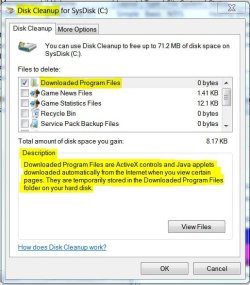
Perhaps we are talking about a different download folder. Since this one is most certainly controlled by Windows with a "native" Windows cleanup function. By default, it's selected. If a user selects it as a file location, the files will be deleted on a cleanup.
 

Attachments

  • Disk Cleanup.JPG
    Disk Cleanup.JPG
    54.9 KB · Views: 36

My Computer My Computer

At a glance

Windows 7 Pro-x64i7-2600 3.4GHz - 3.8GHz Turbo8Gb - 2x4GB, Muskin 991770 PC3-1333Integrated Intel HD 2000
Computer type
PC/Desktop
Computer Manufacturer/Model Number
Built 2/11/2011
OS
Windows 7 Pro-x64
CPU
i7-2600 3.4GHz - 3.8GHz Turbo
Motherboard
Intel DH67BL-B3
Memory
8Gb - 2x4GB, Muskin 991770 PC3-1333
Graphics Card(s)
Integrated Intel HD 2000
Sound Card
Integrated Intel 10.1 HD, RealTek ALC892
Monitor(s) Displays
Asus LCD VH222H, Haier HL24XSL2a
Screen Resolution
1920x1080, 1920x1080
Hard Drives
Crucial SSD C300-128Gb,
Western Digital WD5002AALX - 500Gb,
Western Digital WD7501AALS - 750Gb
PSU
Seasonic 650W 80+ Gold Modular
Case
Rosewill Defender
Cooling
Stock CPU, Four 120mm case fans, PCH fan added
Keyboard
Logitech EX100 Y-RBH94 Wireless
Mouse
Logitech EX100 M-RCE95 Wireless
Internet Speed
3.0/1.5 Mbs
Antivirus
Microsoft Security Essentials
Browser
Microsoft Internet Explorer 11
Other Info
Antec Veris Premier-Multimedia IR Station,
Cyber Accoustics-3602 Speakers,
AFT XM-5U Card Reader,
Hauppauge TV-HVR-2250,
Sony LX300 USB Turntable
That folder is located here:
...\Windows\Downloaded Program Files

I've never seen 100GB in that folder. (See the OP for that figure.)

I'm pretty sure that the thread is talking about the user's download folder located here:
...\Users\username\Downloads

The native disk cleanup does not touch any of the user download folder(s).

A user's download folder is used for downloads by default within IE.
 
Last edited:

My Computer My Computer

At a glance

W7 Pro SP1 64biti78GBIntel HD Graphics
Computer type
Laptop
Computer Manufacturer/Model Number
Employer provided Dell Latitude
OS
W7 Pro SP1 64bit
CPU
i7
Memory
8GB
Graphics Card(s)
Intel HD Graphics
Hard Drives
crappy SSD
Antivirus
Employer mandated Symantec Endpoint Protection
Browser
Pale Moon 64bit, IE11 64bit & Chrome 64bit

My Computer My Computer

At a glance

Windows 10 ProAMD Ryzen 5 2400G Processor with Radeon RX Ve...G.SKILL Ripjaws V Series 16GB (2 x 8GB) 288-P...2047MB NVIDIA GeForce GTX 1060 6GB (EVGA)
Computer type
PC/Desktop
Computer Manufacturer/Model Number
Custom Built
OS
Windows 10 Pro
CPU
AMD Ryzen 5 2400G Processor with Radeon RX Vega 11 Graphics
Motherboard
ASRock X470 Master SLI/AC AM4 AMD Promontory X470 SATA 6Gb/s
Memory
G.SKILL Ripjaws V Series 16GB (2 x 8GB) 288-Pin DDR4 SDRAM D
Graphics Card(s)
2047MB NVIDIA GeForce GTX 1060 6GB (EVGA)
Sound Card
Motherboard Built in
Monitor(s) Displays
Acer R240HY bidx 23.8-Inch IPS HDMI DVI VGA (1920 x 1080) Wi
Screen Resolution
1920 x 1080
Hard Drives
1TB Sandisk SSD PLUS (Main drive)
500 GB Seagate 7200 RPM (Games)
500 GB Western Digital 7200 RPM (Virtual Machines)
PSU
CORSAIR TX Series TX650M 650W 80+ Gold Modular Power Supply
Case
CORSAIR CARBIDE SPEC-02 Mid-Tower Gaming Case, Red LED Fan
Cooling
220mm, two 120mm, and four 60mm fans
Keyboard
Wired Dell keyboard
Mouse
Wireless Logitech mouse
Internet Speed
250mb down, 30mb up
Antivirus
Panda Cloud Antivirus
Browser
Chrome-ish x64
Other Info
Your awesome for reading this.
Do you or have you been using Advanced System Care by IObits or any other programs from IObits?

Yes, I did use that program come to think of it before the problem started. However it's been uninstalled for many months but the problem still persists.
 

My Computer My Computer

At a glance

Windows 7 Home Premium 64bitIntel Core i5-3570KCorsair Value Select 4GB (3x4GB) DDR3 1333MSI Nvidia GTX 660 2GB
Computer type
PC/Desktop
Computer Manufacturer/Model Number
Chillblast Fusion Elixir (Custom Build)
OS
Windows 7 Home Premium 64bit
CPU
Intel Core i5-3570K
Motherboard
Asus P8Z77-V LX
Memory
Corsair Value Select 4GB (3x4GB) DDR3 1333
Graphics Card(s)
MSI Nvidia GTX 660 2GB
Monitor(s) Displays
Benq GL2450HM + LG DM2750D
Screen Resolution
1920x1080 x2
Hard Drives
Seagate 1TB 3.5 inch 7200RPM 64MB Cache SATA3 Hard Drive
PSU
BeQuiet Pure Power 530W
Case
CiT Vantage Midi Mesh Gaming Case
Cooling
Arctic Cooling Freezer 7 Pro rev 2
Keyboard
Qpad MK-80 Backlit Mechanical Keyboard - Cherry MX Brown
Mouse
Sharkoon Fireglider Laser Mouse
Internet Speed
36mbps download / 9mbps upload
Antivirus
Bullguard Anti-Virus
Browser
Google Chrome
Perhaps we are talking about a different download folder. Since this one is most certainly controlled by Windows with a "native" Windows cleanup function. By default, it's selected. If a user selects it as a file location, the files will be deleted on a cleanup.

Yes, the "C:\Users\Ethans PC\Downloads" folder is the one which is causing all the problems. The "C:\Windows\Downloaded Program Files" folder has been cleaned with the Disk Cleanup software many times but there wasn't anything of use in there.
 

My Computer My Computer

At a glance

Windows 7 Home Premium 64bitIntel Core i5-3570KCorsair Value Select 4GB (3x4GB) DDR3 1333MSI Nvidia GTX 660 2GB
Computer type
PC/Desktop
Computer Manufacturer/Model Number
Chillblast Fusion Elixir (Custom Build)
OS
Windows 7 Home Premium 64bit
CPU
Intel Core i5-3570K
Motherboard
Asus P8Z77-V LX
Memory
Corsair Value Select 4GB (3x4GB) DDR3 1333
Graphics Card(s)
MSI Nvidia GTX 660 2GB
Monitor(s) Displays
Benq GL2450HM + LG DM2750D
Screen Resolution
1920x1080 x2
Hard Drives
Seagate 1TB 3.5 inch 7200RPM 64MB Cache SATA3 Hard Drive
PSU
BeQuiet Pure Power 530W
Case
CiT Vantage Midi Mesh Gaming Case
Cooling
Arctic Cooling Freezer 7 Pro rev 2
Keyboard
Qpad MK-80 Backlit Mechanical Keyboard - Cherry MX Brown
Mouse
Sharkoon Fireglider Laser Mouse
Internet Speed
36mbps download / 9mbps upload
Antivirus
Bullguard Anti-Virus
Browser
Google Chrome
That folder is located here:
...\Windows\Downloaded Program Files

I've never seen 100GB in that folder. (See the OP for that figure.)

I'm pretty sure that the thread is talking about the user's download folder located here:
...\Users\username\Downloads

The native disk cleanup does not touch any of the user download folder(s).

A user's download folder is used for downloads by default within IE.

Yes correct I forgot to mention that it's the "C:\Users\Ethans PC\Downloads" not the other one.
 

My Computer My Computer

At a glance

Windows 7 Home Premium 64bitIntel Core i5-3570KCorsair Value Select 4GB (3x4GB) DDR3 1333MSI Nvidia GTX 660 2GB
Computer type
PC/Desktop
Computer Manufacturer/Model Number
Chillblast Fusion Elixir (Custom Build)
OS
Windows 7 Home Premium 64bit
CPU
Intel Core i5-3570K
Motherboard
Asus P8Z77-V LX
Memory
Corsair Value Select 4GB (3x4GB) DDR3 1333
Graphics Card(s)
MSI Nvidia GTX 660 2GB
Monitor(s) Displays
Benq GL2450HM + LG DM2750D
Screen Resolution
1920x1080 x2
Hard Drives
Seagate 1TB 3.5 inch 7200RPM 64MB Cache SATA3 Hard Drive
PSU
BeQuiet Pure Power 530W
Case
CiT Vantage Midi Mesh Gaming Case
Cooling
Arctic Cooling Freezer 7 Pro rev 2
Keyboard
Qpad MK-80 Backlit Mechanical Keyboard - Cherry MX Brown
Mouse
Sharkoon Fireglider Laser Mouse
Internet Speed
36mbps download / 9mbps upload
Antivirus
Bullguard Anti-Virus
Browser
Google Chrome
Do you or have you been using Advanced System Care by IObits or any other programs from IObits?

Nice call Jack.

Search results show that there are remnants left behind when ASC is uninstalled. I'm not certain, but some reports state that there are running remnants. The really sad thing is that the IObit uninstaller is recommended as a remedy. This is a general uninstaller, not a specific ASC uninstaller as far as I can tell.

@ethanchal: rather than download another IObit program, see if Revo uninstaller (free) can clean up ASC for you.
Video Instructions: http://www.sevenforums.com/tutorials/106594-revo-uninstaller-freeware-uninstall-programs.html
Revo docs: Revo Uninstaller Pro - How To
 

My Computer My Computer

At a glance

x64 (6.3.9600) Win8.1 Pro & soon dual boot x6...AMD A6-3420M APU with Radeon(tm) HD Graphics6.00 GBAMD Radeon(TM) HD 6520G
Computer type
Laptop
Computer Manufacturer/Model Number
HP Pavilion dv6-6c10us
OS
x64 (6.3.9600) Win8.1 Pro & soon dual boot x64 (6.1.7601) Win7_SP1 HomePrem
CPU
AMD A6-3420M APU with Radeon(tm) HD Graphics
Motherboard
Hewlett-Packard 1805
Memory
6.00 GB
Graphics Card(s)
AMD Radeon(TM) HD 6520G
Sound Card
(1) AMD High Definition Audio Device (2) IDT High Definiti
Monitor(s) Displays
HP W2072a 20" LCD (1600 x 900) @ 60 Hz
Screen Resolution
1366 x 768 x 32 bits (4294967296 colors) @ 60 Hz
Hard Drives
ST640LM0 00 HM641JI SATA Disk Device
Keyboard
Logitech k520 wireless KB
Mouse
Logitech m320 wireless mouse (bundled with KB)
Internet Speed
15/5 | 54 MB Wireless 'n'
Antivirus
Realtime: Defender or Avast | On-demand: Malwarebytes, ESET
Browser
IE 11 on Win8, IE 10 on win 7
Other Info
Media: [Gimp, Audacity, VLC] || Comm: [WEmail 2012, Skype] || Productivity: [OpenOffice,| Textpad] || Utils: [Sysinternals, cCleaner, Speccy, Defraggler]
Iobit programs are very difficult to remove. They may also leave behind the ability to call home to China. Their was one member on the Seven Forum after blocking the Iobit call home on his computer they started calling him on his regular phone.

Many have had to do a Clean Install just to get rid of all the Iobit. If you just remove A.S.C. you don't know what it has done so you don't know what needs fixed.
Any internal or external drives can also have damage done by this Iobit trash.

Please note the part in orange. I have not been able to find the post I read that from to verify it is the truth on my part.
If anybody finds it please PM me so I can verify to all.
Thank you Layback Bear.
 
Last edited:

My Computer My Computer

At a glance

Windows 10 Pro. 64/ version 1709 Windows 7 Pr...Intel i7-6800K @ 4.3Corsair Platinum 16 gig @2400EVGA GTX 1070 OC
Computer type
PC/Desktop
Computer Manufacturer/Model Number
Home made Desktop
OS
Windows 10 Pro. 64/ version 1709 Windows 7 Pro/64
CPU
Intel i7-6800K @ 4.3
Motherboard
ASUS X-99 Deluxe II
Memory
Corsair Platinum 16 gig @2400
Graphics Card(s)
EVGA GTX 1070 OC
Monitor(s) Displays
Asus 27" LED LCD/VE278Q
Screen Resolution
1920-1080 or 1280-720 HDMI
Hard Drives
INTEL SSD 730-240 Gb Sata 3.0/
PSU
EVGA Platium 1200W
Case
Phanteks Luxe Tempered Glass 8 fans/ one radiator
Cooling
XSPC/ Water Cooled CPU
Keyboard
Das 4 Professional
Mouse
Logitech M705/MX Anywhere 2-S
Internet Speed
100 mbits
Antivirus
Microsoft Security Essentials/ Malwarebytes Premium 3.0/ SAS
Browser
I.E. 11 default/Firefox/ ISP Time Warner Cable/Spectrum
Other Info
LG BluRay Burner/
Sound system-KLipsch-THX/
Icy Dock ssd Hot Swap bays.
Back
Top