Solved Users Folder displays double "Downloads" Folder.

escozul

New member
Local time
12:33 PM
Messages
4
Hello guys,

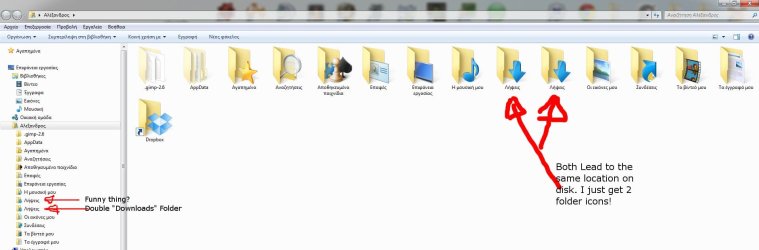
I have a rather strange problem. Lately I've been seing that I have a double refference of my "Downloads" folder in my user folder. You can see that effect on my attached picture:
attachment.php


They appear double though and lead to the same location (when right clicking and going to the position tab). When you open them of course they are one and the same. When you delete them... well... they both are deleted! (carefull there). I even tried to reallocate one of them and erase the other, but they both are moved. It looks as if one is the ghost of the other!

It's not a big problem of course but It pisses me off! Isn't there a way to make the downloads folder link single again? I guess I should look somewhere in the registry but don't know where to look. Any help would be hot.
 

Attachments
  • Double downloads folder.jpg
    Double downloads folder.jpg
    89.5 KB · Views: 257

My Computer

OS
Windows 7 Ultimate x64
Hello Escozul, and welcome to Seven Forums.

When you right click on each "Downloads" folder and click on Properties, do they both have a Location tab?

If not, then delete the folder that doesn't.

In addition, double check using OPTION TWO in the tutorial below for the Downloads folder to make sure everything is set properly for the folder.

http://www.sevenforums.com/tutorials/18583-user-folders-restore-default-location.html

Hope this helps,
Shawn
 

My Computer

Computer type
PC/Desktop
Computer Manufacturer/Model Number
Self built custom
OS
64-bit Windows 11 Pro for Workstations
CPU
Intel i7-8700K OC'd to 5 GHz
Motherboard
ASUS ROG Maximus XI Formula Z390
Memory
64 GB (4x16GB) G.SKILL TridentZ RGB DDR4 3600 MHz
Graphics Card(s)
ASUS ROG-STRIX-GTX1080TI-O11G-GAMING
Sound Card
Integrated
Monitor(s) Displays
2 x Samsung Odyssey G7 27"
Screen Resolution
2560x1440
Hard Drives
1TB Samsung 990 PRO M.2,
4TB Samsung 990 PRO PRO M.2,
TerraMaster F8 SSD Plus NAS
PSU
Seasonic Prime Titanium 850W
Case
Thermaltake Core P3
Cooling
Corsair Hydro H115i
Keyboard
Logitech wireless K800
Mouse
Logitech MX Master 4
Internet Speed
2 Gb/s Download and 100 Mb/s Upload
Antivirus
Malwarebyte Anti-Malware Premium
Browser
Google Chrome
Other Info
Logitech Z625 speaker system,
Logitech BRIO 4K Pro webcam,
HP Color LaserJet Pro MFP M477fdn,
APC SMART-UPS RT 1000 XL - SURT1000XLI,
Galaxy S23 Plus phone
When I right click on both folders there is a location tab and even if I try to change the location for one of them, it changes on the other as well.

However it seems that I've found the issue!

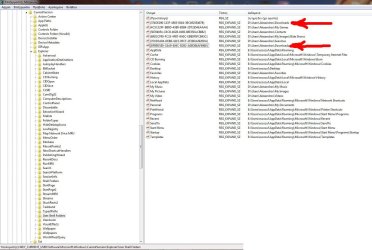
In the following picture I can see that there are 2 refferences for the Downloads folder in the
Code:
HKEY_CURRENT_USER\Software\Microsoft\Windows\CurrentVersion\Explorer\User Shell Folders
attachment.php


Now the question is, which one do I delete?
 

Attachments

  • Registry for double downloads folder.jpg
    Registry for double downloads folder.jpg
    176.1 KB · Views: 264

My Computer

OS
Windows 7 Ultimate x64
I'd be inclined to try them one at a time.

Backup the registry key in question, and then delete it.

Restart your computer then check to see how many download folders you've got.

If everything is OK you're good to go. If not, restore the deleted registry key then backup and delete the other one.

I can only imagine it has occurred because you may have saved a previous download to a location other than the default downloads folder and I imagine what you're seeing is a junction point in action. The key wording is yours: "They appear double though and lead to the same location".

The other option would be a sytem restore to a point before the problem occurred.

You might find this software of use: http://www.getfoldersize.com/en_getfoldersize.htm
 

My Computer

Computer Manufacturer/Model Number
HP Pavilion Elite 495UK
OS
Windows 7 Ultimate SP1 64-Bit
CPU
Intel Core i7 870 @ 2.93GHz
Motherboard
MSI 2A9C (CPU1)
Memory
8Gb Dual-Channel DDR3 @ 664MHz
Graphics Card(s)
nVidia GeForce GTX 460 1024MB dedicated RAM
Sound Card
Realtek HD Audio
Monitor(s) Displays
HP2310i
Screen Resolution
1920 x 1080
Hard Drives
1x1954GB Hitachi HDS22020ALA 330 (RAID), 1x1954GB Hitachi External for backup and storage
PSU
460W
Case
HP Elite
Cooling
Air cooled
Keyboard
Logitech K750 solar-powered keyboard
Mouse
Logitech Wireless M180 mouse
Internet Speed
2Mb
Other Info
Pure Avanti Flow Internet Radio with iPod Dock, 64Gb iPod, HP USB Speakers, Sony MDR-V500 Headphones, Sony Vaio F-Series Laptop
I guess I'll go and do that. I believe that erasing any of them won't make any difference! I will always be wondering "Did I erase the right one?". That's why I wanted opinions.

anyway trying to erase the first one now...
 

My Computer

OS
Windows 7 Ultimate x64
hehe, Got it!
Thanks everybody for the help. So what I did was this:

If you see on the second screenshot there is no "Links" folder in the user Shell folders of the registry. However I have a links folder when I open my folders. That is because the links folder still exists inside the c:\users directory and the desktop.ini in that folder is the one from the orginal "links" folder from the windows installation. So I never noticed that it doesn't have a "location" tab in properties. Anyway I made a search for the description of the second downloads folders (used the name of the value, that "bfb9..." in the two { marks) and found that it was always referenced as a "links" folder. The other one though was reffered to as Downloads folder in several parts in the registry. So I changed the value of the second value to point to the Links folder. Rebooted and voilas! The Links folder now has a "location" Tab and the second "Downloads" folder is gone.

Very happy with that solution too. It seems that no erasing needs to be made and all work fine. Thanx for all the help.
 

My Computer

OS
Windows 7 Ultimate x64
That's great news Escozul. I'm happy to hear that you got it sorted. Thank you for posting back with your results and solution. :)
 

My Computer

Computer type
PC/Desktop
Computer Manufacturer/Model Number
Self built custom
OS
64-bit Windows 11 Pro for Workstations
CPU
Intel i7-8700K OC'd to 5 GHz
Motherboard
ASUS ROG Maximus XI Formula Z390
Memory
64 GB (4x16GB) G.SKILL TridentZ RGB DDR4 3600 MHz
Graphics Card(s)
ASUS ROG-STRIX-GTX1080TI-O11G-GAMING
Sound Card
Integrated
Monitor(s) Displays
2 x Samsung Odyssey G7 27"
Screen Resolution
2560x1440
Hard Drives
1TB Samsung 990 PRO M.2,
4TB Samsung 990 PRO PRO M.2,
TerraMaster F8 SSD Plus NAS
PSU
Seasonic Prime Titanium 850W
Case
Thermaltake Core P3
Cooling
Corsair Hydro H115i
Keyboard
Logitech wireless K800
Mouse
Logitech MX Master 4
Internet Speed
2 Gb/s Download and 100 Mb/s Upload
Antivirus
Malwarebyte Anti-Malware Premium
Browser
Google Chrome
Other Info
Logitech Z625 speaker system,
Logitech BRIO 4K Pro webcam,
HP Color LaserJet Pro MFP M477fdn,
APC SMART-UPS RT 1000 XL - SURT1000XLI,
Galaxy S23 Plus phone
Nice work escozul.

Thanks for the update, it's appreciated.
 

My Computer

Computer Manufacturer/Model Number
HP Pavilion Elite 495UK
OS
Windows 7 Ultimate SP1 64-Bit
CPU
Intel Core i7 870 @ 2.93GHz
Motherboard
MSI 2A9C (CPU1)
Memory
8Gb Dual-Channel DDR3 @ 664MHz
Graphics Card(s)
nVidia GeForce GTX 460 1024MB dedicated RAM
Sound Card
Realtek HD Audio
Monitor(s) Displays
HP2310i
Screen Resolution
1920 x 1080
Hard Drives
1x1954GB Hitachi HDS22020ALA 330 (RAID), 1x1954GB Hitachi External for backup and storage
PSU
460W
Case
HP Elite
Cooling
Air cooled
Keyboard
Logitech K750 solar-powered keyboard
Mouse
Logitech Wireless M180 mouse
Internet Speed
2Mb
Other Info
Pure Avanti Flow Internet Radio with iPod Dock, 64Gb iPod, HP USB Speakers, Sony MDR-V500 Headphones, Sony Vaio F-Series Laptop
Back
Top