best backup software for windows 7

I'm also baffled. Before I replied to original question about the time/date stamps, I inserted a backup drive in my computer and compared the contents of a couple of folders on the backup drive with the same contents of the original folders just to make sure and the times and dates were identical.

Could you post screen shots showing where the time and date stamps have changed?
 

My Computer My Computer

At a glance

Win 7 Ultimate 64 bitIntel i7-3930KKingston HyperX Genesis 32GB Kit (8x4GB Modul...MSI R7850 Twin Frozr 2GD5/OC Radeon HD 7850 2...
Computer type
PC/Desktop
Computer Manufacturer/Model Number
Custom Build
OS
Win 7 Ultimate 64 bit
CPU
Intel i7-3930K
Motherboard
ASUS P9X79 WS
Memory
Kingston HyperX Genesis 32GB Kit (8x4GB Modules) 1600MHz DDR
Graphics Card(s)
MSI R7850 Twin Frozr 2GD5/OC Radeon HD 7850 2GB 256-bit GDDR
Sound Card
Asus Xonar Essence STX
Monitor(s) Displays
3x Asus VG248QE 24", Vizio 32" TV
Screen Resolution
1920 x 1080, ?
Hard Drives
Samsung 128GB 840 Pro SSD (1),
Samsung 4TB 850 EVO SSDs (4)
Samsung 4TB 850 EVO SSDs (16) external backup drives used in 2.5" hot swap bays in the computer.
PSU
Corsair HX750w
Case
Antec Two Hundred v2 (modified)
Cooling
Cooler Master GeminII S524 120mm (fan replaced with a 140mm)
Keyboard
Logitech G510s
Mouse
Logitech M525 (two in use)
Internet Speed
=< 32Mbps down, 8Mbps up
Antivirus
AVAST!, MBAM, SAS, Spybot S&D (all but MBAM free) Glary Util
Browser
IE11
Other Info
LSI 9211-8i HBA card (8 SATA III ports), 2.5" & 3.5" Hot Swap Bays, HooToo HT-CR001 PCI-E to USB 3.0 Internal Hub + 6 Slot Card Reader, and LG Model CH12LS28 BD-ROM Optical Drive. Also, ScanSnap S1500 ADF duplexing scanner, Canon 9000F flat bed scanner, Corsair SP2500 2.1 speakers, Samsung CLP 415nw laser color printer, Cyberpower PP2200SW UPS
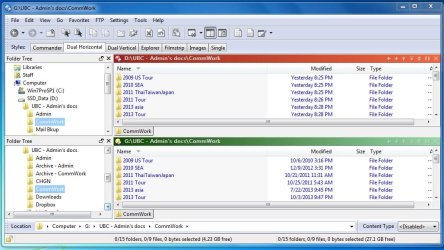
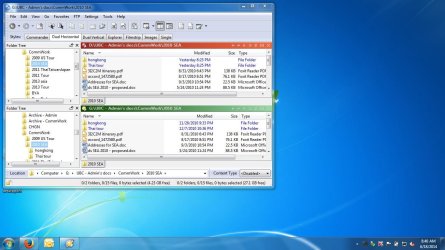
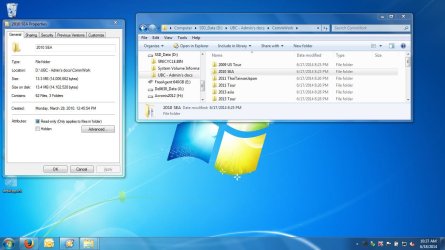
Good morning....here are a couple of screenshots: the first shows the top level subfolders right under CommWork and the second shows the next level down within one those subfolders (2010 SEA).

20140618 CommWork time-date stamp comparison.JPG

20140618 CommWork time-date stamp comparison2.JPG

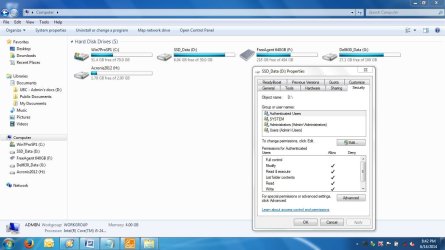
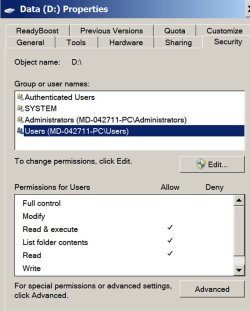
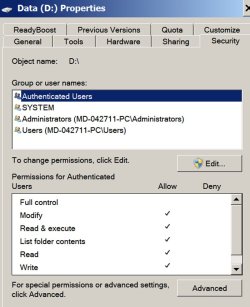
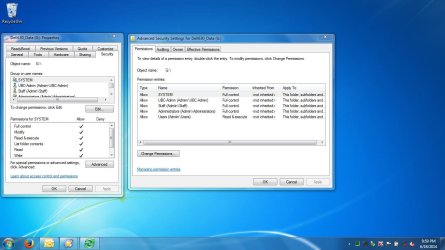
I don't know if permissions and access would cause affects in this regard but I had used MiniTool Partition Wizard to format the D partition on the SSD and the security tab for it doesn't show either of my user accounts specifically:

20140614 - partition D securitytab info.JPG

Both SYSTEM and Administrators group have full control and Users group only have Read & Execute + List folders content permissions.

Thank you for taking the time to look at these for me.----dpwoodpecker
 

My Computer My Computer

At a glance

Windows 7 Pro Version 6.1.7601 Service Pack 1...Intel core i5-2467M CPU @160GHz4Gb installed RAMIntel HD Graphics 3000
Computer type
Laptop
Computer Manufacturer/Model Number
Dell XPS 13 (L321X) x64
OS
Windows 7 Pro Version 6.1.7601 Service Pack 1 Build 7601, clean OEM re-install
CPU
Intel core i5-2467M CPU @160GHz
Motherboard
Dell Inc. 085X6F A00
Memory
4Gb installed RAM
Graphics Card(s)
Intel HD Graphics 3000
Hard Drives
SAMSUNG SSD PM830 mSATA 128GB ATA Device, ACHI enabled
SEAGATE FREEAGENT USB HDD - 640GB
Antivirus
Kaspersky Internet Security 2014 G patch
Browser
Firefox 29.1
I forgot to mention that I didn't click the box "copy NTFS permissions" (under Options) in the configuration used. Also forgot to share that I've had the external HDD for awhile and had created the G partition using the old laptop running XP. In using the HDD with this laptop running Windows 7, the admin user account now has ownership and the standard user account also have full control of the data partition (G) on it. By the way this same problem of subfolders not retaining original dates also happened awhile back in using SyncBack.
 

My Computer My Computer

At a glance

Windows 7 Pro Version 6.1.7601 Service Pack 1...Intel core i5-2467M CPU @160GHz4Gb installed RAMIntel HD Graphics 3000
Computer type
Laptop
Computer Manufacturer/Model Number
Dell XPS 13 (L321X) x64
OS
Windows 7 Pro Version 6.1.7601 Service Pack 1 Build 7601, clean OEM re-install
CPU
Intel core i5-2467M CPU @160GHz
Motherboard
Dell Inc. 085X6F A00
Memory
4Gb installed RAM
Graphics Card(s)
Intel HD Graphics 3000
Hard Drives
SAMSUNG SSD PM830 mSATA 128GB ATA Device, ACHI enabled
SEAGATE FREEAGENT USB HDD - 640GB
Antivirus
Kaspersky Internet Security 2014 G patch
Browser
Firefox 29.1
I clicked on "last page" link and missed reading ignatzatsonic's response....and checked as you showed - the original created dates are preserved. See sample:

20140618 CommWork time-date stamp comparison3.JPG

This was helpful for me to clarify then that I need to be able to maintain the "modified" time/date of the source subfolders in doing the sync/backups - would that be possible at all with these programs?
 

My Computer My Computer

At a glance

Windows 7 Pro Version 6.1.7601 Service Pack 1...Intel core i5-2467M CPU @160GHz4Gb installed RAMIntel HD Graphics 3000
Computer type
Laptop
Computer Manufacturer/Model Number
Dell XPS 13 (L321X) x64
OS
Windows 7 Pro Version 6.1.7601 Service Pack 1 Build 7601, clean OEM re-install
CPU
Intel core i5-2467M CPU @160GHz
Motherboard
Dell Inc. 085X6F A00
Memory
4Gb installed RAM
Graphics Card(s)
Intel HD Graphics 3000
Hard Drives
SAMSUNG SSD PM830 mSATA 128GB ATA Device, ACHI enabled
SEAGATE FREEAGENT USB HDD - 640GB
Antivirus
Kaspersky Internet Security 2014 G patch
Browser
Firefox 29.1
I don't know if permissions and access would cause affects in this regard but I had used MiniTool Partition Wizard to format the D partition on the SSD and the security tab for it doesn't show either of my user accounts specifically:


Both SYSTEM and Administrators group have full control and Users group only have Read & Execute + List folders content permissions.

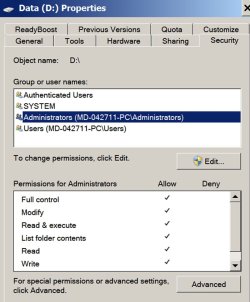
The properties page/security tab for my source drive appears the same as yours.

My System and Administrators group have full control. Users group has read and execute, list folder contents, and read permissions.

I have no idea if it matters.
 

My Computer My Computer

At a glance

Windows 7 Home Premium SP1, 64-bitIntel Skylake i5-6600K, not overclocked8 GB HyperX DDR4-2666 (2 x 4 GB)none; graphics are integrated on CPU
Computer type
PC/Desktop
Computer Manufacturer/Model Number
Ignatz Special; 4 speed manual gearbox; factory air conditioning; one of one
OS
Windows 7 Home Premium SP1, 64-bit
CPU
Intel Skylake i5-6600K, not overclocked
Motherboard
AsRock Z170M Extreme 4, micro ATX
Memory
8 GB HyperX DDR4-2666 (2 x 4 GB)
Graphics Card(s)
none; graphics are integrated on CPU
Sound Card
onboard: Realtek ALC1150; external: USB Behringer UF0-202
Monitor(s) Displays
Dell S2340M 23 inch IPS
Screen Resolution
1600 x 900
Hard Drives
System: Crucial MX100 series SSD, 128 GB;
Data: Samsung Spinpoint 103SJ, 1 TB;
Backup: WD Caviar Green WD30EZRX-00D8PB0, 3 TB
PSU
Rosewill SilentNight 500 watt fanless, semi-modular
Case
Antec Solo II
Cooling
Noctua NH-U12S; Noctua F12 intake, Noctua S12A exhaust
Keyboard
Microsoft 200 6JH-00001 USB
Mouse
Dell or Microsoft optical wired; USB
Antivirus
Microsoft Security Essentials and Malwarebytes Premium
Browser
Pale Moon
Other Info
All fans PWM; speeds at idle: CPU circa 500 rpm; intake circa 600 rpm; exhaust circa 600 rpm; CPU temps 27 idle and 47 C load in a warm room (27 C/81 F) when running Intel Extreme Tuning Utility stress test.
I forgot to mention that I didn't click the box "copy NTFS permissions" (under Options) in the configuration used. Also forgot to share that I've had the external HDD for awhile and had created the G partition using the old laptop running XP. In using the HDD with this laptop running Windows 7, the admin user account now has ownership and the standard user account also have full control of the data partition (G) on it. By the way this same problem of subfolders not retaining original dates also happened awhile back in using SyncBack.

I can't find this "copy NTFS permissions" setting you refer to under "options". I can't even find "options". So I can't compare to my own setup. EXACTLY what are you looking at?

I have no reason to believe that how or when the G partition was made would matter.
 

My Computer My Computer

At a glance

Windows 7 Home Premium SP1, 64-bitIntel Skylake i5-6600K, not overclocked8 GB HyperX DDR4-2666 (2 x 4 GB)none; graphics are integrated on CPU
Computer type
PC/Desktop
Computer Manufacturer/Model Number
Ignatz Special; 4 speed manual gearbox; factory air conditioning; one of one
OS
Windows 7 Home Premium SP1, 64-bit
CPU
Intel Skylake i5-6600K, not overclocked
Motherboard
AsRock Z170M Extreme 4, micro ATX
Memory
8 GB HyperX DDR4-2666 (2 x 4 GB)
Graphics Card(s)
none; graphics are integrated on CPU
Sound Card
onboard: Realtek ALC1150; external: USB Behringer UF0-202
Monitor(s) Displays
Dell S2340M 23 inch IPS
Screen Resolution
1600 x 900
Hard Drives
System: Crucial MX100 series SSD, 128 GB;
Data: Samsung Spinpoint 103SJ, 1 TB;
Backup: WD Caviar Green WD30EZRX-00D8PB0, 3 TB
PSU
Rosewill SilentNight 500 watt fanless, semi-modular
Case
Antec Solo II
Cooling
Noctua NH-U12S; Noctua F12 intake, Noctua S12A exhaust
Keyboard
Microsoft 200 6JH-00001 USB
Mouse
Dell or Microsoft optical wired; USB
Antivirus
Microsoft Security Essentials and Malwarebytes Premium
Browser
Pale Moon
Other Info
All fans PWM; speeds at idle: CPU circa 500 rpm; intake circa 600 rpm; exhaust circa 600 rpm; CPU temps 27 idle and 47 C load in a warm room (27 C/81 F) when running Intel Extreme Tuning Utility stress test.
Hmmm....regarding the "modified" dates in the second pic in post 42 above:

Source is G drive; copy is on D.

There are 6 files shown for each drive. Curiously, 4 of them retained the modified date. Two others did not: hongkong and Thai tour, which show a new modified date of "yesterday 8:25 PM".

What would account for only 2 of 6 getting a new modified date?
 

My Computer My Computer

At a glance

Windows 7 Home Premium SP1, 64-bitIntel Skylake i5-6600K, not overclocked8 GB HyperX DDR4-2666 (2 x 4 GB)none; graphics are integrated on CPU
Computer type
PC/Desktop
Computer Manufacturer/Model Number
Ignatz Special; 4 speed manual gearbox; factory air conditioning; one of one
OS
Windows 7 Home Premium SP1, 64-bit
CPU
Intel Skylake i5-6600K, not overclocked
Motherboard
AsRock Z170M Extreme 4, micro ATX
Memory
8 GB HyperX DDR4-2666 (2 x 4 GB)
Graphics Card(s)
none; graphics are integrated on CPU
Sound Card
onboard: Realtek ALC1150; external: USB Behringer UF0-202
Monitor(s) Displays
Dell S2340M 23 inch IPS
Screen Resolution
1600 x 900
Hard Drives
System: Crucial MX100 series SSD, 128 GB;
Data: Samsung Spinpoint 103SJ, 1 TB;
Backup: WD Caviar Green WD30EZRX-00D8PB0, 3 TB
PSU
Rosewill SilentNight 500 watt fanless, semi-modular
Case
Antec Solo II
Cooling
Noctua NH-U12S; Noctua F12 intake, Noctua S12A exhaust
Keyboard
Microsoft 200 6JH-00001 USB
Mouse
Dell or Microsoft optical wired; USB
Antivirus
Microsoft Security Essentials and Malwarebytes Premium
Browser
Pale Moon
Other Info
All fans PWM; speeds at idle: CPU circa 500 rpm; intake circa 600 rpm; exhaust circa 600 rpm; CPU temps 27 idle and 47 C load in a warm room (27 C/81 F) when running Intel Extreme Tuning Utility stress test.
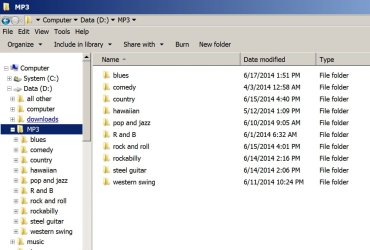
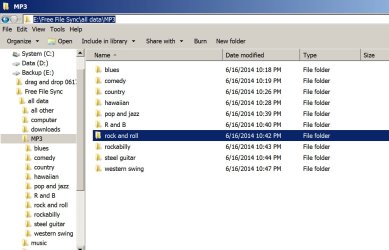
Here’s a couple of pix of my folder trees showing modified dates for a series of folders.

The first is the source D drive, showing modified dates ranging from April 3 to June 17 at 1:51 PM.

The second is the destination E drive, showing modified dates all near 10 PM on June 16. I know what that date and time means. It is the FIRST time that Free File Sync was run on THAT physical drive. I bought a new 3 TB drive on June 16 and ran Free File Sync on it that night, creating those folders for the first time.

I just ran Free File Sync again in the last 5 minutes. The modified dates for the G destination drive did NOT change. They remain near 10 PM on June 16.

As far as I know, this is ordinary default behavior when doing a custom sync in FFS.

Folder “created” dates are as shown on the properties page as explained in my earlier post—source and destination drives are in complete agreement, with matching created dates from June 2011. I know what that date is: the date I first installed and loaded data on my then new Samsung 1 TB primary data drive.

I have no idea why you might get different behavior.
 

Attachments

  • d drive rr date modified april to 61714 near 10pm, indicating when originals last modified.jpg
    d drive rr date modified april to 61714 near 10pm, indicating when originals last modified.jpg
    100.2 KB · Views: 0
  • e drive rr date modified 61614 near 10pm, indicating when first created.jpg
    e drive rr date modified 61614 near 10pm, indicating when first created.jpg
    109.8 KB · Views: 0
Last edited:

My Computer My Computer

At a glance

Windows 7 Home Premium SP1, 64-bitIntel Skylake i5-6600K, not overclocked8 GB HyperX DDR4-2666 (2 x 4 GB)none; graphics are integrated on CPU
Computer type
PC/Desktop
Computer Manufacturer/Model Number
Ignatz Special; 4 speed manual gearbox; factory air conditioning; one of one
OS
Windows 7 Home Premium SP1, 64-bit
CPU
Intel Skylake i5-6600K, not overclocked
Motherboard
AsRock Z170M Extreme 4, micro ATX
Memory
8 GB HyperX DDR4-2666 (2 x 4 GB)
Graphics Card(s)
none; graphics are integrated on CPU
Sound Card
onboard: Realtek ALC1150; external: USB Behringer UF0-202
Monitor(s) Displays
Dell S2340M 23 inch IPS
Screen Resolution
1600 x 900
Hard Drives
System: Crucial MX100 series SSD, 128 GB;
Data: Samsung Spinpoint 103SJ, 1 TB;
Backup: WD Caviar Green WD30EZRX-00D8PB0, 3 TB
PSU
Rosewill SilentNight 500 watt fanless, semi-modular
Case
Antec Solo II
Cooling
Noctua NH-U12S; Noctua F12 intake, Noctua S12A exhaust
Keyboard
Microsoft 200 6JH-00001 USB
Mouse
Dell or Microsoft optical wired; USB
Antivirus
Microsoft Security Essentials and Malwarebytes Premium
Browser
Pale Moon
Other Info
All fans PWM; speeds at idle: CPU circa 500 rpm; intake circa 600 rpm; exhaust circa 600 rpm; CPU temps 27 idle and 47 C load in a warm room (27 C/81 F) when running Intel Extreme Tuning Utility stress test.
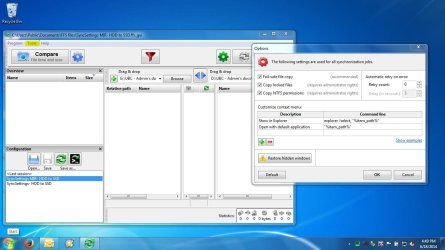
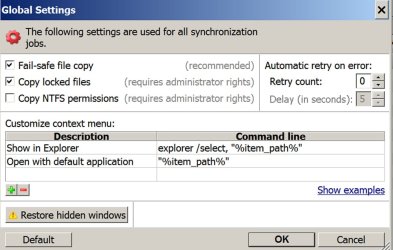
Wow....thank you for the step-by-step explanation, ignatzatsonic. Here is the screen shot of FFS main window with tools tab (highlighted) on menu and within that is the "options" choice I had mentioned....and the dialog box is what opens up when it's chosen.

20140618 FFS tools-options-NTFS.JPG
 

My Computer My Computer

At a glance

Windows 7 Pro Version 6.1.7601 Service Pack 1...Intel core i5-2467M CPU @160GHz4Gb installed RAMIntel HD Graphics 3000
Computer type
Laptop
Computer Manufacturer/Model Number
Dell XPS 13 (L321X) x64
OS
Windows 7 Pro Version 6.1.7601 Service Pack 1 Build 7601, clean OEM re-install
CPU
Intel core i5-2467M CPU @160GHz
Motherboard
Dell Inc. 085X6F A00
Memory
4Gb installed RAM
Graphics Card(s)
Intel HD Graphics 3000
Hard Drives
SAMSUNG SSD PM830 mSATA 128GB ATA Device, ACHI enabled
SEAGATE FREEAGENT USB HDD - 640GB
Antivirus
Kaspersky Internet Security 2014 G patch
Browser
Firefox 29.1
I don't know if permissions and access would cause affects in this regard but I had used MiniTool Partition Wizard to format the D partition on the SSD and the security tab for it doesn't show either of my user accounts specifically:

Both SYSTEM and Administrators group have full control and Users group only have Read & Execute + List folders content permissions.

The properties page/security tab for my source drive appears the same as yours.

My System and Administrators group have full control. Users group has read and execute, list folder contents, and read permissions.

I have no idea if it matters.

I don't know if it matters either but in case it does, the properties page/security tab shown in the 3rd attachment of my post #42 is of the destination D: (internal SSD data partition). For my source drive G: (external HDD), both the admin user account has ownership and the standard user account has full control, in addition to the above mentioned permissions.

Here’s a couple of pix of my folder trees showing modified dates for a series of folders.

The first is the source D drive, showing modified dates ranging from April 3 to June 17 at 1:51 PM.

The second is the destination G drive, showing modified dates all near 10 PM on June 16. I know what that date and time means. It is the FIRST time that Free File Sync was run on THAT physical drive. I bought a new 3 TB drive on June 16 and ran Free File Sync on it that night, creating those folders for the first time.

Well, this is the first time I've used FFS and on these drives (external HDD, source G: and internal SSD, destination D:, which again is a newly formatted partition). So do I understand correctly that in creating the new folders for the first time on destination drive, FFS cannot transfer the source subfolders' modified dates to those folders?

I just ran Free File Sync again in the last 5 minutes. The modified dates for the G destination drive did NOT change. They remain near 10 PM on June 16.

As far as I know, this is ordinary default behavior when doing a custom sync in FFS.

Using FFS for the first time, the custom option seemed easiest way to me for creating a simple configuration setting for copying my data from the HDD to the SSD. Do you think any of the other variants would give the result I need? This is more like migrating data that I am working on (thus the need to keep the subfolders' modified time/dates) to a new drive instead of a backup.
 
Last edited:

My Computer My Computer

At a glance

Windows 7 Pro Version 6.1.7601 Service Pack 1...Intel core i5-2467M CPU @160GHz4Gb installed RAMIntel HD Graphics 3000
Computer type
Laptop
Computer Manufacturer/Model Number
Dell XPS 13 (L321X) x64
OS
Windows 7 Pro Version 6.1.7601 Service Pack 1 Build 7601, clean OEM re-install
CPU
Intel core i5-2467M CPU @160GHz
Motherboard
Dell Inc. 085X6F A00
Memory
4Gb installed RAM
Graphics Card(s)
Intel HD Graphics 3000
Hard Drives
SAMSUNG SSD PM830 mSATA 128GB ATA Device, ACHI enabled
SEAGATE FREEAGENT USB HDD - 640GB
Antivirus
Kaspersky Internet Security 2014 G patch
Browser
Firefox 29.1
Wow....thank you for the step-by-step explanation, ignatzatsonic. Here is the screen shot of FFS main window with tools tab (highlighted) on menu and within that is the "options" choice I had mentioned....and the dialog box is what opens up when it's chosen.

OK, now I'm with you.

Here's what I have under options. All are default I would guess.

Note that I don't have "Copy NTFS permissions" checked.
 

Attachments

  • options tab.jpg
    options tab.jpg
    94.1 KB · Views: 1
Last edited:

My Computer My Computer

At a glance

Windows 7 Home Premium SP1, 64-bitIntel Skylake i5-6600K, not overclocked8 GB HyperX DDR4-2666 (2 x 4 GB)none; graphics are integrated on CPU
Computer type
PC/Desktop
Computer Manufacturer/Model Number
Ignatz Special; 4 speed manual gearbox; factory air conditioning; one of one
OS
Windows 7 Home Premium SP1, 64-bit
CPU
Intel Skylake i5-6600K, not overclocked
Motherboard
AsRock Z170M Extreme 4, micro ATX
Memory
8 GB HyperX DDR4-2666 (2 x 4 GB)
Graphics Card(s)
none; graphics are integrated on CPU
Sound Card
onboard: Realtek ALC1150; external: USB Behringer UF0-202
Monitor(s) Displays
Dell S2340M 23 inch IPS
Screen Resolution
1600 x 900
Hard Drives
System: Crucial MX100 series SSD, 128 GB;
Data: Samsung Spinpoint 103SJ, 1 TB;
Backup: WD Caviar Green WD30EZRX-00D8PB0, 3 TB
PSU
Rosewill SilentNight 500 watt fanless, semi-modular
Case
Antec Solo II
Cooling
Noctua NH-U12S; Noctua F12 intake, Noctua S12A exhaust
Keyboard
Microsoft 200 6JH-00001 USB
Mouse
Dell or Microsoft optical wired; USB
Antivirus
Microsoft Security Essentials and Malwarebytes Premium
Browser
Pale Moon
Other Info
All fans PWM; speeds at idle: CPU circa 500 rpm; intake circa 600 rpm; exhaust circa 600 rpm; CPU temps 27 idle and 47 C load in a warm room (27 C/81 F) when running Intel Extreme Tuning Utility stress test.
Here are some pix of the security tabs of properties pages.

In this order: administrators group, authenticated users group, users group. I think they all match yours?
 

Attachments

  • source drive users group properties.jpg
    source drive users group properties.jpg
    80.1 KB · Views: 0
  • source drive authenticated users properties.jpg
    source drive authenticated users properties.jpg
    81.9 KB · Views: 0
  • source drive administrators group properties.jpg
    source drive administrators group properties.jpg
    82.9 KB · Views: 0

My Computer My Computer

At a glance

Windows 7 Home Premium SP1, 64-bitIntel Skylake i5-6600K, not overclocked8 GB HyperX DDR4-2666 (2 x 4 GB)none; graphics are integrated on CPU
Computer type
PC/Desktop
Computer Manufacturer/Model Number
Ignatz Special; 4 speed manual gearbox; factory air conditioning; one of one
OS
Windows 7 Home Premium SP1, 64-bit
CPU
Intel Skylake i5-6600K, not overclocked
Motherboard
AsRock Z170M Extreme 4, micro ATX
Memory
8 GB HyperX DDR4-2666 (2 x 4 GB)
Graphics Card(s)
none; graphics are integrated on CPU
Sound Card
onboard: Realtek ALC1150; external: USB Behringer UF0-202
Monitor(s) Displays
Dell S2340M 23 inch IPS
Screen Resolution
1600 x 900
Hard Drives
System: Crucial MX100 series SSD, 128 GB;
Data: Samsung Spinpoint 103SJ, 1 TB;
Backup: WD Caviar Green WD30EZRX-00D8PB0, 3 TB
PSU
Rosewill SilentNight 500 watt fanless, semi-modular
Case
Antec Solo II
Cooling
Noctua NH-U12S; Noctua F12 intake, Noctua S12A exhaust
Keyboard
Microsoft 200 6JH-00001 USB
Mouse
Dell or Microsoft optical wired; USB
Antivirus
Microsoft Security Essentials and Malwarebytes Premium
Browser
Pale Moon
Other Info
All fans PWM; speeds at idle: CPU circa 500 rpm; intake circa 600 rpm; exhaust circa 600 rpm; CPU temps 27 idle and 47 C load in a warm room (27 C/81 F) when running Intel Extreme Tuning Utility stress test.
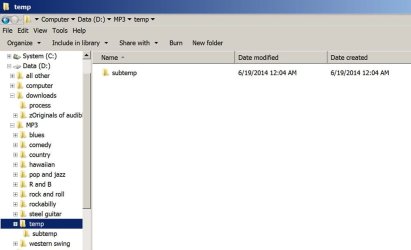
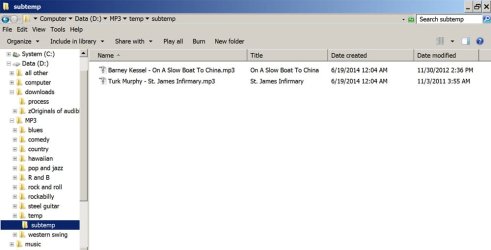
I just did the following test:

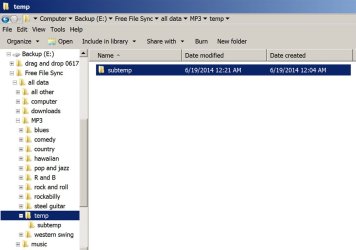
1204 am. I created temp and subtemp folders on the source drive and put 2 files in subtemp.

1213 am. I ran FFS and checked the created and modified dates on the destination drive. They all matched the source drive—temp, subtemp, and subtemp’s contents.

1221 am. I then deleted one file from subtemp and immediately ran FFS again. The modified date for temp and subtemp both changed to 1221. The modified date for the remaining file did not change, because it was skipped and not recopied.

Pix below are in this order:

subtemp properties on source drive at 1204 am

subtemp contents properties on source drive at 1204 am

subtemp properties on destination drive at 1221 am
 

Attachments

  • subtemp properties on source drive at 1204 am.jpg
    subtemp properties on source drive at 1204 am.jpg
    50.5 KB · Views: 0
  • subtemp contents properties on source drive at 1204 am.jpg
    subtemp contents properties on source drive at 1204 am.jpg
    55.2 KB · Views: 0
  • subtemp properties on destination drive at 1221 am.jpg
    subtemp properties on destination drive at 1221 am.jpg
    69 KB · Views: 0

My Computer My Computer

At a glance

Windows 7 Home Premium SP1, 64-bitIntel Skylake i5-6600K, not overclocked8 GB HyperX DDR4-2666 (2 x 4 GB)none; graphics are integrated on CPU
Computer type
PC/Desktop
Computer Manufacturer/Model Number
Ignatz Special; 4 speed manual gearbox; factory air conditioning; one of one
OS
Windows 7 Home Premium SP1, 64-bit
CPU
Intel Skylake i5-6600K, not overclocked
Motherboard
AsRock Z170M Extreme 4, micro ATX
Memory
8 GB HyperX DDR4-2666 (2 x 4 GB)
Graphics Card(s)
none; graphics are integrated on CPU
Sound Card
onboard: Realtek ALC1150; external: USB Behringer UF0-202
Monitor(s) Displays
Dell S2340M 23 inch IPS
Screen Resolution
1600 x 900
Hard Drives
System: Crucial MX100 series SSD, 128 GB;
Data: Samsung Spinpoint 103SJ, 1 TB;
Backup: WD Caviar Green WD30EZRX-00D8PB0, 3 TB
PSU
Rosewill SilentNight 500 watt fanless, semi-modular
Case
Antec Solo II
Cooling
Noctua NH-U12S; Noctua F12 intake, Noctua S12A exhaust
Keyboard
Microsoft 200 6JH-00001 USB
Mouse
Dell or Microsoft optical wired; USB
Antivirus
Microsoft Security Essentials and Malwarebytes Premium
Browser
Pale Moon
Other Info
All fans PWM; speeds at idle: CPU circa 500 rpm; intake circa 600 rpm; exhaust circa 600 rpm; CPU temps 27 idle and 47 C load in a warm room (27 C/81 F) when running Intel Extreme Tuning Utility stress test.
Wow....thank you for the step-by-step explanation, ignatzatsonic. Here is the screen shot of FFS main window with tools tab (highlighted) on menu and within that is the "options" choice I had mentioned....and the dialog box is what opens up when it's chosen.

OK, now I'm with you.

Here's what I have under options. All are default I would guess.

Note that I don't have "Copy NTFS permissions" checked.

I didn't have that last box checked either when I ran the first sync....only on the 2nd sync testing whether it would make a difference in retaining the subfolders' modified dates. It does just that - copies the NTFS permissions to the copied files & folders.
 
Last edited:

My Computer My Computer

At a glance

Windows 7 Pro Version 6.1.7601 Service Pack 1...Intel core i5-2467M CPU @160GHz4Gb installed RAMIntel HD Graphics 3000
Computer type
Laptop
Computer Manufacturer/Model Number
Dell XPS 13 (L321X) x64
OS
Windows 7 Pro Version 6.1.7601 Service Pack 1 Build 7601, clean OEM re-install
CPU
Intel core i5-2467M CPU @160GHz
Motherboard
Dell Inc. 085X6F A00
Memory
4Gb installed RAM
Graphics Card(s)
Intel HD Graphics 3000
Hard Drives
SAMSUNG SSD PM830 mSATA 128GB ATA Device, ACHI enabled
SEAGATE FREEAGENT USB HDD - 640GB
Antivirus
Kaspersky Internet Security 2014 G patch
Browser
Firefox 29.1
Here are some pix of the security tabs of properties pages.

In this order: administrators group, authenticated users group, users group. I think they all match yours?

These all match for my DESTINATION partition D, whereas your drive D is your SOURCE, right?

Here is the properties/security tab info for my SOURCE G (external HDD):

20140614 - partition G securitytab info.JPG
 

My Computer My Computer

At a glance

Windows 7 Pro Version 6.1.7601 Service Pack 1...Intel core i5-2467M CPU @160GHz4Gb installed RAMIntel HD Graphics 3000
Computer type
Laptop
Computer Manufacturer/Model Number
Dell XPS 13 (L321X) x64
OS
Windows 7 Pro Version 6.1.7601 Service Pack 1 Build 7601, clean OEM re-install
CPU
Intel core i5-2467M CPU @160GHz
Motherboard
Dell Inc. 085X6F A00
Memory
4Gb installed RAM
Graphics Card(s)
Intel HD Graphics 3000
Hard Drives
SAMSUNG SSD PM830 mSATA 128GB ATA Device, ACHI enabled
SEAGATE FREEAGENT USB HDD - 640GB
Antivirus
Kaspersky Internet Security 2014 G patch
Browser
Firefox 29.1
I just did the following test:

1204 am. I created temp and subtemp folders on the source drive and put 2 files in subtemp.

1213 am. I ran FFS and checked the created and modified dates on the destination drive. They all matched the source drive—temp, subtemp, and subtemp’s contents.

Thank you for doing the tests....this step here simulates my scenario - I don't have problems with time/date stamps of files, just with folders.

So after running FFS at 1213am, the temp and subtemp folders on your destination G "all matched the source drive" and showed 1204am time. Whereas in my case those folders on my destination would show 1213 time as the modified time when FFS first created those folders on that drive!

I would appreciate further help to be able to copy my data now and also be able to use FFS as a backup tool later. ---dpwoodpecker
 

My Computer My Computer

At a glance

Windows 7 Pro Version 6.1.7601 Service Pack 1...Intel core i5-2467M CPU @160GHz4Gb installed RAMIntel HD Graphics 3000
Computer type
Laptop
Computer Manufacturer/Model Number
Dell XPS 13 (L321X) x64
OS
Windows 7 Pro Version 6.1.7601 Service Pack 1 Build 7601, clean OEM re-install
CPU
Intel core i5-2467M CPU @160GHz
Motherboard
Dell Inc. 085X6F A00
Memory
4Gb installed RAM
Graphics Card(s)
Intel HD Graphics 3000
Hard Drives
SAMSUNG SSD PM830 mSATA 128GB ATA Device, ACHI enabled
SEAGATE FREEAGENT USB HDD - 640GB
Antivirus
Kaspersky Internet Security 2014 G patch
Browser
Firefox 29.1
These all match for my DESTINATION partition D, whereas your drive D is your SOURCE, right?

Here is the properties/security tab info for my SOURCE G (external HDD):

Yes. D is my source drive.

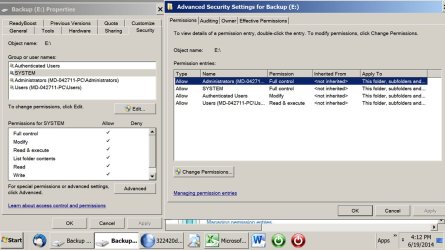
Here are the properties for my destination drive E.
 

Attachments

  • backup drive E properties.jpg
    backup drive E properties.jpg
    110 KB · Views: 2

My Computer My Computer

At a glance

Windows 7 Home Premium SP1, 64-bitIntel Skylake i5-6600K, not overclocked8 GB HyperX DDR4-2666 (2 x 4 GB)none; graphics are integrated on CPU
Computer type
PC/Desktop
Computer Manufacturer/Model Number
Ignatz Special; 4 speed manual gearbox; factory air conditioning; one of one
OS
Windows 7 Home Premium SP1, 64-bit
CPU
Intel Skylake i5-6600K, not overclocked
Motherboard
AsRock Z170M Extreme 4, micro ATX
Memory
8 GB HyperX DDR4-2666 (2 x 4 GB)
Graphics Card(s)
none; graphics are integrated on CPU
Sound Card
onboard: Realtek ALC1150; external: USB Behringer UF0-202
Monitor(s) Displays
Dell S2340M 23 inch IPS
Screen Resolution
1600 x 900
Hard Drives
System: Crucial MX100 series SSD, 128 GB;
Data: Samsung Spinpoint 103SJ, 1 TB;
Backup: WD Caviar Green WD30EZRX-00D8PB0, 3 TB
PSU
Rosewill SilentNight 500 watt fanless, semi-modular
Case
Antec Solo II
Cooling
Noctua NH-U12S; Noctua F12 intake, Noctua S12A exhaust
Keyboard
Microsoft 200 6JH-00001 USB
Mouse
Dell or Microsoft optical wired; USB
Antivirus
Microsoft Security Essentials and Malwarebytes Premium
Browser
Pale Moon
Other Info
All fans PWM; speeds at idle: CPU circa 500 rpm; intake circa 600 rpm; exhaust circa 600 rpm; CPU temps 27 idle and 47 C load in a warm room (27 C/81 F) when running Intel Extreme Tuning Utility stress test.

My Computer My Computer

At a glance

Windows 7 Pro Version 6.1.7601 Service Pack 1...Intel core i5-2467M CPU @160GHz4Gb installed RAMIntel HD Graphics 3000
Computer type
Laptop
Computer Manufacturer/Model Number
Dell XPS 13 (L321X) x64
OS
Windows 7 Pro Version 6.1.7601 Service Pack 1 Build 7601, clean OEM re-install
CPU
Intel core i5-2467M CPU @160GHz
Motherboard
Dell Inc. 085X6F A00
Memory
4Gb installed RAM
Graphics Card(s)
Intel HD Graphics 3000
Hard Drives
SAMSUNG SSD PM830 mSATA 128GB ATA Device, ACHI enabled
SEAGATE FREEAGENT USB HDD - 640GB
Antivirus
Kaspersky Internet Security 2014 G patch
Browser
Firefox 29.1

My Computers My Computers

  • At a glance

    7 X64i5 84002x8gb 3200mhz
    Computer type
    PC/Desktop
    OS
    7 X64
    CPU
    i5 8400
    Motherboard
    gigabyte b365m ds3h
    Memory
    2x8gb 3200mhz
    Hard Drives
    various
    PSU
    pure power 11 400w cm
    Case
    Coolermaster
    Cooling
    cryorig m9i
  • At a glance

    7x64g54008gb ddr4 2400
    Computer type
    PC/Desktop
    OS
    7x64
    CPU
    g5400
    Motherboard
    ga b365m ds3h
    Memory
    8gb ddr4 2400
    PSU
    xfx pro 450w
Just tried SyncToy....no luck....will download Karen's Replicator to try next...keeping fingers crossed!
 

My Computer My Computer

At a glance

Windows 7 Pro Version 6.1.7601 Service Pack 1...Intel core i5-2467M CPU @160GHz4Gb installed RAMIntel HD Graphics 3000
Computer type
Laptop
Computer Manufacturer/Model Number
Dell XPS 13 (L321X) x64
OS
Windows 7 Pro Version 6.1.7601 Service Pack 1 Build 7601, clean OEM re-install
CPU
Intel core i5-2467M CPU @160GHz
Motherboard
Dell Inc. 085X6F A00
Memory
4Gb installed RAM
Graphics Card(s)
Intel HD Graphics 3000
Hard Drives
SAMSUNG SSD PM830 mSATA 128GB ATA Device, ACHI enabled
SEAGATE FREEAGENT USB HDD - 640GB
Antivirus
Kaspersky Internet Security 2014 G patch
Browser
Firefox 29.1
Back
Top