Unable to install Windows on new SSD, error 0x80070057

Maesen

New member
Member
VIP
Local time
12:35 AM
Messages
147
Hi,

I bought a new SSD (PNY 120gb) and planned a full complete clean install of Windows.

Since I planned on installing Windows 7 64 bits on it and start over from there, I unplugged all other drives as well as useless USB peripherals. I even removed 8gb outta my 16gb setup.

Went in BIOS and set the SSD as AHCI (or something like that). Rebooted on Windows 7 DVD. Pressed SHIFT+F10.

In the Command Prompt, I did the following command:
DISKPART
LIST DISK
SELECT DISK 0
DETAIL DISK (to make sure you got the hard disk)
CLEAN
EXIT
EXIT (this one gets you back into the install program.
Then went on and clicked INSTALL.
Chose my disk, then selected NEXT.

Then boom. Windows Cannot be installed on this disk (Error 0x80070057).

The Disk 0 is really the SSD, not the DVD drive.

I tried doing, in the Command Prompt,
select disk 0
create partition primary
format fs=ntfs
It failed at 100% complete with this message: "Diskpart has encountered an error: The parameter is incorrect. See the System Event Log for more information."

So I rebooted, pressed SHIFT-F10 at the "Install" part and tried this command;
diskpart
list disk
select disk 0
clean all
create partition primary
select partition
active
list volume
select volume 1
format fs=ntfs
But it still gives me the same error


322534-random-bsod-error-0x101-imageuploadedbytapatalk1403318445.613410.jpg


And before going to bed, I tried this command:
diskpart
list disk
select disk 0
clean all
create partition primary
select partition
active
exit
exit
Then tried to Format the drive in the installation Wizard but it still wont do it.
322537-random-bsod-error-0x101-imageuploadedbytapatalk1403320676.235786.jpg


What do I do from there? Thanks to Golden for his help last night.
Thanks in advance!
 

My Computer My Computer

At a glance

Windows 7 Ultimate x64AMD FX-835016GB Corsair VengeancenVidia GeForce GTX 660
Computer type
PC/Desktop
Computer Manufacturer/Model Number
Custom Built
OS
Windows 7 Ultimate x64
CPU
AMD FX-8350
Motherboard
Asus Sabertooth 990FX R2.0
Memory
16GB Corsair Vengeance
Graphics Card(s)
nVidia GeForce GTX 660
Monitor(s) Displays
Asus ML248 + Viewsonic VX922
Screen Resolution
1920x1080 + 1280x1024
Hard Drives
120gb PNY xlr8 SSD
1TB WD Caviar Black
2TB WD Caviar Black
PSU
Corsair CX750M
Case
Antec Twelve-Hundred
Cooling
Antec Kuhler H2O 620
Keyboard
Logitech G15 (first gen)
Mouse
Razer Naga Epic
Internet Speed
Slow
Antivirus
MSE
Browser
Google Chrome
All you need to do to install Windows 7 to an SSD is to boot with the Windows 7 DVD and install.

Why did you use diskpart and then format?
 

My Computer My Computer

At a glance

Windows 10 Pro x64, Windows 8.1 Pro x64, Wind...INTEL i9-7920X LGA 206664 GB (4 X 16 GB) G-Skill V Series DDR4 3200 ...EVGA GTX 1060 SC 3 GB
Computer type
PC/Desktop
Computer Manufacturer/Model Number
Custom Built
OS
Windows 10 Pro x64, Windows 8.1 Pro x64, Windows 7 Ultimate x64 SP1,
CPU
INTEL i9-7920X LGA 2066
Motherboard
Gigabyte X299-WU8 F3
Memory
64 GB (4 X 16 GB) G-Skill V Series DDR4 3200 Quad Channel
Graphics Card(s)
EVGA GTX 1060 SC 3 GB
Sound Card
Realtek Onboard ALC1220
Monitor(s) Displays
2 x Samsung S27E310
Screen Resolution
1920x1080
Hard Drives
Samsung 2 x 970 EVO Plus 500 GB NVMe
1 x 6TB WD 6003FZBX SATA
1 x 6TB WD 60EFRX SATA
12 x 3TB WD 30EFRX SATA
PSU
Seasonic X-1050
Case
Thermaltake Armor+
Cooling
Corsair H80i V2 Liquid AOI Cooler
Keyboard
Logitech G510s
Mouse
Logitech MX Master 2S
Internet Speed
200 Mb/s
Antivirus
ESET NOD32 13.1
Browser
EDGE (Dev, Canary, Beta), Chrome
Other Info
ASUS RT-AC68U router
Malwarebytes 4.0.4
All you need to do to install Windows 7 to an SSD is to boot with the Windows 7 DVD and install.

Why did you use diskpart and then format?
Because it did not work in the first place.
 

My Computer My Computer

At a glance

Windows 7 Ultimate x64AMD FX-835016GB Corsair VengeancenVidia GeForce GTX 660
Computer type
PC/Desktop
Computer Manufacturer/Model Number
Custom Built
OS
Windows 7 Ultimate x64
CPU
AMD FX-8350
Motherboard
Asus Sabertooth 990FX R2.0
Memory
16GB Corsair Vengeance
Graphics Card(s)
nVidia GeForce GTX 660
Monitor(s) Displays
Asus ML248 + Viewsonic VX922
Screen Resolution
1920x1080 + 1280x1024
Hard Drives
120gb PNY xlr8 SSD
1TB WD Caviar Black
2TB WD Caviar Black
PSU
Corsair CX750M
Case
Antec Twelve-Hundred
Cooling
Antec Kuhler H2O 620
Keyboard
Logitech G15 (first gen)
Mouse
Razer Naga Epic
Internet Speed
Slow
Antivirus
MSE
Browser
Google Chrome
Hi

It looks like your install DVD is booted in UEFI mode but having some issues in installing "Windows" in UEFI mode. It might be due to some incorrect configuration in BIOS. Please try the below steps.

1. Enter BIOS setup and load default configuration.

2. Make sure SATA is set to AHCI mode.

3. Save and exit the BIOS and press F8 to open boot selection menu. You may see your DVD drive listed wise - one with a regular name and other with a UEFI prefix. Make sure to not select the one with UEFI for an MBR based install.

An example :

19935d1356445263t-uefi-bios-settings-windows-8-windows-8-downgrade-006-sb-posting.png


In the above example, DVD Drive with the P1 prefix should be selected for boot.


4. Open DISKPART at boot and issue the CLEAN command ( not CLEAN ALL). Then try to install Windows.
 

My Computer My Computer

At a glance

Windows 7 Ultimate x64
Computer type
PC/Desktop
OS
Windows 7 Ultimate x64
Hi

It looks like your install DVD is booted in UEFI mode but having some issues in installing "Windows" in UEFI mode. It might be due to some incorrect configuration in BIOS. Please try the below steps.

1. Enter BIOS setup and load default configuration.

2. Make sure SATA is set to AHCI mode.

3. Save and exit the BIOS and press F8 to open boot selection menu. You may see your DVD drive listed wise - one with a regular name and other with a UEFI prefix. Make sure to not select the one with UEFI for an MBR based install.

An example :

19935d1356445263t-uefi-bios-settings-windows-8-windows-8-downgrade-006-sb-posting.png


In the above example, DVD Drive with the P1 prefix should be selected for boot.


4. Open DISKPART at boot and issue the CLEAN command ( not CLEAN ALL). Then try to install Windows.
You got it.
It was indeed booting on the UEFI version.

Made it go into NON-UEFI, did the CLEAN command and so far it is installing correctly.

I will update this thread when its done!

Thank you sir for that FAST fix! Haha
 

My Computer My Computer

At a glance

Windows 7 Ultimate x64AMD FX-835016GB Corsair VengeancenVidia GeForce GTX 660
Computer type
PC/Desktop
Computer Manufacturer/Model Number
Custom Built
OS
Windows 7 Ultimate x64
CPU
AMD FX-8350
Motherboard
Asus Sabertooth 990FX R2.0
Memory
16GB Corsair Vengeance
Graphics Card(s)
nVidia GeForce GTX 660
Monitor(s) Displays
Asus ML248 + Viewsonic VX922
Screen Resolution
1920x1080 + 1280x1024
Hard Drives
120gb PNY xlr8 SSD
1TB WD Caviar Black
2TB WD Caviar Black
PSU
Corsair CX750M
Case
Antec Twelve-Hundred
Cooling
Antec Kuhler H2O 620
Keyboard
Logitech G15 (first gen)
Mouse
Razer Naga Epic
Internet Speed
Slow
Antivirus
MSE
Browser
Google Chrome
Hi

It looks like your install DVD is booted in UEFI mode but having some issues in installing "Windows" in UEFI mode. It might be due to some incorrect configuration in BIOS. Please try the below steps.

1. Enter BIOS setup and load default configuration.

2. Make sure SATA is set to AHCI mode.

3. Save and exit the BIOS and press F8 to open boot selection menu. You may see your DVD drive listed wise - one with a regular name and other with a UEFI prefix. Make sure to not select the one with UEFI for an MBR based install.

An example :

19935d1356445263t-uefi-bios-settings-windows-8-windows-8-downgrade-006-sb-posting.png


In the above example, DVD Drive with the P1 prefix should be selected for boot.


4. Open DISKPART at boot and issue the CLEAN command ( not CLEAN ALL). Then try to install Windows.
You got it.
It was indeed booting on the UEFI version.

Made it go into NON-UEFI, did the CLEAN command and so far it is installing correctly.

I will update this thread when its done!

Thank you sir for that FAST fix! Haha

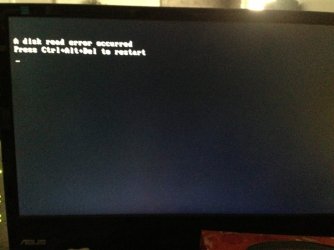
I knew I shouldnt have claimed Victory so fast. I let everything install and when I came back to the computer it had this screen. ImageUploadedByTapatalk1403371631.276029.jpg
 

My Computer My Computer

At a glance

Windows 7 Ultimate x64AMD FX-835016GB Corsair VengeancenVidia GeForce GTX 660
Computer type
PC/Desktop
Computer Manufacturer/Model Number
Custom Built
OS
Windows 7 Ultimate x64
CPU
AMD FX-8350
Motherboard
Asus Sabertooth 990FX R2.0
Memory
16GB Corsair Vengeance
Graphics Card(s)
nVidia GeForce GTX 660
Monitor(s) Displays
Asus ML248 + Viewsonic VX922
Screen Resolution
1920x1080 + 1280x1024
Hard Drives
120gb PNY xlr8 SSD
1TB WD Caviar Black
2TB WD Caviar Black
PSU
Corsair CX750M
Case
Antec Twelve-Hundred
Cooling
Antec Kuhler H2O 620
Keyboard
Logitech G15 (first gen)
Mouse
Razer Naga Epic
Internet Speed
Slow
Antivirus
MSE
Browser
Google Chrome
What happens when you press F8 and select the hard drive for boot ?.

Do you still have the old hard drive ?. If yes, disconnect SSD and connect it to the same SATA port. Without changing anything in the BIOS, try booting from the HDD and let me know the result.
 

My Computer My Computer

At a glance

Windows 7 Ultimate x64
Computer type
PC/Desktop
OS
Windows 7 Ultimate x64
What happens when you press F8 and select the hard drive for boot ?.

Do you still have the old hard drive ?. If yes, disconnect SSD and connect it to the same SATA port. Without changing anything in the BIOS, try booting from the HDD and let me know the result.

When pressing F8 and choosing the SSD, I get the screen I posted above.

I do have the old HDD but the disk itself failed and I am in the process of sending it back to WD for warranty claim.
 

My Computer My Computer

At a glance

Windows 7 Ultimate x64AMD FX-835016GB Corsair VengeancenVidia GeForce GTX 660
Computer type
PC/Desktop
Computer Manufacturer/Model Number
Custom Built
OS
Windows 7 Ultimate x64
CPU
AMD FX-8350
Motherboard
Asus Sabertooth 990FX R2.0
Memory
16GB Corsair Vengeance
Graphics Card(s)
nVidia GeForce GTX 660
Monitor(s) Displays
Asus ML248 + Viewsonic VX922
Screen Resolution
1920x1080 + 1280x1024
Hard Drives
120gb PNY xlr8 SSD
1TB WD Caviar Black
2TB WD Caviar Black
PSU
Corsair CX750M
Case
Antec Twelve-Hundred
Cooling
Antec Kuhler H2O 620
Keyboard
Logitech G15 (first gen)
Mouse
Razer Naga Epic
Internet Speed
Slow
Antivirus
MSE
Browser
Google Chrome
A "Disk Read Error" is usually not considered as a good sign. Please try the below steps one by one.

1. Change SATA cable. A faulty cable can cause weird issues. Also reset the power connector.

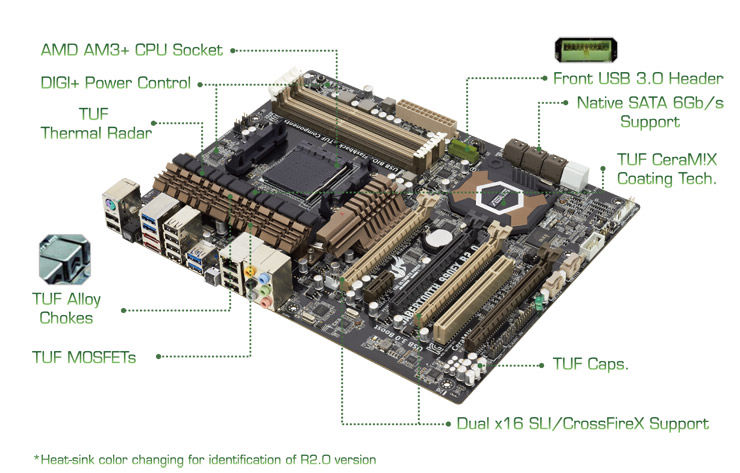
2. If that is not helpful, switch the SATA port and re-install OS. You will see two types of SATA ports - brown and black colored. If the SSD is currently connected to a brown colored port, reconnect it to a white port or vice versa. Then re-install OS from scratch.

SAB_990FX_R2-line-01.jpg
 

My Computer My Computer

At a glance

Windows 7 Ultimate x64
Computer type
PC/Desktop
OS
Windows 7 Ultimate x64
A "Disk Read Error" is usually not considered as a good sign. Please try the below steps one by one.

1. Change SATA cable. A faulty cable can cause weird issues. Also reset the power connector.

2. If that is not helpful, switch the SATA port and re-install OS. You will see two types of SATA ports - brown and black colored. If the SSD is currently connected to a brown colored port, reconnect it to a white port or vice versa. Then re-install OS from scratch.

SAB_990FX_R2-line-01.jpg
I changed my SATA cable for the motherboard ones. Now my SSD is not showing up in the BIOS when in AHCI mode. It does show up in IDE mode though.
 

My Computer My Computer

At a glance

Windows 7 Ultimate x64AMD FX-835016GB Corsair VengeancenVidia GeForce GTX 660
Computer type
PC/Desktop
Computer Manufacturer/Model Number
Custom Built
OS
Windows 7 Ultimate x64
CPU
AMD FX-8350
Motherboard
Asus Sabertooth 990FX R2.0
Memory
16GB Corsair Vengeance
Graphics Card(s)
nVidia GeForce GTX 660
Monitor(s) Displays
Asus ML248 + Viewsonic VX922
Screen Resolution
1920x1080 + 1280x1024
Hard Drives
120gb PNY xlr8 SSD
1TB WD Caviar Black
2TB WD Caviar Black
PSU
Corsair CX750M
Case
Antec Twelve-Hundred
Cooling
Antec Kuhler H2O 620
Keyboard
Logitech G15 (first gen)
Mouse
Razer Naga Epic
Internet Speed
Slow
Antivirus
MSE
Browser
Google Chrome
I changed my SATA cable for the motherboard ones. Now my SSD is not showing up in the BIOS when in AHCI mode. It does show up in IDE mode though.

Try changing the SATA port.

If it is a normal HDD, we could use manufacturer's diagnostic tools to test and verify whether the disk is in good shape. Unfortunately there is no such tools exist for solid state drives. Although some manufacturer's released supporting software for their SSD, they are only helpful in updating firmware etc.

Do you have any chance to test that SSD on another system ?.
 

My Computer My Computer

At a glance

Windows 7 Ultimate x64
Computer type
PC/Desktop
OS
Windows 7 Ultimate x64
I changed my SATA cable for the motherboard ones. Now my SSD is not showing up in the BIOS when in AHCI mode. It does show up in IDE mode though.

Try changing the SATA port.

If it is a normal HDD, we could use manufacturer's diagnostic tools to test and verify whether the disk is in good shape. Unfortunately there is no such tools exist for solid state drives. Although some manufacturer's released supporting software for their SSD, they are only helpful in updating firmware etc.

Do you have any chance to test that SSD on another system ?.

I had changed the ports already but changed port one more time. It actually worked!

I managed to install Windows. Did updates then installed SP1. Ran updates again. I am now reinstalling up to date drivers and will reconnect other drives and RAM.

Thank you!
 

My Computer My Computer

At a glance

Windows 7 Ultimate x64AMD FX-835016GB Corsair VengeancenVidia GeForce GTX 660
Computer type
PC/Desktop
Computer Manufacturer/Model Number
Custom Built
OS
Windows 7 Ultimate x64
CPU
AMD FX-8350
Motherboard
Asus Sabertooth 990FX R2.0
Memory
16GB Corsair Vengeance
Graphics Card(s)
nVidia GeForce GTX 660
Monitor(s) Displays
Asus ML248 + Viewsonic VX922
Screen Resolution
1920x1080 + 1280x1024
Hard Drives
120gb PNY xlr8 SSD
1TB WD Caviar Black
2TB WD Caviar Black
PSU
Corsair CX750M
Case
Antec Twelve-Hundred
Cooling
Antec Kuhler H2O 620
Keyboard
Logitech G15 (first gen)
Mouse
Razer Naga Epic
Internet Speed
Slow
Antivirus
MSE
Browser
Google Chrome
Glad to to be able to help. Enjoy Gaming :).
 

My Computer My Computer

At a glance

Windows 7 Ultimate x64
Computer type
PC/Desktop
OS
Windows 7 Ultimate x64
Glad to to be able to help. Enjoy Gaming :).
I have another issue. Windows 7 works flawlessly on the new SSD. I plugged my old storage HDD and it is recognized and working properly. Then I decided to plug in my other storage HDD (which had Windows 7 installed prior its crash). But now Windows wont boot. Even when I assign it the SSD as boot priority #1, it still tries to boot on the HDD.

Its like Windows insists on booting on the HDD.

When I installed Windows 7 on the SSD, Every single HDD were UNPLUGGED.

I tried to Hotswap the disk while Windows was running but the disk isnt recognized. Or at least I cannot see it in Disks Management or else.

Any ways I can make it as a slave? I would like to see if I can recover some files before sending it as RMA.

Thanks again.
 

My Computer My Computer

At a glance

Windows 7 Ultimate x64AMD FX-835016GB Corsair VengeancenVidia GeForce GTX 660
Computer type
PC/Desktop
Computer Manufacturer/Model Number
Custom Built
OS
Windows 7 Ultimate x64
CPU
AMD FX-8350
Motherboard
Asus Sabertooth 990FX R2.0
Memory
16GB Corsair Vengeance
Graphics Card(s)
nVidia GeForce GTX 660
Monitor(s) Displays
Asus ML248 + Viewsonic VX922
Screen Resolution
1920x1080 + 1280x1024
Hard Drives
120gb PNY xlr8 SSD
1TB WD Caviar Black
2TB WD Caviar Black
PSU
Corsair CX750M
Case
Antec Twelve-Hundred
Cooling
Antec Kuhler H2O 620
Keyboard
Logitech G15 (first gen)
Mouse
Razer Naga Epic
Internet Speed
Slow
Antivirus
MSE
Browser
Google Chrome
Is the storage hard drive with Win7 on it still bootable? If so check in BIOS setup that the SSD is chosen as the priority drive over the old WIn7 HD. It may be grabbing first priority when plugged in.

This is sometimes a different setting than boot priority, more like HD priority. If you have doubts about which setting controls this, then look at each of their explanation text to the right when you click on a setting in BIOS setup, and the choices offered until you find it. You can also post back screenshots of the BIOS using a Fkey which is shown on the first screen, or using your phone camera.

Try tapping F8 after reboot to get the BIOS Boot Menu. Does SSD boot when chosen? How about HD?

This should be resolved in BIOS setup, however sometimes boot code on a HD can block other devices from booting correctly until it is wiped using http://www.sevenforums.com/tutorials/52129-disk-clean-clean-all-diskpart-command.html to clear this boot code and the partition table. You'd need to back up your files first.
 
Is the storage hard drive still bootable with Win7 on it? If so check in BIOS setup that the SSD is chosen as the priority drive over the old WIn7 HD. It may be grabbing first priority when plugged in.

This is sometimes a different setting than boot priority, more like HD priority. If you have doubts about which setting controls this, then look at each of their explanation text to the right when you click on a setting in BIOS setup, and the choices offered until you find it. You can also post back screenshots of the BIOS using a Fkey which is shown on the first screen, or using your phone camera.

Try tapping F8 after reboot to get the BIOS Boot Menu. Does SSD boot when chosen? How about HD?

This should be resolved in BIOS setup, however sometimes boot code on a HD can block other devices from booting correctly until it is wiped using http://www.sevenforums.com/tutorials/52129-disk-clean-clean-all-diskpart-command.html to clear this boot code and the partition table. You'd need to back up your files first.
Lets make this clear. I actually have three drives. Two HDDs, one SSD.

SSD has Windows 7 installed since Yesterday (is now the main Windows 7).
HDD1 is only storage.
HDD2 is storage WITH a Windows 7 Partition (used to be my main drive).

HDD2 is dead. Many disk errors.

When HDD2 is NOT plugged in, Windows 7 boots up normally and works flawlessly.
If I plug in HDD2 and boot, it tries to load Windows which is installed on HDD2 (instead of SSD). And it doesnt work because the drive died.

Even when entering the BIOS and putting SSD as main priority or even Boot overriding the SSD, it still tries to boot the HDD2.

So as you said, maybe there is a code in HDD2 that makes it main boot priority even if I say the opposite. But to remove that code with the Clean and Clean All commands, I need to boot on it (which is not possible to do because its dead).

How can I boot on my SSD, while HDD2 is plugged, in order to try to save some important files?
 

My Computer My Computer

At a glance

Windows 7 Ultimate x64AMD FX-835016GB Corsair VengeancenVidia GeForce GTX 660
Computer type
PC/Desktop
Computer Manufacturer/Model Number
Custom Built
OS
Windows 7 Ultimate x64
CPU
AMD FX-8350
Motherboard
Asus Sabertooth 990FX R2.0
Memory
16GB Corsair Vengeance
Graphics Card(s)
nVidia GeForce GTX 660
Monitor(s) Displays
Asus ML248 + Viewsonic VX922
Screen Resolution
1920x1080 + 1280x1024
Hard Drives
120gb PNY xlr8 SSD
1TB WD Caviar Black
2TB WD Caviar Black
PSU
Corsair CX750M
Case
Antec Twelve-Hundred
Cooling
Antec Kuhler H2O 620
Keyboard
Logitech G15 (first gen)
Mouse
Razer Naga Epic
Internet Speed
Slow
Antivirus
MSE
Browser
Google Chrome
Did you already check if there is a HD priority setting in BIOS setup since I just explained the difference between it and Boot Priority order settings? That is the main reason this would happen.

You can boot in with your Win7 installation media to bypass the drives booting at all, to rescue your files with http://www.sevenforums.com/tutorials/93347-copy-paste-windows-recovery-console.html to another HD or external flash.
 
Last edited:
Did you already check if there is a HD priority setting in BIOS setup since I just explained the difference between it and Boot Priority order settings? That is the main reason this would happen.
There is. And I disabled both HDDs and let only the SSD.
 

My Computer My Computer

At a glance

Windows 7 Ultimate x64AMD FX-835016GB Corsair VengeancenVidia GeForce GTX 660
Computer type
PC/Desktop
Computer Manufacturer/Model Number
Custom Built
OS
Windows 7 Ultimate x64
CPU
AMD FX-8350
Motherboard
Asus Sabertooth 990FX R2.0
Memory
16GB Corsair Vengeance
Graphics Card(s)
nVidia GeForce GTX 660
Monitor(s) Displays
Asus ML248 + Viewsonic VX922
Screen Resolution
1920x1080 + 1280x1024
Hard Drives
120gb PNY xlr8 SSD
1TB WD Caviar Black
2TB WD Caviar Black
PSU
Corsair CX750M
Case
Antec Twelve-Hundred
Cooling
Antec Kuhler H2O 620
Keyboard
Logitech G15 (first gen)
Mouse
Razer Naga Epic
Internet Speed
Slow
Antivirus
MSE
Browser
Google Chrome
When HDD2 is NOT plugged in, Windows 7 boots up normally and works flawlessly.
If I plug in HDD2 and boot, it tries to load Windows which is installed on HDD2 (instead of SSD). And it doesnt work because the drive died.

I think it is the other way around. Probably Windows was loading from SSD but the bad slave drive is preventing it from loading. A slave disk with too many bad sectors may cause Windows to stall/hang at the logo flashing screen.
 

My Computer My Computer

At a glance

Windows 7 Ultimate x64
Computer type
PC/Desktop
OS
Windows 7 Ultimate x64
Back
Top