Solved Installed Windows on new disk - still booting from old disk

denisl

New member
Member
Local time
6:48 AM
Messages
52
Hi
I have 2 disks one is the original HDD (disk 0) and one is the SSD (disk 1).
I installed Win7 on the SSD but can't get my system to boot from the new install.
On my HDD, the Win7 install is on a 29GB partition which has no space. I want to run off the 75GB SSD.

I can't seem to set the boot flag on disk 1 partition 1 - or disable it on disk 0 partition 2.

If I disconnect (physically unplug) disk 0 - the HDD, my system will not boot. Even if I select the remaining SSD from the boot menu.

Thanks

Code:
Microsoft Windows [Version 6.1.7601]
Copyright (c) 2009 Microsoft Corporation.  All rights reserved.

C:\Windows\system32>diskpart

Microsoft DiskPart version 6.1.7601
Copyright (C) 1999-2008 Microsoft Corporation.
On computer: TRANSAM-EMERG

DISKPART> list disk

  Disk ###  Status         Size     Free     Dyn  Gpt
  --------  -------------  -------  -------  ---  ---
  Disk 0    Online          931 GB  1024 KB
  Disk 1    Online           74 GB      0 B
  Disk 2    No Media           0 B      0 B
  Disk 3    No Media           0 B      0 B
  Disk 4    No Media           0 B      0 B
  Disk 5    No Media           0 B      0 B

DISKPART> select disk 0

Disk 0 is now the selected disk.

DISKPART> list disk

  Disk ###  Status         Size     Free     Dyn  Gpt
  --------  -------------  -------  -------  ---  ---
* Disk 0    Online          931 GB  1024 KB
  Disk 1    Online           74 GB      0 B
  Disk 2    No Media           0 B      0 B
  Disk 3    No Media           0 B      0 B
  Disk 4    No Media           0 B      0 B
  Disk 5    No Media           0 B      0 B

DISKPART> select disk 0

Disk 0 is now the selected disk.

DISKPART> list partition

  Partition ###  Type              Size     Offset
  -------------  ----------------  -------  -------
  Partition 1    Primary            890 GB  1024 KB
  Partition 2    Primary             29 GB   890 GB
  Partition 3    Primary             11 GB   919 GB

DISKPART> select partition 2

Partition 2 is now the selected partition.

DISKPART> detail partition

Partition 2
Type  : 07
Hidden: No
Active: No
Offset in Bytes: 956130394112

  Volume ###  Ltr  Label        Fs     Type        Size     Status     Info
  ----------  ---  -----------  -----  ----------  -------  ---------  --------
* Volume 2     C   Win7 Emerge  NTFS   Partition     29 GB  Healthy    Boot

DISKPART> select disk 1

Disk 1 is now the selected disk.

DISKPART> list partition

  Partition ###  Type              Size     Offset
  -------------  ----------------  -------  -------
  Partition 1    Primary             74 GB  1024 KB

DISKPART> select partition 1

Partition 1 is now the selected partition.

DISKPART> detail partition

Partition 1
Type  : 07
Hidden: No
Active: Yes
Offset in Bytes: 1048576

  Volume ###  Ltr  Label        Fs     Type        Size     Status     Info
  ----------  ---  -----------  -----  ----------  -------  ---------  --------
* Volume 4     G   Windows7_OS  NTFS   Partition     74 GB  Healthy    System

DISKPART>
 

My Computer My Computer

At a glance

Windows 7 64bit Home PremiumAMD Phenom II X4 945 3.0GHz8GB
Computer Manufacturer/Model Number
HP HPE-210f
OS
Windows 7 64bit Home Premium
CPU
AMD Phenom II X4 945 3.0GHz
Memory
8GB
Hard Drives
Intel 320 Series SSD - 80GB
WD Green - 1TB
Hi Denisl,

You need to change the BIOS boot option
it should be showing both - select the SSD

note i suspect your having problems on the HDD, you should allways have 10% free.
delete anything you dont use, you will have to do it bit by bit tho

Roy
 

My Computer My Computer

At a glance

W7 home premium 32bit/W7HP 64bit/w10 tp insid...E5300 dual core3gbNvidia Geforce 7100 Nforce 630i
Computer type
PC/Desktop
Computer Manufacturer/Model Number
medionl/Aspire 6930G/acer x55a
OS
W7 home premium 32bit/W7HP 64bit/w10 tp insider ring
CPU
E5300 dual core
Motherboard
medion MS7366
Memory
3gb
Graphics Card(s)
Nvidia Geforce 7100 Nforce 630i
Monitor(s) Displays
avixc
Internet Speed
n (isp resticted to 72)
Antivirus
mse/pands
Browser
palemoon
Other Info
Belkin Fd7050 n USB using Railink RT2870 drivers, more upto date
Hi Roy
I did setup my SSD in the bios.
I also disconnected my HDD and still won't boot from the SSD.
The SSD is not flagged at "boot". Is that the issue?
 

My Computer My Computer

At a glance

Windows 7 64bit Home PremiumAMD Phenom II X4 945 3.0GHz8GB
Computer Manufacturer/Model Number
HP HPE-210f
OS
Windows 7 64bit Home Premium
CPU
AMD Phenom II X4 945 3.0GHz
Memory
8GB
Hard Drives
Intel 320 Series SSD - 80GB
WD Green - 1TB
The SSD is not flagged at "boot". Is that the issue?

Flagged by what as "boot"?

If you are using MS tools, "Boot" is the partition you are currently booted into.

"System" is the partition containing boot critical files such as bootmgr and bcd store. In mbr scheme, "System" partition is marked "active".

System and boot can be different partitions, or you can have one partition that is both system and boot.
 

My Computers My Computers

  • At a glance

    7 X64i5 84002x8gb 3200mhz
    Computer type
    PC/Desktop
    OS
    7 X64
    CPU
    i5 8400
    Motherboard
    gigabyte b365m ds3h
    Memory
    2x8gb 3200mhz
    Hard Drives
    various
    PSU
    pure power 11 400w cm
    Case
    Coolermaster
    Cooling
    cryorig m9i
  • At a glance

    7x64g54008gb ddr4 2400
    Computer type
    PC/Desktop
    OS
    7x64
    CPU
    g5400
    Motherboard
    ga b365m ds3h
    Memory
    8gb ddr4 2400
    PSU
    xfx pro 450w
Thank you for the feedback. I'm confused because the disk/partition being booted from is inactive and the SDD partition is active and both with a MBR. I cannot get my system to boot from the SDD.

I've gone into the bios menu and set the INTEL SSD drive as the boot drive in the HDD boot group. It still only boots from the WD HDD.

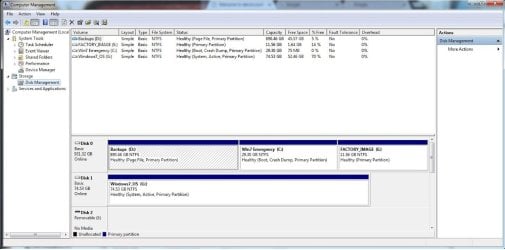
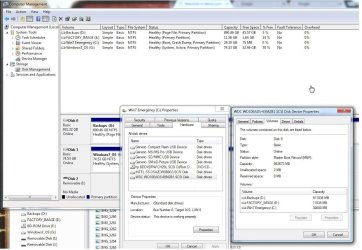
Here are some screenshots that may be helfpul.
I really appreciate the help. This has been a problem for a long time now and I need to fix. With a 29TB Windows partition the computer isn't usable. I need to boot from the 76GB SSD drive.

The partition being booted from is the one labeled "Win7 Emergency" which I put there as a way to access my data should the SSD drive fail.


https://photos.app.goo.gl/jxVhRdoF6VWQAdip2
https://photos.app.goo.gl/lwGJXol1wGjve3tR2
https://photos.app.goo.gl/Gnojd5XxhW4eLSiV2
 

My Computer My Computer

At a glance

Windows 7 64bit Home PremiumAMD Phenom II X4 945 3.0GHz8GB
Computer Manufacturer/Model Number
HP HPE-210f
OS
Windows 7 64bit Home Premium
CPU
AMD Phenom II X4 945 3.0GHz
Memory
8GB
Hard Drives
Intel 320 Series SSD - 80GB
WD Green - 1TB
Use the little paper clip to upload photos.

attachments.jpg

After they have uploaded,close the attachment window, then click the paperclip again to insert them into your post

1.jpg

2.jpg

3.jpg
 

My Computers My Computers

  • At a glance

    7 X64i5 84002x8gb 3200mhz
    Computer type
    PC/Desktop
    OS
    7 X64
    CPU
    i5 8400
    Motherboard
    gigabyte b365m ds3h
    Memory
    2x8gb 3200mhz
    Hard Drives
    various
    PSU
    pure power 11 400w cm
    Case
    Coolermaster
    Cooling
    cryorig m9i
  • At a glance

    7x64g54008gb ddr4 2400
    Computer type
    PC/Desktop
    OS
    7x64
    CPU
    g5400
    Motherboard
    ga b365m ds3h
    Memory
    8gb ddr4 2400
    PSU
    xfx pro 450w
Open an elevated command prompt and type:

bcdboot G:\windows /s G:

Then press enter.

(That assumes you are running the command from your current c: partition.)

Then reboot.
 

My Computers My Computers

  • At a glance

    7 X64i5 84002x8gb 3200mhz
    Computer type
    PC/Desktop
    OS
    7 X64
    CPU
    i5 8400
    Motherboard
    gigabyte b365m ds3h
    Memory
    2x8gb 3200mhz
    Hard Drives
    various
    PSU
    pure power 11 400w cm
    Case
    Coolermaster
    Cooling
    cryorig m9i
  • At a glance

    7x64g54008gb ddr4 2400
    Computer type
    PC/Desktop
    OS
    7x64
    CPU
    g5400
    Motherboard
    ga b365m ds3h
    Memory
    8gb ddr4 2400
    PSU
    xfx pro 450w
That got me closer. When I rebooted I had an option of 2 "Windows 7" OS's to boot from.
When I booted from the what I G: drive I received a bunch of dll errors and my desktop from my C: drive loaded.
I suspected that the C:\ path is absolute in some cases and was pulling files from my C:\ drive. I went to disk manager and changed the HDD C:\ drive label to 0:\ then rebooted.

I received the "Preparing your desktop" which lasted for about 5 mins then went to a blank desktop. I could only reboot/logoff/switch user by ctl-alt-del.

I rebooted back to my original partition and the system relabeled it back to C:\ (from 0:\ that I relabeled from when I booted from G:)

Is there a way to load my FACTORY_IMAGE E: partition (the HP recovery partition) to my SSD and start fresh?

Thanks for your help!
 

My Computer My Computer

At a glance

Windows 7 64bit Home PremiumAMD Phenom II X4 945 3.0GHz8GB
Computer Manufacturer/Model Number
HP HPE-210f
OS
Windows 7 64bit Home Premium
CPU
AMD Phenom II X4 945 3.0GHz
Memory
8GB
Hard Drives
Intel 320 Series SSD - 80GB
WD Green - 1TB
My Computers My Computers

  • At a glance

    7 X64i5 84002x8gb 3200mhz
    Computer type
    PC/Desktop
    OS
    7 X64
    CPU
    i5 8400
    Motherboard
    gigabyte b365m ds3h
    Memory
    2x8gb 3200mhz
    Hard Drives
    various
    PSU
    pure power 11 400w cm
    Case
    Coolermaster
    Cooling
    cryorig m9i
  • At a glance

    7x64g54008gb ddr4 2400
    Computer type
    PC/Desktop
    OS
    7x64
    CPU
    g5400
    Motherboard
    ga b365m ds3h
    Memory
    8gb ddr4 2400
    PSU
    xfx pro 450w
That did it!! Finally I'm running on my SSD drive. Desktop loads - it's a new clean install.
Thank you so much for helping me through this. I have my computer back!

One more question -
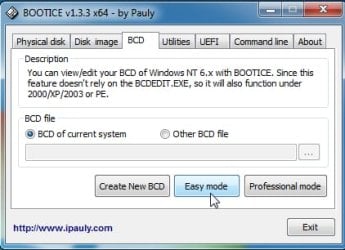
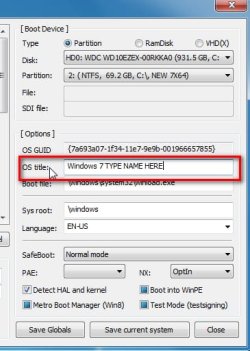
Now when I boot I have the option to boot from 2 OS's. They're both labeled "Windows 7". Is there a way for me to rename them so I can tell them apart?
 

My Computer My Computer

At a glance

Windows 7 64bit Home PremiumAMD Phenom II X4 945 3.0GHz8GB
Computer Manufacturer/Model Number
HP HPE-210f
OS
Windows 7 64bit Home Premium
CPU
AMD Phenom II X4 945 3.0GHz
Memory
8GB
Hard Drives
Intel 320 Series SSD - 80GB
WD Green - 1TB

My Computers My Computers

  • At a glance

    7 X64i5 84002x8gb 3200mhz
    Computer type
    PC/Desktop
    OS
    7 X64
    CPU
    i5 8400
    Motherboard
    gigabyte b365m ds3h
    Memory
    2x8gb 3200mhz
    Hard Drives
    various
    PSU
    pure power 11 400w cm
    Case
    Coolermaster
    Cooling
    cryorig m9i
  • At a glance

    7x64g54008gb ddr4 2400
    Computer type
    PC/Desktop
    OS
    7x64
    CPU
    g5400
    Motherboard
    ga b365m ds3h
    Memory
    8gb ddr4 2400
    PSU
    xfx pro 450w
That did it. I'm all set. Thank you again SIW2. Truly appreciated.
 

My Computer My Computer

At a glance

Windows 7 64bit Home PremiumAMD Phenom II X4 945 3.0GHz8GB
Computer Manufacturer/Model Number
HP HPE-210f
OS
Windows 7 64bit Home Premium
CPU
AMD Phenom II X4 945 3.0GHz
Memory
8GB
Hard Drives
Intel 320 Series SSD - 80GB
WD Green - 1TB
You are welcome.:)

You can d/l a copy of my boot media. It can be burned to cd/dvd or extracted to usb stick. You may find it useful at some stage.

17514x64-v5.iso
 

My Computers My Computers

  • At a glance

    7 X64i5 84002x8gb 3200mhz
    Computer type
    PC/Desktop
    OS
    7 X64
    CPU
    i5 8400
    Motherboard
    gigabyte b365m ds3h
    Memory
    2x8gb 3200mhz
    Hard Drives
    various
    PSU
    pure power 11 400w cm
    Case
    Coolermaster
    Cooling
    cryorig m9i
  • At a glance

    7x64g54008gb ddr4 2400
    Computer type
    PC/Desktop
    OS
    7x64
    CPU
    g5400
    Motherboard
    ga b365m ds3h
    Memory
    8gb ddr4 2400
    PSU
    xfx pro 450w
Back
Top