Solved Homegroup/Networking access permissions

flaverfav

New member
Local time
2:59 PM
Messages
5
Hi,

So I have a home network setup.
Yesterday I was still able to access COMP2 files/folders by going to the network tab and selecting it, from COMP1. However, later in the evening I had some network problems and did ipconfig /release , /renew. I also had uninstall some VMware network adapters on COMP1 and now I cannot access any of my computers listed on my network or Homegroup. Whenever I try to access one of them I get an error message saying \\COMPNAME is not accessible. You might not have permissions to use this network resource. However, I am able to use COMP2 to access COMP1 in the same way but it doesn't work from COMP1 to COMP2.

I have restarted my modem, and rejoined my homegroup but it is not fixed yet.

Any insight?:confused:
 

My Computer My Computer

At a glance

7 ULTIMATE
OS
7 ULTIMATE
Hi,

So I have a home network setup.
Yesterday I was still able to access COMP2 files/folders by going to the network tab and selecting it, from COMP1. However, later in the evening I had some network problems and did ipconfig /release , /renew. I also had uninstall some VMware network adapters on COMP1 and now I cannot access any of my computers listed on my network or Homegroup. Whenever I try to access one of them I get an error message saying \\COMPNAME is not accessible. You might not have permissions to use this network resource. However, I am able to use COMP2 to access COMP1 in the same way but it doesn't work from COMP1 to COMP2.

I have restarted my modem, and rejoined my homegroup but it is not fixed yet.

Any insight?:confused:

At this point it's best to leave the old Homegroup on both machines then create a new Homegroup and rejoin from the other machine using the new Homegroup password.
 

My Computer My Computer

At a glance

Windows 7 Ult, Windows 8.1 Pro,Q9650-4.275GHz, E8600 4.5GHz, E6750-3.8GHzG.Skill PC2 9600 1200Mhz 5 5 5 15 2TGTX480
Computer type
PC/Desktop
Computer Manufacturer/Model Number
Home built
OS
Windows 7 Ult, Windows 8.1 Pro,
CPU
Q9650-4.275GHz, E8600 4.5GHz, E6750-3.8GHz
Motherboard
Evga 780i FTW
Memory
G.Skill PC2 9600 1200Mhz 5 5 5 15 2T
Graphics Card(s)
GTX480
Sound Card
Asus Xonar D2
Monitor(s) Displays
HannsG
Screen Resolution
1680X1050
Hard Drives
GSkill Phoenix Pro 120GB SSD
PSU
ThermalTake Toughpower 1000Watt modular
Case
ThermalTake XaserV
Cooling
Xigmatek S1283
Keyboard
Logitech G15
Mouse
Logitech G9
Internet Speed
T1
Okay, so I have a new problem now.
I took both PCs and removed them from the homegroup. However both computers are stating that they detect a homegroup on my network. But that homegroup has no members in it, so it shouldn't exist right? I can't create a new homegroup but only join. When I tried joining it, I hung there and then got an error message saying I couldn't join it.

EDIT: Actually the reason behind this was my brother's Windows 8 computer. I left the homegroup on his computer too, but it kept popping up on my two windows 7 computers. So, I just created the homegroup on his computer and rebooted both of mine then joined the homegroup I created on his!

btw +1 rep to chev65!
 
Last edited:

My Computer My Computer

At a glance

7 ULTIMATE
OS
7 ULTIMATE
Okay, so I have a new problem now.
I took both PCs and removed them from the homegroup. However both computers are stating that they detect a homegroup on my network. But that homegroup has no members in it, so it shouldn't exist right? I can't create a new homegroup but only join. When I tried joining it, I hung there and then got an error message saying I couldn't join it.

EDIT: Actually the reason behind this was my brother's Windows 8 computer. I left the homegroup on his computer too, but it kept popping up on my two windows 7 computers. So, I just created the homegroup on his computer and rebooted both of mine then joined the homegroup I created on his!

btw +1 rep to chev65!

Yes I know what you mean here. Sometimes the Homegroup will prefer to be created on certain machines over others. I have this problem myself but it's easy enough to go with the flow and just create a new Homegroup on the preferred machine and go from there hence my suggestion to leave on all machines and create a new one.

Glad your problem is resolved. :)
 

My Computer My Computer

At a glance

Windows 7 Ult, Windows 8.1 Pro,Q9650-4.275GHz, E8600 4.5GHz, E6750-3.8GHzG.Skill PC2 9600 1200Mhz 5 5 5 15 2TGTX480
Computer type
PC/Desktop
Computer Manufacturer/Model Number
Home built
OS
Windows 7 Ult, Windows 8.1 Pro,
CPU
Q9650-4.275GHz, E8600 4.5GHz, E6750-3.8GHz
Motherboard
Evga 780i FTW
Memory
G.Skill PC2 9600 1200Mhz 5 5 5 15 2T
Graphics Card(s)
GTX480
Sound Card
Asus Xonar D2
Monitor(s) Displays
HannsG
Screen Resolution
1680X1050
Hard Drives
GSkill Phoenix Pro 120GB SSD
PSU
ThermalTake Toughpower 1000Watt modular
Case
ThermalTake XaserV
Cooling
Xigmatek S1283
Keyboard
Logitech G15
Mouse
Logitech G9
Internet Speed
T1
Please forgive my nooniness, its late just wanted to ask a question.
I have an old Cisco router WRT54g and 2 laptops. One is mine, the other is a roomates.
I do not wish to share any info with any other computer. I am running Comodo CIS freebee

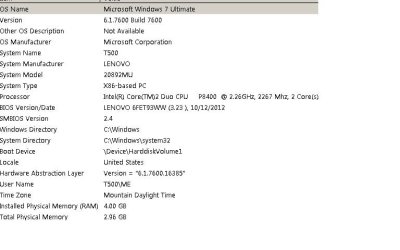
T500 Lenovo thinkpad 6.1.7600 win 7 Ultimate 4gig ram 20892MU Native 64 bit
T500 Lenovo.jpgl Lans sort of like back in the win 3.11 days. I keep getting a nag , where are you at home etc. drives me crazy.what is point of a homegroup, is it the OS or the firewall nagging me to join?

Second question
I bought this PC of Kijiji..came from high security company with the weirdest Bios. Has computrace, fingergerprint all all sorts of crap. Originally installed with Vista and upraded to win 7 Pro.
Then decided to take my chances and run killdisk and install a fresh copy of Win 7 Ultimate 32 bit, instead of the native 64 bit which I do not have the os for. I supoose I could reinstall the original sytem image, extract the Win7 Pro (UPDATE) key and DL Win7 from MS, since the key is legit, but encrypted..just about every thing works, a few disabled things in DM, not sure what they are. Would i be able extract the original win7 update key, could I DL a copy of win7 pro from MS and use the exttracted update key ?

Everything I need works fine EXCEPT only one processor core is active, how the heck do I flash the BIOS?
Is it worth the risk? Do not want to brick My MB...just want to get rid of all the computrace security stuff in my BIOS and have both cores working. Centrino 2 Intel vPro. It is a native 64 bit, decided on 32 bit OS Win 7 Ultimate, less driver hassless...thoughts?

Thanks guys and gals
MercurialGuy
 
Last edited:

My Computer My Computer

At a glance

windows 7 ultimate x86
OS
windows 7 ultimate x86
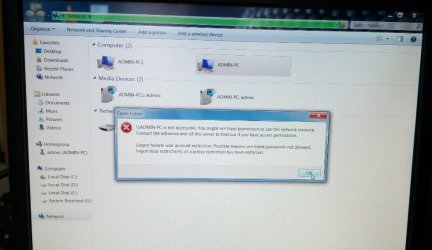
I want to create wireless LAN network. I setup everything which is require to LAN.. creating homegroup, joining homegroup, advance sharing files, permission to everyone but still it is showing admin pc is not accessible... i have given jpeg scrnshot of error.... what to do... Pls help
 

Attachments

  • Untitled.jpg
    Untitled.jpg
    57.9 KB · Views: 3

My Computer My Computer

At a glance

windows 7 ultimate 32-bit SP4GB
Computer type
PC/Desktop
Computer Manufacturer/Model Number
dell 3048
OS
windows 7 ultimate 32-bit SP
Memory
4GB
Hard Drives
1TB
Antivirus
QUICKHEAL
Browser
MOZILLA
Other Info
D-LINK MODEM ROUTER
Back
Top