Solved Determine Product Key From Unbootable Hard Drive

Yes, as you said if 4GB memory 64 bit otherwise 32 bit.

@boweasel, Thank you for the rep. I am happy to see happy faces. Now Greg is there to help you with a clean install. Even if that key is OEM System Builder Key - which I think it can be - the activation will go through on the original PC. And take a screenshot of the key and keep it.

Looking at the imaging screenshot, I see something is mentioned as MFT corrupt. We may try MFT repair on it with TestDisk. But that is all secondary. Go ahead with the clean install on a new HDD as Greg suggested without wiping the old HDD.

Have a good day.
 

My Computer My Computer

At a glance

Windows 7 Home Premium 32 bit
OS
Windows 7 Home Premium 32 bit
Crystal Disk flags it as Bad HD but I think I'd want confirmation from HD Diagnostic
scan either from boot disk or Windows just to be sure.

Absent confirmed bad diagnostics, MFT corruption also can be overcome as far as I know by reinstall with wiping.
 
I've got 2 Microsoft Windows 7 disks - one is 32 and the other 64. But they're Windows 7 Professional and I sort of remember getting an indication somewhere that the bad HDD was Home Premium. I also have a Dell 64 bit W7HP, as well as 2 unbranded disks I created from somewhere. One of those is labelled W7HP and the other W7HP 64. I have no idea how much memory is in the original tower. Since the case is already open I suppose I can yank out the memory and read what it says on the sticks. Or maybe just go with the unbranded W7HP.... I'm starting to wonder just how much I like my brother...
 

My Computer My Computer

At a glance

Windows 7 home premium 64 bitAMD K103.00GB Dual-Channel DDR3 @ 532MHzATI AMD M880G with ATI Mobility Radeon HD 425...
Computer type
Laptop
OS
Windows 7 home premium 64 bit
CPU
AMD K10
Motherboard
Hewlett-Packard 1444 (Socket S1G4)
Memory
3.00GB Dual-Channel DDR3 @ 532MHz
Graphics Card(s)
ATI AMD M880G with ATI Mobility Radeon HD 4250 (HP)
Sound Card
Realtek
Screen Resolution
1366 x 768
Hard Drives
465GB Western Digital
Antivirus
MSE
Use the latest 32 bit installer for home Premium in Reinstall tutorial which you should be following.
 
SOB.... After jumping through all these hoops to determine the product key, wiping, partitioning, formatting a new drive, and using my unbranded Windows 7 Home Premium disk to install Windows.... I ultimately get a message 'The product key does not match current Windows SKU'. See my previous Microsoft product key rant because I'm having a hard time not dropping the F-bomb.
 

My Computer My Computer

At a glance

Windows 7 home premium 64 bitAMD K103.00GB Dual-Channel DDR3 @ 532MHzATI AMD M880G with ATI Mobility Radeon HD 425...
Computer type
Laptop
OS
Windows 7 home premium 64 bit
CPU
AMD K10
Motherboard
Hewlett-Packard 1444 (Socket S1G4)
Memory
3.00GB Dual-Channel DDR3 @ 532MHz
Graphics Card(s)
ATI AMD M880G with ATI Mobility Radeon HD 4250 (HP)
Sound Card
Realtek
Screen Resolution
1366 x 768
Hard Drives
465GB Western Digital
Antivirus
MSE

My Computers My Computers

  • At a glance

    7 X64i5 84002x8gb 3200mhz
    Computer type
    PC/Desktop
    OS
    7 X64
    CPU
    i5 8400
    Motherboard
    gigabyte b365m ds3h
    Memory
    2x8gb 3200mhz
    Hard Drives
    various
    PSU
    pure power 11 400w cm
    Case
    Coolermaster
    Cooling
    cryorig m9i
  • At a glance

    7x64g54008gb ddr4 2400
    Computer type
    PC/Desktop
    OS
    7x64
    CPU
    g5400
    Motherboard
    ga b365m ds3h
    Memory
    8gb ddr4 2400
    PSU
    xfx pro 450w
It may be Upgrade. If you can't find out with certainty the version go ahead and install anyway and afterwards do the quick registry workaround to activate Upgrade on a clean drive.

Si probably thinks its Basic since 32 bit. Ask user if he at least remembers transparent borders. Basic has solid powder blue ones

You can also call MS Customer Service to confirm the key. Better to use SIW2's checker.
 
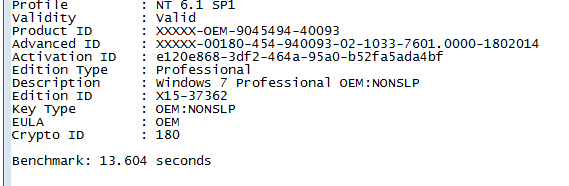
It might be Home Basic ? Check the product key with this:

The Ultimate PID Checker
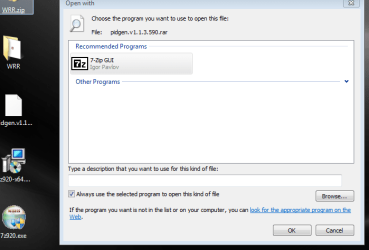
And the frustration level continues to ratchet even higher.... This is a RAR file and although this computer seems to be able to handle zip files with a right click followed by extract all, right clicking this puppy does nothing. I downloaded the 32 bit exe 7-Zip from Source Forge, installed it to the Program File and still nothing. Downloaded the 64 bit msi file to Program Files (x86) and still nothing happens on a right click.

Have they changed 7-Zip?
 

Attachments

  • Capture8.PNG
    Capture8.PNG
    22 KB · Views: 22
  • Capture9.PNG
    Capture9.PNG
    6.1 KB · Views: 23

My Computer My Computer

At a glance

Windows 7 home premium 64 bitAMD K103.00GB Dual-Channel DDR3 @ 532MHzATI AMD M880G with ATI Mobility Radeon HD 425...
Computer type
Laptop
OS
Windows 7 home premium 64 bit
CPU
AMD K10
Motherboard
Hewlett-Packard 1444 (Socket S1G4)
Memory
3.00GB Dual-Channel DDR3 @ 532MHz
Graphics Card(s)
ATI AMD M880G with ATI Mobility Radeon HD 4250 (HP)
Sound Card
Realtek
Screen Resolution
1366 x 768
Hard Drives
465GB Western Digital
Antivirus
MSE
Had to open 7-zip from all programs, then navigate to the pidgen.rar file to get it to work. That ain't the way it USED to work.....
 

Attachments

  • Capture10.PNG
    Capture10.PNG
    5.3 KB · Views: 21

My Computer My Computer

At a glance

Windows 7 home premium 64 bitAMD K103.00GB Dual-Channel DDR3 @ 532MHzATI AMD M880G with ATI Mobility Radeon HD 425...
Computer type
Laptop
OS
Windows 7 home premium 64 bit
CPU
AMD K10
Motherboard
Hewlett-Packard 1444 (Socket S1G4)
Memory
3.00GB Dual-Channel DDR3 @ 532MHz
Graphics Card(s)
ATI AMD M880G with ATI Mobility Radeon HD 4250 (HP)
Sound Card
Realtek
Screen Resolution
1366 x 768
Hard Drives
465GB Western Digital
Antivirus
MSE
Success! :shock: It actually worked. Of course I have no drivers. Can they be pulled of the old drive, or should I just go to the ASUS site?
 

My Computer My Computer

At a glance

Windows 7 home premium 64 bitAMD K103.00GB Dual-Channel DDR3 @ 532MHzATI AMD M880G with ATI Mobility Radeon HD 425...
Computer type
Laptop
OS
Windows 7 home premium 64 bit
CPU
AMD K10
Motherboard
Hewlett-Packard 1444 (Socket S1G4)
Memory
3.00GB Dual-Channel DDR3 @ 532MHz
Graphics Card(s)
ATI AMD M880G with ATI Mobility Radeon HD 4250 (HP)
Sound Card
Realtek
Screen Resolution
1366 x 768
Hard Drives
465GB Western Digital
Antivirus
MSE
Yes, get any drivers you need from Asus. If you have a red X through the network icon at the bottom right, you need to get the network (LAN) drivers, once you install those you can start running windows update, but I`m sure you`ll have to get 1 or 2 more drivers from Asus.

Right the key down using ink, put it in a zip lock bag and tape it to the inside of the case.

Once you have all the drivers you need from Asus, you could put those on a cd and put that in the bag too.
 

My Computer My Computer

At a glance

Windows 10 Pro x64Intel Core i7 6700KGSkill TridentZ RGB 16GB 3600 16-16-16-36EVGA GTX 980 Ti SC x2
Computer type
PC/Desktop
Computer Manufacturer/Model Number
Skylake Special #666
OS
Windows 10 Pro x64
CPU
Intel Core i7 6700K
Motherboard
Asus Sabertooth Z170 Mark 1
Memory
GSkill TridentZ RGB 16GB 3600 16-16-16-36
Graphics Card(s)
EVGA GTX 980 Ti SC x2
Sound Card
Realtek High Definition
Monitor(s) Displays
AOC G2460PG
Screen Resolution
1920 x 1080 144Hz
Hard Drives
Samsung 860 Pro 256GB, Seagate Barracuda 4TB x2
PSU
EVGA 1000 P2, EVGA White Custom Braided Cables
Case
Corsair Vengeance C70 Gunmetal Black
Cooling
Corsair H100i v2, Corsair ML120 x2, Thermal Grizzly Kryonaut
Keyboard
Logitech G910 Orion Spectrum
Mouse
Logitech G700s
Internet Speed
Verizon Fios Quantum Gateway 75/75
Antivirus
Windows Defender, Malwarebytes Free 3.8.3
Browser
Chrome
Other Info
Corsair SP120 x4, LG Blu-ray Drive, Durabrand HT-395 100 Watt Dolby Digital Amp, Corsair H2100 Wireless 7.1 Headset
Enable Automatically deliver drivers via Windows Update (Step 3) then run all rounds of Important and Optional Updates except Bing, with reboots, until there are no more offered when you go back to Check for Updates.

This will provide most drivers and important patches to make them work better. So it needs to be done right off. Only after all Updates are done should you import any missing drivers from Asus, unless you need the network driver to get to Updates.

You can set up your desktop and other things while they're installing, even install some programs. But I'd pace myself so that you can monitor performance after each reboot.
 
Just for Information:

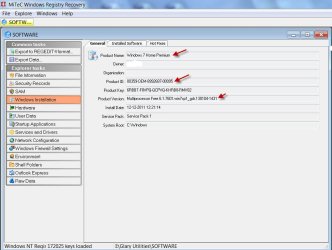
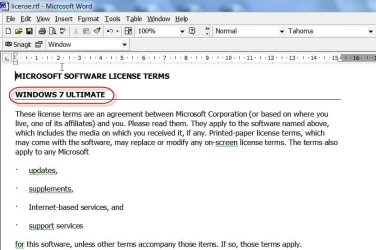
The Windows Registry Recovery Window will show the Product Name, Product ID ( If it is OEM the OEM string will be there in it) and also Product version apart from the Product Key.. I hope you have taken a screenshot and kept as advised.

29-06-2014 18-28-36.jpg

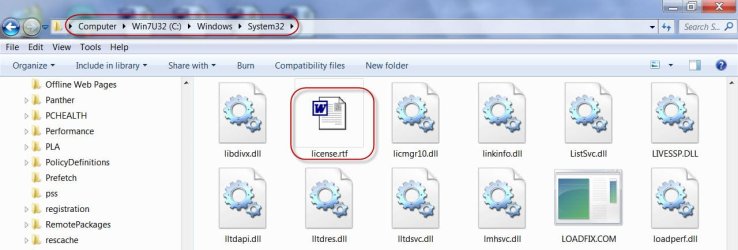
Next you can find your Windows version from the licence.rtf file which is in Windows > System 32.

30-06-2014 07-53-51.jpg

30-06-2014 07-55-33.jpg

All this on your faulty drive. There is no way that the information presented by Windows Registry Recovery can go wrong since it is extracted from the Registry.

I hope everything goes on well, unless it is some TechNet Key ( I forget the exact name). If you send a PM to NoelDP with the Key, he may be able advise on the nature of the key)

Also you may be aware, if it is a OEM System Builder key, the activation is tied up to the original machine id - which is already present in the MS activation servers - and the activation will go through only on that machine.
 
Last edited:

My Computer My Computer

At a glance

Windows 7 Home Premium 32 bit
OS
Windows 7 Home Premium 32 bit
You guys have been great! With GR's tip about the drivers and windows updates, I only had to get the Ethernet driver from ASUS. The rest just came in with the updates. Have activated Windows, installed all the updates, minus Bing and Silverlight, re-integrated her desktop background photo and copied all her pictures, documents and music from the external drive where I was storing them. The PC is running beautifully.

This undertaking would have been impossible without the assistance of this forum. Thanks again.
 

My Computer My Computer

At a glance

Windows 7 home premium 64 bitAMD K103.00GB Dual-Channel DDR3 @ 532MHzATI AMD M880G with ATI Mobility Radeon HD 425...
Computer type
Laptop
OS
Windows 7 home premium 64 bit
CPU
AMD K10
Motherboard
Hewlett-Packard 1444 (Socket S1G4)
Memory
3.00GB Dual-Channel DDR3 @ 532MHz
Graphics Card(s)
ATI AMD M880G with ATI Mobility Radeon HD 4250 (HP)
Sound Card
Realtek
Screen Resolution
1366 x 768
Hard Drives
465GB Western Digital
Antivirus
MSE
Glad to hear it! :thumbsup:

Did it activate with no problems?
Yup. After the ethernet driver was installed I waited 'till all the updates were complete (and when you think they're finally complete - just wait 5 minutes and they'll be a whole new set), then I activated online. It took all of 30 seconds. I double checked by right-clicking Computer and left-clicking Properties.

I wish I could double the reputations I've given.
 

My Computer My Computer

At a glance

Windows 7 home premium 64 bitAMD K103.00GB Dual-Channel DDR3 @ 532MHzATI AMD M880G with ATI Mobility Radeon HD 425...
Computer type
Laptop
OS
Windows 7 home premium 64 bit
CPU
AMD K10
Motherboard
Hewlett-Packard 1444 (Socket S1G4)
Memory
3.00GB Dual-Channel DDR3 @ 532MHz
Graphics Card(s)
ATI AMD M880G with ATI Mobility Radeon HD 4250 (HP)
Sound Card
Realtek
Screen Resolution
1366 x 768
Hard Drives
465GB Western Digital
Antivirus
MSE
:thumbsup: I am happy to see the tick mark against this thread. Well done.
 

My Computer My Computer

At a glance

Windows 7 Home Premium 32 bit
OS
Windows 7 Home Premium 32 bit
Back
Top