How do i fix unknown, not initialized and unallocated external hd?

200naveen

New member
Local time
11:38 PM
Messages
10
Please help me to get my important data from my bad hard disk,

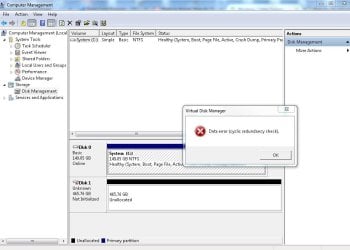
I have a segate 500 GB usb external HDD, It was working fine since last 3 years. yesterday i connect this to a XP machine, and start coping some data. the coping speed was very slow, so I restarted the machine in between. After that I LOST MY hdd, it never be back. I tried a lot.. no success till now.
Please help me get my data back:
 

Attachments
  • Disk1 MBR.JPG
    Disk1 MBR.JPG
    83.7 KB · Views: 2
  • MBR repair error.JPG
    MBR repair error.JPG
    67.9 KB · Views: 5
  • Mini tools.jpg
    Mini tools.jpg
    105.8 KB · Views: 3
  • No options.jpg
    No options.jpg
    98.9 KB · Views: 2
  • Blank.JPG
    Blank.JPG
    64.7 KB · Views: 5

My Computer My Computer

Computer type
PC/Desktop
OS
windows 7
Sorry to be the bearer of bad news ... but I had almost exactly the same thing happen to me on a Seagate 2TB hard drive. Working for months, even passing surface checks with no errors and then, one day -- "bad disk".

I've tried every data recovery app I could find against it (4 of them) and none of them find anything.

I've had drives fail me over the years and have never run into this situation where the drive powers up but NOTHING can be recovered from it.

So, I've resorted to sending it off to a local data recovery outfit
 

My Computer My Computer

Computer type
PC/Desktop
Computer Manufacturer/Model Number
Custom
OS
Win7 Pro 32-bit, Win8 Pro 32-bit
CPU
AMD Phenom II X6 1090T
Motherboard
Gigabyte
Memory
4GB ddr3 1300
Graphics Card(s)
AMD HD 4290 onboard
Sound Card
Builtin Realtek HD Audio
Monitor(s) Displays
Samsung 24" widescreen, LG 23" widescreen
Screen Resolution
1920x1200/1920x1080
Hard Drives
Kingston 256GB SSD
Keyboard
Logitech Illuminated Keyboard
Mouse
Logitech M705 wireless mouse
Antivirus
Norton Av 2013
Browser
IE v10
The Local data recovery outfit recovered your data??
 

My Computer My Computer

Computer type
PC/Desktop
OS
windows 7
Mark is probably right, but run Seatools just as a quick test

Try SeaTools for DOS first
Download SeaTools DOS | Documentation (PDF)


If you have problems with the DOS version (some people do for an unknown reason), try the Windows version
Download SeaTools Windows | Documentation (PDF)

Run these tests:
Short Drive Self Test (DST)
Long Generic
-> do not select repair, you just want to see what SeaTools reports

Post a screen shot of the results.
 

My Computer My Computer

Computer type
Laptop
Computer Manufacturer/Model Number
HP Pavilion dv6-6c10us
OS
x64 (6.3.9600) Win8.1 Pro & soon dual boot x64 (6.1.7601) Win7_SP1 HomePrem
CPU
AMD A6-3420M APU with Radeon(tm) HD Graphics
Motherboard
Hewlett-Packard 1805
Memory
6.00 GB
Graphics Card(s)
AMD Radeon(TM) HD 6520G
Sound Card
(1) AMD High Definition Audio Device (2) IDT High Definiti
Monitor(s) Displays
HP W2072a 20" LCD (1600 x 900) @ 60 Hz
Screen Resolution
1366 x 768 x 32 bits (4294967296 colors) @ 60 Hz
Hard Drives
ST640LM0 00 HM641JI SATA Disk Device
Keyboard
Logitech k520 wireless KB
Mouse
Logitech m320 wireless mouse (bundled with KB)
Internet Speed
15/5 | 54 MB Wireless 'n'
Antivirus
Realtime: Defender or Avast | On-demand: Malwarebytes, ESET
Browser
IE 11 on Win8, IE 10 on win 7
Other Info
Media: [Gimp, Audacity, VLC] || Comm: [WEmail 2012, Skype] || Productivity: [OpenOffice,| Textpad] || Utils: [Sysinternals, cCleaner, Speccy, Defraggler]
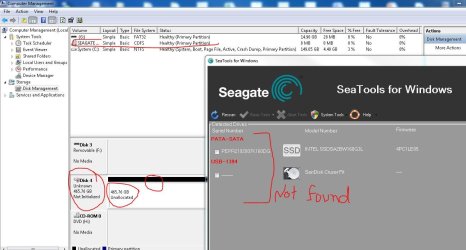
SeaTools is unable to find the HDD

Hello Slartybart,

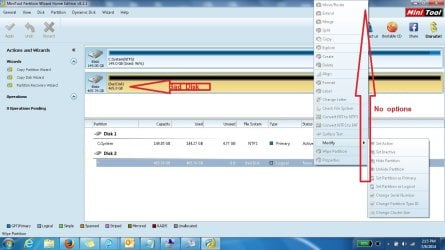
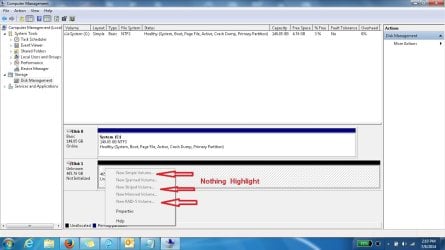
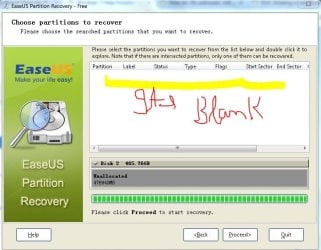
Sea tool in unable to scan the Bad disk, The Bad disk is shown in Disk management only, here it is showing Unknown and Not Initalized...Unallocated.

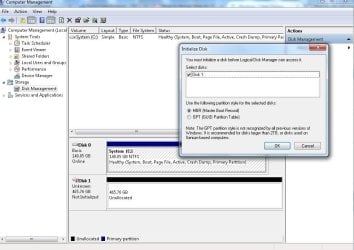
When I try to Initalized disk it showing error " The request could not be performed because of an I/O device error."


Mark is probably right, but run Seatools just as a quick test

Try SeaTools for DOS first
Download SeaTools DOS | Documentation (PDF)


If you have problems with the DOS version (some people do for an unknown reason), try the Windows version
Download SeaTools Windows | Documentation (PDF)

Run these tests:
Short Drive Self Test (DST)
Long Generic
-> do not select repair, you just want to see what SeaTools reports

Post a screen shot of the results.
 

Attachments

  • hdd.JPG
    hdd.JPG
    94.1 KB · Views: 3

My Computer My Computer

Computer type
PC/Desktop
OS
windows 7
Gurus any solution

Hello Gurus, any solution of my problem, I posted screen shoot in last post..
 

My Computer My Computer

Computer type
PC/Desktop
OS
windows 7
At the outset, let me say that there may not be much hope in recovering any data from your external hard drive as a DIY project.

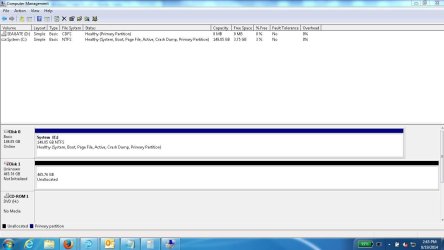
There is something mysterious in your last screenshot. Your Seagate is shown as having a 8MB CDFS partition in the disk listing.

Let us see if we can atleast format your drive.

Please post a new and untruncated full screenshot of Windows Disk Management with only the problem HDD plugged into the PC.

(Please remove all other USB storage devices including pen drives, USB hubs if any and USB card readers.

Go to the top toolbar in the disk management window, the click on "Show/Hide Console Tree" and "Show/Hide Action Pane" icons to hide those. If necessary lift the horizontal divider bar above the disk map up as far as it can go without cutting into the Disk List so that we can see the full disk Map. In short a full screenshot with nothing obscured or truncated.)
 

My Computer My Computer

OS
Windows 7 Home Premium 32 bit

My Computer My Computer

Computer type
PC/Desktop
Computer Manufacturer/Model Number
Home made Desktop
OS
Windows 10 Pro. 64/ version 1709 Windows 7 Pro/64
CPU
Intel i7-6800K @ 4.3
Motherboard
ASUS X-99 Deluxe II
Memory
Corsair Platinum 16 gig @2400
Graphics Card(s)
EVGA GTX 1070 OC
Monitor(s) Displays
Asus 27" LED LCD/VE278Q
Screen Resolution
1920-1080 or 1280-720 HDMI
Hard Drives
INTEL SSD 730-240 Gb Sata 3.0/
PSU
EVGA Platium 1200W
Case
Phanteks Luxe Tempered Glass 8 fans/ one radiator
Cooling
XSPC/ Water Cooled CPU
Keyboard
Das 4 Professional
Mouse
Logitech M705/MX Anywhere 2-S
Internet Speed
100 mbits
Antivirus
Microsoft Security Essentials/ Malwarebytes Premium 3.0/ SAS
Browser
I.E. 11 default/Firefox/ ISP Time Warner Cable/Spectrum
Other Info
LG BluRay Burner/
Sound system-KLipsch-THX/
Icy Dock ssd Hot Swap bays.

Attachments

  • segate HDD.jpg
    segate HDD.jpg
    78.8 KB · Views: 4

My Computer My Computer

Computer type
PC/Desktop
OS
windows 7
OK, Naveen.

Your screenshot does confirm that your Seagate drive now does have a CDFS partition. It also gets a drive letter D. But how come is the question. It was not there before in the screenshot in your first post. Can you think of anything that could have brought about this?

Let me think about it and see whether something strikes.

For now I am going to bed as you will.:) ( Are you in USA or you haven't changed the time zone.)
 

My Computer My Computer

OS
Windows 7 Home Premium 32 bit
Jumanji, When i plugged in the drive it was showing CDFS, but after some time automatically it showing unallocated space..
 

My Computer My Computer

Computer type
PC/Desktop
OS
windows 7
OK. One reason why Seatools is not seeing your external drive may be because there is that mysterious CDFS partition on that drive.

Before trying to format the drive, let us see whether Linux booted from a pen drive can see your external
disk and whether Gparted in it can see the CDFS partition and delete it.

For the present unplug your problem external drive.

Download Lucid Puppy (Ubuntu-Compatible Build) lupu-528.005.iso I have chosen this because it is only a 132.6 MB download. http://puppylinux.org/main/Download%...%20Release.htm Create your bootable pen drive with this ISO using Rufus 1.4.10 (616KB) Rufus - Create bootable USB drives the easy way (Before you run Rufus, backup all data on your pendrive for it will be lost when Rufus formats the pendrive during the creation process.)

Once you are ready, shut down your PC, plug in your problem Seagate drive
and boot from Live Linux Lucid Puppy USB pen drive.

Check whether your problem Seagate drive is seen by Linux and report.

For familiarising with Lucid Puppy read
http://www.sevenforums.com/software/198909-lucid-puppy-way-recover-files-non-bootable-computer.html

In that thread,

You will only see the screenshots from the time Lucid Puppy boots to the point where and how to identify your system drive and the external HDD . Your external HDD may or may not appear and that is what we are trying to ascertain.

Just report whether your 500 GB Seagate external drive is seen.
 
Last edited:

My Computer My Computer

OS
Windows 7 Home Premium 32 bit
Back
Top