Solved Infinite reboot loop after a BSoD and attempted windows updates

Start/Stop Windows Modules Installer service in Windows 7 from Services, Regedit or CMD
Try to set the "start type" to manual and apply.
wp8565213e_01.png


After that press start to service. Service is really started? Crash?

Open "device manager" . Any question/exclamation marks or "other devices" there?

Code:
ipconfig>ipconfig.txt
start ipconfig.txt
del ipconfig.txt
Post that info

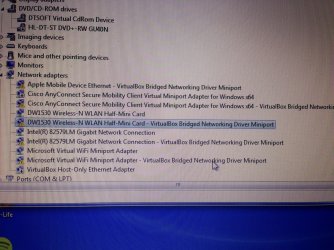
Exclamation points by:
"Apple mobile device Ethernet-virtualbox bridged networking driver miniport"
Cisco anyconnect secure mobility client virtual miniport adapter for windowsx64- virtual box bridged networking driver miniport
Dw150 wireless-n WLAN half-mini card - virtual box bridged networking driver miniport
Intel(r) 82579LM gigabit network connection - virtualbox bridged networking driver miniport
Microsoft virtual wifi miniport adapter - virtualbox bridged networkijg driver miniport
SDA standard compliant SD host controller
 

Attachments

  • image.jpg
    image.jpg
    970.1 KB · Views: 0

My Computer My Computer

At a glance

Windows 7 64 bit8gbIntel HD 3000
Computer type
Laptop
Computer Manufacturer/Model Number
Dell Latitude e6520
OS
Windows 7 64 bit
Memory
8gb
Graphics Card(s)
Intel HD 3000
Antivirus
Norton Antivirus, Avast, Malwarebytes
Browser
Chrome
Start/Stop Windows Modules Installer service in Windows 7 from Services, Regedit or CMD
Try to set the "start type" to manual and apply.
wp8565213e_01.png


After that press start to service. Service is really started? Crash?

Open "device manager" . Any question/exclamation marks or "other devices" there?

Code:
ipconfig>ipconfig.txt
start ipconfig.txt
del ipconfig.txt
Post that info

Exclamation points by:
"Apple mobile device Ethernet-virtualbox bridged networking driver miniport"
Cisco anyconnect secure mobility client virtual miniport adapter for windowsx64- virtual box bridged networking driver miniport
Dw150 wireless-n WLAN half-mini card - virtual box bridged networking driver miniport
Intel(r) 82579LM gigabit network connection - virtualbox bridged networking driver miniport
Microsoft virtual wifi miniport adapter - virtualbox bridged networkijg driver miniport
SDA standard compliant SD host controller
uninstall virtualbox and check device manager again. Especially check the network card driver
 

My Computer My Computer

At a glance

Microsoft Windows 7 Home Premium 64-bits 7601...Intel(R) Core(TM) i3 CPU M 370 @ 2.40GHz4,00 GBATI Mobility Radeon HD 5400 Series
Computer type
Laptop
Computer Manufacturer/Model Number
ACER ASPIRE 5742G
OS
Microsoft Windows 7 Home Premium 64-bits 7601 Multiprocessor Free Service Pack 1
CPU
Intel(R) Core(TM) i3 CPU M 370 @ 2.40GHz
Motherboard
Acer Aspire 5742G
Memory
4,00 GB
Graphics Card(s)
ATI Mobility Radeon HD 5400 Series
Sound Card
(1) AMD High Definition Audio Device (2) Realtek High Defi
Screen Resolution
1366 x 768 x 32 bits (4294967296 colors) @ 60 Hz
Hard Drives
WDC WD5000BEVT-22ZAT0
I cannot find a virtualbox uninstall.
 

My Computer My Computer

At a glance

Windows 7 64 bit8gbIntel HD 3000
Computer type
Laptop
Computer Manufacturer/Model Number
Dell Latitude e6520
OS
Windows 7 64 bit
Memory
8gb
Graphics Card(s)
Intel HD 3000
Antivirus
Norton Antivirus, Avast, Malwarebytes
Browser
Chrome
I cannot find a virtualbox uninstall.
Did you check "Add/Remove Programs" applet in the Windows Control Panel?
Otherwise in device manager: rightclick the virtual box stuff one by one and select uninstall driver.

Are you trying to connect to internet wired or wireless?
 

My Computer My Computer

At a glance

Microsoft Windows 7 Home Premium 64-bits 7601...Intel(R) Core(TM) i3 CPU M 370 @ 2.40GHz4,00 GBATI Mobility Radeon HD 5400 Series
Computer type
Laptop
Computer Manufacturer/Model Number
ACER ASPIRE 5742G
OS
Microsoft Windows 7 Home Premium 64-bits 7601 Multiprocessor Free Service Pack 1
CPU
Intel(R) Core(TM) i3 CPU M 370 @ 2.40GHz
Motherboard
Acer Aspire 5742G
Memory
4,00 GB
Graphics Card(s)
ATI Mobility Radeon HD 5400 Series
Sound Card
(1) AMD High Definition Audio Device (2) Realtek High Defi
Screen Resolution
1366 x 768 x 32 bits (4294967296 colors) @ 60 Hz
Hard Drives
WDC WD5000BEVT-22ZAT0
I cannot find a virtualbox uninstall.
Did you check "Add/Remove Programs" applet in the Windows Control Panel?
Otherwise in device manager: rightclick the virtual box stuff one by one and select uninstall driver.

Are you trying to connect to internet wired or wireless?

I did check that, and it's not listed as a program.

I can't uninstall the driver's individually either.

I'm trying wireless, but I've also tried a USB connection from my phone. I'll go try Ethernet in a minute.
 

My Computer My Computer

At a glance

Windows 7 64 bit8gbIntel HD 3000
Computer type
Laptop
Computer Manufacturer/Model Number
Dell Latitude e6520
OS
Windows 7 64 bit
Memory
8gb
Graphics Card(s)
Intel HD 3000
Antivirus
Norton Antivirus, Avast, Malwarebytes
Browser
Chrome
Exclamation points by:
SDA standard compliant SD host controller =>that's a SD-card reader. Totally irrelevangt now.


"Apple mobile device Ethernet-virtualbox bridged networking driver miniport"
Cisco anyconnect secure mobility client virtual miniport adapter for windowsx64- virtual box bridged networking driver miniport
Dw150 wireless-n WLAN half-mini card - virtual box bridged networking driver miniport
Intel(r) 82579LM gigabit network connection - virtualbox bridged networking driver miniport
Microsoft virtual wifi miniport adapter - virtualbox bridged networkijg driver miniport

All virtual and virtualbox stuff? Post screenshot of device manager. Rightclick on Intel(r) 82579LM gigabit network connection->properties. in field status... what is the error code?
Same for Dw150 wireless-n WLAN half-mini card.
 

My Computer My Computer

At a glance

Microsoft Windows 7 Home Premium 64-bits 7601...Intel(R) Core(TM) i3 CPU M 370 @ 2.40GHz4,00 GBATI Mobility Radeon HD 5400 Series
Computer type
Laptop
Computer Manufacturer/Model Number
ACER ASPIRE 5742G
OS
Microsoft Windows 7 Home Premium 64-bits 7601 Multiprocessor Free Service Pack 1
CPU
Intel(R) Core(TM) i3 CPU M 370 @ 2.40GHz
Motherboard
Acer Aspire 5742G
Memory
4,00 GB
Graphics Card(s)
ATI Mobility Radeon HD 5400 Series
Sound Card
(1) AMD High Definition Audio Device (2) Realtek High Defi
Screen Resolution
1366 x 768 x 32 bits (4294967296 colors) @ 60 Hz
Hard Drives
WDC WD5000BEVT-22ZAT0
Exclamation points by:
SDA standard compliant SD host controller =>that's a SD-card reader. Totally irrelevangt now.


"Apple mobile device Ethernet-virtualbox bridged networking driver miniport"
Cisco anyconnect secure mobility client virtual miniport adapter for windowsx64- virtual box bridged networking driver miniport
Dw150 wireless-n WLAN half-mini card - virtual box bridged networking driver miniport
Intel(r) 82579LM gigabit network connection - virtualbox bridged networking driver miniport
Microsoft virtual wifi miniport adapter - virtualbox bridged networkijg driver miniport

All virtual and virtualbox stuff? Post screenshot of device manager. Rightclick on Intel(r) 82579LM gigabit network connection->properties. in field status... what is the error code?
Same for Dw150 wireless-n WLAN half-mini card.

The error for both devices is "windows cannot load the device driver for this hardware. The driver may be corrupted or missing"
 

Attachments

  • image.jpg
    image.jpg
    911.9 KB · Views: 0

My Computer My Computer

At a glance

Windows 7 64 bit8gbIntel HD 3000
Computer type
Laptop
Computer Manufacturer/Model Number
Dell Latitude e6520
OS
Windows 7 64 bit
Memory
8gb
Graphics Card(s)
Intel HD 3000
Antivirus
Norton Antivirus, Avast, Malwarebytes
Browser
Chrome
I cannot find a virtualbox uninstall.
2.1.3. Uninstallation


As VirtualBox uses the standard Microsoft Windows installer, VirtualBox can be safely uninstalled at any time by choosing the program entry in the "Add/Remove Programs" applet in the Windows Control Panel.
------

Or maybe you can try: install virtualbox again and uninstall it later after reboot.
 

My Computer My Computer

At a glance

Microsoft Windows 7 Home Premium 64-bits 7601...Intel(R) Core(TM) i3 CPU M 370 @ 2.40GHz4,00 GBATI Mobility Radeon HD 5400 Series
Computer type
Laptop
Computer Manufacturer/Model Number
ACER ASPIRE 5742G
OS
Microsoft Windows 7 Home Premium 64-bits 7601 Multiprocessor Free Service Pack 1
CPU
Intel(R) Core(TM) i3 CPU M 370 @ 2.40GHz
Motherboard
Acer Aspire 5742G
Memory
4,00 GB
Graphics Card(s)
ATI Mobility Radeon HD 5400 Series
Sound Card
(1) AMD High Definition Audio Device (2) Realtek High Defi
Screen Resolution
1366 x 768 x 32 bits (4294967296 colors) @ 60 Hz
Hard Drives
WDC WD5000BEVT-22ZAT0
Got it. Internet works now. Now what?
 

My Computer My Computer

At a glance

Windows 7 64 bit8gbIntel HD 3000
Computer type
Laptop
Computer Manufacturer/Model Number
Dell Latitude e6520
OS
Windows 7 64 bit
Memory
8gb
Graphics Card(s)
Intel HD 3000
Antivirus
Norton Antivirus, Avast, Malwarebytes
Browser
Chrome
Exclamation points by:
SDA standard compliant SD host controller =>that's a SD-card reader. Totally irrelevangt now.


"Apple mobile device Ethernet-virtualbox bridged networking driver miniport"
Cisco anyconnect secure mobility client virtual miniport adapter for windowsx64- virtual box bridged networking driver miniport
Dw150 wireless-n WLAN half-mini card - virtual box bridged networking driver miniport
Intel(r) 82579LM gigabit network connection - virtualbox bridged networking driver miniport
Microsoft virtual wifi miniport adapter - virtualbox bridged networkijg driver miniport

All virtual and virtualbox stuff? Post screenshot of device manager. Rightclick on Intel(r) 82579LM gigabit network connection->properties. in field status... what is the error code?
Same for Dw150 wireless-n WLAN half-mini card.

The error for both devices is "windows cannot load the device driver for this hardware. The driver may be corrupted or missing"
It looks like all related virtualbox stuff is broken in device manager.
Please post screenshot of "network center" -> adapter settings as well
 

My Computer My Computer

At a glance

Microsoft Windows 7 Home Premium 64-bits 7601...Intel(R) Core(TM) i3 CPU M 370 @ 2.40GHz4,00 GBATI Mobility Radeon HD 5400 Series
Computer type
Laptop
Computer Manufacturer/Model Number
ACER ASPIRE 5742G
OS
Microsoft Windows 7 Home Premium 64-bits 7601 Multiprocessor Free Service Pack 1
CPU
Intel(R) Core(TM) i3 CPU M 370 @ 2.40GHz
Motherboard
Acer Aspire 5742G
Memory
4,00 GB
Graphics Card(s)
ATI Mobility Radeon HD 5400 Series
Sound Card
(1) AMD High Definition Audio Device (2) Realtek High Defi
Screen Resolution
1366 x 768 x 32 bits (4294967296 colors) @ 60 Hz
Hard Drives
WDC WD5000BEVT-22ZAT0

My Computer My Computer

At a glance

Microsoft Windows 7 Home Premium 64-bits 7601...Intel(R) Core(TM) i3 CPU M 370 @ 2.40GHz4,00 GBATI Mobility Radeon HD 5400 Series
Computer type
Laptop
Computer Manufacturer/Model Number
ACER ASPIRE 5742G
OS
Microsoft Windows 7 Home Premium 64-bits 7601 Multiprocessor Free Service Pack 1
CPU
Intel(R) Core(TM) i3 CPU M 370 @ 2.40GHz
Motherboard
Acer Aspire 5742G
Memory
4,00 GB
Graphics Card(s)
ATI Mobility Radeon HD 5400 Series
Sound Card
(1) AMD High Definition Audio Device (2) Realtek High Defi
Screen Resolution
1366 x 768 x 32 bits (4294967296 colors) @ 60 Hz
Hard Drives
WDC WD5000BEVT-22ZAT0
Exclamation points by:
SDA standard compliant SD host controller =>that's a SD-card reader. Totally irrelevangt now.


"Apple mobile device Ethernet-virtualbox bridged networking driver miniport"
Cisco anyconnect secure mobility client virtual miniport adapter for windowsx64- virtual box bridged networking driver miniport
Dw150 wireless-n WLAN half-mini card - virtual box bridged networking driver miniport
Intel(r) 82579LM gigabit network connection - virtualbox bridged networking driver miniport
Microsoft virtual wifi miniport adapter - virtualbox bridged networkijg driver miniport

All virtual and virtualbox stuff? Post screenshot of device manager. Rightclick on Intel(r) 82579LM gigabit network connection->properties. in field status... what is the error code?
Same for Dw150 wireless-n WLAN half-mini card.

The error for both devices is "windows cannot load the device driver for this hardware. The driver may be corrupted or missing"
The two devices with arrow down sign in front: they are just network adapters that are disabled in "network center"->adapter settings.

normal wireless and wired networking looks like normal. Try "windows update"-> find updates. and install 1 as a test.
 

My Computer My Computer

At a glance

Microsoft Windows 7 Home Premium 64-bits 7601...Intel(R) Core(TM) i3 CPU M 370 @ 2.40GHz4,00 GBATI Mobility Radeon HD 5400 Series
Computer type
Laptop
Computer Manufacturer/Model Number
ACER ASPIRE 5742G
OS
Microsoft Windows 7 Home Premium 64-bits 7601 Multiprocessor Free Service Pack 1
CPU
Intel(R) Core(TM) i3 CPU M 370 @ 2.40GHz
Motherboard
Acer Aspire 5742G
Memory
4,00 GB
Graphics Card(s)
ATI Mobility Radeon HD 5400 Series
Sound Card
(1) AMD High Definition Audio Device (2) Realtek High Defi
Screen Resolution
1366 x 768 x 32 bits (4294967296 colors) @ 60 Hz
Hard Drives
WDC WD5000BEVT-22ZAT0
Well luckily I still had the setup file for virtualbox, so I used that to remove the install. As soon as I did that the internet connected.
 

My Computer My Computer

At a glance

Windows 7 64 bit8gbIntel HD 3000
Computer type
Laptop
Computer Manufacturer/Model Number
Dell Latitude e6520
OS
Windows 7 64 bit
Memory
8gb
Graphics Card(s)
Intel HD 3000
Antivirus
Norton Antivirus, Avast, Malwarebytes
Browser
Chrome
I had to reboot the computer and it went back into the loop. The registry value that I changed earlier had reverted to 2. Once I switched it back to three again it booted, but I'm pretty sure that if I reboot it's going to keep up with this problem.
 

My Computer My Computer

At a glance

Windows 7 64 bit8gbIntel HD 3000
Computer type
Laptop
Computer Manufacturer/Model Number
Dell Latitude e6520
OS
Windows 7 64 bit
Memory
8gb
Graphics Card(s)
Intel HD 3000
Antivirus
Norton Antivirus, Avast, Malwarebytes
Browser
Chrome
I also can't run sfc /scannow. I'm getting the same error I was getting from the recovery window "There is a system repair pending which requires a reboot to complete"
 

My Computer My Computer

At a glance

Windows 7 64 bit8gbIntel HD 3000
Computer type
Laptop
Computer Manufacturer/Model Number
Dell Latitude e6520
OS
Windows 7 64 bit
Memory
8gb
Graphics Card(s)
Intel HD 3000
Antivirus
Norton Antivirus, Avast, Malwarebytes
Browser
Chrome
I had to reboot the computer and it went back into the loop. The registry value that I changed earlier had reverted to 2. Once I switched it back to three again it booted, but I'm pretty sure that if I reboot it's going to keep up with this problem.
But did you install 1 windows update?

So with start=3 it boots fine. Also with start=4 (that's what we did before).

Just before shutdown or restart check the value in registry. Or reopen services.msc and look at the start type. It should be manual.

Fixing the value in recovery environment makes the system bootable. So it's definitely not reset in the boot fase.

Try to logoff/logon... is the value reset?
 

My Computer My Computer

At a glance

Microsoft Windows 7 Home Premium 64-bits 7601...Intel(R) Core(TM) i3 CPU M 370 @ 2.40GHz4,00 GBATI Mobility Radeon HD 5400 Series
Computer type
Laptop
Computer Manufacturer/Model Number
ACER ASPIRE 5742G
OS
Microsoft Windows 7 Home Premium 64-bits 7601 Multiprocessor Free Service Pack 1
CPU
Intel(R) Core(TM) i3 CPU M 370 @ 2.40GHz
Motherboard
Acer Aspire 5742G
Memory
4,00 GB
Graphics Card(s)
ATI Mobility Radeon HD 5400 Series
Sound Card
(1) AMD High Definition Audio Device (2) Realtek High Defi
Screen Resolution
1366 x 768 x 32 bits (4294967296 colors) @ 60 Hz
Hard Drives
WDC WD5000BEVT-22ZAT0
Well the value for start in HKEY_LOCAL_MACHINE\SYSTEM\ControlSet001\services\TrustedInstaller is 2 now that I've booted. The Window's installer module was changed to automatic, but I definitely set it to manual before I rebooted last time. I just finished installing an update, so I'm about to restart to see what happens.
 

My Computer My Computer

At a glance

Windows 7 64 bit8gbIntel HD 3000
Computer type
Laptop
Computer Manufacturer/Model Number
Dell Latitude e6520
OS
Windows 7 64 bit
Memory
8gb
Graphics Card(s)
Intel HD 3000
Antivirus
Norton Antivirus, Avast, Malwarebytes
Browser
Chrome
Okay, so if I reset the registry value to 3 before the reboot, it reboots and everything looks fine. But every time I boot up the registry value is reset to 2.

I installed a window's update and that seems to have gone fine.
 

My Computer My Computer

At a glance

Windows 7 64 bit8gbIntel HD 3000
Computer type
Laptop
Computer Manufacturer/Model Number
Dell Latitude e6520
OS
Windows 7 64 bit
Memory
8gb
Graphics Card(s)
Intel HD 3000
Antivirus
Norton Antivirus, Avast, Malwarebytes
Browser
Chrome
After installing an update and just before shutdown: What is the "start" value?
Don't shutdown at that moment but logoff and logon: What is the "start" value?
 

My Computer My Computer

At a glance

Microsoft Windows 7 Home Premium 64-bits 7601...Intel(R) Core(TM) i3 CPU M 370 @ 2.40GHz4,00 GBATI Mobility Radeon HD 5400 Series
Computer type
Laptop
Computer Manufacturer/Model Number
ACER ASPIRE 5742G
OS
Microsoft Windows 7 Home Premium 64-bits 7601 Multiprocessor Free Service Pack 1
CPU
Intel(R) Core(TM) i3 CPU M 370 @ 2.40GHz
Motherboard
Acer Aspire 5742G
Memory
4,00 GB
Graphics Card(s)
ATI Mobility Radeon HD 5400 Series
Sound Card
(1) AMD High Definition Audio Device (2) Realtek High Defi
Screen Resolution
1366 x 768 x 32 bits (4294967296 colors) @ 60 Hz
Hard Drives
WDC WD5000BEVT-22ZAT0
The start value is 2 as soon as I boot up, through all of that, and when I shut down. The only time it isn't 2 is if I go into the services.msc and change trustedinstaller to manual.
 

My Computer My Computer

At a glance

Windows 7 64 bit8gbIntel HD 3000
Computer type
Laptop
Computer Manufacturer/Model Number
Dell Latitude e6520
OS
Windows 7 64 bit
Memory
8gb
Graphics Card(s)
Intel HD 3000
Antivirus
Norton Antivirus, Avast, Malwarebytes
Browser
Chrome
Back
Top