
Windows 7 Transfer with System on SSD and Profiles on HD

jonhp

New member
Local time
10:24 AM
Messages
10
http://www.sevenforums.com/tutorials/135077-windows-7-installation-transfer-new-computer.html
http://www.sevenforums.com/tutorial...reate-move-during-windows-7-installation.html

windows 7 pro is on ssd
all profiles are on hard drive

question is, when replacing the motherboard (chip set, processor, memory), how to ensure that windows sees the SSD as the C: drive and the hard drive as the D: drive. If they don't appear with the correct drive letters, then windows is going to be confused about where the profiles are really at.
 

My Computer My Computer

At a glance

Windows 7 Professional 64bitIntel Zeon X34702 x Kingston 4GB DDR3 1066 KVR1066D3E7S/4Gonboard
Computer Manufacturer/Model Number
OEM
OS
Windows 7 Professional 64bit
CPU
Intel Zeon X3470
Motherboard
ASUS P7F7-E WS Supercomputer
Memory
2 x Kingston 4GB DDR3 1066 KVR1066D3E7S/4G
Graphics Card(s)
onboard
Sound Card
onboard
Monitor(s) Displays
Samsung SyncMaster 930b
Screen Resolution
1280x1024
Hard Drives
Corsair SSD 120GB F120GB2-BRKT
WD 640GB 7200rpm WD6402AAEX Sata II
PSU
Seasonic S12II 520 watts
Case
Antec Three Hundred Illusion
Cooling
included with case
Keyboard
IBM 92G7453
Mouse
Microsoft Optical
Internet Speed
6mbps
Other Info
Vantec USB 3.0 Hub
AZiO BTD-V201 USB 2.0 Mcrio Bluetooth Adapter
Sony DVD/CD Writer AD-7260S-0B
Is this an OEM or a retail license ?
 

My Computer My Computer

At a glance

Vista, Windows7, Mint Mate, Zorin, Windows 8from 1.6GHz Duo to i7
Computer Manufacturer/Model Number
HP, Dell, Gateway, Toshiba - 4 laptops and 2 desktops
OS
Vista, Windows7, Mint Mate, Zorin, Windows 8
CPU
from 1.6GHz Duo to i7
Monitor(s) Displays
2x HP w2207
Hard Drives
5x HDD, 7x SSD, 12x Externals
Keyboard
with trackball - no mices
Mouse
Trackball mice
Internet Speed
DSL 6000
Retail I think. Channel ID in Product ID is 702.
 

My Computer My Computer

At a glance

Windows 7 Professional 64bitIntel Zeon X34702 x Kingston 4GB DDR3 1066 KVR1066D3E7S/4Gonboard
Computer Manufacturer/Model Number
OEM
OS
Windows 7 Professional 64bit
CPU
Intel Zeon X3470
Motherboard
ASUS P7F7-E WS Supercomputer
Memory
2 x Kingston 4GB DDR3 1066 KVR1066D3E7S/4G
Graphics Card(s)
onboard
Sound Card
onboard
Monitor(s) Displays
Samsung SyncMaster 930b
Screen Resolution
1280x1024
Hard Drives
Corsair SSD 120GB F120GB2-BRKT
WD 640GB 7200rpm WD6402AAEX Sata II
PSU
Seasonic S12II 520 watts
Case
Antec Three Hundred Illusion
Cooling
included with case
Keyboard
IBM 92G7453
Mouse
Microsoft Optical
Internet Speed
6mbps
Other Info
Vantec USB 3.0 Hub
AZiO BTD-V201 USB 2.0 Mcrio Bluetooth Adapter
Sony DVD/CD Writer AD-7260S-0B
http://www.sevenforums.com/tutorials/135077-windows-7-installation-transfer-new-computer.html
http://www.sevenforums.com/tutorial...reate-move-during-windows-7-installation.html

windows 7 pro is on ssd
all profiles are on hard drive

question is, when replacing the motherboard (chip set, processor, memory), how to ensure that windows sees the SSD as the C: drive and the hard drive as the D: drive. If they don't appear with the correct drive letters, then windows is going to be confused about where the profiles are really at.
Sorry I don't understand it completely. What are you exactly transfering? So explain the old and new situation plz. Also explain current situation plz.
 

My Computer My Computer

At a glance

Microsoft Windows 7 Home Premium 64-bits 7601...Intel(R) Core(TM) i3 CPU M 370 @ 2.40GHz4,00 GBATI Mobility Radeon HD 5400 Series
Computer type
Laptop
Computer Manufacturer/Model Number
ACER ASPIRE 5742G
OS
Microsoft Windows 7 Home Premium 64-bits 7601 Multiprocessor Free Service Pack 1
CPU
Intel(R) Core(TM) i3 CPU M 370 @ 2.40GHz
Motherboard
Acer Aspire 5742G
Memory
4,00 GB
Graphics Card(s)
ATI Mobility Radeon HD 5400 Series
Sound Card
(1) AMD High Definition Audio Device (2) Realtek High Defi
Screen Resolution
1366 x 768 x 32 bits (4294967296 colors) @ 60 Hz
Hard Drives
WDC WD5000BEVT-22ZAT0
current: windows 7 pro; system and applications (program files, program files (x86)) on an ssd; user profiles, programdata and other user data on a hard drive.

plan: replace the motherboard (chipset), cpu, memory. keep the rest of the system as is.

some SSD (c:\) data:
05/22/2012 11:27 PM <JUNCTION> ProgramData [D:\ProgramData]
05/22/2012 11:27 PM <JUNCTION> Users [D:\Users]

concern: since there are links on the ssd to the hard drive for the user profiles and program data, it is imperative that the os, when it boots for the first time with the new motherboard etc, sees the drives in the exact same order with the exact same drive letters. ie the ssd must be seen as the c: drive and the hard drive as the d: drive. otherwise the OS is going to get confused about the location of the user profiles and programdata and start automatically creating profile folders to satisfy itself before any user intervention is possible.

hope this helps further describe my concern/question.
 

My Computer My Computer

At a glance

Windows 7 Professional 64bitIntel Zeon X34702 x Kingston 4GB DDR3 1066 KVR1066D3E7S/4Gonboard
Computer Manufacturer/Model Number
OEM
OS
Windows 7 Professional 64bit
CPU
Intel Zeon X3470
Motherboard
ASUS P7F7-E WS Supercomputer
Memory
2 x Kingston 4GB DDR3 1066 KVR1066D3E7S/4G
Graphics Card(s)
onboard
Sound Card
onboard
Monitor(s) Displays
Samsung SyncMaster 930b
Screen Resolution
1280x1024
Hard Drives
Corsair SSD 120GB F120GB2-BRKT
WD 640GB 7200rpm WD6402AAEX Sata II
PSU
Seasonic S12II 520 watts
Case
Antec Three Hundred Illusion
Cooling
included with case
Keyboard
IBM 92G7453
Mouse
Microsoft Optical
Internet Speed
6mbps
Other Info
Vantec USB 3.0 Hub
AZiO BTD-V201 USB 2.0 Mcrio Bluetooth Adapter
Sony DVD/CD Writer AD-7260S-0B
current: windows 7 pro; system and applications (program files, program files (x86)) on an ssd; user profiles, programdata and other user data on a hard drive.

plan: replace the motherboard (chipset), cpu, memory. keep the rest of the system as is.

some SSD (c:\) data:
05/22/2012 11:27 PM <JUNCTION> ProgramData [D:\ProgramData]
05/22/2012 11:27 PM <JUNCTION> Users [D:\Users]

concern: since there are links on the ssd to the hard drive for the user profiles and program data, it is imperative that the os, when it boots for the first time with the new motherboard etc, sees the drives in the exact same order with the exact same drive letters. ie the ssd must be seen as the c: drive and the hard drive as the d: drive. otherwise the OS is going to get confused about the location of the user profiles and programdata and start automatically creating profile folders to satisfy itself before any user intervention is possible.

hope this helps further describe my concern/question.
Each physical disk has an unique disk signature. In win7 registry is defined what is called C, D etc. It is in registry key HKEY_LOCAL_MACHINE\SYSTEM\MountedDevices. It's the disk signature and start sector of the partition that is in that key that defines the drive letter.

You aren't going to relocate partitions? Not going to change disk signature? Even if you did with a good partition manager .... drive letters in registry will be updated by the program as well. So no problems at all!!

How are you making the system bootable after motherboard swap? sysprep doesn't work if you have relocated the stuff!!!! I advise you to do this: http://www.sevenforums.com/tutorials/292068-make-windows-7-bootable-after-motherboard-swap.html . But first uninstall all unneeded drivers and software.

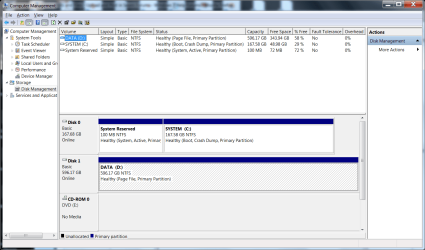
Please post screenshot of disk management as the situation is now ... so before swap. Only 1 ACTIVE partition I hope??!!

Post results
 

My Computer My Computer

At a glance

Microsoft Windows 7 Home Premium 64-bits 7601...Intel(R) Core(TM) i3 CPU M 370 @ 2.40GHz4,00 GBATI Mobility Radeon HD 5400 Series
Computer type
Laptop
Computer Manufacturer/Model Number
ACER ASPIRE 5742G
OS
Microsoft Windows 7 Home Premium 64-bits 7601 Multiprocessor Free Service Pack 1
CPU
Intel(R) Core(TM) i3 CPU M 370 @ 2.40GHz
Motherboard
Acer Aspire 5742G
Memory
4,00 GB
Graphics Card(s)
ATI Mobility Radeon HD 5400 Series
Sound Card
(1) AMD High Definition Audio Device (2) Realtek High Defi
Screen Resolution
1366 x 768 x 32 bits (4294967296 colors) @ 60 Hz
Hard Drives
WDC WD5000BEVT-22ZAT0
My intent was to sysprep: oobe, generalize, shutdown. swap motherboard, cpu and memory. then reboot.
 

Attachments

  • diskmgmt.png
    diskmgmt.png
    50.4 KB · Views: 1

My Computer My Computer

At a glance

Windows 7 Professional 64bitIntel Zeon X34702 x Kingston 4GB DDR3 1066 KVR1066D3E7S/4Gonboard
Computer Manufacturer/Model Number
OEM
OS
Windows 7 Professional 64bit
CPU
Intel Zeon X3470
Motherboard
ASUS P7F7-E WS Supercomputer
Memory
2 x Kingston 4GB DDR3 1066 KVR1066D3E7S/4G
Graphics Card(s)
onboard
Sound Card
onboard
Monitor(s) Displays
Samsung SyncMaster 930b
Screen Resolution
1280x1024
Hard Drives
Corsair SSD 120GB F120GB2-BRKT
WD 640GB 7200rpm WD6402AAEX Sata II
PSU
Seasonic S12II 520 watts
Case
Antec Three Hundred Illusion
Cooling
included with case
Keyboard
IBM 92G7453
Mouse
Microsoft Optical
Internet Speed
6mbps
Other Info
Vantec USB 3.0 Hub
AZiO BTD-V201 USB 2.0 Mcrio Bluetooth Adapter
Sony DVD/CD Writer AD-7260S-0B
system boots from ACTIVE partition so "system reserved" . That has a boot menu that has a boot entry to win7 on C.
Drive lettering will give you no issues at all if you dont't move the partitions.

Don't use sysprep. I advise you to do this: Make Windows 7 bootable after motherboard swap . But first uninstall all unneeded drivers and software.
 

My Computer My Computer

At a glance

Microsoft Windows 7 Home Premium 64-bits 7601...Intel(R) Core(TM) i3 CPU M 370 @ 2.40GHz4,00 GBATI Mobility Radeon HD 5400 Series
Computer type
Laptop
Computer Manufacturer/Model Number
ACER ASPIRE 5742G
OS
Microsoft Windows 7 Home Premium 64-bits 7601 Multiprocessor Free Service Pack 1
CPU
Intel(R) Core(TM) i3 CPU M 370 @ 2.40GHz
Motherboard
Acer Aspire 5742G
Memory
4,00 GB
Graphics Card(s)
ATI Mobility Radeon HD 5400 Series
Sound Card
(1) AMD High Definition Audio Device (2) Realtek High Defi
Screen Resolution
1366 x 768 x 32 bits (4294967296 colors) @ 60 Hz
Hard Drives
WDC WD5000BEVT-22ZAT0
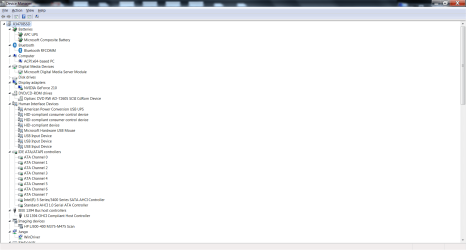
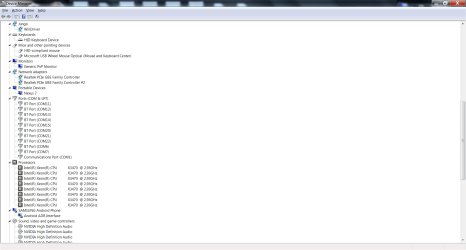
Before swap, so now: Please post "device manager" screenhot. Expand all branches except "systemdevices". I think you have to make 2 screenshots to show everything.
 
Last edited:

My Computer My Computer

At a glance

Microsoft Windows 7 Home Premium 64-bits 7601...Intel(R) Core(TM) i3 CPU M 370 @ 2.40GHz4,00 GBATI Mobility Radeon HD 5400 Series
Computer type
Laptop
Computer Manufacturer/Model Number
ACER ASPIRE 5742G
OS
Microsoft Windows 7 Home Premium 64-bits 7601 Multiprocessor Free Service Pack 1
CPU
Intel(R) Core(TM) i3 CPU M 370 @ 2.40GHz
Motherboard
Acer Aspire 5742G
Memory
4,00 GB
Graphics Card(s)
ATI Mobility Radeon HD 5400 Series
Sound Card
(1) AMD High Definition Audio Device (2) Realtek High Defi
Screen Resolution
1366 x 768 x 32 bits (4294967296 colors) @ 60 Hz
Hard Drives
WDC WD5000BEVT-22ZAT0
It appears that the "Paragon Adaptive Restore" has been replaced by the "P2P Adjust OS Wizard" on the "Paragon Recovery Media Builder" prepared bootable environment (have Paragon Drive Copy V14).

Is the "uninstall all unneeded drivers and software" really required? If the "P2P Adjust OS Wizard" adds drivers for the new hardware and the OS on reboot does all plug-and-play, do a few extra unused drivers make any difference?

"sapw"? not familiar.
 

Attachments

  • devmgr1.png
    devmgr1.png
    50.3 KB · Views: 1
  • devmgr2.png
    devmgr2.png
    54.5 KB · Views: 1
  • devmgr3.png
    devmgr3.png
    55.3 KB · Views: 1

My Computer My Computer

At a glance

Windows 7 Professional 64bitIntel Zeon X34702 x Kingston 4GB DDR3 1066 KVR1066D3E7S/4Gonboard
Computer Manufacturer/Model Number
OEM
OS
Windows 7 Professional 64bit
CPU
Intel Zeon X3470
Motherboard
ASUS P7F7-E WS Supercomputer
Memory
2 x Kingston 4GB DDR3 1066 KVR1066D3E7S/4G
Graphics Card(s)
onboard
Sound Card
onboard
Monitor(s) Displays
Samsung SyncMaster 930b
Screen Resolution
1280x1024
Hard Drives
Corsair SSD 120GB F120GB2-BRKT
WD 640GB 7200rpm WD6402AAEX Sata II
PSU
Seasonic S12II 520 watts
Case
Antec Three Hundred Illusion
Cooling
included with case
Keyboard
IBM 92G7453
Mouse
Microsoft Optical
Internet Speed
6mbps
Other Info
Vantec USB 3.0 Hub
AZiO BTD-V201 USB 2.0 Mcrio Bluetooth Adapter
Sony DVD/CD Writer AD-7260S-0B
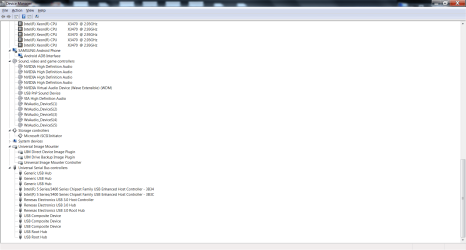
Some extra driver don't make a huge difference indeed. But I prefer to uninstall the NVIDIA driver totally before swap. Maybe system doesn't boot with wrong driver. But you can always do a "safe mode" boot and uninstall the stuff.

More important: install "Standard AHCI 1.0 Serial ATA Controller". You already did that... nice. That works with all controllers in AHCI mode.

Most likely you can boot without using Paragon Adjust OS Wizard at all(?) But be sure to cleanup "device manager" afterwards.
 

My Computer My Computer

At a glance

Microsoft Windows 7 Home Premium 64-bits 7601...Intel(R) Core(TM) i3 CPU M 370 @ 2.40GHz4,00 GBATI Mobility Radeon HD 5400 Series
Computer type
Laptop
Computer Manufacturer/Model Number
ACER ASPIRE 5742G
OS
Microsoft Windows 7 Home Premium 64-bits 7601 Multiprocessor Free Service Pack 1
CPU
Intel(R) Core(TM) i3 CPU M 370 @ 2.40GHz
Motherboard
Acer Aspire 5742G
Memory
4,00 GB
Graphics Card(s)
ATI Mobility Radeon HD 5400 Series
Sound Card
(1) AMD High Definition Audio Device (2) Realtek High Defi
Screen Resolution
1366 x 768 x 32 bits (4294967296 colors) @ 60 Hz
Hard Drives
WDC WD5000BEVT-22ZAT0
oh, display adapter, good point. in this instance a separate video card, PCI Express x16 2. it will be the same before and after the motherboard swap. so probably not a driver concern here in this particular case.
 

My Computer My Computer

At a glance

Windows 7 Professional 64bitIntel Zeon X34702 x Kingston 4GB DDR3 1066 KVR1066D3E7S/4Gonboard
Computer Manufacturer/Model Number
OEM
OS
Windows 7 Professional 64bit
CPU
Intel Zeon X3470
Motherboard
ASUS P7F7-E WS Supercomputer
Memory
2 x Kingston 4GB DDR3 1066 KVR1066D3E7S/4G
Graphics Card(s)
onboard
Sound Card
onboard
Monitor(s) Displays
Samsung SyncMaster 930b
Screen Resolution
1280x1024
Hard Drives
Corsair SSD 120GB F120GB2-BRKT
WD 640GB 7200rpm WD6402AAEX Sata II
PSU
Seasonic S12II 520 watts
Case
Antec Three Hundred Illusion
Cooling
included with case
Keyboard
IBM 92G7453
Mouse
Microsoft Optical
Internet Speed
6mbps
Other Info
Vantec USB 3.0 Hub
AZiO BTD-V201 USB 2.0 Mcrio Bluetooth Adapter
Sony DVD/CD Writer AD-7260S-0B
Back
Top