
Solved A Couple of RAM Questions

tcyz

New member
Local time
5:07 AM
Messages
9
Hi, I apologize in advance for this really long post and I know these questions were asked a million times, but I can't seem to find anything accurate through search.

Recently, only 8GB of RAM became usable from the 12GB (4x3 Corsair Dominator 9,9,9,24 1.65v) I have installed. After testing each RAM and slots individually, I get these results:

A1 A2 B1 B2 C1 C2 (default setting) = 8/12 GB RAM used

A1 A2 B1 B2 C1 C2 = 4 GB
A1 A2 B1 B2 C1 C2 = Windows won't boot (blank screen)
A1 A2 B1 B2 C1 C2 = 4 GB

Now the weird part.

A1 A2 B1 B2 C1 C2 = Windows won't boot (blank screen)
A1 A2 B1 B2 C1C2 = Windows won't boot (blank screen)
A1 A2 B1 B2 C1 C2 = 8 GB
A1 A2 B1 B2 C1 C2 = 4 GB

It seems a stick in B1 would prevent my system from booting. I pretty much concluded that Channel B stopped working and I will need a new Motherboard. Now, to the questions;

1. When a "slot" becomes faulty, does the entire channel (both slots) normally stop working altogether like my results above? Is it safe to say this is a motherboard failure?

2. Even though B2 has stopped working, Windows is still detecting 12GB RAM on my system. Am I still on Triple Channel mode using A2, B2, and C2?

I do extreme Photoshop work and each file I'm currently working on takes up to 7GB of physical memory. Adding that to the memory I have on cache crashes my program. I have a set of old ADATA (2GB 9,9,9,24 1.55v) RAM and I was thinking of placing them into A1 and C1 to boost my RAM back to 12GB while I wait for my new motherboard to arrive.

A1 A2 B1 B2 C1 C2
red = ADATA Gaming Series (9,9,9,24 1.55v)
blue = Corsair Dominator 9,9,9,24 1.65v)

If the faulty B channel drops me back into single channel mode;

3. What are the risks and consequences of mixing RAM of different size and manufactures like above? Would this cause hardware damage? Or do people not recommend it only because of a performance impact?
 

My Computer My Computer

At a glance

Windows Ultimate x64Intel i7 930Corsair Dominator 12 GB Triple Channel
Computer type
PC/Desktop
Computer Manufacturer/Model Number
Custom
OS
Windows Ultimate x64
CPU
Intel i7 930
Motherboard
x58a-ud3r
Memory
Corsair Dominator 12 GB Triple Channel
What program did you use to test your ram?

Where are you getting your information on how much ram is useable?
Installed ram and useable ram is two different things.

If you have a bad slot on the motherboard it will not matter what ram you use the slot is still bad. Mixing ram is not a good thing.

The slot you think is bad; will any ram module work in it?

1. Their is not a way to know exactly what is wrong with the ram.
Just knowing it's bad is enough.

2. Window 7 gets ram information from the motherboard.
How much ram does your bios indicate?

This program is very useful to see information about your ram.

CPU-Z CPUID - System & hardware benchmark, monitoring, reporting


Give us a picture Resource Monitor like this.

Use this tutorial by Brink for posting screen shots.
http://www.sevenforums.com/tutorials/9733-screenshots-files-upload-post-seven-forums.html


Resource Monitor.PNG
 

My Computer My Computer

At a glance

Windows 10 Pro. 64/ version 1709 Windows 7 Pr...Intel i7-6800K @ 4.3Corsair Platinum 16 gig @2400EVGA GTX 1070 OC
Computer type
PC/Desktop
Computer Manufacturer/Model Number
Home made Desktop
OS
Windows 10 Pro. 64/ version 1709 Windows 7 Pro/64
CPU
Intel i7-6800K @ 4.3
Motherboard
ASUS X-99 Deluxe II
Memory
Corsair Platinum 16 gig @2400
Graphics Card(s)
EVGA GTX 1070 OC
Monitor(s) Displays
Asus 27" LED LCD/VE278Q
Screen Resolution
1920-1080 or 1280-720 HDMI
Hard Drives
INTEL SSD 730-240 Gb Sata 3.0/
PSU
EVGA Platium 1200W
Case
Phanteks Luxe Tempered Glass 8 fans/ one radiator
Cooling
XSPC/ Water Cooled CPU
Keyboard
Das 4 Professional
Mouse
Logitech M705/MX Anywhere 2-S
Internet Speed
100 mbits
Antivirus
Microsoft Security Essentials/ Malwarebytes Premium 3.0/ SAS
Browser
I.E. 11 default/Firefox/ ISP Time Warner Cable/Spectrum
Other Info
LG BluRay Burner/
Sound system-KLipsch-THX/
Icy Dock ssd Hot Swap bays.
Mixing RAM sizes, types, manufacturers is never recommended. Matched RAM modules is always best.
This won't do any physical damage but everything else is unpredictable. It may work with no problems or the system may be unbootable. Anything in between is possible.
 

My Computer My Computer

At a glance

Windows 7 Pro 64 bitXeon W35208 GBNvidia Geforce 210
Computer type
PC/Desktop
Computer Manufacturer/Model Number
HP
OS
Windows 7 Pro 64 bit
CPU
Xeon W3520
Memory
8 GB
Graphics Card(s)
Nvidia Geforce 210
Thank you Layback Bear for the link to the screenshot tutorial.

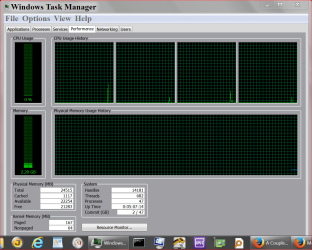
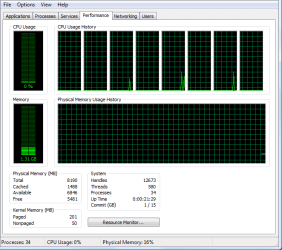
First time noticing the problem was when Photoshop crashed after opening my file last night. I went into task manager to look at the resource.

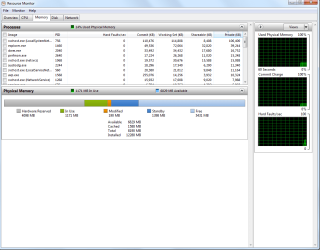
1. Performance.png 2. Resource Monitor.png

Then I checked my system from control panel and saw the 12GB (8GB Usable) line.

3. System.png

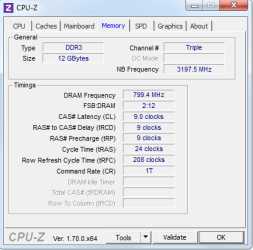
Dxdiag shows I have 12GB installed. CPUZ also states I have 12GB installed.

4. CPUZ Memory.png

The BIOS listed the following:
Base Memory - 640K
Extended Memory - 8190M
Total Memory - 8192M

"What program did you use to test your ram?"
I did not use any program to test my RAM. What I did do was took out each RAM and inserted them into Channel A2 to see if they booted. All 3 of them booted with 4GB.

"Where are you getting your information on how much ram is useable? Installed ram and useable ram is two different things."
The system page from the above screenshot.

"The slot you think is bad; will any ram module work in it?"
No. I tried my old ADATA 2GB x3 and the same results came in like on the first post. B1 will prevent my system from booting and B2 will not be used leaving me with 4GB using the ADATA 2GB x3.

I am already aware that mixing RAM is not recommended, but I just wanted to know for sure what the consequences are. As of now, I can't get back to work on my PC because Photoshop refuses to open my files due to insufficient RAM.
 

My Computer My Computer

At a glance

Windows Ultimate x64Intel i7 930Corsair Dominator 12 GB Triple Channel
Computer type
PC/Desktop
Computer Manufacturer/Model Number
Custom
OS
Windows Ultimate x64
CPU
Intel i7 930
Motherboard
x58a-ud3r
Memory
Corsair Dominator 12 GB Triple Channel
I am already aware that mixing RAM is not recommended, but I just wanted to know for sure what the consequences are. As of now, I can't get back to work on my PC because Photoshop refuses to open my files due to insufficient RAM.

Soz I know this isn't a fix for your problem but I have a concern that your current problem is related to PS and not so much your RAM issue, although the 2 issues are linked ... try pressing Ctrl+Alt+Shift immediately after clicking the Photoshop icon (some say hold Ctrl+Alt+Shift whilst clicking the icon --- but I have seen that some say this doesn't work) ... this will reset your PS settings and hopefully you can open your psd file ;)
 

My Computer My Computer

At a glance

Windows 7 Ultimate 64bitAMD Phenom Quad core 9950 black edition16Gb2x XFX Radeon 5850
Computer type
PC/Desktop
Computer Manufacturer/Model Number
Self Built
OS
Windows 7 Ultimate 64bit
CPU
AMD Phenom Quad core 9950 black edition
Motherboard
Gigabyte
Memory
16Gb
Graphics Card(s)
2x XFX Radeon 5850
Sound Card
PCI Express X-Fi Titanium / Logitech G35
Monitor(s) Displays
2x HP 2410i
Screen Resolution
1920x1080
Hard Drives
2x 500Gb Seagate
1x 300Gb Seagate
1x 1Tb Seagate
2x 1Tb Hitatchi
PSU
Jean Tech Storm 700W
Case
Cooler Master COSMOS S
Cooling
Akasa Evo Blue Pro
Keyboard
Logitech G15
Mouse
Mad Catz M.M.O. 7
Internet Speed
12mb
Soz I know this isn't a fix for your problem but I have a concern that your current problem is related to PS and not so much your RAM issue, although the 2 issues are linked ... try pressing Ctrl+Alt+Shift immediately after clicking the Photoshop icon (some say hold Ctrl+Alt+Shift whilst clicking the icon --- but I have seen that some say this doesn't work) ... this will reset your PS settings and hopefully you can open your psd file ;)

Hi, I am more than positive that there is nothing wrong with Photoshop. I work with files ranging from 1MB to 800MB (very large, detailed documents prior to flattening of 100+ layers). When my 12GB was still intact, I was able to open and work on these 800mb files as they take up to 8GB of physical memory without problems, until last night. I can still work with other smaller sized files without issue, as they take up anything from 3GB-5GB of physical memory. Anything bigger would cause the program to lag, freeze, and crash.
 

My Computer My Computer

At a glance

Windows Ultimate x64Intel i7 930Corsair Dominator 12 GB Triple Channel
Computer type
PC/Desktop
Computer Manufacturer/Model Number
Custom
OS
Windows Ultimate x64
CPU
Intel i7 930
Motherboard
x58a-ud3r
Memory
Corsair Dominator 12 GB Triple Channel
Hiya pal

I'm lucky enough to be an IT technician & a graphic artist, I to work with very large files often as big as the ones you work with. I've just done a test on another unit that I have and I opened a 210mb psd file with only 2Gb of ram with over 170 layers although it was a bit slow it still opened and I could work on it.
Then I changed my PS memory settings to use 100% memory usage and then shut down & took out 1 stick of ram (which left me with 1Gb) ... when I tried to open the same file & I got the error "insufficient RAM"

I then reset my PS memory settings using the Ctrl+Alt+Shift option and I can now open the same file with only 1Gb of RAM although I must admit it is really slow and not practical to work with ;)
 

My Computer My Computer

At a glance

Windows 7 Ultimate 64bitAMD Phenom Quad core 9950 black edition16Gb2x XFX Radeon 5850
Computer type
PC/Desktop
Computer Manufacturer/Model Number
Self Built
OS
Windows 7 Ultimate 64bit
CPU
AMD Phenom Quad core 9950 black edition
Motherboard
Gigabyte
Memory
16Gb
Graphics Card(s)
2x XFX Radeon 5850
Sound Card
PCI Express X-Fi Titanium / Logitech G35
Monitor(s) Displays
2x HP 2410i
Screen Resolution
1920x1080
Hard Drives
2x 500Gb Seagate
1x 300Gb Seagate
1x 1Tb Seagate
2x 1Tb Hitatchi
PSU
Jean Tech Storm 700W
Case
Cooler Master COSMOS S
Cooling
Akasa Evo Blue Pro
Keyboard
Logitech G15
Mouse
Mad Catz M.M.O. 7
Internet Speed
12mb
Hi, thank you for reminding me of the RAM allocation! I just increased it from my 80% to 100% through preference.

I can now open the file but I still can't work with them. Like you stated, it's extremely slow. Applying filters takes 5 minutes before the program crashes. Best case scenario is scrubby zoom and anti-alias stops working after the filter is applied. Transforming objects instantly crashes the program. Stroking with a brush causes a slow motion trail. (Doing digital paintings at 300dpi on a 20x30 in. canvas by the way)

Proceeded to reset the settings on load and reallocated the default 71% to 100%. Same results as the above. I guess I will improvise for now.

Though, I am still hoping to see if the missing RAM is caused by a faulty MOBO before I proceed to purchase another.
 

My Computer My Computer

At a glance

Windows Ultimate x64Intel i7 930Corsair Dominator 12 GB Triple Channel
Computer type
PC/Desktop
Computer Manufacturer/Model Number
Custom
OS
Windows Ultimate x64
CPU
Intel i7 930
Motherboard
x58a-ud3r
Memory
Corsair Dominator 12 GB Triple Channel
Your Hardware Reserve use of ram is very high. You are using 4 gb. It normally is in mb.

Most of the time it indicates the ram is not installed as per the motherboard manual. Or the wrong ram.
Seldom is it the motherboard.

**How many ram modules are you using?
Verify the proper location as per motherboard manual for that amount of modules.

Proper program to test ram. Tutorial by Jonathan King:

http://www.sevenforums.com/tutorials/105647-ram-test-memtest86.ht

I have never used PS but have you tried just letting Windows 7 manage the memory.

You post you are allocating ram to PS and then you are asking where did the ram go.
For a test let Windows 7 manage the ram and then take another look.
 

My Computer My Computer

At a glance

Windows 10 Pro. 64/ version 1709 Windows 7 Pr...Intel i7-6800K @ 4.3Corsair Platinum 16 gig @2400EVGA GTX 1070 OC
Computer type
PC/Desktop
Computer Manufacturer/Model Number
Home made Desktop
OS
Windows 10 Pro. 64/ version 1709 Windows 7 Pro/64
CPU
Intel i7-6800K @ 4.3
Motherboard
ASUS X-99 Deluxe II
Memory
Corsair Platinum 16 gig @2400
Graphics Card(s)
EVGA GTX 1070 OC
Monitor(s) Displays
Asus 27" LED LCD/VE278Q
Screen Resolution
1920-1080 or 1280-720 HDMI
Hard Drives
INTEL SSD 730-240 Gb Sata 3.0/
PSU
EVGA Platium 1200W
Case
Phanteks Luxe Tempered Glass 8 fans/ one radiator
Cooling
XSPC/ Water Cooled CPU
Keyboard
Das 4 Professional
Mouse
Logitech M705/MX Anywhere 2-S
Internet Speed
100 mbits
Antivirus
Microsoft Security Essentials/ Malwarebytes Premium 3.0/ SAS
Browser
I.E. 11 default/Firefox/ ISP Time Warner Cable/Spectrum
Other Info
LG BluRay Burner/
Sound system-KLipsch-THX/
Icy Dock ssd Hot Swap bays.
4GB of reserve is a stick gone missing. I am currently running 3 sticks of Corsair Dominator DDR3 4GB each (12 Total).

Sorry, but can you clarify a little more on "Verify the proper location as per motherboard manual for that amount of modules." I am not very savvy when it comes to hardware so I will try to answer based on a guess to what you're saying.

I am using a X58A-UD3R MOBO using Triple Channel mode. The 3 RAM sticks are Corsairs mentioned above and are DDR3 compatible as with my MOBO, currently located on: A1 A2 B1 B2 C1 C2 (the white slots)

RAM in the A1 A2 B1 B2 C1 C2 setup (the blue slots) prevents my system from booting.

I will run Memtest. Will post back later with results.

"You post you are allocating ram to PS and then you are asking where did the ram go.
For a test let Windows 7 manage the ram and then take another look."
RAM allocation to PS is after the 4GB RAM went missing. Letting Windows manage the RAM results in my file not opening, which is why I had to reallocate the additional available RAM to PS. My main problem is, 4GB out of 12GB RAM was already missing before everything I did in my previous post.
 
Last edited:

My Computer My Computer

At a glance

Windows Ultimate x64Intel i7 930Corsair Dominator 12 GB Triple Channel
Computer type
PC/Desktop
Computer Manufacturer/Model Number
Custom
OS
Windows Ultimate x64
CPU
Intel i7 930
Motherboard
x58a-ud3r
Memory
Corsair Dominator 12 GB Triple Channel
When you can disable P/S. Do not have P/S start at boot.

Set memory to Windows 7 Manage. No memory allocated to anything.
Then take a look at the same Task Manager/Resource Manger as you did in post
#4.
Is it different? If so what is different?

Take a look in System Configure/Boot/Advanced Options.

At the top do you have check marks in the square boxes and what # are in the boxes.
*Number of processors
* Max Memory

** Have you installed any new hardware?
What CPU cooler do you use and have you been doing any maintenance on the cooler?

***Do you have the motherboard manual?***


Why I ask I want to know if the 3 modules are installed in the motherboard as per the manual.
I understand the white slots work and the blue slots don't work.
Is that the way the manual indicates?
 

My Computer My Computer

At a glance

Windows 10 Pro. 64/ version 1709 Windows 7 Pr...Intel i7-6800K @ 4.3Corsair Platinum 16 gig @2400EVGA GTX 1070 OC
Computer type
PC/Desktop
Computer Manufacturer/Model Number
Home made Desktop
OS
Windows 10 Pro. 64/ version 1709 Windows 7 Pro/64
CPU
Intel i7-6800K @ 4.3
Motherboard
ASUS X-99 Deluxe II
Memory
Corsair Platinum 16 gig @2400
Graphics Card(s)
EVGA GTX 1070 OC
Monitor(s) Displays
Asus 27" LED LCD/VE278Q
Screen Resolution
1920-1080 or 1280-720 HDMI
Hard Drives
INTEL SSD 730-240 Gb Sata 3.0/
PSU
EVGA Platium 1200W
Case
Phanteks Luxe Tempered Glass 8 fans/ one radiator
Cooling
XSPC/ Water Cooled CPU
Keyboard
Das 4 Professional
Mouse
Logitech M705/MX Anywhere 2-S
Internet Speed
100 mbits
Antivirus
Microsoft Security Essentials/ Malwarebytes Premium 3.0/ SAS
Browser
I.E. 11 default/Firefox/ ISP Time Warner Cable/Spectrum
Other Info
LG BluRay Burner/
Sound system-KLipsch-THX/
Icy Dock ssd Hot Swap bays.
When you can disable P/S. Do not have P/S start at boot.

Set memory to Windows 7 Manage. No memory allocated to anything.
Then take a look at the same Task Manager/Resource Manger as you did in post
#4.
Is it different? If so what is different?

Take a look in System Configure/Boot/Advanced Options.

At the top do you have check marks in the square boxes and what # are in the boxes.
*Number of processors
* Max Memory

** Have you installed any new hardware?
What CPU cooler do you use and have you been doing any maintenance on the cooler?

***Do you have the motherboard manual?***


Why I ask I want to know if the 3 modules are installed in the motherboard as per the manual.
I understand the white slots work and the blue slots don't work.
Is that the way the manual indicates?

In the screenshots I posted above, Photoshop is not open. Photoshop doesn't start up on boot. The extra memory I allocated to Photoshop only takes place when the program is opened with a large file in order to help it perform faster. The screenshots above are still accurate regardless if I had just reallocated Photoshop memory because this program is not open nor is it running in the background.

Windows 7 is infact, managing everything dealing with RAM at the moment because I do not have Photoshop open.

msconfig/System Configuration/Boot/Advanced Options was the first thing i looked at. Both boxes are unchecked and the numbers are greyed out at 1 (Number of Processors) and 0 (Maximum Memory).

No new hardware was installed for almost 3 years (CPU built on Dec 2011). My CPU cooler is a Coolmaster Hyper 212 EVO. Problem only arised last night.

Yes, I still have the manual. Yes, it's the way the manual indicates for Triple Channel.
 

My Computer My Computer

At a glance

Windows Ultimate x64Intel i7 930Corsair Dominator 12 GB Triple Channel
Computer type
PC/Desktop
Computer Manufacturer/Model Number
Custom
OS
Windows Ultimate x64
CPU
Intel i7 930
Motherboard
x58a-ud3r
Memory
Corsair Dominator 12 GB Triple Channel
Thank you for answering my question very exact. It does help.
You are our eyes and ears concerning your system.

My concern is why is their 4 GB of Hardware Reserve. I have two system and both are under 1 GB.

Could you fill in your System Specs completely.

Take a look at mine it will give you a good idea of what information is nice to see.
If you could post here the exact ram you are using and the exact video card.

Something is increasing your Hardware Reserve to high.

I have had a cpu cooler that was tighten down to tight cause the same problem you are having. It put undue stress on the cpu and the motherboard.

From a post I made a day or two ago.
http://www.sevenforums.com/pc-custo...ooking-advice-parts-list-water-cooling-2.html

** I had installed the new cooler to tight.
Puts to much pressure on the cpu where the memory controller is and puts to much pressure on the motherboard which effects the two ram slots closes to the cpu.
 

My Computer My Computer

At a glance

Windows 10 Pro. 64/ version 1709 Windows 7 Pr...Intel i7-6800K @ 4.3Corsair Platinum 16 gig @2400EVGA GTX 1070 OC
Computer type
PC/Desktop
Computer Manufacturer/Model Number
Home made Desktop
OS
Windows 10 Pro. 64/ version 1709 Windows 7 Pro/64
CPU
Intel i7-6800K @ 4.3
Motherboard
ASUS X-99 Deluxe II
Memory
Corsair Platinum 16 gig @2400
Graphics Card(s)
EVGA GTX 1070 OC
Monitor(s) Displays
Asus 27" LED LCD/VE278Q
Screen Resolution
1920-1080 or 1280-720 HDMI
Hard Drives
INTEL SSD 730-240 Gb Sata 3.0/
PSU
EVGA Platium 1200W
Case
Phanteks Luxe Tempered Glass 8 fans/ one radiator
Cooling
XSPC/ Water Cooled CPU
Keyboard
Das 4 Professional
Mouse
Logitech M705/MX Anywhere 2-S
Internet Speed
100 mbits
Antivirus
Microsoft Security Essentials/ Malwarebytes Premium 3.0/ SAS
Browser
I.E. 11 default/Firefox/ ISP Time Warner Cable/Spectrum
Other Info
LG BluRay Burner/
Sound system-KLipsch-THX/
Icy Dock ssd Hot Swap bays.
I want to be as thorough as I can since it's hindering my job.

I'm using a ATI Radeon 4870. This is my RAM CORSAIR DOMINATOR 12GB (3 x 4GB) 240-Pin DDR3 SDRAM DDR3 1600 (PC3 12800) Desktop Memory Model CMP12GX3M3A1600C9 - Newegg.com

If my cooler was on too tight, I would've had this RAM problem a long time ago right? It was fine for more than 2 years, and only the middle 2 RAM slots (B1 and B2) appear to be failing as of yesterday. The first two, A1 and A2 that are closest to the CPU are working without issues.

Can memtest86 detect a failing DIMM slot?
 

My Computer My Computer

At a glance

Windows Ultimate x64Intel i7 930Corsair Dominator 12 GB Triple Channel
Computer type
PC/Desktop
Computer Manufacturer/Model Number
Custom
OS
Windows Ultimate x64
CPU
Intel i7 930
Motherboard
x58a-ud3r
Memory
Corsair Dominator 12 GB Triple Channel
It doesn't check ram slots per-say.
Read the tutorial again.
When you have known 1 or 2 sticks of good ram and they work in other slots but not the suspect slot, it the slot or motherboard.

I have no way of knowing from here how long your cooler was installed. I can't tell from here if you have done any maintenance. That is why I asked the questions.

I would do the Memtest86+ as per tutorial next.
 

My Computer My Computer

At a glance

Windows 10 Pro. 64/ version 1709 Windows 7 Pr...Intel i7-6800K @ 4.3Corsair Platinum 16 gig @2400EVGA GTX 1070 OC
Computer type
PC/Desktop
Computer Manufacturer/Model Number
Home made Desktop
OS
Windows 10 Pro. 64/ version 1709 Windows 7 Pro/64
CPU
Intel i7-6800K @ 4.3
Motherboard
ASUS X-99 Deluxe II
Memory
Corsair Platinum 16 gig @2400
Graphics Card(s)
EVGA GTX 1070 OC
Monitor(s) Displays
Asus 27" LED LCD/VE278Q
Screen Resolution
1920-1080 or 1280-720 HDMI
Hard Drives
INTEL SSD 730-240 Gb Sata 3.0/
PSU
EVGA Platium 1200W
Case
Phanteks Luxe Tempered Glass 8 fans/ one radiator
Cooling
XSPC/ Water Cooled CPU
Keyboard
Das 4 Professional
Mouse
Logitech M705/MX Anywhere 2-S
Internet Speed
100 mbits
Antivirus
Microsoft Security Essentials/ Malwarebytes Premium 3.0/ SAS
Browser
I.E. 11 default/Firefox/ ISP Time Warner Cable/Spectrum
Other Info
LG BluRay Burner/
Sound system-KLipsch-THX/
Icy Dock ssd Hot Swap bays.
MemTest86 came out clean after an overnight test, no errors. Memtest says I have 8GB (8191MB) RAM like it did on my BIOS, while Windows and CPUZ says I have 12 installed.

I'm suspecting my BIOS and Memtest completely ignored the fact that I had a stick in Channel B and only scanned A and C. Afterwards, I removed Sticks A2 and C2 with RAM only in B2 to run Memtest, since I already suspected the culprit to be the B Channel.

The results were a blank screen. It didn't even show the POST bios screen so I couldn't run Memtest on B.

Swapped the B2 stick with A2 stick after, and the results were the same.

It's like my Channel B RAM is there, but it's not being read at all.
 

My Computer My Computer

At a glance

Windows Ultimate x64Intel i7 930Corsair Dominator 12 GB Triple Channel
Computer type
PC/Desktop
Computer Manufacturer/Model Number
Custom
OS
Windows Ultimate x64
CPU
Intel i7 930
Motherboard
x58a-ud3r
Memory
Corsair Dominator 12 GB Triple Channel
That make me think it's the motherboard.
 

My Computer My Computer

At a glance

Windows 10 Pro. 64/ version 1709 Windows 7 Pr...Intel i7-6800K @ 4.3Corsair Platinum 16 gig @2400EVGA GTX 1070 OC
Computer type
PC/Desktop
Computer Manufacturer/Model Number
Home made Desktop
OS
Windows 10 Pro. 64/ version 1709 Windows 7 Pro/64
CPU
Intel i7-6800K @ 4.3
Motherboard
ASUS X-99 Deluxe II
Memory
Corsair Platinum 16 gig @2400
Graphics Card(s)
EVGA GTX 1070 OC
Monitor(s) Displays
Asus 27" LED LCD/VE278Q
Screen Resolution
1920-1080 or 1280-720 HDMI
Hard Drives
INTEL SSD 730-240 Gb Sata 3.0/
PSU
EVGA Platium 1200W
Case
Phanteks Luxe Tempered Glass 8 fans/ one radiator
Cooling
XSPC/ Water Cooled CPU
Keyboard
Das 4 Professional
Mouse
Logitech M705/MX Anywhere 2-S
Internet Speed
100 mbits
Antivirus
Microsoft Security Essentials/ Malwarebytes Premium 3.0/ SAS
Browser
I.E. 11 default/Firefox/ ISP Time Warner Cable/Spectrum
Other Info
LG BluRay Burner/
Sound system-KLipsch-THX/
Icy Dock ssd Hot Swap bays.
I didn't think this would have worked, but I just placed the B2 stick into C1.

A1 A2 B1 B2 C1 C2

Now I have all my 12GB RAM back. Only difference is CPUZ indicating my RAM running Dual Channel instead of Triple. My PS files are opening again with access to all RAM so I guess this is solved.

Thank you Layback Bear, for being patient with me.
 

My Computer My Computer

At a glance

Windows Ultimate x64Intel i7 930Corsair Dominator 12 GB Triple Channel
Computer type
PC/Desktop
Computer Manufacturer/Model Number
Custom
OS
Windows Ultimate x64
CPU
Intel i7 930
Motherboard
x58a-ud3r
Memory
Corsair Dominator 12 GB Triple Channel
Your welcome.
I'm glad things are working for you and PS.

I do find Gigabytes motherboard manual lacking of information. At least the one I found on line.
Happy computing.
 

My Computer My Computer

At a glance

Windows 10 Pro. 64/ version 1709 Windows 7 Pr...Intel i7-6800K @ 4.3Corsair Platinum 16 gig @2400EVGA GTX 1070 OC
Computer type
PC/Desktop
Computer Manufacturer/Model Number
Home made Desktop
OS
Windows 10 Pro. 64/ version 1709 Windows 7 Pro/64
CPU
Intel i7-6800K @ 4.3
Motherboard
ASUS X-99 Deluxe II
Memory
Corsair Platinum 16 gig @2400
Graphics Card(s)
EVGA GTX 1070 OC
Monitor(s) Displays
Asus 27" LED LCD/VE278Q
Screen Resolution
1920-1080 or 1280-720 HDMI
Hard Drives
INTEL SSD 730-240 Gb Sata 3.0/
PSU
EVGA Platium 1200W
Case
Phanteks Luxe Tempered Glass 8 fans/ one radiator
Cooling
XSPC/ Water Cooled CPU
Keyboard
Das 4 Professional
Mouse
Logitech M705/MX Anywhere 2-S
Internet Speed
100 mbits
Antivirus
Microsoft Security Essentials/ Malwarebytes Premium 3.0/ SAS
Browser
I.E. 11 default/Firefox/ ISP Time Warner Cable/Spectrum
Other Info
LG BluRay Burner/
Sound system-KLipsch-THX/
Icy Dock ssd Hot Swap bays.
Back
Top