Laptop Temperature - Reduction Tips? (Without Cooling Pad/Fans)

x BlueRobot

Closed by request
Local time
6:47 PM
Messages
6,784
Hey,

I run my laptop without a battery, just use the power adapter from the mains, to put strain upon the battery and the power adapter, which I have found to produce excessive heat when the battery is charging.

Also, I have the air vents fully unobstructed and make sure their clean by blowing with air by lung power :P

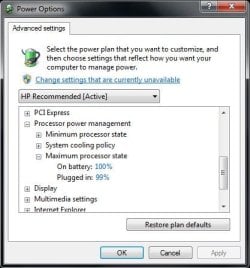
The power settings have been changed to maximum CPU state of 99% to reduce the temperature of the CPU (from what I've heard).

Anyone know any other good tips?
 

My Computer My Computer

Computer type
Laptop
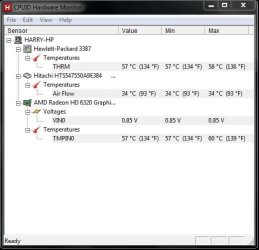
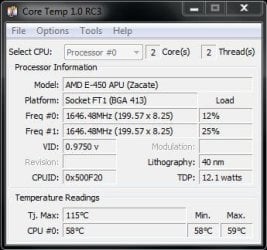
Here are some screenshots (: The temperature is with Google Chrome (Windows Seven Forums) open.
 

Attachments

  • Power Options.JPG
    Power Options.JPG
    36.8 KB · Views: 59
  • Core Temp.JPG
    Core Temp.JPG
    30.6 KB · Views: 60
  • Hardware.JPG
    Hardware.JPG
    34.7 KB · Views: 54

My Computer My Computer

Computer type
Laptop
Hey,

I run my laptop without a battery, just use the power adapter from the mains, to put strain upon the battery and the power adapter, which I have found to produce excessive heat when the battery is charging.

Also, I have the air vents fully unobstructed and make sure their clean by blowing with air by lung power :P

The power settings have been changed to maximum CPU state of 99% to reduce the temperature of the CPU (from what I've heard).

Anyone know any other good tips?

Use a can of compressed air. works. I do it myself.

Is the battery and is the inverter (power adapter) original?

Simply choose the Power Saver power plan.
WIN + X key combo| Battery Status section, choose Power Saver from the dropdown box.
WIN = key with Microsoft logo on top.

The biggest consumer of power by a very big margin is the display.
Once again WIN + X | choose Display Brighness section | click on the icon and slide sliders to the left.
 

My Computer My Computer

At a glance

MS Windows 7 Ultimate SP1 64-bitAMD A10-4600M6.00 GB Dual-Channel DDR3 @ 798MHz (11-11-12-28)AMD Radeon HD 7660G
Computer Manufacturer/Model Number
Toshiba Satellite S875D-S7239 laptop
OS
MS Windows 7 Ultimate SP1 64-bit
CPU
AMD A10-4600M
Motherboard
AMD Pumori (Socket FT1)
Memory
6.00 GB Dual-Channel DDR3 @ 798MHz (11-11-12-28)
Graphics Card(s)
AMD Radeon HD 7660G
Sound Card
High Definition Audio Device
Monitor(s) Displays
Generic PnP Monitor (1600x900@60Hz)
Screen Resolution
1600x900@60Hz
Hard Drives
SSD 119GB Corsair CSSD-V128GB2 ATA Device
Keyboard
Standard PS/2 Keyboard
Mouse
HP Wireless Optical Mobile Mouse Model FHA-3410
Internet Speed
What the local pub, local coffee shop offers.
Other Info
Optical Drive:MATSHITA BD-CMB UJ160B ATA Device


Also have an Asus ha1002xp netbook with Win 7 Ultimate installed.
Okay thanks, I'll try that then (: and I'm going to get a cooling pad/fan when I have the money to do so (:
 

My Computer My Computer

Computer type
Laptop
Is the battery and is the inverter (power adapter) original?

an easy way to keep an eye on temps is with SPECCY (link in my sig).

to determine battery condition, SIW | Hardware Section | Battery
Link to SIW in my signature.

Is the battery and is the inverter (power adapter) original?
 

My Computer My Computer

At a glance

MS Windows 7 Ultimate SP1 64-bitAMD A10-4600M6.00 GB Dual-Channel DDR3 @ 798MHz (11-11-12-28)AMD Radeon HD 7660G
Computer Manufacturer/Model Number
Toshiba Satellite S875D-S7239 laptop
OS
MS Windows 7 Ultimate SP1 64-bit
CPU
AMD A10-4600M
Motherboard
AMD Pumori (Socket FT1)
Memory
6.00 GB Dual-Channel DDR3 @ 798MHz (11-11-12-28)
Graphics Card(s)
AMD Radeon HD 7660G
Sound Card
High Definition Audio Device
Monitor(s) Displays
Generic PnP Monitor (1600x900@60Hz)
Screen Resolution
1600x900@60Hz
Hard Drives
SSD 119GB Corsair CSSD-V128GB2 ATA Device
Keyboard
Standard PS/2 Keyboard
Mouse
HP Wireless Optical Mobile Mouse Model FHA-3410
Internet Speed
What the local pub, local coffee shop offers.
Other Info
Optical Drive:MATSHITA BD-CMB UJ160B ATA Device


Also have an Asus ha1002xp netbook with Win 7 Ultimate installed.
The battery and the power adapter are original (:

EDIT: Installing the programs now :D
 

My Computer My Computer

Computer type
Laptop
As far as I know, laptop temps in the 50s are normal and safe. They just run a lot hotter than desktops due to their design limitations.

I wouldn't get excited by your indicated temperatures.
 

My Computer My Computer

At a glance

Windows 7 Home Premium SP1, 64-bitIntel Skylake i5-6600K, not overclocked8 GB HyperX DDR4-2666 (2 x 4 GB)none; graphics are integrated on CPU
Computer type
PC/Desktop
Computer Manufacturer/Model Number
Ignatz Special; 4 speed manual gearbox; factory air conditioning; one of one
OS
Windows 7 Home Premium SP1, 64-bit
CPU
Intel Skylake i5-6600K, not overclocked
Motherboard
AsRock Z170M Extreme 4, micro ATX
Memory
8 GB HyperX DDR4-2666 (2 x 4 GB)
Graphics Card(s)
none; graphics are integrated on CPU
Sound Card
onboard: Realtek ALC1150; external: USB Behringer UF0-202
Monitor(s) Displays
Dell S2340M 23 inch IPS
Screen Resolution
1600 x 900
Hard Drives
System: Crucial MX100 series SSD, 128 GB;
Data: Samsung Spinpoint 103SJ, 1 TB;
Backup: WD Caviar Green WD30EZRX-00D8PB0, 3 TB
PSU
Rosewill SilentNight 500 watt fanless, semi-modular
Case
Antec Solo II
Cooling
Noctua NH-U12S; Noctua F12 intake, Noctua S12A exhaust
Keyboard
Microsoft 200 6JH-00001 USB
Mouse
Dell or Microsoft optical wired; USB
Antivirus
Microsoft Security Essentials and Malwarebytes Premium
Browser
Pale Moon
Other Info
All fans PWM; speeds at idle: CPU circa 500 rpm; intake circa 600 rpm; exhaust circa 600 rpm; CPU temps 27 idle and 47 C load in a warm room (27 C/81 F) when running Intel Extreme Tuning Utility stress test.
cooling laptop internaly

i was also worried about high temperature of my Sony vaio lap top , now successfully found a solution to maintain cpu core temp as low as 43 degree centigrade . solution is install right mark cpu clock utility software and control pc power utilization , not that only pro version support easy switching and monitoring of temperature

how to do

make program manage CPU clock under performance under demand at various power state , and make another profile power saver with low CPU frequency and voltage ,done!

after that go to pro feature where program when cpu temp go beyond 44 degree change to power saver profile option

restart you will notice lap top work as it it is in refrigerator temperature can be monitored with HW MONITOR and observe temperature remain constant 44 degree variation is+- 5 only
 

My Computer My Computer

At a glance

windows vista
Computer type
PC/Desktop
OS
windows vista
i was also worried about high temperature of my Sony vaio lap top , now successfully found a solution to maintain cpu core temp as low as 43 degree centigrade . solution is install right mark cpu clock utility software and control pc power utilization , not that only pro version support easy switching and monitoring of temperature

how to do

make program manage CPU clock under performance under demand at various power state , and make another profile power saver with low CPU frequency and voltage ,done!

after that go to pro feature where program when cpu temp go beyond 44 degree change to power saver profile option

restart you will notice lap top work as it it is in refrigerator temperature can be monitored with HW MONITOR and observe temperature remain constant 44 degree variation is+- 5 only

You shouldn't have to do that on recent computers. They can be controlled with the power plans in Windows. I would recommend people be careful when using programs like this.
 

My Computer My Computer

At a glance

Windows 7 Professional x64 Service Pack 1AMD Athlon X4 6456GB DDR3 1066Sapphire Radeon HD 5670 512MB GDDR5
Computer type
PC/Desktop
Computer Manufacturer/Model Number
HP Pavilion P7-1010
OS
Windows 7 Professional x64 Service Pack 1
CPU
AMD Athlon X4 645
Motherboard
Foxxcon N-Alvorix RS880
Memory
6GB DDR3 1066
Graphics Card(s)
Sapphire Radeon HD 5670 512MB GDDR5
Sound Card
Realtek Integrated Audio
Monitor(s) Displays
HP 2011x
Screen Resolution
1600x900
Hard Drives
1. Crucial M4 128GB SSD
2. 1TB Seagate Barracuda 7200.12 RPM
3. 1TB Western Digital Caviar Green 5400RPM
PSU
Seasonic S12 II Bronze 380 Watt
Case
HP OEM
Cooling
Coolermaster Heatsink, AVC Case Fan
Keyboard
HP OEM- Made by Chicony
Mouse
HP OEM- Made by Logitech
Internet Speed
20MBit Down/4 Up
Antivirus
Microsoft Security Essentials
Browser
Internet Explorer 10
That's pretty normal for a laptop. You know what's not normal? Having 80C idle temps with cooling pad like me. If you want to reduce the heat, use windows power plan (as you did) but reduce the max CPU usage to 50%, or 5% to keep it on the lowest idle clock. Make various profiles so you can use the 5% usage for browsing/watching movies etc and one with 100% if you want the best performance.
 

My Computer My Computer

At a glance

Windows 7 Home Premium x64Intel Core I7 4790 @ 3.6ghz (4.0ghz turbo boo...8gb DDR3 Corsair Vengeance (2x4)iGPU intel HD graphics 4600
Computer type
PC/Desktop
Computer Manufacturer/Model Number
Custom Built Desktop
OS
Windows 7 Home Premium x64
CPU
Intel Core I7 4790 @ 3.6ghz (4.0ghz turbo boost), stock
Motherboard
Asus z97m-plus, stock BIOS
Memory
8gb DDR3 Corsair Vengeance (2x4)
Graphics Card(s)
iGPU intel HD graphics 4600
Sound Card
Integrated Asus Crystal Sound
Screen Resolution
1920x1080
Hard Drives
WD Caviar Green 1tb,
Kingston v300 120gb
PSU
Cooler Master B600 - 600W
Case
Aerocool qs-200 White Lite
Cooling
Stock case cooler and stock CPU cooler
Antivirus
None
Browser
Chrome/IE
That's pretty normal for a laptop. You know what's not normal? Having 80C idle temps with cooling pad like me. If you want to reduce the heat, use windows power plan (as you did) but reduce the max CPU usage to 50%, or 5% to keep it on the lowest idle clock. Make various profiles so you can use the 5% usage for browsing/watching movies etc and one with 100% if you want the best performance.

That is way, way too high for an idle temperature. If your laptop is under warranty, send it in to Asus. If it is not, you may want to pick up some Arctic Silver thermal compound and reapply the thermal paste on your CPU, GPU, and the chipset.
 

My Computer My Computer

At a glance

Windows 7 Professional x64 Service Pack 1AMD Athlon X4 6456GB DDR3 1066Sapphire Radeon HD 5670 512MB GDDR5
Computer type
PC/Desktop
Computer Manufacturer/Model Number
HP Pavilion P7-1010
OS
Windows 7 Professional x64 Service Pack 1
CPU
AMD Athlon X4 645
Motherboard
Foxxcon N-Alvorix RS880
Memory
6GB DDR3 1066
Graphics Card(s)
Sapphire Radeon HD 5670 512MB GDDR5
Sound Card
Realtek Integrated Audio
Monitor(s) Displays
HP 2011x
Screen Resolution
1600x900
Hard Drives
1. Crucial M4 128GB SSD
2. 1TB Seagate Barracuda 7200.12 RPM
3. 1TB Western Digital Caviar Green 5400RPM
PSU
Seasonic S12 II Bronze 380 Watt
Case
HP OEM
Cooling
Coolermaster Heatsink, AVC Case Fan
Keyboard
HP OEM- Made by Chicony
Mouse
HP OEM- Made by Logitech
Internet Speed
20MBit Down/4 Up
Antivirus
Microsoft Security Essentials
Browser
Internet Explorer 10
That's pretty normal for a laptop. You know what's not normal? Having 80C idle temps with cooling pad like me. If you want to reduce the heat, use windows power plan (as you did) but reduce the max CPU usage to 50%, or 5% to keep it on the lowest idle clock. Make various profiles so you can use the 5% usage for browsing/watching movies etc and one with 100% if you want the best performance.

That is way, way too high for an idle temperature. If your laptop is under warranty, send it in to Asus. If it is not, you may want to pick up some Arctic Silver thermal compound and reapply the thermal paste on your CPU, GPU, and the chipset.

Actually I just blew compressed gas to the fan in my laptop (first time after 4 years of use lol) and now it's better than when I bought it: 48-54C idle and 90C with stress test, and converting videos is only about 80C. I should have done it earlier because I built a PC so now I don't really need the laptop :/
 

My Computer My Computer

At a glance

Windows 7 Home Premium x64Intel Core I7 4790 @ 3.6ghz (4.0ghz turbo boo...8gb DDR3 Corsair Vengeance (2x4)iGPU intel HD graphics 4600
Computer type
PC/Desktop
Computer Manufacturer/Model Number
Custom Built Desktop
OS
Windows 7 Home Premium x64
CPU
Intel Core I7 4790 @ 3.6ghz (4.0ghz turbo boost), stock
Motherboard
Asus z97m-plus, stock BIOS
Memory
8gb DDR3 Corsair Vengeance (2x4)
Graphics Card(s)
iGPU intel HD graphics 4600
Sound Card
Integrated Asus Crystal Sound
Screen Resolution
1920x1080
Hard Drives
WD Caviar Green 1tb,
Kingston v300 120gb
PSU
Cooler Master B600 - 600W
Case
Aerocool qs-200 White Lite
Cooling
Stock case cooler and stock CPU cooler
Antivirus
None
Browser
Chrome/IE
Back
Top