Hello all.
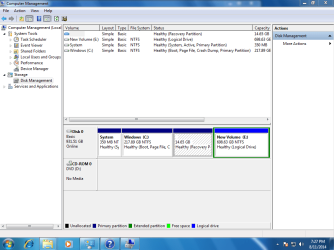
I am a newbie to Windows 7 (and backup software). Just bought a HP refurb desktop from a certified Microsoft Authorized Refurbisher with Windows 7 pro 64-bit on it. No os disks came with it though. The tech there said that it comes with recovery partition on hd, and as such I didn't need to back up on my own but I'm not sure. Just want to protect my OS against catastrophe since I don't have reinstall disks.
Would you recommend just using the built-in windows program, or if not something like AOMEI Backupper or Macrium Reflect. Or just nothing like the tech said. I've read a few of the older threads here on the subject but wanted to ask for the most up to date opinions.
Thanks in advance.
I am a newbie to Windows 7 (and backup software). Just bought a HP refurb desktop from a certified Microsoft Authorized Refurbisher with Windows 7 pro 64-bit on it. No os disks came with it though. The tech there said that it comes with recovery partition on hd, and as such I didn't need to back up on my own but I'm not sure. Just want to protect my OS against catastrophe since I don't have reinstall disks.
Would you recommend just using the built-in windows program, or if not something like AOMEI Backupper or Macrium Reflect. Or just nothing like the tech said. I've read a few of the older threads here on the subject but wanted to ask for the most up to date opinions.
Thanks in advance.
My Computer
- Computer type
- PC/Desktop
- Computer Manufacturer/Model Number
- HP 6005 Pro
- OS
- Windows 7 Pro x64
- CPU
- Athlon II X2 B24 (3.00GHz)
- Memory
- 8GB DDR3
- Hard Drives
- 1TB HDD