Solved Newb Backup & Recovery advice

cedar

New member
Member
VIP
Local time
5:49 AM
Messages
138
Hello all.

I am a newbie to Windows 7 (and backup software). Just bought a HP refurb desktop from a certified Microsoft Authorized Refurbisher with Windows 7 pro 64-bit on it. No os disks came with it though. The tech there said that it comes with recovery partition on hd, and as such I didn't need to back up on my own but I'm not sure. Just want to protect my OS against catastrophe since I don't have reinstall disks.

Would you recommend just using the built-in windows program, or if not something like AOMEI Backupper or Macrium Reflect. Or just nothing like the tech said. I've read a few of the older threads here on the subject but wanted to ask for the most up to date opinions.


Thanks in advance.
 

My Computer My Computer

Computer type
PC/Desktop
Computer Manufacturer/Model Number
HP 6005 Pro
OS
Windows 7 Pro x64
CPU
Athlon II X2 B24 (3.00GHz)
Memory
8GB DDR3
Hard Drives
1TB HDD
Use AOMEI Backupper or Macrium Reflect Free. don't forget to make a recovery CD!
They are more flexible than the win7 built-in backup program. Win7 built-in for example can't restore to smaller disk. On restore it creates the partition layout as it was at time of backup.

Reinstall DVD can be found on Windows 7 Direct Download Links, Official Disk Images from Digital River

Do you have a valid product key ? (needed in case of reinstall).

The technician is not telling the truth. What in case the physical drive is corrupt?? Then even the recovery won't work. And of course nobody want to revert to factory settings. And don't want to lose personal stuff.
 

My Computer My Computer

Computer type
Laptop
Computer Manufacturer/Model Number
ACER ASPIRE 5742G
OS
Microsoft Windows 7 Home Premium 64-bits 7601 Multiprocessor Free Service Pack 1
CPU
Intel(R) Core(TM) i3 CPU M 370 @ 2.40GHz
Motherboard
Acer Aspire 5742G
Memory
4,00 GB
Graphics Card(s)
ATI Mobility Radeon HD 5400 Series
Sound Card
(1) AMD High Definition Audio Device (2) Realtek High Defi
Screen Resolution
1366 x 768 x 32 bits (4294967296 colors) @ 60 Hz
Hard Drives
WDC WD5000BEVT-22ZAT0
The tech there said that it comes with recovery partition on hd, ....
In addition to the advice above I'd find out a little more about exactly how your system was reburbished. For example was it refurbished with HP partitions? The tech should have also told you how to use the recovery partition.

As mentioned you should use system imaging and not just rely on a recovery partition. You can see how your HDD is partitioned using say
http://www.sevenforums.com/tutorials/274797-disk-management-post-screen-capture-image.html
 

My Computer My Computer

Computer type
PC/Desktop
Computer Manufacturer/Model Number
Own build
OS
Windows 7x64 Home Premium SP1
CPU
Intel i7 2600k
Motherboard
ASUS P8Z68 Deluxe
Memory
G.Skill Ripjaws (DDR3-1600) 2x4GB
Graphics Card(s)
Nvidia GeForce GTS 450; Intel HD Graphics 3000(GT2+)
Monitor(s) Displays
Dell Ultrasharp IPS panel U2311H, Samsung SyncMaster P2350
Screen Resolution
1920x1080
Hard Drives
Samsung 850 Pro SSD 256GB, Samsung SSD 840 120GB, Seagates 1TB Barracuda ST31000528AS x2
PSU
Seasonic M12II 520W
Case
Lian Li Lancool PC-K60
Cooling
Case: 1x120mm, 3x140mm CPU: Hyper 212+
Keyboard
Logitech MK520 (wireless)
Mouse
Logitech MK520
Internet Speed
6-7 Mbps
Antivirus
Norton Security Premium, Malwarebytes on 2 (MSE on 3rd PC)
Browser
FireFox
Other Info
Audio: Logitech Z523 2.1
Kaktussoft, mjf, thanks for replying.

I probably miscast the person I spoke to who was just a CSR (customer service rep) at the toll-free CS number. And I had called once prior and the 1st CSR did recommend backing up with the win7 built-in rec. software, but the 2nd one didn't.

It's funny because I did ask the CSR if it was them who had partitioned the hard drive because it had C and E partitions and I had never seen that on all my previous XP machines before. He said he wasn't sure but could ask the factory/tech guys if I wanted.


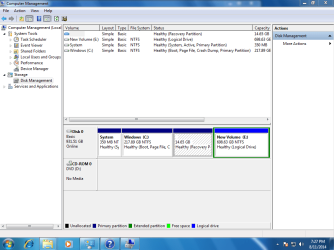
Anyway here's the screenshot:

Capture - Disk Management.PNG


And this is my unit.

Another question. I have a 1.5tb external usb HD that I use for storage. If I backed up onto that would AOMEI or Macrium reformat the entire drive and destroy all the files on it or is that not necessary.

Thanks.

Oh and I do have a product key sticker on machine.
 

My Computer My Computer

Computer type
PC/Desktop
Computer Manufacturer/Model Number
HP 6005 Pro
OS
Windows 7 Pro x64
CPU
Athlon II X2 B24 (3.00GHz)
Memory
8GB DDR3
Hard Drives
1TB HDD
That picture is about what you'd expect. The 14.65 GB partition is the recovery partition and should restore you to what you see in that picture, less any changes you have made to the PC since you bought it.

You can also make a set of recovery disks that would accomplish the same thing as that recovery partition. You'd do that through a menu found on the PC. Look in your list of HP programs for anything related to recovery or backup. The disks wouldn't be foolproof, but I'd probably make them regardless.

A Macrium backup would typically be stored on your external. You'd need to make images of the System and C partitions--either in one image file or separately. You'd need to restore both to have a bootable PC. You'd also need to make a "recovery" disk from within Macrium, preferably a WinPE recovery disk. You'd boot from that disk if you had to restore. Check to make sure that recovery disk is in fact bootable.

Storing image files on your backup drive would NOT destroy anything on it. An unrestored image file is just another harmless file file UNTIL it's restored, making the drive to which its restored bootable.
 

My Computer My Computer

Computer type
PC/Desktop
Computer Manufacturer/Model Number
Ignatz Special; 4 speed manual gearbox; factory air conditioning; one of one
OS
Windows 7 Home Premium SP1, 64-bit
CPU
Intel Skylake i5-6600K, not overclocked
Motherboard
AsRock Z170M Extreme 4, micro ATX
Memory
8 GB HyperX DDR4-2666 (2 x 4 GB)
Graphics Card(s)
none; graphics are integrated on CPU
Sound Card
onboard: Realtek ALC1150; external: USB Behringer UF0-202
Monitor(s) Displays
Dell S2340M 23 inch IPS
Screen Resolution
1600 x 900
Hard Drives
System: Crucial MX100 series SSD, 128 GB;
Data: Samsung Spinpoint 103SJ, 1 TB;
Backup: WD Caviar Green WD30EZRX-00D8PB0, 3 TB
PSU
Rosewill SilentNight 500 watt fanless, semi-modular
Case
Antec Solo II
Cooling
Noctua NH-U12S; Noctua F12 intake, Noctua S12A exhaust
Keyboard
Microsoft 200 6JH-00001 USB
Mouse
Dell or Microsoft optical wired; USB
Antivirus
Microsoft Security Essentials and Malwarebytes Premium
Browser
Pale Moon
Other Info
All fans PWM; speeds at idle: CPU circa 500 rpm; intake circa 600 rpm; exhaust circa 600 rpm; CPU temps 27 idle and 47 C load in a warm room (27 C/81 F) when running Intel Extreme Tuning Utility stress test.
Thanks for replying ignatzatsonic.

This computer is brand new with nothing done. Haven't even ran Windows Update yet. I'm on a different computer here on the forum. And there's no HP software I can find, just the Backup & Restore of Windows 7. It's good to know that I won't have to reformat my external drive to store the recovery image(s). I had read that with a usb flash drive you had to reformat so I wasn't sure.


Any opinion on AOMEI or Macrium? I've read that AOMEI is newb-friendly and that it auto detects/adds the system files folder but I know a lot of people like Macrium as well.


thanks in advance.
 

My Computer My Computer

Computer type
PC/Desktop
Computer Manufacturer/Model Number
HP 6005 Pro
OS
Windows 7 Pro x64
CPU
Athlon II X2 B24 (3.00GHz)
Memory
8GB DDR3
Hard Drives
1TB HDD
This computer is brand new with nothing done. Haven't even ran Windows Update yet...................there's no HP software I can find, just the Backup & Restore of Windows 7.


Any opinion on AOMEI or Macrium? I've read that AOMEI is newb-friendly and that it auto detects/adds the system files folder but I know a lot of people like Macrium as well.

I'd certainly get the thing updated before I made an image.

I've never owned an HP or HP refurb and it may be that the refurb doesn't have the ability to make those recovery disks. I'd pound on the HP support site and/or whatever documentation you got to confirm what it supposedly has. As far as I know, any machine with a recovery partition has the capability to also make the separate recovery disks, but this could be an exception.

I use Macrium without issues. Good intuitive interface, well-designed, quick. Takes me about 6 minutes to make an image of my C, which has 35 GB occupied. That image file is about 15 GB in size. I make one a month and keep the most recent two. If my hard drive were to drop dead tomorrow, I'd expect I could be back up and running in under an hour--half of that to get the new drive installed and half to do the actual restoration.

I hear good things about Aomei from respected posters here. As far as I know, you'd be fine with both. Just understand that they any backup app is short of foolproof---you need to have Plan B for when they disappoint you and you have to do a clean install. If you have a 25 character Product Key on a sticker somewhere on that PC, you can download a legit Windows 7 ISO from Digital River, burn it to DVD, install from it, and activate with that Product Key. You should burn such a DVD pronto if you have the Product Key. I'm assuming you have no ordinary install disk at this time. Such a clean install would of course leave you without that HP recovery partition or any HP programs that are now on the PC.
 

My Computer My Computer

Computer type
PC/Desktop
Computer Manufacturer/Model Number
Ignatz Special; 4 speed manual gearbox; factory air conditioning; one of one
OS
Windows 7 Home Premium SP1, 64-bit
CPU
Intel Skylake i5-6600K, not overclocked
Motherboard
AsRock Z170M Extreme 4, micro ATX
Memory
8 GB HyperX DDR4-2666 (2 x 4 GB)
Graphics Card(s)
none; graphics are integrated on CPU
Sound Card
onboard: Realtek ALC1150; external: USB Behringer UF0-202
Monitor(s) Displays
Dell S2340M 23 inch IPS
Screen Resolution
1600 x 900
Hard Drives
System: Crucial MX100 series SSD, 128 GB;
Data: Samsung Spinpoint 103SJ, 1 TB;
Backup: WD Caviar Green WD30EZRX-00D8PB0, 3 TB
PSU
Rosewill SilentNight 500 watt fanless, semi-modular
Case
Antec Solo II
Cooling
Noctua NH-U12S; Noctua F12 intake, Noctua S12A exhaust
Keyboard
Microsoft 200 6JH-00001 USB
Mouse
Dell or Microsoft optical wired; USB
Antivirus
Microsoft Security Essentials and Malwarebytes Premium
Browser
Pale Moon
Other Info
All fans PWM; speeds at idle: CPU circa 500 rpm; intake circa 600 rpm; exhaust circa 600 rpm; CPU temps 27 idle and 47 C load in a warm room (27 C/81 F) when running Intel Extreme Tuning Utility stress test.
Okay, I used the link that Kaktussoft gave earkier in this thread:
Windows 7 Direct Download Links, Official Disk Images from Digital River


I wasn't sure which one was correct as I came up with these 2:

Windows 7 Professional N x64 SP1 U (media refresh)
X17-59337.iso

Windows 7 Professional x64 SP1 (old)
X17-24281.iso


Not sure what "media refresh" is but that's the one I d/l'ed. Maybe someone could tell me the difference.

Anyway do I need to convert/rename this to anything before burning to dvd?
Can I add a text file with my product # to dvd or would that screw it up?
I have no experience burning isos or recovery/os disks.


thanks in advance.
 

My Computer My Computer

Computer type
PC/Desktop
Computer Manufacturer/Model Number
HP 6005 Pro
OS
Windows 7 Pro x64
CPU
Athlon II X2 B24 (3.00GHz)
Memory
8GB DDR3
Hard Drives
1TB HDD
media refresh is most recent, so you have the right one.

You can just burn the iso image direct to dvd, and/or put it on usb using Rufus - Create bootable USB drives the easy way

I use Aomei backupper.

Not sure what kind of key you have. Might be oem (system builder), in which case you can back it up and use like a normal key.
 

My Computers My Computers

System One System Two

  • Computer type
    PC/Desktop
    OS
    7 X64
    CPU
    i5 8400
    Motherboard
    gigabyte b365m ds3h
    Memory
    2x8gb 3200mhz
    Hard Drives
    various
    PSU
    pure power 11 400w cm
    Case
    Coolermaster
    Cooling
    cryorig m9i
  • Computer type
    PC/Desktop
    OS
    7x64
    CPU
    g5400
    Motherboard
    ga b365m ds3h
    Memory
    8gb ddr4 2400
    PSU
    xfx pro 450w
Okay, I used the link that Kaktussoft gave earkier in this thread:
Windows 7 Direct Download Links, Official Disk Images from Digital River


I wasn't sure which one was correct as I came up with these 2:

Windows 7 Professional N x64 SP1 U (media refresh)
X17-59337.iso

Windows 7 Professional x64 SP1 (old)
X17-24281.iso


Not sure what "media refresh" is but that's the one I d/l'ed. Maybe someone could tell me the difference.

Anyway do I need to convert/rename this to anything before burning to dvd?
Can I add a text file with my product # to dvd or would that screw it up?
I have no experience burning isos or recovery/os disks.


thanks in advance.

Either would work, but you got the right one---media refresh. It's the newer one. Can't recall the exact difference.

Your existing license and Product Key must be for Professional version of Windows 7.

You downloaded an ISO. You burn that directly to a DVD, with any common burner. There's one built into Windows. Other good programs to do it are CD Burner XP and ImgBurn, both free and downloadable. Any burning app should work fine.
 

My Computer My Computer

Computer type
PC/Desktop
Computer Manufacturer/Model Number
Ignatz Special; 4 speed manual gearbox; factory air conditioning; one of one
OS
Windows 7 Home Premium SP1, 64-bit
CPU
Intel Skylake i5-6600K, not overclocked
Motherboard
AsRock Z170M Extreme 4, micro ATX
Memory
8 GB HyperX DDR4-2666 (2 x 4 GB)
Graphics Card(s)
none; graphics are integrated on CPU
Sound Card
onboard: Realtek ALC1150; external: USB Behringer UF0-202
Monitor(s) Displays
Dell S2340M 23 inch IPS
Screen Resolution
1600 x 900
Hard Drives
System: Crucial MX100 series SSD, 128 GB;
Data: Samsung Spinpoint 103SJ, 1 TB;
Backup: WD Caviar Green WD30EZRX-00D8PB0, 3 TB
PSU
Rosewill SilentNight 500 watt fanless, semi-modular
Case
Antec Solo II
Cooling
Noctua NH-U12S; Noctua F12 intake, Noctua S12A exhaust
Keyboard
Microsoft 200 6JH-00001 USB
Mouse
Dell or Microsoft optical wired; USB
Antivirus
Microsoft Security Essentials and Malwarebytes Premium
Browser
Pale Moon
Other Info
All fans PWM; speeds at idle: CPU circa 500 rpm; intake circa 600 rpm; exhaust circa 600 rpm; CPU temps 27 idle and 47 C load in a warm room (27 C/81 F) when running Intel Extreme Tuning Utility stress test.
If your key is oem SLP, you may have difficulty activating a clean install with that media.

If it says Key Type: OEM:NONSLP you will be fine.

Best thing is to check your key with Online PIDChecker
 

My Computers My Computers

System One System Two

  • Computer type
    PC/Desktop
    OS
    7 X64
    CPU
    i5 8400
    Motherboard
    gigabyte b365m ds3h
    Memory
    2x8gb 3200mhz
    Hard Drives
    various
    PSU
    pure power 11 400w cm
    Case
    Coolermaster
    Cooling
    cryorig m9i
  • Computer type
    PC/Desktop
    OS
    7x64
    CPU
    g5400
    Motherboard
    ga b365m ds3h
    Memory
    8gb ddr4 2400
    PSU
    xfx pro 450w

My Computer My Computer

Computer type
Laptop
Computer Manufacturer/Model Number
ACER ASPIRE 5742G
OS
Microsoft Windows 7 Home Premium 64-bits 7601 Multiprocessor Free Service Pack 1
CPU
Intel(R) Core(TM) i3 CPU M 370 @ 2.40GHz
Motherboard
Acer Aspire 5742G
Memory
4,00 GB
Graphics Card(s)
ATI Mobility Radeon HD 5400 Series
Sound Card
(1) AMD High Definition Audio Device (2) Realtek High Defi
Screen Resolution
1366 x 768 x 32 bits (4294967296 colors) @ 60 Hz
Hard Drives
WDC WD5000BEVT-22ZAT0
You downloaded an ISO. You burn that directly to a DVD, with any common burner. There's one built into Windows. Other good programs to do it are CD Burner XP and ImgBurn, both free and downloadable. Any burning app should work fine.

I've used ImgBurn for quite awhile now.


You better use http://msft.digitalrivercontent.net/win/X17-59186.iso 2147483647 X17-59186.iso Windows 7 Professional x64 English SP1

Why did you want to download the N version??

I have no idea what the "N version" is. Just what I saw on the page that was win7 pro 64 bit.
And thanks for the link. I'll use that one instead.


If your key is oem SLP, you may have difficulty activating a clean install with that media.

If it says Key Type: OEM:NONSLP you will be fine.

Best thing is to check your key with Online PIDChecker

Used the link you posted (thanks), and it said that my key is valid.

Description : Windows 7 Professional OEM:NONSLP
Edition ID : X15-37369
Key Type : OEM:NONSLP


media refresh is most recent, so you have the right one.

You can just burn the iso image direct to dvd, and/or put it on usb using Rufus - Create bootable USB drives the easy way

I use Aomei backupper.

Not sure what kind of key you have. Might be oem (system builder), in which case you can back it up and use like a normal key.

Is Rufus just for flash drives? I was reading the faq and it sounds like it formats and completely wipes whatever drive you put it on, which would be a no-no for my 1.5tb My Passport.


Thanks to all again.
 

My Computer My Computer

Computer type
PC/Desktop
Computer Manufacturer/Model Number
HP 6005 Pro
OS
Windows 7 Pro x64
CPU
Athlon II X2 B24 (3.00GHz)
Memory
8GB DDR3
Hard Drives
1TB HDD
What are E, N, K and KN editions?

Microsoft had to introduce the E and N editions to the European market and the K and KN editions to the Korean market due to anti-trust appeals. The N editions don't contain any media player software; the E editions don't contain the internet explorer; the K editions contain additional selection screens to download alternative media player and messenger software, the KN editions don't contain any media player or messenger software, or any links to alternatives.

Images with SP1 Media Refresh now available

Microsoft released updated media refresh images in May 2011. They have the post SP1 hotfix KB2534111 integrated as well. The original versions of the SP1 integrated DVDs don't allow any non ASCII characters when assigning the computer name, which has been fixed with this update

Source: Windows 7 Direct Download Links, Official Disk Images from Digital River
 

My Computer My Computer

Computer type
Laptop
Computer Manufacturer/Model Number
ACER ASPIRE 5742G
OS
Microsoft Windows 7 Home Premium 64-bits 7601 Multiprocessor Free Service Pack 1
CPU
Intel(R) Core(TM) i3 CPU M 370 @ 2.40GHz
Motherboard
Acer Aspire 5742G
Memory
4,00 GB
Graphics Card(s)
ATI Mobility Radeon HD 5400 Series
Sound Card
(1) AMD High Definition Audio Device (2) Realtek High Defi
Screen Resolution
1366 x 768 x 32 bits (4294967296 colors) @ 60 Hz
Hard Drives
WDC WD5000BEVT-22ZAT0
Your post above says you have an OEM:NONSLP so I'm a bit surprised your reburbished system didn't have a clean install to begin with and you were not given the the install DVD.

It looks like the HP "Tools" partition was sacrificed to give you an extended partition for logical drives (like partitions). If you plan to keep the current setup I'd also keep a Macrium image of the Recovery partition as well as system reserved and the OS partition.
 
Last edited:

My Computer My Computer

Computer type
PC/Desktop
Computer Manufacturer/Model Number
Own build
OS
Windows 7x64 Home Premium SP1
CPU
Intel i7 2600k
Motherboard
ASUS P8Z68 Deluxe
Memory
G.Skill Ripjaws (DDR3-1600) 2x4GB
Graphics Card(s)
Nvidia GeForce GTS 450; Intel HD Graphics 3000(GT2+)
Monitor(s) Displays
Dell Ultrasharp IPS panel U2311H, Samsung SyncMaster P2350
Screen Resolution
1920x1080
Hard Drives
Samsung 850 Pro SSD 256GB, Samsung SSD 840 120GB, Seagates 1TB Barracuda ST31000528AS x2
PSU
Seasonic M12II 520W
Case
Lian Li Lancool PC-K60
Cooling
Case: 1x120mm, 3x140mm CPU: Hyper 212+
Keyboard
Logitech MK520 (wireless)
Mouse
Logitech MK520
Internet Speed
6-7 Mbps
Antivirus
Norton Security Premium, Malwarebytes on 2 (MSE on 3rd PC)
Browser
FireFox
Other Info
Audio: Logitech Z523 2.1
Sorry I haven't got back for awhile. I go slow and steady. lol
I burned the iso Kaktussoft linked to dvd. Then I ran windows update (about 600mb). After some deliberation I decided to use AOMEI Backupper as it is supposed to be novice friendly.


But 1st I ran the windows 7 backup software (as a 2nd backup option), and saved to an external hard drive. Came up 11.88gb in size. Then I installed AOMEI and ran it.

Cloning was out of the question with AOMEI because it said it would have to reformat the external hd and I would lose all my data files. So I did a "system backup" that covered *:System and C:Windows. Came out 6.24gb. Don't think it got the recovery partition so I did a "partition backup" with that. Came out 2.89gb.
 

My Computer My Computer

Computer type
PC/Desktop
Computer Manufacturer/Model Number
HP 6005 Pro
OS
Windows 7 Pro x64
CPU
Athlon II X2 B24 (3.00GHz)
Memory
8GB DDR3
Hard Drives
1TB HDD
So I have a "system backup" of *:system and c:windows files and a "partition backup" of the recovery console/partition.

Would I have been better off just doing a "partition backup" on all three partitions instead of a "system backup" on C and System files? What is the difference between a "system backup" and a "partition backup" for the C and system files?


thanks in advance.
 

My Computer My Computer

Computer type
PC/Desktop
Computer Manufacturer/Model Number
HP 6005 Pro
OS
Windows 7 Pro x64
CPU
Athlon II X2 B24 (3.00GHz)
Memory
8GB DDR3
Hard Drives
1TB HDD
Well no one replying any more so I will just stick with what I have.

thanks for all your help everyone.
cheers
 

My Computer My Computer

Computer type
PC/Desktop
Computer Manufacturer/Model Number
HP 6005 Pro
OS
Windows 7 Pro x64
CPU
Athlon II X2 B24 (3.00GHz)
Memory
8GB DDR3
Hard Drives
1TB HDD
Back
Top