
You are using an out of date browser. It may not display this or other websites correctly.
You should upgrade or use an alternative browser.
You should upgrade or use an alternative browser.
Snipping Tool Margin
- Thread starter bhs67
- Start date

Hi and welcome to SevenForums,
I would say use the rectangle snip option instead,
Then drag around the area as you wish,
View attachment 331198
I would say use the rectangle snip option instead,
Then drag around the area as you wish,
View attachment 331198
Last edited:
My Computer
At a glance
Win-7-Pro64bit 7-H-Prem-64biti7-5930K 2nd i9-9940x both water blocked VRM'...Trident-z 3200C14 2nd Trident-z 3600C16EVGA 1080ti ftw3 2nd Titan Xp both water blocked
- Computer type
- PC/Desktop
- Computer Manufacturer/Model Number
- Custom assembled by me :}
- OS
- Win-7-Pro64bit 7-H-Prem-64bit
- CPU
- i7-5930K 2nd i9-9940x both water blocked VRM's too
- Motherboard
- ASUS SABERTOOTH X99 2nd ASUS x299 Apex
- Memory
- Trident-z 3200C14 2nd Trident-z 3600C16
- Graphics Card(s)
- EVGA 1080ti ftw3 2nd Titan Xp both water blocked
- Sound Card
- Built-in Realtek
- Monitor(s) Displays
- 1-AOC G2460PG 24"G-Sync 144Hz/ 2nd 1-ASUS VG248QE 24" 144Hz
- Screen Resolution
- 1920 x 1080 144Hz
- Hard Drives
- 2-Samsung M.2 Evo & Evo Plus
2-Samsung 850 EVO 500GB SSD's/ 3-2.5 W.D. Black 1tb-&3-1tb/3-3.5 WD Black 1tb hdd's
- PSU
- EVGA SuperNOVA 1000-P2 2nd 1200-P2
- Case
- 2-Corsair Obsidian Series 450D Black ATX Mid Tower
- Cooling
- Custom water loops
- Keyboard
- Logitech G710+/ 2nd Logitech G910
- Mouse
- 2-RedDragon M901 Perdition 16400 dpi Gaming mouse = wired
- Internet Speed
- Comcast Ping 19ms 89.31mbps download speed 6.12mbps upload
- Antivirus
- Malwarebytes Pro/ Superantispyware Pro
- Browser
- FireFox & Pale moon
- Other Info
- 2nd ASUS X299 Apex/Intel i9-9940x with Custom water loop/7H-Prem-x64/Corsair 450D case/Ram Trident-z 3600C16 4x8gb / Samsung970Evo plus 500gb SSD/Dual ssd EZ swap evo/PSU EVGA SuperNova 1200w-P2 80+Platinum/GPU Titan Xp /8-ML-140 on push-pull on 2-280GTX rads

Here is a little video tutorial I made the other day for a friend of my wife. This is the Windows 8.1 version, but the operational part is the same in Windows 7. Maybe it helps.
https://www.youtube.com/watch?v=1Gs5GelHi5s
https://www.youtube.com/watch?v=1Gs5GelHi5s
My Computer
At a glance
Vista, Windows7, Mint Mate, Zorin, Windows 8from 1.6GHz Duo to i7
- Computer Manufacturer/Model Number
- HP, Dell, Gateway, Toshiba - 4 laptops and 2 desktops
- OS
- Vista, Windows7, Mint Mate, Zorin, Windows 8
- CPU
- from 1.6GHz Duo to i7
- Monitor(s) Displays
- 2x HP w2207
- Hard Drives
- 5x HDD, 7x SSD, 12x Externals
- Keyboard
- with trackball - no mices
- Mouse
- Trackball mice
- Internet Speed
- DSL 6000

Another great tutorial.
That should take the mystery out of the snipping tool.
That should take the mystery out of the snipping tool.
My Computer
At a glance
Windows 10 Pro. 64/ version 1709 Windows 7 Pr...Intel i7-6800K @ 4.3Corsair Platinum 16 gig @2400EVGA GTX 1070 OC
- Computer type
- PC/Desktop
- Computer Manufacturer/Model Number
- Home made Desktop
- OS
- Windows 10 Pro. 64/ version 1709 Windows 7 Pro/64
- CPU
- Intel i7-6800K @ 4.3
- Motherboard
- ASUS X-99 Deluxe II
- Memory
- Corsair Platinum 16 gig @2400
- Graphics Card(s)
- EVGA GTX 1070 OC
- Monitor(s) Displays
- Asus 27" LED LCD/VE278Q
- Screen Resolution
- 1920-1080 or 1280-720 HDMI
- Hard Drives
- INTEL SSD 730-240 Gb Sata 3.0/
- PSU
- EVGA Platium 1200W
- Case
- Phanteks Luxe Tempered Glass 8 fans/ one radiator
- Cooling
- XSPC/ Water Cooled CPU
- Keyboard
- Das 4 Professional
- Mouse
- Logitech M705/MX Anywhere 2-S
- Internet Speed
- 100 mbits
- Antivirus
- Microsoft Security Essentials/ Malwarebytes Premium 3.0/ SAS
- Browser
- I.E. 11 default/Firefox/ ISP Time Warner Cable/Spectrum
- Other Info
- LG BluRay Burner/
Sound system-KLipsch-THX/
Icy Dock ssd Hot Swap bays.
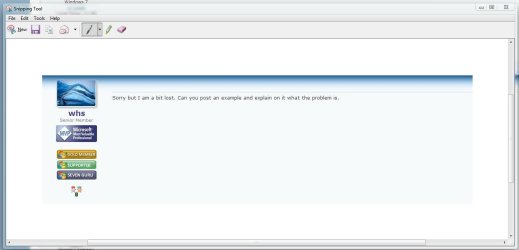
I should have been more specific. Yes, if I save it, the margins are gone. However, when I capture, before I save, the margins are there.
I use Snipping Tool to temporarily capture some settings ... allows me to do a comparison (saving and opening the saved file are two more steps). The wide margin consumes screen real estate ... unnecessarily.
I use Snipping Tool to temporarily capture some settings ... allows me to do a comparison (saving and opening the saved file are two more steps). The wide margin consumes screen real estate ... unnecessarily.
My Computer
At a glance
Windows 7
- Computer type
- PC/Desktop
- OS
- Windows 7
Sorry but I am a bit lost. Can you post an example and explain on it what the problem is.
My Computer
At a glance
Vista, Windows7, Mint Mate, Zorin, Windows 8from 1.6GHz Duo to i7
- Computer Manufacturer/Model Number
- HP, Dell, Gateway, Toshiba - 4 laptops and 2 desktops
- OS
- Vista, Windows7, Mint Mate, Zorin, Windows 8
- CPU
- from 1.6GHz Duo to i7
- Monitor(s) Displays
- 2x HP w2207
- Hard Drives
- 5x HDD, 7x SSD, 12x Externals
- Keyboard
- with trackball - no mices
- Mouse
- Trackball mice
- Internet Speed
- DSL 6000
Thanks Jack, but that was really not intended as a general tutorial. The wife's friend had just asked for a helping hand and I wipped that up in a few minutes. For a general tutorial I would probably redo it because I was stuttering at a couple of places.Another great tutorial.
That should take the mystery out of the snipping tool.

My Computer
At a glance
Vista, Windows7, Mint Mate, Zorin, Windows 8from 1.6GHz Duo to i7
- Computer Manufacturer/Model Number
- HP, Dell, Gateway, Toshiba - 4 laptops and 2 desktops
- OS
- Vista, Windows7, Mint Mate, Zorin, Windows 8
- CPU
- from 1.6GHz Duo to i7
- Monitor(s) Displays
- 2x HP w2207
- Hard Drives
- 5x HDD, 7x SSD, 12x Externals
- Keyboard
- with trackball - no mices
- Mouse
- Trackball mice
- Internet Speed
- DSL 6000
Well thank your friend also for sharing the tutorial.
I would also like to look at bhs67 snapshot post because I'm not understanding either.
I would also like to look at bhs67 snapshot post because I'm not understanding either.
My Computer
At a glance
Windows 10 Pro. 64/ version 1709 Windows 7 Pr...Intel i7-6800K @ 4.3Corsair Platinum 16 gig @2400EVGA GTX 1070 OC
- Computer type
- PC/Desktop
- Computer Manufacturer/Model Number
- Home made Desktop
- OS
- Windows 10 Pro. 64/ version 1709 Windows 7 Pro/64
- CPU
- Intel i7-6800K @ 4.3
- Motherboard
- ASUS X-99 Deluxe II
- Memory
- Corsair Platinum 16 gig @2400
- Graphics Card(s)
- EVGA GTX 1070 OC
- Monitor(s) Displays
- Asus 27" LED LCD/VE278Q
- Screen Resolution
- 1920-1080 or 1280-720 HDMI
- Hard Drives
- INTEL SSD 730-240 Gb Sata 3.0/
- PSU
- EVGA Platium 1200W
- Case
- Phanteks Luxe Tempered Glass 8 fans/ one radiator
- Cooling
- XSPC/ Water Cooled CPU
- Keyboard
- Das 4 Professional
- Mouse
- Logitech M705/MX Anywhere 2-S
- Internet Speed
- 100 mbits
- Antivirus
- Microsoft Security Essentials/ Malwarebytes Premium 3.0/ SAS
- Browser
- I.E. 11 default/Firefox/ ISP Time Warner Cable/Spectrum
- Other Info
- LG BluRay Burner/
Sound system-KLipsch-THX/
Icy Dock ssd Hot Swap bays.

This is a screen print of the snipping tool window - before the snip is saved.
The text in the red rectangle is what I selected with the snipping tool.
The OP would like to make all the white space around the actual snip smaller.
It's apx 1" "white borders" around the actual snip.
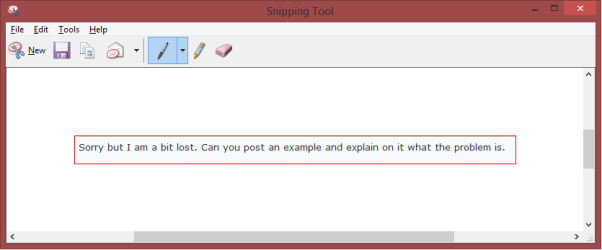
The text in the red rectangle is what I selected with the snipping tool.
The OP would like to make all the white space around the actual snip smaller.
It's apx 1" "white borders" around the actual snip.
My Computer
At a glance
Multi-Boot W7_Pro_x64 W8.1_Pro_x64 W10_Pro_x6...AMD Athlon II x4 6206GB GSkill DDR2 800AMD 4670 GPU + AMD 4200 IGP
- Computer type
- PC/Desktop
- Computer Manufacturer/Model Number
- home built
- OS
- Multi-Boot W7_Pro_x64 W8.1_Pro_x64 W10_Pro_x64 +Linux_VMs +Chromium_VM
- CPU
- AMD Athlon II x4 620
- Motherboard
- Gigabyte GA-MA785G-UD3H
- Memory
- 6GB GSkill DDR2 800
- Graphics Card(s)
- AMD 4670 GPU + AMD 4200 IGP
- Sound Card
- on board Realtek ALC889A
- Monitor(s) Displays
- RCA 40" LCD TV, Insignia 32" LCD TV, HP 15" LCD monitor
- Screen Resolution
- 1680 x 1050
- Hard Drives
- OCZ Vertex 3 120GB,
Samsung F3 1TB (3),
Several others - WD, Seagate, Hitachi, ...
- PSU
- Corsair 500 W
- Case
- Rosewill mid tower
- Cooling
- CM 90mm rifle
- Keyboard
- Gyration wireless, Logitech wireless, Dell USB wired
- Mouse
- Gyration wireless, Logitech wireless, V7 USB wired
- Internet Speed
- Spectrum - 100Mbps D / 10Mbps U
- Antivirus
- Avast, MBAM3, EMET, WinPatrol
- Browser
- Pale Moon, Firefox, IE
- Other Info
- 2 multi-boot PC's
Mainly HTPC/Office/Gen purpose (no gaming).
Trendnet USB KVM.
LG DVD burner/Blue Ray Player.
Tray system for removable SATA backup drives.
Not currently OCd, under-volted.
I use Hybrid sleep, rarely re-boot or shutdown.
Hauppauge HD-PVR, Avermedia PCIe TV Tuner, Hauppauge PCI TV Tuner.
My Computer
At a glance
Win 10 Pro x64Intel I5-2500K @3.3GHz16GB G.Skill Ripjaws X (4x4GB)EVGA GeForce 750 Ti SC 2GB
- Computer type
- PC/Desktop
- Computer Manufacturer/Model Number
- Self Built
- OS
- Win 10 Pro x64
- CPU
- Intel I5-2500K @3.3GHz
- Motherboard
- Asrock P67 Extreme4
- Memory
- 16GB G.Skill Ripjaws X (4x4GB)
- Graphics Card(s)
- EVGA GeForce 750 Ti SC 2GB
- Sound Card
- ASUS Xonar DG 5.1 Channels 24-bit 96KHz PCI Interface Sound
- Monitor(s) Displays
- auria eq2367
- Screen Resolution
- 1920 x 1080
- Hard Drives
- 250GB Samsung 850 EVO SSD
1TB WD Blue
1TB Hitachi
- PSU
- SeaSonic X 650W 80 Plus Gold
- Case
- Corsair Obsidian 750D
- Cooling
- Corsair H60, Three 140mm case fans
- Keyboard
- Logitech Wireless Keyboard K520
- Mouse
- Logitech Wireless Mouse M310
- Internet Speed
- Wave Broadband ~ 100 dn 5 up
- Antivirus
- Windows Defender, Malwarebytes Premium
- Browser
- Edge, IE11, Chrome
- Other Info
- Laptop specs: HP g7-1365dx /
CPU: AMD A6-3420M APU with Radeon(tm) HD Graphics /
RAM: Crucial 8Gb (2x4Gb) /
SSD: Crucial M4-CT128M4SSD2 ATA Device/ FW 000F /
GFX: AMD Radeon HD 6520G /
OS: Windows 10 Pro x64
But who cares about the white border before it's saved. What counts is how it looks after it was saved.
My Computer
At a glance
Vista, Windows7, Mint Mate, Zorin, Windows 8from 1.6GHz Duo to i7
- Computer Manufacturer/Model Number
- HP, Dell, Gateway, Toshiba - 4 laptops and 2 desktops
- OS
- Vista, Windows7, Mint Mate, Zorin, Windows 8
- CPU
- from 1.6GHz Duo to i7
- Monitor(s) Displays
- 2x HP w2207
- Hard Drives
- 5x HDD, 7x SSD, 12x Externals
- Keyboard
- with trackball - no mices
- Mouse
- Trackball mice
- Internet Speed
- DSL 6000
I'll take a guess until confirmed,
Go to Tools and Options and compare these settings ?
View attachment 331232
View attachment 331233
Video seems pretty good too Wolfgang
Go to Tools and Options and compare these settings ?
View attachment 331232
View attachment 331233
Video seems pretty good too Wolfgang
Last edited:
My Computer
At a glance
Win-7-Pro64bit 7-H-Prem-64biti7-5930K 2nd i9-9940x both water blocked VRM'...Trident-z 3200C14 2nd Trident-z 3600C16EVGA 1080ti ftw3 2nd Titan Xp both water blocked
- Computer type
- PC/Desktop
- Computer Manufacturer/Model Number
- Custom assembled by me :}
- OS
- Win-7-Pro64bit 7-H-Prem-64bit
- CPU
- i7-5930K 2nd i9-9940x both water blocked VRM's too
- Motherboard
- ASUS SABERTOOTH X99 2nd ASUS x299 Apex
- Memory
- Trident-z 3200C14 2nd Trident-z 3600C16
- Graphics Card(s)
- EVGA 1080ti ftw3 2nd Titan Xp both water blocked
- Sound Card
- Built-in Realtek
- Monitor(s) Displays
- 1-AOC G2460PG 24"G-Sync 144Hz/ 2nd 1-ASUS VG248QE 24" 144Hz
- Screen Resolution
- 1920 x 1080 144Hz
- Hard Drives
- 2-Samsung M.2 Evo & Evo Plus
2-Samsung 850 EVO 500GB SSD's/ 3-2.5 W.D. Black 1tb-&3-1tb/3-3.5 WD Black 1tb hdd's
- PSU
- EVGA SuperNOVA 1000-P2 2nd 1200-P2
- Case
- 2-Corsair Obsidian Series 450D Black ATX Mid Tower
- Cooling
- Custom water loops
- Keyboard
- Logitech G710+/ 2nd Logitech G910
- Mouse
- 2-RedDragon M901 Perdition 16400 dpi Gaming mouse = wired
- Internet Speed
- Comcast Ping 19ms 89.31mbps download speed 6.12mbps upload
- Antivirus
- Malwarebytes Pro/ Superantispyware Pro
- Browser
- FireFox & Pale moon
- Other Info
- 2nd ASUS X299 Apex/Intel i9-9940x with Custom water loop/7H-Prem-x64/Corsair 450D case/Ram Trident-z 3600C16 4x8gb / Samsung970Evo plus 500gb SSD/Dual ssd EZ swap evo/PSU EVGA SuperNova 1200w-P2 80+Platinum/GPU Titan Xp /8-ML-140 on push-pull on 2-280GTX rads
But who cares about the white border before it's saved. What counts is how it looks after it was saved.
Obviously the OP cares, and they are aware of how it looks after saving. The snips are temporary as mentioned below.
I should have been more specific. Yes, if I save it, the margins are gone. However, when I capture, before I save, the margins are there.
I use Snipping Tool to temporarily capture some settings ... allows me to do a comparison (saving and opening the saved file are two more steps). The wide margin consumes screen real estate ... unnecessarily.
I don't think there is a solution to your problem with snipping tool, you may want to try a different screen capture program.
My Computer
At a glance
Win 10 Pro x64Intel I5-2500K @3.3GHz16GB G.Skill Ripjaws X (4x4GB)EVGA GeForce 750 Ti SC 2GB
- Computer type
- PC/Desktop
- Computer Manufacturer/Model Number
- Self Built
- OS
- Win 10 Pro x64
- CPU
- Intel I5-2500K @3.3GHz
- Motherboard
- Asrock P67 Extreme4
- Memory
- 16GB G.Skill Ripjaws X (4x4GB)
- Graphics Card(s)
- EVGA GeForce 750 Ti SC 2GB
- Sound Card
- ASUS Xonar DG 5.1 Channels 24-bit 96KHz PCI Interface Sound
- Monitor(s) Displays
- auria eq2367
- Screen Resolution
- 1920 x 1080
- Hard Drives
- 250GB Samsung 850 EVO SSD
1TB WD Blue
1TB Hitachi
- PSU
- SeaSonic X 650W 80 Plus Gold
- Case
- Corsair Obsidian 750D
- Cooling
- Corsair H60, Three 140mm case fans
- Keyboard
- Logitech Wireless Keyboard K520
- Mouse
- Logitech Wireless Mouse M310
- Internet Speed
- Wave Broadband ~ 100 dn 5 up
- Antivirus
- Windows Defender, Malwarebytes Premium
- Browser
- Edge, IE11, Chrome
- Other Info
- Laptop specs: HP g7-1365dx /
CPU: AMD A6-3420M APU with Radeon(tm) HD Graphics /
RAM: Crucial 8Gb (2x4Gb) /
SSD: Crucial M4-CT128M4SSD2 ATA Device/ FW 000F /
GFX: AMD Radeon HD 6520G /
OS: Windows 10 Pro x64
Similar threads

- Replies
- 0
- Views
- 652

- Replies
- 8
- Views
- 2K
- Replies
- 2
- Views
- 1K

