Solved Burnt out from error error error! Time to go back to Paper.

At this point the red fail sound card state isn't that critical, well, it is, but it isn't. I can explain later if needed.

What I find interesting is the 2nd screen shot near the bottom under switching; That says if you want to change applications, press alt+tab, and it opens the accessibility menu.

Maybe from there you could access the factory restore?

Do you have the capability to open a Command window?

Hi again Anak.
Oh - I just took the disc out.
I have been here since early this morning. I need to 'step away' for a short break.
My old eyes are getting sore.
(I'm going to Tim's to get a coffee.)
I will try that when I come back. Thank you for your patience Anak.
 

My Computer My Computer

At a glance

Windows 7 Home Premium (x64) Service Pack 1 (...Intel Pentium P6200 2.13 GHz4.00 GBIntel HD Graphics
Computer type
Laptop
Computer Manufacturer/Model Number
HP 2000-150CA Notebook
OS
Windows 7 Home Premium (x64) Service Pack 1 (build 7601)
CPU
Intel Pentium P6200 2.13 GHz
Motherboard
HP 3674 28.49 1066 MH / BIOS: HP F.34
Memory
4.00 GB
Graphics Card(s)
Intel HD Graphics
Sound Card
Multimedia HD
Monitor(s) Displays
15.3
Screen Resolution
1366X768
Hard Drives
Hitachi HTS545050B9A300 ATA
(500.11 GB)
Keyboard
Standard PS2
Mouse
Synaptics PS2 Port Touch Pad / Microsoft HID-compliant mouse
Internet Speed
100 Mbps
Antivirus
MSE
Browser
PaleMoon / Fire Fox
Other Info
Purchased 2011
Forget the kaspersky disk.

When you get back from Tim's, I'd still like you to try the F11 solution to get into HP's Recovery before you try anything else.

If that doesn't work then try to access the operating system (OS) with the bootable Ubuntu disk you made to see if you can change applications.
From there we can get into disk management and start the factory restore. I hope.


Please answer this question:
Do you have the capability to open a Command window?
 

My Computer My Computer

At a glance

Originally Win 7 Hm Prem x64 Ver 6.1.7600 Bui...Intel i3 530 2.93GHz, 2933MHz 2 Cores 4 Logic...6GB of 1,333MHz DDR3 SDRAM32MB Intel Graphics Media Accelerator HD IGChip
Computer type
PC/Desktop
Computer Manufacturer/Model Number
Gateway DX4831-01e (Mid-Tower Desktop)
OS
Originally Win 7 Hm Prem x64 Ver 6.1.7600 Build 7601-SP1 | Upgraded to Windows 10 December 14, 2019
CPU
Intel i3 530 2.93GHz, 2933MHz 2 Cores 4 Logical Processors
Motherboard
Gateway H57M01 133 megahertz
Memory
6GB of 1,333MHz DDR3 SDRAM
Graphics Card(s)
32MB Intel Graphics Media Accelerator HD IGChip
Sound Card
Realtek High Definition Audio
Monitor(s) Displays
Gateway HX2000 20inch TFT active matrix TN
Screen Resolution
1600 x 900 x 59 hertz
Hard Drives
WDC WD10EADS-00M2B0 [HDD] (1000.20 GB) -- drive 0,
HL-DT-ST DVDRAM GH41N [CD-ROM dr]
Four card readers, and Four USB 2.0
PSU
300watts.
Case
Mid-Tower Desktop
Cooling
Stock from Gateway
Keyboard
Natural Ergonomic Keyboard 4000, see Other Info
Mouse
Orig. Gateway wore out now using Insignia USB wired optical
Internet Speed
Vz FIOS 10ms png 57.64Mbps down 65.53Mbps up Speedtest.org
Antivirus
Zamana Anti-logger with Anti-malware, MSE, Windows Firewall,
Browser
IE11.0.9600.19399-Upd ver11.0.135, Firefox 68.0.1 x64
Other Info
System Specs by Belarc.

BIOS: American Megatrends Inc. P01-A0 11/17/2009

Replaced the MS 'Natural' Standard PS/2 Enhanced 101-102 Keyboard with a new Natural Ergonomic Keyboard 4000 on August 1st 2014.

Canon Pixma MG3222 Printer.

Updated to IE11 on 12102015 | Fios Quantum Router g1100

Additional AV: SpywareBlaster, manual Mbam, SAS
At this point the red fail sound card state isn't that critical, well, it is, but it isn't. I can explain later if needed.

What I find interesting is the 2nd screen shot near the bottom under switching; That says if you want to change applications, press alt+tab, and it opens the accessibility menu.

Maybe from there you could access the factory restore?

Do you have the capability to open a Command window?

Hello Anak. I'm back.
I pressed the alt+tab. It didn't open anything. I'm probably doing it wrong...
I really don't know what I am doing?

I would like to talk about the Repair Disc I made, for a moment.
The disc was a brand new - never used DVD-R 4GB.
Although the links to reset to factory condition did not work...
I could open the Command Prompt Window, but I didn't know what to type in there.
In other words I don't know how to use it.
(only to check my IP Address. lol.)
If I knew what to type in the box to set it back to factory condition maybe that would work.
I actually was looking that up yesterday but could not find anything on how to do it.
 
Last edited:

My Computer My Computer

At a glance

Windows 7 Home Premium (x64) Service Pack 1 (...Intel Pentium P6200 2.13 GHz4.00 GBIntel HD Graphics
Computer type
Laptop
Computer Manufacturer/Model Number
HP 2000-150CA Notebook
OS
Windows 7 Home Premium (x64) Service Pack 1 (build 7601)
CPU
Intel Pentium P6200 2.13 GHz
Motherboard
HP 3674 28.49 1066 MH / BIOS: HP F.34
Memory
4.00 GB
Graphics Card(s)
Intel HD Graphics
Sound Card
Multimedia HD
Monitor(s) Displays
15.3
Screen Resolution
1366X768
Hard Drives
Hitachi HTS545050B9A300 ATA
(500.11 GB)
Keyboard
Standard PS2
Mouse
Synaptics PS2 Port Touch Pad / Microsoft HID-compliant mouse
Internet Speed
100 Mbps
Antivirus
MSE
Browser
PaleMoon / Fire Fox
Other Info
Purchased 2011
We are so close it hurts.........

Don't worry about the alt+tab or the repair disk. Its good that you can open a command prompt. (CMD)

Have you tried that F11 procedure?!?
 

My Computer My Computer

At a glance

Originally Win 7 Hm Prem x64 Ver 6.1.7600 Bui...Intel i3 530 2.93GHz, 2933MHz 2 Cores 4 Logic...6GB of 1,333MHz DDR3 SDRAM32MB Intel Graphics Media Accelerator HD IGChip
Computer type
PC/Desktop
Computer Manufacturer/Model Number
Gateway DX4831-01e (Mid-Tower Desktop)
OS
Originally Win 7 Hm Prem x64 Ver 6.1.7600 Build 7601-SP1 | Upgraded to Windows 10 December 14, 2019
CPU
Intel i3 530 2.93GHz, 2933MHz 2 Cores 4 Logical Processors
Motherboard
Gateway H57M01 133 megahertz
Memory
6GB of 1,333MHz DDR3 SDRAM
Graphics Card(s)
32MB Intel Graphics Media Accelerator HD IGChip
Sound Card
Realtek High Definition Audio
Monitor(s) Displays
Gateway HX2000 20inch TFT active matrix TN
Screen Resolution
1600 x 900 x 59 hertz
Hard Drives
WDC WD10EADS-00M2B0 [HDD] (1000.20 GB) -- drive 0,
HL-DT-ST DVDRAM GH41N [CD-ROM dr]
Four card readers, and Four USB 2.0
PSU
300watts.
Case
Mid-Tower Desktop
Cooling
Stock from Gateway
Keyboard
Natural Ergonomic Keyboard 4000, see Other Info
Mouse
Orig. Gateway wore out now using Insignia USB wired optical
Internet Speed
Vz FIOS 10ms png 57.64Mbps down 65.53Mbps up Speedtest.org
Antivirus
Zamana Anti-logger with Anti-malware, MSE, Windows Firewall,
Browser
IE11.0.9600.19399-Upd ver11.0.135, Firefox 68.0.1 x64
Other Info
System Specs by Belarc.

BIOS: American Megatrends Inc. P01-A0 11/17/2009

Replaced the MS 'Natural' Standard PS/2 Enhanced 101-102 Keyboard with a new Natural Ergonomic Keyboard 4000 on August 1st 2014.

Canon Pixma MG3222 Printer.

Updated to IE11 on 12102015 | Fios Quantum Router g1100

Additional AV: SpywareBlaster, manual Mbam, SAS
We are so close it hurts.........

Don't worry about the alt+tab or the repair disk. Its good that you can open a command prompt. (CMD)

Have you tried that F11 procedure?!?

Yes Anak, as we speak.
When I pressed it, it is just making a loud beeping noise and shows F11...System Recovery on the left hand bottom of the screen.
 
Last edited:

My Computer My Computer

At a glance

Windows 7 Home Premium (x64) Service Pack 1 (...Intel Pentium P6200 2.13 GHz4.00 GBIntel HD Graphics
Computer type
Laptop
Computer Manufacturer/Model Number
HP 2000-150CA Notebook
OS
Windows 7 Home Premium (x64) Service Pack 1 (build 7601)
CPU
Intel Pentium P6200 2.13 GHz
Motherboard
HP 3674 28.49 1066 MH / BIOS: HP F.34
Memory
4.00 GB
Graphics Card(s)
Intel HD Graphics
Sound Card
Multimedia HD
Monitor(s) Displays
15.3
Screen Resolution
1366X768
Hard Drives
Hitachi HTS545050B9A300 ATA
(500.11 GB)
Keyboard
Standard PS2
Mouse
Synaptics PS2 Port Touch Pad / Microsoft HID-compliant mouse
Internet Speed
100 Mbps
Antivirus
MSE
Browser
PaleMoon / Fire Fox
Other Info
Purchased 2011
We are so close it hurts.........

Don't worry about the alt+tab or the repair disk. Its good that you can open a command prompt. (CMD)

Have you tried that F11 procedure?!?

Yes Anak, as we speak.
When I pressed it, it is just making a loud beeping noise and shows F11...System Recovery on the left hand bottom of the screen.

I have Command Prompt open, looking for something to type in there. :geek:
 

My Computer My Computer

At a glance

Windows 7 Home Premium (x64) Service Pack 1 (...Intel Pentium P6200 2.13 GHz4.00 GBIntel HD Graphics
Computer type
Laptop
Computer Manufacturer/Model Number
HP 2000-150CA Notebook
OS
Windows 7 Home Premium (x64) Service Pack 1 (build 7601)
CPU
Intel Pentium P6200 2.13 GHz
Motherboard
HP 3674 28.49 1066 MH / BIOS: HP F.34
Memory
4.00 GB
Graphics Card(s)
Intel HD Graphics
Sound Card
Multimedia HD
Monitor(s) Displays
15.3
Screen Resolution
1366X768
Hard Drives
Hitachi HTS545050B9A300 ATA
(500.11 GB)
Keyboard
Standard PS2
Mouse
Synaptics PS2 Port Touch Pad / Microsoft HID-compliant mouse
Internet Speed
100 Mbps
Antivirus
MSE
Browser
PaleMoon / Fire Fox
Other Info
Purchased 2011
We are so close it hurts.........

Don't worry about the alt+tab or the repair disk. Its good that you can open a command prompt. (CMD)

Have you tried that F11 procedure?!?

Yes Anak, as we speak.
When I pressed it, it is just making a loud beeping noise and shows F11...System Recovery on the left hand bottom of the screen.

I have Command Prompt open, looking for something to type in there. :geek:
Well, maybe tomorrow then...
 

My Computer My Computer

At a glance

Windows 7 Home Premium (x64) Service Pack 1 (...Intel Pentium P6200 2.13 GHz4.00 GBIntel HD Graphics
Computer type
Laptop
Computer Manufacturer/Model Number
HP 2000-150CA Notebook
OS
Windows 7 Home Premium (x64) Service Pack 1 (build 7601)
CPU
Intel Pentium P6200 2.13 GHz
Motherboard
HP 3674 28.49 1066 MH / BIOS: HP F.34
Memory
4.00 GB
Graphics Card(s)
Intel HD Graphics
Sound Card
Multimedia HD
Monitor(s) Displays
15.3
Screen Resolution
1366X768
Hard Drives
Hitachi HTS545050B9A300 ATA
(500.11 GB)
Keyboard
Standard PS2
Mouse
Synaptics PS2 Port Touch Pad / Microsoft HID-compliant mouse
Internet Speed
100 Mbps
Antivirus
MSE
Browser
PaleMoon / Fire Fox
Other Info
Purchased 2011
I got busy last night and couldn't get to a computer.

We are so close it hurts.........

Don't worry about the alt+tab or the repair disk. Its good that you can open a command prompt. (CMD)

Have you tried that F11 procedure?!?

Yes Anak, as we speak.
When I pressed it, it is just making a loud beeping noise and shows F11...System Recovery on the left hand bottom of the screen.
Did it look like this:
elljay1.JPG


Or did it look like a minimized title bar like this? eljay2.JPG

Disregard the words I'm only using this as an example, yours would say system recovery where it says magnifier settings.

If it is, click on it to open and see if it looks like the upper attachment, if it does, click on system recovery at the bottom of the left panel to start the factory restore process.

But, you may want to go here and either read and or print the instructions before you start. From my #14 post:
Here's the procedure to "factory restore" your machine, scroll 'bout a third of the way down here: Performing an HP System Recovery (Windows 7) | HP® Support
You'll know your at the right place when you see this:
Recovery from the startup screen (during system boot)
If Windows 7 does not open correctly, perform the following steps to recover the computer:
Do or are you using another machine as you're working on this one?
 

My Computer My Computer

At a glance

Originally Win 7 Hm Prem x64 Ver 6.1.7600 Bui...Intel i3 530 2.93GHz, 2933MHz 2 Cores 4 Logic...6GB of 1,333MHz DDR3 SDRAM32MB Intel Graphics Media Accelerator HD IGChip
Computer type
PC/Desktop
Computer Manufacturer/Model Number
Gateway DX4831-01e (Mid-Tower Desktop)
OS
Originally Win 7 Hm Prem x64 Ver 6.1.7600 Build 7601-SP1 | Upgraded to Windows 10 December 14, 2019
CPU
Intel i3 530 2.93GHz, 2933MHz 2 Cores 4 Logical Processors
Motherboard
Gateway H57M01 133 megahertz
Memory
6GB of 1,333MHz DDR3 SDRAM
Graphics Card(s)
32MB Intel Graphics Media Accelerator HD IGChip
Sound Card
Realtek High Definition Audio
Monitor(s) Displays
Gateway HX2000 20inch TFT active matrix TN
Screen Resolution
1600 x 900 x 59 hertz
Hard Drives
WDC WD10EADS-00M2B0 [HDD] (1000.20 GB) -- drive 0,
HL-DT-ST DVDRAM GH41N [CD-ROM dr]
Four card readers, and Four USB 2.0
PSU
300watts.
Case
Mid-Tower Desktop
Cooling
Stock from Gateway
Keyboard
Natural Ergonomic Keyboard 4000, see Other Info
Mouse
Orig. Gateway wore out now using Insignia USB wired optical
Internet Speed
Vz FIOS 10ms png 57.64Mbps down 65.53Mbps up Speedtest.org
Antivirus
Zamana Anti-logger with Anti-malware, MSE, Windows Firewall,
Browser
IE11.0.9600.19399-Upd ver11.0.135, Firefox 68.0.1 x64
Other Info
System Specs by Belarc.

BIOS: American Megatrends Inc. P01-A0 11/17/2009

Replaced the MS 'Natural' Standard PS/2 Enhanced 101-102 Keyboard with a new Natural Ergonomic Keyboard 4000 on August 1st 2014.

Canon Pixma MG3222 Printer.

Updated to IE11 on 12102015 | Fios Quantum Router g1100

Additional AV: SpywareBlaster, manual Mbam, SAS
Anak
Gone Fishin'​
MCC130c.png

gold.png

supporter.png

guru.png

reputation_bronzestar.gif

reputation_green.gif
reputation_greenh.gif
reputation_gold.gif


Join Date: Mar 2010

Win 7 Home Premium 64bit Ver 6.1.7600 Build 7601 - SP1
3,889 posts
Central Pa.
Local Time: 09:17 PM
USA.gif
us%20pennsylvania.gif


user_offline.gif


I got busy last night and couldn't get to a computer.

That's Ok Anak. I was over in the Chill Out Room telling Cat Stories. :)
http://www.sevenforums.com/chillout-room/140935-show-us-your-cats-2.html#post2872932

http://www.sevenforums.com/chillout-room/140935-show-us-your-cats.html#post2873298
 

My Computer My Computer

At a glance

Windows 7 Home Premium (x64) Service Pack 1 (...Intel Pentium P6200 2.13 GHz4.00 GBIntel HD Graphics
Computer type
Laptop
Computer Manufacturer/Model Number
HP 2000-150CA Notebook
OS
Windows 7 Home Premium (x64) Service Pack 1 (build 7601)
CPU
Intel Pentium P6200 2.13 GHz
Motherboard
HP 3674 28.49 1066 MH / BIOS: HP F.34
Memory
4.00 GB
Graphics Card(s)
Intel HD Graphics
Sound Card
Multimedia HD
Monitor(s) Displays
15.3
Screen Resolution
1366X768
Hard Drives
Hitachi HTS545050B9A300 ATA
(500.11 GB)
Keyboard
Standard PS2
Mouse
Synaptics PS2 Port Touch Pad / Microsoft HID-compliant mouse
Internet Speed
100 Mbps
Antivirus
MSE
Browser
PaleMoon / Fire Fox
Other Info
Purchased 2011
I got busy last night and couldn't get to a computer.

We are so close it hurts.........

Don't worry about the alt+tab or the repair disk. Its good that you can open a command prompt. (CMD)

Have you tried that F11 procedure?!?

Yes Anak, as we speak.
When I pressed it, it is just making a loud beeping noise and shows F11...System Recovery on the left hand bottom of the screen.
Did it look like this:
View attachment 331661


Or did it look like a minimized title bar like this? View attachment 331662

Disregard the words I'm only using this as an example, yours would say system recovery where it says magnifier settings.

If it is, click on it to open and see if it looks like the upper attachment, if it does, click on system recovery at the bottom of the left panel to start the factory restore process.

But, you may want to go here and either read and or print the instructions before you start. From my #14 post:
Here's the procedure to "factory restore" your machine, scroll 'bout a third of the way down here: Performing an HP System Recovery (Windows 7) | HP® Support
You'll know your at the right place when you see this:
Recovery from the startup screen (during system boot)
If Windows 7 does not open correctly, perform the following steps to recover the computer:
Do or are you using another machine as you're working on this one?

Hi Anak. No it does not look like that.
I was under the impression that I could make a repair Disc from someone elses machine as long as it was either 64 bit or 32 bit.
So I made the disc using my brother-in-laws Acer win7 64bit Laptop.
It looks like this...
 

Attachments

  • 01.jpg
    01.jpg
    778.3 KB · Views: 0
  • 02.jpg
    02.jpg
    1,006.3 KB · Views: 1
  • 03.jpg
    03.jpg
    585.9 KB · Views: 0

My Computer My Computer

At a glance

Windows 7 Home Premium (x64) Service Pack 1 (...Intel Pentium P6200 2.13 GHz4.00 GBIntel HD Graphics
Computer type
Laptop
Computer Manufacturer/Model Number
HP 2000-150CA Notebook
OS
Windows 7 Home Premium (x64) Service Pack 1 (build 7601)
CPU
Intel Pentium P6200 2.13 GHz
Motherboard
HP 3674 28.49 1066 MH / BIOS: HP F.34
Memory
4.00 GB
Graphics Card(s)
Intel HD Graphics
Sound Card
Multimedia HD
Monitor(s) Displays
15.3
Screen Resolution
1366X768
Hard Drives
Hitachi HTS545050B9A300 ATA
(500.11 GB)
Keyboard
Standard PS2
Mouse
Synaptics PS2 Port Touch Pad / Microsoft HID-compliant mouse
Internet Speed
100 Mbps
Antivirus
MSE
Browser
PaleMoon / Fire Fox
Other Info
Purchased 2011
I got busy last night and couldn't get to a computer.

Yes Anak, as we speak.
When I pressed it, it is just making a loud beeping noise and shows F11...System Recovery on the left hand bottom of the screen.
Did it look like this:
View attachment 331661


Or did it look like a minimized title bar like this? View attachment 331662

Disregard the words I'm only using this as an example, yours would say system recovery where it says magnifier settings.

If it is, click on it to open and see if it looks like the upper attachment, if it does, click on system recovery at the bottom of the left panel to start the factory restore process.

But, you may want to go here and either read and or print the instructions before you start. From my #14 post:
You'll know your at the right place when you see this:
Recovery from the startup screen (during system boot)
If Windows 7 does not open correctly, perform the following steps to recover the computer:
Do or are you using another machine as you're working on this one?

Hi Anak. No it does not look like that.
I was under the impression that I could make a repair Disc from someone elses machine as long as it was either 64 bit or 32 bit.
So I made the disc using my brother-in-laws Acer win7 64bit Laptop.
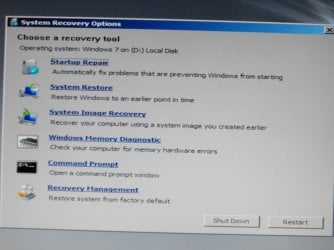
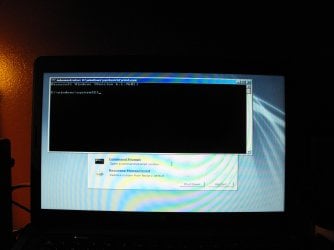
It looks like this...
#1 I can run Startup Repair... but it eventually says it can't be fixed automatically.
#2 attachment, Recovery management is where the links do not work to do a Factory Restore.
#3 attachment shows I can open the command prompt...and it is blinking.
(maybe that doesn't mean anything.):rolleyes:
 

My Computer My Computer

At a glance

Windows 7 Home Premium (x64) Service Pack 1 (...Intel Pentium P6200 2.13 GHz4.00 GBIntel HD Graphics
Computer type
Laptop
Computer Manufacturer/Model Number
HP 2000-150CA Notebook
OS
Windows 7 Home Premium (x64) Service Pack 1 (build 7601)
CPU
Intel Pentium P6200 2.13 GHz
Motherboard
HP 3674 28.49 1066 MH / BIOS: HP F.34
Memory
4.00 GB
Graphics Card(s)
Intel HD Graphics
Sound Card
Multimedia HD
Monitor(s) Displays
15.3
Screen Resolution
1366X768
Hard Drives
Hitachi HTS545050B9A300 ATA
(500.11 GB)
Keyboard
Standard PS2
Mouse
Synaptics PS2 Port Touch Pad / Microsoft HID-compliant mouse
Internet Speed
100 Mbps
Antivirus
MSE
Browser
PaleMoon / Fire Fox
Other Info
Purchased 2011
I got busy last night and couldn't get to a computer.

Yes Anak, as we speak.
When I pressed it, it is just making a loud beeping noise and shows F11...System Recovery on the left hand bottom of the screen.
Did it look like this:
View attachment 331661


Or did it look like a minimized title bar like this? View attachment 331662

Disregard the words I'm only using this as an example, yours would say system recovery where it says magnifier settings.

If it is, click on it to open and see if it looks like the upper attachment, if it does, click on system recovery at the bottom of the left panel to start the factory restore process.

But, you may want to go here and either read and or print the instructions before you start. From my #14 post:
You'll know your at the right place when you see this:
Recovery from the startup screen (during system boot)
If Windows 7 does not open correctly, perform the following steps to recover the computer:
Do or are you using another machine as you're working on this one?

Hi Anak. No it does not look like that.
I was under the impression that I could make a repair Disc from someone elses machine as long as it was either 64 bit or 32 bit.
So I made the disc using my brother-in-laws Acer win7 64bit Laptop.
It looks like this...

Yes, I am using another machine to communicate here. I have a little Acer Netbook.
Although it gets hard on my eyes, it is better than nothing.
It is beside my crashed HP.

OK. I will go and read the material you linked me to.
Thanks Anak. :)
 

My Computer My Computer

At a glance

Windows 7 Home Premium (x64) Service Pack 1 (...Intel Pentium P6200 2.13 GHz4.00 GBIntel HD Graphics
Computer type
Laptop
Computer Manufacturer/Model Number
HP 2000-150CA Notebook
OS
Windows 7 Home Premium (x64) Service Pack 1 (build 7601)
CPU
Intel Pentium P6200 2.13 GHz
Motherboard
HP 3674 28.49 1066 MH / BIOS: HP F.34
Memory
4.00 GB
Graphics Card(s)
Intel HD Graphics
Sound Card
Multimedia HD
Monitor(s) Displays
15.3
Screen Resolution
1366X768
Hard Drives
Hitachi HTS545050B9A300 ATA
(500.11 GB)
Keyboard
Standard PS2
Mouse
Synaptics PS2 Port Touch Pad / Microsoft HID-compliant mouse
Internet Speed
100 Mbps
Antivirus
MSE
Browser
PaleMoon / Fire Fox
Other Info
Purchased 2011
Ok looks like you are getting somewhere the Ubuntu screen - I have got this post really late - looks fairly normal though I have never had that happen.

The Kaspersky should just run after getting you permission I have no idea what is going on there either.

Smacks of something wrong with the motherboard but I am just grabbing at straws here Anak's approach is what I would be going with:)
 

My Computer My Computer

At a glance

Desk1 7 Home Prem / Desk2 10 Pro / Main lap A...Desk1 i5 3750K / Laptop i7 GTX 860M / Desk2 i...Desk1 8GB (1866) / Desk2 16GB (1333) / Laptop...Desk 1& 2NVidia GTX 650 & Laptops on board Intel
Computer type
PC/Desktop
Computer Manufacturer/Model Number
Own build (new) Desk1 / Asus ROG Win 7 / Desk2 1st build
OS
Desk1 7 Home Prem / Desk2 10 Pro / Main lap Asus ROG 10 Pro 2 laptop Toshiba 7 Pro Asus P2520 7 & 10
CPU
Desk1 i5 3750K / Laptop i7 GTX 860M / Desk2 i5 2500
Motherboard
Desk1 Asus P877-V / Desk2 Gigabyte H67 UD3H / Laptop ?
Memory
Desk1 8GB (1866) / Desk2 16GB (1333) / Laptop 8Gb DDR3
Graphics Card(s)
Desk 1& 2NVidia GTX 650 & Laptops on board Intel
Sound Card
Desk 1 & 2 -XONAR DG Realtek High Def audio Laptop
Monitor(s) Displays
Desk 1 Benq HD 2450 / Desk2 Philips 24" / Laptop 17.5"
Screen Resolution
1920x1080 D1 & D2 & Laptop 1
Hard Drives
Desk1 Samsung 120GB 830 SSD
Asus ROG 256GB 850 Pro SSD
Desk2 Samsung 840 256 SSD
Toshiba 120GB EVO
PSU
Desk 1 Corsair HX 1050/ Laptop ? / Desk 2 Corsair HX 650
Case
Desk 1 Cooler HAF XM ? Toshiba laptop / Desk2 Coolermaster
Cooling
Fans on all Desk1 -2 Desk2 - all Coolermasters 5 Laptop ?
Keyboard
Desk 1 MS Sidewinder X6 Desk 2 MS Sidewinder X 4
Mouse
Desk 1&2 - Gigabyte MS 900 gamer - laptop - Logitec wireless
Internet Speed
ADSL2+
Other Info
One other Desktop (tester) and spare Toshba laptop both with SSD's
Running Kaspersky 2016 ISS on all machines config'd identically
Logitec audio stereo systems on each machine (x3)
Canon MG5250MFC
Router/modem TP-Link running WPA2SK
Ok looks like you are getting somewhere the Ubuntu screen - I have got this post really late - looks fairly normal though I have never had that happen.

The Kaspersky should just run after getting you permission I have no idea what is going on there either.

Smacks of something wrong with the motherboard but I am just grabbing at straws here Anak's approach is what I would be going with:)

That's OK. No worries ICit2lol. I needed a rest from this anyways.
Been playing in the Chill Out Room.
Yes OK. I went to Kaspersky Forum and asked what's up with that.
I don't have response yet.
Yes, I think Anak's approach is less confusing for me at the moment. I still appreciate your help and thanks for your time. :)
 

My Computer My Computer

At a glance

Windows 7 Home Premium (x64) Service Pack 1 (...Intel Pentium P6200 2.13 GHz4.00 GBIntel HD Graphics
Computer type
Laptop
Computer Manufacturer/Model Number
HP 2000-150CA Notebook
OS
Windows 7 Home Premium (x64) Service Pack 1 (build 7601)
CPU
Intel Pentium P6200 2.13 GHz
Motherboard
HP 3674 28.49 1066 MH / BIOS: HP F.34
Memory
4.00 GB
Graphics Card(s)
Intel HD Graphics
Sound Card
Multimedia HD
Monitor(s) Displays
15.3
Screen Resolution
1366X768
Hard Drives
Hitachi HTS545050B9A300 ATA
(500.11 GB)
Keyboard
Standard PS2
Mouse
Synaptics PS2 Port Touch Pad / Microsoft HID-compliant mouse
Internet Speed
100 Mbps
Antivirus
MSE
Browser
PaleMoon / Fire Fox
Other Info
Purchased 2011

My Computer My Computer

At a glance

Desk1 7 Home Prem / Desk2 10 Pro / Main lap A...Desk1 i5 3750K / Laptop i7 GTX 860M / Desk2 i...Desk1 8GB (1866) / Desk2 16GB (1333) / Laptop...Desk 1& 2NVidia GTX 650 & Laptops on board Intel
Computer type
PC/Desktop
Computer Manufacturer/Model Number
Own build (new) Desk1 / Asus ROG Win 7 / Desk2 1st build
OS
Desk1 7 Home Prem / Desk2 10 Pro / Main lap Asus ROG 10 Pro 2 laptop Toshiba 7 Pro Asus P2520 7 & 10
CPU
Desk1 i5 3750K / Laptop i7 GTX 860M / Desk2 i5 2500
Motherboard
Desk1 Asus P877-V / Desk2 Gigabyte H67 UD3H / Laptop ?
Memory
Desk1 8GB (1866) / Desk2 16GB (1333) / Laptop 8Gb DDR3
Graphics Card(s)
Desk 1& 2NVidia GTX 650 & Laptops on board Intel
Sound Card
Desk 1 & 2 -XONAR DG Realtek High Def audio Laptop
Monitor(s) Displays
Desk 1 Benq HD 2450 / Desk2 Philips 24" / Laptop 17.5"
Screen Resolution
1920x1080 D1 & D2 & Laptop 1
Hard Drives
Desk1 Samsung 120GB 830 SSD
Asus ROG 256GB 850 Pro SSD
Desk2 Samsung 840 256 SSD
Toshiba 120GB EVO
PSU
Desk 1 Corsair HX 1050/ Laptop ? / Desk 2 Corsair HX 650
Case
Desk 1 Cooler HAF XM ? Toshiba laptop / Desk2 Coolermaster
Cooling
Fans on all Desk1 -2 Desk2 - all Coolermasters 5 Laptop ?
Keyboard
Desk 1 MS Sidewinder X6 Desk 2 MS Sidewinder X 4
Mouse
Desk 1&2 - Gigabyte MS 900 gamer - laptop - Logitec wireless
Internet Speed
ADSL2+
Other Info
One other Desktop (tester) and spare Toshba laptop both with SSD's
Running Kaspersky 2016 ISS on all machines config'd identically
Logitec audio stereo systems on each machine (x3)
Canon MG5250MFC
Router/modem TP-Link running WPA2SK
#3 attachment shows I can open the command prompt...and it is blinking. (maybe that doesn't mean anything.) :rolleyes:

It just might.

I saw this earlier, but hesitated because I didn't know if you could get to a command (CMD) prompt. Its from the last post on this page: How do I RESTORE my system to the original factory settings - HP Support Forum - 50113

There are some differences that I will get to in a moment, but I wanted to show you her way.
From CherylG:
1. Right-click on "Computer" icon and select manage.
2. This will launch the Microsoft Management Console.
3. On the left side of the MMC, click on "Disk Management" and it will show you all of the partitions.
4. Right-click on the "HP Recovery" partition and select "Mark as Active Partition."
5. When the warning prompt appears, select "Yes" - Reboot and it will automatically boot into the Recovery Manager (without pressing F11).
   Note
Because you can't get to the Desktop to get to the "computer" icon to get to the Microsoft Management Console, I'll make the changes so you can get there with a CMD prompt.

Step #3 has become step #2a in the first, and second attachment, because of that the numbering has changed.

If you remember, please take a picture of the Disk Management after it populates, and if this works, after the recovery process. I'm very curious as to what is showing.

When you reboot to start the recovery process in step 4, I don't know if the recovery program will ask you if you want to backup your settings and Files. Since you already have backed them up that's your call if you want to make a second backup or not; Because of the condition your machine is in, the optical drive may not work or you could send it to that shiny new external drive.

I'm unfamiliar with HP products, If you can't mark the recovery partition active we're going to have to try diskpart or something similar.

If this doesn't work, we'll have to go with either a repair or clean install.

1. Open your command (CMD) prompt, type in mmc at the blinking cursor and touch the Enter key. You will probably see a User Account Control (UAC) box pop-up, click on yes, allow this program to make changes.

1a. If you don't see the UAC, it should go directly to the console.

2. This will launch the Microsoft Management Console. On the left side of the MMC, click on "Disk Management"

2a. If it doesn't show Disk Management, please read the instructions on the attachment. Then click on Disk Management and it will show you all of the partitions after its done populating.
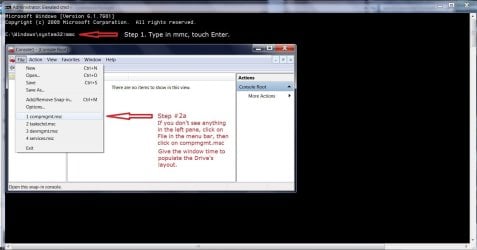
ej3.jpg


You should see this without my notes and orange highlight, but please read my notes, and take picture here:
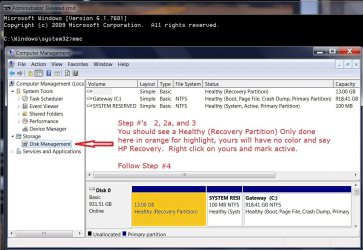
ej4.jpg

3. Right-click on the "HP Recovery" partition and select "Mark as Active Partition."

4. When the warning prompt appears, select "Yes" - Reboot and it will automatically boot into the Recovery Manager (without pressing F11).
 

My Computer My Computer

At a glance

Originally Win 7 Hm Prem x64 Ver 6.1.7600 Bui...Intel i3 530 2.93GHz, 2933MHz 2 Cores 4 Logic...6GB of 1,333MHz DDR3 SDRAM32MB Intel Graphics Media Accelerator HD IGChip
Computer type
PC/Desktop
Computer Manufacturer/Model Number
Gateway DX4831-01e (Mid-Tower Desktop)
OS
Originally Win 7 Hm Prem x64 Ver 6.1.7600 Build 7601-SP1 | Upgraded to Windows 10 December 14, 2019
CPU
Intel i3 530 2.93GHz, 2933MHz 2 Cores 4 Logical Processors
Motherboard
Gateway H57M01 133 megahertz
Memory
6GB of 1,333MHz DDR3 SDRAM
Graphics Card(s)
32MB Intel Graphics Media Accelerator HD IGChip
Sound Card
Realtek High Definition Audio
Monitor(s) Displays
Gateway HX2000 20inch TFT active matrix TN
Screen Resolution
1600 x 900 x 59 hertz
Hard Drives
WDC WD10EADS-00M2B0 [HDD] (1000.20 GB) -- drive 0,
HL-DT-ST DVDRAM GH41N [CD-ROM dr]
Four card readers, and Four USB 2.0
PSU
300watts.
Case
Mid-Tower Desktop
Cooling
Stock from Gateway
Keyboard
Natural Ergonomic Keyboard 4000, see Other Info
Mouse
Orig. Gateway wore out now using Insignia USB wired optical
Internet Speed
Vz FIOS 10ms png 57.64Mbps down 65.53Mbps up Speedtest.org
Antivirus
Zamana Anti-logger with Anti-malware, MSE, Windows Firewall,
Browser
IE11.0.9600.19399-Upd ver11.0.135, Firefox 68.0.1 x64
Other Info
System Specs by Belarc.

BIOS: American Megatrends Inc. P01-A0 11/17/2009

Replaced the MS 'Natural' Standard PS/2 Enhanced 101-102 Keyboard with a new Natural Ergonomic Keyboard 4000 on August 1st 2014.

Canon Pixma MG3222 Printer.

Updated to IE11 on 12102015 | Fios Quantum Router g1100

Additional AV: SpywareBlaster, manual Mbam, SAS
Yes mate that forum is very slow at responding I use it as last resort because it is so slow.

But keep plugging on eh?:)

PS take a look at these this is how it should go
How to record Kaspersky Rescue Disk 10 to a CD/DVD and boot my computer from the disk? then read this
How to start scan for viruses using Kaspersky Rescue Disk?

Hi Icit2tol. I found this video on you tube a few days ago.
Very good video, especially for beginners.
The Author is really clear and concise.
Kaspersky Rescue Disk - Download - Burn - Scan - - YouTube
 

My Computer My Computer

At a glance

Windows 7 Home Premium (x64) Service Pack 1 (...Intel Pentium P6200 2.13 GHz4.00 GBIntel HD Graphics
Computer type
Laptop
Computer Manufacturer/Model Number
HP 2000-150CA Notebook
OS
Windows 7 Home Premium (x64) Service Pack 1 (build 7601)
CPU
Intel Pentium P6200 2.13 GHz
Motherboard
HP 3674 28.49 1066 MH / BIOS: HP F.34
Memory
4.00 GB
Graphics Card(s)
Intel HD Graphics
Sound Card
Multimedia HD
Monitor(s) Displays
15.3
Screen Resolution
1366X768
Hard Drives
Hitachi HTS545050B9A300 ATA
(500.11 GB)
Keyboard
Standard PS2
Mouse
Synaptics PS2 Port Touch Pad / Microsoft HID-compliant mouse
Internet Speed
100 Mbps
Antivirus
MSE
Browser
PaleMoon / Fire Fox
Other Info
Purchased 2011
Yes Eli it is probably better than us trying to explain it in a post:)
 

My Computer My Computer

At a glance

Desk1 7 Home Prem / Desk2 10 Pro / Main lap A...Desk1 i5 3750K / Laptop i7 GTX 860M / Desk2 i...Desk1 8GB (1866) / Desk2 16GB (1333) / Laptop...Desk 1& 2NVidia GTX 650 & Laptops on board Intel
Computer type
PC/Desktop
Computer Manufacturer/Model Number
Own build (new) Desk1 / Asus ROG Win 7 / Desk2 1st build
OS
Desk1 7 Home Prem / Desk2 10 Pro / Main lap Asus ROG 10 Pro 2 laptop Toshiba 7 Pro Asus P2520 7 & 10
CPU
Desk1 i5 3750K / Laptop i7 GTX 860M / Desk2 i5 2500
Motherboard
Desk1 Asus P877-V / Desk2 Gigabyte H67 UD3H / Laptop ?
Memory
Desk1 8GB (1866) / Desk2 16GB (1333) / Laptop 8Gb DDR3
Graphics Card(s)
Desk 1& 2NVidia GTX 650 & Laptops on board Intel
Sound Card
Desk 1 & 2 -XONAR DG Realtek High Def audio Laptop
Monitor(s) Displays
Desk 1 Benq HD 2450 / Desk2 Philips 24" / Laptop 17.5"
Screen Resolution
1920x1080 D1 & D2 & Laptop 1
Hard Drives
Desk1 Samsung 120GB 830 SSD
Asus ROG 256GB 850 Pro SSD
Desk2 Samsung 840 256 SSD
Toshiba 120GB EVO
PSU
Desk 1 Corsair HX 1050/ Laptop ? / Desk 2 Corsair HX 650
Case
Desk 1 Cooler HAF XM ? Toshiba laptop / Desk2 Coolermaster
Cooling
Fans on all Desk1 -2 Desk2 - all Coolermasters 5 Laptop ?
Keyboard
Desk 1 MS Sidewinder X6 Desk 2 MS Sidewinder X 4
Mouse
Desk 1&2 - Gigabyte MS 900 gamer - laptop - Logitec wireless
Internet Speed
ADSL2+
Other Info
One other Desktop (tester) and spare Toshba laptop both with SSD's
Running Kaspersky 2016 ISS on all machines config'd identically
Logitec audio stereo systems on each machine (x3)
Canon MG5250MFC
Router/modem TP-Link running WPA2SK
Yes Eli it is probably better than us trying to explain it in a post:)

Yes, ICit2lol, it probably is.
It's nice when one comes across a good video too.

Icit2lol, do you know much about UBUNTU?
I see I can find quite a few things about my computer.
I can find my files too etc... and a lot of folders I have no idea what they are.
(PC terminology??)
Would I be able to set my computer back to Factory Condition with UBUNTU?
Is there somewhere I can reach COMMAND PROMPT?
I was searching for that last time I had the disc in.
 

My Computer My Computer

At a glance

Windows 7 Home Premium (x64) Service Pack 1 (...Intel Pentium P6200 2.13 GHz4.00 GBIntel HD Graphics
Computer type
Laptop
Computer Manufacturer/Model Number
HP 2000-150CA Notebook
OS
Windows 7 Home Premium (x64) Service Pack 1 (build 7601)
CPU
Intel Pentium P6200 2.13 GHz
Motherboard
HP 3674 28.49 1066 MH / BIOS: HP F.34
Memory
4.00 GB
Graphics Card(s)
Intel HD Graphics
Sound Card
Multimedia HD
Monitor(s) Displays
15.3
Screen Resolution
1366X768
Hard Drives
Hitachi HTS545050B9A300 ATA
(500.11 GB)
Keyboard
Standard PS2
Mouse
Synaptics PS2 Port Touch Pad / Microsoft HID-compliant mouse
Internet Speed
100 Mbps
Antivirus
MSE
Browser
PaleMoon / Fire Fox
Other Info
Purchased 2011
#3 attachment shows I can open the command prompt...and it is blinking. (maybe that doesn't mean anything.) :rolleyes:


If this doesn't work, we'll have to go with either a repair or clean install.
[/NOTE]
1. Open your command (CMD) prompt, type in mmc at the blinking cursor and touch the Enter key. You will probably see a User Account Control (UAC) box pop-up, click on yes, allow this program to make changes.

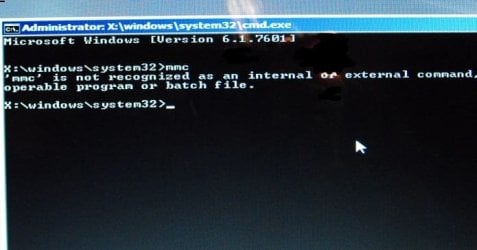
Hi Anak. I opened Command Prompt and typed in mmc.
It told me that 'mmc' is not recognized as an internal or external command, operable program or batch file. :rolleyes:
 

Attachments

  • command mmc.jpg
    command mmc.jpg
    34 KB · Views: 29

My Computer My Computer

At a glance

Windows 7 Home Premium (x64) Service Pack 1 (...Intel Pentium P6200 2.13 GHz4.00 GBIntel HD Graphics
Computer type
Laptop
Computer Manufacturer/Model Number
HP 2000-150CA Notebook
OS
Windows 7 Home Premium (x64) Service Pack 1 (build 7601)
CPU
Intel Pentium P6200 2.13 GHz
Motherboard
HP 3674 28.49 1066 MH / BIOS: HP F.34
Memory
4.00 GB
Graphics Card(s)
Intel HD Graphics
Sound Card
Multimedia HD
Monitor(s) Displays
15.3
Screen Resolution
1366X768
Hard Drives
Hitachi HTS545050B9A300 ATA
(500.11 GB)
Keyboard
Standard PS2
Mouse
Synaptics PS2 Port Touch Pad / Microsoft HID-compliant mouse
Internet Speed
100 Mbps
Antivirus
MSE
Browser
PaleMoon / Fire Fox
Other Info
Purchased 2011
Back
Top