
Solved Being bottlenecked by Linksys Wireless-G router

RamyG4

New member
Local time
9:41 AM
Messages
21
Router: http://www.amazon.com/Linksys-WRT54G-Wireless-G-Router/dp/B00007KDVI

Needing faster download speeds, I recently upgraded my internet service. With my pc wired through the router, I get speeds of about 21 Mbps and 12-13 Mbps when connected wirelessly. When bypassing the router, i get speeds of about 60Mbps.

Does anybody have an idea of what the issue may be? Any recommendations on routers that can handle 60Mbps if I do indeed need to upgrade?
 

My Computer My Computer

At a glance

Windows 7 64bitIntel(R) Core(TM) i7-2670QM CPU @ 2.20GHz8.00 GB(1) NVIDIA GeForce 610M (2) Intel(R) HD Graph...
Computer Manufacturer/Model Number
ASUS A53SD-TS72
OS
Windows 7 64bit
CPU
Intel(R) Core(TM) i7-2670QM CPU @ 2.20GHz
Motherboard
ASUSTeK Computer Inc. K53SD
Memory
8.00 GB
Graphics Card(s)
(1) NVIDIA GeForce 610M (2) Intel(R) HD Graphics Family
Sound Card
(1) Realtek High Definition Audio (2) Intel(R) Display Aud
WRT54G has an ancient CPU that can't keep up with today's bandwidth. For 60 Mbps bandwidth on both WiFi and Ethernet, buy at least N750 Gigabit router which costs around $90. For better performance/money, get an AC1200 Gigabit router for $120 and triple your WiFi speed that you get out of N750 router with a AC1200 client (i.e. your devices must support 802.11ac to get the 3x speeds).
 

My Computer My Computer

At a glance

Windows 7 Professional x64 SP1Intel® Pentium® 4 @ 2.26 GHz, Intel Core i7-2...512MB Dual channel DDR SDRAM @ 400MHz 2.5-3-3...Intel 82865G, Nvidia GeForce 520M Graphics
Computer type
Laptop
Computer Manufacturer/Model Number
Dell Optiplex SX270, Lenovo Z470
OS
Windows 7 Professional x64 SP1
CPU
Intel® Pentium® 4 @ 2.26 GHz, Intel Core i7-2670QM @ 2.20 GH
Motherboard
Dell, Lenovo
Memory
512MB Dual channel DDR SDRAM @ 400MHz 2.5-3-3-7, 8 GB DDR3
Graphics Card(s)
Intel 82865G, Nvidia GeForce 520M Graphics
Sound Card
SoundMax Integrated Audio, Integrated HD Audio
Monitor(s) Displays
LG W1952
Screen Resolution
1440x900, 1366 x 768
Hard Drives
40 GB 2.5" IDE 4200 RPM HDD, 500 GB 5400 RPM Sata 1.5 + 32 GB SSD
PSU
Dell 145 Watt, Lenovo 120 Watt Power Adapter
Case
Optiplex SX270 Small Form Factor, Laptop
Cooling
Dell Proprietary Air Cooling, Stock laptop cooling
Keyboard
Dell SK-8125 USB Keyboard
Mouse
Dell PS/2 2 button ball mouse with wheel scroll
Internet Speed
300 Mbit down / 20 Mbps up Time Warner Cable
Antivirus
MSE, Malwarebytes Scanner
Browser
Internet (Aizawa) Explorer 11
Other Info
Running Windows Server 2012 Datacenter on a virtual machine to run Metro Apps.
WRT54G has an ancient CPU that can't keep up with today's bandwidth. For 60 Mbps bandwidth on both WiFi and Ethernet, buy at least N750 Gigabit router which costs around $90. For better performance/money, get an AC1200 Gigabit router for $120 and triple your WiFi speed that you get out of N750 router with a AC1200 client (i.e. your devices must support 802.11ac to get the 3x speeds).


Thanks. Neither of my computers support 802.11ac (have a desktop with a wireless usb adapter and a laptop); both support 802.11n but I suppose a new usb adapter could always remedy that if necessary.

You lost me on the 3x speed though. It sounds like you're saying that an AC1200 router will give me 3x the speed I would get on an N750 router, but that doesn't make sense to me if an n750 router would be giving me 60mbps.
 

My Computer My Computer

At a glance

Windows 7 64bitIntel(R) Core(TM) i7-2670QM CPU @ 2.20GHz8.00 GB(1) NVIDIA GeForce 610M (2) Intel(R) HD Graph...
Computer Manufacturer/Model Number
ASUS A53SD-TS72
OS
Windows 7 64bit
CPU
Intel(R) Core(TM) i7-2670QM CPU @ 2.20GHz
Motherboard
ASUSTeK Computer Inc. K53SD
Memory
8.00 GB
Graphics Card(s)
(1) NVIDIA GeForce 610M (2) Intel(R) HD Graphics Family
Sound Card
(1) Realtek High Definition Audio (2) Intel(R) Display Aud
WRT54G has an ancient CPU that can't keep up with today's bandwidth. For 60 Mbps bandwidth on both WiFi and Ethernet, buy at least N750 Gigabit router which costs around $90. For better performance/money, get an AC1200 Gigabit router for $120 and triple your WiFi speed that you get out of N750 router with a AC1200 client (i.e. your devices must support 802.11ac to get the 3x speeds).


Thanks. Neither of my computers support 802.11ac (have a desktop with a wireless usb adapter and a laptop); both support 802.11n but I suppose a new usb adapter could always remedy that if necessary.

You lost me on the 3x speed though. It sounds like you're saying that an AC1200 router will give me 3x the speed I would get on an N750 router, but that doesn't make sense to me if an n750 router would be giving me 60mbps.

It's rounded off to 3x the speed. Most laptops have link speeds of 300 Mbps (N300 or N600) while newer AC1200 adapters have 866 Mbps speed (rounded off to 900 Mbps hence AC1200 = 900 + 300). Those link speeds are when the router is in line of sight with the device

Actual transfer speeds is around 50 - 60 Megabytes/sec (400 - 500 Mbps) while it's around 20 MB/s (160 Mbps) for N so you can have a 300 Mbps internet plan and get all that speed with an AC1200 router.

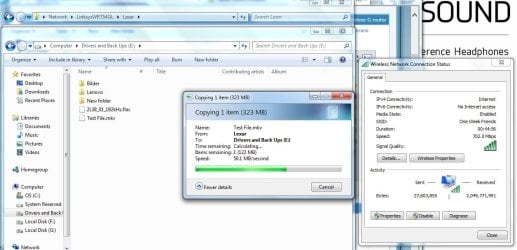
I'm 1 wall between the laptop and router and the router gives me 702 Mbps link speed with an actual transfer rate of 45 - 50 MB/s on USB 3.0 flash drive attached to my router. Not too shabby.

Untitled.jpg
 

My Computer My Computer

At a glance

Windows 7 Professional x64 SP1Intel® Pentium® 4 @ 2.26 GHz, Intel Core i7-2...512MB Dual channel DDR SDRAM @ 400MHz 2.5-3-3...Intel 82865G, Nvidia GeForce 520M Graphics
Computer type
Laptop
Computer Manufacturer/Model Number
Dell Optiplex SX270, Lenovo Z470
OS
Windows 7 Professional x64 SP1
CPU
Intel® Pentium® 4 @ 2.26 GHz, Intel Core i7-2670QM @ 2.20 GH
Motherboard
Dell, Lenovo
Memory
512MB Dual channel DDR SDRAM @ 400MHz 2.5-3-3-7, 8 GB DDR3
Graphics Card(s)
Intel 82865G, Nvidia GeForce 520M Graphics
Sound Card
SoundMax Integrated Audio, Integrated HD Audio
Monitor(s) Displays
LG W1952
Screen Resolution
1440x900, 1366 x 768
Hard Drives
40 GB 2.5" IDE 4200 RPM HDD, 500 GB 5400 RPM Sata 1.5 + 32 GB SSD
PSU
Dell 145 Watt, Lenovo 120 Watt Power Adapter
Case
Optiplex SX270 Small Form Factor, Laptop
Cooling
Dell Proprietary Air Cooling, Stock laptop cooling
Keyboard
Dell SK-8125 USB Keyboard
Mouse
Dell PS/2 2 button ball mouse with wheel scroll
Internet Speed
300 Mbit down / 20 Mbps up Time Warner Cable
Antivirus
MSE, Malwarebytes Scanner
Browser
Internet (Aizawa) Explorer 11
Other Info
Running Windows Server 2012 Datacenter on a virtual machine to run Metro Apps.

My Computer My Computer

At a glance

Windows 10 Pro X64Intel(R) Core(TM) i5-3570K CPU OC@ 4.5GHZ Turbo8.00 GB DDR3 1600MhzMSI Gaming X GTX 1070
Computer type
PC/Desktop
Computer Manufacturer/Model Number
Dude Build
OS
Windows 10 Pro X64
CPU
Intel(R) Core(TM) i5-3570K CPU OC@ 4.5GHZ Turbo
Motherboard
MSI Z77A-G45 Gaming
Memory
8.00 GB DDR3 1600Mhz
Graphics Card(s)
MSI Gaming X GTX 1070
Sound Card
Realtek High Definition
Monitor(s) Displays
Dell S23O9W, HP L1710
Screen Resolution
DELL-1920 x 1080 HP-1280 x1024
Hard Drives
Crucial m4 256 SSD, WD 7200RPM 500GB WD 1TB
PSU
Seasonic X650 GOLD
Case
Zalman Z12
Cooling
Antec Kuhler 920
Keyboard
Logitech
Mouse
MSI DS100 Interceptor
Internet Speed
50 down and 5 up
Antivirus
MSE
Browser
Chrome, IE 11
Other Info
Logitech X-620 Speakers
WRT54G has an ancient CPU that can't keep up with today's bandwidth. For 60 Mbps bandwidth on both WiFi and Ethernet, buy at least N750 Gigabit router which costs around $90. For better performance/money, get an AC1200 Gigabit router for $120 and triple your WiFi speed that you get out of N750 router with a AC1200 client (i.e. your devices must support 802.11ac to get the 3x speeds).


Thanks. Neither of my computers support 802.11ac (have a desktop with a wireless usb adapter and a laptop); both support 802.11n but I suppose a new usb adapter could always remedy that if necessary.

You lost me on the 3x speed though. It sounds like you're saying that an AC1200 router will give me 3x the speed I would get on an N750 router, but that doesn't make sense to me if an n750 router would be giving me 60mbps.

It's rounded off to 3x the speed. Most laptops have link speeds of 300 Mbps (N300 or N600) while newer AC1200 adapters have 866 Mbps speed (rounded off to 900 Mbps hence AC1200 = 900 + 300). Those link speeds are when the router is in line of sight with the device

Actual transfer speeds is around 50 - 60 Megabytes/sec (400 - 500 Mbps) while it's around 20 MB/s (160 Mbps) for N so you can have a 300 Mbps internet plan and get all that speed with an AC1200 router.

I'm 1 wall between the laptop and router and the router gives me 702 Mbps link speed with an actual transfer rate of 45 - 50 MB/s on USB 3.0 flash drive attached to my router. Not too shabby.

View attachment 331937


Alright got it, thanks for your help. I think I'll order an N750 router for now and see what speeds I get with it. Looking at this one:

Amazon.com: TP-LINK TL-WDR4300 Wireless N750 Dual Band Router, Gigabit, 2.4GHz 300Mbps+5Ghz 450Mbps, 2 USB port, Wireless On/Off Switch: Electronics
 

My Computer My Computer

At a glance

Windows 7 64bitIntel(R) Core(TM) i7-2670QM CPU @ 2.20GHz8.00 GB(1) NVIDIA GeForce 610M (2) Intel(R) HD Graph...
Computer Manufacturer/Model Number
ASUS A53SD-TS72
OS
Windows 7 64bit
CPU
Intel(R) Core(TM) i7-2670QM CPU @ 2.20GHz
Motherboard
ASUSTeK Computer Inc. K53SD
Memory
8.00 GB
Graphics Card(s)
(1) NVIDIA GeForce 610M (2) Intel(R) HD Graphics Family
Sound Card
(1) Realtek High Definition Audio (2) Intel(R) Display Aud
Keep in mind that you must use a N900 wireless adapter to get the 450 Mbps advertised speeds by TP-Link. Those adapters are quite expensive (not refurb) and it's cheaper to just get an AC1200 adapter (it's backwards compatible with N and G). It's all up to you in the end.
 

My Computer My Computer

At a glance

Windows 7 Professional x64 SP1Intel® Pentium® 4 @ 2.26 GHz, Intel Core i7-2...512MB Dual channel DDR SDRAM @ 400MHz 2.5-3-3...Intel 82865G, Nvidia GeForce 520M Graphics
Computer type
Laptop
Computer Manufacturer/Model Number
Dell Optiplex SX270, Lenovo Z470
OS
Windows 7 Professional x64 SP1
CPU
Intel® Pentium® 4 @ 2.26 GHz, Intel Core i7-2670QM @ 2.20 GH
Motherboard
Dell, Lenovo
Memory
512MB Dual channel DDR SDRAM @ 400MHz 2.5-3-3-7, 8 GB DDR3
Graphics Card(s)
Intel 82865G, Nvidia GeForce 520M Graphics
Sound Card
SoundMax Integrated Audio, Integrated HD Audio
Monitor(s) Displays
LG W1952
Screen Resolution
1440x900, 1366 x 768
Hard Drives
40 GB 2.5" IDE 4200 RPM HDD, 500 GB 5400 RPM Sata 1.5 + 32 GB SSD
PSU
Dell 145 Watt, Lenovo 120 Watt Power Adapter
Case
Optiplex SX270 Small Form Factor, Laptop
Cooling
Dell Proprietary Air Cooling, Stock laptop cooling
Keyboard
Dell SK-8125 USB Keyboard
Mouse
Dell PS/2 2 button ball mouse with wheel scroll
Internet Speed
300 Mbit down / 20 Mbps up Time Warner Cable
Antivirus
MSE, Malwarebytes Scanner
Browser
Internet (Aizawa) Explorer 11
Other Info
Running Windows Server 2012 Datacenter on a virtual machine to run Metro Apps.
Thanks for all your help theveterans, it's greatly appreciated.
 

My Computer My Computer

At a glance

Windows 7 64bitIntel(R) Core(TM) i7-2670QM CPU @ 2.20GHz8.00 GB(1) NVIDIA GeForce 610M (2) Intel(R) HD Graph...
Computer Manufacturer/Model Number
ASUS A53SD-TS72
OS
Windows 7 64bit
CPU
Intel(R) Core(TM) i7-2670QM CPU @ 2.20GHz
Motherboard
ASUSTeK Computer Inc. K53SD
Memory
8.00 GB
Graphics Card(s)
(1) NVIDIA GeForce 610M (2) Intel(R) HD Graphics Family
Sound Card
(1) Realtek High Definition Audio (2) Intel(R) Display Aud
Back
Top