Solved Connected but with no internet !

Make sure your Antivirus firewall don't block your outbound ! even you are connected to internet, firewall can block all ports ! Disable it for a while !

Cheers!

I will look into that... but ..

If the avast firewall, blocks me, should it block me constantly and not intermittently ?

I will try to turn off avast and windows firewall and see what happens, though..
 

My Computer My Computer

Computer type
PC/Desktop
OS
Windows 7 Pro, 32 bit
CPU
AMD Athlon 64 x2 3800+
Motherboard
ASRock 939N98PV-GLAN
Memory
DDR Dual Channel 4 Gbytes
Graphics Card(s)
Nvidia GeForce GT440
Antivirus
Avast
Browser
Chrome
You use utorrent?
 

My Computer My Computer

Computer type
PC/Desktop
Computer Manufacturer/Model Number
Gigabyte
OS
Windows 7 Ultimate x64
CPU
Intel Core 2 Duo 3 Ghz
Internet Speed
14,4 Mbps
Antivirus
F-Secure
Browser
Firefox 31
You use utorrent?

yeap I do... But it's off...
I don't have it on starting programs either...

but...

why do you ask?
 

My Computer My Computer

Computer type
PC/Desktop
OS
Windows 7 Pro, 32 bit
CPU
AMD Athlon 64 x2 3800+
Motherboard
ASRock 939N98PV-GLAN
Memory
DDR Dual Channel 4 Gbytes
Graphics Card(s)
Nvidia GeForce GT440
Antivirus
Avast
Browser
Chrome
because , settings of torrent incorrectly goes to fail most of the time.
maximum allowed connections are 200 , not to high beyond that limit (up to 256) because your bandwidth will be seriously throttled!

you may set those values like that

Global Max number of conn = 256
max num of conn pers per torrent = 64
max num upload slots per torrent = 8
 

My Computer My Computer

Computer type
PC/Desktop
Computer Manufacturer/Model Number
Gigabyte
OS
Windows 7 Ultimate x64
CPU
Intel Core 2 Duo 3 Ghz
Internet Speed
14,4 Mbps
Antivirus
F-Secure
Browser
Firefox 31
because , settings of torrent incorrectly goes to fail most of the time.
maximum allowed connections are 200 , not to high beyond that limit (up to 256) because your bandwidth will be seriously throttled!

you may set those values like that

Global Max number of conn = 256
max num of conn pers per torrent = 64
max num upload slots per torrent = 8

This is not the problem.. I have been using utorrent for years now...
But even if my bandwidth was throttled, I would still be able to connect.

So the issue here is not slow internet.. but NO internet.. lol :-)

Thank you for you suggestion Keight :)
 

My Computer My Computer

Computer type
PC/Desktop
OS
Windows 7 Pro, 32 bit
CPU
AMD Athlon 64 x2 3800+
Motherboard
ASRock 939N98PV-GLAN
Memory
DDR Dual Channel 4 Gbytes
Graphics Card(s)
Nvidia GeForce GT440
Antivirus
Avast
Browser
Chrome
then set MTU to 1460 or lower and see what's happen!
 

My Computer My Computer

Computer type
PC/Desktop
Computer Manufacturer/Model Number
Gigabyte
OS
Windows 7 Ultimate x64
CPU
Intel Core 2 Duo 3 Ghz
Internet Speed
14,4 Mbps
Antivirus
F-Secure
Browser
Firefox 31
Make sure your Antivirus firewall don't block your outbound ! even you are connected to internet, firewall can block all ports ! Disable it for a while !

Cheers!

I have disabled windows firewall, and all avast shields.

I see the same behaviour.. connects for a few seconds, then off and tries to re-connect :(
 

My Computer My Computer

Computer type
PC/Desktop
OS
Windows 7 Pro, 32 bit
CPU
AMD Athlon 64 x2 3800+
Motherboard
ASRock 939N98PV-GLAN
Memory
DDR Dual Channel 4 Gbytes
Graphics Card(s)
Nvidia GeForce GT440
Antivirus
Avast
Browser
Chrome
For the few seconds that it connects and for a fact I know that it gets an ip I get the following...

Please advice as to how I "get rid" of the Wins Server... although it was working without problem before.

Have you tried to set up a new profile and see how things work ?

Thank you Total for your suggestions...
I guess what you mean is to create a new user.. right?

I just did this... but unfortunately I get the exact same behaviour.. :(
 

My Computer My Computer

Computer type
PC/Desktop
OS
Windows 7 Pro, 32 bit
CPU
AMD Athlon 64 x2 3800+
Motherboard
ASRock 939N98PV-GLAN
Memory
DDR Dual Channel 4 Gbytes
Graphics Card(s)
Nvidia GeForce GT440
Antivirus
Avast
Browser
Chrome
Ok, I kinda had a breakthrough...

To do a small recap, when I am connected to the router via my switch neither windows nor linux (boot from usb) can connect to the internet.

I was playing around with the switch's ports but nothing happened.
As soon as I connected directly to the router I was connected immediately to the internet... HOWEVER.... my connection was actually non existent. It could even see my router 192.168.1.1 but extremely slow... I took so much time that it could load the page but not the pictures.

Now as soon as I booted with linux, it got connected immediately and doing a speed test confirmed my suspicions. The Internet was top speed (for my connection)...

So it's not a hardware problem.. It IS a software problem.
It seems that windows are extremely slow.. as if there is a conflict... I don't know...

Now I am connected directly to my router, and I connect with the internet...

Any new suggestions?
 

Attachments

  • SC 01.png
    SC 01.png
    69.2 KB · Views: 1

My Computer My Computer

Computer type
PC/Desktop
OS
Windows 7 Pro, 32 bit
CPU
AMD Athlon 64 x2 3800+
Motherboard
ASRock 939N98PV-GLAN
Memory
DDR Dual Channel 4 Gbytes
Graphics Card(s)
Nvidia GeForce GT440
Antivirus
Avast
Browser
Chrome
These are my settings with the current setup.
I wonder why it can't find my DNS Server...
Any ideas?

ps. I also checked my router's LAN ip addresses for possible conflcts. There was none. All connected devices had their own specific and separate IP's.
 

Attachments

  • Capture 15.PNG
    Capture 15.PNG
    118.3 KB · Views: 4

My Computer My Computer

Computer type
PC/Desktop
OS
Windows 7 Pro, 32 bit
CPU
AMD Athlon 64 x2 3800+
Motherboard
ASRock 939N98PV-GLAN
Memory
DDR Dual Channel 4 Gbytes
Graphics Card(s)
Nvidia GeForce GT440
Antivirus
Avast
Browser
Chrome
did you've flushed DNS?
 

My Computer My Computer

Computer type
PC/Desktop
Computer Manufacturer/Model Number
Gigabyte
OS
Windows 7 Ultimate x64
CPU
Intel Core 2 Duo 3 Ghz
Internet Speed
14,4 Mbps
Antivirus
F-Secure
Browser
Firefox 31
Other than rebooting several times both router and computer.... no...

How do I flush DNS?
 

My Computer My Computer

Computer type
PC/Desktop
OS
Windows 7 Pro, 32 bit
CPU
AMD Athlon 64 x2 3800+
Motherboard
ASRock 939N98PV-GLAN
Memory
DDR Dual Channel 4 Gbytes
Graphics Card(s)
Nvidia GeForce GT440
Antivirus
Avast
Browser
Chrome
open cmd as administrator

copy this:

ipconfig /flushdns

press enter ! wait about 1 or 2 mintes to refresh IP of your router !
 

My Computer My Computer

Computer type
PC/Desktop
Computer Manufacturer/Model Number
Gigabyte
OS
Windows 7 Ultimate x64
CPU
Intel Core 2 Duo 3 Ghz
Internet Speed
14,4 Mbps
Antivirus
F-Secure
Browser
Firefox 31
open elevated command prompt and type the following command
NETSH WINSOCK RESET
NETSH INT IP RESET
 

My Computer My Computer

Computer type
Laptop
Computer Manufacturer/Model Number
Dell Vostro 2520
OS
Windows 10 Tech Preview
CPU
Intel i5 (3rd Gen)
Motherboard
Intel® Mobile HM75 Express chipset
Memory
4GB
Graphics Card(s)
Intel HD Graphics 4000
Hard Drives
500GB
Keyboard
onboard keypad, USB keyboard
Mouse
touchpad, USB mouse, wireless muse
Internet Speed
4 Mbps
Antivirus
No
Browser
IE, chrome, firefox
Ok I am going officially nuts !!

I have given up every hope..

I reinstalled windows 7 pro, 64 bit version.
I even formatted and installed in another partition and a different HD !!

I have just finished installation.
Everything is on default.

When I connect the cable to my switch, It gets ip and identifies for a few second the network. Then disconnects, and reconnects.

When I connect my cable to my router, it gets ip and connects stable. But although is says connected to the internet it just doesn't connect to the internet.

At the same time booting with Ubuntu from a USB, I see the internet and have top download speed !!

I am totally out of options here!!
I was trying to avoid reinstallation although I knew that would be my solution to my problems....
However now I don't have any other options...

btw.

@ Keight : I have tried it.. it didn't make any difference.
@ Mayank : It has been already suggested and I have tried it...
 

My Computer My Computer

Computer type
PC/Desktop
OS
Windows 7 Pro, 32 bit
CPU
AMD Athlon 64 x2 3800+
Motherboard
ASRock 939N98PV-GLAN
Memory
DDR Dual Channel 4 Gbytes
Graphics Card(s)
Nvidia GeForce GT440
Antivirus
Avast
Browser
Chrome
and now I am going to knock your socks off !!

Last night playing around, I got bored of the crappy graphics and fonts that this installation was able to support, so I downloaded on my other computer the latest related nvidia drivers and copied them to windows computer.

Started the installation, but then I saw that it needed .net framework, and that it started "downloading" it.
It said that this might take a while... I thought "...like a lifetime and more..."...

However it showed that it "downloading something"... It was late and I decided to go to bed and just leave it there.

This morning the graphics driver has been installed and works fine!

Could someone tell me, how the heck did it download .net framework over the internet??!!

Needless to say, that I still can't connect to the internet...
 

My Computer My Computer

Computer type
PC/Desktop
OS
Windows 7 Pro, 32 bit
CPU
AMD Athlon 64 x2 3800+
Motherboard
ASRock 939N98PV-GLAN
Memory
DDR Dual Channel 4 Gbytes
Graphics Card(s)
Nvidia GeForce GT440
Antivirus
Avast
Browser
Chrome
I think your mainboard has the blame though , something in BIOS are not set correctly, try to disable NetDMA !
You have a weird PC , lol... I don't know what else to try if I can't see your desktop !

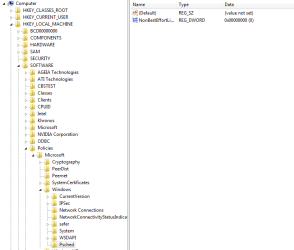
did you've tried this one ?

Code:
Windows Registry Editor Version 5.00

[HKEY_LOCAL_MACHINE\SOFTWARE\Policies\Microsoft\Windows\Psched]
"NonBestEffortLimit"=dword:00000000
needs restart PC
 

My Computer My Computer

Computer type
PC/Desktop
Computer Manufacturer/Model Number
Gigabyte
OS
Windows 7 Ultimate x64
CPU
Intel Core 2 Duo 3 Ghz
Internet Speed
14,4 Mbps
Antivirus
F-Secure
Browser
Firefox 31
I think your mainboard has the blame though , something in BIOS are not set correctly, try to disable NetDMA !
You have a weird PC , lol... I don't know what else to try if I can't see your desktop !

did you've tried this one ?

Code:
Windows Registry Editor Version 5.00

[HKEY_LOCAL_MACHINE\SOFTWARE\Policies\Microsoft\Windows\Psched]
"NonBestEffortLimit"=dword:00000000
needs restart PC

Hello Keight :-)
I was thinking the same... The only logical explanation for all this weird behaviour is the mainboard....

But this Linux getting connecting deal... is buffling me...
However Linux connects ONLY when I am connected directly to the router and not through the switch... what can you make of that?

As far as the windows Registry editing...
I do that with regedit I guess?

ps. Another "weird" thing is that I connected via the switch two more external HDs. My Linux computer (which is my main) is connected to the LAN, and can see them no problemo....

Windows which is connected to the LAN and to the same name Network, it can't see anything... So that means that the computer although connected to the LAN, it can't see anything EVEN Locally :(
 

My Computer My Computer

Computer type
PC/Desktop
OS
Windows 7 Pro, 32 bit
CPU
AMD Athlon 64 x2 3800+
Motherboard
ASRock 939N98PV-GLAN
Memory
DDR Dual Channel 4 Gbytes
Graphics Card(s)
Nvidia GeForce GT440
Antivirus
Avast
Browser
Chrome
Does this look ok?
 

Attachments

  • Capture.PNG
    Capture.PNG
    13 KB · Views: 0

My Computer My Computer

Computer type
PC/Desktop
OS
Windows 7 Pro, 32 bit
CPU
AMD Athlon 64 x2 3800+
Motherboard
ASRock 939N98PV-GLAN
Memory
DDR Dual Channel 4 Gbytes
Graphics Card(s)
Nvidia GeForce GT440
Antivirus
Avast
Browser
Chrome
It didn't work....
Do you know of any good software to test my motherboard, chipset, net card etc... ?
 

My Computer My Computer

Computer type
PC/Desktop
OS
Windows 7 Pro, 32 bit
CPU
AMD Athlon 64 x2 3800+
Motherboard
ASRock 939N98PV-GLAN
Memory
DDR Dual Channel 4 Gbytes
Graphics Card(s)
Nvidia GeForce GT440
Antivirus
Avast
Browser
Chrome
Back
Top