Solved Burnt out from error error error! Time to go back to Paper.

What are you using to open that CMD prompt?

That X= shouldn't be there, it should read C:\ . We need to see what's on that drive. Follow this:

At that X= Command Prompt.

Type: diskpart, see if that CMD works, (I'm hopin', but with that X= there I don't think it will.)


If it works:

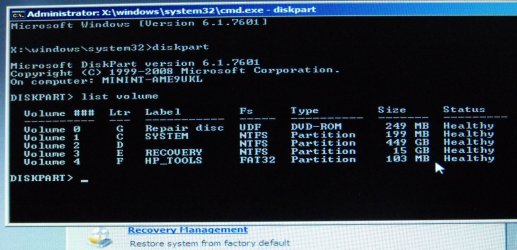
At the DISKPART prompt, type: list volume

Make note of the number of the simple volume whose drive letter you want to assign, change, or remove.
Take another picture here and post it in your next reply DO NOT go any further!


ICit2lol, have you ever seen anything like this CMD prompt??
 
Last edited:

My Computer My Computer

At a glance

Originally Win 7 Hm Prem x64 Ver 6.1.7600 Bui...Intel i3 530 2.93GHz, 2933MHz 2 Cores 4 Logic...6GB of 1,333MHz DDR3 SDRAM32MB Intel Graphics Media Accelerator HD IGChip
Computer type
PC/Desktop
Computer Manufacturer/Model Number
Gateway DX4831-01e (Mid-Tower Desktop)
OS
Originally Win 7 Hm Prem x64 Ver 6.1.7600 Build 7601-SP1 | Upgraded to Windows 10 December 14, 2019
CPU
Intel i3 530 2.93GHz, 2933MHz 2 Cores 4 Logical Processors
Motherboard
Gateway H57M01 133 megahertz
Memory
6GB of 1,333MHz DDR3 SDRAM
Graphics Card(s)
32MB Intel Graphics Media Accelerator HD IGChip
Sound Card
Realtek High Definition Audio
Monitor(s) Displays
Gateway HX2000 20inch TFT active matrix TN
Screen Resolution
1600 x 900 x 59 hertz
Hard Drives
WDC WD10EADS-00M2B0 [HDD] (1000.20 GB) -- drive 0,
HL-DT-ST DVDRAM GH41N [CD-ROM dr]
Four card readers, and Four USB 2.0
PSU
300watts.
Case
Mid-Tower Desktop
Cooling
Stock from Gateway
Keyboard
Natural Ergonomic Keyboard 4000, see Other Info
Mouse
Orig. Gateway wore out now using Insignia USB wired optical
Internet Speed
Vz FIOS 10ms png 57.64Mbps down 65.53Mbps up Speedtest.org
Antivirus
Zamana Anti-logger with Anti-malware, MSE, Windows Firewall,
Browser
IE11.0.9600.19399-Upd ver11.0.135, Firefox 68.0.1 x64
Other Info
System Specs by Belarc.

BIOS: American Megatrends Inc. P01-A0 11/17/2009

Replaced the MS 'Natural' Standard PS/2 Enhanced 101-102 Keyboard with a new Natural Ergonomic Keyboard 4000 on August 1st 2014.

Canon Pixma MG3222 Printer.

Updated to IE11 on 12102015 | Fios Quantum Router g1100

Additional AV: SpywareBlaster, manual Mbam, SAS
Yes Eli it is probably better than us trying to explain it in a post:)

Yes, ICit2lol, it probably is.
It's nice when one comes across a good video too.

Icit2lol, do you know much about UBUNTU?
I see I can find quite a few things about my computer.
I can find my files too etc... and a lot of folders I have no idea what they are.
(PC terminology??)
Would I be able to set my computer back to Factory Condition with UBUNTU?
Is there somewhere I can reach COMMAND PROMPT?
I was searching for that last time I had the disc in.

Mate I don't know much about Ubuntu per se' I stumbled over it a long time ago when I first started getting into computing in more than a curiosity level, and I had a go at using the Linux based OS's because they were no cost and I was naively curious as to what they did and looked like.
I was using it in that fashion one day and again through pure curiosity I clicked on the drives and found I could open them that way so one thing lead to another and I was able to open drives that were to all intents and purposes dead or impenetrable. I then found I could open the C: drive on my own machine without the login password. So I instantly had an easy and very cheap way of doing fixes for people.
I also found I could get an internet connection where the machine being fixed would not connect how much I tried so one can download info for fix it stuff.
There was also the added ability of writing documents and printing them off if I wanted to etc etc.
Now there is one "drawback" (that I should add to my little ditty) and that is there are some files that are made in Windows that are not accessible in Ubuntu for I am guessing some form of program coding. But things like pictures, videos, documents (again some were just a machine language) however it does recover data that most folks in trouble really want ie pics!!
I was then able to at least cut the fix time with machines by half, and all for the sake of burning one simple disk.
One advantage is that it doesn't interfere with or need Windows to run and used to be virtually malware free so it in itself was a real plus to me - but that has changed since those days.
I was discussing this with another member a little while ago and it reminded me of the dual boot -Windows / Linux Mint I tried but found it hard to work and I was too lazy to get around the boot problems I was having so dumped the Mint and just stuck to Ubuntu.
I know there are people who use Linux based stuff rather than Windows but the sheer number of systems and complexity is too much for me.
Now the other stuff you wanted to know about I am not sure about ie factory restore as I have never tried that and I doubt it would happen through Ubuntu because hitting the correct key for that function is just the machine accessing the partition on the hard drive that has been allocated for that purpose so you would have to have the machine switched off to start with and if you had Ubuntu running means it would have to be shut down. I stand to be corrected some of the Linux buffs might know but that is the simple way I think of it.
The command prompt again I am not sure I will have to have a play around with it to see.
In a nutshell I just see it as a way of retrieving data and accessing the net in dire straights, and there have been many times if it were not for Ubuntu I would not have been able to fix machines for folks and they would have ended up going to a techie because I do not charge anything but spare parts at cost - I just enjoy the challenge and the appreciation of folks for fixing their machines.:)
By the by there are other fixers like this - Golden another member did a tutorial on using a bootable Mint for example http://www.sevenforums.com/tutorial...ate-live-cd-dvd-usb-use-emergency-backup.html
and whs -
http://www.sevenforums.com/tutorials/287439-emergency-kit-save-your-files-dead-os.html

Me I am not clever or patient enough to tutorials and just put out my dittys as I call them:)
 

My Computer My Computer

At a glance

Desk1 7 Home Prem / Desk2 10 Pro / Main lap A...Desk1 i5 3750K / Laptop i7 GTX 860M / Desk2 i...Desk1 8GB (1866) / Desk2 16GB (1333) / Laptop...Desk 1& 2NVidia GTX 650 & Laptops on board Intel
Computer type
PC/Desktop
Computer Manufacturer/Model Number
Own build (new) Desk1 / Asus ROG Win 7 / Desk2 1st build
OS
Desk1 7 Home Prem / Desk2 10 Pro / Main lap Asus ROG 10 Pro 2 laptop Toshiba 7 Pro Asus P2520 7 & 10
CPU
Desk1 i5 3750K / Laptop i7 GTX 860M / Desk2 i5 2500
Motherboard
Desk1 Asus P877-V / Desk2 Gigabyte H67 UD3H / Laptop ?
Memory
Desk1 8GB (1866) / Desk2 16GB (1333) / Laptop 8Gb DDR3
Graphics Card(s)
Desk 1& 2NVidia GTX 650 & Laptops on board Intel
Sound Card
Desk 1 & 2 -XONAR DG Realtek High Def audio Laptop
Monitor(s) Displays
Desk 1 Benq HD 2450 / Desk2 Philips 24" / Laptop 17.5"
Screen Resolution
1920x1080 D1 & D2 & Laptop 1
Hard Drives
Desk1 Samsung 120GB 830 SSD
Asus ROG 256GB 850 Pro SSD
Desk2 Samsung 840 256 SSD
Toshiba 120GB EVO
PSU
Desk 1 Corsair HX 1050/ Laptop ? / Desk 2 Corsair HX 650
Case
Desk 1 Cooler HAF XM ? Toshiba laptop / Desk2 Coolermaster
Cooling
Fans on all Desk1 -2 Desk2 - all Coolermasters 5 Laptop ?
Keyboard
Desk 1 MS Sidewinder X6 Desk 2 MS Sidewinder X 4
Mouse
Desk 1&2 - Gigabyte MS 900 gamer - laptop - Logitec wireless
Internet Speed
ADSL2+
Other Info
One other Desktop (tester) and spare Toshba laptop both with SSD's
Running Kaspersky 2016 ISS on all machines config'd identically
Logitec audio stereo systems on each machine (x3)
Canon MG5250MFC
Router/modem TP-Link running WPA2SK
What are you using to open that CMD prompt?

That X= shouldn't be there, it should read C:\ . We need to see what's on that drive. Follow this:

At that X= Command Prompt.

Type: diskpart, see if that CMD works, (I'm hopin', but with that X= there I don't think it will.)


If it works:

At the DISKPART prompt, type: list volume

Make note of the number of the simple volume whose drive letter you want to assign, change, or remove.
Take another picture here and post it in your next reply DO NOT go any further!


ICit2lol, have you ever seen anything like this CMD prompt??
Now you have mentioned it Anak I seem to remember something along those lines and like I replied to the OP I I haven't dabbled with it for some time now so have not kept with using it more thoroughly:o
 

My Computer My Computer

At a glance

Desk1 7 Home Prem / Desk2 10 Pro / Main lap A...Desk1 i5 3750K / Laptop i7 GTX 860M / Desk2 i...Desk1 8GB (1866) / Desk2 16GB (1333) / Laptop...Desk 1& 2NVidia GTX 650 & Laptops on board Intel
Computer type
PC/Desktop
Computer Manufacturer/Model Number
Own build (new) Desk1 / Asus ROG Win 7 / Desk2 1st build
OS
Desk1 7 Home Prem / Desk2 10 Pro / Main lap Asus ROG 10 Pro 2 laptop Toshiba 7 Pro Asus P2520 7 & 10
CPU
Desk1 i5 3750K / Laptop i7 GTX 860M / Desk2 i5 2500
Motherboard
Desk1 Asus P877-V / Desk2 Gigabyte H67 UD3H / Laptop ?
Memory
Desk1 8GB (1866) / Desk2 16GB (1333) / Laptop 8Gb DDR3
Graphics Card(s)
Desk 1& 2NVidia GTX 650 & Laptops on board Intel
Sound Card
Desk 1 & 2 -XONAR DG Realtek High Def audio Laptop
Monitor(s) Displays
Desk 1 Benq HD 2450 / Desk2 Philips 24" / Laptop 17.5"
Screen Resolution
1920x1080 D1 & D2 & Laptop 1
Hard Drives
Desk1 Samsung 120GB 830 SSD
Asus ROG 256GB 850 Pro SSD
Desk2 Samsung 840 256 SSD
Toshiba 120GB EVO
PSU
Desk 1 Corsair HX 1050/ Laptop ? / Desk 2 Corsair HX 650
Case
Desk 1 Cooler HAF XM ? Toshiba laptop / Desk2 Coolermaster
Cooling
Fans on all Desk1 -2 Desk2 - all Coolermasters 5 Laptop ?
Keyboard
Desk 1 MS Sidewinder X6 Desk 2 MS Sidewinder X 4
Mouse
Desk 1&2 - Gigabyte MS 900 gamer - laptop - Logitec wireless
Internet Speed
ADSL2+
Other Info
One other Desktop (tester) and spare Toshba laptop both with SSD's
Running Kaspersky 2016 ISS on all machines config'd identically
Logitec audio stereo systems on each machine (x3)
Canon MG5250MFC
Router/modem TP-Link running WPA2SK

My Computer My Computer

At a glance

Originally Win 7 Hm Prem x64 Ver 6.1.7600 Bui...Intel i3 530 2.93GHz, 2933MHz 2 Cores 4 Logic...6GB of 1,333MHz DDR3 SDRAM32MB Intel Graphics Media Accelerator HD IGChip
Computer type
PC/Desktop
Computer Manufacturer/Model Number
Gateway DX4831-01e (Mid-Tower Desktop)
OS
Originally Win 7 Hm Prem x64 Ver 6.1.7600 Build 7601-SP1 | Upgraded to Windows 10 December 14, 2019
CPU
Intel i3 530 2.93GHz, 2933MHz 2 Cores 4 Logical Processors
Motherboard
Gateway H57M01 133 megahertz
Memory
6GB of 1,333MHz DDR3 SDRAM
Graphics Card(s)
32MB Intel Graphics Media Accelerator HD IGChip
Sound Card
Realtek High Definition Audio
Monitor(s) Displays
Gateway HX2000 20inch TFT active matrix TN
Screen Resolution
1600 x 900 x 59 hertz
Hard Drives
WDC WD10EADS-00M2B0 [HDD] (1000.20 GB) -- drive 0,
HL-DT-ST DVDRAM GH41N [CD-ROM dr]
Four card readers, and Four USB 2.0
PSU
300watts.
Case
Mid-Tower Desktop
Cooling
Stock from Gateway
Keyboard
Natural Ergonomic Keyboard 4000, see Other Info
Mouse
Orig. Gateway wore out now using Insignia USB wired optical
Internet Speed
Vz FIOS 10ms png 57.64Mbps down 65.53Mbps up Speedtest.org
Antivirus
Zamana Anti-logger with Anti-malware, MSE, Windows Firewall,
Browser
IE11.0.9600.19399-Upd ver11.0.135, Firefox 68.0.1 x64
Other Info
System Specs by Belarc.

BIOS: American Megatrends Inc. P01-A0 11/17/2009

Replaced the MS 'Natural' Standard PS/2 Enhanced 101-102 Keyboard with a new Natural Ergonomic Keyboard 4000 on August 1st 2014.

Canon Pixma MG3222 Printer.

Updated to IE11 on 12102015 | Fios Quantum Router g1100

Additional AV: SpywareBlaster, manual Mbam, SAS
Elljay, are you sure we're working with Windows 7 on this HP2000?

For this model of 2000 the specs say Windows 8 (64-bit): HP 2000-2b19WM Notebook PC Product Specifications

ICit2lol, have you ever seen anything like this CMD prompt??
John, that X= prompt is the Recovery Drive Command Prompt in Windows 8

Use the Recovery Drive Command Prompt to edit the registry or recover data - TechRepublic


It's late here and I'm signing off, will pick this up tomorrow.......

Yes Sir.
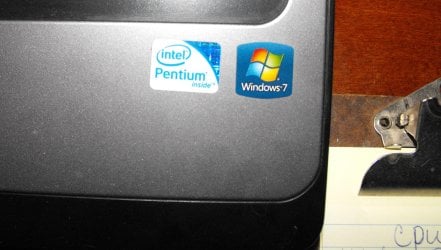
My HP has Windows 7. Here is shot of the labels on my machine.
OK Anak. Thank you.
Goodnight.


Attachments

  • WIN7.jpg
    WIN7.jpg
    358.9 KB · Views: 0
Last edited:

My Computer My Computer

At a glance

Windows 7 Home Premium (x64) Service Pack 1 (...Intel Pentium P6200 2.13 GHz4.00 GBIntel HD Graphics
Computer type
Laptop
Computer Manufacturer/Model Number
HP 2000-150CA Notebook
OS
Windows 7 Home Premium (x64) Service Pack 1 (build 7601)
CPU
Intel Pentium P6200 2.13 GHz
Motherboard
HP 3674 28.49 1066 MH / BIOS: HP F.34
Memory
4.00 GB
Graphics Card(s)
Intel HD Graphics
Sound Card
Multimedia HD
Monitor(s) Displays
15.3
Screen Resolution
1366X768
Hard Drives
Hitachi HTS545050B9A300 ATA
(500.11 GB)
Keyboard
Standard PS2
Mouse
Synaptics PS2 Port Touch Pad / Microsoft HID-compliant mouse
Internet Speed
100 Mbps
Antivirus
MSE
Browser
PaleMoon / Fire Fox
Other Info
Purchased 2011
Anak, way back in the thread @ #30 #31, I mentioned I made a Repair Disc from another machine. That Repair Disc is what I am booting from.

I used my brother-in-law's machine. An Acer win7 64bit.
Remember I mentioned none of the links work to send it back to Factory Condition...but I CAN open the Command Prompt in there.
The 3 attachments are photos I took of what I see and what I can and can not do with this Disc??
I'm starting to think this Repair Disc is messed up.
I read your links to HP Support. I'm thinking it needs to be an HP only.
Your last suggestion did do something though. Here it is...
 

Attachments

  • DISKPART1.jpg
    DISKPART1.jpg
    568.7 KB · Views: 0
  • DISK PART 2.jpg
    DISK PART 2.jpg
    759.2 KB · Views: 0
Last edited:

My Computer My Computer

At a glance

Windows 7 Home Premium (x64) Service Pack 1 (...Intel Pentium P6200 2.13 GHz4.00 GBIntel HD Graphics
Computer type
Laptop
Computer Manufacturer/Model Number
HP 2000-150CA Notebook
OS
Windows 7 Home Premium (x64) Service Pack 1 (build 7601)
CPU
Intel Pentium P6200 2.13 GHz
Motherboard
HP 3674 28.49 1066 MH / BIOS: HP F.34
Memory
4.00 GB
Graphics Card(s)
Intel HD Graphics
Sound Card
Multimedia HD
Monitor(s) Displays
15.3
Screen Resolution
1366X768
Hard Drives
Hitachi HTS545050B9A300 ATA
(500.11 GB)
Keyboard
Standard PS2
Mouse
Synaptics PS2 Port Touch Pad / Microsoft HID-compliant mouse
Internet Speed
100 Mbps
Antivirus
MSE
Browser
PaleMoon / Fire Fox
Other Info
Purchased 2011
I only have time to make this post Elljay as I've got errands and chores that will take me into this evening.

That all looks good Elljay although, I'm not sure why the D partition is nameless. What we need is the E partition Recovery.

I'd like to stay away from the CMD prompt if we can, and I can't recall if you can boot into Windows using Safe Mode, Can you?

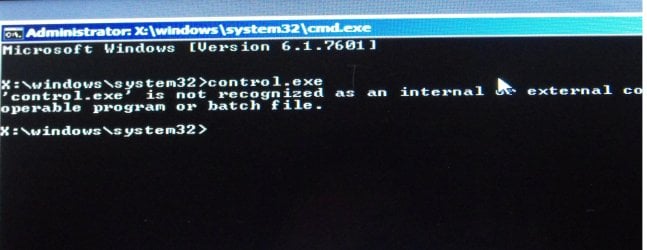
And, There is one more CMD that I'd like you to try from that X=prompt, type in control.exe then enter, does it open the Control Panel?

If either one works you need to go to the Action Center in Control Panel. When open you should see this:
52254d1265365209-action-center-shortcut-create-action_center.jpg

Image source; SevenForums Action Center Tutorial: http://www.sevenforums.com/tutorials/61298-action-center-shortcut-create.html

Click on Recovery there at the bottom right and in the next window click on Advanced Recovery Methods.

When that opens you'll see two options:

  1. Use an image you created earlier, or
  2. Restore your computer to factory condition.

Click on #2 to start the process.
 

My Computer My Computer

At a glance

Originally Win 7 Hm Prem x64 Ver 6.1.7600 Bui...Intel i3 530 2.93GHz, 2933MHz 2 Cores 4 Logic...6GB of 1,333MHz DDR3 SDRAM32MB Intel Graphics Media Accelerator HD IGChip
Computer type
PC/Desktop
Computer Manufacturer/Model Number
Gateway DX4831-01e (Mid-Tower Desktop)
OS
Originally Win 7 Hm Prem x64 Ver 6.1.7600 Build 7601-SP1 | Upgraded to Windows 10 December 14, 2019
CPU
Intel i3 530 2.93GHz, 2933MHz 2 Cores 4 Logical Processors
Motherboard
Gateway H57M01 133 megahertz
Memory
6GB of 1,333MHz DDR3 SDRAM
Graphics Card(s)
32MB Intel Graphics Media Accelerator HD IGChip
Sound Card
Realtek High Definition Audio
Monitor(s) Displays
Gateway HX2000 20inch TFT active matrix TN
Screen Resolution
1600 x 900 x 59 hertz
Hard Drives
WDC WD10EADS-00M2B0 [HDD] (1000.20 GB) -- drive 0,
HL-DT-ST DVDRAM GH41N [CD-ROM dr]
Four card readers, and Four USB 2.0
PSU
300watts.
Case
Mid-Tower Desktop
Cooling
Stock from Gateway
Keyboard
Natural Ergonomic Keyboard 4000, see Other Info
Mouse
Orig. Gateway wore out now using Insignia USB wired optical
Internet Speed
Vz FIOS 10ms png 57.64Mbps down 65.53Mbps up Speedtest.org
Antivirus
Zamana Anti-logger with Anti-malware, MSE, Windows Firewall,
Browser
IE11.0.9600.19399-Upd ver11.0.135, Firefox 68.0.1 x64
Other Info
System Specs by Belarc.

BIOS: American Megatrends Inc. P01-A0 11/17/2009

Replaced the MS 'Natural' Standard PS/2 Enhanced 101-102 Keyboard with a new Natural Ergonomic Keyboard 4000 on August 1st 2014.

Canon Pixma MG3222 Printer.

Updated to IE11 on 12102015 | Fios Quantum Router g1100

Additional AV: SpywareBlaster, manual Mbam, SAS
I only have time to make this post Elljay as I've got errands and chores that will take me into this evening.
That's OK Anak. We all have lives. :)
 

My Computer My Computer

At a glance

Windows 7 Home Premium (x64) Service Pack 1 (...Intel Pentium P6200 2.13 GHz4.00 GBIntel HD Graphics
Computer type
Laptop
Computer Manufacturer/Model Number
HP 2000-150CA Notebook
OS
Windows 7 Home Premium (x64) Service Pack 1 (build 7601)
CPU
Intel Pentium P6200 2.13 GHz
Motherboard
HP 3674 28.49 1066 MH / BIOS: HP F.34
Memory
4.00 GB
Graphics Card(s)
Intel HD Graphics
Sound Card
Multimedia HD
Monitor(s) Displays
15.3
Screen Resolution
1366X768
Hard Drives
Hitachi HTS545050B9A300 ATA
(500.11 GB)
Keyboard
Standard PS2
Mouse
Synaptics PS2 Port Touch Pad / Microsoft HID-compliant mouse
Internet Speed
100 Mbps
Antivirus
MSE
Browser
PaleMoon / Fire Fox
Other Info
Purchased 2011
That all looks good Elljay although, I'm not sure why the D partition is nameless. What we need is the E partition Recovery.

I'd like to stay away from the CMD prompt if we can, and I can't recall if you can boot into Windows using Safe Mode, Can you?

And, There is one more CMD that I'd like you to try from that X=prompt, type in control.exe then enter, does it open the Control Panel?
No, I can't get to safe Mode. It takes me back to BSOD.
That Command didn't work Anak.
Here is the attachment.

Just to let you know; I'm not totally green.
I know a few tweaks here and there.
I do know how to use the Control Panel.
On a working machine, I do know how to send my PC back to Factory Condition or an Earlier time. I've sent this little Netbook I'm using right now, back to Factory Condition X2. in 5 years.
 

Attachments

  • command2.jpg
    command2.jpg
    535.4 KB · Views: 0

My Computer My Computer

At a glance

Windows 7 Home Premium (x64) Service Pack 1 (...Intel Pentium P6200 2.13 GHz4.00 GBIntel HD Graphics
Computer type
Laptop
Computer Manufacturer/Model Number
HP 2000-150CA Notebook
OS
Windows 7 Home Premium (x64) Service Pack 1 (build 7601)
CPU
Intel Pentium P6200 2.13 GHz
Motherboard
HP 3674 28.49 1066 MH / BIOS: HP F.34
Memory
4.00 GB
Graphics Card(s)
Intel HD Graphics
Sound Card
Multimedia HD
Monitor(s) Displays
15.3
Screen Resolution
1366X768
Hard Drives
Hitachi HTS545050B9A300 ATA
(500.11 GB)
Keyboard
Standard PS2
Mouse
Synaptics PS2 Port Touch Pad / Microsoft HID-compliant mouse
Internet Speed
100 Mbps
Antivirus
MSE
Browser
PaleMoon / Fire Fox
Other Info
Purchased 2011

My Computer My Computer

At a glance

Windows 7 Home Premium (x64) Service Pack 1 (...Intel Pentium P6200 2.13 GHz4.00 GBIntel HD Graphics
Computer type
Laptop
Computer Manufacturer/Model Number
HP 2000-150CA Notebook
OS
Windows 7 Home Premium (x64) Service Pack 1 (build 7601)
CPU
Intel Pentium P6200 2.13 GHz
Motherboard
HP 3674 28.49 1066 MH / BIOS: HP F.34
Memory
4.00 GB
Graphics Card(s)
Intel HD Graphics
Sound Card
Multimedia HD
Monitor(s) Displays
15.3
Screen Resolution
1366X768
Hard Drives
Hitachi HTS545050B9A300 ATA
(500.11 GB)
Keyboard
Standard PS2
Mouse
Synaptics PS2 Port Touch Pad / Microsoft HID-compliant mouse
Internet Speed
100 Mbps
Antivirus
MSE
Browser
PaleMoon / Fire Fox
Other Info
Purchased 2011

Attachments

  • DITTIES.jpg
    DITTIES.jpg
    33.6 KB · Views: 38

My Computer My Computer

At a glance

Windows 7 Home Premium (x64) Service Pack 1 (...Intel Pentium P6200 2.13 GHz4.00 GBIntel HD Graphics
Computer type
Laptop
Computer Manufacturer/Model Number
HP 2000-150CA Notebook
OS
Windows 7 Home Premium (x64) Service Pack 1 (build 7601)
CPU
Intel Pentium P6200 2.13 GHz
Motherboard
HP 3674 28.49 1066 MH / BIOS: HP F.34
Memory
4.00 GB
Graphics Card(s)
Intel HD Graphics
Sound Card
Multimedia HD
Monitor(s) Displays
15.3
Screen Resolution
1366X768
Hard Drives
Hitachi HTS545050B9A300 ATA
(500.11 GB)
Keyboard
Standard PS2
Mouse
Synaptics PS2 Port Touch Pad / Microsoft HID-compliant mouse
Internet Speed
100 Mbps
Antivirus
MSE
Browser
PaleMoon / Fire Fox
Other Info
Purchased 2011
That all looks good Elljay although, I'm not sure why the D partition is nameless. What we need is the E partition Recovery.

I'd like to stay away from the CMD prompt if we can, and I can't recall if you can boot into Windows using Safe Mode, Can you?

And, There is one more CMD that I'd like you to try from that X=prompt, type in control.exe then enter, does it open the Control Panel?
No, I can't get to safe Mode. It takes me back to BSOD.
That Command didn't work Anak.
Here is the attachment.

Just to let you know; I'm not totally green.
I know a few tweaks here and there.
I do know how to use the Control Panel.
On a working machine, I do know how to send my PC back to Factory Condition or an Earlier time. I've sent this little Netbook I'm using right now, back to Factory Condition X2. in 5 years.

Waiting for your expertise...
Where do we go from here Anak?
 

My Computer My Computer

At a glance

Windows 7 Home Premium (x64) Service Pack 1 (...Intel Pentium P6200 2.13 GHz4.00 GBIntel HD Graphics
Computer type
Laptop
Computer Manufacturer/Model Number
HP 2000-150CA Notebook
OS
Windows 7 Home Premium (x64) Service Pack 1 (build 7601)
CPU
Intel Pentium P6200 2.13 GHz
Motherboard
HP 3674 28.49 1066 MH / BIOS: HP F.34
Memory
4.00 GB
Graphics Card(s)
Intel HD Graphics
Sound Card
Multimedia HD
Monitor(s) Displays
15.3
Screen Resolution
1366X768
Hard Drives
Hitachi HTS545050B9A300 ATA
(500.11 GB)
Keyboard
Standard PS2
Mouse
Synaptics PS2 Port Touch Pad / Microsoft HID-compliant mouse
Internet Speed
100 Mbps
Antivirus
MSE
Browser
PaleMoon / Fire Fox
Other Info
Purchased 2011
Me I am not clever or patient enough to tutorials and just put out my dittys as I call them:)

Ditty. I like that. I had to look it up. Lol. :D
LOL!! It is a term we used to use when I was much younger back in England where I come from. It was just our way of saying "I do this and it works for me - try it" in a short spiel >
noun
noun: spiel; plural noun: spiels
  1. 1.
    an elaborate or glib speech or story, typically one used by a salesperson.
    "he delivers a breathless and effortless spiel in promotion of his new novel"
    synonyms:speech, line, patter, pitch, sales pitch; Moremonologue, rigmarole, story, saga
    "he launched into a big spiel about the merits of the product"


verb
verb: spiel; 3rd person present: spiels; past tense: spieled; past participle: spieled; gerund or present participle: spieling
  1. 1.
    reel off; recite.
    "he solemnly spieled all he knew"


just in case you are wondering what that one is :D
 

My Computer My Computer

At a glance

Desk1 7 Home Prem / Desk2 10 Pro / Main lap A...Desk1 i5 3750K / Laptop i7 GTX 860M / Desk2 i...Desk1 8GB (1866) / Desk2 16GB (1333) / Laptop...Desk 1& 2NVidia GTX 650 & Laptops on board Intel
Computer type
PC/Desktop
Computer Manufacturer/Model Number
Own build (new) Desk1 / Asus ROG Win 7 / Desk2 1st build
OS
Desk1 7 Home Prem / Desk2 10 Pro / Main lap Asus ROG 10 Pro 2 laptop Toshiba 7 Pro Asus P2520 7 & 10
CPU
Desk1 i5 3750K / Laptop i7 GTX 860M / Desk2 i5 2500
Motherboard
Desk1 Asus P877-V / Desk2 Gigabyte H67 UD3H / Laptop ?
Memory
Desk1 8GB (1866) / Desk2 16GB (1333) / Laptop 8Gb DDR3
Graphics Card(s)
Desk 1& 2NVidia GTX 650 & Laptops on board Intel
Sound Card
Desk 1 & 2 -XONAR DG Realtek High Def audio Laptop
Monitor(s) Displays
Desk 1 Benq HD 2450 / Desk2 Philips 24" / Laptop 17.5"
Screen Resolution
1920x1080 D1 & D2 & Laptop 1
Hard Drives
Desk1 Samsung 120GB 830 SSD
Asus ROG 256GB 850 Pro SSD
Desk2 Samsung 840 256 SSD
Toshiba 120GB EVO
PSU
Desk 1 Corsair HX 1050/ Laptop ? / Desk 2 Corsair HX 650
Case
Desk 1 Cooler HAF XM ? Toshiba laptop / Desk2 Coolermaster
Cooling
Fans on all Desk1 -2 Desk2 - all Coolermasters 5 Laptop ?
Keyboard
Desk 1 MS Sidewinder X6 Desk 2 MS Sidewinder X 4
Mouse
Desk 1&2 - Gigabyte MS 900 gamer - laptop - Logitec wireless
Internet Speed
ADSL2+
Other Info
One other Desktop (tester) and spare Toshba laptop both with SSD's
Running Kaspersky 2016 ISS on all machines config'd identically
Logitec audio stereo systems on each machine (x3)
Canon MG5250MFC
Router/modem TP-Link running WPA2SK
Ditty. I like that. I had to look it up. Lol. :D

LOL!! It is a term we used to use when I was much younger back in England where I come from. It was just our way of saying "I do this and it works for me - try it" in a short spiel >
noun
noun: spiel; plural noun: spiels
just in case you are wondering what that one is :D

We use this word in North America too...just one long spiel. :D
 

My Computer My Computer

At a glance

Windows 7 Home Premium (x64) Service Pack 1 (...Intel Pentium P6200 2.13 GHz4.00 GBIntel HD Graphics
Computer type
Laptop
Computer Manufacturer/Model Number
HP 2000-150CA Notebook
OS
Windows 7 Home Premium (x64) Service Pack 1 (build 7601)
CPU
Intel Pentium P6200 2.13 GHz
Motherboard
HP 3674 28.49 1066 MH / BIOS: HP F.34
Memory
4.00 GB
Graphics Card(s)
Intel HD Graphics
Sound Card
Multimedia HD
Monitor(s) Displays
15.3
Screen Resolution
1366X768
Hard Drives
Hitachi HTS545050B9A300 ATA
(500.11 GB)
Keyboard
Standard PS2
Mouse
Synaptics PS2 Port Touch Pad / Microsoft HID-compliant mouse
Internet Speed
100 Mbps
Antivirus
MSE
Browser
PaleMoon / Fire Fox
Other Info
Purchased 2011
Waiting for your expertise...Where do we go from here Anak?
I'm still trying to figure this one out, but I'm fresh out of ideas Elljay.

So, I've sent a VM to gregrocker to take a look at your situation and see if he can help figure this one out for us.
You may see me answering some of his questions, if I'm incorrect don't hesitate to make clarifications.


EDIT:

Can you remember if you've ever gone into the BIOS using F10 and changed anything?
 
Last edited:

My Computer My Computer

At a glance

Originally Win 7 Hm Prem x64 Ver 6.1.7600 Bui...Intel i3 530 2.93GHz, 2933MHz 2 Cores 4 Logic...6GB of 1,333MHz DDR3 SDRAM32MB Intel Graphics Media Accelerator HD IGChip
Computer type
PC/Desktop
Computer Manufacturer/Model Number
Gateway DX4831-01e (Mid-Tower Desktop)
OS
Originally Win 7 Hm Prem x64 Ver 6.1.7600 Build 7601-SP1 | Upgraded to Windows 10 December 14, 2019
CPU
Intel i3 530 2.93GHz, 2933MHz 2 Cores 4 Logical Processors
Motherboard
Gateway H57M01 133 megahertz
Memory
6GB of 1,333MHz DDR3 SDRAM
Graphics Card(s)
32MB Intel Graphics Media Accelerator HD IGChip
Sound Card
Realtek High Definition Audio
Monitor(s) Displays
Gateway HX2000 20inch TFT active matrix TN
Screen Resolution
1600 x 900 x 59 hertz
Hard Drives
WDC WD10EADS-00M2B0 [HDD] (1000.20 GB) -- drive 0,
HL-DT-ST DVDRAM GH41N [CD-ROM dr]
Four card readers, and Four USB 2.0
PSU
300watts.
Case
Mid-Tower Desktop
Cooling
Stock from Gateway
Keyboard
Natural Ergonomic Keyboard 4000, see Other Info
Mouse
Orig. Gateway wore out now using Insignia USB wired optical
Internet Speed
Vz FIOS 10ms png 57.64Mbps down 65.53Mbps up Speedtest.org
Antivirus
Zamana Anti-logger with Anti-malware, MSE, Windows Firewall,
Browser
IE11.0.9600.19399-Upd ver11.0.135, Firefox 68.0.1 x64
Other Info
System Specs by Belarc.

BIOS: American Megatrends Inc. P01-A0 11/17/2009

Replaced the MS 'Natural' Standard PS/2 Enhanced 101-102 Keyboard with a new Natural Ergonomic Keyboard 4000 on August 1st 2014.

Canon Pixma MG3222 Printer.

Updated to IE11 on 12102015 | Fios Quantum Router g1100

Additional AV: SpywareBlaster, manual Mbam, SAS
I understand you were trying to repair your Win7 following http://www.sevenforums.com/tutorials/219533-troubleshooting-windows-7-failure-boot.html which first determines if there is infection to clear. You tried to run Kapersky Rescue disk but didn't appear to find out how to use it to scan for infection even though a tutorial was posted earlier showing exactly how this is done. Here is another: How to Use the Kaspersky Rescue Disk to Clean Your Infected PC

In such cases try using a different AV scan CD so that you get at least one good boot scan to determine if your PC is infected, then try starting in normal or Safe Mode to run a full Malwarebytes scan. If it won't start I would try a different boot scan.

The http://www.sevenforums.com/tutorials/219533-troubleshooting-windows-7-failure-boot.html steps lead up to possibly running Factory Recovery or doing the vastly superior http://www.sevenforums.com/tutorials/219487-clean-reinstall-factory-oem-windows-7-a.html#post1839164. HP's have the worst load of bloatware in the industry, making it the worst install of WIn7 once can possibly have even when freshly restored. So I'd strongly consider looking over the reinstall steps including the Special Note for HP Owners at the end so you can take this opportunity to do the best install of Win7 instead of the worst one.

Otherwise if you cannot run Perform an HP System Recovery (Windows 7) | HP® Support and have not made the Recovery disks earlier when Win7 was running, then make sure Recovery is the http://www.sevenforums.com/tutorials/71432-partition-mark-active.html to see if it will then respond to the proper key. Anak gave you a picture of a typical HP disk configuration to help determine which is the Recovery partition to mark Active from Diskpart commands in the blue link.

If the F11 key will not respond then try booting with the ESC key to access F11. If that fails then try the ESC key to run Diagnostics to see if the onboard diagnostics will boot and run. This will tell you the condition of your hardware, and let's you know that the Tools partition is functional so is worth saving if you reinstall.

If Recovery cannot be made to boot then a way to salvage it is to do a rescue install of Win7 to C, afterwards add the Recovery partition to a Dual Boot to Boot Recovery Partition using EasyBCD which should run Recovery to reinstall to C.

But since you need to reinstall Win7 to C to do this, it's better to invest the time and effort in a http://www.sevenforums.com/tutorials/219487-clean-reinstall-factory-oem-windows-7-a.html#post1839164 while deleting all partitions during the install to create/format New as shown in tutorial, unless Diagnostics will run in which case I would save the OEM Tools partition but delete all others.
 
Last edited:

My Computer My Computer

At a glance

Windows 7 Home Premium (x64) Service Pack 1 (...Intel Pentium P6200 2.13 GHz4.00 GBIntel HD Graphics
Computer type
Laptop
Computer Manufacturer/Model Number
HP 2000-150CA Notebook
OS
Windows 7 Home Premium (x64) Service Pack 1 (build 7601)
CPU
Intel Pentium P6200 2.13 GHz
Motherboard
HP 3674 28.49 1066 MH / BIOS: HP F.34
Memory
4.00 GB
Graphics Card(s)
Intel HD Graphics
Sound Card
Multimedia HD
Monitor(s) Displays
15.3
Screen Resolution
1366X768
Hard Drives
Hitachi HTS545050B9A300 ATA
(500.11 GB)
Keyboard
Standard PS2
Mouse
Synaptics PS2 Port Touch Pad / Microsoft HID-compliant mouse
Internet Speed
100 Mbps
Antivirus
MSE
Browser
PaleMoon / Fire Fox
Other Info
Purchased 2011
Changing the boot order is okay.

Have you read over Greg's post; Read it carefully, is there anything there that you feel you've tried and didn't work?

In which direction do you think we should proceed?
 

My Computer My Computer

At a glance

Originally Win 7 Hm Prem x64 Ver 6.1.7600 Bui...Intel i3 530 2.93GHz, 2933MHz 2 Cores 4 Logic...6GB of 1,333MHz DDR3 SDRAM32MB Intel Graphics Media Accelerator HD IGChip
Computer type
PC/Desktop
Computer Manufacturer/Model Number
Gateway DX4831-01e (Mid-Tower Desktop)
OS
Originally Win 7 Hm Prem x64 Ver 6.1.7600 Build 7601-SP1 | Upgraded to Windows 10 December 14, 2019
CPU
Intel i3 530 2.93GHz, 2933MHz 2 Cores 4 Logical Processors
Motherboard
Gateway H57M01 133 megahertz
Memory
6GB of 1,333MHz DDR3 SDRAM
Graphics Card(s)
32MB Intel Graphics Media Accelerator HD IGChip
Sound Card
Realtek High Definition Audio
Monitor(s) Displays
Gateway HX2000 20inch TFT active matrix TN
Screen Resolution
1600 x 900 x 59 hertz
Hard Drives
WDC WD10EADS-00M2B0 [HDD] (1000.20 GB) -- drive 0,
HL-DT-ST DVDRAM GH41N [CD-ROM dr]
Four card readers, and Four USB 2.0
PSU
300watts.
Case
Mid-Tower Desktop
Cooling
Stock from Gateway
Keyboard
Natural Ergonomic Keyboard 4000, see Other Info
Mouse
Orig. Gateway wore out now using Insignia USB wired optical
Internet Speed
Vz FIOS 10ms png 57.64Mbps down 65.53Mbps up Speedtest.org
Antivirus
Zamana Anti-logger with Anti-malware, MSE, Windows Firewall,
Browser
IE11.0.9600.19399-Upd ver11.0.135, Firefox 68.0.1 x64
Other Info
System Specs by Belarc.

BIOS: American Megatrends Inc. P01-A0 11/17/2009

Replaced the MS 'Natural' Standard PS/2 Enhanced 101-102 Keyboard with a new Natural Ergonomic Keyboard 4000 on August 1st 2014.

Canon Pixma MG3222 Printer.

Updated to IE11 on 12102015 | Fios Quantum Router g1100

Additional AV: SpywareBlaster, manual Mbam, SAS
Hi Elljay, haven't heard from you, this series of CMD's using DISKPART should get your netbook running again.

The capitalized CMD's are to make it easier for you to see, they do not have to be capitalized.

  • Boot with the repair disk you made.

  • At the Command Prompt type; DISKPART.

  • After the prompt changes to DISKPART, type; LIST DISK. You should see a list with your optical drive, the hard drive, and card reader ports.

  • In order to be sure we are working with the hard drive (HDD) only, type; SELECT DISK 0 (That is a zero not a letter O). You should see; “Disk 0 is now the selected disk”.

  • At the next DISKPART prompt, instead of List Volume type; LIST PARTITION.
   Note
You should see a list of the partitions on the netbook's hard drive disk (HDD). What we're after is that Volume E – Recovery volume, if the partition is not labeled as Recovery then the only thing you can go by is the size of the partition.

In your pix of the volumes in post #46 select the one that matches the 15 GB size of the Volume 3 E Recovery. The pix is showing Volume 3 as the third partition in descending order.

But, when I do it on my machine, my recovery is named recovery and it is listed as partition "1". If you are unsure take a screenshot and post it so we can look at it to make sure which one you need to select.

  • You would type in; Select PARTITION 3 or ? - You should see; Partition 3 or ? is now the selected partition.

  • At the next Diskpart prompt, type; ACTIVE. - You should see; "Diskpart marked the current partition active".

  • At the next Diskpart prompt, type Exit.
The CMD window should close and bring you back to the repair disk screen, close it out and remove the repair disk from the optical drive. If everything is already closed out remove the rescue disk.

  • Restart your netbook, and observe.
Since you mentioned in earlier conversation that you have already gone through the recovery process, watch to see if this restart looks like the recovery process you are used to. If anything looks abnormal please take screenshots and post them in your next reply, with providence the recovery will take and you will have your netbook back.


My Computer My Computer

At a glance

Originally Win 7 Hm Prem x64 Ver 6.1.7600 Bui...Intel i3 530 2.93GHz, 2933MHz 2 Cores 4 Logic...6GB of 1,333MHz DDR3 SDRAM32MB Intel Graphics Media Accelerator HD IGChip
Computer type
PC/Desktop
Computer Manufacturer/Model Number
Gateway DX4831-01e (Mid-Tower Desktop)
OS
Originally Win 7 Hm Prem x64 Ver 6.1.7600 Build 7601-SP1 | Upgraded to Windows 10 December 14, 2019
CPU
Intel i3 530 2.93GHz, 2933MHz 2 Cores 4 Logical Processors
Motherboard
Gateway H57M01 133 megahertz
Memory
6GB of 1,333MHz DDR3 SDRAM
Graphics Card(s)
32MB Intel Graphics Media Accelerator HD IGChip
Sound Card
Realtek High Definition Audio
Monitor(s) Displays
Gateway HX2000 20inch TFT active matrix TN
Screen Resolution
1600 x 900 x 59 hertz
Hard Drives
WDC WD10EADS-00M2B0 [HDD] (1000.20 GB) -- drive 0,
HL-DT-ST DVDRAM GH41N [CD-ROM dr]
Four card readers, and Four USB 2.0
PSU
300watts.
Case
Mid-Tower Desktop
Cooling
Stock from Gateway
Keyboard
Natural Ergonomic Keyboard 4000, see Other Info
Mouse
Orig. Gateway wore out now using Insignia USB wired optical
Internet Speed
Vz FIOS 10ms png 57.64Mbps down 65.53Mbps up Speedtest.org
Antivirus
Zamana Anti-logger with Anti-malware, MSE, Windows Firewall,
Browser
IE11.0.9600.19399-Upd ver11.0.135, Firefox 68.0.1 x64
Other Info
System Specs by Belarc.

BIOS: American Megatrends Inc. P01-A0 11/17/2009

Replaced the MS 'Natural' Standard PS/2 Enhanced 101-102 Keyboard with a new Natural Ergonomic Keyboard 4000 on August 1st 2014.

Canon Pixma MG3222 Printer.

Updated to IE11 on 12102015 | Fios Quantum Router g1100

Additional AV: SpywareBlaster, manual Mbam, SAS
Am now wondering if the hard drive is a suspect one myself and the failure of most things so far ie the running of the Kaspersky rescue disk has me foxed as it should just boot into the program with very little difficulty:confused:
In fact I would not be surprised if there were more than the hard drive being at fault:(
 

My Computer My Computer

At a glance

Desk1 7 Home Prem / Desk2 10 Pro / Main lap A...Desk1 i5 3750K / Laptop i7 GTX 860M / Desk2 i...Desk1 8GB (1866) / Desk2 16GB (1333) / Laptop...Desk 1& 2NVidia GTX 650 & Laptops on board Intel
Computer type
PC/Desktop
Computer Manufacturer/Model Number
Own build (new) Desk1 / Asus ROG Win 7 / Desk2 1st build
OS
Desk1 7 Home Prem / Desk2 10 Pro / Main lap Asus ROG 10 Pro 2 laptop Toshiba 7 Pro Asus P2520 7 & 10
CPU
Desk1 i5 3750K / Laptop i7 GTX 860M / Desk2 i5 2500
Motherboard
Desk1 Asus P877-V / Desk2 Gigabyte H67 UD3H / Laptop ?
Memory
Desk1 8GB (1866) / Desk2 16GB (1333) / Laptop 8Gb DDR3
Graphics Card(s)
Desk 1& 2NVidia GTX 650 & Laptops on board Intel
Sound Card
Desk 1 & 2 -XONAR DG Realtek High Def audio Laptop
Monitor(s) Displays
Desk 1 Benq HD 2450 / Desk2 Philips 24" / Laptop 17.5"
Screen Resolution
1920x1080 D1 & D2 & Laptop 1
Hard Drives
Desk1 Samsung 120GB 830 SSD
Asus ROG 256GB 850 Pro SSD
Desk2 Samsung 840 256 SSD
Toshiba 120GB EVO
PSU
Desk 1 Corsair HX 1050/ Laptop ? / Desk 2 Corsair HX 650
Case
Desk 1 Cooler HAF XM ? Toshiba laptop / Desk2 Coolermaster
Cooling
Fans on all Desk1 -2 Desk2 - all Coolermasters 5 Laptop ?
Keyboard
Desk 1 MS Sidewinder X6 Desk 2 MS Sidewinder X 4
Mouse
Desk 1&2 - Gigabyte MS 900 gamer - laptop - Logitec wireless
Internet Speed
ADSL2+
Other Info
One other Desktop (tester) and spare Toshba laptop both with SSD's
Running Kaspersky 2016 ISS on all machines config'd identically
Logitec audio stereo systems on each machine (x3)
Canon MG5250MFC
Router/modem TP-Link running WPA2SK
Back
Top