Solved Burnt out from error error error! Time to go back to Paper.

Hello gregrocker and Anak.
I'm sorry for the late response.
No, it isn't good to try and do this work when I'm tired. The other day I was actually in the process of painting and in between coats of paint drying, I was trying to work on this problem. I have been painting for the past 3 days.
Life gets demanding sometimes and I don't always have the time to sit in front of the computer.

Tonight I just found out I have been logged into the forum on my sister's PC upstairs because I was showing her something a week ago or so, but I wasn't actually logged in on my Netbook downstairs because I haven't had time. So sorry if it looked like I was online and ignoring you. I wasn't. :confused:

gregrocker, I did read your tutorials but at the that time I never tried the suggestions because Anak and ICit2lol were in the process of helping me work through steps and giving me suggestions. I am so sorry, I am not that fast.
I thought it would be rude to abandon the people that were helping me and jump over there ... and I was having difficulty absorbing more information. I have read so much 'stuff' about technology in the past month and a 1/2 that my head feels overwhelmed with information.

That being said, I did do this when Anak asked me to: Anak had you mark the Recovery partition Active to see if Recovery would either boot itself at reboot, or if it would now run from F11 or ESC key. It didn't work. I could get to ESC key but still not to F11.

The other day I did watch the HP videos x2 and a month ago I watched that video also.

I went to your trouble shooting tutorial late last night.
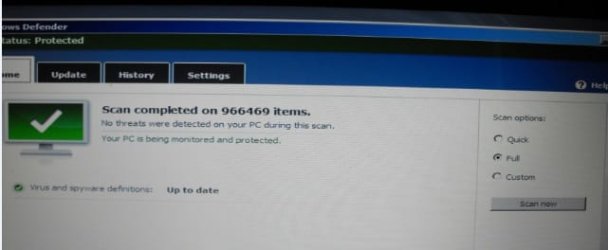
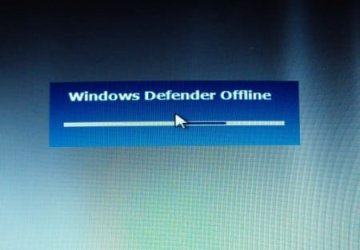
Yes, I made an Anti Virus Disc that finally works. I started running Windows Defender at 1:30 A.M. (although the disc has a different time) and threw a towel over the screen and went to bed exhausted. In the morning I looked at it. It didn't find anything.
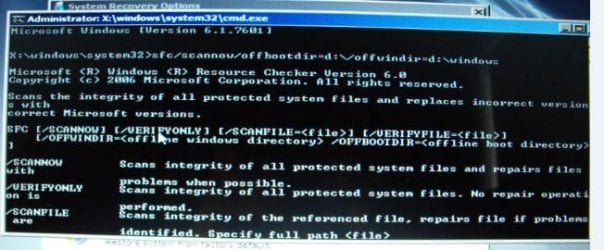
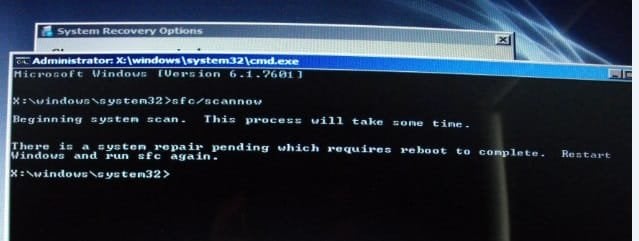
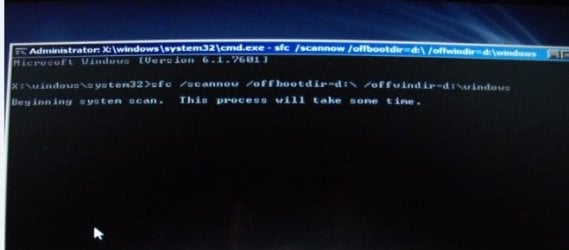
I am trying step 4 sfc/scannow today and that is where I am at. I didn't do something right it looks like. :(
I tried rebooting several times and doing it over and running Repair again.
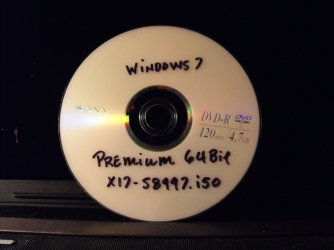
I made the X17-58997.iso Disc also.
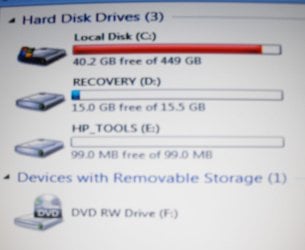
Here are the screen shots.
Thank you for your time gregrocker.
 

Attachments
  • DEFENDER 1.jpg
    DEFENDER 1.jpg
    15.4 KB · Views: 24
  • BIT FENDER 2.jpg
    BIT FENDER 2.jpg
    15.1 KB · Views: 24
  • SFC 1..jpg
    SFC 1..jpg
    16.2 KB · Views: 24
  • SFC 2.jpg
    SFC 2.jpg
    38.3 KB · Views: 24
  • SFC 3.jpg
    SFC 3.jpg
    20.5 KB · Views: 25
  • DSCF5075.jpg
    DSCF5075.jpg
    601.2 KB · Views: 0
Last edited:

My Computer My Computer

At a glance

Windows 7 Home Premium (x64) Service Pack 1 (...Intel Pentium P6200 2.13 GHz4.00 GBIntel HD Graphics
Computer type
Laptop
Computer Manufacturer/Model Number
HP 2000-150CA Notebook
OS
Windows 7 Home Premium (x64) Service Pack 1 (build 7601)
CPU
Intel Pentium P6200 2.13 GHz
Motherboard
HP 3674 28.49 1066 MH / BIOS: HP F.34
Memory
4.00 GB
Graphics Card(s)
Intel HD Graphics
Sound Card
Multimedia HD
Monitor(s) Displays
15.3
Screen Resolution
1366X768
Hard Drives
Hitachi HTS545050B9A300 ATA
(500.11 GB)
Keyboard
Standard PS2
Mouse
Synaptics PS2 Port Touch Pad / Microsoft HID-compliant mouse
Internet Speed
100 Mbps
Antivirus
MSE
Browser
PaleMoon / Fire Fox
Other Info
Purchased 2011
Elljay, after consulting with Steve (Anak) I'd be willing to walk you through the booted phase of a reinstall over the phone up to installing TeamViewer, then connect to set it up, install all Updates and any drivers, your programs, optimize it as I do all my installs.

I do this for those who are struggling yet trying and eager to learn. You clearly have the ability to do the actual install steps during boot, then the rest is easy for me as well as good practice.

To do this I need you to rescue any files using the Win7 disk to http://www.sevenforums.com/tutorials/93347-copy-paste-windows-recovery-console.html. I gave you the ISO download earlier to burn to disk using tool in Step 2 of http://www.sevenforums.com/tutorials/219487-clean-reinstall-factory-oem-windows-7-a.html#post1839164.

Then i will provide links for your network driver to install if necessary to get online and Teamviewe to download to backup. Make a list of the programs you use so I can gathering the installers you don't have. Do you use Office and have its disk and/or key? What word processing do you use?

Think this over as I'd need to do this for you before Tues when I travel for two weeks until I'd have time to do it from my Calif home.

I am lost for words. :geek: :D Thank you so much gregrocker!
 

My Computer My Computer

At a glance

Windows 7 Home Premium (x64) Service Pack 1 (...Intel Pentium P6200 2.13 GHz4.00 GBIntel HD Graphics
Computer type
Laptop
Computer Manufacturer/Model Number
HP 2000-150CA Notebook
OS
Windows 7 Home Premium (x64) Service Pack 1 (build 7601)
CPU
Intel Pentium P6200 2.13 GHz
Motherboard
HP 3674 28.49 1066 MH / BIOS: HP F.34
Memory
4.00 GB
Graphics Card(s)
Intel HD Graphics
Sound Card
Multimedia HD
Monitor(s) Displays
15.3
Screen Resolution
1366X768
Hard Drives
Hitachi HTS545050B9A300 ATA
(500.11 GB)
Keyboard
Standard PS2
Mouse
Synaptics PS2 Port Touch Pad / Microsoft HID-compliant mouse
Internet Speed
100 Mbps
Antivirus
MSE
Browser
PaleMoon / Fire Fox
Other Info
Purchased 2011
Did you see Recovery on the ESC menu?

Looks like you missed a space before the word scannow in the command. It must be typed exactly as printed. http://www.sevenforums.com/tutorials/139810-sfc-scannow-run-command-prompt-boot.html

If it passes the AV scan and SFC then proceed with marking 199mb partition Active to run http://www.sevenforums.com/tutorials/105541-startup-repair-run-3-separate-times.html from the disk you made. If it fails either scan then run them again and follow the cleanup or further repair procedure in each one's tutorial. Windows Defender Offline

If that fails I would copy out any files you need to rescue to a flash stick or external hard drive: http://www.sevenforums.com/tutorials/93347-copy-paste-windows-recovery-console.html, probably under C:Users/Your User name

I just reinstalled an HP 2000 a few weeks ago. If you look on the HP sticker on the PC what is the model extension number, or serial number? We take that number and put it into HP Drivers and Downloads for Printers, Scanners and More | HP ® Support to find the Network LAN drivers to also download to the backup. You'd want the wireless LAN and Ethernet LAN. I can help you find these if you get the model extension.

In addition put into your backup this download for Free TeamViewer Download for Windows
 
Looks like you missed a space before the word scannow in the command. It must be typed exactly as printed. http://www.sevenforums.com/tutorials/139810-sfc-scannow-run-command-prompt-boot.html
Hi gregrocker. Actually it looks like I missed 3 spaces throughout the line. It is running right now. How long does it take approx.
It's 2:30 A.M. here. I need to go to bed.
Can I just let it run? Throw a towel over it again. Lol.
I can get the Model no. tomorrow.
In the ESC menu. I would have to recheck.
I remember seeing all the F links. F11 didn't work. F1 etc... did.
I will find some time to work on these things tomorrow gregrocker.
OK. I think it is done. Adding another attachment.
 

Attachments

  • scan now done.jpg
    scan now done.jpg
    15.7 KB · Views: 26
  • scan now done.jpg 2.jpg
    scan now done.jpg 2.jpg
    14.8 KB · Views: 25
Last edited:

My Computer My Computer

At a glance

Windows 7 Home Premium (x64) Service Pack 1 (...Intel Pentium P6200 2.13 GHz4.00 GBIntel HD Graphics
Computer type
Laptop
Computer Manufacturer/Model Number
HP 2000-150CA Notebook
OS
Windows 7 Home Premium (x64) Service Pack 1 (build 7601)
CPU
Intel Pentium P6200 2.13 GHz
Motherboard
HP 3674 28.49 1066 MH / BIOS: HP F.34
Memory
4.00 GB
Graphics Card(s)
Intel HD Graphics
Sound Card
Multimedia HD
Monitor(s) Displays
15.3
Screen Resolution
1366X768
Hard Drives
Hitachi HTS545050B9A300 ATA
(500.11 GB)
Keyboard
Standard PS2
Mouse
Synaptics PS2 Port Touch Pad / Microsoft HID-compliant mouse
Internet Speed
100 Mbps
Antivirus
MSE
Browser
PaleMoon / Fire Fox
Other Info
Purchased 2011
Do you have a function key along the top row to turn off your monitor?

It looks like you have no damaged system files. If the virus scans came up clean then try the bootrec and bootsect commands in Use Bootrec.exe in the Windows RE to troubleshoot startup issues, followed by 3 Startup Repairs with the Active flag on 199mb partition.

When you have any needed files rescued to backup I am ready to help you do the reinstall whenever you want. Download the Network LAN drivers for your exact model to disk, stick or external drive, then Teamviewer. Look over the other preparatory steps for http://www.sevenforums.com/tutorials/219487-clean-reinstall-factory-oem-windows-7-a.html#post1839164 to see if there's anything else you want to try to rescue from the install.

Do you use Office and have the disk and Product Key? If not what version of Office or other word processor do you use? What other programs do you rely upon? Do you have their disks and Product Keys? We can help you locate these if not.
 
Last edited:
Just want to let the two of you know that I'm here, but too many cooks spoil the broth so I'll stand-aside unless specifically asked something.

Greg good catch on those extra spaces, and Elljay, I see Greg has broken his instructions down into paragraphs or steps if you prefer. Take one step at a time.
If you have any questions about anything you don't understand do not hesitate to ask first.
 

My Computer My Computer

At a glance

Originally Win 7 Hm Prem x64 Ver 6.1.7600 Bui...Intel i3 530 2.93GHz, 2933MHz 2 Cores 4 Logic...6GB of 1,333MHz DDR3 SDRAM32MB Intel Graphics Media Accelerator HD IGChip
Computer type
PC/Desktop
Computer Manufacturer/Model Number
Gateway DX4831-01e (Mid-Tower Desktop)
OS
Originally Win 7 Hm Prem x64 Ver 6.1.7600 Build 7601-SP1 | Upgraded to Windows 10 December 14, 2019
CPU
Intel i3 530 2.93GHz, 2933MHz 2 Cores 4 Logical Processors
Motherboard
Gateway H57M01 133 megahertz
Memory
6GB of 1,333MHz DDR3 SDRAM
Graphics Card(s)
32MB Intel Graphics Media Accelerator HD IGChip
Sound Card
Realtek High Definition Audio
Monitor(s) Displays
Gateway HX2000 20inch TFT active matrix TN
Screen Resolution
1600 x 900 x 59 hertz
Hard Drives
WDC WD10EADS-00M2B0 [HDD] (1000.20 GB) -- drive 0,
HL-DT-ST DVDRAM GH41N [CD-ROM dr]
Four card readers, and Four USB 2.0
PSU
300watts.
Case
Mid-Tower Desktop
Cooling
Stock from Gateway
Keyboard
Natural Ergonomic Keyboard 4000, see Other Info
Mouse
Orig. Gateway wore out now using Insignia USB wired optical
Internet Speed
Vz FIOS 10ms png 57.64Mbps down 65.53Mbps up Speedtest.org
Antivirus
Zamana Anti-logger with Anti-malware, MSE, Windows Firewall,
Browser
IE11.0.9600.19399-Upd ver11.0.135, Firefox 68.0.1 x64
Other Info
System Specs by Belarc.

BIOS: American Megatrends Inc. P01-A0 11/17/2009

Replaced the MS 'Natural' Standard PS/2 Enhanced 101-102 Keyboard with a new Natural Ergonomic Keyboard 4000 on August 1st 2014.

Canon Pixma MG3222 Printer.

Updated to IE11 on 12102015 | Fios Quantum Router g1100

Additional AV: SpywareBlaster, manual Mbam, SAS
I'm back. Hello there gregrocker, Anak and iCit2lol. Garden and orchard are finally put to bed for winter.
Well, I finally did the Reinstall of Windows 7 last night, on my HP.
Good grief, it wasn't as hard as I was it expecting it to be. Essentially it is just running a Disk and doing updates. I guess I was thinking it was going to be really technical, due to the fact that so many people hire folks to do this for them...including my sister last year. :D
So here is what happened. I chose partition 2. There was only the option to press NEXT.
I did not delete Recovery and Hp Tools.
Windows installed on C: drive but it did not automatically format the drive. So now I have all the old data which I don't want. (except maybe bookmarks)
The HP Tools look like they disappeared anyways and the F11 key doesn't work.
So, my question is...do I need to do a Re Re-install. Should I do it again?
I don't want to do all the updates if I need to redo it.
My other question is how many times can I use my product key?
 

Attachments

  • HP HARD DRIVE2.jpg
    HP HARD DRIVE2.jpg
    72.4 KB · Views: 0
  • OLD DATA 1.jpg
    OLD DATA 1.jpg
    18.9 KB · Views: 18
  • UPDATES FOR REINSTALL.png
    UPDATES FOR REINSTALL.png
    8 KB · Views: 17
Last edited:

My Computer My Computer

At a glance

Windows 7 Home Premium (x64) Service Pack 1 (...Intel Pentium P6200 2.13 GHz4.00 GBIntel HD Graphics
Computer type
Laptop
Computer Manufacturer/Model Number
HP 2000-150CA Notebook
OS
Windows 7 Home Premium (x64) Service Pack 1 (build 7601)
CPU
Intel Pentium P6200 2.13 GHz
Motherboard
HP 3674 28.49 1066 MH / BIOS: HP F.34
Memory
4.00 GB
Graphics Card(s)
Intel HD Graphics
Sound Card
Multimedia HD
Monitor(s) Displays
15.3
Screen Resolution
1366X768
Hard Drives
Hitachi HTS545050B9A300 ATA
(500.11 GB)
Keyboard
Standard PS2
Mouse
Synaptics PS2 Port Touch Pad / Microsoft HID-compliant mouse
Internet Speed
100 Mbps
Antivirus
MSE
Browser
PaleMoon / Fire Fox
Other Info
Purchased 2011
Well i guess you missed booting the installer but as long as youre sure you did Custom install to C then It's probably clean enough, once you make sure you have everything needed from C:\ windows.old archive including bookmarks and files. Disk Cleanup can then delete it.

Meanwhile install all Important and Optional Updates with requested restarts until no more are offered when you check for updates.

HP Tools Is hidden folder so the way to test it is boot via ESC to see if Diagnostics will run -which can never hurt and is a step in the tutorial given for HP's. I'd also test to see if Recovery will boot and offers the Minimal choice - which the tutorial says is as good as Clean Reinstall - then Cancel it.

When I get home I'll find your hot key driver if Updates doesn't deliver it. Give Updates a full day to deliver everything then report back what's still missing in Device Manager plus any functions or programs you still need.

Of course if you're following the Reinstall tutorial you know all this. Did you miss booting the disk?
 
Hi gregrocker. I set the Bios to boot from the CD. It did. I pressed any key.
Is this what you mean by 'booting from the installer'?
Yes, I chose the custom install.
I am following your tutorial.
I've also downloaded all the apps you have suggested.
(They are in waiting.)
OK gregrocker, I will go ahead with all the Updates.
I really appreciate your patience. :)
 

My Computer My Computer

At a glance

Windows 7 Home Premium (x64) Service Pack 1 (...Intel Pentium P6200 2.13 GHz4.00 GBIntel HD Graphics
Computer type
Laptop
Computer Manufacturer/Model Number
HP 2000-150CA Notebook
OS
Windows 7 Home Premium (x64) Service Pack 1 (build 7601)
CPU
Intel Pentium P6200 2.13 GHz
Motherboard
HP 3674 28.49 1066 MH / BIOS: HP F.34
Memory
4.00 GB
Graphics Card(s)
Intel HD Graphics
Sound Card
Multimedia HD
Monitor(s) Displays
15.3
Screen Resolution
1366X768
Hard Drives
Hitachi HTS545050B9A300 ATA
(500.11 GB)
Keyboard
Standard PS2
Mouse
Synaptics PS2 Port Touch Pad / Microsoft HID-compliant mouse
Internet Speed
100 Mbps
Antivirus
MSE
Browser
PaleMoon / Fire Fox
Other Info
Purchased 2011
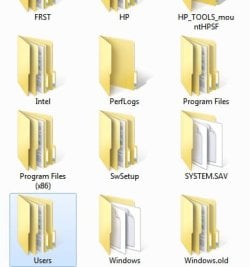
Good. At least we know an Upgrade Repair install wasn't done. Do you see windows.old on C? Size?

What bookmarks are you missing? IE favorites will be under C:/windows. old/Users/your Name/Favorites. Click on Organize to Select All and drag the group to your new User Favorites folder.
 
Good. At least we know an Upgrade Repair install wasn't done. Do you see windows.old on C? Size?

What bookmarks are you missing? IE favorites will be under C:/windows. old/Users/your Name/Favorites. Click on Organize to Select All and drag the group to your new User Favorites folder.

Yes, it's good. I was trying to be really careful. At first my heart was beating like a racehorse.
Lol! :D In fear of messing up.
But hey, I guess that's how some of us learn.

Yes, I did see the Windows.old folder there.
The size of this folder is huge. My C:drive was almost full when it crashed.
I didn't have much space left to play with.
I am not sure what is missing at the moment...
O.K. I will investigate after I do a few more of these Updates.
I am doing 15 @ a time with Restart in between.
 
Last edited:

My Computer My Computer

At a glance

Windows 7 Home Premium (x64) Service Pack 1 (...Intel Pentium P6200 2.13 GHz4.00 GBIntel HD Graphics
Computer type
Laptop
Computer Manufacturer/Model Number
HP 2000-150CA Notebook
OS
Windows 7 Home Premium (x64) Service Pack 1 (build 7601)
CPU
Intel Pentium P6200 2.13 GHz
Motherboard
HP 3674 28.49 1066 MH / BIOS: HP F.34
Memory
4.00 GB
Graphics Card(s)
Intel HD Graphics
Sound Card
Multimedia HD
Monitor(s) Displays
15.3
Screen Resolution
1366X768
Hard Drives
Hitachi HTS545050B9A300 ATA
(500.11 GB)
Keyboard
Standard PS2
Mouse
Synaptics PS2 Port Touch Pad / Microsoft HID-compliant mouse
Internet Speed
100 Mbps
Antivirus
MSE
Browser
PaleMoon / Fire Fox
Other Info
Purchased 2011
Sounds like a plan. Hang in there.

Well, I'm finally done with the Updates - Important and Optional. That was a lot of Updates.
A few more might straggle in I suppose...
Everything seems to be going well, except things aren't looking 'Crisp' for lack of better words and the font looks tiny ... but I'm happy! :D
Going to check drivers now.
 

My Computer My Computer

At a glance

Windows 7 Home Premium (x64) Service Pack 1 (...Intel Pentium P6200 2.13 GHz4.00 GBIntel HD Graphics
Computer type
Laptop
Computer Manufacturer/Model Number
HP 2000-150CA Notebook
OS
Windows 7 Home Premium (x64) Service Pack 1 (build 7601)
CPU
Intel Pentium P6200 2.13 GHz
Motherboard
HP 3674 28.49 1066 MH / BIOS: HP F.34
Memory
4.00 GB
Graphics Card(s)
Intel HD Graphics
Sound Card
Multimedia HD
Monitor(s) Displays
15.3
Screen Resolution
1366X768
Hard Drives
Hitachi HTS545050B9A300 ATA
(500.11 GB)
Keyboard
Standard PS2
Mouse
Synaptics PS2 Port Touch Pad / Microsoft HID-compliant mouse
Internet Speed
100 Mbps
Antivirus
MSE
Browser
PaleMoon / Fire Fox
Other Info
Purchased 2011
What display driver do you have now? Compare it to the latest on the Support Downloads webpage for your model HP.

You will need the model extension for HP 2000-xxxx then browse to it here: HP Customer Support | HP® Support. I had asked you for the full model number earlier and you said you'd report it back but I don't see it. I assume you found it so you'd have your wireless driver in your backup to get online if needed.

When you have the latest Display driver, rightclick on a blank area of the desktop to choose Screen Resolution and make sure you have the highest resolution for best clarity. At the same location you can increase the DPI percentage so that fonts and icons appear larger. A good start is 113%.

In your browser, once you open each page hold the Cntrl key and use the _ or + keys or mouse wheel to fill the screen with the image. The browser will eventually remember most of your pages settings.
 
What display driver do you have now? Compare it to the latest on the Support Downloads webpage for your model HP.
The Display adapter says: INTEL(R) HD GRAPHICS
 

My Computer My Computer

At a glance

Windows 7 Home Premium (x64) Service Pack 1 (...Intel Pentium P6200 2.13 GHz4.00 GBIntel HD Graphics
Computer type
Laptop
Computer Manufacturer/Model Number
HP 2000-150CA Notebook
OS
Windows 7 Home Premium (x64) Service Pack 1 (build 7601)
CPU
Intel Pentium P6200 2.13 GHz
Motherboard
HP 3674 28.49 1066 MH / BIOS: HP F.34
Memory
4.00 GB
Graphics Card(s)
Intel HD Graphics
Sound Card
Multimedia HD
Monitor(s) Displays
15.3
Screen Resolution
1366X768
Hard Drives
Hitachi HTS545050B9A300 ATA
(500.11 GB)
Keyboard
Standard PS2
Mouse
Synaptics PS2 Port Touch Pad / Microsoft HID-compliant mouse
Internet Speed
100 Mbps
Antivirus
MSE
Browser
PaleMoon / Fire Fox
Other Info
Purchased 2011
Do you get a crisp enough resolution when you set the Screen Resolution with that driver at highest, adjust DPI to where icons are big enough, adjust web pages to fill the frame?

If not compare it to the Display driver on the HP webpage. If it is newer then try it out.
 
You will need the model extension for HP 2000-xxxx then browse to it here: HP Customer Support | HP® Support. I had asked you for the full model number earlier and you said you'd report it back but I don't see it. I assume you found it so you'd have your wireless driver in your backup to get online if needed.
Yes, I did Greg. I sent you a private message with the model and the SIN.
Then I sent you a message and told you I went to the HP site and downloaded 'ALL' the drivers HP had for this specific model.
Yes, you are correct. The first thing I did after installation, was get the wireless from the HP folder I have...so I could get on line quick. :D
I have all the HP Drivers in a folder on my desk top.
 

Attachments

  • HP DRIVERS.jpg
    HP DRIVERS.jpg
    21.9 KB · Views: 14

My Computer My Computer

At a glance

Windows 7 Home Premium (x64) Service Pack 1 (...Intel Pentium P6200 2.13 GHz4.00 GBIntel HD Graphics
Computer type
Laptop
Computer Manufacturer/Model Number
HP 2000-150CA Notebook
OS
Windows 7 Home Premium (x64) Service Pack 1 (build 7601)
CPU
Intel Pentium P6200 2.13 GHz
Motherboard
HP 3674 28.49 1066 MH / BIOS: HP F.34
Memory
4.00 GB
Graphics Card(s)
Intel HD Graphics
Sound Card
Multimedia HD
Monitor(s) Displays
15.3
Screen Resolution
1366X768
Hard Drives
Hitachi HTS545050B9A300 ATA
(500.11 GB)
Keyboard
Standard PS2
Mouse
Synaptics PS2 Port Touch Pad / Microsoft HID-compliant mouse
Internet Speed
100 Mbps
Antivirus
MSE
Browser
PaleMoon / Fire Fox
Other Info
Purchased 2011
This is why its important to keep all of the help in the thread and not via message. Others will benefit from everything being here.

What Graphics driver does HP offer for latest? I would not replace the one Win7 gave you unless it is more recent and after comparison you like it better.

Which drivers are still missing in Device Manager.

Back tomorrow.
 
Do you get a crisp enough resolution when you set the Screen Resolution with that driver at highest, adjust DPI to where icons are big enough, adjust web pages to fill the frame?

If not compare it to the Display driver on the HP webpage. If it is newer then try it out.

O.K. gregrocker. It's good to go I think. I just needed to set the font @ 125%.
The webpages look OK now.
 

My Computer My Computer

At a glance

Windows 7 Home Premium (x64) Service Pack 1 (...Intel Pentium P6200 2.13 GHz4.00 GBIntel HD Graphics
Computer type
Laptop
Computer Manufacturer/Model Number
HP 2000-150CA Notebook
OS
Windows 7 Home Premium (x64) Service Pack 1 (build 7601)
CPU
Intel Pentium P6200 2.13 GHz
Motherboard
HP 3674 28.49 1066 MH / BIOS: HP F.34
Memory
4.00 GB
Graphics Card(s)
Intel HD Graphics
Sound Card
Multimedia HD
Monitor(s) Displays
15.3
Screen Resolution
1366X768
Hard Drives
Hitachi HTS545050B9A300 ATA
(500.11 GB)
Keyboard
Standard PS2
Mouse
Synaptics PS2 Port Touch Pad / Microsoft HID-compliant mouse
Internet Speed
100 Mbps
Antivirus
MSE
Browser
PaleMoon / Fire Fox
Other Info
Purchased 2011
This is why its important to keep all of the help in the thread and not via message. Others will benefit from everything being here.
Yes, you are correct. I understand that it helps others too. I learn quite a bit this way.
Sorry. At the time I just didn't want to put my SIN out there that's all.
 

My Computer My Computer

At a glance

Windows 7 Home Premium (x64) Service Pack 1 (...Intel Pentium P6200 2.13 GHz4.00 GBIntel HD Graphics
Computer type
Laptop
Computer Manufacturer/Model Number
HP 2000-150CA Notebook
OS
Windows 7 Home Premium (x64) Service Pack 1 (build 7601)
CPU
Intel Pentium P6200 2.13 GHz
Motherboard
HP 3674 28.49 1066 MH / BIOS: HP F.34
Memory
4.00 GB
Graphics Card(s)
Intel HD Graphics
Sound Card
Multimedia HD
Monitor(s) Displays
15.3
Screen Resolution
1366X768
Hard Drives
Hitachi HTS545050B9A300 ATA
(500.11 GB)
Keyboard
Standard PS2
Mouse
Synaptics PS2 Port Touch Pad / Microsoft HID-compliant mouse
Internet Speed
100 Mbps
Antivirus
MSE
Browser
PaleMoon / Fire Fox
Other Info
Purchased 2011
Back
Top