Solved install new ssd but keep other HDD installed

paparazzo79

New member
Member
Local time
4:50 PM
Messages
95
I bought new Samsung 840 evo yesterday and I want to try it on my current system with Win 7 64 bit Ultimate on my 990FX chipset board with 4 WD HDD drive installed.I'm not going into too much complication I wanted to keep my current installation intact and install again Windows 7 on a ssd,so I can choose wether to boot from HDD or SSD.Is it possible to do that and how?But I have only 4 sata ports on MB so that could be problem,because all are occupied with HDD.
The 2nd option would be to unplug the current WD drive which is 500 GB and install this SSD instead of it.Do I need to unplug all other HDD drives and then plug them when installation is done.any other things I should check after installing SSD into pc case?
 

My Computer My Computer

OS
Windows 7 Ultimate 32bit
CPU
amd athlon 64 3600+ X2
Motherboard
Biostar NF520-TE
Graphics Card(s)
Ati Radeon 3650 HD
Monitor(s) Displays
Philips 227EL
Which means I can left my HDD drive plugged if I have spare sata port,connect this SSDand install OS on it.then just in uefi choose from which device to boot windows?
 

My Computer My Computer

OS
Windows 7 Ultimate 32bit
CPU
amd athlon 64 3600+ X2
Motherboard
Biostar NF520-TE
Graphics Card(s)
Ati Radeon 3650 HD
Monitor(s) Displays
Philips 227EL
Which means I can left my HDD drive plugged if I have spare sata port,connect this SSDand install OS on it

NO ... you were told to disconnect the HDD during install, not leave it plugged in. AFTER the install is complete, you can then reconnect the HDD, but you MUST continue to boot from the SSD.
 

My Computer My Computer

Computer type
PC/Desktop
Computer Manufacturer/Model Number
Custom
OS
Win7 Pro 32-bit, Win8 Pro 32-bit
CPU
AMD Phenom II X6 1090T
Motherboard
Gigabyte
Memory
4GB ddr3 1300
Graphics Card(s)
AMD HD 4290 onboard
Sound Card
Builtin Realtek HD Audio
Monitor(s) Displays
Samsung 24" widescreen, LG 23" widescreen
Screen Resolution
1920x1200/1920x1080
Hard Drives
Kingston 256GB SSD
Keyboard
Logitech Illuminated Keyboard
Mouse
Logitech M705 wireless mouse
Antivirus
Norton Av 2013
Browser
IE v10
Oh.what will happen if I plug in that HDD with OS after installation of Windows 7 onto SSD?Or can I somehow create dualboot option?
 

My Computer My Computer

OS
Windows 7 Ultimate 32bit
CPU
amd athlon 64 3600+ X2
Motherboard
Biostar NF520-TE
Graphics Card(s)
Ati Radeon 3650 HD
Monitor(s) Displays
Philips 227EL
Once you have the OS on the SSD, you have to change the BIOS boot order - set the SSD as first boot device. Then your OS on the HDD will be ignored.

But make sure that all HDDs are unplugged when you install on the SSD - else you may end up with the bootmgr on one of the HDDs. And that is a mess.

PS: Yes you then have a kind of a dual boot situation. By changing the temporary boot order (normally F12 at power-on), you can get back to your HDD OS and boot from there.
 

My Computer My Computer

Computer Manufacturer/Model Number
HP, Dell, Gateway, Toshiba - 4 laptops and 2 desktops
OS
Vista, Windows7, Mint Mate, Zorin, Windows 8
CPU
from 1.6GHz Duo to i7
Monitor(s) Displays
2x HP w2207
Hard Drives
5x HDD, 7x SSD, 12x Externals
Keyboard
with trackball - no mices
Mouse
Trackball mice
Internet Speed
DSL 6000
OK.just the last question.SSD must be connected to SATA1 strictly?
 

My Computer My Computer

OS
Windows 7 Ultimate 32bit
CPU
amd athlon 64 3600+ X2
Motherboard
Biostar NF520-TE
Graphics Card(s)
Ati Radeon 3650 HD
Monitor(s) Displays
Philips 227EL
Try that first as it avoids future problems.

I thought I couldn't be more clear when I said to unplug all other drives to install to SSD. Then afterwards plug the others back in making sure SSD remains set first to boot in BIOS. I even said that if you want to boot the HD to use the BIOS boot menu key.

Can you please explain what is unclear about this, requiring you to ask back on every single point as though I had not even written it so clearly?

If this dual boot method isn't to your liking you can install EasyBCD to the SSD to add the HD Win7 to a Windows Dual Boot screen. This will not defeat the purpose of unplugging to keep each OS drive independently bootable.

You're welcome.
 
OK thank you.I'll try on Saturday and tell you the results.I hope nothing will mess my data on my other 3 HDD's
 

My Computer My Computer

OS
Windows 7 Ultimate 32bit
CPU
amd athlon 64 3600+ X2
Motherboard
Biostar NF520-TE
Graphics Card(s)
Ati Radeon 3650 HD
Monitor(s) Displays
Philips 227EL
OK.just the last question.SSD must be connected to SATA1 strictly?
It can be connected to any Sata port. The recommendation to connect it to the first Sata port is because of the Windows installer. But if you disconnect all other HDDs during the OS installation, it does not matter where the SSD is connected. It is, however, an advantage if the SSD connects to a 6Gb port.
 

My Computer My Computer

Computer Manufacturer/Model Number
HP, Dell, Gateway, Toshiba - 4 laptops and 2 desktops
OS
Vista, Windows7, Mint Mate, Zorin, Windows 8
CPU
from 1.6GHz Duo to i7
Monitor(s) Displays
2x HP w2207
Hard Drives
5x HDD, 7x SSD, 12x Externals
Keyboard
with trackball - no mices
Mouse
Trackball mice
Internet Speed
DSL 6000
It matters when year after year we deal with countless cases of the boot mgr being derailed to a previous Primary partition during Repairs or Reinstall if OS is not on DISK0 or all preceding partitions are not Logical and therefore unable to receive boot files.
 
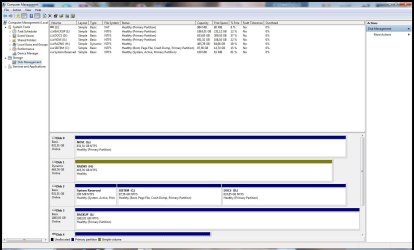
I just checked uefi and wrote which of HDD's are on which sata port.I have 2 HDD with same name one on SATA 1 and second on SATA 2,but I'm not sure which one of them holds my system partition C:
How can I check that?
 

My Computer My Computer

OS
Windows 7 Ultimate 32bit
CPU
amd athlon 64 3600+ X2
Motherboard
Biostar NF520-TE
Graphics Card(s)
Ati Radeon 3650 HD
Monitor(s) Displays
Philips 227EL
Capture2014911-0.jpg
 

My Computer My Computer

OS
Windows 7 Ultimate 32bit
CPU
amd athlon 64 3600+ X2
Motherboard
Biostar NF520-TE
Graphics Card(s)
Ati Radeon 3650 HD
Monitor(s) Displays
Philips 227EL
That did not work - bad website. Attach it with the paperclip top right in the posting window.
 

My Computer My Computer

Computer Manufacturer/Model Number
HP, Dell, Gateway, Toshiba - 4 laptops and 2 desktops
OS
Vista, Windows7, Mint Mate, Zorin, Windows 8
CPU
from 1.6GHz Duo to i7
Monitor(s) Displays
2x HP w2207
Hard Drives
5x HDD, 7x SSD, 12x Externals
Keyboard
with trackball - no mices
Mouse
Trackball mice
Internet Speed
DSL 6000
It matters when year after year we deal with countless cases of the boot mgr being derailed to a previous Primary partition during Repairs or Reinstall if OS is not on DISK0 or all preceding partitions are not Logical and therefore unable to receive boot files.
I understand your point Greg. But if the SSD is the only disk attached to the mobo (as we recommended here), it really does not matter. And on some mobos the 6Gb ports are ports 4 and 5.
 

My Computer My Computer

Computer Manufacturer/Model Number
HP, Dell, Gateway, Toshiba - 4 laptops and 2 desktops
OS
Vista, Windows7, Mint Mate, Zorin, Windows 8
CPU
from 1.6GHz Duo to i7
Monitor(s) Displays
2x HP w2207
Hard Drives
5x HDD, 7x SSD, 12x Externals
Keyboard
with trackball - no mices
Mouse
Trackball mice
Internet Speed
DSL 6000
Your OS is on disk2. And how come disk1 is dynamic?? What is it used for.
 

My Computer My Computer

Computer Manufacturer/Model Number
HP, Dell, Gateway, Toshiba - 4 laptops and 2 desktops
OS
Vista, Windows7, Mint Mate, Zorin, Windows 8
CPU
from 1.6GHz Duo to i7
Monitor(s) Displays
2x HP w2207
Hard Drives
5x HDD, 7x SSD, 12x Externals
Keyboard
with trackball - no mices
Mouse
Trackball mice
Internet Speed
DSL 6000
Your OS is on disk2. And how come disk1 is dynamic?? What is it used for.

I knew it's on disk2 but on which sata port is connected?How can I figure that out.
All my partitions I use for storing data.Why,does it matter much if I made it dynamic

Both 1000 GB drives are the same model,one is on sata 1,second on sata 2,but I can't figure out which of them (C: partiton) is on which sata port.Hope you understand now.
 

My Computer My Computer

OS
Windows 7 Ultimate 32bit
CPU
amd athlon 64 3600+ X2
Motherboard
Biostar NF520-TE
Graphics Card(s)
Ati Radeon 3650 HD
Monitor(s) Displays
Philips 227EL
Which hard drive is set first to boot in BIOS setup? This should be your OS drive.

If unsure, power down, pull the cable from SATA 1 on mobo making sure you unplug the PC, drain residual power by holding power button for 30 seconds, then touch the case before reaching inside to guard against static burst. If PC boots with SATA1 unplugged then the OS is SATA 2.


A Dynamic disk is meant to span a partition across several hard drives, so unless that is more than one HD I would backup up the data (which should always be done anyway) to convert it to Basic.

A solution to solve this non-destructively is to install free Partition Wizard version 4.2 partition wizard 4.2 free.zip - Windows Live which is the last one which offers this as a free feature: How to convert dynamic disk to basic disk with Partition Wizard?

Normally we would only use the PW disk but since this is not the OS disk the risk is much less, although all data should always be backed up anyway.


Wolfgang, most consumers do not unplug all other drives before running Startup Repair which can derail the System boot files to a preceding Primary partition if the OS is not plugged into DISK0 or preceding partitions are not formatted or converted to Logical to avoid it.
 
Last edited:
PW 422 is here

Regarding Disk2 - that maybe on port 2. Ports counts are starting with 0 (zero).
 
Last edited:

My Computer My Computer

Computer Manufacturer/Model Number
HP, Dell, Gateway, Toshiba - 4 laptops and 2 desktops
OS
Vista, Windows7, Mint Mate, Zorin, Windows 8
CPU
from 1.6GHz Duo to i7
Monitor(s) Displays
2x HP w2207
Hard Drives
5x HDD, 7x SSD, 12x Externals
Keyboard
with trackball - no mices
Mouse
Trackball mice
Internet Speed
DSL 6000
Back
Top