Pin to Taskbar and Pin to Start Menu Missing from Context Menu Fix

How to Restore Missing "Pin to Taskbar" and "Pin to Start Menu" Context Menu Items in Windows 7 Shortcuts

   Information
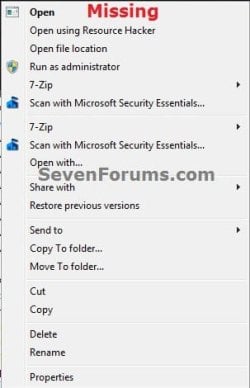
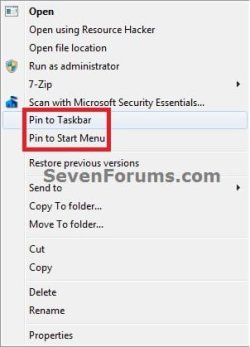
If you have the Pin to Taskbar and Pin to Start Menu options missing from the context menu of shortcuts in Windows 7, then this will show you how to restore them.

   Note
This is usually caused by trying to remove the shortcut overlay arrow icon using the improper XP method of deleting the IsShortcut string value from the HKEY_CLASSES\ROOT\lnkfile key in the registry instead of using the proper Windows 7 method.


EXAMPLE: "Pin to Taskbar "and "Pin to Start Menu" Default and Missing
NOTE: You may also notice some context menu items appearing twice when IsShortcut is deleted. Context_Menu.jpgMissing.jpg

Here's How: 1. Double check to make sure that you have pinning to taskbar enabled.

2. Download and merge the lnk (LNK) option in the tutorial below, then restart the computer. http://www.sevenforums.com/tutorials/19449-default-file-type-associations-restore.html


   Tip
If this doesn't help to restore Pin to Start Menu and Pin to Taskbar to the context menu, then see also:


That's it,
Shawn


Last edited:
Nice tutorial Brink ;)

Sent from my Xperia X8
 

My Computer My Computer

At a glance

Windows 10 Pro x64Intel Core i5 4440 @Stock4 x 4GB HyperX Fury DDR3Gigabyte GTX 1050Ti O4G
Computer type
PC/Desktop
Computer Manufacturer/Model Number
Custom Build
OS
Windows 10 Pro x64
CPU
Intel Core i5 4440 @Stock
Motherboard
Gigabyte Z97 D3H
Memory
4 x 4GB HyperX Fury DDR3
Graphics Card(s)
Gigabyte GTX 1050Ti O4G
Sound Card
Integrated
Monitor(s) Displays
Dell P2417H
Screen Resolution
1920 x 1080
Hard Drives
Samsung EVO 850 120GB / Toshiba DT01ACA050 1TB 7200prm 32MB
PSU
Riotoro Onyx 750W
Case
NZXT H500 Black-Red
Cooling
Stock CPU + NZXT 120mm + 2x120mm red fans
Keyboard
Modecom Volcano Lanparty
Mouse
Asus ROG Gladius / DeepCool E-Pad Plus
Internet Speed
DOCSIS 50/3 Mbit
Browser
Google Chrome
Other Info
Asus K55VJ(i5 3210M, GT635M / 2GB, 8GB DDR3, 500GB HDD)
Nice device. Thank you sir. :)
 

My Computer My Computer

At a glance

64-bit Windows 11 Pro for WorkstationsIntel i7-8700K OC'd to 5 GHz64 GB (4x16GB) G.SKILL TridentZ RGB DDR4 3600...ASUS ROG-STRIX-GTX1080TI-O11G-GAMING
Computer type
PC/Desktop
Computer Manufacturer/Model Number
Self built custom
OS
64-bit Windows 11 Pro for Workstations
CPU
Intel i7-8700K OC'd to 5 GHz
Motherboard
ASUS ROG Maximus XI Formula Z390
Memory
64 GB (4x16GB) G.SKILL TridentZ RGB DDR4 3600 MHz
Graphics Card(s)
ASUS ROG-STRIX-GTX1080TI-O11G-GAMING
Sound Card
Integrated
Monitor(s) Displays
2 x Samsung Odyssey G7 27"
Screen Resolution
2560x1440
Hard Drives
1TB Samsung 990 PRO M.2,
4TB Samsung 990 PRO PRO M.2,
TerraMaster F8 SSD Plus NAS
PSU
Seasonic Prime Titanium 850W
Case
Thermaltake Core P3
Cooling
Corsair Hydro H115i
Keyboard
Logitech wireless K800
Mouse
Logitech MX Master 4
Internet Speed
2 Gb/s Download and 100 Mb/s Upload
Antivirus
Malwarebyte Anti-Malware Premium
Browser
Google Chrome
Other Info
Logitech Z625 speaker system,
Logitech BRIO 4K Pro webcam,
HP Color LaserJet Pro MFP M477fdn,
APC SMART-UPS RT 1000 XL - SURT1000XLI,
Galaxy S23 Plus phone
Brink,
I think LPt was having trouble with this at one time....maybe recently.
Great Tutorial...+1
 

My Computer My Computer

At a glance

Windows 7 Home Premium 64bitIntel(R)Core(TM)2 quad [email protected] 2.39GHz6GB DDR2 6400GeForce 8500/512MB
Computer Manufacturer/Model Number
HP M9077c
OS
Windows 7 Home Premium 64bit
CPU
Intel(R)Core(TM)2 quad [email protected] 2.39GHz
Motherboard
ASUSeK
Memory
6GB DDR2 6400
Graphics Card(s)
GeForce 8500/512MB
Sound Card
Realtek High Def Audio
Monitor(s) Displays
HP w2408 LCD 24" widescreen
Screen Resolution
1920x1200
Cooling
6 pack of Bud
Keyboard
MS wireless Inteli
Mouse
MS wireless Inteli
Thank you Dennis.

Yeah, deleting IsShortcut will cause all sorts of issues in Windows 7 and Vista.
 

My Computer My Computer

At a glance

64-bit Windows 11 Pro for WorkstationsIntel i7-8700K OC'd to 5 GHz64 GB (4x16GB) G.SKILL TridentZ RGB DDR4 3600...ASUS ROG-STRIX-GTX1080TI-O11G-GAMING
Computer type
PC/Desktop
Computer Manufacturer/Model Number
Self built custom
OS
64-bit Windows 11 Pro for Workstations
CPU
Intel i7-8700K OC'd to 5 GHz
Motherboard
ASUS ROG Maximus XI Formula Z390
Memory
64 GB (4x16GB) G.SKILL TridentZ RGB DDR4 3600 MHz
Graphics Card(s)
ASUS ROG-STRIX-GTX1080TI-O11G-GAMING
Sound Card
Integrated
Monitor(s) Displays
2 x Samsung Odyssey G7 27"
Screen Resolution
2560x1440
Hard Drives
1TB Samsung 990 PRO M.2,
4TB Samsung 990 PRO PRO M.2,
TerraMaster F8 SSD Plus NAS
PSU
Seasonic Prime Titanium 850W
Case
Thermaltake Core P3
Cooling
Corsair Hydro H115i
Keyboard
Logitech wireless K800
Mouse
Logitech MX Master 4
Internet Speed
2 Gb/s Download and 100 Mb/s Upload
Antivirus
Malwarebyte Anti-Malware Premium
Browser
Google Chrome
Other Info
Logitech Z625 speaker system,
Logitech BRIO 4K Pro webcam,
HP Color LaserJet Pro MFP M477fdn,
APC SMART-UPS RT 1000 XL - SURT1000XLI,
Galaxy S23 Plus phone
Hello Brink,
I have a problem, here is some pics. What is going on with my pinned icons? Any idea ? :confused: :rolleyes:


I already run these .reg files but i cant see any difference before and after their launch.
 
Last edited by a moderator:

My Computer My Computer

At a glance

Windows 7 Ultimate x32
OS
Windows 7 Ultimate x32
Hello Monster, and welcome to Seven Forums.

Could you give me a description of the issue you are having with them? I'm not sure what I'm suppose to be looking for in your screenshots. :)
 

My Computer My Computer

At a glance

64-bit Windows 11 Pro for WorkstationsIntel i7-8700K OC'd to 5 GHz64 GB (4x16GB) G.SKILL TridentZ RGB DDR4 3600...ASUS ROG-STRIX-GTX1080TI-O11G-GAMING
Computer type
PC/Desktop
Computer Manufacturer/Model Number
Self built custom
OS
64-bit Windows 11 Pro for Workstations
CPU
Intel i7-8700K OC'd to 5 GHz
Motherboard
ASUS ROG Maximus XI Formula Z390
Memory
64 GB (4x16GB) G.SKILL TridentZ RGB DDR4 3600 MHz
Graphics Card(s)
ASUS ROG-STRIX-GTX1080TI-O11G-GAMING
Sound Card
Integrated
Monitor(s) Displays
2 x Samsung Odyssey G7 27"
Screen Resolution
2560x1440
Hard Drives
1TB Samsung 990 PRO M.2,
4TB Samsung 990 PRO PRO M.2,
TerraMaster F8 SSD Plus NAS
PSU
Seasonic Prime Titanium 850W
Case
Thermaltake Core P3
Cooling
Corsair Hydro H115i
Keyboard
Logitech wireless K800
Mouse
Logitech MX Master 4
Internet Speed
2 Gb/s Download and 100 Mb/s Upload
Antivirus
Malwarebyte Anti-Malware Premium
Browser
Google Chrome
Other Info
Logitech Z625 speaker system,
Logitech BRIO 4K Pro webcam,
HP Color LaserJet Pro MFP M477fdn,
APC SMART-UPS RT 1000 XL - SURT1000XLI,
Galaxy S23 Plus phone
Hello Monster, and welcome to Seven Forums.

Could you give me a description of the issue you are having with them? I'm not sure what I'm suppose to be looking for in your screenshots. :)

First, sorry for my bad english
the forum is great but i cant find what i search.

do you see my pics, btw ? :D

i cant put any icons in the taskbar, just can't pin icons..
1. i've try to drag and drop icons to taskbar (to pin them) - failed
2. i've try to copy and paste any icons in the hidden folder (C:\users\***\appdata\roaming\microsoft\internet explorer\quick launch\user pinned\task bar) - failed
3. launch .reg files that you provide, restart the computer and try again - failed

i dont know what to do...
 

My Computer My Computer

At a glance

Windows 7 Ultimate x32
OS
Windows 7 Ultimate x32
Monster,

Do you have the "Pin to Taskbar" option in the context menu of the programs you wanted to pin to the taskbar?

In your last screenshot below, change the items that are set to "Disabled" to "Not configured" to see if that may help.
 
Last edited:

My Computer My Computer

At a glance

64-bit Windows 11 Pro for WorkstationsIntel i7-8700K OC'd to 5 GHz64 GB (4x16GB) G.SKILL TridentZ RGB DDR4 3600...ASUS ROG-STRIX-GTX1080TI-O11G-GAMING
Computer type
PC/Desktop
Computer Manufacturer/Model Number
Self built custom
OS
64-bit Windows 11 Pro for Workstations
CPU
Intel i7-8700K OC'd to 5 GHz
Motherboard
ASUS ROG Maximus XI Formula Z390
Memory
64 GB (4x16GB) G.SKILL TridentZ RGB DDR4 3600 MHz
Graphics Card(s)
ASUS ROG-STRIX-GTX1080TI-O11G-GAMING
Sound Card
Integrated
Monitor(s) Displays
2 x Samsung Odyssey G7 27"
Screen Resolution
2560x1440
Hard Drives
1TB Samsung 990 PRO M.2,
4TB Samsung 990 PRO PRO M.2,
TerraMaster F8 SSD Plus NAS
PSU
Seasonic Prime Titanium 850W
Case
Thermaltake Core P3
Cooling
Corsair Hydro H115i
Keyboard
Logitech wireless K800
Mouse
Logitech MX Master 4
Internet Speed
2 Gb/s Download and 100 Mb/s Upload
Antivirus
Malwarebyte Anti-Malware Premium
Browser
Google Chrome
Other Info
Logitech Z625 speaker system,
Logitech BRIO 4K Pro webcam,
HP Color LaserJet Pro MFP M477fdn,
APC SMART-UPS RT 1000 XL - SURT1000XLI,
Galaxy S23 Plus phone
Yes Brink,
I have "Pin to taskbar" in context menu, but it doesnt work. when i click on it.. for example - On Skype icon (not on shortcut) - it doesnt appear on taskbar, but it figure in the hidden folder :shock:
 

My Computer My Computer

At a glance

Windows 7 Ultimate x32
OS
Windows 7 Ultimate x32
Monster,

As a test, create a new administrator account for yourself to see if it works properly while logged in the new account. If it does, then you could just copy what you like from the old account, and delete the old account when finished.
 

My Computer My Computer

At a glance

64-bit Windows 11 Pro for WorkstationsIntel i7-8700K OC'd to 5 GHz64 GB (4x16GB) G.SKILL TridentZ RGB DDR4 3600...ASUS ROG-STRIX-GTX1080TI-O11G-GAMING
Computer type
PC/Desktop
Computer Manufacturer/Model Number
Self built custom
OS
64-bit Windows 11 Pro for Workstations
CPU
Intel i7-8700K OC'd to 5 GHz
Motherboard
ASUS ROG Maximus XI Formula Z390
Memory
64 GB (4x16GB) G.SKILL TridentZ RGB DDR4 3600 MHz
Graphics Card(s)
ASUS ROG-STRIX-GTX1080TI-O11G-GAMING
Sound Card
Integrated
Monitor(s) Displays
2 x Samsung Odyssey G7 27"
Screen Resolution
2560x1440
Hard Drives
1TB Samsung 990 PRO M.2,
4TB Samsung 990 PRO PRO M.2,
TerraMaster F8 SSD Plus NAS
PSU
Seasonic Prime Titanium 850W
Case
Thermaltake Core P3
Cooling
Corsair Hydro H115i
Keyboard
Logitech wireless K800
Mouse
Logitech MX Master 4
Internet Speed
2 Gb/s Download and 100 Mb/s Upload
Antivirus
Malwarebyte Anti-Malware Premium
Browser
Google Chrome
Other Info
Logitech Z625 speaker system,
Logitech BRIO 4K Pro webcam,
HP Color LaserJet Pro MFP M477fdn,
APC SMART-UPS RT 1000 XL - SURT1000XLI,
Galaxy S23 Plus phone
Brink,
it works :p
the problem was that I was manually deleted IsShortcut from HKEY_CLASSES_ROOT/lnkfile

I have a .reg file that repair all shortcuts..
i hate the arrow on shortcuts and in XP there is no problem to del it, but in windows 7.... who knows :D

hope to help to somebody with the atteched file ;]
nice work :p

Thanks a lot, and happy new year for everyone!
Greetings from BULGARIA! :thumbsup:
 
Last edited by a moderator:

My Computer My Computer

At a glance

Windows 7 Ultimate x32
OS
Windows 7 Ultimate x32

My Computer My Computer

At a glance

64-bit Windows 11 Pro for WorkstationsIntel i7-8700K OC'd to 5 GHz64 GB (4x16GB) G.SKILL TridentZ RGB DDR4 3600...ASUS ROG-STRIX-GTX1080TI-O11G-GAMING
Computer type
PC/Desktop
Computer Manufacturer/Model Number
Self built custom
OS
64-bit Windows 11 Pro for Workstations
CPU
Intel i7-8700K OC'd to 5 GHz
Motherboard
ASUS ROG Maximus XI Formula Z390
Memory
64 GB (4x16GB) G.SKILL TridentZ RGB DDR4 3600 MHz
Graphics Card(s)
ASUS ROG-STRIX-GTX1080TI-O11G-GAMING
Sound Card
Integrated
Monitor(s) Displays
2 x Samsung Odyssey G7 27"
Screen Resolution
2560x1440
Hard Drives
1TB Samsung 990 PRO M.2,
4TB Samsung 990 PRO PRO M.2,
TerraMaster F8 SSD Plus NAS
PSU
Seasonic Prime Titanium 850W
Case
Thermaltake Core P3
Cooling
Corsair Hydro H115i
Keyboard
Logitech wireless K800
Mouse
Logitech MX Master 4
Internet Speed
2 Gb/s Download and 100 Mb/s Upload
Antivirus
Malwarebyte Anti-Malware Premium
Browser
Google Chrome
Other Info
Logitech Z625 speaker system,
Logitech BRIO 4K Pro webcam,
HP Color LaserJet Pro MFP M477fdn,
APC SMART-UPS RT 1000 XL - SURT1000XLI,
Galaxy S23 Plus phone
Work Around Or Quick Fix Pin To Start Menu

Hold down the Shift key while right clicking & pin to or unpin will appear as the option that was missing. I found it somewhere. Don't remember where, but I did remember what key it was. the example i'm using is I pinned to start menu an .Rtf document & it worked. Hope this helps lots of people :cool:
 

My Computer My Computer

At a glance

Windows 7 Home prieum 64 BitIntel(R) Core(TM) i7-2630QM CPU @ 2.00GHz8 gigsNvidia GTX 570M
Computer type
Laptop
Computer Manufacturer/Model Number
M.S.I Gt780Dx
OS
Windows 7 Home prieum 64 Bit
CPU
Intel(R) Core(TM) i7-2630QM CPU @ 2.00GHz
Motherboard
Micro-Star International Co., Ltd.
Memory
8 gigs
Graphics Card(s)
Nvidia GTX 570M
Hard Drives
750 Gigs WDC Wd 7500 BPKT
Antivirus
Norton Internet Security
Browser
IE 9
Cannot make this tweak work - pin still not in tight-click menu

Hi, Brink.
Whether through idiocy (mine) or malice aforethought (M-s**t's), I cannot make this work.

Have
a) enabled pinning to taskbar (at least I downloaded rigth-clicked "merge" for enable_taskbar_pinned_programs, with response "successfully added to registry")
b) downloaded and right-clicked to merge the lnk widget

But the right-click on e.g. Downloads or Thunderbird still gives me just the following:

Open
Open folder location
Include in library - Docs/Music/Pics/Video
Restore previous version
Send to - Compressed / Desktop/ Docs / Fax recipient / Mail recip./ DVD drive E: / BD drive F:
/Removable Disk H:
Cut
Copy
Create shortcut
Delete
Rename
Properties
***********************************************
For what it's worth, this is a new installation of W7 Ultimate (old one stopped working so no repair-install possible) on the C disk of the following set-up:

Mainboard : Asus M4N78-AM
> Chipset : nVidia GeForce 8200
> Processor : AMD Phenom II X4 810 @ 2600 MHz
> Physical Memory : 4096 MB (2 x 2048 DDR2-SDRAM )
> Video Card : NVIDIA GeForce 8200
> Hard Disk : ST3320418AS (320 GB)
> DVD-Rom Drive : HL-DT-ST DVD-RAM GH22NP20 ATA Device
> DVD-Rom Drive : HL-DT-ST BD-RE BH08LS20 ATA Device
> Monitor Type : Idek Iiyama PL2409HD - 23 inches
> Network Card : MCP77 Ethernet
> Network Card : RT2561/RT61 rev B 802.11g

******************************************

Grateful if you can suggest what I am doing wrong (and thanks, as so often, for your indefatigablenessitude in trying to make everyone's life a little happier). adj
 

My Computer My Computer

At a glance

7 ultimateAMD Phenom II x4 810 processor4096MBNVIDIA GeForce 8200
OS
7 ultimate
CPU
AMD Phenom II x4 810 processor
Motherboard
Asus M4N78-AM
Memory
4096MB
Graphics Card(s)
NVIDIA GeForce 8200
Monitor(s) Displays
iiyama prolite B2409 HDS
Hard Drives
Asus 300gb x2
Hello adj,

Are these folders or applications that you are trying to pin?

Folders will not have "Pin to taskbar" in their context menu. Only applications (ex: .exe file) will.
 
Last edited:

My Computer My Computer

At a glance

64-bit Windows 11 Pro for WorkstationsIntel i7-8700K OC'd to 5 GHz64 GB (4x16GB) G.SKILL TridentZ RGB DDR4 3600...ASUS ROG-STRIX-GTX1080TI-O11G-GAMING
Computer type
PC/Desktop
Computer Manufacturer/Model Number
Self built custom
OS
64-bit Windows 11 Pro for Workstations
CPU
Intel i7-8700K OC'd to 5 GHz
Motherboard
ASUS ROG Maximus XI Formula Z390
Memory
64 GB (4x16GB) G.SKILL TridentZ RGB DDR4 3600 MHz
Graphics Card(s)
ASUS ROG-STRIX-GTX1080TI-O11G-GAMING
Sound Card
Integrated
Monitor(s) Displays
2 x Samsung Odyssey G7 27"
Screen Resolution
2560x1440
Hard Drives
1TB Samsung 990 PRO M.2,
4TB Samsung 990 PRO PRO M.2,
TerraMaster F8 SSD Plus NAS
PSU
Seasonic Prime Titanium 850W
Case
Thermaltake Core P3
Cooling
Corsair Hydro H115i
Keyboard
Logitech wireless K800
Mouse
Logitech MX Master 4
Internet Speed
2 Gb/s Download and 100 Mb/s Upload
Antivirus
Malwarebyte Anti-Malware Premium
Browser
Google Chrome
Other Info
Logitech Z625 speaker system,
Logitech BRIO 4K Pro webcam,
HP Color LaserJet Pro MFP M477fdn,
APC SMART-UPS RT 1000 XL - SURT1000XLI,
Galaxy S23 Plus phone
Hello adj,

Are these folders or applications that you are trying to pin?

Folders will not have "Pin to taskbar" in their context menu. Only applications (ex: .exe file) will.

Thanks for swift response: they are typically applications for the taskbar, e.g. Thunderbird - but it would be useful to have Downloads in the Start Menu (think I have had it automatically before, when W7 installed, but seems to have dropped out this time)
 

My Computer My Computer

At a glance

7 ultimateAMD Phenom II x4 810 processor4096MBNVIDIA GeForce 8200
OS
7 ultimate
CPU
AMD Phenom II x4 810 processor
Motherboard
Asus M4N78-AM
Memory
4096MB
Graphics Card(s)
NVIDIA GeForce 8200
Monitor(s) Displays
iiyama prolite B2409 HDS
Hard Drives
Asus 300gb x2
While folders cannot be pinned to the taskbar, you could add them as toolbars, or create shortcuts of them in Quick Launch.

http://www.sevenforums.com/tutorials/9305-taskbar-pin-unpin-folder.html

Do you have both pin context items for files on an internal hard drive?

Since this is a removable drive, you may be able to create a shortcut for the file at a location on your internal drive, then pin the shortcut to your taskbar or Start menu.
 

My Computer My Computer

At a glance

64-bit Windows 11 Pro for WorkstationsIntel i7-8700K OC'd to 5 GHz64 GB (4x16GB) G.SKILL TridentZ RGB DDR4 3600...ASUS ROG-STRIX-GTX1080TI-O11G-GAMING
Computer type
PC/Desktop
Computer Manufacturer/Model Number
Self built custom
OS
64-bit Windows 11 Pro for Workstations
CPU
Intel i7-8700K OC'd to 5 GHz
Motherboard
ASUS ROG Maximus XI Formula Z390
Memory
64 GB (4x16GB) G.SKILL TridentZ RGB DDR4 3600 MHz
Graphics Card(s)
ASUS ROG-STRIX-GTX1080TI-O11G-GAMING
Sound Card
Integrated
Monitor(s) Displays
2 x Samsung Odyssey G7 27"
Screen Resolution
2560x1440
Hard Drives
1TB Samsung 990 PRO M.2,
4TB Samsung 990 PRO PRO M.2,
TerraMaster F8 SSD Plus NAS
PSU
Seasonic Prime Titanium 850W
Case
Thermaltake Core P3
Cooling
Corsair Hydro H115i
Keyboard
Logitech wireless K800
Mouse
Logitech MX Master 4
Internet Speed
2 Gb/s Download and 100 Mb/s Upload
Antivirus
Malwarebyte Anti-Malware Premium
Browser
Google Chrome
Other Info
Logitech Z625 speaker system,
Logitech BRIO 4K Pro webcam,
HP Color LaserJet Pro MFP M477fdn,
APC SMART-UPS RT 1000 XL - SURT1000XLI,
Galaxy S23 Plus phone
problem largely solved though mysteries remain

While folders cannot be pinned to the taskbar, you could add them as toolbars, or create shortcuts of them in Quick Launch.

http://www.sevenforums.com/tutorials/9305-taskbar-pin-unpin-folder.html

Do you have both pin context items for files on an internal hard drive?

Since this is a removable drive, you may be able to create a shortcut for the file at a location on your internal drive, then pin the shortcut to your taskbar or Start menu.

A. Thank you for all your help
B. Sorry for delay but work intervened.
C. After 3 re-boots, the "pin to taskbar / start menu" options appeared in right-click menu, so that's done, even if W7 took its time getting there.
D. In meantime tried your "Taskbar - Pin or Unpin a folder" tutorial, with very mixed results, and will log them there.
E Don't understand your query re having things on internal hard drive, since all this version of W7 is on disk 0, the C drive of this pc, but probably not important now.
F. Many, many thanks again and best wishes, A
 

My Computer My Computer

At a glance

7 ultimateAMD Phenom II x4 810 processor4096MBNVIDIA GeForce 8200
OS
7 ultimate
CPU
AMD Phenom II x4 810 processor
Motherboard
Asus M4N78-AM
Memory
4096MB
Graphics Card(s)
NVIDIA GeForce 8200
Monitor(s) Displays
iiyama prolite B2409 HDS
Hard Drives
Asus 300gb x2
ADJ,

I'm happy to hear this part is sorted. I'll see at the other tutorial for pinning folders as toolbars. :)
 

My Computer My Computer

At a glance

64-bit Windows 11 Pro for WorkstationsIntel i7-8700K OC'd to 5 GHz64 GB (4x16GB) G.SKILL TridentZ RGB DDR4 3600...ASUS ROG-STRIX-GTX1080TI-O11G-GAMING
Computer type
PC/Desktop
Computer Manufacturer/Model Number
Self built custom
OS
64-bit Windows 11 Pro for Workstations
CPU
Intel i7-8700K OC'd to 5 GHz
Motherboard
ASUS ROG Maximus XI Formula Z390
Memory
64 GB (4x16GB) G.SKILL TridentZ RGB DDR4 3600 MHz
Graphics Card(s)
ASUS ROG-STRIX-GTX1080TI-O11G-GAMING
Sound Card
Integrated
Monitor(s) Displays
2 x Samsung Odyssey G7 27"
Screen Resolution
2560x1440
Hard Drives
1TB Samsung 990 PRO M.2,
4TB Samsung 990 PRO PRO M.2,
TerraMaster F8 SSD Plus NAS
PSU
Seasonic Prime Titanium 850W
Case
Thermaltake Core P3
Cooling
Corsair Hydro H115i
Keyboard
Logitech wireless K800
Mouse
Logitech MX Master 4
Internet Speed
2 Gb/s Download and 100 Mb/s Upload
Antivirus
Malwarebyte Anti-Malware Premium
Browser
Google Chrome
Other Info
Logitech Z625 speaker system,
Logitech BRIO 4K Pro webcam,
HP Color LaserJet Pro MFP M477fdn,
APC SMART-UPS RT 1000 XL - SURT1000XLI,
Galaxy S23 Plus phone
Back
Top