"Date Modified" changes on original file when copying

I'd always wanted to be able to MOVE files & folders between different HDDs and Partitions without the C & M dates changing. It's crucial for me to have those dates for HISTORICAL tracking / REMEMBERING purpose.
Use ROBOCOPY for that

:) Actually, I use a combination of TeraCopy and RichCopy (runs Robocopy in the back) as both miss certain things but I do a 2 or 3 step layering and Folders and Files are 99% cloned with C & M dates:
RC > TC > RC
 

My Computer My Computer

At a glance

WinXP/ Win7x64/ Mac OSX Snow Leopard - Multi ...
Computer Manufacturer/Model Number
Mac Book Pro | Thinkpads T61 X61T W510
OS
WinXP/ Win7x64/ Mac OSX Snow Leopard - Multi Boot
Modified Date changes by just viewing a file

Windows 7 changes the modified date on a file if you just open it to view it.
This has very bad results since we search for files by when they were last "Modified"
I opened a file in Excel and its modified date changes to today even though no modifications are made.
This is a travesty of a moronic operating system.
:mad:
 

My Computer My Computer

At a glance

Windows 7 Professional
Computer type
PC/Desktop
Computer Manufacturer/Model Number
HP
OS
Windows 7 Professional
Windows 7 changes the modified date on a file if you just open it to view it.
This has very bad results since we search for files by when they were last "Modified"
I opened a file in Excel and its modified date changes to today even though no modifications are made.
This is a travesty of a moronic operating system.
:mad:

That is an application problem, not an operating system problem. And the application could be modifying in the background, hard to say, unless you do a hash compare.
 

My Computer My Computer

At a glance

Windows 10 Pro (x64)Intel Core i7-3930K (3.2GHz - 4.5GHz)4x Samsung 4GB PC3-12800 DDR3 (16GB 1600MHz)Nvidia Geforce GTX 690
Computer type
PC/Desktop
Computer Manufacturer/Model Number
Alienware Aurora ALX R4
OS
Windows 10 Pro (x64)
CPU
Intel Core i7-3930K (3.2GHz - 4.5GHz)
Motherboard
Alienware Aurora-R4 x79
Memory
4x Samsung 4GB PC3-12800 DDR3 (16GB 1600MHz)
Graphics Card(s)
Nvidia Geforce GTX 690
Sound Card
SteelSeries Siberia Elite
Monitor(s) Displays
Dell UltraSharp U3011
Screen Resolution
2560x1600
Hard Drives
Samsung 850 Pro 256 GB, Seagate 1TB Desktop Hybrid HDD, 2x Western Digital 4TB Green HDD
PSU
875W Some Dell PSU <.<
Case
Alienware Aurora ALX
Cooling
Custom Liquid Cooling (EK CPU & GPU blocks) dual EK 480RAD
Keyboard
Logitech G710+ Mechanical
Mouse
Logitech G700s
Internet Speed
Verizon Fios (50 mbps average)
Other Info
Server: Intel NUC D54250WYK: i5-4250U, 16GB, 256 GB mSATA, Windows Server 2012 R2
Windows does NOT change the modified time when the file is merely read. This is confirmed by observation. I will not comment on what Excel might be doing. The access time would change in this case, if it was being updated. But for performance reasons Vista and later does not update access datestamps. Again, confirmed by observation.
 

My Computer My Computer

At a glance

Windows 7 Pro 64 bitXeon W35208 GBNvidia Geforce 210
Computer type
PC/Desktop
Computer Manufacturer/Model Number
HP
OS
Windows 7 Pro 64 bit
CPU
Xeon W3520
Memory
8 GB
Graphics Card(s)
Nvidia Geforce 210
To add to this discussion, the reason I am here is that I am seeking a way to prevent the "Date Modified" data from changing on a FOLDER when several of its files are deleted.

This might seem strange, but the reasoning has to do with how I have been working for years to create custom photorealistic scenery for my MS Flight Simulator X setup. Each state has dozens of files which I have uniquely named by either a proximity to a town, lake, river, etc. Since I obviously don't know the entire geographical names and layout of every tiny landmark across the country, the ONLY way I can keep track of where to find these files in my backups is by the creation DATE and TIME, so I can correlate them with a log I keep.

Once I have the folder in place in FSX and have made a backup to bluray, I delete the dozen files used to build that segment (amounting to multiple GB of files) from that folder on the SSD running FSX. It only needs the final scenery BGL file I had generated to use. I do this to preserve space on the SSD. But once I "clean house" on a folder of a single scenery segment, Win7 changes its date, throwing it's chronological location in my project out the window. So I have been manually re-setting the Modified Date on every folder, but that is a pain to do. I'd like to find a file utility that will let me delete files in a folder without modifying the folder's "modified date".

Does anyone know of a utility that can do that?
 

My Computer My Computer

At a glance

Windows 7 x64 bit Home PremiumAND FX815016GB DDR3GeForce GTX 1070
Computer type
PC/Desktop
Computer Manufacturer/Model Number
Self Built
OS
Windows 7 x64 bit Home Premium
CPU
AND FX8150
Motherboard
Asus Crosshair V Formula/Thunderbolt
Memory
16GB DDR3
Graphics Card(s)
GeForce GTX 1070
Monitor(s) Displays
Asus VK228 , LG34UM66, Asus VS228
Screen Resolution
6000 x 2560
Hard Drives
A great many. 3 are SSD, including the Win7 OS Drive, and one for FSX. All SATA
PSU
Cooler Master Silent Pro M 1000W
Case
Cooler Master Cosmos II Ultra Tower
Cooling
Corsair Hydro H100 Extreme Performance Liquid Cooling
Keyboard
Logitech G510s
Mouse
Logitech Trackball M571
Internet Speed
Spectrum Broadband
Antivirus
ME Security Essentials, Malwarebytes AntiMalware
Browser
Chrome
Other Info
Ableconn 10 port SATA PSI Card. Of these 10 and the 6 SATA Ports on the mobo, 14 of them are in use.
Not exactly what you are asking for, but a workaround. A nice set of utilities from StahlWorks Technologies - Software Tools For Professionals is SFK (swiss file knife), a command line utility that includes "touch". So using a command line like
Code:
sfk touch -date 20140101010000 "new folder"
lets you reset the date on your folder to what ever you want.
 

My Computer My Computer

At a glance

Windows 7 Pro 64i7 2760QM 2.4GHz8GBIntel HD/Nvidia GeForce 555M
Computer Manufacturer/Model Number
Dell XPS17 laptop
OS
Windows 7 Pro 64
CPU
i7 2760QM 2.4GHz
Memory
8GB
Graphics Card(s)
Intel HD/Nvidia GeForce 555M
Sound Card
RealTek
Monitor(s) Displays
Ntrig DuoSense digitzer, touchscreen
Hard Drives
750GB
Mouse
Synaptics touchpad
Not exactly what you are asking for, but a workaround. A nice set of utilities from StahlWorks Technologies - Software Tools For Professionals is SFK (swiss file knife), a command line utility that includes "touch". So using a command line like
Code:
sfk touch -date 20140101010000 "new folder"
lets you reset the date on your folder to what ever you want.

Thanks, but I have been using Attribute Changer to change the dates individually like that, after I access each folder. However, I'd like not to have to do that. I'd like to tell Windows not to change the "modified" date at all.
 

My Computer My Computer

At a glance

Windows 7 x64 bit Home PremiumAND FX815016GB DDR3GeForce GTX 1070
Computer type
PC/Desktop
Computer Manufacturer/Model Number
Self Built
OS
Windows 7 x64 bit Home Premium
CPU
AND FX8150
Motherboard
Asus Crosshair V Formula/Thunderbolt
Memory
16GB DDR3
Graphics Card(s)
GeForce GTX 1070
Monitor(s) Displays
Asus VK228 , LG34UM66, Asus VS228
Screen Resolution
6000 x 2560
Hard Drives
A great many. 3 are SSD, including the Win7 OS Drive, and one for FSX. All SATA
PSU
Cooler Master Silent Pro M 1000W
Case
Cooler Master Cosmos II Ultra Tower
Cooling
Corsair Hydro H100 Extreme Performance Liquid Cooling
Keyboard
Logitech G510s
Mouse
Logitech Trackball M571
Internet Speed
Spectrum Broadband
Antivirus
ME Security Essentials, Malwarebytes AntiMalware
Browser
Chrome
Other Info
Ableconn 10 port SATA PSI Card. Of these 10 and the 6 SATA Ports on the mobo, 14 of them are in use.
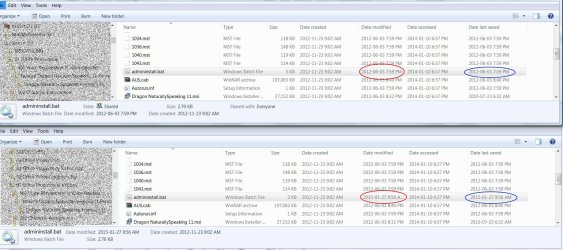
I am currently facing a problem that appears to be related to this thread. In my case though, SOME (not all) files, upon copy, do not retain their original modified and last saved dates.

I have been trying to create an EXACT copy of a directory and the hierarchy below it. The problem is, that in some cases the date modified and date last saved are changed to the current date.
When, using FreeFileSync, I attempt to verify that the copy is indeed exact, multiple files are listed where the modified and last saved dates have changed from the original dates to the current dates. If I actually synchronize the files using either the "mirror" or the "update" functions of FreeFileSync, the modified and last saved dates will still differ from the dates on the original files. Thus, I can synchronize as often as I want but I will still end up with files where the dates/times differ from the original.
I understand some utilities can - supposedly - overcome this shortfall of the Windows operating system: Xcopy, Robocopy, XXCopy all claim to be able to retain the original dates. Their command syntax has specific switches to accomplish just that but, while this works for SOME files, it does not work for others. I have attached a screen shot showing the details for one of those problem files in both, the Source directory (the directory I am copying FROM) and in a directory created using XXCopy using the switches /TCA /TCC /TCW (I tried /Backup as well with the same results). All other files visible in the screen shot have retained their original dates.
I would appreciate any insights WHY this is happening for some files but not for others and any ideas how I can overcome this problem and end up with an exact copy of my directory structure.
(OS is Win7-64, Source and Destination drives are both local. The account used for the copy operations is an Administrator account.)
 

Attachments

  • Screenshot.jpg
    Screenshot.jpg
    247.8 KB · Views: 2

My Computer My Computer

At a glance

Windows 7 Ultimate x64AMD Phenom II X4 965 @ 3.4GHz8GBonboard graphics: ATI Radeon HD 4250 (ASUStek...
Computer Manufacturer/Model Number
Look-Ahead Inc.
OS
Windows 7 Ultimate x64
CPU
AMD Phenom II X4 965 @ 3.4GHz
Motherboard
ASUSTeK Computer INC. M5A88-M (AM3R2)
Memory
8GB
Graphics Card(s)
onboard graphics: ATI Radeon HD 4250 (ASUStek Computer Inc)
Sound Card
onboard sound: Realtek High Definition Audio
Monitor(s) Displays
Acer AL2216W
Screen Resolution
1680x1050@59Hz
Hard Drives
119GB KINGSTON SNV425S2128GB ATA Device (SSD)
1863GB AMD 1X2 Mirror/RAID1 SCSI Disk Device (RAID)
1397GB AMD 1X2 Mirror/RAID1 SCSI Disk Device (RAID)
Back
Top