
"Date Modified" changes on original file when copying

I cannot replicate the problem in question. Doing right-click drag and copy the modified date remains the same, moving it remains the same, left-click drag and copy to another drive stays the same... Maybe you have something, like an anti-virus or explorer extension that is doing something with the file during these copy operations.
+1

I have never seen or noticed original file properties to change in any version of Windows when it's copied. I've now "played" about 15 minutes with this, trying to replicate this. No luck.

Right mouse button drag and drop, selecting Copy here or Create shortcut here > original file or folder properties including time stamp are not changed.

CTRL + C copy, CTRL + V paste > original file or folder properties including time stamp are not changed.

Context menu Copy - Paste > original file or folder properties including time stamp are not changed.

Am I missing something here?

I am using skydrive. I have noticed that upon uploading my files the "date modified" for each file is changed to the time that the file was uploaded.

This seems to violate the presumption that you are archiving an actual exact copy of the original file. I must retain an exact copy of the original.

Does anyone know how to get skydrive to not modify the original file?

I am using W7 64 bit.
Also this issue seems to be impossible to replicate, at least for me.

Right mouse button drag from desktop or folder and drop to SkyDrive > original file or folder properties including time stamp are not changed.

Left mouse button drag from desktop or folder and drop to SkyDrive > original file or folder properties including time stamp are not changed.

Uploading normally > original file or folder properties including time stamp are not changed.

Kari

You were not able to recreate the issue because it really appears when we Move or Copy across different DRIVES/ PARTITIONS. Then the Created and Modified Dates change.
 

My Computer My Computer

Computer Manufacturer/Model Number
Mac Book Pro | Thinkpads T61 X61T W510
OS
WinXP/ Win7x64/ Mac OSX Snow Leopard - Multi Boot
You were not able to recreate the issue because it really appears when we Move or Copy across different DRIVES/ PARTITIONS. Then the Created and Modified Dates change.

It doesn't on my system.
 

My Computer My Computer

Computer type
PC/Desktop
Computer Manufacturer/Model Number
Alienware Aurora ALX R4
OS
Windows 10 Pro (x64)
CPU
Intel Core i7-3930K (3.2GHz - 4.5GHz)
Motherboard
Alienware Aurora-R4 x79
Memory
4x Samsung 4GB PC3-12800 DDR3 (16GB 1600MHz)
Graphics Card(s)
Nvidia Geforce GTX 690
Sound Card
SteelSeries Siberia Elite
Monitor(s) Displays
Dell UltraSharp U3011
Screen Resolution
2560x1600
Hard Drives
Samsung 850 Pro 256 GB, Seagate 1TB Desktop Hybrid HDD, 2x Western Digital 4TB Green HDD
PSU
875W Some Dell PSU <.<
Case
Alienware Aurora ALX
Cooling
Custom Liquid Cooling (EK CPU & GPU blocks) dual EK 480RAD
Keyboard
Logitech G710+ Mechanical
Mouse
Logitech G700s
Internet Speed
Verizon Fios (50 mbps average)
Other Info
Server: Intel NUC D54250WYK: i5-4250U, 16GB, 256 GB mSATA, Windows Server 2012 R2
You were not able to recreate the issue because it really appears when we Move or Copy across different DRIVES/ PARTITIONS. Then the Created and Modified Dates change.

It doesn't on my system.

As per my observation the MODIFIED DATE stays, CREATED date changes.

Only when I COPY with TERACOPY do the CREATED DATES remain.
ROBOCOPY also has the ability but I am checking it as we speak.

Please check this..

COPY some older FOLDERS & FILES that have CREATED & MODIFIED DATES of last year or so. (The columns / fields have to be made visible in explorer if not already)

COPY them to an External USB HDD or so.

Report back with results.

If you are able to find both C & M dates are MAINTAINED, then please post your
Windows OS Details. (i.e. XP / Win 7 / Ultimate/ Pro / x32 / x64)
(Assuming you are not using another Copy/File Tool or CopyHandler)
 

My Computer My Computer

Computer Manufacturer/Model Number
Mac Book Pro | Thinkpads T61 X61T W510
OS
WinXP/ Win7x64/ Mac OSX Snow Leopard - Multi Boot
Last edited:

My Computer My Computer

Computer type
PC/Desktop
Computer Manufacturer/Model Number
Alienware Aurora ALX R4
OS
Windows 10 Pro (x64)
CPU
Intel Core i7-3930K (3.2GHz - 4.5GHz)
Motherboard
Alienware Aurora-R4 x79
Memory
4x Samsung 4GB PC3-12800 DDR3 (16GB 1600MHz)
Graphics Card(s)
Nvidia Geforce GTX 690
Sound Card
SteelSeries Siberia Elite
Monitor(s) Displays
Dell UltraSharp U3011
Screen Resolution
2560x1600
Hard Drives
Samsung 850 Pro 256 GB, Seagate 1TB Desktop Hybrid HDD, 2x Western Digital 4TB Green HDD
PSU
875W Some Dell PSU <.<
Case
Alienware Aurora ALX
Cooling
Custom Liquid Cooling (EK CPU & GPU blocks) dual EK 480RAD
Keyboard
Logitech G710+ Mechanical
Mouse
Logitech G700s
Internet Speed
Verizon Fios (50 mbps average)
Other Info
Server: Intel NUC D54250WYK: i5-4250U, 16GB, 256 GB mSATA, Windows Server 2012 R2
W7pro32bit


My Computer My Computer

Computer type
Laptop
Computer Manufacturer/Model Number
Employer provided Dell Latitude
OS
W7 Pro SP1 64bit
CPU
i7
Memory
8GB
Graphics Card(s)
Intel HD Graphics
Hard Drives
crappy SSD
Antivirus
Employer mandated Symantec Endpoint Protection
Browser
Pale Moon 64bit, IE11 64bit & Chrome 64bit
Maybe my XP is bugging out and not able to do this. Let me check if my Win7 x64 also keeps the CREATED DATES.
 

My Computer My Computer

Computer Manufacturer/Model Number
Mac Book Pro | Thinkpads T61 X61T W510
OS
WinXP/ Win7x64/ Mac OSX Snow Leopard - Multi Boot
My Computer My Computer

OS
XP / Win7 x64 Pro
CPU
Intel Quad-Core Q9450 @ 3.2GHz
Motherboard
Asus P5-E
Memory
2x2GB GSkill DDR2
Graphics Card(s)
NVIDIA GeForce 8600 GTS (EVGA)
Monitor(s) Displays
Dell 2408WFP
Screen Resolution
1920x1200

My Computer My Computer

Computer Manufacturer/Model Number
Mac Book Pro | Thinkpads T61 X61T W510
OS
WinXP/ Win7x64/ Mac OSX Snow Leopard - Multi Boot
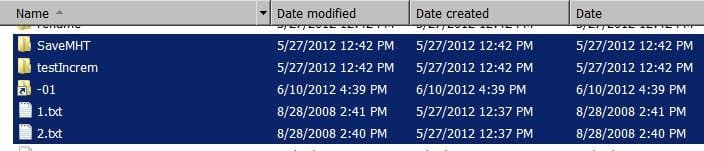
In my experience, and as UsernameIssues above shows, when you copy a file to a new partition or drive, the created time will update to the current time it was copied but the file modification time remains unchanged. If you move the file, it retains the creation and modification times. In both cases, last accessed times are updated to the time it was moved/copied.
 

My Computer My Computer

OS
XP / Win7 x64 Pro
CPU
Intel Quad-Core Q9450 @ 3.2GHz
Motherboard
Asus P5-E
Memory
2x2GB GSkill DDR2
Graphics Card(s)
NVIDIA GeForce 8600 GTS (EVGA)
Monitor(s) Displays
Dell 2408WFP
Screen Resolution
1920x1200
What a charming discussion about an obscure, and mostly ignored topic. The term "Date" in Windows is even more complicated than previously described. There is in addition to "Date Modified", and "Date created", there is also just a "Date". (plus date accessed, archived, saved,...)

If you are having a slow afternoon, and like Windows puzzles, try this. In the Contents pane of a folder in Windows Explorer, Right click a blank area, which gives a context menu, dependent on... what, Folder "type" maybe? (I really hate folder "types". It is so Apple-like to have the computer arbitrarily decide for me, like I am too stupid to assign folder types when I want them.) But never mind, R-C gives a context menu.

Menu type one -- Sort choices include "Date" (Name, Date, Type, Size, Tags) other folders will have Menu type two -- Sort choices include "Date modified" (Name, Date modified, Type, Size) There are also other menus for folders containing mostly music and video.

Virtually all varieties of Sort, (that I have tried) leaves sub-folders before mere files--Except with Date Modified, Descending--here files come before folder. This was really irritating. If you sort by "Date Modified" "Ascending", Folders come before files. But Date Modified, Descending, Files come first.

The "More..." choice at the bottom of the "Sort-by" list, allows adding choices to that menu. So, I added a "Date" choice.

If you sort by "Date" "Descending" then all sub-folders are at the top of the list, Files at the bottom. (everywhere I tried). Changing to Ascending, keeps the folders at top of the list.

I am nearly always interested in Descending, to keep my recent work at the top of the list. But I want my folders first. So, I am adding Sort by "Date" to all my folders. Hope this is not something that will crash like the feature (XP, or Vista?) that limited the number of folders where you could create a custom layout.

And I still dont know where the "Date" value really comes from. Seems equal to either Date created or Date modified, but the fun is wearing thin.
 

My Computer My Computer

Computer Manufacturer/Model Number
Dell XPS17 laptop
OS
Windows 7 Pro 64
CPU
i7 2760QM 2.4GHz
Memory
8GB
Graphics Card(s)
Intel HD/Nvidia GeForce 555M
Sound Card
RealTek
Monitor(s) Displays
Ntrig DuoSense digitzer, touchscreen
Hard Drives
750GB
Mouse
Synaptics touchpad
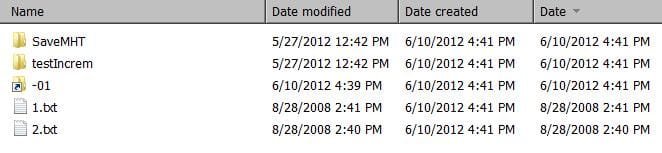
My results to others questions...
Copying to another drive.
Code:
                 Files        Folders        Shortcuts
Date Modified     unchanged    unchanged    unchanged
Date created      changed      changed      changed
Date              unchanged    changed      changed
 

Attachments

  • MWSnap2012-06-10-16_44_59.jpg
    MWSnap2012-06-10-16_44_59.jpg
    18 KB · Views: 47
  • MWSnap2012-06-10-16_45_22.jpg
    MWSnap2012-06-10-16_45_22.jpg
    22.2 KB · Views: 18

My Computer My Computer

Computer Manufacturer/Model Number
Dell XPS17 laptop
OS
Windows 7 Pro 64
CPU
i7 2760QM 2.4GHz
Memory
8GB
Graphics Card(s)
Intel HD/Nvidia GeForce 555M
Sound Card
RealTek
Monitor(s) Displays
Ntrig DuoSense digitzer, touchscreen
Hard Drives
750GB
Mouse
Synaptics touchpad
My results to others questions...
Copying to another drive.
Code:
                 Files        Folders        Shortcuts
Date Modified     unchanged    unchanged    unchanged
Date created      changed      changed      changed
Date              unchanged    changed      changed
What's strange about this? What did you expect?
 

My Computer My Computer

Computer type
Laptop
Computer Manufacturer/Model Number
ACER ASPIRE 5742G
OS
Microsoft Windows 7 Home Premium 64-bits 7601 Multiprocessor Free Service Pack 1
CPU
Intel(R) Core(TM) i3 CPU M 370 @ 2.40GHz
Motherboard
Acer Aspire 5742G
Memory
4,00 GB
Graphics Card(s)
ATI Mobility Radeon HD 5400 Series
Sound Card
(1) AMD High Definition Audio Device (2) Realtek High Defi
Screen Resolution
1366 x 768 x 32 bits (4294967296 colors) @ 60 Hz
Hard Drives
WDC WD5000BEVT-22ZAT0
For every file on an NTFS volume, there are the following dates:
  1. File Created
  2. File Accessed
  3. File Modified
  4. MTF last written
Each of these dates are explained below:
File Created: This is the date the file was “created” on the volume. This does not change when working normally with a file, e.g. opening, closing, saving, or modifying the file.
File Accessed: This is the date the file was last accessed. An access can be a move, an open, or any other simple access. It can also be tripped by Anti-virus scanners, or Windows system processes. Therefore caution has to be used when stating a “file was last accessed by user XXX” if there is only the “File Access” date in NTFS to work from.=>feature is off by default (registry HKEY_LOCAL_MACHINE\SYSTEM\CurrentControlSet\Control\FileSystem\NtfsDisableLastAccessUpdate=1)
File Modified: This date as shown by Windows there has been a change to the file itself. E.g a notepad document is has more date added to it, would trip the date it was modified.
MFT Entry Modified: A basic understanding of NTFS and the MFT is required for this section. This is date not shown by Windows Explorer or the average windows interace, but requires forensic tools , e.g EnCase, FTK, iLook, WinHex, etc. This date shows when the MFT entry, which points to the file of concern, was changed. This means that if the record that points to the file is changed, then this date would trip. As all the dates, file name, file sizes are stored in the MFT, if any of those are changed then the date will change. For example, if the file size changes then the MFT Entry modified date is changed. If the file name is changed, than the MFT entry modified is changed
 

My Computer My Computer

Computer type
Laptop
Computer Manufacturer/Model Number
ACER ASPIRE 5742G
OS
Microsoft Windows 7 Home Premium 64-bits 7601 Multiprocessor Free Service Pack 1
CPU
Intel(R) Core(TM) i3 CPU M 370 @ 2.40GHz
Motherboard
Acer Aspire 5742G
Memory
4,00 GB
Graphics Card(s)
ATI Mobility Radeon HD 5400 Series
Sound Card
(1) AMD High Definition Audio Device (2) Realtek High Defi
Screen Resolution
1366 x 768 x 32 bits (4294967296 colors) @ 60 Hz
Hard Drives
WDC WD5000BEVT-22ZAT0
I experience this issue intermittently, and NOT just when different hard drives are involved, and it is a HUGE bug in Windows 7 that has never been fixed. The problem is that the issue is so intermittent and probably not reproducible by most users on demand. It is frustrating, although somewhat understandable, to see responders assume the user has mistaken "modification date" for "creation" or other dates.

For example, today I was sorting photos into directories, and noticed that a couple of photos had mysteriously changed MODIFIED dates. A few minutes later, investigating another folder, I moved all files in
C:\photos\2011-04-21 - 25 PC Beach\346CANON
to
C:\photos\2011-04-21 - 25 PC Beach
and immediately afterward, I noticed that the first few files had changed MODIFIED dates to the current date & time. I attempted to UNDO, which moved the files back; however, the dates remained changed, so I went back to the EDIT - UNDO menu, and let it move the files again. Afterward, it appeared close to half of the files dates had been changed, but the rest were not changed. Now hours later as I write this, I've just discovered that ALL the files dates have now been changed.
By all, I mean all the jpg's AND all the .mov movie files. Oddly enough, the .thm (movie thumbnail) files are the only files which did not get the modified date changed.

I realize I can probably recover most of the jpg date & times by using the "Date Taken On" Date, but the .mov files have no such date, and therefore their true original date & time is now lost to me forever.

(I use no antivirus -- I simply let Microsoft scan occasionally when I install Windows Updates, and I also occasionally scan manually with MalwareBytes. Neither have found any problems.)

Someone please solve this terrible bug!!

Thanks,
hallwal

PS: I believe I pressed Ctrl-A to select all, followed by Ctrl-X and finally Ctrl-V in the destination folder. Sometimes I right click and choose Paste instead. I do not remember for sure which I did here but I will try to notice the next time it happens.

PPS: I have recreated the problem, using keyboard shortcuts as above, and a new folder. Also, I tried COPYING a couple of files, which resulted in retaining the modified dates. I then changed the filenames slightly of the original files in the original folder, and after verifying that the name change had caused no date changes, I MOVED them, which then resulted in resetting the modified date.
 
Last edited:

My Computer My Computer

Computer type
PC/Desktop
Computer Manufacturer/Model Number
custom build
OS
Windows 7 Professional x64
CPU
Intel i7 920
Motherboard
Asus P6T Deluxe V2
Memory
12GB
Graphics Card(s)
AMD Radeon HD 7950
Antivirus
none
Browser
IE10
I know that this thread is pretty old, but since it's still an issue with Windows 7 and this thread showed up pretty high in my Google search when looking for a fix I thought I'd share a link to an awesome (and free :-)) Microsoft Utility I found called RichCopy that both resolves this issue and makes it so much easier to copy large numbers of files/folders :)

Here's a link to the article about it in Microsoft's TechNet Magazine which describes the tool, and has a link to download it as well: Free Utility: RichCopy, an Advanced Alternative to RoboCopy
 

My Computer My Computer

Computer type
PC/Desktop
OS
Windows 7 Home Premium 64bit
Welcome to the Seven Forums, ChayaCooper.

Thanks for posting your findings and the link.
 

My Computer My Computer

Computer type
Laptop
Computer Manufacturer/Model Number
Employer provided Dell Latitude
OS
W7 Pro SP1 64bit
CPU
i7
Memory
8GB
Graphics Card(s)
Intel HD Graphics
Hard Drives
crappy SSD
Antivirus
Employer mandated Symantec Endpoint Protection
Browser
Pale Moon 64bit, IE11 64bit & Chrome 64bit
Thanks @UsernameIssues :D
 

My Computer My Computer

Computer type
PC/Desktop
OS
Windows 7 Home Premium 64bit
I've not ever noticed this, but then I almost never use Explorer to manipulate/copy/move folders and files.

I know there are probably many alternatives to Explorer, but the one-and-only that I've used for many years is Free Commander. This GUI from this program has an intuitive 2-pane or 4-pane Explorer-like but "readable tabular/linear" presentation, where any pane can be the source and any other pane can be the target.

File manipulations using Free Commander do not exhibit the stated symptom, and in fact the copied file does not pick up a new modified date but rather retains the modified date of the original file... as you'd want. In other words COPY is a true COPY, including the original file system entry. Only the "A" attribute byte gets turned on in the copy target... as you'd expect. And of course the "create date" and "last access" dates for the copy are current... as you'd expect.

But the original file's "last modified" date is retained in the copy, and the original file has NO changes whatsoever.
 

My Computer My Computer

Computer type
PC/Desktop
Computer Manufacturer/Model Number
Home-built, two systems (1) and (2)
OS
Windows 7 Pro x64 (1), Win7 Pro X64 (2)
CPU
i5-3350p 3.1Ghz/6MB-cache (1); E8400 3.0Ghz/6MB-cache (2)
Motherboard
ASUS P8Z77-V Pro (1); ASUS P5Q3 (2)
Memory
8GB PC3-12800 DDR3 (1); 4GB PC3-10600 DDR3 (2)
Graphics Card(s)
ATI HD7750 (1), (see TV cards); ATI R7 250 (2)
Sound Card
Realtek ALC892 HD Audio (1); Realtek ALC1200 HD Audio (2)
Monitor(s) Displays
Eizo HD2441W LCD, Eizo S2433W (1); Eizo 24" S2433W (2)
Screen Resolution
1920x1200, 1920x1200 (1); 1920x1200 (2)
Hard Drives
(1) 1TB SATA-II (7200RPM), 2x2TB SATA-III (7200RPM), 250GB SATA-III (10000RPM) for OS; 2x2TB external USB 3.0

(2) 320GB SATA-II (7200RPM), 750GB SATA-II (7200RPM), 150GB SATA-II (10000RPM) for OS; 2TB external USB 3.0
PSU
Nesteq ECS-6001 600W (1); Nesteq ECS-5001 500W (2)
Case
Acousti-Case 360 (1) and (2)
Cooling
Noctua NH-U12P SE2 for CPU, 2x120mm case fans (1) and (2)
Keyboard
IBM PS/2 (1) and (2)
Mouse
Logitech MX Revolution wireless (1); Microsoft wired (2)
Internet Speed
100mbps down / 10mbps up
Antivirus
Microsoft Security Essentials; Malwarebyte Anti-Malware Pro
Browser
Firefox
Other Info
Ceton InfiniTV 4-tuner cablecard-enabled TV card as well as Hauppauge HVR-2250 OTA/ATSC 2-tuner TV card in (1), running under Win7 WMC
I'd always wanted to be able to MOVE files & folders between different HDDs and Partitions without the C & M dates changing. It's crucial for me to have those dates for HISTORICAL tracking / REMEMBERING purpose.
 

My Computer My Computer

Computer Manufacturer/Model Number
Mac Book Pro | Thinkpads T61 X61T W510
OS
WinXP/ Win7x64/ Mac OSX Snow Leopard - Multi Boot
I'd always wanted to be able to MOVE files & folders between different HDDs and Partitions without the C & M dates changing. It's crucial for me to have those dates for HISTORICAL tracking / REMEMBERING purpose.
Use ROBOCOPY for that
 

My Computer My Computer

Computer type
Laptop
Computer Manufacturer/Model Number
ACER ASPIRE 5742G
OS
Microsoft Windows 7 Home Premium 64-bits 7601 Multiprocessor Free Service Pack 1
CPU
Intel(R) Core(TM) i3 CPU M 370 @ 2.40GHz
Motherboard
Acer Aspire 5742G
Memory
4,00 GB
Graphics Card(s)
ATI Mobility Radeon HD 5400 Series
Sound Card
(1) AMD High Definition Audio Device (2) Realtek High Defi
Screen Resolution
1366 x 768 x 32 bits (4294967296 colors) @ 60 Hz
Hard Drives
WDC WD5000BEVT-22ZAT0
Back
Top