windows 7 hard drive is denying permissions to every folder

waywaydj

New member
Local time
4:20 PM
Messages
8
I recently fooled around with my permission for folders and files. Now I think I gave access to the computer 'System' to over ride all other access. Is there a way to fix this so that I recover 'Permissions?' I cannot access the "C" drive.
 

My Computer My Computer

At a glance

windows 7, 32 bitIntel Core 2 duo. 2.20 ghz3 GB
Computer type
Laptop
Computer Manufacturer/Model Number
toshiba satellite pro
OS
windows 7, 32 bit
CPU
Intel Core 2 duo. 2.20 ghz
Memory
3 GB
Hard Drives
Hitachi
Antivirus
microsft security essentials
Browser
Internet explorer
I recently fooled around with my permission for folders and files. Now I think I gave access to the computer 'System' to over ride all other access. Is there a way to fix this so that I recover 'Permissions?' I cannot access the "C" drive.

Do you mean you can boot into Windows, but once there, if you go to file manager (My Computer) you can't access any folders?
 

My Computer My Computer

At a glance

Win 7 Ultimate 64-bit
OS
Win 7 Ultimate 64-bit
Yes when I try going into My Computer, and then into the hard drive, I cant access it. It will boot and I can go on the internet, but that's it. I cant look at my pictures, copy my pictures or music to any flash drive.
The system has complete control over everything, I cannot change any settings to the computer. I think I gave all the permissions to the system. I cannot even access the "C" HARD DRIVE.
 

My Computer My Computer

At a glance

windows 7, 32 bitIntel Core 2 duo. 2.20 ghz3 GB
Computer type
Laptop
Computer Manufacturer/Model Number
toshiba satellite pro
OS
windows 7, 32 bit
CPU
Intel Core 2 duo. 2.20 ghz
Memory
3 GB
Hard Drives
Hitachi
Antivirus
microsft security essentials
Browser
Internet explorer
I cant look at my pictures it says access denied. I cant change any settings such as user accounts, it says access denied. I cant copy music to a memory stick, it says access denied. everything is denied!
 

My Computer My Computer

At a glance

windows 7, 32 bitIntel Core 2 duo. 2.20 ghz3 GB
Computer type
Laptop
Computer Manufacturer/Model Number
toshiba satellite pro
OS
windows 7, 32 bit
CPU
Intel Core 2 duo. 2.20 ghz
Memory
3 GB
Hard Drives
Hitachi
Antivirus
microsft security essentials
Browser
Internet explorer
Hi waywaydj,

Check whether this post helps. Reset All User Permissions To Default - Tips and Tricks

Now it involves creating a System Restore point in the first instance - which is very essential to revert back to your start condition in case something misfires - and then use subinacl.msi + a script reset.cmd file which it will use to reset all permissions to default. A fairly rigourous procedure.

If you want to cut short on it, you may try Permissions Time Machine v1.4.2 AMYD Projects - Official Blog: Permissions Time Machine v1.4.2

Atleast one member here, Galane, seems to have used it successfully. http://www.sevenforums.com/performa...d-permissions-fixing-tool-actually-works.html

Whichever you want to use, it is imperative that you create a System Restore point before doing anything - to be safe rather than sorry - if something goes awry and you muck up the system further..
 

My Computer My Computer

At a glance

Windows 7 Home Premium 32 bit
OS
Windows 7 Home Premium 32 bit
Hi waywaydj,

Check whether this post helps. Reset All User Permissions To Default - Tips and Tricks

Now it involves creating a System Restore point in the first instance - which is very essential to revert back to your start condition in case something misfires - and then use subinacl.msi + a script reset.cmd file which it will use to reset all permissions to default. A fairly rigourous procedure.

If you want to cut short on it, you may try Permissions Time Machine v1.4.2 AMYD Projects - Official Blog: Permissions Time Machine v1.4.2

Atleast one member here, Galane, seems to have used it successfully. http://www.sevenforums.com/performa...d-permissions-fixing-tool-actually-works.html

Whichever you want to use, it is imperative that you create a System Restore point before doing anything - to be safe rather than sorry - if something goes awry and you muck up the system further..

Hi thank, I tried accessing system restore but I couldn't, it says I don not have permission to access program. Everything on the computer settings doesn't allow me to change anything.
 

My Computer My Computer

At a glance

windows 7, 32 bitIntel Core 2 duo. 2.20 ghz3 GB
Computer type
Laptop
Computer Manufacturer/Model Number
toshiba satellite pro
OS
windows 7, 32 bit
CPU
Intel Core 2 duo. 2.20 ghz
Memory
3 GB
Hard Drives
Hitachi
Antivirus
microsft security essentials
Browser
Internet explorer
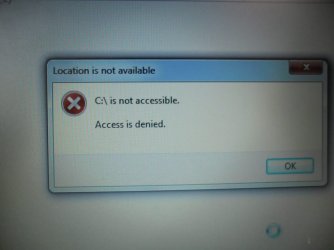
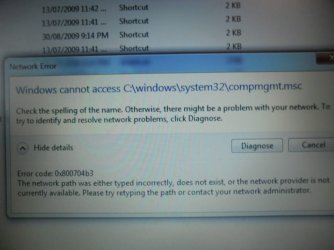
[/ATTACH][/ATTACH][/ATTACH][/ATTACH] screenshots of messages received when trying to access system restore, c drive, and computer management.
 

Attachments

  • SAM_2004.JPG
    SAM_2004.JPG
    46.8 KB · Views: 2
  • SAM_2003.JPG
    SAM_2003.JPG
    68.2 KB · Views: 1
  • SAM_2000.JPG
    SAM_2000.JPG
    69.1 KB · Views: 0
  • SAM_1998.JPG
    SAM_1998.JPG
    93 KB · Views: 0

My Computer My Computer

At a glance

windows 7, 32 bitIntel Core 2 duo. 2.20 ghz3 GB
Computer type
Laptop
Computer Manufacturer/Model Number
toshiba satellite pro
OS
windows 7, 32 bit
CPU
Intel Core 2 duo. 2.20 ghz
Memory
3 GB
Hard Drives
Hitachi
Antivirus
microsft security essentials
Browser
Internet explorer
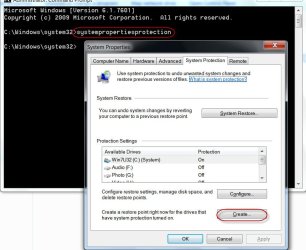
"IF you are going to attemt this procedure, I want you to use system restore by opening a elevated command prompt, and type: systempropertiesprotection

When you do this step, the system properties window will open, and at the bottom, there is a option that is asking you to create a restore point on the disk that supports this action.

Click CREATE, Choose a name for the restore point, and click CREATE again then you are done when the loading finishes."

Were you not able to open the elevated command prompt and create a system restore point as specified above?

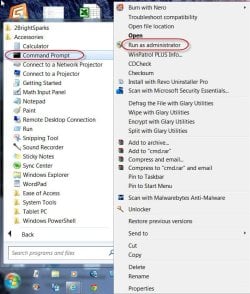
Start > All Programs > Accessories > Right click on Command Prompt > Run as administrator

Against the prompt type: systempropertiesprotection [ENTER]

If it is not possible, then wait for someone else to come up with any idea as to how to create the System Restore point under the conditions. There must definitely be someway which I may not know.

As indicated by both the authors in the referenced links, I would hesitate to proceed with the actual procedures mentioned without creating a System Restore point.
 
Last edited:

My Computer My Computer

At a glance

Windows 7 Home Premium 32 bit
OS
Windows 7 Home Premium 32 bit
Last edited:

My Computer My Computer

At a glance

windows 7, 32 bitIntel Core 2 duo. 2.20 ghz3 GB
Computer type
Laptop
Computer Manufacturer/Model Number
toshiba satellite pro
OS
windows 7, 32 bit
CPU
Intel Core 2 duo. 2.20 ghz
Memory
3 GB
Hard Drives
Hitachi
Antivirus
microsft security essentials
Browser
Internet explorer
As below:

29-09-2014 01-06-56.jpg

29-09-2014 01-10-59.jpg
 

My Computer My Computer

At a glance

Windows 7 Home Premium 32 bit
OS
Windows 7 Home Premium 32 bit
If you still can't, wait for someone else to catch up.

I am retiring for the day now. Already 01:18 AM.
 

My Computer My Computer

At a glance

Windows 7 Home Premium 32 bit
OS
Windows 7 Home Premium 32 bit
it says cannot find system properties protection in cmd.
Thank for help jumanji.
 

My Computer My Computer

At a glance

windows 7, 32 bitIntel Core 2 duo. 2.20 ghz3 GB
Computer type
Laptop
Computer Manufacturer/Model Number
toshiba satellite pro
OS
windows 7, 32 bit
CPU
Intel Core 2 duo. 2.20 ghz
Memory
3 GB
Hard Drives
Hitachi
Antivirus
microsft security essentials
Browser
Internet explorer
My last straw of hope in getting the system restore command to work before I give up :D

Instead of plain systempropertiesprotection, type the following command and press enter.

%SystemRoot%\System32\SystemPropertiesProtection.exe [ENTER]
 

My Computer My Computer

At a glance

Windows 7 Home Premium 32 bit
OS
Windows 7 Home Premium 32 bit
it says: the system cannot find the path specified
 

My Computer My Computer

At a glance

windows 7, 32 bitIntel Core 2 duo. 2.20 ghz3 GB
Computer type
Laptop
Computer Manufacturer/Model Number
toshiba satellite pro
OS
windows 7, 32 bit
CPU
Intel Core 2 duo. 2.20 ghz
Memory
3 GB
Hard Drives
Hitachi
Antivirus
microsft security essentials
Browser
Internet explorer
My innings over. It is now for other experts to look into the whole problem and suggest. I shall stay on the sidelines. :)
 

My Computer My Computer

At a glance

Windows 7 Home Premium 32 bit
OS
Windows 7 Home Premium 32 bit
wayway... this happened to me once about a year ago. I wish I could help you but I had much less patience than you and fortunately, redundant BU strategies in place. So rather than hassle it, I booted from a USB Macrium Reflect rescue stick and restored the C drive from a recent BU I keep archived on an external.

If you happen to have a recent BU but have data you'd like to save, you can make a USB live Linux drive (bootable stick) and boot into Linux on the machine, then mount the internal drive through Linux and copy any critical data files to the stick or even to another external drive. Then restore the C drive.

Sorry I can't tell you how to just fix the problem as is. I am hoping someone else knows. Did you try booting off a CD Repair disc?
 

My Computer My Computer

At a glance

Win 7 Ultimate 64-bit
OS
Win 7 Ultimate 64-bit
You said you gave access to "system" to the whole drive, right?
But did you gave your own user access? That could be the root problem.
Try to reach into the permissions page again (possibly it will ask for elevation at some point) and add the "users" group at least.
 

My Computer My Computer

At a glance

Windows 7 Ultimate x64Intel Core i7-740QM8 GB DDR3NVIDIA GeForce 330GT
Computer type
Laptop
Computer Manufacturer/Model Number
Toshiba Sattelite A665-S6092
OS
Windows 7 Ultimate x64
CPU
Intel Core i7-740QM
Memory
8 GB DDR3
Graphics Card(s)
NVIDIA GeForce 330GT
Screen Resolution
1366x768
Hard Drives
Samsung 840 SSD 500GB
1TB USB3 external HD
Cooling
Coolermaster Notepal U3 notebook cooling pad
Internet Speed
3mbps ASDL
Antivirus
ClamWin 0.98.7
Browser
Opera 12.17 x86 (main), Firefox 38 (sec), IE11 (last resort)
Back
Top