Solved Use Winamp or other player for streaming in Win7

loninappleton

New member
Member
VIP
Local time
5:43 PM
Messages
892
In old Win XP I had regularly used specific players such as WinAmp for m3u files to stream news broadcasts from websites.

And I've seen a similar Folder Options routine in Win7.

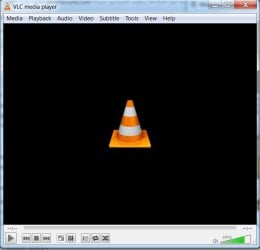
But the peculiar thing that happens regardless of how I specifiy a player in Win7 is a black open browser window with a miniature icon for VLC embedded in the center. The VLC player will display and work normally for audio. But since it is in a browser window it is not possible to navigate away without closing the stream.

Using Winamp allows streaming while navigating other websites.

How is this resolved in Win7? Please be specific in the manner of a series of steps.

If some sort of re-installation of VLC is necessary I can do that. I used the VLC option to make it the primary player to _get rid of_ Windows Media Player displaying it's icons on _everything_ which is completely annoying. I never want to see one again.

There should be a compromise and setup possible to select a player for a file type individually.
 

My Computer My Computer

At a glance

Windows 7 x64 UltimateAMD Athlon II x3 4502 GB
Computer type
PC/Desktop
Computer Manufacturer/Model Number
custom
OS
Windows 7 x64 Ultimate
CPU
AMD Athlon II x3 450
Motherboard
MSI 880GM
Memory
2 GB
Hard Drives
various
Browser
Firefox, Opera
I just installed VLC and made only one change, Unchecked the Web things, one for Firefox and the other ActiveX for Internet Explorer. It does not open as a Web page, as you can see in this image it has its own window.

If you don't like black you can go to http://www.videolan.org/vlc/skins.php to get more skins.
 

Attachments

  • VLC.jpg
    VLC.jpg
    23 KB · Views: 23

My Computer My Computer

At a glance

Windows 7 Ultimate 64-bit, Windows 8.1 64-bit...
Computer type
PC/Desktop
Computer Manufacturer/Model Number
Customs, Dell, Gateway, HP, Toshiba, Acer, ASUS
OS
Windows 7 Ultimate 64-bit, Windows 8.1 64-bit, Mac OS X 10.10, Linux Mint 17, Windows 10 Pro TP
Keyboard
Microsoft
Mouse
Microsoft
I don't need any skins.

Thanks for answering but where is all this stuff happening during setup? There are umpteen check boxes to go through the manual way and, as noted-- no Windows Media Player leftovers should remain. The only way I got rid of WMP icons was to let VLC take over completely which wasn't even a good solution.

I also use Foobar 2000 for some things.
 

My Computer My Computer

At a glance

Windows 7 x64 UltimateAMD Athlon II x3 4502 GB
Computer type
PC/Desktop
Computer Manufacturer/Model Number
custom
OS
Windows 7 x64 Ultimate
CPU
AMD Athlon II x3 450
Motherboard
MSI 880GM
Memory
2 GB
Hard Drives
various
Browser
Firefox, Opera
Are you sure vlc is the only program set to associate with m3u files? Can you link a file in question that would open not vlc but a stream in the browser instead?
 

My Computer My Computer

At a glance

10 Pro x64Ryzen 9 3900X64GB(4x16GB) DDR4EVGA 1080ti FTW3
Computer type
PC/Desktop
Computer Manufacturer/Model Number
Custom
OS
10 Pro x64
CPU
Ryzen 9 3900X
Motherboard
Asrock x370 Tachi
Memory
64GB(4x16GB) DDR4
Graphics Card(s)
EVGA 1080ti FTW3
Sound Card
ASUS Xonar Essence STX (V4 Bursons), ODAC rev B, NFB-11, O2
Monitor(s) Displays
3xASUS PB278Q/R, Optoma HD142X
Screen Resolution
3x1440p, 1080p
Hard Drives
512GB 850 EVO(OS, Programs)
4TB (Movies)
3TB (Downloads)
3TB (Programs)
1TB HDD (Games)
2x6TB R1 (videos)
PSU
AX760
Case
Fractal Define R5
Cooling
NH-D15S
Keyboard
Massdrop Ctrl with Box Navy's
Mouse
G903, Alioth XXL Mat
Internet Speed
280/40
Antivirus
MBAM, ESET
Browser
Canary 64 Bit
Other Info
I also own a Thinkpad P50 Xeon 4K, X220T, X1C5
m3u files are pretty rare and there seems to be some confusion (for me) when loading a news stream marked as an mp3 download which displays as m3u. If there is interest these are all Pacifica radio content. Plus some Democracy Now.

I make this reference because that is about the only problem area and the only news I use. How do I make such a test with these limited sources?

I have no idea what other prog. might be associated because this Win7 is a new install made from scratch
except for adding in bookmarks to Firefox using Mozbackup. I have no idea if that is related.

I will take another look. But I have looked at the folder options, found the m3u etc made the file association and still get the effect described originally.
 

My Computer My Computer

At a glance

Windows 7 x64 UltimateAMD Athlon II x3 4502 GB
Computer type
PC/Desktop
Computer Manufacturer/Model Number
custom
OS
Windows 7 x64 Ultimate
CPU
AMD Athlon II x3 450
Motherboard
MSI 880GM
Memory
2 GB
Hard Drives
various
Browser
Firefox, Opera
Progress.

The problem was not in Win7 but the Firefox browser.
Under Options > Applications in FFx I looked for the file types such as m3u and mp3 then used the options box to change. Many of these boxes have 'use VLC web plugin' showing. I do not know how this option becomes the default unless just my ignorance during setup.

If anyone knows the _exact_ options to specify for a specific player that would be better. I changed
all of them that looked relevant. Also settled on Foobar 2000 for this instead of Winamp for now.
Winamp was issuing an error saying couldn't find target output or something. That might be an install issue at (x86) programs or 64 bit programs. That I don't know.

I will mark solved after a bit of additional testing.
 

My Computer My Computer

At a glance

Windows 7 x64 UltimateAMD Athlon II x3 4502 GB
Computer type
PC/Desktop
Computer Manufacturer/Model Number
custom
OS
Windows 7 x64 Ultimate
CPU
AMD Athlon II x3 450
Motherboard
MSI 880GM
Memory
2 GB
Hard Drives
various
Browser
Firefox, Opera
Yeah uninstall vlc and reinstall it choose custom install and don't install the web plugins if you don't want it to run things in the browser but in vlc's own window. I dont have that part installed and by I went here http://kpft.org:8000/status.xsl and downloaded one of the files for m3u and it wanted to default play in wmp. it works if you open it it for vlc though defiantly.
 

My Computer My Computer

At a glance

10 Pro x64Ryzen 9 3900X64GB(4x16GB) DDR4EVGA 1080ti FTW3
Computer type
PC/Desktop
Computer Manufacturer/Model Number
Custom
OS
10 Pro x64
CPU
Ryzen 9 3900X
Motherboard
Asrock x370 Tachi
Memory
64GB(4x16GB) DDR4
Graphics Card(s)
EVGA 1080ti FTW3
Sound Card
ASUS Xonar Essence STX (V4 Bursons), ODAC rev B, NFB-11, O2
Monitor(s) Displays
3xASUS PB278Q/R, Optoma HD142X
Screen Resolution
3x1440p, 1080p
Hard Drives
512GB 850 EVO(OS, Programs)
4TB (Movies)
3TB (Downloads)
3TB (Programs)
1TB HDD (Games)
2x6TB R1 (videos)
PSU
AX760
Case
Fractal Define R5
Cooling
NH-D15S
Keyboard
Massdrop Ctrl with Box Navy's
Mouse
G903, Alioth XXL Mat
Internet Speed
280/40
Antivirus
MBAM, ESET
Browser
Canary 64 Bit
Other Info
I also own a Thinkpad P50 Xeon 4K, X220T, X1C5
Ok I will try the re-install.

Right now, my chosen player opens for the radio site home, but at the separate Democracy Now news site
it opens a player in the Firefox window.

I suppose I could dodge the problem by just using KPFK (home of the network) all the time
but there are news followups at DN which would still manifest the problem.

The option is called "download mp3" and I don't know if that means one of the numerous options in Firefox which I cannot identify.

FYI I never could understand much of Mozilla help site/ Mozillazine at all. That's why I'm pursuing it here.

Win7 search works better the more I use it. The folder options were found just by typing folder--a big improvement.
 

My Computer My Computer

At a glance

Windows 7 x64 UltimateAMD Athlon II x3 4502 GB
Computer type
PC/Desktop
Computer Manufacturer/Model Number
custom
OS
Windows 7 x64 Ultimate
CPU
AMD Athlon II x3 450
Motherboard
MSI 880GM
Memory
2 GB
Hard Drives
various
Browser
Firefox, Opera
Ok I will try the re-install.

Right now, my chosen player opens for the radio site home, but at the separate Democracy Now news site
it opens a player in the Firefox window.

I suppose I could dodge the problem by just using KPFK (home of the network) all the time
but there are news followups at DN which would still manifest the problem.

The option is called "download mp3" and I don't know if that means one of the numerous options in Firefox which I cannot identify.

FYI I never could understand much of Mozilla help site/ Mozillazine at all. That's why I'm pursuing it here.

Win7 search works better the more I use it. The folder options were found just by typing folder--a big improvement.

Can you link the page with the download so I can see how its formatted to better answer your questions.
 

My Computer My Computer

At a glance

10 Pro x64Ryzen 9 3900X64GB(4x16GB) DDR4EVGA 1080ti FTW3
Computer type
PC/Desktop
Computer Manufacturer/Model Number
Custom
OS
10 Pro x64
CPU
Ryzen 9 3900X
Motherboard
Asrock x370 Tachi
Memory
64GB(4x16GB) DDR4
Graphics Card(s)
EVGA 1080ti FTW3
Sound Card
ASUS Xonar Essence STX (V4 Bursons), ODAC rev B, NFB-11, O2
Monitor(s) Displays
3xASUS PB278Q/R, Optoma HD142X
Screen Resolution
3x1440p, 1080p
Hard Drives
512GB 850 EVO(OS, Programs)
4TB (Movies)
3TB (Downloads)
3TB (Programs)
1TB HDD (Games)
2x6TB R1 (videos)
PSU
AX760
Case
Fractal Define R5
Cooling
NH-D15S
Keyboard
Massdrop Ctrl with Box Navy's
Mouse
G903, Alioth XXL Mat
Internet Speed
280/40
Antivirus
MBAM, ESET
Browser
Canary 64 Bit
Other Info
I also own a Thinkpad P50 Xeon 4K, X220T, X1C5

My Computer My Computer

At a glance

Windows 7 x64 UltimateAMD Athlon II x3 4502 GB
Computer type
PC/Desktop
Computer Manufacturer/Model Number
custom
OS
Windows 7 x64 Ultimate
CPU
AMD Athlon II x3 450
Motherboard
MSI 880GM
Memory
2 GB
Hard Drives
various
Browser
Firefox, Opera

My Computer My Computer

At a glance

10 Pro x64Ryzen 9 3900X64GB(4x16GB) DDR4EVGA 1080ti FTW3
Computer type
PC/Desktop
Computer Manufacturer/Model Number
Custom
OS
10 Pro x64
CPU
Ryzen 9 3900X
Motherboard
Asrock x370 Tachi
Memory
64GB(4x16GB) DDR4
Graphics Card(s)
EVGA 1080ti FTW3
Sound Card
ASUS Xonar Essence STX (V4 Bursons), ODAC rev B, NFB-11, O2
Monitor(s) Displays
3xASUS PB278Q/R, Optoma HD142X
Screen Resolution
3x1440p, 1080p
Hard Drives
512GB 850 EVO(OS, Programs)
4TB (Movies)
3TB (Downloads)
3TB (Programs)
1TB HDD (Games)
2x6TB R1 (videos)
PSU
AX760
Case
Fractal Define R5
Cooling
NH-D15S
Keyboard
Massdrop Ctrl with Box Navy's
Mouse
G903, Alioth XXL Mat
Internet Speed
280/40
Antivirus
MBAM, ESET
Browser
Canary 64 Bit
Other Info
I also own a Thinkpad P50 Xeon 4K, X220T, X1C5
I right clicked to Save As and then the process of the download would start rather
than a direct stream. (Foot tapping and finger drumming starts ;-) )

If there is no way around their setup (pod casts are out-- they require subscription) I 'll
have to use one of the other feeds to be able to do two things at once.

But I've seen other sites for this hang too: the player loads but cannot start. Winamp said it was looking for something it couldn't find--

In Firefox there are all these stream settings For Pod cast, Video podcast-- many many of them.
Could one of these be blocking the correct setup?

I am writing from the old XP machine. I will review those to find any differences.
 

My Computer My Computer

At a glance

Windows 7 x64 UltimateAMD Athlon II x3 4502 GB
Computer type
PC/Desktop
Computer Manufacturer/Model Number
custom
OS
Windows 7 x64 Ultimate
CPU
AMD Athlon II x3 450
Motherboard
MSI 880GM
Memory
2 GB
Hard Drives
various
Browser
Firefox, Opera
I right clicked to Save As and then the process of the download would start rather than a direct stream.
That's exactly how the Save As is supposed to work, prompts the user to name it and specify the location/Folder on the HDD to save it to.
 

My Computer My Computer

At a glance

Windows 7 Ultimate 64-bit, Windows 8.1 64-bit...
Computer type
PC/Desktop
Computer Manufacturer/Model Number
Customs, Dell, Gateway, HP, Toshiba, Acer, ASUS
OS
Windows 7 Ultimate 64-bit, Windows 8.1 64-bit, Mac OS X 10.10, Linux Mint 17, Windows 10 Pro TP
Keyboard
Microsoft
Mouse
Microsoft
I don't care to save each newscast or, as mentioned, wait for a download.

There is no shortage of sites for this news. Once I have one working (KPFA plus Foobar)
I can get the needed content.

We found that the problem was Firefox. I think I can mark the thread solved.
 

My Computer My Computer

At a glance

Windows 7 x64 UltimateAMD Athlon II x3 4502 GB
Computer type
PC/Desktop
Computer Manufacturer/Model Number
custom
OS
Windows 7 x64 Ultimate
CPU
AMD Athlon II x3 450
Motherboard
MSI 880GM
Memory
2 GB
Hard Drives
various
Browser
Firefox, Opera
Back
Top