
I can't seem to get the background images like I wanted, I know you can modify High contrast theme for lower contrast but not totally. Also Start Menu I don't see it like windows 7 in Windows 10 preview. I even installed ClassicShellSetup_4_0_4 to use the windows 7 old style start menu. I really don't know how to explain this, but the default start menu in windows 10 preview doesn't look like Windows 7 start menu. To me it looks like Microsoft shrunk the metro screen and put it on the start menu and made an apps link. I still will play around with it, but my main operating system will be windows 7 for now.
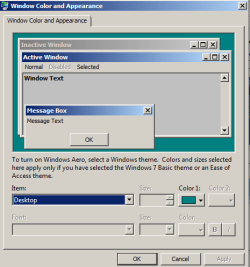
Here is what I would miss in Windows 10.
Here is what I would miss in Windows 10.
Attachments
My Computer
- Computer type
- PC/Desktop
- Computer Manufacturer/Model Number
- Dell All in one Inspiron 2020
- OS
- W10 32 bit, XUbuntu 18.xx 64 bit
- CPU
- Intel(R) Celeron(R) CPU G1620T @ 2.40GHz, 2400 Mhz
- Motherboard
- Dell
- Memory
- 4GB
- Graphics Card(s)
- Intel HD graphics
- Sound Card
- High Definition Audio Device
- Monitor(s) Displays
- 20 inch Screen
- Screen Resolution
- W7=1280 x 720 & Linux Mint Xfce=1360 x 768
- Hard Drives
- 500 GB hard drive
- Keyboard
- Usb
- Mouse
- Usb
- Internet Speed
- High-Speed
- Antivirus
- MSE
- Browser
- Main Browser Firefox
- Other Info
- I have done a clean install of Windows 7 using Dell re-installation disk (Dell sent me one). I also use Free Macrium reflect backup and restore.
 . As for now, Win10 is a mere service pack 2 for Win8.


