Dual Boot Installation with Windows 7 and XP

How to Setup a Dual Boot Installation with Windows 7 and XP


   Information
This will show you how to install Windows 7 and XP to dual boot with when you already have either Windows 7 or XP installed first.
   Note
With a dual boot installaton, you will have two operating systems (OS) installed. When you start the computer, you will have the choice to choose which OS you would like to start up to. This method is the easiest way of doing a dual boot with these two operating systems.
   Tip
When dual booting with another OS (ex: Vista or XP), you may not always have that OS partition show up in Computer with a driver letter in Windows 7. If this happens, then you will just need to add a drive letter to the OS (ex: Vista or XP) partition in Windows 7 Disk Management for it to show up in Computer with a driver letter.
   Warning
To stop XP from deleting your Windows 7 System Restore Points everytime XP is started, then see System Restore Points - Stop XP Dual Boot Delete to hide Windows 7 from XP.

Windows 7 Minimum Hardware Requirements


NOTE: For more information on this, see: Windows 7 system requirements
  • 1 GHz 32-bit or 64-bit processor
  • 1 GB RAM for 32-bit Windows 7 OR 2 GB RAM for 64-bit Windows 7
  • 16 GB available disk space 32-bit Windows 7 OR 20 GB for 64-bit Windows 7
  • Support for DirectX 9 graphics with 128 MB memory (in order to enable Aero theme)
  • DVD-R/W Drive
  • Internet or phone access to activate Windows 7.
Windows XP Minimum Hardware Requirements

NOTE: For more information on this, see: System requirements for Windows XP operating systems
  • PC with 300 megahertz (MHz) or higher processor clock speed recommended; 233-MHz minimum required;* Intel Pentium/Celeron family, AMD K6/Athlon/Duron family, or compatible processor recommended
  • 128 megabytes (MB) of RAM or higher recommended (64 MB minimum supported; may limit performance and some features)
  • 1.5 gigabyte (GB) of available hard disk space.*
  • Super VGA (800 × 600) or higher resolution video adapter and monitor
  • CD-ROM or DVD drive
  • Keyboard and Microsoft Mouse or compatible pointing device
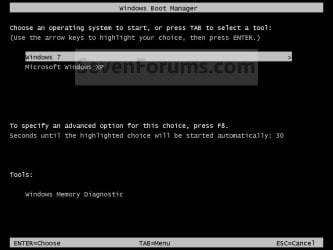
EXAMPLE: Windows Boot Manager
NOTE: This is the boot screen where you select what operating system that you would like to start. By default, you have 30 seconds to choose another operating system before the default operating system will start automatically.
Example.jpg


OPTION ONE

When XP is Installed First


NOTE: If you have a RAID setup, you will need to have the Windows 7 RAID drivers on a USB flash drive available to select and load while installing Windows 7.
1. Do step 2 or 3 below for where you wanted to install Windows 7 at.

2. To Create a New Partition from the XP Hard Disk Drive
A) With your Windows 7 installation disc boot into the Command Prompt from the System Recovery Options screen.
NOTE: Make sure that the CD/DVD drive is selected first in the boot order in the BIOS.

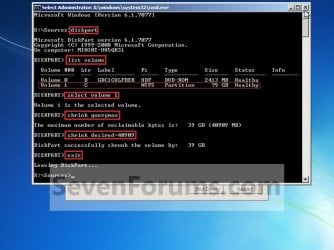
B) In the command prompt, select and shrink the XP volume by how many MB (1024 MB = 1 GB) you want to have for this Windows 7 partition. (See screenshot below)
NOTE: You would do steps 2 to 9 in METHOD TWO at that link. Windows 7 will need a minimum of 16 GB (16384 MB).
XP-W7_1.jpg
C) Click on the X at the top right corner to close the command prompt. (See screenshot above)

D) Click on the X at the top right corner to close System Recovery Options. (See screenshot below)
XP-W7_2.jpg
E) Go to step 4.
3. To Use a Separate Hard Disk Drive than the XP Drive
A) Boot from your Windows 7 installation disc.
NOTE: Make sure that the CD/DVD drive is selected first in the boot order in the BIOS.
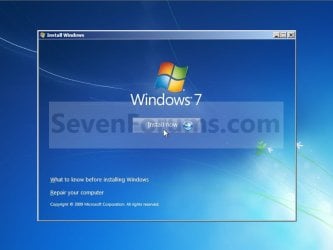
4. Click on the Install now button. (See screenshot below)
XP-W7_3.jpg
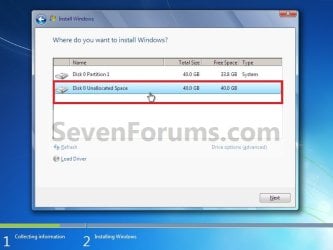
5. When you get to this point, select the partition (step 2) or hard drive to install Windows 7 on. (See screenshot below)
XP-W7_4.jpg
6. Finish installing Windows 7.
NOTE: You would start at step 9 in that link to finish installing Windows 7.

7. When finished, restart the computer to have the option to boot from XP (Earlier Verision of Windows) or Windows 7. (See screenshot below)

   Note
If you are only booting into Windows 7 and do not have XP listed in the Windows Boot Manager, then you can install only EasyBCD (step 8 Option Two below) to add XP (or Windows 7) while started in Windows 7 the same way to the boot list.

Example.jpg


OPTION TWO

When Windows 7 is Installed First


   Warning

1. To Create a New Partition from the Windows 7 Hard Disk Drive
NOTE: If you want to install XP on a separate internal hard drive instead, then skip this step and go to step 2.
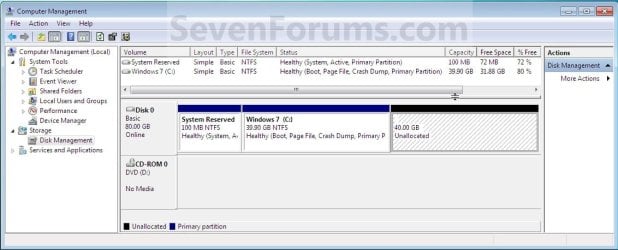
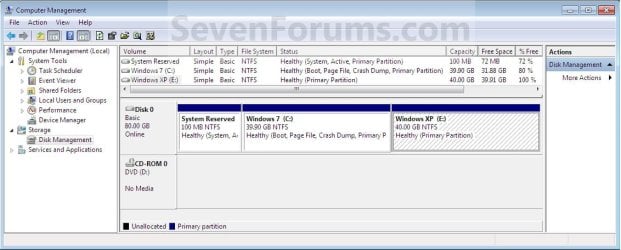
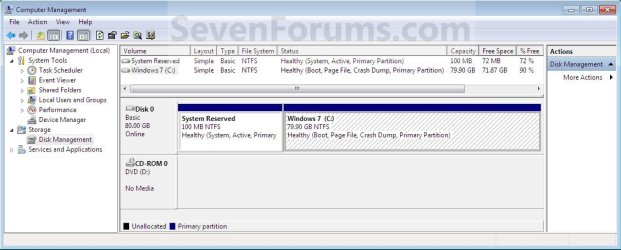
A) In Windows 7, select and shrink the Windows 7 volume in Disk Management by how many MB (1024 MB = 1 GB) you want to have for this XP partition. (See screenshots below)
NOTE: You would do all of Method One at that link.
W7-XP-1.jpg

W7-XP-2.jpg

W7-XP-3.jpg
2. Insert your XP installation disc, then restart the computer and press any key to boot from it when prompted. (See screenshot below)
NOTE: Make sure that the CD/DVD drive is selected first in the boot order in the BIOS.

Step1.jpg
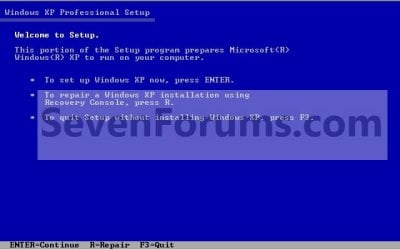
3. From XP Setup, Press Enter. (See screenshot below)


   Warning

W7-XP-4.jpg
4. Press F8. (See screenshot below)
NOTE: On some multimedia keyboards, you may need to press the F-Lock or Function key before pressing F8.
W7-XP-5.jpg
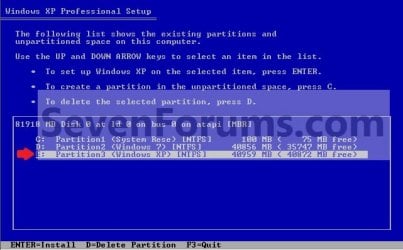
5. Select the partition (step 1) or hard drive that you want to install XP on using the arrow keys and press Enter.
W7-XP-6.jpg
6. Finish installing XP.


   Tip
If you get Error loading Operating System after XP restarts:
  • Using your Windows 7 installation disc, boot to the command prompt at startup.
  • Type in these comands below, and press enter after each one.
    • bootrec /FixMbr
    • bootrec /FixBoot
    • bootrec /RebuildBcd
  • Exit the command prompt and restart the computer.
  • At this point, Windows 7 should boot up the same way before trying to install XP.
  • Continue to step 8 below and run EasyBCD from Windows 7 instead.

7. In XP, download and install .Net Framework 2.0 (32-bit) version or .Net Framework 2.0 (64-bit) version first, and EasyBCD (free version) for your 32-bit (x86) or 64-bit (x86) XP.
NOTE: In XP, Net Framework is required to be installed to run EasyBCD. After you click on Register (at bottom of link) for the free EasyBCD, registration is not required to download it.

8. Run EasyBCD (free version).
NOTE: This is required to repair the Windows 7 boot file and add XP to the Windows Boot Manager list.

9. On the left side of EasyBCD, click on the Add New Entry button. (See screenshot below)
A) In the top section under Operating Systems, click on the Windows tab. (See screenshot below)
B) To the right of Type, select Windows NT/2k/XP/2k3 from the drop down menu. (See screenshot below)
:warn:WARNING: Be sure to leave the Automatically detect correct drive box checked.

C) To the right of Name, you can leave the default Microsoft Windows XP as the name to be displayed in the Windows Boot Manager, or you can type whatever name you would like to have instead. (See screenshot below)
D) Click on the Add Entry button. (See screenshot below)
W7-XP-7.jpg
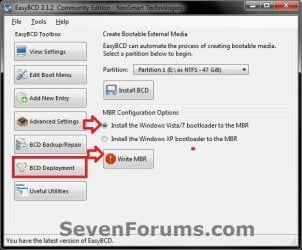
10. On the left side of EasyBCD, click on the BCD Deployment button, select (dot) the Install the Windows Vista/7 bootloader to the MBR option, and click on the Write MBR button. (See screenshot below)
W7-XP-9.jpg
11. Close EasyBCD.

12. Restart the computer to have the option to boot from Microsoft Windows XP or Windows 7. (See screenshot below)
Example2.jpg
   Tip
If Windows 7 will not start up when selected, then use your Windows 7 installation DVD to do a Startup Repair.

That's it,
Shawn


Last edited:
You will still be able to activate online as usual when you reinstall on the new SSD later. If it won't activate online for some reason, you will still be able to activate by phone.

Go ahead and create a new thread about your Windows Update issue in the Windows Updates & Activation forum with as much details as possible about is.
 

My Computer My Computer

At a glance

64-bit Windows 11 Pro for WorkstationsIntel i7-8700K OC'd to 5 GHz64 GB (4x16GB) G.SKILL TridentZ RGB DDR4 3600...ASUS ROG-STRIX-GTX1080TI-O11G-GAMING
Computer type
PC/Desktop
Computer Manufacturer/Model Number
Self built custom
OS
64-bit Windows 11 Pro for Workstations
CPU
Intel i7-8700K OC'd to 5 GHz
Motherboard
ASUS ROG Maximus XI Formula Z390
Memory
64 GB (4x16GB) G.SKILL TridentZ RGB DDR4 3600 MHz
Graphics Card(s)
ASUS ROG-STRIX-GTX1080TI-O11G-GAMING
Sound Card
Integrated
Monitor(s) Displays
2 x Samsung Odyssey G7 27"
Screen Resolution
2560x1440
Hard Drives
1TB Samsung 990 PRO M.2,
4TB Samsung 990 PRO PRO M.2,
TerraMaster F8 SSD Plus NAS
PSU
Seasonic Prime Titanium 850W
Case
Thermaltake Core P3
Cooling
Corsair Hydro H115i
Keyboard
Logitech wireless K800
Mouse
Logitech MX Master 4
Internet Speed
2 Gb/s Download and 100 Mb/s Upload
Antivirus
Malwarebyte Anti-Malware Premium
Browser
Google Chrome
Other Info
Logitech Z625 speaker system,
Logitech BRIO 4K Pro webcam,
HP Color LaserJet Pro MFP M477fdn,
APC SMART-UPS RT 1000 XL - SURT1000XLI,
Galaxy S23 Plus phone
Okay. So finished clean install of Windows 7 onto the solid state drive I bought and well, its proving the biggest disappointment. Windows Update is working but almost every thing I do or click ends up hanging something - every window goes to Not Responding for ages. Takes ages to do anything.

I suspect it must have to do with the SSD. I thought using a SSD drive was plug and play.

Are there any special settings or drivers needed for an SSD?
 

My Computer My Computer

At a glance

Windows XP SP3
Computer type
Laptop
Computer Manufacturer/Model Number
Lenovo ThinkPas T61p
OS
Windows XP SP3

My Computer My Computer

At a glance

64-bit Windows 11 Pro for WorkstationsIntel i7-8700K OC'd to 5 GHz64 GB (4x16GB) G.SKILL TridentZ RGB DDR4 3600...ASUS ROG-STRIX-GTX1080TI-O11G-GAMING
Computer type
PC/Desktop
Computer Manufacturer/Model Number
Self built custom
OS
64-bit Windows 11 Pro for Workstations
CPU
Intel i7-8700K OC'd to 5 GHz
Motherboard
ASUS ROG Maximus XI Formula Z390
Memory
64 GB (4x16GB) G.SKILL TridentZ RGB DDR4 3600 MHz
Graphics Card(s)
ASUS ROG-STRIX-GTX1080TI-O11G-GAMING
Sound Card
Integrated
Monitor(s) Displays
2 x Samsung Odyssey G7 27"
Screen Resolution
2560x1440
Hard Drives
1TB Samsung 990 PRO M.2,
4TB Samsung 990 PRO PRO M.2,
TerraMaster F8 SSD Plus NAS
PSU
Seasonic Prime Titanium 850W
Case
Thermaltake Core P3
Cooling
Corsair Hydro H115i
Keyboard
Logitech wireless K800
Mouse
Logitech MX Master 4
Internet Speed
2 Gb/s Download and 100 Mb/s Upload
Antivirus
Malwarebyte Anti-Malware Premium
Browser
Google Chrome
Other Info
Logitech Z625 speaker system,
Logitech BRIO 4K Pro webcam,
HP Color LaserJet Pro MFP M477fdn,
APC SMART-UPS RT 1000 XL - SURT1000XLI,
Galaxy S23 Plus phone
Yeah, something is not right. A SSD should make a huge difference in performance over a HDD.

yes, very disappointing. every thing I tried to run, copy or move caused window to hangchange to not responding and if I clicked again white out until ages later. the kind of bad experience to make me stay away from SSD forever and stick to what I know.

Especially given my next to replies.

Did you have your BIOS set to AHCI and not IDE when installing Windows?)

Yes, don't forget I have a parallel (dual boot) installation on a regular HDD running almost perfectly but for the Windows Update and related issues.

Check to make sure that you have all of your Thinkpad T61p chipset and SATA drivers installed for the OS you have installed on it.

Did all that. I keep all my drivers on my NAS and have done for years checking periodically for updates even for Windows 7 as I had expected to migrate years before now. So I have everything at hand.

As I mention I have a parallel installation on a regular HDD although under Device Manage in both installations, and in addition to a Biometric Fingerprint reader, which I never install (PITA), I had three unknown or 'Other' Base System Devices, for which I could not find drivers.

:confused: However weird development. I can't remember how I found it or what the solution was originally meant for however, after hours of browsing for a solution to both the unrelated Windows Update problem and SDD problem I found a reference to installing Intel Rapid Storage Technology Drivers.

Which I did except that the link was to driver on an HP support page and one which I suspect is not the latest. Nonetheless, hey presto Windows Update and every seemingly related issue which was not working and or causing errors (on the regular HDD) suddenly was and is.

So I installed every Windows Update which MS threw at me.

Even stranger I see now that I only have two unknown or Other Base System Devices under Device manager and despite not installing any driver for it, no Biometric Fingerprint reader any more. I don't know if this change is since installing SP1 and over 150 Updates.

Anyway as the SSD installation is still impossible to use and I don't have the time or inclination to find a solution, I am going to try and return it. Many of the related posts or articles I read point to this 520 series drive from Intel being a problem child. Just my luck! :banghead:
 

My Computer My Computer

At a glance

Windows XP SP3
Computer type
Laptop
Computer Manufacturer/Model Number
Lenovo ThinkPas T61p
OS
Windows XP SP3
What type of IRST do you have? It can be used for MSATA drive cache RAID which is itself a small SSD chip on the HD. Is IRST enabled for SATA controller in BIOS setup? More here about Install Windows on System with MSATA and ISRT - Windows 7 Help Forums

Can we see a screenshot of http://www.sevenforums.com/tutorial...nt-post-screen-capture-image.html#post2261610 showing all drives?

You may need SSD Alignment - Windows 7 Forums or to consider http://www.sevenforums.com/tutorials/70822-ssd-tweaks-optimizations-windows-7-a.html.

In addition look over these steps for doing a http://www.sevenforums.com/tutorials/219487-clean-reinstall-factory-oem-windows-7-a.html#post1839164 which compile everything that works best in tens of thousands of installs we've helped with here.
 
What type of IRST do you have? It can be used for MSATA drive cache RAID which is itself a small SSD chip on the HD. Is IRST enabled for SATA controller in BIOS setup? More here about Install Windows on System with MSATA and ISRT - Windows 7 Help Forums
Firstly I am not even sure I am supposed to have IRST installed or actually what I should have installed it for in the first place.

I only found a reference to installing it fixing something - I cant remember what as I was looking for a solution to Windows Update not working and related issues on my HDD Win 7 installation at the same time as looking for a solution to the SDD problem and was suffering information overload. But I did install it and hey presto, all the windows update related issues went away.

I suspect I am not actually mean to have it installed as I have never come across it before for my ThinkPads.

You could except that I returned the SDD to the store where I bought it. I don't think they're going to take it back as they have it apparently working in another application and suspect that it might related to my ThinkPad being 'older'.

I started a thread about my problem on a ThinkPad specific forum. Some replies are indicating that SDD which have a SandForce controller, including the Intel 520 series SDD I bought, are problematic, at least in the ThinkPads I have, which are some years old now. Here is a link to that thread.

In addition look over these steps for doing a http://www.sevenforums.com/tutorials/219487-clean-reinstall-factory-oem-windows-7-a.html#post1839164 which compile everything that works best in tens of thousands of installs we've helped with here.
I did a clean install following that guide.

I used an Intel Diagnostic tool and it tweaked some things but made no difference.

I suspect that the store believe my ThinkPad is too old for SDDs and won't ultimately, let me exchange the SDD.

Some further reading I did would suggest that Lenovo doesn't provide an official BIOS which allows SATA II or better. There is apparently an unofficial BIOS developed by a ThinkPad enthusiast which apparently does.

T61 Wiki
| Middleton BIOS questions

I am just weighing up now whether to try it or not.
 

My Computer My Computer

At a glance

Windows XP SP3
Computer type
Laptop
Computer Manufacturer/Model Number
Lenovo ThinkPas T61p
OS
Windows XP SP3
Shawn may have some thoughts on that. I wouldn't modify a BIOS except on an older board /PC I can afford to lose. And I'd have at least one known-good rescue method.
 
Shawn may have some thoughts on that. I wouldn't modify a BIOS except on an older board /PC I can afford to lose. And I'd have at least one known-good rescue method.

This is what's weighing on my mind.

Although initially a reluctant one, my decision to upgrade from XP to Windows 7 has been made. So now I have to also decide whether to stick with what I know HDD, or also upgrade to SDD.

Unfortunately, this is my only experience with an SSD so I don't know whether to persist with it, or whether the benefits of an SDD would be worth the risk of flashing the BIOS.

This unofficial BIOS by the way has apparently been used and tested by quite a few.

See this post: What does the caveat mean to you?

As I am reading the BIOS is quite a sought after mod because these Thinkpads are otherwise worth keeping and using. I once replaced a back light in an older Thinkpad and didn't ever think much else was possible. But the T61 Wiki details upgrades including upgrading the wireless card and even CPU. I have bought the wireless card on eBay which I hope is plug and play and will give me wireless 'n'.

BTW who is Shawn as I am very new here. (Brink?)
 
Last edited:

My Computer My Computer

At a glance

Windows XP SP3
Computer type
Laptop
Computer Manufacturer/Model Number
Lenovo ThinkPas T61p
OS
Windows XP SP3
If you use an unofficial BIOS, you would void all warranties. :(
 

My Computer My Computer

At a glance

64-bit Windows 11 Pro for WorkstationsIntel i7-8700K OC'd to 5 GHz64 GB (4x16GB) G.SKILL TridentZ RGB DDR4 3600...ASUS ROG-STRIX-GTX1080TI-O11G-GAMING
Computer type
PC/Desktop
Computer Manufacturer/Model Number
Self built custom
OS
64-bit Windows 11 Pro for Workstations
CPU
Intel i7-8700K OC'd to 5 GHz
Motherboard
ASUS ROG Maximus XI Formula Z390
Memory
64 GB (4x16GB) G.SKILL TridentZ RGB DDR4 3600 MHz
Graphics Card(s)
ASUS ROG-STRIX-GTX1080TI-O11G-GAMING
Sound Card
Integrated
Monitor(s) Displays
2 x Samsung Odyssey G7 27"
Screen Resolution
2560x1440
Hard Drives
1TB Samsung 990 PRO M.2,
4TB Samsung 990 PRO PRO M.2,
TerraMaster F8 SSD Plus NAS
PSU
Seasonic Prime Titanium 850W
Case
Thermaltake Core P3
Cooling
Corsair Hydro H115i
Keyboard
Logitech wireless K800
Mouse
Logitech MX Master 4
Internet Speed
2 Gb/s Download and 100 Mb/s Upload
Antivirus
Malwarebyte Anti-Malware Premium
Browser
Google Chrome
Other Info
Logitech Z625 speaker system,
Logitech BRIO 4K Pro webcam,
HP Color LaserJet Pro MFP M477fdn,
APC SMART-UPS RT 1000 XL - SURT1000XLI,
Galaxy S23 Plus phone
If you use an unofficial BIOS, you would void all warranties. :(

Thanks. previous poster mentioned Shawn, that you?

Anyway notebook is well out of warranty. And although it would be a real pity, if I did brick the laptop I am just itching to buy another :D.

But in reality this is one perfectly good for now and probably years to come so I decided to risk it and install the BIOS. Basically it seems to be an official BIOS version 2.9 (current is 2.3) hacked to enable SATA II.

I doubt it will because I can't imagine the sort of lag and not responding I saw before could solely be because of SATA I, but now Ill have to get the SSD back from the store and see if this makes a difference.

Before I do how can I tell whether the regular HDD is operating at SATA II speeds?
 

My Computer My Computer

At a glance

Windows XP SP3
Computer type
Laptop
Computer Manufacturer/Model Number
Lenovo ThinkPas T61p
OS
Windows XP SP3

My Computer My Computer

At a glance

64-bit Windows 11 Pro for WorkstationsIntel i7-8700K OC'd to 5 GHz64 GB (4x16GB) G.SKILL TridentZ RGB DDR4 3600...ASUS ROG-STRIX-GTX1080TI-O11G-GAMING
Computer type
PC/Desktop
Computer Manufacturer/Model Number
Self built custom
OS
64-bit Windows 11 Pro for Workstations
CPU
Intel i7-8700K OC'd to 5 GHz
Motherboard
ASUS ROG Maximus XI Formula Z390
Memory
64 GB (4x16GB) G.SKILL TridentZ RGB DDR4 3600 MHz
Graphics Card(s)
ASUS ROG-STRIX-GTX1080TI-O11G-GAMING
Sound Card
Integrated
Monitor(s) Displays
2 x Samsung Odyssey G7 27"
Screen Resolution
2560x1440
Hard Drives
1TB Samsung 990 PRO M.2,
4TB Samsung 990 PRO PRO M.2,
TerraMaster F8 SSD Plus NAS
PSU
Seasonic Prime Titanium 850W
Case
Thermaltake Core P3
Cooling
Corsair Hydro H115i
Keyboard
Logitech wireless K800
Mouse
Logitech MX Master 4
Internet Speed
2 Gb/s Download and 100 Mb/s Upload
Antivirus
Malwarebyte Anti-Malware Premium
Browser
Google Chrome
Other Info
Logitech Z625 speaker system,
Logitech BRIO 4K Pro webcam,
HP Color LaserJet Pro MFP M477fdn,
APC SMART-UPS RT 1000 XL - SURT1000XLI,
Galaxy S23 Plus phone
Backup and Restored partition fails to start.

Yep, that's me.

You could use a HDD benchmarking program like below to see what the HDD is running at.

Hi Shawn.

Thanks. I looked into all that but in the end returned the SSD for a refund.

I was used to having two disks in each of notebooks, one for the system and the other data. The second in place of its optical drive. So for two notebooks, I always needed 4 disks.

But I need to make savings so while I have two excellent Hitachi drives one 500GB and the other 1TB, and have a 12TB NAS with 3 disks configured as a 6TB RAID5 (the 4th as a hot swap), I decided I could do without the additional disks and also therefore a new SSD. Although less preferable to 2 separate disks, 500GB and 1TB are large enough to partition 2 drives on each, one for the OS and the other, data which for some reasons I don't want to saved to or only to reside on the NAS.

As I presently have XP and Windows 7 installed on the 500GB disk as a dual boot configuration I thought I would used Drive Snapshot which if you don;t know is I think, an excellent program with a really small footprint, to back up each partition, and then restore each OS to a a new partition on the 1TB disk.

In the same machine, booting this 1TB gets to the OS selection but selecting either OS produces an error. XP complains that there is something wrong with NTLDR or it is missing and Windows 7 that there is some device error.

In the case of XP I know NTLDR does exist and I have no idea why Windows 7 can't start. It's a little beyond me - as I suspect the answer is an obvious one, I though you might know?

Do you know what it is about backing up a whole partition (OS), and then restoring it to a new disk, which would prevent either OS from starting?

EDIT: This is from memory so I'll check first but the screen after selecting Windows 7 shows
status: 0xc0000225
info: the boot selection failed because a required device is inaccessible
and the screen after selecting Windows 7 shows
/NDLR is missing
status: 0xc0000225

 
Last edited:

My Computer My Computer

At a glance

Windows XP SP3
Computer type
Laptop
Computer Manufacturer/Model Number
Lenovo ThinkPas T61p
OS
Windows XP SP3

My Computer My Computer

At a glance

64-bit Windows 11 Pro for WorkstationsIntel i7-8700K OC'd to 5 GHz64 GB (4x16GB) G.SKILL TridentZ RGB DDR4 3600...ASUS ROG-STRIX-GTX1080TI-O11G-GAMING
Computer type
PC/Desktop
Computer Manufacturer/Model Number
Self built custom
OS
64-bit Windows 11 Pro for Workstations
CPU
Intel i7-8700K OC'd to 5 GHz
Motherboard
ASUS ROG Maximus XI Formula Z390
Memory
64 GB (4x16GB) G.SKILL TridentZ RGB DDR4 3600 MHz
Graphics Card(s)
ASUS ROG-STRIX-GTX1080TI-O11G-GAMING
Sound Card
Integrated
Monitor(s) Displays
2 x Samsung Odyssey G7 27"
Screen Resolution
2560x1440
Hard Drives
1TB Samsung 990 PRO M.2,
4TB Samsung 990 PRO PRO M.2,
TerraMaster F8 SSD Plus NAS
PSU
Seasonic Prime Titanium 850W
Case
Thermaltake Core P3
Cooling
Corsair Hydro H115i
Keyboard
Logitech wireless K800
Mouse
Logitech MX Master 4
Internet Speed
2 Gb/s Download and 100 Mb/s Upload
Antivirus
Malwarebyte Anti-Malware Premium
Browser
Google Chrome
Other Info
Logitech Z625 speaker system,
Logitech BRIO 4K Pro webcam,
HP Color LaserJet Pro MFP M477fdn,
APC SMART-UPS RT 1000 XL - SURT1000XLI,
Galaxy S23 Plus phone
Normally, it would be best to back up and restore the whole disk instead of just a partition to avoid missing to restore any system partitions.

You might see if this below may be able to help repair your boot manager. :)

http://www.sevenforums.com/tutorials/20864-mbr-restore-windows-7-master-boot-record.html

yes I have given up on backing up and restoring single partitions and ultimately came to the same conclusion. However as I do this so seldom have no idea which program I should try. I tried Clonezilla but I found the syntax complex and because it recognized the two disks (source and target) in my notebook the wrong around I inadvertently selected the intended target disk as the source disk and the source disk as the target disk I ended up losing my XP partition which presently is the only fully installed partition.

But mysteriously the XP partition I had earlier restored to the larger newer disk so I hope I might be able to restore XP back to the 'last known' working confirguration.

Anyhow what could I try to back up or clone a whole disk? If Clonezilla then I'll have to be careful when selecting source and target disks. Also it seem to have a problem with the disk sizes (one is 500GB and the newer one 1TB).
 

My Computer My Computer

At a glance

Windows XP SP3
Computer type
Laptop
Computer Manufacturer/Model Number
Lenovo ThinkPas T61p
OS
Windows XP SP3

My Computer My Computer

At a glance

64-bit Windows 11 Pro for WorkstationsIntel i7-8700K OC'd to 5 GHz64 GB (4x16GB) G.SKILL TridentZ RGB DDR4 3600...ASUS ROG-STRIX-GTX1080TI-O11G-GAMING
Computer type
PC/Desktop
Computer Manufacturer/Model Number
Self built custom
OS
64-bit Windows 11 Pro for Workstations
CPU
Intel i7-8700K OC'd to 5 GHz
Motherboard
ASUS ROG Maximus XI Formula Z390
Memory
64 GB (4x16GB) G.SKILL TridentZ RGB DDR4 3600 MHz
Graphics Card(s)
ASUS ROG-STRIX-GTX1080TI-O11G-GAMING
Sound Card
Integrated
Monitor(s) Displays
2 x Samsung Odyssey G7 27"
Screen Resolution
2560x1440
Hard Drives
1TB Samsung 990 PRO M.2,
4TB Samsung 990 PRO PRO M.2,
TerraMaster F8 SSD Plus NAS
PSU
Seasonic Prime Titanium 850W
Case
Thermaltake Core P3
Cooling
Corsair Hydro H115i
Keyboard
Logitech wireless K800
Mouse
Logitech MX Master 4
Internet Speed
2 Gb/s Download and 100 Mb/s Upload
Antivirus
Malwarebyte Anti-Malware Premium
Browser
Google Chrome
Other Info
Logitech Z625 speaker system,
Logitech BRIO 4K Pro webcam,
HP Color LaserJet Pro MFP M477fdn,
APC SMART-UPS RT 1000 XL - SURT1000XLI,
Galaxy S23 Plus phone
You might see how Macrium Refelect Free may work for you.

http://www.sevenforums.com/tutorials/73828-imaging-free-macrium.html

Thanks for the recommendation Shawn. What a program!

Better than all the useless and problematic ones I either looked at or tried.

It not fixed the boot problems which I was having on not only one partition but both but then easily and perfectly copied the whole disk live under Windows. Beautiful.

So I have my solution and for now, sticking to regular disks :party: Thanks again
 

My Computer My Computer

At a glance

Windows XP SP3
Computer type
Laptop
Computer Manufacturer/Model Number
Lenovo ThinkPas T61p
OS
Windows XP SP3
You're welcome. I'm glad it'll work for you for now.
 

My Computer My Computer

At a glance

64-bit Windows 11 Pro for WorkstationsIntel i7-8700K OC'd to 5 GHz64 GB (4x16GB) G.SKILL TridentZ RGB DDR4 3600...ASUS ROG-STRIX-GTX1080TI-O11G-GAMING
Computer type
PC/Desktop
Computer Manufacturer/Model Number
Self built custom
OS
64-bit Windows 11 Pro for Workstations
CPU
Intel i7-8700K OC'd to 5 GHz
Motherboard
ASUS ROG Maximus XI Formula Z390
Memory
64 GB (4x16GB) G.SKILL TridentZ RGB DDR4 3600 MHz
Graphics Card(s)
ASUS ROG-STRIX-GTX1080TI-O11G-GAMING
Sound Card
Integrated
Monitor(s) Displays
2 x Samsung Odyssey G7 27"
Screen Resolution
2560x1440
Hard Drives
1TB Samsung 990 PRO M.2,
4TB Samsung 990 PRO PRO M.2,
TerraMaster F8 SSD Plus NAS
PSU
Seasonic Prime Titanium 850W
Case
Thermaltake Core P3
Cooling
Corsair Hydro H115i
Keyboard
Logitech wireless K800
Mouse
Logitech MX Master 4
Internet Speed
2 Gb/s Download and 100 Mb/s Upload
Antivirus
Malwarebyte Anti-Malware Premium
Browser
Google Chrome
Other Info
Logitech Z625 speaker system,
Logitech BRIO 4K Pro webcam,
HP Color LaserJet Pro MFP M477fdn,
APC SMART-UPS RT 1000 XL - SURT1000XLI,
Galaxy S23 Plus phone
You're welcome. I'm glad it'll work for you for now.

Yeah, all's well that ends well. I am happy to say that as I get into it I wish I had switched to Windows 7 ages ago.

Just a pity that while I have 2 ThinkPads, and was happily going to use either of my two XP keys for the first older T60 Thinkpad, I only have 1 Windows 7 key. :(
 

My Computer My Computer

At a glance

Windows XP SP3
Computer type
Laptop
Computer Manufacturer/Model Number
Lenovo ThinkPas T61p
OS
Windows XP SP3
I have a TV tuner that worked flawlessly when I had XP. I tried to use it in Win 7, but all i get is a message that the hardware cannot be found. I even changed slots and still no luck. My question is this: If i reinstall XP as a dual OS, would that tuner work?
 

My Computer My Computer

At a glance

Win 7 x64.Win 10AMD A10 7850K8 gbNil
Computer type
PC/Desktop
Computer Manufacturer/Model Number
Build OEM Desktop
OS
Win 7 x64.Win 10
CPU
AMD A10 7850K
Motherboard
Asus A88X-Pro
Memory
8 gb
Graphics Card(s)
Nil
Sound Card
Nil
Monitor(s) Displays
Insignia
Screen Resolution
1376 x
Hard Drives
500 gb
Case
ABS
Keyboard
Sony
Mouse
OEM
Antivirus
Windows defender, Windows essential, Malware, autospyware
Browser
Firefox,Vivaldi
I have a TV tuner that worked flawlessly when I had XP. I tried to use it in Win 7, but all i get is a message that the hardware cannot be found. I even changed slots and still no luck. My question is this: If i reinstall XP as a dual OS, would that tuner work?

Hello Novel,

The TV tuner should work while you were booted into XP, but it still wouldn't work in Windows 7.

If the TV tuner has drivers available for Windows 7 that you could install, then it may be able to work properly in Windows 7.

What is the brand and model of the TV tuner? We may be able to help find W7 drivers for it if any are available.
 

My Computer My Computer

At a glance

64-bit Windows 11 Pro for WorkstationsIntel i7-8700K OC'd to 5 GHz64 GB (4x16GB) G.SKILL TridentZ RGB DDR4 3600...ASUS ROG-STRIX-GTX1080TI-O11G-GAMING
Computer type
PC/Desktop
Computer Manufacturer/Model Number
Self built custom
OS
64-bit Windows 11 Pro for Workstations
CPU
Intel i7-8700K OC'd to 5 GHz
Motherboard
ASUS ROG Maximus XI Formula Z390
Memory
64 GB (4x16GB) G.SKILL TridentZ RGB DDR4 3600 MHz
Graphics Card(s)
ASUS ROG-STRIX-GTX1080TI-O11G-GAMING
Sound Card
Integrated
Monitor(s) Displays
2 x Samsung Odyssey G7 27"
Screen Resolution
2560x1440
Hard Drives
1TB Samsung 990 PRO M.2,
4TB Samsung 990 PRO PRO M.2,
TerraMaster F8 SSD Plus NAS
PSU
Seasonic Prime Titanium 850W
Case
Thermaltake Core P3
Cooling
Corsair Hydro H115i
Keyboard
Logitech wireless K800
Mouse
Logitech MX Master 4
Internet Speed
2 Gb/s Download and 100 Mb/s Upload
Antivirus
Malwarebyte Anti-Malware Premium
Browser
Google Chrome
Other Info
Logitech Z625 speaker system,
Logitech BRIO 4K Pro webcam,
HP Color LaserJet Pro MFP M477fdn,
APC SMART-UPS RT 1000 XL - SURT1000XLI,
Galaxy S23 Plus phone
Back
Top