Windows has detected an IP address conflict

Involute

New member
Local time
6:26 AM
Messages
55
I'm running Win7 x64. My PC is connected directly to a Netgear R7000 router to which several other devices are connected wirelessly and directly. This setup has been stable for several months. I started getting the title error two or three days ago, roughly 40 times/hour. I went into Event Viewer and saw that Event ID 1014 (Warning: DNS Client Services) always occurs contemporaneously with the error, and Event ID 4199 (Error: Tcpip) does about 25% of the time; 4199 only appear when 1014 does.

The full text of the 1014 is "Name resolution for the name 6.1.168.192.in-addr.arpa timed out after none of the configured DNS servers responded." Though the leading digit in the address (6 in this example) varies.

The full text of the 4199 is "The system detected an address conflict for IP address :: with the system having network hardware address 00-00-00-00-00-00. Network operations on this system may be disrupted as a result." This text is always the same.

I've tried ipconfig /release, ipconfig /renew, to no effect.

Any ideas? Thanks.
 

My Computer My Computer

At a glance

Windows 7 Pro x64Intel i7-97012GBNvidia Quadro 4000
Computer Manufacturer/Model Number
Titanus
OS
Windows 7 Pro x64
CPU
Intel i7-970
Motherboard
Asus P-6X58D-E
Memory
12GB
Graphics Card(s)
Nvidia Quadro 4000
Sound Card
Creative SB X-Fi
Monitor(s) Displays
Samsung SyncMaster 204T
Hard Drives
Corsair Nova V128 128GB SSD; WD Velociraptor 600GB (x2 configured as RAID 1)
Case
Tuniq 3
Cooling
ECO Advanced Liquid Cooling
Internet Speed
Cable
That happens with my Netgear at times too. I power it off, wait for 30 seconds and power it back on. That fixes it.
 

My Computer My Computer

At a glance

Vista, Windows7, Mint Mate, Zorin, Windows 8from 1.6GHz Duo to i7
Computer Manufacturer/Model Number
HP, Dell, Gateway, Toshiba - 4 laptops and 2 desktops
OS
Vista, Windows7, Mint Mate, Zorin, Windows 8
CPU
from 1.6GHz Duo to i7
Monitor(s) Displays
2x HP w2207
Hard Drives
5x HDD, 7x SSD, 12x Externals
Keyboard
with trackball - no mices
Mouse
Trackball mice
Internet Speed
DSL 6000
That seems to be working. Thanks.
 

My Computer My Computer

At a glance

Windows 7 Pro x64Intel i7-97012GBNvidia Quadro 4000
Computer Manufacturer/Model Number
Titanus
OS
Windows 7 Pro x64
CPU
Intel i7-970
Motherboard
Asus P-6X58D-E
Memory
12GB
Graphics Card(s)
Nvidia Quadro 4000
Sound Card
Creative SB X-Fi
Monitor(s) Displays
Samsung SyncMaster 204T
Hard Drives
Corsair Nova V128 128GB SSD; WD Velociraptor 600GB (x2 configured as RAID 1)
Case
Tuniq 3
Cooling
ECO Advanced Liquid Cooling
Internet Speed
Cable
You are welcome.
 

My Computer My Computer

At a glance

Vista, Windows7, Mint Mate, Zorin, Windows 8from 1.6GHz Duo to i7
Computer Manufacturer/Model Number
HP, Dell, Gateway, Toshiba - 4 laptops and 2 desktops
OS
Vista, Windows7, Mint Mate, Zorin, Windows 8
CPU
from 1.6GHz Duo to i7
Monitor(s) Displays
2x HP w2207
Hard Drives
5x HDD, 7x SSD, 12x Externals
Keyboard
with trackball - no mices
Mouse
Trackball mice
Internet Speed
DSL 6000
Unfortunately, the problem's back after disappearing for seven hours yesterday. Power cycling the router has no effect. Any other ideas?
 

My Computer My Computer

At a glance

Windows 7 Pro x64Intel i7-97012GBNvidia Quadro 4000
Computer Manufacturer/Model Number
Titanus
OS
Windows 7 Pro x64
CPU
Intel i7-970
Motherboard
Asus P-6X58D-E
Memory
12GB
Graphics Card(s)
Nvidia Quadro 4000
Sound Card
Creative SB X-Fi
Monitor(s) Displays
Samsung SyncMaster 204T
Hard Drives
Corsair Nova V128 128GB SSD; WD Velociraptor 600GB (x2 configured as RAID 1)
Case
Tuniq 3
Cooling
ECO Advanced Liquid Cooling
Internet Speed
Cable
try powering the router and everything that is connected to it down
 
Last edited:

My Computer My Computer

At a glance

Microsoft Windows 7 Ultimate 32-bit 7601Intel(R) Pentium(R) Dual CPU E2160 @ 1.80GHz4.00 GB(1) VNC Mirror Driver (2) Intel(R) G33/G31 Ex...
Computer type
PC/Desktop
Computer Manufacturer/Model Number
Compac
OS
Microsoft Windows 7 Ultimate 32-bit 7601
CPU
Intel(R) Pentium(R) Dual CPU E2160 @ 1.80GHz
Motherboard
MSI Boston
Memory
4.00 GB
Graphics Card(s)
(1) VNC Mirror Driver (2) Intel(R) G33/G31 Express Chipset
Sound Card
Disabled
Monitor(s) Displays
Headless
Screen Resolution
1280 x 960 x 32 bits (4294967296 colors) @ 60 Hz
Hard Drives
ST3320820AS ATA Device
Keyboard
Headless
Mouse
Headless
Antivirus
Malwarebytes pro
Other Info
Also
Windows 8.1 Laptop and Desktop both Acer
Actually, I think I've narrowed the problem down to an interaction with my iPhone. When the phone is plugged into a USB port (either on a hub or directly on the PC), I have the problem. When it's not plugged in, no problem. I guess it's over to the iOS forums. <sigh>
 

My Computer My Computer

At a glance

Windows 7 Pro x64Intel i7-97012GBNvidia Quadro 4000
Computer Manufacturer/Model Number
Titanus
OS
Windows 7 Pro x64
CPU
Intel i7-970
Motherboard
Asus P-6X58D-E
Memory
12GB
Graphics Card(s)
Nvidia Quadro 4000
Sound Card
Creative SB X-Fi
Monitor(s) Displays
Samsung SyncMaster 204T
Hard Drives
Corsair Nova V128 128GB SSD; WD Velociraptor 600GB (x2 configured as RAID 1)
Case
Tuniq 3
Cooling
ECO Advanced Liquid Cooling
Internet Speed
Cable
In my case the cause is that the router is used by my desktop and the laptop of my wife. I think the conflict arises when several devices use the router - any devices not just phones.

This problem only occurs with our setup here in Germany. In our Florida home where the Netgear router is shared by 1 desktop, 2 laptops and an Android tablet, this problem never occured.

I am not reallly an expert in connectivity. So I hope that someone who knows this area better has an idea on how to avoid the conflict.
 

My Computer My Computer

At a glance

Vista, Windows7, Mint Mate, Zorin, Windows 8from 1.6GHz Duo to i7
Computer Manufacturer/Model Number
HP, Dell, Gateway, Toshiba - 4 laptops and 2 desktops
OS
Vista, Windows7, Mint Mate, Zorin, Windows 8
CPU
from 1.6GHz Duo to i7
Monitor(s) Displays
2x HP w2207
Hard Drives
5x HDD, 7x SSD, 12x Externals
Keyboard
with trackball - no mices
Mouse
Trackball mice
Internet Speed
DSL 6000
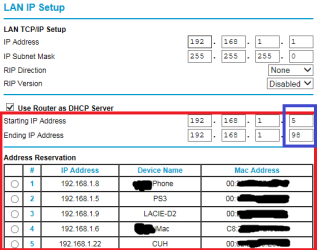
I have a Netgear router too, an older and now unsupported model. But I've made some changes and everything's working fine. I've set up address reservation in the router:
addrReserv.png
This is very easy to do. Connect the device to the network, click add new address reservation from the picture above(add button not visible in this picture) and you can choose from a list of connected devices so you don't have to fill in Mac Address etc.

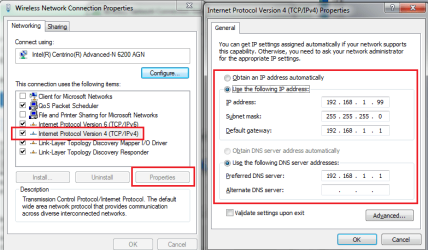
BUT, there's a bug in the router(at least in my older version, hopefully you don't have to do this step) so it can't reserve addresses for devices that has Mac Addresses beginning with something else than 00. So on this laptop I had to modify the WiFi network settings to NOT use DHCP(obtain IP address automatically). I've set it to a static IP outside the DHCP interval specified in the router as seen in picture 1. Therefor this laptop is not in the list of address reservation in picture 1.
staticIP.png

In the router I changed the DHCP interval to 192.168.1.5 - 192.168.1.98
In the WiFi settings on this laptop I set a static IP outside of that range: 192.168.1.99 so the router will never try to give it an IP automatically. Next device that needs a static IP outside the DHCP range I set to 192.168.1.100 and so on.

A little work to set up but works perfectly. Maybe it's time I get a new router if the "Mac address not beginning with 00" bug has been fixed in newer Netgear routers :p
 

My Computer My Computer

At a glance

Windows 7 Pro 32Intel(R) Core(TM) i5 CPU M 540 @ 2.53GHz4,00 GB (Usable 2,98)NVIDIA NVS 5100M
Computer type
Laptop
Computer Manufacturer/Model Number
HP Elitebook 8540p
OS
Windows 7 Pro 32
CPU
Intel(R) Core(TM) i5 CPU M 540 @ 2.53GHz
Motherboard
Hewlett-Packard 1521
Memory
4,00 GB (Usable 2,98)
Graphics Card(s)
NVIDIA NVS 5100M
Sound Card
NVIDIA High Definition Audio
Screen Resolution
1600x900
Hard Drives
INTEL SSDSA2CW120G3
Antivirus
F-Secure Internet Security
Browser
IE, Firefox, Opera
Other Info
Sandboxie,
SRP (Software Restriction Policy),
EMET (Enhanced Mitigation Experience Toolkit),
WFC (Windows Firewall Control by BiniSoft),
Malwarebytes Premium
That happens with my Netgear at times too. I power it off, wait for 30 seconds and power it back on. That fixes it.

Oddly enough; I have a netgear router also but Ive never had to power it off due to something like this. I just power cycle it because sometimes it helps to improve the connection speed a bit.
 

My Computer My Computer

At a glance

Windows 7 ultimate 64-bitIntel I7 2600K 3.4ghzCorsair 16gb ddr3 1600mhzNvidia Geforce gt 430
Computer type
PC/Desktop
Computer Manufacturer/Model Number
custom built
OS
Windows 7 ultimate 64-bit
CPU
Intel I7 2600K 3.4ghz
Motherboard
Asus Evo P8P67
Memory
Corsair 16gb ddr3 1600mhz
Graphics Card(s)
Nvidia Geforce gt 430
Sound Card
Sound Blaster Titanium x-fi pci express
Monitor(s) Displays
Dell E198WFP
Hard Drives
1 western digital 2TB drive.
PSU
Antec 1200 watt
Case
Inwin Dragon Rider
Cooling
6 case supplied cooling fans
Keyboard
logitech mk700
Mouse
logitech m705
Internet Speed
25-50mbps download; 10mbps upload(i think)
Antivirus
avg free 2014
Browser
mozilla firefox
Other Info
Also have a pretty bad speaker setup which is a klipsch promedia 5.1 surround speaker setup with huge subwoofer and lg blu ray player/writer. Also a hp officejet pro 8600 plus wireless all in one and a logitech s7500 webcam.
I'm running Win7 x64. My PC is connected directly to a Netgear R7000 router to which several other devices are connected wirelessly and directly. This setup has been stable for several months. I started getting the title error two or three days ago, roughly 40 times/hour. I went into Event Viewer and saw that Event ID 1014 (Warning: DNS Client Services) always occurs contemporaneously with the error, and Event ID 4199 (Error: Tcpip) does about 25% of the time; 4199 only appear when 1014 does.

The full text of the 1014 is "Name resolution for the name 6.1.168.192.in-addr.arpa timed out after none of the configured DNS servers responded." Though the leading digit in the address (6 in this example) varies.

The full text of the 4199 is "The system detected an address conflict for IP address :: with the system having network hardware address 00-00-00-00-00-00. Network operations on this system may be disrupted as a result." This text is always the same.

I've tried ipconfig /release, ipconfig /renew, to no effect.

Any ideas? Thanks.

This would be the cause... some device that is claiming to own your IP address and triggered windows to prompt you of a possible conflict. Question is ... why is the MAC address set to all 0's ... That is normally an indication of a faulty NIC somewhere or a potential network attack.

Normally this happens during the ARP process...

Josh :)
 

My Computer My Computer

At a glance

Windows 7 Professional x64 SP1 ; Windows Serv...Intel Core i5 2400 @ 3.10GHz8.0GB DDR3 @ 665MHz (2GBx4)AMD Radeon HD 6870
Computer type
PC/Desktop
Computer Manufacturer/Model Number
Custom Built
OS
Windows 7 Professional x64 SP1 ; Windows Server 2012 R2 Standard
CPU
Intel Core i5 2400 @ 3.10GHz
Motherboard
Foxconn H67MP-S/-V/H67MP
Memory
8.0GB DDR3 @ 665MHz (2GBx4)
Graphics Card(s)
AMD Radeon HD 6870
Sound Card
Realtek High Definition Audio
Monitor(s) Displays
AOC 2243W & SMB1930NW
Screen Resolution
1440x900 & 1920x1080
Hard Drives
977GB Seagate ST31000524AS ATA Drive (SATA)
250GB WD iSCSI attached Drive
PSU
750W Gaming PSU
Case
Novatech Night
Cooling
Fan
Keyboard
Dell Standard PS/2 Keyboard
Mouse
R.A.T 07 Gaming Mouse
Internet Speed
Download: 10 Mbps Ping: 30ms Upload: 0.81 Mbps
Browser
Google Chrome
Other Info
Optiarc DVD RW AD-5260S ATA Device
Back
Top