Win7codecs

I just wanted to say thank you for your truly amazing work and for giving us the best codec package going.

I love that your Settings Application under x64 allows us to set the x64 version of Windows Media Player.
It works very well, however I have noticed a small issue, sometimes with the x64 version of WMP pinned to the new Windows 7 taskbar it will open a new instance of WMP rather than use the one that is already there.

Is it possible this could be fixed?
 

My Computer

Computer Manufacturer/Model Number
Custom Build
OS
Windows 7 Ultimate x64
CPU
Intel Pentium D 2.8GHz
Motherboard
Gigabyte GA-P35-DQ6
Memory
4GB
Graphics Card(s)
ATI Radeon HD 2600 Pro
Sound Card
Onboard Realtek HD Audio
Monitor(s) Displays
Asus 22"
Screen Resolution
1680 x 1050
Hard Drives
x2 160GB Seagate RAID 0
Case
Gigabyte 3D Aurora
Cooling
Zalman
Keyboard
Microsoft
Mouse
Microsoft
Internet Speed
4MB
I just wanted to say thank you for your truly amazing work and for giving us the best codec package going.

I love that your Settings Application under x64 allows us to set the x64 version of Windows Media Player.
It works very well, however I have noticed a small issue, sometimes with the x64 version of WMP pinned to the new Windows 7 taskbar it will open a new instance of WMP rather than use the one that is already there.

Is it possible this could be fixed?

If you have the 32bit version 1.3.1 and x64 version 2.1.1 (or greater) already installed open the 32bit Settings Application. (even though you are using the x64 WMP) On the Help TAB is a button to Associate all new filetypes to WMP. This button reads which player is set as default (32bit or 64bit) at the time of use and sets up the associations accordingly.

After using this associations button you will have new rightclick options on all your media files stating 'Add to Windows Media Player list'.

This will Enqueue your selection to play next.
 

My Computer

Computer Manufacturer/Model Number
Selfbuilt
OS
Windows 7 Ultimate 64bit
CPU
i7 2600k
Motherboard
asus P8Z68-V LE
Memory
16GB (4x4) corsair vengeance
Graphics Card(s)
Intel HD3000 iGPU / AMD HD6870 1024MB
Sound Card
bitstreamed to an Onkyo 609
Monitor(s) Displays
Asus VE278 27" LED / Bravia EX7 60" LED
Screen Resolution
native 1080p x2
Hard Drives
4x 2TB int. + 2x 2TB external and a SSD for the boot drive.
PSU
650w Antec
Case
NZXT tempest evo
Cooling
air/stock
Keyboard
Dell
Mouse
logitech m505
Internet Speed
dual: cable/blackberry tether for travel use
Other Info
BD re-writer //
asus notebook G73Jw
Excellent, thanks a lot mate.

Keep up the good work!
 

My Computer

Computer Manufacturer/Model Number
Custom Build
OS
Windows 7 Ultimate x64
CPU
Intel Pentium D 2.8GHz
Motherboard
Gigabyte GA-P35-DQ6
Memory
4GB
Graphics Card(s)
ATI Radeon HD 2600 Pro
Sound Card
Onboard Realtek HD Audio
Monitor(s) Displays
Asus 22"
Screen Resolution
1680 x 1050
Hard Drives
x2 160GB Seagate RAID 0
Case
Gigabyte 3D Aurora
Cooling
Zalman
Keyboard
Microsoft
Mouse
Microsoft
Internet Speed
4MB
quick question. i have onboard sound card VIA HD Audio deck and have 2 front, 2 rear, center and sub speakers hooked up. All the speakers work like they should.

I installed the codec pack and I could no longer get sound through my center speaker. as soon as i uninstalled the codec, all speakers work fine again. and I didn't change any settings before or after.

any suggestions??

thanks
 

My Computer

Computer Manufacturer/Model Number
Custom Built
OS
Windows 7 Pro 64-bit
CPU
AMD Phenom II X2 550 BE
Motherboard
ASUS M4A79XTD EVO
Memory
A-Data DDR3 1600 4gb
Graphics Card(s)
HIS Radeon HD 4670
Sound Card
VIA VT1708S (8 channel onboard)
Monitor(s) Displays
Dell 23" S2309W
Screen Resolution
1920 x 1080
Hard Drives
WD 320,750gb, Seagate 500gb External Backup
PSU
Rosewill Green Series 430W
Case
Coolermaster
Cooling
Scythe SCKTN-3000
Did you setup the Audio TAB of the Settings Application?
 

My Computer

Computer Manufacturer/Model Number
Selfbuilt
OS
Windows 7 Ultimate 64bit
CPU
i7 2600k
Motherboard
asus P8Z68-V LE
Memory
16GB (4x4) corsair vengeance
Graphics Card(s)
Intel HD3000 iGPU / AMD HD6870 1024MB
Sound Card
bitstreamed to an Onkyo 609
Monitor(s) Displays
Asus VE278 27" LED / Bravia EX7 60" LED
Screen Resolution
native 1080p x2
Hard Drives
4x 2TB int. + 2x 2TB external and a SSD for the boot drive.
PSU
650w Antec
Case
NZXT tempest evo
Cooling
air/stock
Keyboard
Dell
Mouse
logitech m505
Internet Speed
dual: cable/blackberry tether for travel use
Other Info
BD re-writer //
asus notebook G73Jw
Did you setup the Audio TAB of the Settings Application?


i didn't really mess with anything, other than setting x64 WMP to load by default.

but I just reinstalled the codec pack and now all the speakers work fine.

im starting to think it's the VIA driver or maybe the speaker wires going bad
 

My Computer

Computer Manufacturer/Model Number
Custom Built
OS
Windows 7 Pro 64-bit
CPU
AMD Phenom II X2 550 BE
Motherboard
ASUS M4A79XTD EVO
Memory
A-Data DDR3 1600 4gb
Graphics Card(s)
HIS Radeon HD 4670
Sound Card
VIA VT1708S (8 channel onboard)
Monitor(s) Displays
Dell 23" S2309W
Screen Resolution
1920 x 1080
Hard Drives
WD 320,750gb, Seagate 500gb External Backup
PSU
Rosewill Green Series 430W
Case
Coolermaster
Cooling
Scythe SCKTN-3000
If you already have 131/121 installed visit my forums for an update that will allow FFDshow to be used for MP3 decoding in ALL players including WMP and MC and for x64 TOO!

So much for the WMF lockdown. I hacked nothing. I've broken nothing. Uncheck the box, uninstall my software or use the Reset All feature and all native decoding is re-instated.

This breakthrough fixes MANY issues related to MP3 playback whether the relevant audio stream was within a container such as MKV or for standalone MP3's.

If the MP3 updates werent enough...

The recent x64 update adds new functionality that when selecting to use the x64 WMP as default, Windows Explorer will differentiate between the two players as depicted below. Also new, when a user chooses to select filetype associations from within the 32bit settings application Help TAB, while set to the x86 WMP, and the user later chooses to set the x64 player as default, the filetypes previously associated to the x86 player will automatically switch to opening using the x64 player.

avixa.jpg


These updates are not publicly released but are avaialble through my forums, URL is above.
 

My Computer

Computer Manufacturer/Model Number
Selfbuilt
OS
Windows 7 Ultimate 64bit
CPU
i7 2600k
Motherboard
asus P8Z68-V LE
Memory
16GB (4x4) corsair vengeance
Graphics Card(s)
Intel HD3000 iGPU / AMD HD6870 1024MB
Sound Card
bitstreamed to an Onkyo 609
Monitor(s) Displays
Asus VE278 27" LED / Bravia EX7 60" LED
Screen Resolution
native 1080p x2
Hard Drives
4x 2TB int. + 2x 2TB external and a SSD for the boot drive.
PSU
650w Antec
Case
NZXT tempest evo
Cooling
air/stock
Keyboard
Dell
Mouse
logitech m505
Internet Speed
dual: cable/blackberry tether for travel use
Other Info
BD re-writer //
asus notebook G73Jw
Hey Shark007, I was asking how could one change/rename the right click context menu here http://www.sevenforums.com/general-discussion/24084-possible-rename-items-context-menu.html, and you posted a pix of that:D, how did you get "Windows Media Player X64" and "Windows Media Player x86" to show in the context menu? The last time I made Windows Media Player x64 the default player, I ended up with two identical "Windows Media Player" in the context menu:confused:.

Regards.
 

My Computer

OS
Windows 7 Pro x64 RTM
CPU
Intel
Hey Shark007, I was asking how could one change/rename the right click context menu ... and you posted a pix of that ... how did you get "Windows Media Player X64" and "Windows Media Player x86" to show in the context menu?

I put alot of time and effort into the creation of my software.

This change was not easy to implement. When releasing software as I do, you need to think outside of the box. Changes such as this cannot be hardcoded because many people have Windows installed to 'E' drive and then there are other people that place 'Program Files' onto a different drive other than the system drive. All of these variables need to be accounted for. The above also applies to switching the WMP to x64 completely, not just using SwapTo:64, which was written for Vista and is not fully sufficient on Windows 7.

To detail my processes to achieve my goals would render releasing my software pointless.
 

My Computer

Computer Manufacturer/Model Number
Selfbuilt
OS
Windows 7 Ultimate 64bit
CPU
i7 2600k
Motherboard
asus P8Z68-V LE
Memory
16GB (4x4) corsair vengeance
Graphics Card(s)
Intel HD3000 iGPU / AMD HD6870 1024MB
Sound Card
bitstreamed to an Onkyo 609
Monitor(s) Displays
Asus VE278 27" LED / Bravia EX7 60" LED
Screen Resolution
native 1080p x2
Hard Drives
4x 2TB int. + 2x 2TB external and a SSD for the boot drive.
PSU
650w Antec
Case
NZXT tempest evo
Cooling
air/stock
Keyboard
Dell
Mouse
logitech m505
Internet Speed
dual: cable/blackberry tether for travel use
Other Info
BD re-writer //
asus notebook G73Jw
:what: I was just asking a straight simple question (I thought maybe a simple change in one of the reg key...), but I guess I was wrong! I know nothing about coding and I like to keep everything simple:geek:.

Regards.
 
Last edited:

My Computer

OS
Windows 7 Pro x64 RTM
CPU
Intel

My Computer

Computer Manufacturer/Model Number
Selfbuilt
OS
Windows 7 Ultimate 64bit
CPU
i7 2600k
Motherboard
asus P8Z68-V LE
Memory
16GB (4x4) corsair vengeance
Graphics Card(s)
Intel HD3000 iGPU / AMD HD6870 1024MB
Sound Card
bitstreamed to an Onkyo 609
Monitor(s) Displays
Asus VE278 27" LED / Bravia EX7 60" LED
Screen Resolution
native 1080p x2
Hard Drives
4x 2TB int. + 2x 2TB external and a SSD for the boot drive.
PSU
650w Antec
Case
NZXT tempest evo
Cooling
air/stock
Keyboard
Dell
Mouse
logitech m505
Internet Speed
dual: cable/blackberry tether for travel use
Other Info
BD re-writer //
asus notebook G73Jw
Wonder if anyone can help me. I have built a new HTPC using a Gigabyte GA-MA785GPM-UD2H mobo (on board sound and video, HDMI etc). I am running Windows 7 Pro and have installed Shark007, PowerDVD9, ANYDVD HD and Media Browser (thats about it ). PC is connected via HDMI to my AV Receiver which supports Tru-HD, DTS HD, and all the usual Dolby stuff. Now, when I play a blu-ray movie from the BR drive I get what I expect ie Dolby Digital 5.1 (and it says this on the receiver). If I play a DVD disk I get the same. If I play a Video_TS movie (dvd rip) though Media Browser I also get 5.1 surround. However, if I play a blu-ray rip (1080p and DTS) I just get stereo and my receiver just says "Logic 7" which is kinda like the default. The volume is also very quiet... Also, avi's are coming out Stereo as well..

I have tried running with the Shark007 defaults and also changing Spdif to pass-through etc. I have also tried using an optical cable but its exactly the same. I don't care much about the avi's but the MKV's multiple channels do not seem to being recognised.....
 

My Computer

OS
Windows 7
I don't own the hardware so it's difficult to give you an informed response.
For MKV's have you tried chaging the splitter to Gabests on the MKV TAB?

If you have an x64 OS be sure to change it in both apps.
 

My Computer

Computer Manufacturer/Model Number
Selfbuilt
OS
Windows 7 Ultimate 64bit
CPU
i7 2600k
Motherboard
asus P8Z68-V LE
Memory
16GB (4x4) corsair vengeance
Graphics Card(s)
Intel HD3000 iGPU / AMD HD6870 1024MB
Sound Card
bitstreamed to an Onkyo 609
Monitor(s) Displays
Asus VE278 27" LED / Bravia EX7 60" LED
Screen Resolution
native 1080p x2
Hard Drives
4x 2TB int. + 2x 2TB external and a SSD for the boot drive.
PSU
650w Antec
Case
NZXT tempest evo
Cooling
air/stock
Keyboard
Dell
Mouse
logitech m505
Internet Speed
dual: cable/blackberry tether for travel use
Other Info
BD re-writer //
asus notebook G73Jw
Ok, went into supported formats under 'sound' and it said:

number of channels 2
HDCP no supported
Encoded formats
Dolby Digital

Went into WMC and Speaker setup. Did TEST and sound came out of all speakers apart from front left (yes its plugged in)

Uninstalled Shark007 and re-installed very latest version. All default settings

Tried to play MKV file again
Went into AC3Filter and it shows 5 channel input but only 2 output. Spdif is disabled.
Went into FFDSHOW Audio part of Shark007, went to Mixer then Output. Selected Pass-through for DTS and AC3. Replayed MKV file and its now working. Also played an AVI file with AC3 audio and this also came up Dolby Digital....

Brilliant... still not sure why it is working as this is exactly what I did with previous version of Shark007 but still.....

Thanks for all the help.......
 

My Computer

OS
Windows 7

Attachments

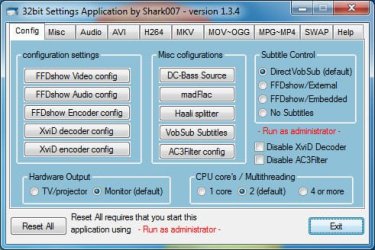
  • Configsettings.jpg
    Configsettings.jpg
    57.3 KB · Views: 52
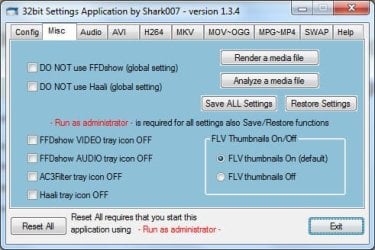
  • Miscsettings.jpg
    Miscsettings.jpg
    49.1 KB · Views: 40
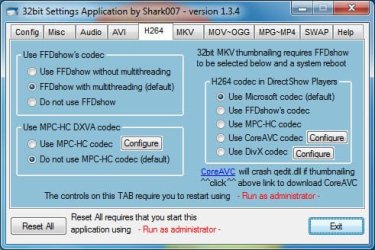
  • H264settings.jpg
    H264settings.jpg
    57 KB · Views: 79
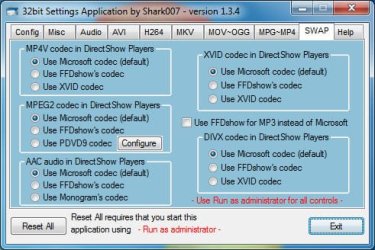
  • SWAPsettings.jpg
    SWAPsettings.jpg
    57.3 KB · Views: 65
Last edited:

My Computer

Computer Manufacturer/Model Number
Selfbuilt
OS
Windows 7 Ultimate 64bit
CPU
i7 2600k
Motherboard
asus P8Z68-V LE
Memory
16GB (4x4) corsair vengeance
Graphics Card(s)
Intel HD3000 iGPU / AMD HD6870 1024MB
Sound Card
bitstreamed to an Onkyo 609
Monitor(s) Displays
Asus VE278 27" LED / Bravia EX7 60" LED
Screen Resolution
native 1080p x2
Hard Drives
4x 2TB int. + 2x 2TB external and a SSD for the boot drive.
PSU
650w Antec
Case
NZXT tempest evo
Cooling
air/stock
Keyboard
Dell
Mouse
logitech m505
Internet Speed
dual: cable/blackberry tether for travel use
Other Info
BD re-writer //
asus notebook G73Jw
Always trust the experts, that's what they do, as Antman will tell you. This place has more experts than any other place except (maybe) Redmond.

Shark is the codec expert...:D
 

My Computer

Computer Manufacturer/Model Number
Gateway, Toshiba Laptop, and Home Brew
OS
Windows 7 x64 HP, Windows 7 HP, Windows 7 Ult
CPU
Intel I3, Cerelon, Pentium 4 @ 3Ghz
Motherboard
Intel, Intel, Asus
Memory
8G, 3G, 3G
Graphics Card(s)
On-board Intel, On-board nVidia, nVIDIA card
Sound Card
on-board, on-board, SoundBlaster
Monitor(s) Displays
Hannspree HF237, Toshiba, SyncMaster 931B
Screen Resolution
default (all)
Hard Drives
1T internal, 320G internal, 160G internal, 1T networked
PSU
300w, unk, 650w
Case
black, black, grey
Cooling
air (all)
Keyboard
standard wired (all)
Mouse
standard wired (all)
Internet Speed
6M down, 768K up
Other Info
Home LAN through Linksys hub to 4 port and wireless switch/router. Networked HP 2600n. Wife's computer running Windows 7, and spare laptop running Ubuntu "Karmic Kola" (9.10).
Use a good player and you don't need additional codecs. If you search a little you will find that adding these things causes more problems than they solve.
This one in particular is F'd up. It actually has some rogeware in it. Are people this dumb to argue this is a clean program? The only clean codec pack is CCCP, and even still, a good video player like TheKMplayer and GOM are codec free! I use CCCP for convenience with encoding, but if you are just watching, I recommend not using this.
 

My Computer

OS
Windows 7 (Build 7068)
This one in particular is F'd up. It actually has some rogeware in it. Are people this dumb to argue this is a clean program?


Please cite your source for this statement...
 

My Computer

Computer type
PC/Desktop
Computer Manufacturer/Model Number
LENOVO K450 @3.0GHZ
OS
64-bit Windows 8.1 Pro
CPU
Core(TM) i5 CPU 4330 Haswell @ 3.20GHz
Motherboard
LENOVO
Memory
12.00 GB
Graphics Card(s)
Intel(R) HD Graphics
Sound Card
Intel HD integtrated
Monitor(s) Displays
HP 25' ISP Monitor
Screen Resolution
1900/1020
Hard Drives
(1) ST1000DM003-1CH162 (2) Generic STORAGE DEVICE USB Device (3) Generic STORAGE DEVICE USB Device
Internet Speed
100mb down/10mb up
This one in particular is F'd up. It actually has some rogeware in it. Are people this dumb to argue this is a clean program?


Please cite your source for this statement...

Shark's codec pack causes NOD32 to warn me. I know it's a false positive, but I'm guessing that's what he's referring to.
 

My Computer

OS
Windows 7 Professional x64 SP1
CPU
Intel Core i5-2500K
Motherboard
Gigabyte P67X-UD3-B3
Memory
8 GB Corsair Vengeance Blue DDR3-1600
Graphics Card(s)
Sapphire Radeon HD 6870 1 GB GDDR5
Monitor(s) Displays
Samsung SyncMaster T220HD
Screen Resolution
1680x1050
Hard Drives
120 GB Corsair Force SSD + 320 GB Seagate Barracuda SATA2 + 2 TB My Book Elite
PSU
Corsair 650W
Internet Speed
50 Mbps
Back
Top