
Solved WLM 2012 Started Crashing when Sending Emails

Side note: Using filters to cut down on junk mail

Service providers can only do so much about junk mail - I set up rules to delete the msg from the server once I know the sender is mailing junk. You can also setup international filters if you now the junk originates from a foreign domain (.it - Italy ...) - this implies that you don't normally receive msgs from that int'l domain.

You have to be careful though as many junk mailers spoof a valid domain (yahoo. com is a favorite).

I delete msgs FROM domains XYZ.com and mail.DEF.com. I included the at-sign which limits the scope of the rule to exactly that domain - if junk comes from a sub domain it will not be flagged by the rule (subdomain.XYZ.com).

I also delete msgs TO a specific user [email protected]
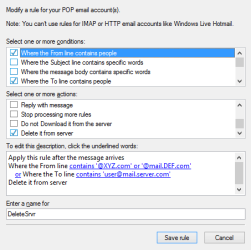
MsgRules.png

Build up the rule slowly, adding full user and domain addresses at first. If more junk comes though and only the user name has changed, add the junk domain to the filter (or modify the user/domain already in the list). I was too aggressive when I first built these rules and some good mail got deleted. You could build a test rule to move the msgs to a Storage folder. Once you're sure the rule works correctly (it doesn't delete good msgs), you can change it to Delete from Server.

I agree, the Service providers don't seem to do too much with anything we send them. They're probably aware of the leaks, but many use third party packages to process junk. It takes a while for the third party vendor to update their package and even longer for the service provider to implement the change. That plus the fact that junk mailers can quickly change their methods makes it a tough nut to crack.

The only junk mail I see now are things that the server flagged as junk, but are valid msgs (mostly list mail).

Bill
.
 

My Computer My Computer

At a glance

x64 (6.3.9600) Win8.1 Pro & soon dual boot x6...AMD A6-3420M APU with Radeon(tm) HD Graphics6.00 GBAMD Radeon(TM) HD 6520G
Computer type
Laptop
Computer Manufacturer/Model Number
HP Pavilion dv6-6c10us
OS
x64 (6.3.9600) Win8.1 Pro & soon dual boot x64 (6.1.7601) Win7_SP1 HomePrem
CPU
AMD A6-3420M APU with Radeon(tm) HD Graphics
Motherboard
Hewlett-Packard 1805
Memory
6.00 GB
Graphics Card(s)
AMD Radeon(TM) HD 6520G
Sound Card
(1) AMD High Definition Audio Device (2) IDT High Definiti
Monitor(s) Displays
HP W2072a 20" LCD (1600 x 900) @ 60 Hz
Screen Resolution
1366 x 768 x 32 bits (4294967296 colors) @ 60 Hz
Hard Drives
ST640LM0 00 HM641JI SATA Disk Device
Keyboard
Logitech k520 wireless KB
Mouse
Logitech m320 wireless mouse (bundled with KB)
Internet Speed
15/5 | 54 MB Wireless 'n'
Antivirus
Realtime: Defender or Avast | On-demand: Malwarebytes, ESET
Browser
IE 11 on Win8, IE 10 on win 7
Other Info
Media: [Gimp, Audacity, VLC] || Comm: [WEmail 2012, Skype] || Productivity: [OpenOffice,| Textpad] || Utils: [Sysinternals, cCleaner, Speccy, Defraggler]
That's the first thing I tried. All of these end in .net and they never use the same domain name. I ended up with a HUGE blocked list in WLM that did no good.

I had a crash this morning, but it will take me a while to post back the info.
 

My Computer My Computer

At a glance

Windows 7 Pro x64Intel 17-47708GBIntegrated Intel HD Graphics 4600
Computer type
PC/Desktop
Computer Manufacturer/Model Number
Lenovo M83
OS
Windows 7 Pro x64
CPU
Intel 17-4770
Motherboard
Lenovo Sharkbay 0B98401 PRO
Memory
8GB
Graphics Card(s)
Integrated Intel HD Graphics 4600
Monitor(s) Displays
acer AL2216W
Screen Resolution
1680 x 1050
Hard Drives
WD 10EZEX-08M 1TB
Case
Mini-tower
Internet Speed
25/25MB
Antivirus
Norton Internet Security
Browser
IE11 & Firefox
Thanks, exporting and importing into a fresh WLM install rules out a big question.

It's always good to keep your system up-to-date with all Windows updates - I'm not confident these updates will have any effect on the issue.

See if WLM troubleshooting provides any additional information:
Click the blue WLM File menu
Select Options -> Mail -> Advanced tab
Click the Maintenance... button
Under Troubleshooting
Tick
picture.php
General
Tick
picture.php
E-mail
Click Close

Review the spelling options, this is how I have WLM spelling setup.
Click OK to exit options

If Filters USA is in your contacts, the address should be considered as a safe sender. You could manually enter their address into the safe senders list:
Click the blue WLM File menu
Select Options -> Safety options -> Safe Senders tab
Click the Add button and enter their address

I suggest these settings fro the other options
Tick
picture.php
Also trust email from my Contacts
Clear
picture.php
Automatically add people I email to the Safe Senders list

I hadn't read this post before this morning's crash, so I'm just now getting to it.

I've now checked the 2 Maintenance Troubleshooting check boxes.

The Spelling options were already set the same as your screen shot.

The 2 options on the Safe Senders tab were already set the same as your screen shot.

I'm going to go gather the information from this morning's crash and then post it. Stay tuned.
 

My Computer My Computer

At a glance

Windows 7 Pro x64Intel 17-47708GBIntegrated Intel HD Graphics 4600
Computer type
PC/Desktop
Computer Manufacturer/Model Number
Lenovo M83
OS
Windows 7 Pro x64
CPU
Intel 17-4770
Motherboard
Lenovo Sharkbay 0B98401 PRO
Memory
8GB
Graphics Card(s)
Integrated Intel HD Graphics 4600
Monitor(s) Displays
acer AL2216W
Screen Resolution
1680 x 1050
Hard Drives
WD 10EZEX-08M 1TB
Case
Mini-tower
Internet Speed
25/25MB
Antivirus
Norton Internet Security
Browser
IE11 & Firefox
Side note: Using filters to cut down on junk mail

Service providers can only do so much about junk mail - I set up rules to delete the msg from the server once I know the sender is mailing junk. You can also setup international filters if you now the junk originates from a foreign domain (.it - Italy ...) - this implies that you don't normally receive msgs from that int'l domain.

You have to be careful though as many junk mailers spoof a valid domain (yahoo. com is a favorite).

I delete msgs FROM domains XYZ.com and mail.DEF.com. I included the at-sign which limits the scope of the rule to exactly that domain - if junk comes from a sub domain it will not be flagged by the rule (subdomain.XYZ.com).

I also delete msgs TO a specific user [email protected]
Build up the rule slowly, adding full user and domain addresses at first. If more junk comes though and only the user name has changed, add the junk domain to the filter (or modify the user/domain already in the list). I was too aggressive when I first built these rules and some good mail got deleted. You could build a test rule to move the msgs to a Storage folder. Once you're sure the rule works correctly (it doesn't delete good msgs), you can change it to Delete from Server.

I agree, the Service providers don't seem to do too much with anything we send them. They're probably aware of the leaks, but many use third party packages to process junk. It takes a while for the third party vendor to update their package and even longer for the service provider to implement the change. That plus the fact that junk mailers can quickly change their methods makes it a tough nut to crack.

The only junk mail I see now are things that the server flagged as junk, but are valid msgs (mostly list mail).

Bill
.
Your screen shot reminded me - I have a side question about how filters (rules) work in WLM. This is something I have never really understood. The window in your screen shot contains the phrase: "Apply this rule after the message arrives." The way I read that, the word after implies that the message will be downloaded to the PC, checked to see if it meets the filter criteria and if it does, then delete it from the server. This would leave the message on the PC. What good is that?

If I am misunderstanding it's meaning, then can you explain how it really works.
 
Last edited:

My Computer My Computer

At a glance

Windows 7 Pro x64Intel 17-47708GBIntegrated Intel HD Graphics 4600
Computer type
PC/Desktop
Computer Manufacturer/Model Number
Lenovo M83
OS
Windows 7 Pro x64
CPU
Intel 17-4770
Motherboard
Lenovo Sharkbay 0B98401 PRO
Memory
8GB
Graphics Card(s)
Integrated Intel HD Graphics 4600
Monitor(s) Displays
acer AL2216W
Screen Resolution
1680 x 1050
Hard Drives
WD 10EZEX-08M 1TB
Case
Mini-tower
Internet Speed
25/25MB
Antivirus
Norton Internet Security
Browser
IE11 & Firefox
Same scenario as before - trying to forward a spam email to Verizon. As soon as I click the Send button, WLM crashes. Norton email scanning is still turned off. This was 1 of 6 messages that WLM had placed in the Junk folder.
Code:
Log Name:      Application
Source:        Application Error
Date:          10/19/2014 6:38:43 AM
Event ID:      1000
Task Category: (100)
Level:         Error
Keywords:      Classic
User:          N/A
Computer:      lenovoM83
Description:
Faulting application name: wlmail.exe, version: 16.4.3528.331, time stamp: 0x533a3fce
Faulting module name: unknown, version: 0.0.0.0, time stamp: 0x00000000
Exception code: 0xc0000005
Fault offset: 0x00000000
Faulting process id: 0x%9
Faulting application start time: 0x%10
Faulting application path: %11
Faulting module path: %12
Report Id: %13
Event Xml:
<Event xmlns="[URL]http://schemas.microsoft.com/win/2004/08/events/event[/URL]">
  <System>
    <Provider Name="Application Error" />
    <EventID Qualifiers="0">1000</EventID>
    <Level>2</Level>
    <Task>100</Task>
    <Keywords>0x80000000000000</Keywords>
    <TimeCreated SystemTime="2014-10-19T10:38:43.000000000Z" />
    <EventRecordID>15304</EventRecordID>
    <Channel>Application</Channel>
    <Computer>lenovoM83</Computer>
    <Security />
  </System>
  <EventData>
    <Data>wlmail.exe</Data>
    <Data>16.4.3528.331</Data>
    <Data>533a3fce</Data>
    <Data>unknown</Data>
    <Data>0.0.0.0</Data>
    <Data>00000000</Data>
    <Data>c0000005</Data>
    <Data>00000000</Data>
  </EventData>
</Event>
Code:
Log Name:      Application
Source:        Windows Error Reporting
Date:          10/19/2014 6:38:56 AM
Event ID:      1001
Task Category: None
Level:         Information
Keywords:      Classic
User:          N/A
Computer:      lenovoM83
Description:
Fault bucket , type 0
Event Name: APPCRASH
Response: Not available
Cab Id: 0
Problem signature:
P1: wlmail.exe
P2: 16.4.3528.331
P3: 533a3fce
P4: unknown
P5: 0.0.0.0
P6: 00000000
P7: c0000005
P8: 00000000
P9: 
P10: 
Attached files:
These files may be available here:
C:\Users\Gary & Linda\AppData\Local\Microsoft\Windows\WER\ReportArchive\AppCrash_wlmail.exe_27e68f2ea86fbae277e55967a56533826153b7e0_081f756d
Analysis symbol: 
Rechecking for solution: 0
Report Id: 18758534-577c-11e4-8278-4439c437d02a
Report Status: 0
Event Xml:
<Event xmlns="[URL]http://schemas.microsoft.com/win/2004/08/events/event[/URL]">
  <System>
    <Provider Name="Windows Error Reporting" />
    <EventID Qualifiers="0">1001</EventID>
    <Level>4</Level>
    <Task>0</Task>
    <Keywords>0x80000000000000</Keywords>
    <TimeCreated SystemTime="2014-10-19T10:38:56.000000000Z" />
    <EventRecordID>15305</EventRecordID>
    <Channel>Application</Channel>
    <Computer>lenovoM83</Computer>
    <Security />
  </System>
  <EventData>
    <Data>
    </Data>
    <Data>0</Data>
    <Data>APPCRASH</Data>
    <Data>Not available</Data>
    <Data>0</Data>
    <Data>wlmail.exe</Data>
    <Data>16.4.3528.331</Data>
    <Data>533a3fce</Data>
    <Data>unknown</Data>
    <Data>0.0.0.0</Data>
    <Data>00000000</Data>
    <Data>c0000005</Data>
    <Data>00000000</Data>
    <Data>
    </Data>
    <Data>
    </Data>
    <Data>
    </Data>
    <Data>C:\Users\Gary & Linda\AppData\Local\Microsoft\Windows\WER\ReportArchive\AppCrash_wlmail.exe_27e68f2ea86fbae277e55967a56533826153b7e0_081f756d</Data>
    <Data>
    </Data>
    <Data>0</Data>
    <Data>18758534-577c-11e4-8278-4439c437d02a</Data>
    <Data>0</Data>
  </EventData>
</Event>
I don't think the problem is message-content specific and this is why. When WLM crashes, I have to click on the Close option in the popup message box. WLM then closes and restarts. When it restarted I immediately went back into the Junk folder and dragged a copy of the message to the Desktop (Sample.eml). I then opened the same message again, clicked Forward and entered the same Verizon email address in the To: line and clicked Send. It sent normally with no crash. If the problem were message-content specific, I would expect WLM to crash every time.
I then went through the remaining 5 Junk messages and forwarded them with no problem.

Here is the message that caused the crash:
(attachment removed)
 
Last edited:

My Computer My Computer

At a glance

Windows 7 Pro x64Intel 17-47708GBIntegrated Intel HD Graphics 4600
Computer type
PC/Desktop
Computer Manufacturer/Model Number
Lenovo M83
OS
Windows 7 Pro x64
CPU
Intel 17-4770
Motherboard
Lenovo Sharkbay 0B98401 PRO
Memory
8GB
Graphics Card(s)
Integrated Intel HD Graphics 4600
Monitor(s) Displays
acer AL2216W
Screen Resolution
1680 x 1050
Hard Drives
WD 10EZEX-08M 1TB
Case
Mini-tower
Internet Speed
25/25MB
Antivirus
Norton Internet Security
Browser
IE11 & Firefox
Your screen shot reminded me - I have a side question about how filters (rules) work in WLM. This is something I have never really understood. The window in your screen shot contains the phrase: "Apply this rule after the message arrives." The way I read that, the word after implies that the message will be downloaded to the PC, checked to see if it meets the filter criteria and if it does, then delete it from the server. This would leave the message on the PC. What good is that?

If I am misunderstanding it's meaning, then can you explain how it really works.

Messages have headers and body - if the header meets the rule, the body is never downloaded.
 

My Computer My Computer

At a glance

x64 (6.3.9600) Win8.1 Pro & soon dual boot x6...AMD A6-3420M APU with Radeon(tm) HD Graphics6.00 GBAMD Radeon(TM) HD 6520G
Computer type
Laptop
Computer Manufacturer/Model Number
HP Pavilion dv6-6c10us
OS
x64 (6.3.9600) Win8.1 Pro & soon dual boot x64 (6.1.7601) Win7_SP1 HomePrem
CPU
AMD A6-3420M APU with Radeon(tm) HD Graphics
Motherboard
Hewlett-Packard 1805
Memory
6.00 GB
Graphics Card(s)
AMD Radeon(TM) HD 6520G
Sound Card
(1) AMD High Definition Audio Device (2) IDT High Definiti
Monitor(s) Displays
HP W2072a 20" LCD (1600 x 900) @ 60 Hz
Screen Resolution
1366 x 768 x 32 bits (4294967296 colors) @ 60 Hz
Hard Drives
ST640LM0 00 HM641JI SATA Disk Device
Keyboard
Logitech k520 wireless KB
Mouse
Logitech m320 wireless mouse (bundled with KB)
Internet Speed
15/5 | 54 MB Wireless 'n'
Antivirus
Realtime: Defender or Avast | On-demand: Malwarebytes, ESET
Browser
IE 11 on Win8, IE 10 on win 7
Other Info
Media: [Gimp, Audacity, VLC] || Comm: [WEmail 2012, Skype] || Productivity: [OpenOffice,| Textpad] || Utils: [Sysinternals, cCleaner, Speccy, Defraggler]
Your screen shot reminded me - I have a side question about how filters (rules) work in WLM. This is something I have never really understood. The window in your screen shot contains the phrase: "Apply this rule after the message arrives." The way I read that, the word after implies that the message will be downloaded to the PC, checked to see if it meets the filter criteria and if it does, then delete it from the server. This would leave the message on the PC. What good is that?

If I am misunderstanding it's meaning, then can you explain how it really works.

Messages have headers and body - if the header meets the rule, the body is never downloaded.

Thank you for explaining that. Makes sense.
 

My Computer My Computer

At a glance

Windows 7 Pro x64Intel 17-47708GBIntegrated Intel HD Graphics 4600
Computer type
PC/Desktop
Computer Manufacturer/Model Number
Lenovo M83
OS
Windows 7 Pro x64
CPU
Intel 17-4770
Motherboard
Lenovo Sharkbay 0B98401 PRO
Memory
8GB
Graphics Card(s)
Integrated Intel HD Graphics 4600
Monitor(s) Displays
acer AL2216W
Screen Resolution
1680 x 1050
Hard Drives
WD 10EZEX-08M 1TB
Case
Mini-tower
Internet Speed
25/25MB
Antivirus
Norton Internet Security
Browser
IE11 & Firefox
Ok, thanks - I'll look at the zip file next.

I missed this before
Faulting application name: wlmail.exe, version: 16.4.3528.331, time stamp: 0x533a3fce
Faulting module name: unknown, version: 0.0.0.0, time stamp: 0x00000000

The last object in the fault chain is wlmail.exe - the unknown object causes WLM to crash.

I know that doesn't help other than to change what I'm focusing on (was spell check or another component of WLM).

It is interesting that the 2nd fwd of the same msg had no issue.

When you get a chance, Check C:\ using Option One:
http://www.sevenforums.com/tutorials/433-disk-check.html

The image in step 4 shows the options you should use
Step 7 describes the options selected in step 4
Step 9 is the ok button
Step 11 describes the disk in use (C:\)
Click schedule disk check and restart your machine

That's steps 1 through 4, step 9 & step 11

The results are in the event viewer. See option one in http://www.sevenforums.com/tutorials/96938-check-disk-chkdsk-read-event-viewer-log.html

This will eliminate file system disk errors as a possible cause. If there were bad spots on the disks, you would probably be aware of that. I didn't want you to check for bad spots on the first run of check disk - the option in step 4 is the least intensive repair option.

Bill
.
 

My Computer My Computer

At a glance

x64 (6.3.9600) Win8.1 Pro & soon dual boot x6...AMD A6-3420M APU with Radeon(tm) HD Graphics6.00 GBAMD Radeon(TM) HD 6520G
Computer type
Laptop
Computer Manufacturer/Model Number
HP Pavilion dv6-6c10us
OS
x64 (6.3.9600) Win8.1 Pro & soon dual boot x64 (6.1.7601) Win7_SP1 HomePrem
CPU
AMD A6-3420M APU with Radeon(tm) HD Graphics
Motherboard
Hewlett-Packard 1805
Memory
6.00 GB
Graphics Card(s)
AMD Radeon(TM) HD 6520G
Sound Card
(1) AMD High Definition Audio Device (2) IDT High Definiti
Monitor(s) Displays
HP W2072a 20" LCD (1600 x 900) @ 60 Hz
Screen Resolution
1366 x 768 x 32 bits (4294967296 colors) @ 60 Hz
Hard Drives
ST640LM0 00 HM641JI SATA Disk Device
Keyboard
Logitech k520 wireless KB
Mouse
Logitech m320 wireless mouse (bundled with KB)
Internet Speed
15/5 | 54 MB Wireless 'n'
Antivirus
Realtime: Defender or Avast | On-demand: Malwarebytes, ESET
Browser
IE 11 on Win8, IE 10 on win 7
Other Info
Media: [Gimp, Audacity, VLC] || Comm: [WEmail 2012, Skype] || Productivity: [OpenOffice,| Textpad] || Utils: [Sysinternals, cCleaner, Speccy, Defraggler]
I sent you a private msg.

Looking at both msgs you've posted, they have two things in common
- long lines (greater than 76)
- 7bit encoding

This isn't normally an issue with eMail ... unless the text characters are non ASCII (the 7 bit part)
Real mail clients shouldn't create a msg like that, but a programmed mass mailer spam program might.

Neither msg contained non-ASCII characters, but you said the most recent msg was fwd'd without issue - maybe WLM stripped out any bad chars. All I know is that the files you provided don't have anything in them that I can determine to be the cause. That doesn't mean that they didn't originally have something in them.

I'm still considering Norton as part of the issue. If you can locate the license key, then you could uninstall Norton as a test. I'm sure you paid for Norton, so make sure you have the license key BEFORE uninstalling. I know you turned off mail filtering, but sometimes a remnant exists that gums up the works. You will need some protection while you wait for another occurance (or no occurance-that would be nice and proof positive), so you can download MSE as interim protection (Avast and AVG are also free). I suggest MSE simply because it doesn't carry any extras that might get installed or configured.

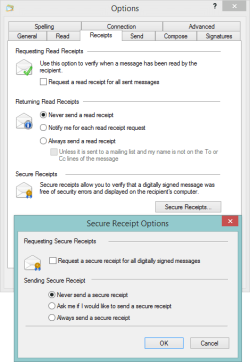
The other thing you can do is whittle down the WLM options. Check the images below to see how your WLM is configured. There are many more options to set, but I didn't want to strip down the client for just a few msgs. Those settings might eliminate the issue, but then all you would see is plain text.
WLM rcpts.png

The settings above prevent receipts being sent - a very rare occurrence anyway, but hard to notice that it's happening. Spammers might request a receipt - I don't know if this is the case or not.

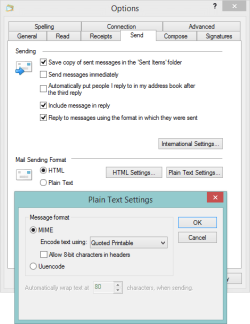
WLM send.png

The settings above are an example of something you could change (don't include original msg, and don't reply in the original format) that would limit the function of the mail client. Something I said might be done, but am not recommending now.

The Plain Text setting IS a change you should make. Since the issue presents itself outbound, encoding it as quoted printable might stop the failing process from choking on the msg.

This only affects text msgs, not anything with HTML. Both bad msgs were text/7bit.​


Do either Norton or the option changes and wait for the issue to reoccur. If you do both you won't know which one solved it (hopefully).

You might call Vze and complain about the spam. It's possible they could tighten the screws a bit - but they'll need your permission. Again, try to stage the changes so you have an idea of why it was fixed (perpetual optimist here)

I'm here for the duration.

Bill
.
 

My Computer My Computer

At a glance

x64 (6.3.9600) Win8.1 Pro & soon dual boot x6...AMD A6-3420M APU with Radeon(tm) HD Graphics6.00 GBAMD Radeon(TM) HD 6520G
Computer type
Laptop
Computer Manufacturer/Model Number
HP Pavilion dv6-6c10us
OS
x64 (6.3.9600) Win8.1 Pro & soon dual boot x64 (6.1.7601) Win7_SP1 HomePrem
CPU
AMD A6-3420M APU with Radeon(tm) HD Graphics
Motherboard
Hewlett-Packard 1805
Memory
6.00 GB
Graphics Card(s)
AMD Radeon(TM) HD 6520G
Sound Card
(1) AMD High Definition Audio Device (2) IDT High Definiti
Monitor(s) Displays
HP W2072a 20" LCD (1600 x 900) @ 60 Hz
Screen Resolution
1366 x 768 x 32 bits (4294967296 colors) @ 60 Hz
Hard Drives
ST640LM0 00 HM641JI SATA Disk Device
Keyboard
Logitech k520 wireless KB
Mouse
Logitech m320 wireless mouse (bundled with KB)
Internet Speed
15/5 | 54 MB Wireless 'n'
Antivirus
Realtime: Defender or Avast | On-demand: Malwarebytes, ESET
Browser
IE 11 on Win8, IE 10 on win 7
Other Info
Media: [Gimp, Audacity, VLC] || Comm: [WEmail 2012, Skype] || Productivity: [OpenOffice,| Textpad] || Utils: [Sysinternals, cCleaner, Speccy, Defraggler]
Ok, thanks - I'll look at the zip file next.

I missed this before
Faulting application name: wlmail.exe, version: 16.4.3528.331, time stamp: 0x533a3fce
Faulting module name: unknown, version: 0.0.0.0, time stamp: 0x00000000
The last object in the fault chain is wlmail.exe - the unknown object causes WLM to crash.

I know that doesn't help other than to change what I'm focusing on (was spell check or another component of WLM).

It is interesting that the 2nd fwd of the same msg had no issue.

When you get a chance, Check C:\ using Option One:
http://www.sevenforums.com/tutorials/433-disk-check.html

The image in step 4 shows the options you should use
Step 7 describes the options selected in step 4
Step 9 is the ok button
Step 11 describes the disk in use (C:\)
Click schedule disk check and restart your machine

That's steps 1 through 4, step 9 & step 11

The results are in the event viewer. See option one in http://www.sevenforums.com/tutorials/96938-check-disk-chkdsk-read-event-viewer-log.html

This will eliminate file system disk errors as a possible cause. If there were bad spots on the disks, you would probably be aware of that. I didn't want you to check for bad spots on the first run of check disk - the option in step 4 is the least intensive repair option.

Bill
.

First, here are the results from the Check Disk:

Code:
Log Name:      Application
Source:        Microsoft-Windows-Wininit
Date:          10/21/2014 3:34:51 PM
Event ID:      1001
Task Category: None
Level:         Information
Keywords:      Classic
User:          N/A
Computer:      lenovoM83
Description:
 
Checking file system on C:
The type of the file system is NTFS.
Volume label is Windows7_OS.
 
A disk check has been scheduled.
Windows will now check the disk.                         
CHKDSK is verifying files (stage 1 of 3)...
  219648 file records processed.                                         File verification completed.
  414 large file records processed.                                     0 bad file records processed.                                       2 EA records processed.                                             61 reparse records processed.                                      CHKDSK is verifying indexes (stage 2 of 3)...
  279364 index entries processed.                                        Index verification completed.
  0 unindexed files scanned.                                          0 unindexed files recovered.                                      CHKDSK is verifying security descriptors (stage 3 of 3)...
  219648 file SDs/SIDs processed.                                        Cleaning up 343 unused index entries from index $SII of file 0x9.
Cleaning up 343 unused index entries from index $SDH of file 0x9.
Cleaning up 343 unused security descriptors.
CHKDSK is compacting the security descriptor stream
  29859 data files processed.                                           CHKDSK is verifying Usn Journal...
  34219136 USN bytes processed.                                            Usn Journal verification completed.
Correcting errors in the Volume Bitmap.
Windows has made corrections to the file system.
 860113916 KB total disk space.
  97864008 KB in 179852 files.
    100600 KB in 29862 indexes.
         0 KB in bad sectors.
    346344 KB in use by the system.
     65536 KB occupied by the log file.
 761802964 KB available on disk.
      4096 bytes in each allocation unit.
 215028479 total allocation units on disk.
 190450741 allocation units available on disk.
Internal Info:
00 5a 03 00 39 33 03 00 cb bf 05 00 00 00 00 00  .Z..93..........
09 3a 00 00 3d 00 00 00 00 00 00 00 00 00 00 00  .:..=...........
00 00 00 00 00 00 00 00 00 00 00 00 00 00 00 00  ................
Windows has finished checking your disk.
Please wait while your computer restarts.
Event Xml:
<Event xmlns="[URL]http://schemas.microsoft.com/win/2004/08/events/event[/URL]">
  <System>
    <Provider Name="Microsoft-Windows-Wininit" Guid="{206f6dea-d3c5-4d10-bc72-989f03c8b84b}" EventSourceName="Wininit" />
    <EventID Qualifiers="16384">1001</EventID>
    <Version>0</Version>
    <Level>4</Level>
    <Task>0</Task>
    <Opcode>0</Opcode>
    <Keywords>0x80000000000000</Keywords>
    <TimeCreated SystemTime="2014-10-21T19:34:51.000000000Z" />
    <EventRecordID>15478</EventRecordID>
    <Correlation />
    <Execution ProcessID="0" ThreadID="0" />
    <Channel>Application</Channel>
    <Computer>lenovoM83</Computer>
    <Security />
  </System>
  <EventData>
    <Data>
Checking file system on C:
The type of the file system is NTFS.
Volume label is Windows7_OS.
 
A disk check has been scheduled.
Windows will now check the disk.                         
CHKDSK is verifying files (stage 1 of 3)...
  219648 file records processed.                                         File verification completed.
  414 large file records processed.                                     0 bad file records processed.                                       2 EA records processed.                                             61 reparse records processed.                                      CHKDSK is verifying indexes (stage 2 of 3)...
  279364 index entries processed.                                        Index verification completed.
  0 unindexed files scanned.                                          0 unindexed files recovered.                                      CHKDSK is verifying security descriptors (stage 3 of 3)...
  219648 file SDs/SIDs processed.                                        Cleaning up 343 unused index entries from index $SII of file 0x9.
Cleaning up 343 unused index entries from index $SDH of file 0x9.
Cleaning up 343 unused security descriptors.
CHKDSK is compacting the security descriptor stream
  29859 data files processed.                                           CHKDSK is verifying Usn Journal...
  34219136 USN bytes processed.                                            Usn Journal verification completed.
Correcting errors in the Volume Bitmap.
Windows has made corrections to the file system.
 860113916 KB total disk space.
  97864008 KB in 179852 files.
    100600 KB in 29862 indexes.
         0 KB in bad sectors.
    346344 KB in use by the system.
     65536 KB occupied by the log file.
 761802964 KB available on disk.
      4096 bytes in each allocation unit.
 215028479 total allocation units on disk.
 190450741 allocation units available on disk.
Internal Info:
00 5a 03 00 39 33 03 00 cb bf 05 00 00 00 00 00  .Z..93..........
09 3a 00 00 3d 00 00 00 00 00 00 00 00 00 00 00  .:..=...........
00 00 00 00 00 00 00 00 00 00 00 00 00 00 00 00  ................
Windows has finished checking your disk.
Please wait while your computer restarts.
</Data>
  </EventData>
</Event>
 

My Computer My Computer

At a glance

Windows 7 Pro x64Intel 17-47708GBIntegrated Intel HD Graphics 4600
Computer type
PC/Desktop
Computer Manufacturer/Model Number
Lenovo M83
OS
Windows 7 Pro x64
CPU
Intel 17-4770
Motherboard
Lenovo Sharkbay 0B98401 PRO
Memory
8GB
Graphics Card(s)
Integrated Intel HD Graphics 4600
Monitor(s) Displays
acer AL2216W
Screen Resolution
1680 x 1050
Hard Drives
WD 10EZEX-08M 1TB
Case
Mini-tower
Internet Speed
25/25MB
Antivirus
Norton Internet Security
Browser
IE11 & Firefox
Thanks, that doesn't look bad. It's common to clean up unused security descriptors and then fix the volume bitmap.

I don't think the check disk repair will have any effect on the issue. If there were other errors reported, possibly, but that was just house keeping on the disk.

When you get the chance, go ahead and try the suggestions re: Norton or WLM options. Then it's a waiting game.

Bill
.
 

My Computer My Computer

At a glance

x64 (6.3.9600) Win8.1 Pro & soon dual boot x6...AMD A6-3420M APU with Radeon(tm) HD Graphics6.00 GBAMD Radeon(TM) HD 6520G
Computer type
Laptop
Computer Manufacturer/Model Number
HP Pavilion dv6-6c10us
OS
x64 (6.3.9600) Win8.1 Pro & soon dual boot x64 (6.1.7601) Win7_SP1 HomePrem
CPU
AMD A6-3420M APU with Radeon(tm) HD Graphics
Motherboard
Hewlett-Packard 1805
Memory
6.00 GB
Graphics Card(s)
AMD Radeon(TM) HD 6520G
Sound Card
(1) AMD High Definition Audio Device (2) IDT High Definiti
Monitor(s) Displays
HP W2072a 20" LCD (1600 x 900) @ 60 Hz
Screen Resolution
1366 x 768 x 32 bits (4294967296 colors) @ 60 Hz
Hard Drives
ST640LM0 00 HM641JI SATA Disk Device
Keyboard
Logitech k520 wireless KB
Mouse
Logitech m320 wireless mouse (bundled with KB)
Internet Speed
15/5 | 54 MB Wireless 'n'
Antivirus
Realtime: Defender or Avast | On-demand: Malwarebytes, ESET
Browser
IE 11 on Win8, IE 10 on win 7
Other Info
Media: [Gimp, Audacity, VLC] || Comm: [WEmail 2012, Skype] || Productivity: [OpenOffice,| Textpad] || Utils: [Sysinternals, cCleaner, Speccy, Defraggler]
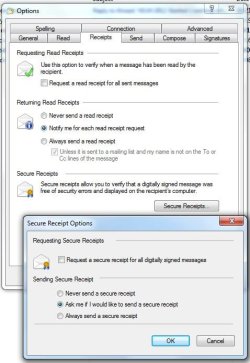
I have it set to notify me of any read receipts. I very rarely have a read receipt requested and never from any of these junk messages.
 

Attachments

  • Receipt1.jpg
    Receipt1.jpg
    48.3 KB · Views: 24

My Computer My Computer

At a glance

Windows 7 Pro x64Intel 17-47708GBIntegrated Intel HD Graphics 4600
Computer type
PC/Desktop
Computer Manufacturer/Model Number
Lenovo M83
OS
Windows 7 Pro x64
CPU
Intel 17-4770
Motherboard
Lenovo Sharkbay 0B98401 PRO
Memory
8GB
Graphics Card(s)
Integrated Intel HD Graphics 4600
Monitor(s) Displays
acer AL2216W
Screen Resolution
1680 x 1050
Hard Drives
WD 10EZEX-08M 1TB
Case
Mini-tower
Internet Speed
25/25MB
Antivirus
Norton Internet Security
Browser
IE11 & Firefox
Your other screen shot shows Send Message Immediately unchecked. Did you mean to uncheck Include Message In Reply? I think so based on your paragraph which followed - "(don't include original msg, and don't reply in the original format)"

I really don't want to do that. We rely on those when sending replies back & forth as it keeps the whole conversation. I'll try changing the plain text settings.

With the infrequency of the crash, I'll just have to run this way for a week or so.
 

My Computer My Computer

At a glance

Windows 7 Pro x64Intel 17-47708GBIntegrated Intel HD Graphics 4600
Computer type
PC/Desktop
Computer Manufacturer/Model Number
Lenovo M83
OS
Windows 7 Pro x64
CPU
Intel 17-4770
Motherboard
Lenovo Sharkbay 0B98401 PRO
Memory
8GB
Graphics Card(s)
Integrated Intel HD Graphics 4600
Monitor(s) Displays
acer AL2216W
Screen Resolution
1680 x 1050
Hard Drives
WD 10EZEX-08M 1TB
Case
Mini-tower
Internet Speed
25/25MB
Antivirus
Norton Internet Security
Browser
IE11 & Firefox
My problem just took a very bizarre turn. My wife was using IE11 to go out to an insurance company website. She clicked on a 'mailto:' link to send an email to the company. This is something I never do so I didn't know there was a problem. I had to force a shutdown of the PC to recover.

I then tried it on my Win7 laptop and it worked as expected - click on a 'mailto:' link from any webpage and an new WLM message opens with the email address populated on the To: line.

Since I got a message that the email client (WLM) was not properly installed, I think I may be at the point of having to uninstall/reinstall Windows Live Essentials.

The problem is so strange, I made a video of it and uploaded it to OneDrive. Here's the link:

https://onedrive.live.com/redir.asp...!AhJCMon_jjydtqg&Bpub=SDX.SkyDrive&Bsrc=Share

You may have to either let the video buffer or download it. When I played it online, the audio stuttered.

My wife is back on the PC with the insurance company on the phone navigating their website.
 

My Computer My Computer

At a glance

Windows 7 Pro x64Intel 17-47708GBIntegrated Intel HD Graphics 4600
Computer type
PC/Desktop
Computer Manufacturer/Model Number
Lenovo M83
OS
Windows 7 Pro x64
CPU
Intel 17-4770
Motherboard
Lenovo Sharkbay 0B98401 PRO
Memory
8GB
Graphics Card(s)
Integrated Intel HD Graphics 4600
Monitor(s) Displays
acer AL2216W
Screen Resolution
1680 x 1050
Hard Drives
WD 10EZEX-08M 1TB
Case
Mini-tower
Internet Speed
25/25MB
Antivirus
Norton Internet Security
Browser
IE11 & Firefox
I'll take a look at the video.

This is odd ... wlarp (repair WLM) didn't fix anything when you ran it as I recall (control panel -> WLM repair).
mailto: is a standard protocol.

Take a look at Control Panel -> Default programs, file associations.
Files are listed first, so scroll down to the bottom and see what application is set for the MAILTO protocol.
Let me know what protocols are associated with WLM.

I'm not suggesting any change - just look. I'm on Win10 right now so I'll have to wait until the download finishes to switch back to Win7 (it might take a while ... it's a 2 GB download).

Also see if WLM is the default mail handler. You might be right .., a reinstall might be the best route to go.
Another option is setting up a new user and trying the same mailto: on the insurance page. That will tell you if it's WLM or a user profile issue.

I'll get back after looking at the video.

Before you reinstall, it is probably advisable to check the system using a wide range of scanners. This is an excellent guide: How to easily clean an infected computer (Malware Removal Guide)

I suggest skipping Step 5-RogueKiller only because some users have reported issues on their machines.

I would add Old Timer-Temp File Cleaner to the list as the first tool.
Download from BleepingComputer

It's important to follow the instructions on when to reboot and when not to reboot. In general the only time you don't want to reboot is after running Rkill.

Most of these scanners run quickly, others (Eset online scanner) can run for a few hours. Plan to run through the guide in one session.

Doing the scans in the guide will almost guarantee that the issue does not crop back up after you decide that a WLM reinstall is the way to go. If there is malware on the system and it is related to the issue, reinstalling WLM won't help by itself.

Some scanners give you the option to decide to clean what was detected - if you know something should not be cleaned, uncheck it - otherwise clean everything else.

After running through the full guide, check the integrity of your system files:
Please follow the instructions in OPTION TWO of http://www.sevenforums.com/tutorials/1538-sfc-scannow-command-system-file-checker.html

Copy C:\Windows\Logs\CBS\CBS.log to your Desktop (it is a protected file so you cannot attach the original)

Attach the copy of the entire CBS.log to a new post.

Thanks,

Bill
.
 

My Computer My Computer

At a glance

x64 (6.3.9600) Win8.1 Pro & soon dual boot x6...AMD A6-3420M APU with Radeon(tm) HD Graphics6.00 GBAMD Radeon(TM) HD 6520G
Computer type
Laptop
Computer Manufacturer/Model Number
HP Pavilion dv6-6c10us
OS
x64 (6.3.9600) Win8.1 Pro & soon dual boot x64 (6.1.7601) Win7_SP1 HomePrem
CPU
AMD A6-3420M APU with Radeon(tm) HD Graphics
Motherboard
Hewlett-Packard 1805
Memory
6.00 GB
Graphics Card(s)
AMD Radeon(TM) HD 6520G
Sound Card
(1) AMD High Definition Audio Device (2) IDT High Definiti
Monitor(s) Displays
HP W2072a 20" LCD (1600 x 900) @ 60 Hz
Screen Resolution
1366 x 768 x 32 bits (4294967296 colors) @ 60 Hz
Hard Drives
ST640LM0 00 HM641JI SATA Disk Device
Keyboard
Logitech k520 wireless KB
Mouse
Logitech m320 wireless mouse (bundled with KB)
Internet Speed
15/5 | 54 MB Wireless 'n'
Antivirus
Realtime: Defender or Avast | On-demand: Malwarebytes, ESET
Browser
IE 11 on Win8, IE 10 on win 7
Other Info
Media: [Gimp, Audacity, VLC] || Comm: [WEmail 2012, Skype] || Productivity: [OpenOffice,| Textpad] || Utils: [Sysinternals, cCleaner, Speccy, Defraggler]
Take a look at Control Panel -> Default programs, file associations.
Files are listed first, so scroll down to the bottom and see what application is set for the MAILTO protocol.
Let me know what protocols are associated with WLM.
I don't see MAILTO listed. I checked my Win7 laptop and it does show up there. Something is very wrong with this desktop.
e0pmvt.jpg

Also see if WLM is the default mail handler.
WLM is set as the default mail handler:
o7ncax.jpg


I'll have to look into the other scanners when I have more time & my wife doesn't need the PC.

Thanks,
Gary
 

My Computer My Computer

At a glance

Windows 7 Pro x64Intel 17-47708GBIntegrated Intel HD Graphics 4600
Computer type
PC/Desktop
Computer Manufacturer/Model Number
Lenovo M83
OS
Windows 7 Pro x64
CPU
Intel 17-4770
Motherboard
Lenovo Sharkbay 0B98401 PRO
Memory
8GB
Graphics Card(s)
Integrated Intel HD Graphics 4600
Monitor(s) Displays
acer AL2216W
Screen Resolution
1680 x 1050
Hard Drives
WD 10EZEX-08M 1TB
Case
Mini-tower
Internet Speed
25/25MB
Antivirus
Norton Internet Security
Browser
IE11 & Firefox
I took several hours this afternoon & evening to run the scans you requested. Here are the details, but basically, it's clean. I did skip step #5 as you recommended.

Temp File Cleaner:
346aver.jpg


I ran a couple scans not listed - Norton Internet Security:
b8sot3.jpg


and Super Anti-Spyware:
16gufl.jpg


TDSSKiller:
2rd973d.jpg


RKill (the hosts file entries are because I run the MVPS Hosts file):
Code:
Rkill 2.6.8 by Lawrence Abrams (Grinler)
[URL="http://www.bleepingcomputer.com/"]Bleeping Computer - Technical Support and Computer Help[/URL]
Copyright 2008-2014 BleepingComputer.com
More Information about Rkill can be found at this link:
 [URL="http://www.bleepingcomputer.com/forums/topic308364.html"]RKill - What it does and What it Doesn't - A brief introduction to the program - Anti-Virus and Anti-Malware Software[/URL]
Program started at: 10/22/2014 04:41:05 PM in x64 mode.
Windows Version: Windows 7 Professional Service Pack 1
Checking for Windows services to stop:
 * No malware services found to stop.
Checking for processes to terminate:
 * No malware processes found to kill.
Checking Registry for malware related settings:
 * No issues found in the Registry.
Resetting .EXE, .COM, & .BAT associations in the Windows Registry.
Performing miscellaneous checks:
 * Windows Defender Disabled
   [HKLM\SOFTWARE\Microsoft\Windows Defender]
   "DisableAntiSpyware" = dword:00000001
Checking Windows Service Integrity: 
 * Windows Defender (WinDefend) is not Running.
   Startup Type set to: Manual
Searching for Missing Digital Signatures: 
 * C:\Windows\System32\drivers\usbuhci.sys : 30,720 : 04/04/2014 01:38 AM : a83d0ec9ae4c31704442099d40ba2471 [NoSig]
 +-> C:\Windows\System32\DriverStore\FileRepository\usbport.inf_amd64_neutral_d5d6e7e900318837\usbuhci.sys : 30,720 : 11/26/2013 09:41 PM : dd253afc3bc6cba412342de60c3647f3 [Pos Repl]
 +-> C:\Windows\System32\DriverStore\FileRepository\usbport.inf_amd64_neutral_f935002f367d5bb0\usbuhci.sys : 30,720 : 07/13/2009 08:06 PM : 81fb2216d3a60d1284455d511797db3d [Pos Repl]
 +-> C:\Windows\winsxs\amd64_usbport.inf_31bf3856ad364e35_6.1.7601.17514_none_1be864e21a2d2b97\usbuhci.sys : 30,720 : 07/13/2009 08:06 PM : 81fb2216d3a60d1284455d511797db3d [Pos Repl]
 +-> C:\Windows\winsxs\amd64_usbport.inf_31bf3856ad364e35_6.1.7601.18328_none_1be17b8a1a31cc37\usbuhci.sys : 30,720 : 11/26/2013 09:41 PM : dd253afc3bc6cba412342de60c3647f3 [Pos Repl]
 +-> C:\Windows\winsxs\amd64_usbport.inf_31bf3856ad364e35_6.1.7601.22526_none_1c6919a73351367a\usbuhci.sys : 30,720 : 11/26/2013 09:42 PM : 2e682dce4319a90e02a327f8a427544a [Pos Repl]
Checking HOSTS File: 
 * Cannot edit the HOSTS file.
 * Permissions Fixed. Administrators can now edit the HOSTS file.
 * HOSTS file entries found: 
  127.0.0.1 localhost
  ::1 localhost #[IPv6]
  0.0.0.0 fr.a2dfp.net
  0.0.0.0 m.fr.a2dfp.net
  0.0.0.0 mfr.a2dfp.net
  0.0.0.0 ad.a8.net
  0.0.0.0 asy.a8ww.net
  0.0.0.0 static.a-ads.com
  0.0.0.0 abcstats.com
  0.0.0.0 ad4.abradio.cz
  0.0.0.0 a.abv.bg
  0.0.0.0 adserver.abv.bg
  0.0.0.0 adv.abv.bg
  0.0.0.0 bimg.abv.bg
  0.0.0.0 ca.abv.bg
  0.0.0.0 www2.a-counter.kiev.ua
  0.0.0.0 track.acclaimnetwork.com
  0.0.0.0 accuserveadsystem.com
  0.0.0.0 [URL="http://www.accuserveadsystem.com"]www.accuserveadsystem.com[/URL]
  0.0.0.0 achmedia.com
  20 out of 13714 HOSTS entries shown.
  Please review HOSTS file for further entries.
Program finished at: 10/22/2014 04:41:13 PM
Execution time: 0 hours(s), 0 minute(s), and 7 seconds(s)

MBAM:
16lwphw.jpg


Hitman Pro (Systweak is installed as part of PC Wizard --> PC-Wizard CPUID - System & hardware benchmark, monitoring, reporting
I left it alone:
5ezazm.jpg


AdwCleaner:
Code:
# AdwCleaner v4.001 - Report created 22/10/2014 at 17:09:08
# Updated 20/10/2014 by Xplode
# Database : 2014-10-21.1
# Operating System : Windows 7 Professional Service Pack 1 (64 bits)
# Username : Gary & Linda - LENOVOM83
# Running from : C:\Users\Gary & Linda\Desktop\adwcleaner_4.001.exe
# Option : Scan
***** [ Services ] *****
 
***** [ Files / Folders ] *****
Folder Found : C:\Windows\Util
***** [ Scheduled Tasks ] *****
 
***** [ Shortcuts ] *****
 
***** [ Registry ] *****
Key Found : HKLM\SOFTWARE\Google\Chrome\Extensions\mkfokfffehpeedafpekjeddnmnjhmcmk
Key Found : HKLM\SOFTWARE\systweak
Key Found : [x64] HKLM\SOFTWARE\Google\Chrome\Extensions\mkfokfffehpeedafpekjeddnmnjhmcmk
***** [ Browsers ] *****
-\\ Internet Explorer v11.0.9600.17344
 
-\\ Mozilla Firefox v32.0.3 (x86 en-US)
 
*************************
AdwCleaner[R0].txt - [868 octets] - [22/10/2014 17:09:08]
########## EOF - C:\AdwCleaner\AdwCleaner[R0].txt - [927 octets] ##########

JRT:
The command window opened and I watched the program run. After a few minutes the command window closed but no log file was displayed as shown on the instructions webpage.

ESET:
2hsc1h2.jpg


Emsisoft:
2nl8pac.jpg

Code:
Emsisoft Emergency Kit - Version 9.0
Last update: 10/22/2014 6:30:43 PM
User account: lenovoM83\Gary & Linda
Scan settings:
Scan type: Smart Scan
Objects: Rootkits, Memory, Traces, C:\Windows\, C:\Program Files\, C:\Program Files (x86)\
Detect PUPs: Off
Scan archives: Off
ADS Scan: On
File extension filter: Off
Advanced caching: On
Direct disk access: Off
Scan start: 10/22/2014 6:31:16 PM
Key: HKEY_LOCAL_MACHINE\SOFTWARE\WOW6432NODE\SYSTWEAK  detected: Application.InstallAd (A)
Value: HKEY_USERS\S-1-5-21-887747954-3897781091-4292849690-1001\SOFTWARE\MICROSOFT\WINDOWS\CURRENTVERSION\POLICIES\SYSTEM -> DISABLETASKMGR  detected: Setting.DisableTaskMgr (A)
Value: HKEY_USERS\S-1-5-21-887747954-3897781091-4292849690-1001\SOFTWARE\MICROSOFT\WINDOWS\CURRENTVERSION\POLICIES\SYSTEM -> DISABLEREGISTRYTOOLS  detected: Setting.DisableRegistryTools (A)
Scanned 186092
Found 3
Scan end: 10/22/2014 6:52:55 PM
Scan time: 0:21:39

SFC:
scyzp1.jpg


CBS log:
 

My Computer My Computer

At a glance

Windows 7 Pro x64Intel 17-47708GBIntegrated Intel HD Graphics 4600
Computer type
PC/Desktop
Computer Manufacturer/Model Number
Lenovo M83
OS
Windows 7 Pro x64
CPU
Intel 17-4770
Motherboard
Lenovo Sharkbay 0B98401 PRO
Memory
8GB
Graphics Card(s)
Integrated Intel HD Graphics 4600
Monitor(s) Displays
acer AL2216W
Screen Resolution
1680 x 1050
Hard Drives
WD 10EZEX-08M 1TB
Case
Mini-tower
Internet Speed
25/25MB
Antivirus
Norton Internet Security
Browser
IE11 & Firefox
While searching around, I found this: http://www.sevenforums.com/browsers-mail/214845-mailto-protocol-missing.html

Apparently, when the MAILTO protocol is missing, the result is multiple IE windows opening very rapidly (page 3, last post in the topic above). I'm going to compare the MAILTO registry entries between my laptop and the desktop since the laptop works.

It does beg the question however, if other parts of the WLM install may be corrupted.

+EDIT

Then I found this: http://www.sevenforums.com/browsers...mailto-link-opens-up-many-ie.html#post2857416

I looked at the HKLM\SOFTWARE\Classes\ key and the mailto key is not there at all. I checked the same key on my laptop (where mailto works properly) and found the keys below. It is not identical to the screen shot in the post, but the URL Protocol key is there.

2qcmeiv.jpg


I could try adding the keys, but I am going to wait until I hear back from you. Searches showed that the missing mailto key seems to be a fairly common problem that is unrelated to my original problem of WLM crashing. My concern is why is this key missing, what else could be missing and is it a WLM or Win7 installation problem? I read several posts where reinstalling WLM did not fix this problem. Although, I may still have to reinstall WLM for my original crashing problem.

Anticipating your next question, no, I do not use Registry cleaner programs.
 
Last edited:

My Computer My Computer

At a glance

Windows 7 Pro x64Intel 17-47708GBIntegrated Intel HD Graphics 4600
Computer type
PC/Desktop
Computer Manufacturer/Model Number
Lenovo M83
OS
Windows 7 Pro x64
CPU
Intel 17-4770
Motherboard
Lenovo Sharkbay 0B98401 PRO
Memory
8GB
Graphics Card(s)
Integrated Intel HD Graphics 4600
Monitor(s) Displays
acer AL2216W
Screen Resolution
1680 x 1050
Hard Drives
WD 10EZEX-08M 1TB
Case
Mini-tower
Internet Speed
25/25MB
Antivirus
Norton Internet Security
Browser
IE11 & Firefox
Wow! You're really good, thanks for running all the scans (plus some) and posting all of the information.

The system is squeaky clean. Why the MAILTO: protocol is missing is beyond me. MAILTO is a base protocol of Windows, any number of things could make it go away (malware, incomplete install or shoddy repair, some over protective third party utility). The forensics of finding out why it's gone is beyond the scope of my time spent troubleshooting.

How to fix that one piece of the puzzle is easy.

Before fixing MAILTO, see how your WLM associations compare to mine (or your laptop - sot the list by current default to make it easy)
WLM file protocol association:
WLMprotocols.PNG

WLM protocol file association:
WLMfiles.PNG

If MAILTO is the only thing that is missing, then use the registry file from this thread:
Post #4: http://www.sevenforums.com/browsers-mail/214845-mailto-protocol-missing.html#post1803321

Right click the downloaded file, select properties and click the Unblock button if present.

Dbl click or right click->merge the reg file to import it to the registry. Answer yes to UAC and merge warning dialogs.

That should set everything up for MAILTO, but please check the associations and default pgms after merging the registry file.

I'd also like you to
1) reset IE proxy settings:
How to reset your Internet Explorer proxy settings.

2) Uninstall Adblock plus (not sure if you already did that)

3) reset your Hosts file
See the Let me fixit it myself for information on how to make a copy of the existing hosts file. Once you have a copy you can just run the MS Fixit.
How can I reset the Hosts file back to the default?

Thanks,

Bill
.
 
Last edited:

My Computer My Computer

At a glance

x64 (6.3.9600) Win8.1 Pro & soon dual boot x6...AMD A6-3420M APU with Radeon(tm) HD Graphics6.00 GBAMD Radeon(TM) HD 6520G
Computer type
Laptop
Computer Manufacturer/Model Number
HP Pavilion dv6-6c10us
OS
x64 (6.3.9600) Win8.1 Pro & soon dual boot x64 (6.1.7601) Win7_SP1 HomePrem
CPU
AMD A6-3420M APU with Radeon(tm) HD Graphics
Motherboard
Hewlett-Packard 1805
Memory
6.00 GB
Graphics Card(s)
AMD Radeon(TM) HD 6520G
Sound Card
(1) AMD High Definition Audio Device (2) IDT High Definiti
Monitor(s) Displays
HP W2072a 20" LCD (1600 x 900) @ 60 Hz
Screen Resolution
1366 x 768 x 32 bits (4294967296 colors) @ 60 Hz
Hard Drives
ST640LM0 00 HM641JI SATA Disk Device
Keyboard
Logitech k520 wireless KB
Mouse
Logitech m320 wireless mouse (bundled with KB)
Internet Speed
15/5 | 54 MB Wireless 'n'
Antivirus
Realtime: Defender or Avast | On-demand: Malwarebytes, ESET
Browser
IE 11 on Win8, IE 10 on win 7
Other Info
Media: [Gimp, Audacity, VLC] || Comm: [WEmail 2012, Skype] || Productivity: [OpenOffice,| Textpad] || Utils: [Sysinternals, cCleaner, Speccy, Defraggler]
The .vcf file association is missing on the desktop, but is present on my laptop (matches yours exactly).

There are no WLM Protocol associations on the desktop at all, and only one on the laptop - MAILTO.

Since mailto was NOT the only thing missing, I stopped at that point in your posted instructions.

+EDIT

I have not uninstalled Adblock Plus and here is why. I suspect that the Adblock Plus error occurred only because of the rapidly opening IE windows. As a test yesterday, I started IE11 with no addons. I went to the same webpage as in the video and clicked on the mailto link. I got the same message that the email client was not properly installed. As soon as soon as I clicked on OK in that message box, the IE11 windows again started opening rapidly but of course there was no Adblock Plus loaded to crash this time so I didn't get that message.

If we can fix the mailto Registry entries so that mailto works properly, then I should no longer get the rapidly opening IE windows which in turn should no longer cause Adblock Plus to crash. We'll have to wait & see.

In my opinion, this mailto problem is unrelated to my original problem of WLM crashing. It's a side issue that has just distracted us from my original problem. Or, do you think it is related?
 
Last edited:

My Computer My Computer

At a glance

Windows 7 Pro x64Intel 17-47708GBIntegrated Intel HD Graphics 4600
Computer type
PC/Desktop
Computer Manufacturer/Model Number
Lenovo M83
OS
Windows 7 Pro x64
CPU
Intel 17-4770
Motherboard
Lenovo Sharkbay 0B98401 PRO
Memory
8GB
Graphics Card(s)
Integrated Intel HD Graphics 4600
Monitor(s) Displays
acer AL2216W
Screen Resolution
1680 x 1050
Hard Drives
WD 10EZEX-08M 1TB
Case
Mini-tower
Internet Speed
25/25MB
Antivirus
Norton Internet Security
Browser
IE11 & Firefox
Back
Top

