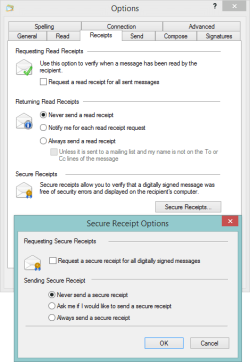
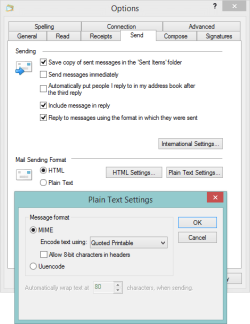
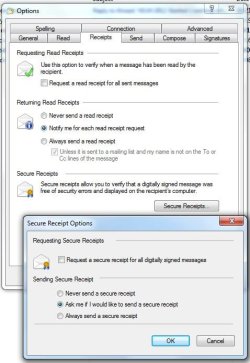
Side note: Using filters to cut down on junk mail
Service providers can only do so much about junk mail - I set up rules to delete the msg from the server once I know the sender is mailing junk. You can also setup international filters if you now the junk originates from a foreign domain (.it - Italy ...) - this implies that you don't normally receive msgs from that int'l domain.
You have to be careful though as many junk mailers spoof a valid domain (yahoo. com is a favorite).
I delete msgs FROM domains XYZ.com and mail.DEF.com. I included the at-sign which limits the scope of the rule to exactly that domain - if junk comes from a sub domain it will not be flagged by the rule (subdomain.XYZ.com).
I also delete msgs TO a specific user [email protected]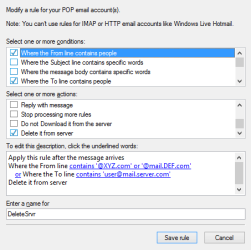
Build up the rule slowly, adding full user and domain addresses at first. If more junk comes though and only the user name has changed, add the junk domain to the filter (or modify the user/domain already in the list). I was too aggressive when I first built these rules and some good mail got deleted. You could build a test rule to move the msgs to a Storage folder. Once you're sure the rule works correctly (it doesn't delete good msgs), you can change it to Delete from Server.
I agree, the Service providers don't seem to do too much with anything we send them. They're probably aware of the leaks, but many use third party packages to process junk. It takes a while for the third party vendor to update their package and even longer for the service provider to implement the change. That plus the fact that junk mailers can quickly change their methods makes it a tough nut to crack.
The only junk mail I see now are things that the server flagged as junk, but are valid msgs (mostly list mail).
Bill
.
Service providers can only do so much about junk mail - I set up rules to delete the msg from the server once I know the sender is mailing junk. You can also setup international filters if you now the junk originates from a foreign domain (.it - Italy ...) - this implies that you don't normally receive msgs from that int'l domain.
You have to be careful though as many junk mailers spoof a valid domain (yahoo. com is a favorite).
I delete msgs FROM domains XYZ.com and mail.DEF.com. I included the at-sign which limits the scope of the rule to exactly that domain - if junk comes from a sub domain it will not be flagged by the rule (subdomain.XYZ.com).
I also delete msgs TO a specific user [email protected]
Build up the rule slowly, adding full user and domain addresses at first. If more junk comes though and only the user name has changed, add the junk domain to the filter (or modify the user/domain already in the list). I was too aggressive when I first built these rules and some good mail got deleted. You could build a test rule to move the msgs to a Storage folder. Once you're sure the rule works correctly (it doesn't delete good msgs), you can change it to Delete from Server.
I agree, the Service providers don't seem to do too much with anything we send them. They're probably aware of the leaks, but many use third party packages to process junk. It takes a while for the third party vendor to update their package and even longer for the service provider to implement the change. That plus the fact that junk mailers can quickly change their methods makes it a tough nut to crack.
The only junk mail I see now are things that the server flagged as junk, but are valid msgs (mostly list mail).
Bill
.
My Computer
At a glance
x64 (6.3.9600) Win8.1 Pro & soon dual boot x6...AMD A6-3420M APU with Radeon(tm) HD Graphics6.00 GBAMD Radeon(TM) HD 6520G
- Computer type
- Laptop
- Computer Manufacturer/Model Number
- HP Pavilion dv6-6c10us
- OS
- x64 (6.3.9600) Win8.1 Pro & soon dual boot x64 (6.1.7601) Win7_SP1 HomePrem
- CPU
- AMD A6-3420M APU with Radeon(tm) HD Graphics
- Motherboard
- Hewlett-Packard 1805
- Memory
- 6.00 GB
- Graphics Card(s)
- AMD Radeon(TM) HD 6520G
- Sound Card
- (1) AMD High Definition Audio Device (2) IDT High Definiti
- Monitor(s) Displays
- HP W2072a 20" LCD (1600 x 900) @ 60 Hz
- Screen Resolution
- 1366 x 768 x 32 bits (4294967296 colors) @ 60 Hz
- Hard Drives
- ST640LM0 00 HM641JI SATA Disk Device
- Keyboard
- Logitech k520 wireless KB
- Mouse
- Logitech m320 wireless mouse (bundled with KB)
- Internet Speed
- 15/5 | 54 MB Wireless 'n'
- Antivirus
- Realtime: Defender or Avast | On-demand: Malwarebytes, ESET
- Browser
- IE 11 on Win8, IE 10 on win 7
- Other Info
- Media: [Gimp, Audacity, VLC] || Comm: [WEmail 2012, Skype] || Productivity: [OpenOffice,| Textpad] || Utils: [Sysinternals, cCleaner, Speccy, Defraggler]