boot.ini

huffman

New member
Pro User
Local time
5:19 AM
Messages
715
I am not sure that it is called boot.ini file in Win 7, but here goes. I had to clean install Win 7 again because I crashed it on the same HDD I was using before. When I did that, I deleted all the partitions and then created them again to try to eliminated problems such as the one I have.

On startup I get a window with two Window 7's listed and it has me pick which one i want for startup. I always pick the top one, but I'm not even sure that matters.

I did a search on C drive (the OS drive) for boot.ini with show system files and folders turned on. Zip, nada absolutely nothing.

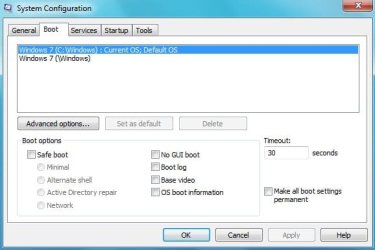
I ran "msconfig" then opened the Boot tab. There are two Windows 7 listed there. The top one says Default but other than that they are the same. Before I do anything I would like to make a copy of the "boot.ini before deleting anything.

How do I get rid of the one file that is causing this??

Thank you
 

My Computer My Computer

OS
Windows 7 Pro
CPU
Intel(R) Pentium(R) Duel CPU E2200 2.20 Ghz
Motherboard
GA-G41M-ES2L
Memory
4 gb 2.96 Usable
Graphics Card(s)
Onboard
Sound Card
Onboard
Hard Drives
2 - 1TB WD Sata Drives
I am not sure that it is called boot.ini file in Win 7, but here goes. I had to clean install Win 7 again because I crashed it on the same HDD I was using before. When I did that, I deleted all the partitions and then created them again to try to eliminated problems such as the one I have.

On startup I get a window with two Window 7's listed and it has me pick which one i want for startup. I always pick the top one, but I'm not even sure that matters.

I did a search on C drive (the OS drive) for boot.ini with show system files and folders turned on. Zip, nada absolutely nothing.

I ran "msconfig" then opened the Boot tab. There are two Windows 7 listed there. The top one says Default but other than that they are the same. Before I do anything I would like to make a copy of the "boot.ini before deleting anything.

How do I get rid of the one file that is causing this??

Thank you
Your sys specs indicate XP. --- This implies dual boot.

Your message is not clear enough to indicate what you have now, or should have now.

With NO XP on the computer, there is no 'boot.ini' file in a w7 installed system.
 

My Computer My Computer

Computer Manufacturer/Model Number
Gateway GT5056
OS
XP_Pro, W7_7201, W7RC.vhd, SciLinux5.3, Fedora12, Fedora9_2x, OpenSolaris_09-06
CPU
AMD 64x2
Motherboard
Yes
Memory
1 gig
Graphics Card(s)
Dunno
Sound Card
Realtek something
Monitor(s) Displays
Samsung SyncMaster 940MW w/TV
Screen Resolution
1280x1024
Hard Drives
250 GB WD, USB Seagate Freedesk 1.5 T
Internet Speed
Cable modem
Other Info
1 + 1 = 10b,
7 + 7 = 16o,
a + b = 15h.
Sorry about the clarity of the question.

Win XP has never been installed on the pc. I built this machine strictly for Win 7.

You are correct in that what comes up on the screen looks exactly like it would have in Win XP.

First on start up:
1. I get a screen that lists two Windows 7 and I have to select one of these then click Enter for Windows to continue to boot.

2. When I run msconfig there are two Win 7 files indicated as below:

msconfig.jpg

It looks almost identical to what Win XP would have looked like with two boot.ini files.

Hope that clears up the question and we can get a solution to the problem.

Thanks
 

My Computer My Computer

OS
Windows 7 Pro
CPU
Intel(R) Pentium(R) Duel CPU E2200 2.20 Ghz
Motherboard
GA-G41M-ES2L
Memory
4 gb 2.96 Usable
Graphics Card(s)
Onboard
Sound Card
Onboard
Hard Drives
2 - 1TB WD Sata Drives
You can remove the duplicate entry using BCDedit. See Brinks tutorial -=> here
 

My Computer My Computer

Computer type
PC/Desktop
Computer Manufacturer/Model Number
LENOVO K450 @3.0GHZ
OS
64-bit Windows 8.1 Pro
CPU
Core(TM) i5 CPU 4330 Haswell @ 3.20GHz
Motherboard
LENOVO
Memory
12.00 GB
Graphics Card(s)
Intel(R) HD Graphics
Sound Card
Intel HD integtrated
Monitor(s) Displays
HP 25' ISP Monitor
Screen Resolution
1900/1020
Hard Drives
(1) ST1000DM003-1CH162 (2) Generic STORAGE DEVICE USB Device (3) Generic STORAGE DEVICE USB Device
Internet Speed
100mb down/10mb up
BCDedit looks great, but it is more complicated than I would like to get into at the moment. I will give it further study shortly.

This brought up two or three other thoughts.

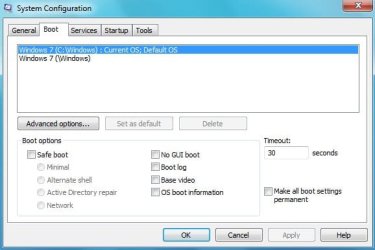
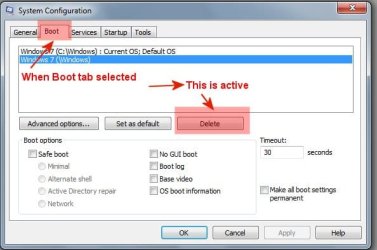
1. Why can't the second line of msconfig be deleted. It has that option. The first line does not have the option to delete.

msconfig.jpg

boottab.jpg

2. Why does the double entry occur and how can it be prevented. I even resized the partitions before installing and definitely formatted the Cdrive??

Thanks
 

My Computer My Computer

OS
Windows 7 Pro
CPU
Intel(R) Pentium(R) Duel CPU E2200 2.20 Ghz
Motherboard
GA-G41M-ES2L
Memory
4 gb 2.96 Usable
Graphics Card(s)
Onboard
Sound Card
Onboard
Hard Drives
2 - 1TB WD Sata Drives
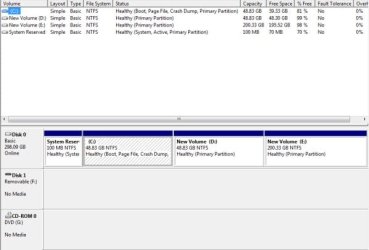
Please provide a screenshot of diskmgmt.msc with all volumes clearly shown and all text legible.

The questions you are asking cannot be addressed without benefit of the information contained there.
 
There is a program called easyBCD.

You can use it to edit the startup sequence.

(Boot.ini only applies to XP, not to Vista, nor to Win7.)

When using easyBCD, make sure you don't delete right away.
First rename one of the startups so it's distinguishable from the other, and reboot and see which one works.

When you found out which one works, you can safely delete the other entry.

Good luck.

Greetz
 

My Computer My Computer

OS
Win7 Build 7600 x86
CPU
Pentium II 300MHz
Motherboard
Asus
Memory
32mb EDO RAM
Graphics Card(s)
Diamond Viper
Sound Card
Soundblaster 16
Monitor(s) Displays
14" AOC CRT 16K color
Screen Resolution
800x600
Hard Drives
300mb Quantum fireball
PSU
110 Watts
Cooling
Passive
Keyboard
Trust Ergonomic
Mouse
Generic
Internet Speed
256K u 128K d
Here is the screen shot of disk management:

diskmgr.jpg
 

My Computer My Computer

OS
Windows 7 Pro
CPU
Intel(R) Pentium(R) Duel CPU E2200 2.20 Ghz
Motherboard
GA-G41M-ES2L
Memory
4 gb 2.96 Usable
Graphics Card(s)
Onboard
Sound Card
Onboard
Hard Drives
2 - 1TB WD Sata Drives
Here is the screen shot of disk management:

View attachment 30041

Your active partition is 100mb reserved by Win7 during install.
That means the boot files are on that partition.

Is your W7 installation on C: ?

You said during boot you get two "Windows 7...." lines to chose from.

Did you do what I suggested? use easybcd and rename one of the startup names to be able to distinguish which is which?

Once you know which of the two is obsolete, you can use easybcd again to delete that entry.

Good luck

(while you are at it, in easybcd you can check the "nr. of processors" box and select the amount of cores you have.
That will make your pc boot a lot faster.
)
 

My Computer My Computer

OS
Win7 Build 7600 x86
CPU
Pentium II 300MHz
Motherboard
Asus
Memory
32mb EDO RAM
Graphics Card(s)
Diamond Viper
Sound Card
Soundblaster 16
Monitor(s) Displays
14" AOC CRT 16K color
Screen Resolution
800x600
Hard Drives
300mb Quantum fireball
PSU
110 Watts
Cooling
Passive
Keyboard
Trust Ergonomic
Mouse
Generic
Internet Speed
256K u 128K d
Yes Windows 7 is instaled on C drive.

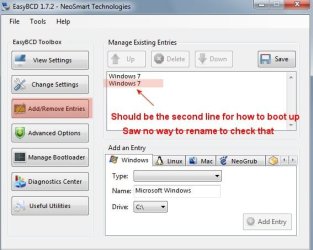
Here is what easyBCD looked like:

easyBCD 1.jpg

The top item should be the default one and the bottom one will run you in circles if it is chosen to boot with.

I saw no way to rename the files at all and if the wrong one is deleted, Windows can not be opened.
 

My Computer My Computer

OS
Windows 7 Pro
CPU
Intel(R) Pentium(R) Duel CPU E2200 2.20 Ghz
Motherboard
GA-G41M-ES2L
Memory
4 gb 2.96 Usable
Graphics Card(s)
Onboard
Sound Card
Onboard
Hard Drives
2 - 1TB WD Sata Drives
Yes Windows 7 is instaled on C drive.

Here is what easyBCD looked like:

View attachment 30171

The top item should be the default one and the bottom one will run you in circles if it is chosen to boot with.

I saw no way to rename the files at all and if the wrong one is deleted, Windows can not be opened.

Geez, :sarc: there is nothing wrong with doing some fiddling around for yourself.
That's how most of us learned.

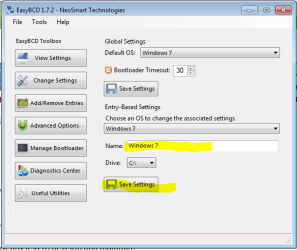
Click on "change settings"

Then you'll be presented this screen.

Click on "chose an OS......." dropdown and select the one you want to change the name of.

Change the name in the name box, and click "save settings".

bcd.PNG

good luck

PS. At the top you can chose the default OS to boot.
 

My Computer My Computer

OS
Win7 Build 7600 x86
CPU
Pentium II 300MHz
Motherboard
Asus
Memory
32mb EDO RAM
Graphics Card(s)
Diamond Viper
Sound Card
Soundblaster 16
Monitor(s) Displays
14" AOC CRT 16K color
Screen Resolution
800x600
Hard Drives
300mb Quantum fireball
PSU
110 Watts
Cooling
Passive
Keyboard
Trust Ergonomic
Mouse
Generic
Internet Speed
256K u 128K d
Back
Top