Solved Dual Boot: Win7: Boot Manager Status: 0xc000000f boot selection failed

Bikaln1

New member
Local time
12:34 AM
Messages
28
Hello,

I have dual boot in my laptop with Ubuntnu 14.04 LTS and Windows 7 Home Premium 64 bit. Today after working on Ubuntu I restarted and switched to Windows and as soon as it logged in I noticed the battery was 0%. I thought maybe it was some kind of glitch or something (silly me!) so I just pulled the power supply and the laptop abruptly turned off. My laptop battery is completely dead now...won't charge at all and after that incident when I tried to log back into Windows it showed this error:

Windows failed to start. A recent hardware of software change might be the cause. To fix the problem:

1.Insert your Windows installation disc and restart the computer.
2.Choose your language settings, and then click "Next".
3.Click "Repair your computer."

If you do not have this disc, contact your system administrator or computer manufacturer for assistance.

Status: 0xc000000f

Info: The boot selection failed because a required device is inaccessible.

I don't have an installation disc, I tried pressing F8 and none of the options there helped. Ubuntu still works totally fine though. So I'm guessing it is not some hard drive crash and my data are fine in Windows but I just can't boot into it! Please Help!!
 

My Computer My Computer

Computer type
Laptop
Computer Manufacturer/Model Number
Dell
OS
Windows 7 Home Premium 64 bit
Are you using GRUB2 as bootmanager and is windows one of the options? Or do you start ubuntu from the win7 boot menu?
 

My Computer My Computer

Computer type
Laptop
Computer Manufacturer/Model Number
ACER ASPIRE 5742G
OS
Microsoft Windows 7 Home Premium 64-bits 7601 Multiprocessor Free Service Pack 1
CPU
Intel(R) Core(TM) i3 CPU M 370 @ 2.40GHz
Motherboard
Acer Aspire 5742G
Memory
4,00 GB
Graphics Card(s)
ATI Mobility Radeon HD 5400 Series
Sound Card
(1) AMD High Definition Audio Device (2) Realtek High Defi
Screen Resolution
1366 x 768 x 32 bits (4294967296 colors) @ 60 Hz
Hard Drives
WDC WD5000BEVT-22ZAT0
Hello,

I have dual boot in my laptop with Ubuntnu 14.04 LTS and Windows 7 Home Premium 64 bit. Today after working on Ubuntu I restarted and switched to Windows and as soon as it logged in I noticed the battery was 0%. I thought maybe it was some kind of glitch or something (silly me!) so I just pulled the power supply and the laptop abruptly turned off. My laptop battery is completely dead now...won't charge at all and after that incident when I tried to log back into Windows it showed this error:

Windows failed to start. A recent hardware of software change might be the cause. To fix the problem:

1.Insert your Windows installation disc and restart the computer.
2.Choose your language settings, and then click "Next".
3.Click "Repair your computer."

If you do not have this disc, contact your system administrator or computer manufacturer for assistance.

Status: 0xc000000f

Info: The boot selection failed because a required device is inaccessible.

I don't have an installation disc, I tried pressing F8 and none of the options there helped. Ubuntu still works totally fine though. So I'm guessing it is not some hard drive crash and my data are fine in Windows but I just can't boot into it! Please Help!!
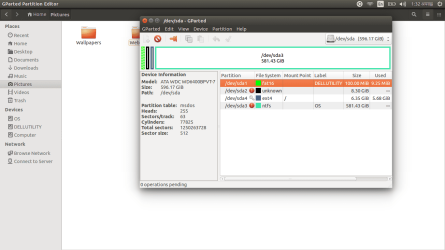
Boot to ubuntu and run a partition manager like GPARTED or any other partition manager. Post a screenshot of the partition layout and the file systems like shown on GParted -- Screenshots for example
 

My Computer My Computer

Computer type
Laptop
Computer Manufacturer/Model Number
ACER ASPIRE 5742G
OS
Microsoft Windows 7 Home Premium 64-bits 7601 Multiprocessor Free Service Pack 1
CPU
Intel(R) Core(TM) i3 CPU M 370 @ 2.40GHz
Motherboard
Acer Aspire 5742G
Memory
4,00 GB
Graphics Card(s)
ATI Mobility Radeon HD 5400 Series
Sound Card
(1) AMD High Definition Audio Device (2) Realtek High Defi
Screen Resolution
1366 x 768 x 32 bits (4294967296 colors) @ 60 Hz
Hard Drives
WDC WD5000BEVT-22ZAT0
Hi Kaktussoft,

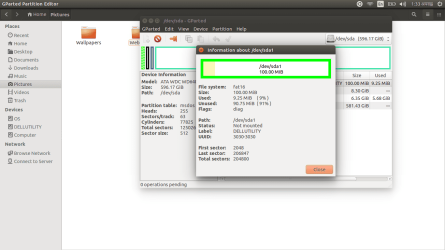
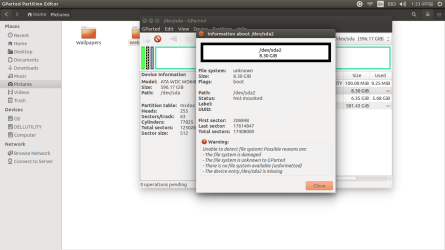
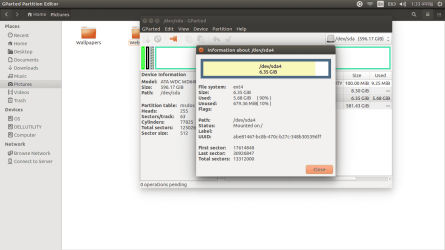
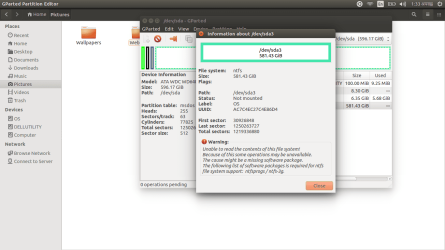
Thanks for the reply. Yes, I use Grub 2 and select Windows 7. The screen shots from GParted are attached. It definitely shows some errors...Sorry, I replied a little late but I had a major problem with GParted and had to make a new thread about it in UbuntuForums but I figured it out by myself. Thanks for help, much appreciated...
 

Attachments

  • Screenshot from 2014-10-23 13:32:55.png
    Screenshot from 2014-10-23 13:32:55.png
    44.2 KB · Views: 3
  • Screenshot from 2014-10-23 13:33:12.png
    Screenshot from 2014-10-23 13:33:12.png
    55.5 KB · Views: 1
  • Screenshot from 2014-10-23 13:33:17.png
    Screenshot from 2014-10-23 13:33:17.png
    70.6 KB · Views: 1
  • Screenshot from 2014-10-23 13:33:21.png
    Screenshot from 2014-10-23 13:33:21.png
    55.5 KB · Views: 1
  • Screenshot from 2014-10-23 13:33:26.png
    Screenshot from 2014-10-23 13:33:26.png
    62.5 KB · Views: 2

My Computer My Computer

Computer type
Laptop
Computer Manufacturer/Model Number
Dell
OS
Windows 7 Home Premium 64 bit
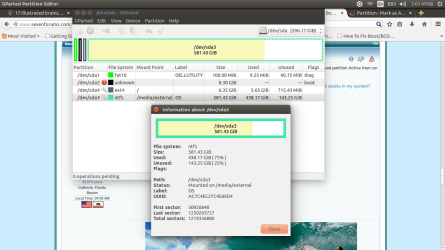
You see the warning at sda3 screenshot? Most likely because the ntfs drivers aren't loaded. Please borrow a win7 x64 install DVD or a http://www.sevenforums.com/tutorials/2083-system-repair-disc-create.html

Don't perform a "startup repair" because that rewrites the disk's MBR and linux won't boot afterwards!

Boot from that CD/DVD and enter recovery options http://www.sevenforums.com/tutorials/668-system-recovery-options.html . Now select "command prompt". Or just do http://www.sevenforums.com/tutorials/682-command-prompt-startup.html

From within command prompt determine what drive letter the win7 volume has.
Code:
diskpart
list volume [COLOR=royalblue](what volume has flag system or boot in output?)[/COLOR]
exit
Its label is OS but what is the drive letter? In this example I use Q use drive letter.
Code:
chkdsk/f  [COLOR=red]Q[/COLOR]:
Many errors? All repaired? Maybe run it twice to see if all has been fixed.
Code:
bcdedit /store [COLOR=red]C[/COLOR]:\boot\bcd  /enum all> [COLOR=red]Q[/COLOR]:\bcd.txt
C is drive letter of partition marked "system" in "list volume" output. Now copy the file Q:\bcd.txt to usb stick. For example (assuming K is usb stick drive letter)
Code:
copy  [COLOR=red]Q[/COLOR]:\bcd.txt  [COLOR=red]K[/COLOR]:\
Attach the usb stick to a healthe machine and post that file bcd.txt .
 
Last edited:

My Computer My Computer

Computer type
Laptop
Computer Manufacturer/Model Number
ACER ASPIRE 5742G
OS
Microsoft Windows 7 Home Premium 64-bits 7601 Multiprocessor Free Service Pack 1
CPU
Intel(R) Core(TM) i3 CPU M 370 @ 2.40GHz
Motherboard
Acer Aspire 5742G
Memory
4,00 GB
Graphics Card(s)
ATI Mobility Radeon HD 5400 Series
Sound Card
(1) AMD High Definition Audio Device (2) Realtek High Defi
Screen Resolution
1366 x 768 x 32 bits (4294967296 colors) @ 60 Hz
Hard Drives
WDC WD5000BEVT-22ZAT0
Actually, I don't mind losing Ubuntu. It's just been around 2 months that I've installed it and there are not much files in Ubuntu...I just use it to learn Linux and become familiar with it but I need Windows as it was and I can again install and dual boot Ubuntu. So, in that case can I perform a Startup Repair...I will have all the files in Windows right. Also, if it is ok to perform startup repair then, since their are two OS, what kinds of errors or warnings am I likely to get at that point?
 

My Computer My Computer

Computer type
Laptop
Computer Manufacturer/Model Number
Dell
OS
Windows 7 Home Premium 64 bit
Startup Repair will fix a few things by simply overwriting stuff. For example the MBR will be overwritten, and the NTFS bootsector of the active partition for example. Both are not the source of the problem anyway!

  • Is OS drive still healthy? chkdsk/f command will show and fix that.
  • Is boot entry in bootmenu still pointing to OS partition? Answer... NO and that's the cause of the problems! Did you move start position of partition OS?
  • What is sda2?
Startup repair isn't needed! Did you burn a win7 x64 install dvd already? Or a system repair cd?
 

My Computer My Computer

Computer type
Laptop
Computer Manufacturer/Model Number
ACER ASPIRE 5742G
OS
Microsoft Windows 7 Home Premium 64-bits 7601 Multiprocessor Free Service Pack 1
CPU
Intel(R) Core(TM) i3 CPU M 370 @ 2.40GHz
Motherboard
Acer Aspire 5742G
Memory
4,00 GB
Graphics Card(s)
ATI Mobility Radeon HD 5400 Series
Sound Card
(1) AMD High Definition Audio Device (2) Realtek High Defi
Screen Resolution
1366 x 768 x 32 bits (4294967296 colors) @ 60 Hz
Hard Drives
WDC WD5000BEVT-22ZAT0
No, unfortunately I can get hands on the Windows 7 disc only after 4 days...Meanwhile, I will be using Ubuntu...I will definitely report after 4 days, so please stay subscribed to this post...Thanks a lot!! :)
 

My Computer My Computer

Computer type
Laptop
Computer Manufacturer/Model Number
Dell
OS
Windows 7 Home Premium 64 bit
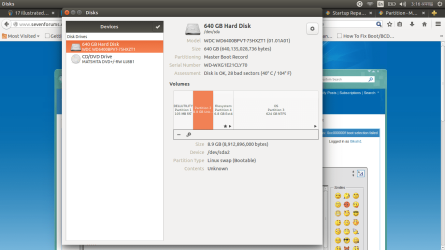
In linux:

Code:
sudo  apt-get  update
sudo  apt-get  install  ntfs-3g
sudo  apt-get  install  ntfsprogs

Both install succesfullly? If so reboot to linux and try access sda3 and sda2 again.
 

My Computer My Computer

Computer type
Laptop
Computer Manufacturer/Model Number
ACER ASPIRE 5742G
OS
Microsoft Windows 7 Home Premium 64-bits 7601 Multiprocessor Free Service Pack 1
CPU
Intel(R) Core(TM) i3 CPU M 370 @ 2.40GHz
Motherboard
Acer Aspire 5742G
Memory
4,00 GB
Graphics Card(s)
ATI Mobility Radeon HD 5400 Series
Sound Card
(1) AMD High Definition Audio Device (2) Realtek High Defi
Screen Resolution
1366 x 768 x 32 bits (4294967296 colors) @ 60 Hz
Hard Drives
WDC WD5000BEVT-22ZAT0
I don't know if it's realy a ntfs partition
Code:
sudo  ntfsfix  /dev/sda2

But sda3 is a ntfs partition.
Code:
sudo  ntfsfix  /dev/sda3
 

My Computer My Computer

Computer type
Laptop
Computer Manufacturer/Model Number
ACER ASPIRE 5742G
OS
Microsoft Windows 7 Home Premium 64-bits 7601 Multiprocessor Free Service Pack 1
CPU
Intel(R) Core(TM) i3 CPU M 370 @ 2.40GHz
Motherboard
Acer Aspire 5742G
Memory
4,00 GB
Graphics Card(s)
ATI Mobility Radeon HD 5400 Series
Sound Card
(1) AMD High Definition Audio Device (2) Realtek High Defi
Screen Resolution
1366 x 768 x 32 bits (4294967296 colors) @ 60 Hz
Hard Drives
WDC WD5000BEVT-22ZAT0
In linux:

Code:
sudo  apt-get  update
sudo  apt-get  install  ntfs-3g [U][B][COLOR=Blue]//says "ntfs-3g is already the newest version"[/COLOR][/B][/U]
sudo  apt-get  install  ntfsprogs [U][B][COLOR=Blue]//says "Invalid operation ntfsprogs"[/COLOR][/B][/U]
Both install succesfullly? If so reboot to linux and try access sda3 and sda2 again.

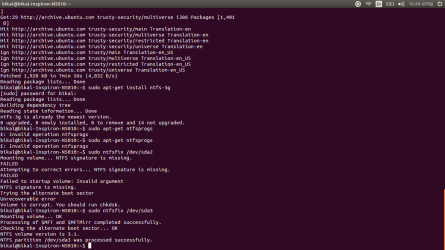
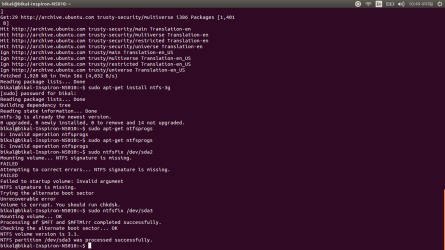
Other than above outputs...output for other commands are attached...take a look:
 

Attachments

  • Screenshot from 2014-10-23 22:49:37.png
    Screenshot from 2014-10-23 22:49:37.png
    38.3 KB · Views: 1

My Computer My Computer

Computer type
Laptop
Computer Manufacturer/Model Number
Dell
OS
Windows 7 Home Premium 64 bit
The screenshot for the commands are as below...
 

Attachments

  • Screenshot from 2014-10-23 22:49:37.png
    Screenshot from 2014-10-23 22:49:37.png
    38.3 KB · Views: 1

My Computer My Computer

Computer type
Laptop
Computer Manufacturer/Model Number
Dell
OS
Windows 7 Home Premium 64 bit
sudo apt-get install ntfsprogs
but you did
sudo apt-get ntfsprogs

But I assume it was installed as well(?)

What is sda2? Any idea what is/was on that partition?
Can you access sda3 now?
 

My Computer My Computer

Computer type
Laptop
Computer Manufacturer/Model Number
ACER ASPIRE 5742G
OS
Microsoft Windows 7 Home Premium 64-bits 7601 Multiprocessor Free Service Pack 1
CPU
Intel(R) Core(TM) i3 CPU M 370 @ 2.40GHz
Motherboard
Acer Aspire 5742G
Memory
4,00 GB
Graphics Card(s)
ATI Mobility Radeon HD 5400 Series
Sound Card
(1) AMD High Definition Audio Device (2) Realtek High Defi
Screen Resolution
1366 x 768 x 32 bits (4294967296 colors) @ 60 Hz
Hard Drives
WDC WD5000BEVT-22ZAT0
Code:
sudo  mount  -t  ntfs-3g   /dev/sda3   /media/external
What happens? Can you browse files on it now?

To unmount it:
Code:
sudo  umount  /dev/sda3
 

My Computer My Computer

Computer type
Laptop
Computer Manufacturer/Model Number
ACER ASPIRE 5742G
OS
Microsoft Windows 7 Home Premium 64-bits 7601 Multiprocessor Free Service Pack 1
CPU
Intel(R) Core(TM) i3 CPU M 370 @ 2.40GHz
Motherboard
Acer Aspire 5742G
Memory
4,00 GB
Graphics Card(s)
ATI Mobility Radeon HD 5400 Series
Sound Card
(1) AMD High Definition Audio Device (2) Realtek High Defi
Screen Resolution
1366 x 768 x 32 bits (4294967296 colors) @ 60 Hz
Hard Drives
WDC WD5000BEVT-22ZAT0
sudo apt-get install ntfsprogs
but you did
sudo apt-get ntfsprogs

But I assume it was installed as well(?)

What is sda2? Any idea what is/was on that partition?
Can you access sda3 now?

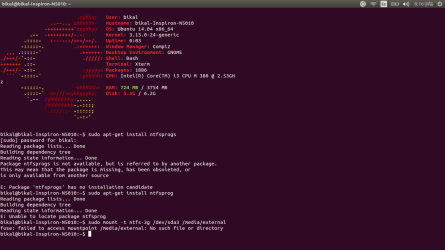
oh yeah, sorry for that...the screen shot is below. Thanks...
 

Attachments

  • Screenshot from 2014-10-24 08:16:59.png
    Screenshot from 2014-10-24 08:16:59.png
    36.4 KB · Views: 1

My Computer My Computer

Computer type
Laptop
Computer Manufacturer/Model Number
Dell
OS
Windows 7 Home Premium 64 bit
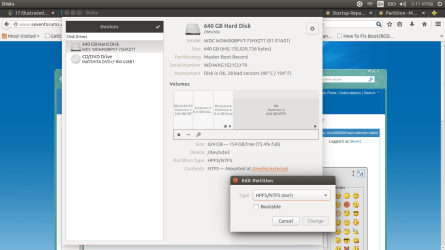
sudo apt-get install ntfsprogs
but you did
sudo apt-get ntfsprogs

But I assume it was installed as well(?)

What is sda2? Any idea what is/was on that partition?
Can you access sda3 now?

oh yeah, sorry for that...the screen shot is below. Thanks...
mkdir /media/external

Do that first, so prior to mounting it.
Anyway forget linux for now... try the win7 way as Greg told you
 

My Computer My Computer

Computer type
Laptop
Computer Manufacturer/Model Number
ACER ASPIRE 5742G
OS
Microsoft Windows 7 Home Premium 64-bits 7601 Multiprocessor Free Service Pack 1
CPU
Intel(R) Core(TM) i3 CPU M 370 @ 2.40GHz
Motherboard
Acer Aspire 5742G
Memory
4,00 GB
Graphics Card(s)
ATI Mobility Radeon HD 5400 Series
Sound Card
(1) AMD High Definition Audio Device (2) Realtek High Defi
Screen Resolution
1366 x 768 x 32 bits (4294967296 colors) @ 60 Hz
Hard Drives
WDC WD5000BEVT-22ZAT0
sudo apt-get install ntfsprogs
but you did
sudo apt-get ntfsprogs

But I assume it was installed as well(?)

What is sda2? Any idea what is/was on that partition?
Can you access sda3 now?

oh yeah, sorry for that...the screen shot is below. Thanks...
mkdir /media/external

Do that first, so prior to mounting it.
Anyway forget linux for now... try the win7 way as Greg told you

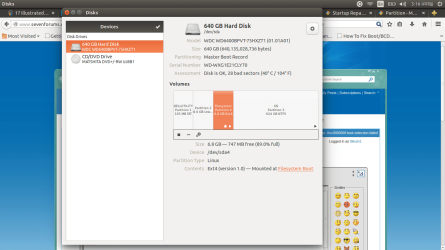
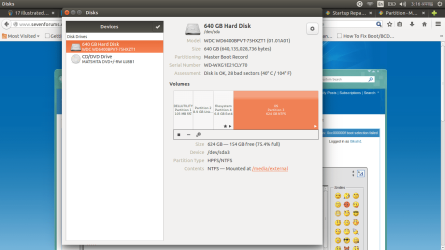
Hey now it doesn't show error in sda3 after mounting sda3 to external!! I tried to boot to Windows again via GRUB, it showed the same 0xc000000f error and when I came back to ubuntu there was the error sign again...I have post some more screenshots that might be relevant:
 

Attachments

  • Screenshot from 2014-10-24 15:01:09.png
    Screenshot from 2014-10-24 15:01:09.png
    79.1 KB · Views: 1
  • Screenshot from 2014-10-24 15:16:30.png
    Screenshot from 2014-10-24 15:16:30.png
    80.1 KB · Views: 1
  • Screenshot from 2014-10-24 15:16:34.png
    Screenshot from 2014-10-24 15:16:34.png
    76.2 KB · Views: 1
  • Screenshot from 2014-10-24 15:16:37.png
    Screenshot from 2014-10-24 15:16:37.png
    78.9 KB · Views: 0
  • Screenshot from 2014-10-24 15:16:40.png
    Screenshot from 2014-10-24 15:16:40.png
    75.9 KB · Views: 0
  • Screenshot from 2014-10-24 15:17:48.png
    Screenshot from 2014-10-24 15:17:48.png
    83.9 KB · Views: 0

My Computer My Computer

Computer type
Laptop
Computer Manufacturer/Model Number
Dell
OS
Windows 7 Home Premium 64 bit
If all else fails, what always works is to Mark Partition Active the Win7 or it's 100 mb System Reserved partition Active then run http://www.sevenforums.com/tutorials/105541-startup-repair-run-3-separate-times.html.

You can then install EasyBCD to add Linus to a Windows Dual Boot menu as suggested in http://www.sevenforums.com/installation-setup/83923-where-install-ubuntu-my-system.html#post733626

How do you do that in Ubuntu? Your link illustrates how to Mark Partition Active in Windows 7 only...
 

My Computer My Computer

Computer type
Laptop
Computer Manufacturer/Model Number
Dell
OS
Windows 7 Home Premium 64 bit
You can see files on sda3 after mounting it?
What the heck is sda2??
 

My Computer My Computer

Computer type
Laptop
Computer Manufacturer/Model Number
ACER ASPIRE 5742G
OS
Microsoft Windows 7 Home Premium 64-bits 7601 Multiprocessor Free Service Pack 1
CPU
Intel(R) Core(TM) i3 CPU M 370 @ 2.40GHz
Motherboard
Acer Aspire 5742G
Memory
4,00 GB
Graphics Card(s)
ATI Mobility Radeon HD 5400 Series
Sound Card
(1) AMD High Definition Audio Device (2) Realtek High Defi
Screen Resolution
1366 x 768 x 32 bits (4294967296 colors) @ 60 Hz
Hard Drives
WDC WD5000BEVT-22ZAT0
Back
Top