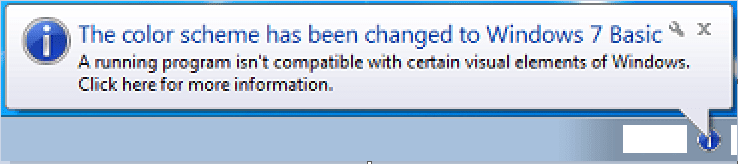
The color scheme has been changed - I need to reproduce it

paxsoftdev

New member
Local time
1:18 AM
Messages
3
Hi all,

At first I would like to greet everyone here. I don't know if this is the right forum section so please move it if there is a section this thread would match better.
You may be surprised by the subject. I think I have solved the problem of those annoying windows popping up but I actually have no way to give my patch a try because I can't reproduce any of these windows. And no, it is not due to hardware being too powerful (Intel Pentium P6100 @ 2.00GHz, 4GB of RAM -- not so much nowadays).

Could somebody name a software/games that are very likely to trigger those DWM notifications? If not within board rules, please PM me some information as to how you happen to get these windows.

Back in 2012 I wrote a script called SuppressDwmPerformancePrompts which turns off Aero, launches a game and re-enables Aero back. Then, DWM is somehow lulled into thinking that everything is OK. In some cases it's worked well but in another it hasn't. So that was a partial solution, and not handy really.

I've returned to trying to defeat it lately. I have written a search-and-replace loader that will be starting with Windows and patching dwm appropriately. Before I make it available for anyone to test I need to be sure it doesn't cause a memory leak, severe crash or OS freeze. To assure myself, I need to reproduce circumstances in which such windows appear. To reproduce them, I need your help. ;)
 

My Computer My Computer

At a glance

Windows 7 Professional SP1 64-bit
Computer type
PC/Desktop
OS
Windows 7 Professional SP1 64-bit
Is this the notification that you are talking about?
color.png

Install UltraVNC server/service onto a computer that uses the Aero theme. I think that UltraVNC's default settings will cause the notification shown above to appear when another computer has connected to the UltraVNC service. So, use another computer to remotely connect to the test computer that is running the UltraVNC server/service and see if that triggers what you want triggered.

If you do not see the notification shown above...
...go to the Windows Start Menu
> All Programs
> UltraVNC
> Edit Settings
Wait for the settings window to appear.
Select the tab named Input/File Transfer.
Uncheck: Disable Viewers [sic] inputs
OK your way out of the settings window.
Restart the computer.
Use another computer to remotely connect to the test computer.

You can look around at other settings like Remove Aero while connected... but I don't have that option checked and I see the notification shown above.
 

My Computer My Computer

At a glance

W7 Pro SP1 64biti78GBIntel HD Graphics
Computer type
Laptop
Computer Manufacturer/Model Number
Employer provided Dell Latitude
OS
W7 Pro SP1 64bit
CPU
i7
Memory
8GB
Graphics Card(s)
Intel HD Graphics
Hard Drives
crappy SSD
Antivirus
Employer mandated Symantec Endpoint Protection
Browser
Pale Moon 64bit, IE11 64bit & Chrome 64bit
Thank you UsernameIssues for your guidance, I am going to give it a try. Actually, I have found only a few threads related to this balloon notification, so I am glad I have learnt a possible way to make it appear.

I want to trigger these windows, too. Or any other, if there are.

colorschemeinteruptus1.jpg
colorschemeinteruptus2.png
 

My Computer My Computer

At a glance

Windows 7 Professional SP1 64-bit
Computer type
PC/Desktop
OS
Windows 7 Professional SP1 64-bit
It sounds like you searched Google images (and/or just the text) for these messages to see what apps/settings make these messages appear. As I did that, I found this: https://trac.mpc-hc.org/ticket/3450

If you render a video as the OP did, you might trigger what you want. As also mentioned in that thread, maybe forcing the compatibility mode on a video intensive app might trigger the message.

I could not locate a way to programmatically create them via MSDN's info. Perhaps members of a programing forum would know how to do that.
 

My Computer My Computer

At a glance

W7 Pro SP1 64biti78GBIntel HD Graphics
Computer type
Laptop
Computer Manufacturer/Model Number
Employer provided Dell Latitude
OS
W7 Pro SP1 64bit
CPU
i7
Memory
8GB
Graphics Card(s)
Intel HD Graphics
Hard Drives
crappy SSD
Antivirus
Employer mandated Symantec Endpoint Protection
Browser
Pale Moon 64bit, IE11 64bit & Chrome 64bit
Actually, these 2 photos come from my old blog page about the script I had written. ~applied batch programming: SuppressDwmPerformancePrompts

They have probably been taken by a guy I was chatting with when developing that script. I have once happened to see the notification pictured on the left, but I can't remember how long ago it was. All in all, the attached pictures haven't been made by me.

It is not a problem for me to locate places in code where these notifications are called. What is the most difficult in this case is reproducing in what circumstances they appear. From what I so far have gathered, they tend to pop up randomly or:

  • when another displays/projectors are connected
  • when resource-heavy applications are launched
  • when custom screen resolutions are applied
I don't expect anyone here to guide me in programming matters with that- I've decided to fiddle with this on my own so don't feel any pressure on my behalf.


Thank you for your further response.
 

My Computer My Computer

At a glance

Windows 7 Professional SP1 64-bit
Computer type
PC/Desktop
OS
Windows 7 Professional SP1 64-bit
Actually, these 2 photos come from my old blog page about the script I had written. ~applied batch programming: SuppressDwmPerformancePrompts
~~~
You mentioned: "...I have found only a few threads related to this balloon notification..."
That sounded to me like you had searched for places where the images or text of the messages of interest have appeared. If you have not done much of this, then that is the way that I would use to find descriptions the steps/apps that lead up to the displaying of the messages.

When I'm chasing rabbits like this, I like to enter some of the message's text into Google, but then switch to image returns. Visiting the websites that are associated with an image often gives good details on the steps to reproduce the message (e.g. places that document issues with images - like your blog - are often more detailed than some random forum post).


You might also consider a slightly different approach to this issue. If you know how to programmatically call the message, then do so and move the message off screen. Don't close it. I wonder if DWM will gen it a second time if the first message was not closed.
 

My Computer My Computer

At a glance

W7 Pro SP1 64biti78GBIntel HD Graphics
Computer type
Laptop
Computer Manufacturer/Model Number
Employer provided Dell Latitude
OS
W7 Pro SP1 64bit
CPU
i7
Memory
8GB
Graphics Card(s)
Intel HD Graphics
Hard Drives
crappy SSD
Antivirus
Employer mandated Symantec Endpoint Protection
Browser
Pale Moon 64bit, IE11 64bit & Chrome 64bit
Back
Top