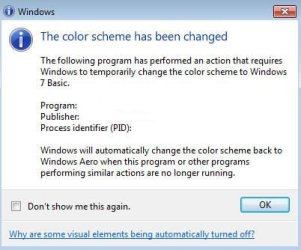
The color scheme has been changed to Windows 7 Basic

This is a really annoying issue. It's not the OS' or a driver mistake, but it just sucks. I can't stop this popup from appearing when i load 3dsmax and several other programs. And its poor of Microsoft to not provide a (working) checkbox to disable this popup.

There might be a registry key to turn it of ... donno ...

(i rly dont care if the colorsettings has been changed, as long as I see everything --- so i dont want to be informed about it)
 

My Computer My Computer

OS
win7
Why?!

Actually, I'm afraid you're wrong. I get this error every other day or so if my wallpaper on my 3 displays changes while I'm doing something CPU intensive like compiling a visual studio solution. I'm not using any 3rd party software or media players - it only happens when the wallpaper changes and the machine is overly occupied - not when I'm starting an app or playing a game or watching a movie. Windows 7 should recognize this and not revert the color scheme without asking - or better yet delay the wallpaper change until the CPU usage drops.

IMO, this is a bug with Windows 7.
I am having the same problem with teamviewer... It runs fine for a while and then after doing some CPU intense thing or another on the computer that I am looking into, the computer I am looking into suddenly switches to basic mode even though the computer can handle all the nice windows 7 visuals... I WANT TO TURN IT OFF THE STUPID THING THAT IS TRYING TO SWITCH THIS... ugggg....
 

My Computer My Computer

OS
Windows 7 RTM
I had this problem, what you could try: right click on the desktop and select Personalize. There are two sets of themes, Aero and Basic - High Contrast. Select one of the Basic themes.
 

My Computer My Computer

OS
XP
i know i'm bumping an old thread, but while searching for a solution to my problem this was top of a google search, so i figured it might help some other people out.

ok i fixed this problem for me. might not work for everyone. here's what my problem was:

suddenly, some of my programs began switching to basic where they didn't previously (Sibelius 6 and Finale 2010).

I found out the problem was with the video codecs within Quicktime Alternative (QT lite). You may encounter a similar problem if you have installed a similar 3rd party codec pack such as K-Lite or whatever.

anyway, once i uninstalled Quicktime Alternative, everything was dandy :)
 

My Computer My Computer

OS
windows 7 x64
Just like spunkymcpunk said, just uninstall QUICKTIME and it probably will stop with that. Picasa 3.6 was giving me this anoying message, and after I read the comment of spunkymcpunk, I realize that when I used to run QT it turned the color scheme. This program confuses Windows 7!
 

My Computer My Computer

OS
Win 7
Uninstalling Quicktime worked for me too. KMPlayer used to work fine. Something required me to have Quicktime, so I recently installed it and started getting this error when starting certain programs. Why KMPlayer uses Quicktime is beyond me, but when trying to uninstall Quicktime with KMPlayer running, I was greeted with a popup saying that a program was using Quicktime, so the uninstall could not continue. I shut down KMPlayer, uninstalled Quicktime, and restarted KMPlayer. No more problems with this error.

Thanks to the 2 previous posters for pointing this out. :)
 

My Computer My Computer

Computer Manufacturer/Model Number
Custom built
OS
Win 7 Ult 64-bit
CPU
Intel 9650
Motherboard
Gigabyte EP45-DS3P
Memory
2x2GB Kingston HyperX PC2-9600
Graphics Card(s)
GeForce 9500GT
Sound Card
onboard
Monitor(s) Displays
CMV 19"
Hard Drives
74GB Velociraptor (dual boot XP Pro and Win 7 Ult 64bit
1TB Samsung F1 (data)
PSU
Corsair HX620W
Case
Antec 1200
Cooling
Thermalright Ultra 120 eXtreme
Balloon tip

Hi there!

I've got a simple question: I have previously ticked the option "Don't show me this again." How can I make Win7 to show these dialog boxes (and the balloons) again? :sarc:

Thanks!
 

Attachments

  • 69346454.jpg
    69346454.jpg
    42.9 KB · Views: 70

My Computer My Computer

OS
Windows 7
Hi there!

I've got a simple question: I have previously ticked the option "Don't show me this again." How can I make Win7 to show these dialog boxes (and the balloons) again? :sarc:

Thanks!

I'd bet my house on this being contained in the registry BUT what search term you'd need to find it (I've tried several!!!!) is quite another matter.
 

My Computer My Computer

OS
Windows 7
have you tried installing the program in compatibility mode? or considered switching to another media player, such as VLC?
 

My Computer My Computer

Computer Manufacturer/Model Number
Alienware AREA-51 M17x
OS
windows 7 ultimate 64bit
CPU
Intel Core2 Extreme x9000 2.8GHZ
Motherboard
Asus P965 Intel chipset
Memory
4Gig
Graphics Card(s)
2 NVidia GeForce 8800M GTX (SLi)
Sound Card
onboard
Monitor(s) Displays
17in. built-in, 47in JVC LCD
Screen Resolution
1080p
Hard Drives
2 250Gig Hitachi (RAID 0) @ 7200RPM
Case
17in. laptop
Mouse
touchpad, Logitech Anywhere Mouse cordless laser
Internet Speed
cable
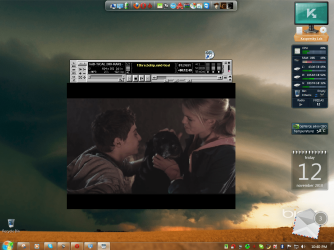
I foun solition this is the old mv2 player and working with aero theme this is link MV2Player 6.01 It will be awesome to someone ho knows solution change rc2 version so that work like this one older version.Please help i must have mv2 rc2 player with aero suport , for my opinon this is the best player . Thanks and sory for my bad english.
 

Attachments

  • mv2.PNG
    mv2.PNG
    306.3 KB · Views: 116

My Computer My Computer

OS
win 7

My Computer My Computer

OS
Windows 7 Ultimate 32bit Ver. 6.1.7600
CPU
Intel(R) Core(TM) 2 Duo CPU [email protected]
Motherboard
ASUS P5KPL-AM P5KPL/1600
Memory
KINGSTON DDR2 800MHz 2.00GBx2
Graphics Card(s)
ASUS RADEON 4670
Sound Card
Onboard
Monitor(s) Displays
Samsung
Screen Resolution
1280 X 1024
Hard Drives
WDC WD5000AADS-00L4B1 ATA 500GB
PSU
COOLERMASTER 500W
Case
COOLERMASTER CM690
Dears

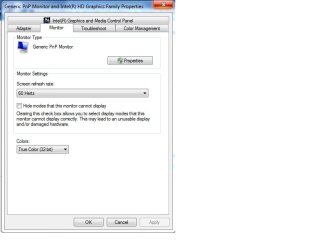
I have the solution for this problem
just simply go to the monitor setting as attached snapshot and tick off hide modes that's all
 

Attachments

  • monitor setting.jpg
    monitor setting.jpg
    30.7 KB · Views: 1,899

My Computer My Computer

OS
all OS
hey myself sunny ,
I have a win 7 ultimate .
but when I tried to run gta sa it shows win 7 basic theme with the same msg.
but when i tried same thing on another same pc it works fine, all the specifications are same and the same graphics memory. but still i am not able to understand the reason . can any one plese help me :cry:
 

My Computer My Computer

Computer Manufacturer/Model Number
HCL
OS
windows 7 ultimate x32
CPU
HCL
Motherboard
gigabyte
Memory
2 gbs
Graphics Card(s)
nil
Sound Card
direct x
Monitor(s) Displays
1
Hard Drives
5
PSU
1
Case
1
Cooling
1
if u play some video then the win 7 basic theme changes,then this may apply to u also
what i did was check the video rendering mode on the video player.
some mode allow Windows Aero. some just dont. try using EVR (Enhanced Video Renderer) mode.

hope that helps.
 

My Computer My Computer

OS
Windows 7 Ultimate 32bit Ver. 6.1.7600
CPU
Intel(R) Core(TM) 2 Duo CPU [email protected]
Motherboard
ASUS P5KPL-AM P5KPL/1600
Memory
KINGSTON DDR2 800MHz 2.00GBx2
Graphics Card(s)
ASUS RADEON 4670
Sound Card
Onboard
Monitor(s) Displays
Samsung
Screen Resolution
1280 X 1024
Hard Drives
WDC WD5000AADS-00L4B1 ATA 500GB
PSU
COOLERMASTER 500W
Case
COOLERMASTER CM690
Same problem just won't go back till a reboot

I pretty much have the same problem. I understand the older games might cause the problem but they also won't return me back after I finish with the programs that do this unless I reboot. Is there a way to get back the aero experience other than rebooting? If there is I can't find it.:cry:
 

My Computer My Computer

Computer Manufacturer/Model Number
I built sysytem
OS
win 7 home premium
CPU
I5 2500 3.4ghz
Motherboard
Asus p8p67 le
Memory
gskill ripjaws 8gig
Graphics Card(s)
msi 430 fermi (nvidia)
Sound Card
On- Board
Monitor(s) Displays
NEC 90gx
Screen Resolution
1280x1024
Hard Drives
1 tb sata 6 (WD)
500 gig IDE
80 gig Seagate IDE
PSU
PC Power & Cooling 500w
Case
Antec Full Tower
Cooling
WHole bunch of fans (6)
Keyboard
Logitech Wave (wired)
Mouse
MS 5000
Internet Speed
Cable
I know this is a really old thread but i have this problem too. I figured out how to fix it though. Go into your graphics properties and it should have put your colour quality onto 16 bit, change it back to 32bit or watever it was before and that should fix it
 

My Computer My Computer

OS
Windows 7 Enterprise 32bit
With some video programs like quicktime alternative, you need to go into settings and look for direct show rendering. on quicktime "overlay mixer" will cause windows to change from aero to basic. changing the setting to "vmr9 renderless" will stop this from happeneing. directshow will cause the switch so look for those setings if your video player causes problems.
 

My Computer My Computer

OS
windows 7 64bit
If u have a old video card then download trutransparency for your PC it 100% works search it on google....:sleepy:
 

My Computer My Computer

Computer type
Laptop
Computer Manufacturer/Model Number
Compaq presario M2000
OS
Windows 7 Home Premium 32bit
CPU
Pentium M
Motherboard
Gigabyte
Memory
768Mb
Graphics Card(s)
128mb intel 915GM/GMS,910GML express chipset family
This worked in our office. I've been trying to figure this one out since I put dual monitors on everyone's desks.

internet explorer
Tools
Advanced
check the box that says Use Software Rendering Instead of GPU rendering *
you must restart the computer
I then opened 14 explorer windows with adds
ran a youtube video
ran outlook 2013
our inhouse software
4 invocations of the system resource monitor
and ran an internet speed test
We are running hp pavillions with quad processors, ATI Video Cards with Intel Onboard Video
Dual Monitors of varying types without crashing, without the color scheme change
and the AREOS was enabled and running.
I recommend giving that a try

We are using an AMD 2Gig Add in card and On Board 1G Intel Card. Remember this is work, not gaming, depends on your goals.
Basically I could see that if I spiked the Memory Usage , most likely from the onboard video card sharing the base memory , after the 3rd time hitting the limit it schemed down to protect the memory space windows was working in. After giving that video control over to the software windows handled the rendering without trouble and without desktop changes. The performance was not a major issue either.
 

My Computer My Computer

Computer type
PC/Desktop
Computer Manufacturer/Model Number
HP Pavillion p7-1080t
OS
Windows 7 64-bit
CPU
Intel i-5 Quad
Motherboard
HP don't know the chipset
Memory
6GB
Graphics Card(s)
AMD Radeon HD 6450 and on board Intel HD Graphics
Hard Drives
1 T
Antivirus
Nortons Business
Browser
Internet Explorer 11
Back
Top