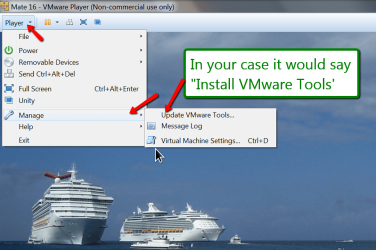
A 1st time here in having installed Windows Virtual PC after which I installed Windows XP from my old original CD (yup I still kept it). Anyhow I fooled around a bit with with desktop setting and managed to get the window a little larger but it is still to small. Is there any way of getting that window larger, or even full screen?
[I installed the virtual machine and XP only so I could play old games (STEAM) on them since other methods proved unsuccessful) ].
Thanks
[I installed the virtual machine and XP only so I could play old games (STEAM) on them since other methods proved unsuccessful) ].
Thanks
My Computer
At a glance
Windows 7 Home Premium 64Intel Core i5 760 @ 2800MHz12288MBAMD Radeon HD 7800 Series
- Computer type
- PC/Desktop
- Computer Manufacturer/Model Number
- OEM Designed by me :-)
- OS
- Windows 7 Home Premium 64
- CPU
- Intel Core i5 760 @ 2800MHz
- Motherboard
- Asus P7P55D-E LX
- Memory
- 12288MB
- Graphics Card(s)
- AMD Radeon HD 7800 Series
- Sound Card
- ASUS Xonar DG
- Monitor(s) Displays
- ViewSonic VX2453 Series, HDMI 1080p Full HD
- Screen Resolution
- 1920X1080
- Hard Drives
- Samsung SSD 840 EVO 250GB& two others
- PSU
- Tagan BZ Series, TG800-BZ 800W
- Keyboard
- Logitech MK250
- Mouse
- Logitech M310
- Internet Speed
- toppest, mostest :-) <-- bad, but fun English
- Browser
- Firefox, Crrome, IE